The Azure Hybrid Benefit is one of Microsoft’s most powerful cost-saving tools. It lets you apply your existing on-premises Windows Server and SQL Server licenses, as long as they have active Software Assurance, to your Azure workloads.
Instead of paying for the software license again in the cloud, you just pay for the base infrastructure. This simple shift can unlock significant savings, especially for businesses moving to a hybrid cloud model.
What Is the Azure Hybrid Benefit?
Think of it as a "bring your own license" (BYOL) model for the cloud. When you launch a new Windows Server VM in Azure, the price you see normally bundles two things: the cost of the server infrastructure and the cost of the Windows Server license.
The Hybrid Benefit lets you neatly unbundle those two. You tell Azure, "I've already got a license for this," and it removes the software fee from your bill.
It's like having a subscription to a streaming service. You can watch on your TV at home, and when you travel, you can log in and watch on your laptop without paying for a second subscription. Your on-premises licenses with Software Assurance work the same way, they grant you access to run that software in Azure without being double-charged.
Let's break down the core ideas.
Here's a quick summary of what the Azure Hybrid Benefit offers and how it works.
Azure Hybrid Benefit at a Glance
| Concept | Description |
|---|---|
| Eligible Products | Windows Server (Standard & Datacenter editions) and SQL Server (Standard & Enterprise editions). |
| Requirement | Active Software Assurance (SA) on your on-premises licenses. |
| Core Saving | Eliminates the software licensing cost from Azure VMs, SQL Database, and other services. |
| Primary Goal | Reduce the cost of migrating and running Microsoft workloads in a hybrid environment. |
Ultimately, this program makes it much more affordable to extend your on-premises investments into the cloud.
A Key Enabler for Hybrid Cloud Adoption
This isn't just a discount program; it's a cornerstone of Microsoft's entire hybrid cloud strategy. Today, running a mix of on-premises and cloud infrastructure isn't the exception, it's the norm.
In fact, about 82% of organizations are already using a hybrid setup, and the market is projected to hit nearly $430 billion by 2030. If you want to dive deeper into this trend, this analysis on Turbo360.com offers some great insights into Azure's position.
The Azure Hybrid Benefit is what makes this transition financially sustainable. It builds a practical bridge for companies that want to modernize their applications without abandoning their existing investments overnight.
The value proposition is incredibly simple: stop paying for the same software license twice. By applying licenses you already own, you can see immediate savings on your Azure bill, making your cloud journey far more predictable and affordable.
Who Benefits from This Program?
While many organizations can take advantage of this, it delivers the most value to businesses with a significant history of investing in the Microsoft ecosystem. The biggest winners are:
- Enterprises with active Software Assurance: This is the non-negotiable ticket to entry, making it perfect for companies that have consistently maintained their Microsoft licensing agreements.
- Organizations planning a phased migration: The benefit gives you the flexibility to move workloads to Azure gradually without the financial sting of paying for licenses in two places at once.
- Businesses running Windows Server or SQL Server: These are the two main product families covered, offering huge savings on everything from virtual machines to managed databases.
How Much You Can Actually Save
The theory behind the Azure Hybrid Benefit is great, but the real story is in the numbers. When you get past the concepts, the financial impact is both massive and immediate. It works by directly slashing the software licensing costs from your Azure bill, which translates into real, tangible reductions in your cloud spend.
For Windows Server virtual machines, this typically means savings of up to 40% compared to the standard pay-as-you-go price tag. The savings get even better when you look at database workloads. With SQL Server, you can expect cost reductions from around 30% on PaaS offerings all the way up to between 50% and 60% on SQL Virtual Machines. If you want to dive deeper into the numbers, a Forrester analysis on Azure cost efficiency provides a comprehensive breakdown.
The broader hybrid cloud market is exploding, which makes cost-saving moves like this even more critical. Projections show the market hitting $158 billion by 2025 and a staggering $430 billion by 2030, with 82% of organizations already on board with a hybrid model.
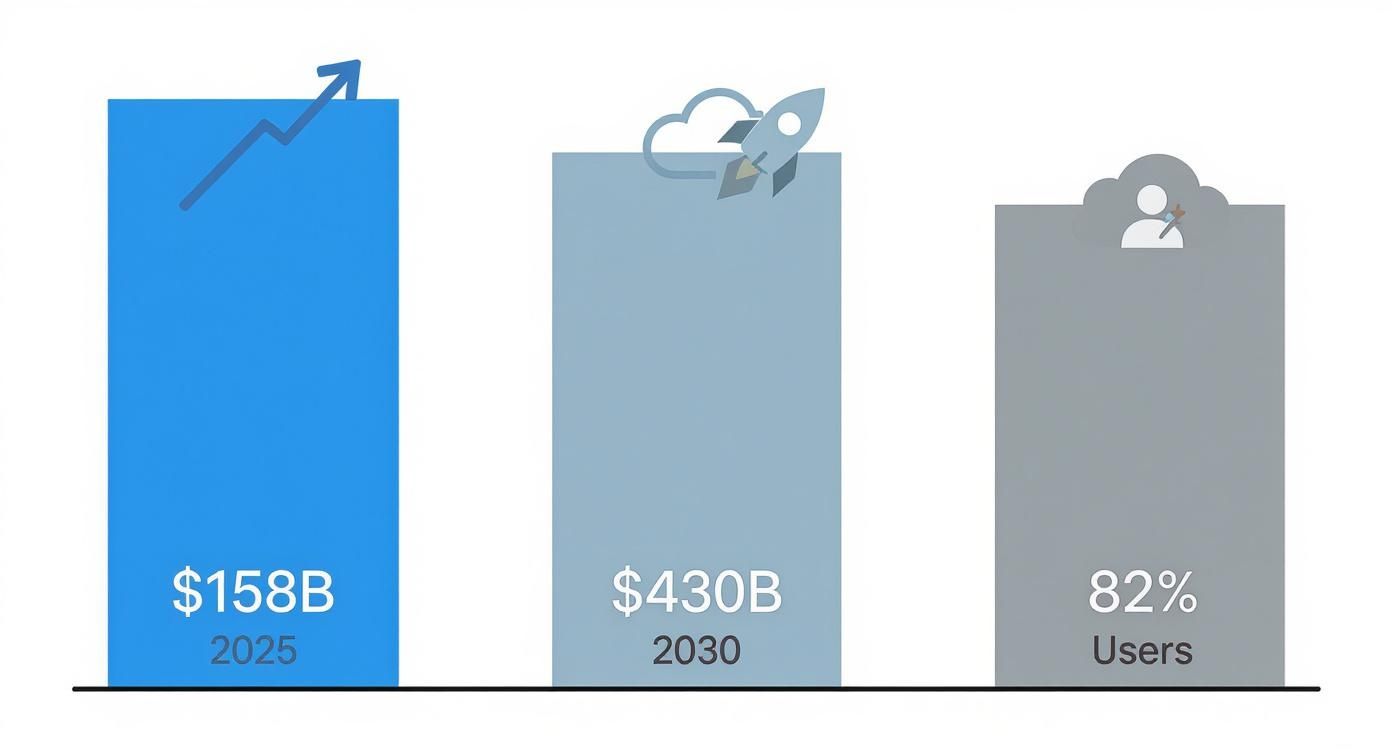
This trend makes one thing clear: using programs like the Azure Hybrid Benefit isn’t just a nice-to-have, it’s a strategic must for keeping costs under control.
A Quick Savings Example
Let's make this more concrete. Imagine a company is moving 50 on-premises Windows Servers to Azure. Back in their data center, each server is licensed with Windows Server Datacenter edition, covering 16 cores per server.
- Without Azure Hybrid Benefit: The company would have to pay the full pay-as-you-go rate. That bill includes both the raw computing power and the Windows Server license cost for every single one of those 50 VMs.
- With Azure Hybrid Benefit: By bringing their existing licenses to the cloud, the company completely wipes out the Windows Server licensing fee on their Azure bill. They now only pay the base compute rate for their VMs, instantly dropping their monthly costs.
By simply flipping the switch on Azure Hybrid Benefit, this company avoids buying 50 brand new software licenses in the cloud. That single move makes the entire migration project far more affordable and dramatically speeds up the return on investment.
Combining Discounts for Maximum Impact
The savings don't have to stop there. You can actually stack the Azure Hybrid Benefit with other Azure discounts, and the most powerful partner here is Azure Reserved Instances (RIs). With RIs, you commit to using specific VM types for a one or three-year term, and in return, you get a huge discount on the compute cost.
When you combine these two, you're attacking your Azure bill from both sides.
- Azure Hybrid Benefit gets rid of the software licensing cost.
- Azure Reserved Instances then cut down the remaining base compute cost.
This one-two punch can drive your total savings up to an incredible 80% compared to standard pay-as-you-go rates. To see exactly how these discounts stack up, you can read our guide on how to calculate percentage savings.
Let's look at how this plays out in a simple comparison for a single, common VM type.
Sample Cost Savings Comparison
| Pricing Model | Estimated Monthly Cost | Potential Savings |
|---|---|---|
| Standard Pay-As-You-Go | $200 | 0% |
| With Azure Hybrid Benefit | $120 | ~40% |
| With Hybrid Benefit + 3-Year RI | $40 | ~80% |
As you can see, the savings become massive when you layer these discounts. This dual-pronged approach is one of the single most effective strategies for managing your long-term Azure costs, especially for workloads you know will be running consistently.
Confirming Your Eligibility and Licensing Rules
Before you can start saving, you need to make sure you're playing by the rules. Getting this wrong can lead to nasty compliance surprises or, just as bad, leaving money on the table.
The single most important requirement for Azure Hybrid Benefit is having active Software Assurance (SA) on your on-premises Windows Server or SQL Server licenses. Think of SA as the key that unlocks this benefit. It’s a Microsoft program that grants you rights like license mobility. Without it, your licenses are stuck in your data center.
Understanding License Conversion
Okay, so you’ve confirmed you have Software Assurance. Now what? The next step is figuring out how your on-prem licenses translate into the cloud. It all comes down to a simple conversion from the physical cores you own to the virtual cores (vCores) you'll use in Azure.
The exact math depends on the product and edition, so it pays to get the details right.
- Windows Server: The ratio here is pretty straightforward. For every 8-core license of Windows Server Standard, you can run an Azure VM with up to 8 vCores. If you have a 16-core license, that covers two VMs with up to 8 vCores each. The Datacenter edition offers even better value, especially if you're deploying at scale.
- SQL Server: Things are a bit different for SQL. One core of SQL Server Enterprise Edition gets you four vCores in Azure SQL Database or Managed Instance. For the Standard Edition, it's typically a one-for-one swap, one on-prem core gets you one vCore in the cloud.
Getting a handle on this core-to-vCore mapping is mission-critical for planning your move. It tells you exactly how many of your licenses you'll need to cover your Azure footprint, so you don't end up overpaying or falling out of compliance.
Rules for Different Azure Services
The Azure Hybrid Benefit isn't just for virtual machines. It also applies to a range of Platform as a Service (PaaS) offerings, though each has its own set of rules.
When you use SQL Server on Azure Virtual Machines, you’re essentially just bringing your own license to cover the software running on infrastructure you manage. It's a clean, direct application of the benefit.
But for services like Azure SQL Database and SQL Managed Instance, you’re applying your license to a fully managed platform. This is where the real magic happens: you get massive cost savings while offloading all the operational headaches to Microsoft.
One of the most useful perks for anyone migrating is the dual-use rights. Microsoft gives you a 180-day grace period to use your licenses both on-premises and in Azure at the same time. This window is a lifesaver, giving you plenty of time to test, validate, and move your workloads without service interruptions or paying for two sets of licenses. Smart teams plan their entire migration to fit within this 180-day period.
Think the Azure Hybrid Benefit is just for the Microsoft crowd? That's a common mistake. This powerhouse of a cost-saving tool actually reaches deep into the open-source world, offering some serious savings for anyone running a mixed IT shop. It’s an often-overlooked perk that makes Azure a much more competitive place to run all sorts of workloads.
Microsoft gets it. Modern infrastructure is rarely a monoculture. Plenty of companies swear by enterprise Linux for its rock-solid stability and performance. The Hybrid Benefit for Linux acknowledges this reality, letting you bring your existing software subscriptions for specific Linux distros straight into the Azure cloud.
Bring Your Own Subscription for Linux
The concept is simple: it’s a “bring your own subscription” (BYOS) model. If you’re already paying for active subscriptions to Red Hat Enterprise Linux (RHEL) or SUSE Linux Enterprise Server (SLES), you can apply them to your Azure virtual machines. This move instantly flips your pay-as-you-go instances from the Azure Marketplace to BYOS billing.
What does that mean for your bill? You stop paying Azure for the Linux software subscription part and only cover the raw compute costs. The result is an immediate drop in your hourly VM rate. You get to keep using your existing open-source investments without paying for the same subscription twice. It’s a clean, straightforward way to cut down your operational expenses while keeping the enterprise-grade support you rely on from your Linux vendor.
This isn't just a minor feature; it's a strategic move. By extending the Hybrid Benefit, Microsoft is doubling down on its commitment to open source and making hybrid cloud a practical reality for more businesses. It ensures the savings aren’t siloed in one ecosystem.
The real value here shines in large-scale deployments. Imagine you have dozens, or even hundreds, of Linux VMs running critical apps. For those organizations, the cumulative savings are huge and can directly boost the ROI of their entire cloud migration.
This benefit is also all about flexibility in a hybrid world. Take RHEL, for example. The Hybrid Benefit lets you slash licensing costs while holding onto enterprise-level security and support. As Microsoft highlighted when celebrating its partnership with Red Hat, this has allowed companies to launch new services in the cloud quickly while keeping a tight grip on their costs.
At the end of the day, this program makes sure that if you’re running Linux, you’re not left out of the cost optimization conversation. It creates a clear path to making Azure more affordable for everyone, not just those all-in on Windows.
A Practical Guide to Activating and Managing the Benefit
Getting your Azure Hybrid Benefit up and running is refreshingly simple, and you can handle it all right from the Azure Portal. Microsoft designed the process to be straightforward, whether you're spinning up new resources or trying to get costs under control for existing ones. This means you can start seeing the savings almost immediately.

If you're deploying a new virtual machine, the activation is built right into the setup wizard. As you click through the configuration steps, you’ll come to a point where Azure asks about your existing Windows Server or SQL Server licenses.
All you have to do is check a box confirming you have an eligible license with Software Assurance. That one click tells Azure to skip the software license charge, applying the lower rate from the moment the VM goes live. It’s a small step that makes a huge difference.
Activating for Existing Resources
But what about the VMs you already have running? No need to tear them down and start over. You can apply the Azure Hybrid Benefit to any existing resource with just a few clicks in the VM’s configuration settings. This flexibility is key, it lets you optimize costs without disrupting your day-to-day operations.
Once you’ve flipped the switch, the real work begins: managing the benefit to keep the savings coming and stay compliant. This is where good governance becomes non-negotiable.
Proper governance isn't just about saving money; it's about making sure you are using your licenses correctly and efficiently. Without tracking, it's easy to misallocate benefits or fall out of compliance with Microsoft's terms.
Tools for Effective Governance
Azure gives you built-in tools to keep an eye on your usage and confirm your savings. Azure Cost Management and Billing is your command center for tracking every dollar and seeing the real-world impact of your benefits.
You can build reports and set up alerts to monitor spending, making sure your licenses are assigned to the most critical workloads. This kind of visibility ensures you’re squeezing every drop of value out of the program.
And while the Hybrid Benefit is great for cutting licensing costs, it doesn't solve the problem of compute waste. For teams looking to stack their savings even higher by shutting down idle machines, checking out an Azure start stop alternative can unlock another layer of cost reduction on top of your licensing discounts.
Combining Hybrid Benefit with Automation for Deeper Savings
The Azure Hybrid Benefit is a fantastic tool for slicing your software licensing costs, but it only solves half of the cloud waste problem. Even with the benefit knocking out your licensing fees, you’re still on the hook for the underlying infrastructure costs as long as a virtual machine is running, whether it’s actually doing any work or not.
This creates a massive blind spot in a lot of cost optimization strategies. You might get a great deal on a dev server by removing the license fee, but if that server runs 24/7 while your team only uses it during business hours, you're still paying for 100+ hours of idle compute time every single week.

This is where automation comes in to unlock the next level of savings. By pairing the Hybrid Benefit with intelligent scheduling, you create a powerful two-pronged strategy that attacks both licensing and compute waste at the same time.
The Power of Automated Scheduling
Automated solutions can detect and shut down these idle resources during off-hours, like nights and weekends, and then bring them back online automatically when they’re needed again. This simple process of turning resources on and off based on a set schedule is a cornerstone of smart cloud cost management.
By layering automated shutdowns on top of the Azure Hybrid Benefit, you address the two largest components of your cloud bill. The benefit handles the software cost, while automation eliminates the cost of paying for infrastructure that’s just sitting there.
This combination unlocks a layer of savings that neither approach can deliver on its own. Think about how these two strategies work together to stretch your budget:
- Azure Hybrid Benefit: Removes the Windows Server or SQL Server license fee from your bill.
- Automation: Stops the billing for the base compute (CPU, RAM) when the resource isn’t in use.
- Combined Result: You only pay the discounted base compute rate, and only for the hours your resources are actually active.
Implementing this dual strategy is surprisingly simple. If you're new to the idea, you can learn more about what is resource scheduling and see how it can dramatically cut your compute expenses. By tackling both licensing and runtime costs, you can achieve a far more efficient and predictable cloud spend.
Common Questions About the Azure Hybrid Benefit
As you dig into the Azure Hybrid Benefit, a few questions always seem to pop up. Getting straight answers to these is key to using the program correctly and, more importantly, avoiding any nasty compliance surprises down the road. Let's clear up some of the common sticking points.
Is Software Assurance Always Required?
For the most part, yes. Think of active Software Assurance (SA) as the ticket that lets your on-premises Windows Server and SQL Server licenses travel to the cloud. It's the official mechanism that grants the "license mobility" needed to apply them to your Azure resources.
But there's a small wrinkle with newer licensing models. If you’re using qualifying subscription licenses for Windows Server or SQL Server, they often bake in rights similar to SA. These can also be used to activate the benefit. The core idea is the same: you need an active agreement with Microsoft that explicitly permits you to use your licenses in Azure.
The bottom line is simple: a standard, perpetual license sitting on a shelf without an active Software Assurance or subscription add-on won't cut it. This is the single most important thing to check before you even think about flipping the switch.
How Is the Benefit Applied Differently to VMs vs PaaS?
The way you apply the Hybrid Benefit changes a bit depending on whether you're running your own virtual machines or using a managed service from Microsoft. This affects both how you save and what you have to manage.
-
For Virtual Machines (IaaS): When you enable the benefit on a Windows or SQL Server VM, you're essentially telling Azure, "Don't worry, I've got the software license covered." You're still responsible for managing everything inside that VM, the operating system, the patches, the software. The benefit just strips the Microsoft software license fee out of your hourly compute bill.
-
For Managed Services (PaaS): With services like Azure SQL Database or SQL Managed Instance, you’re applying your license to a platform where Microsoft handles all the backend work. They manage the infrastructure, patching, and availability for you. Here, the benefit drastically cuts the price of that fully managed service, letting you get all the advantages of PaaS without the premium price tag.
What Happens If My Software Assurance Lapses?
This is a huge deal for compliance, so pay close attention. The moment your Software Assurance coverage expires, your right to use the Azure Hybrid Benefit for those licenses vanishes. Your Azure services won't just shut down overnight, but you will officially be out of compliance with Microsoft's terms.
From that point on, you have a choice to make. You either need to renew your Software Assurance, buy new licenses, or go into the Azure portal and turn off the Hybrid Benefit for those resources. If you disable it, your VMs and databases will flip back to the standard pay-as-you-go pricing, which includes the software license cost. Keeping a close eye on your SA renewal dates is non-negotiable if you want to avoid a surprise bill or a compliance headache.
Ready to stack your savings even further? While the Azure Hybrid Benefit cuts licensing costs, CLOUD TOGGLE eliminates the waste from idle compute. By automatically shutting down unused resources, our platform helps you pay only for what you truly need. Start your free 30-day trial today and see how much more you can save at cloudtoggle.com.