A vCPU, or virtual CPU, is a time-share of a physical processor core assigned to a virtual machine. Cloud providers like AWS and Azure use vCPU count as a primary way to define and bill compute power, so if you're trying to understand a cloud bill, vCPUs are one of the first things to get straight.
The term is often encountered when sizing an instance, comparing VM families, or explaining why a machine that looks small on paper still costs more than expected. The confusion usually comes from treating a vCPU like a literal physical core. Sometimes that rough mental model is close enough to start with, but it's not how virtualization operates.
If you're asking what is a vcpu, the practical answer is this: it's the unit cloud platforms use to package shared CPU capacity. That makes it both a performance concept and a cost concept. Pick too few, and the application struggles. Pick too many, and you pay for processing capacity the workload never uses.
That matters even more in cloud environments where compute doesn't just affect VM pricing. It can also affect software licensing, host density, and how much waste persists in dev, QA, and internal systems that nobody shuts down. If you're already working with virtual machines, it helps to understand the broader context of what an EC2 instance actually is before you optimize CPU allocation inside it.
An Introduction to the vCPU
A vCPU is a virtualized representation of CPU capacity presented to a virtual machine. In everyday operations, it's easiest to think of it as a scheduled share of processor time rather than a permanently reserved physical core.
That distinction explains why cloud works at all. A provider can run many VMs on the same physical server because a hypervisor sits between the hardware and the guest machines, dividing available processing time into pieces and assigning those pieces where needed. The VM sees a CPU. The host sees a scheduling problem.
The reason this matters financially is simple. In infrastructure as a service, vCPUs are one of the clearest knobs you can turn. Instance families are described by vCPU count, memory, and storage, and changing any of those changes cost. If your team consistently over-allocates CPU, you'll carry that waste across production, staging, automation workers, and every VM that was sized once and never reviewed again.
Practical rule: Treat vCPU count as a budget decision, not just a technical setting.
A lot of new engineers assume CPU is either "enough" or "not enough." In reality, most VM sizing mistakes land in a middle zone where the workload runs, but the environment is inefficient. That's where wasted spend hides. A lightly used app server with too many vCPUs doesn't fail loudly. It just keeps billing.
A rough starting point still helps. Educational material often introduces vCPUs as 1 vCPU = 1 physical CPU core, but that is only an approximation. In practice, the mapping depends on the host CPU architecture, whether hyper-threading is enabled, and how the platform schedules workloads. That's why teams that understand vCPUs usually make better decisions about rightsizing, consolidation, and idle shutdown policies.
How a vCPU Actually Works in Virtualization
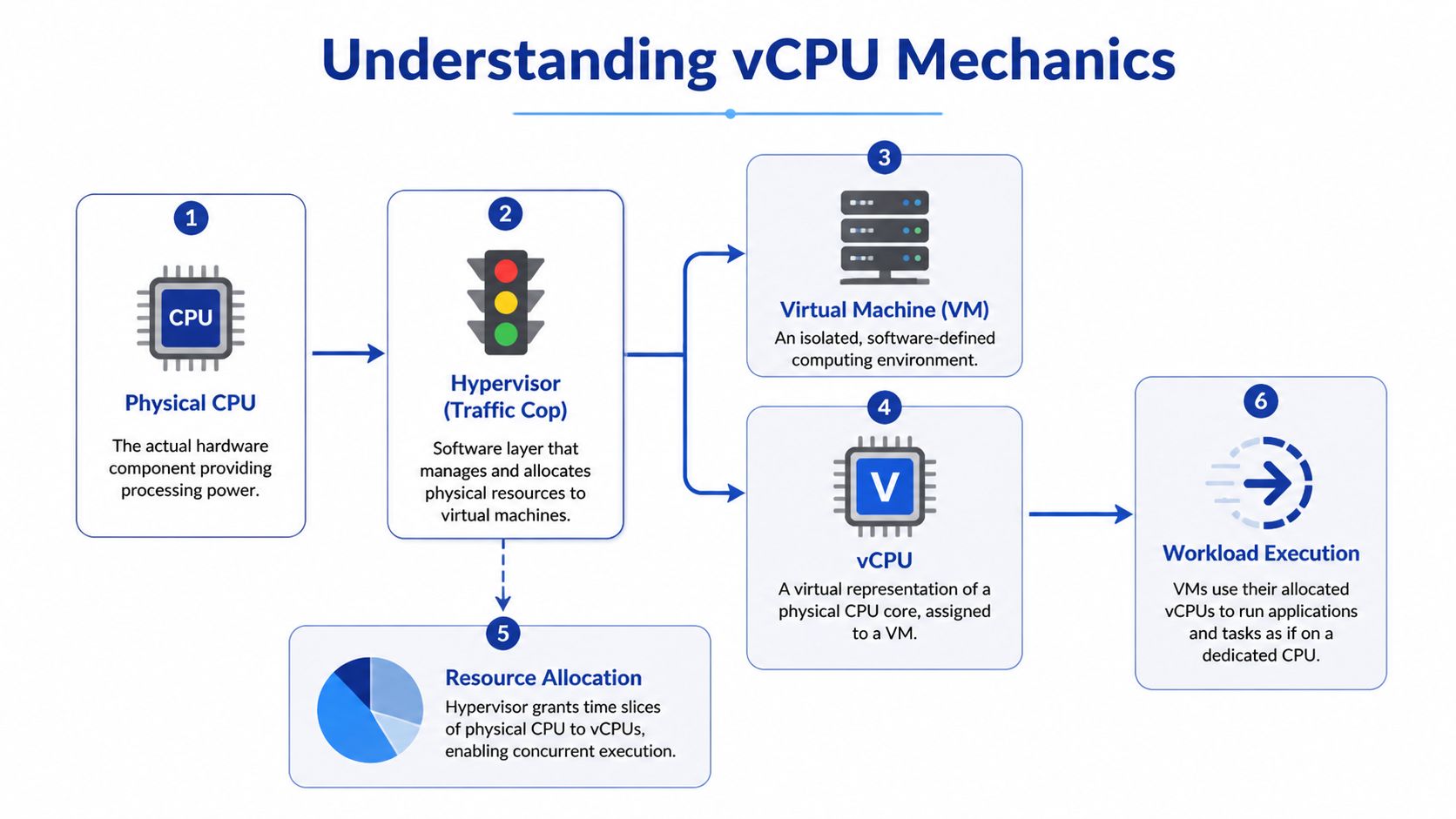
The simplest way to understand vCPU behavior is to look at the hypervisor. The hypervisor is the software layer that manages the physical server and decides when each VM gets access to CPU time. It acts like a traffic controller for compute.
The kitchen analogy that actually holds up
Think of the physical server as a large kitchen, the physical CPU as the stovetops, and each virtual machine as a cook trying to prepare a meal. The hypervisor doesn't build a new kitchen for every cook. It assigns access to the same stovetops in fast, managed turns.
Each vCPU is one of those scheduled turns. If a VM has more vCPUs, it gets more opportunities to run work in parallel or with less waiting, depending on the host and the workload. To the guest operating system, it feels like dedicated CPU resources are present. Under the hood, those resources are being shared.
According to Hyve's explanation of VMware vCPU behavior, a vCPU is a virtualized representation of a physical CPU core, but more precisely it consists of time slots across all available cores. With hyper-threading enabled, 1 physical core typically equals 2 vCPUs, so 4 physical cores can equal 8 vCPUs in common setups, as outlined in Hyve's vCPU overview.
Why the abstraction is useful
This model gives cloud platforms their flexibility. You can add vCPUs to a VM far faster than you can replace hardware in a physical environment. In practice, that means teams can respond to application demand without waiting for procurement, racking, or planned maintenance windows.
It also means the number on the VM spec sheet is not the whole performance story. A VM with several vCPUs may perform well for an intermittent web service and poorly for a sustained compute-heavy task if the host is busy and the hypervisor has to juggle too many runnable workloads.
A few practical takeaways matter more than the theory:
- vCPUs are scheduled, not magical: The hypervisor decides when work runs.
- More vCPUs can help parallel work: They don't guarantee linear performance gains.
- Sharing is the point: Virtualization is efficient because not every VM needs full CPU power at the same time.
- Contention is real: If many busy VMs want CPU simultaneously, latency shows up.
Don't assume "assigned" means "dedicated." In virtualized environments, assigned usually means "available to be scheduled."
That one misunderstanding causes a lot of bad planning.
vCPU vs Physical Cores and Threads Explained
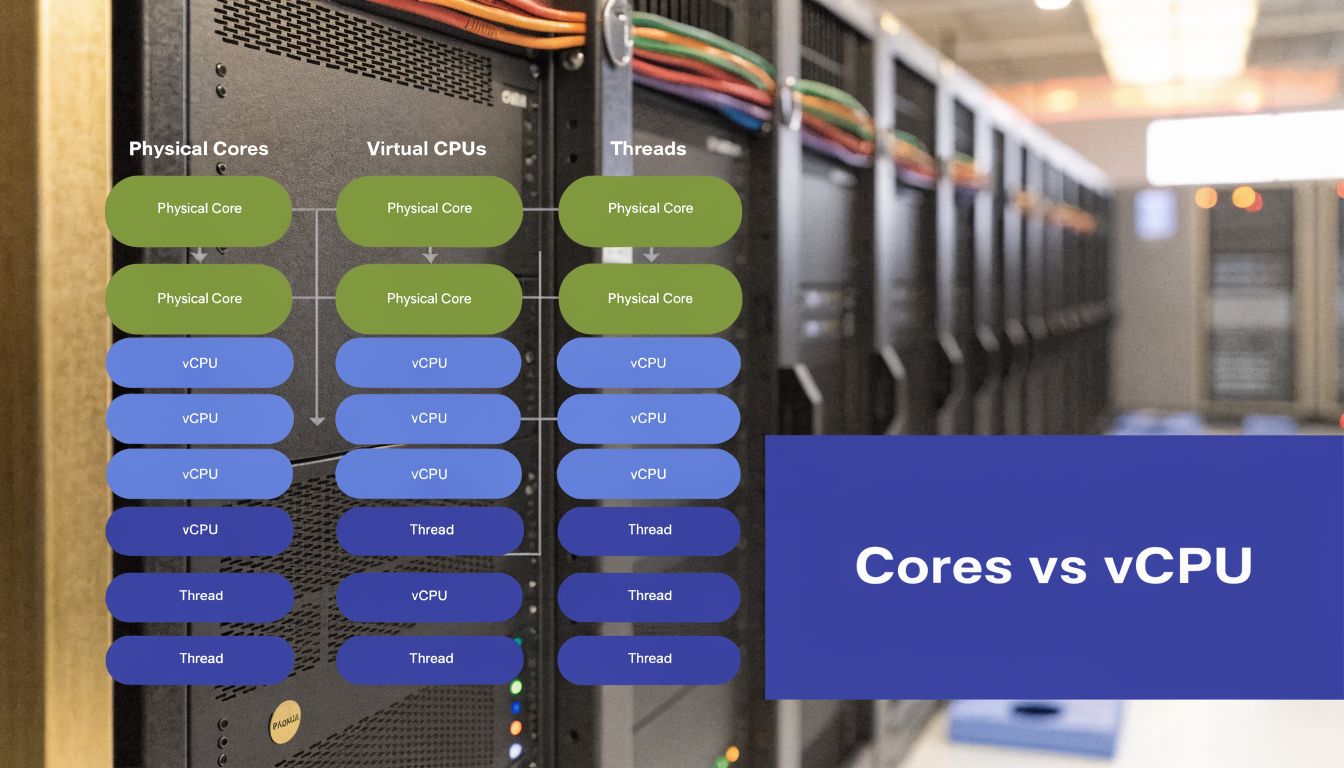
When people compare VM sizes, they often mix up physical cores, threads, and vCPUs as if they're interchangeable. They aren't. They are related, but each describes a different layer of the stack.
The short version
A physical core is the actual hardware execution resource on the processor.
A thread is a logical execution path exposed by the CPU.
A vCPU is what the hypervisor or cloud platform presents to the VM.
On modern Intel Xeon servers with Hyper-Threading, 1 vCPU typically maps to 1 hyperthread, which means a 4 vCPU instance commonly represents 2 physical cores, as explained in OpenMetal's breakdown of vCPU versus dedicated cores. On CPUs without multithreading, such as certain ARM systems, the mapping is typically 1 vCPU per physical core.
Why this changes performance expectations
A physical core gives you dedicated hardware execution capacity. A vCPU gives you virtualized access to CPU time. That's close enough for many workloads, but not all of them.
A stateless web app may run perfectly well on shared vCPUs because requests are short and bursty. A busy database, build worker, or latency-sensitive service can react very differently because it spends more time waiting for consistent CPU access. That's why a VM advertised with a certain vCPU count doesn't always behave like a machine with the same number of dedicated cores.
Here's the practical comparison:
| Resource type | What it means | What you can expect |
|---|---|---|
| Physical core | Real hardware execution unit | Most predictable CPU performance |
| Thread | Logical path on a core | Useful, but not equal to a full extra core |
| vCPU | Virtual compute unit assigned to a VM | Flexible and scalable, but shared |
If you're evaluating CPU sizing in virtual environments, this guide on reducing cloud costs with cores and threads is a useful companion because it ties architecture choices back to billing and scheduling decisions.
What works and what doesn't
What works:
- Match workload shape to CPU type: API servers and small services usually tolerate shared CPU better than steady compute jobs.
- Test with real load: Synthetic idle metrics can hide contention.
- Check the underlying architecture: x86 with hyper-threading and ARM without multithreading don't present vCPUs the same way.
What doesn't:
- Assuming 4 vCPUs always means 4 cores
- Sizing databases by VM label alone
- Comparing instance families without checking the CPU model
If you're comparing compute generations or VM families, looking at differences like C4 vs C5 instance behavior helps because CPU generation and architecture can matter as much as raw vCPU count.
How Cloud Providers Count and Price vCPUs
Cloud providers package compute around the vCPU because it's a clean unit for selling shared CPU access. You pick an instance family, then a size with a given vCPU count, memory allocation, and storage profile. That model is simple to buy, but it's easy to misuse.
The first pricing impact is the VM itself. More vCPUs generally means a larger instance and a higher bill. The second impact is less obvious and often more expensive. Some software licenses are tied directly to vCPU count.
Licensing is where mistakes get expensive
AWS documents this clearly for license-included scenarios. SQL Server Enterprise costs $0.421 per vCPU-hour and Windows Server costs $0.046 per vCPU-hour, and AWS notes that using Optimize CPUs to disable unneeded vCPUs can reduce those licensing charges proportionally on eligible instances, as described in AWS Optimize CPUs documentation.
That matters when a workload needs a lot of memory or IOPS but not much CPU. In those cases, leaving the default vCPU count in place can turn into a licensing problem rather than a performance benefit.
Fewer active vCPUs on the right instance can be the better design when the bottleneck is memory or storage, not compute.
Providers don't define vCPU exactly the same way
Even when clouds use the same term, the practical packaging differs. Some platforms expose more granular CPU scaling. Others bundle vCPU and memory in broader steps, which can force teams to buy more compute than they need just to reach the memory footprint they want.
Here's a working comparison model:
| Provider | vCPU definition | Common CPU architectures | Example instance series |
|---|---|---|---|
| AWS | Usually a logical CPU presented to the instance, commonly aligned to a hyperthread in many x86 environments | Intel Xeon, AMD EPYC, AWS Graviton | EC2 general-purpose and compute-optimized families |
| Azure | Virtualized compute unit used to size and bill VMs | Intel Xeon, AMD EPYC, ARM-based offerings in some services | Azure Virtual Machines series |
| Google Cloud | Virtual compute unit attached to machine types and custom configurations | Intel Xeon, AMD EPYC | E2, C2D, C3D |
| Oracle Cloud Infrastructure | Often expresses scaling in physical core terms that map differently from hyperscaler vCPU packaging | AMD EPYC, Intel Xeon, Arm-based options | OCI Compute shapes |
The cost lesson
Cloud pricing gets messy when teams look only at instance names. The better question is this: how many vCPUs are active, what software is licensed against them, and does the workload use them?
If the answer is no, reducing vCPU count can lower both infrastructure and licensing waste without hurting service quality. That's one of the few cloud optimizations that can be both technically clean and financially immediate.
Managing vCPU Performance and Right Sizing
You can understand what a vCPU is and still overspend badly if you never revisit sizing. Most environments drift into waste because teams provision for peak demand, keep the larger size after launch, and stop checking whether the workload still needs it.
Ace Cloud notes that effective vCPU management can improve hardware utilization by 50% or more, and also points out that 30-70% of cloud spend can be wasted on idle or oversized compute resources. That's why rightsizing isn't a nice-to-have. It's a baseline operational discipline, as discussed in Ace Cloud's CPU vs vCPU analysis.
What under-sizing looks like
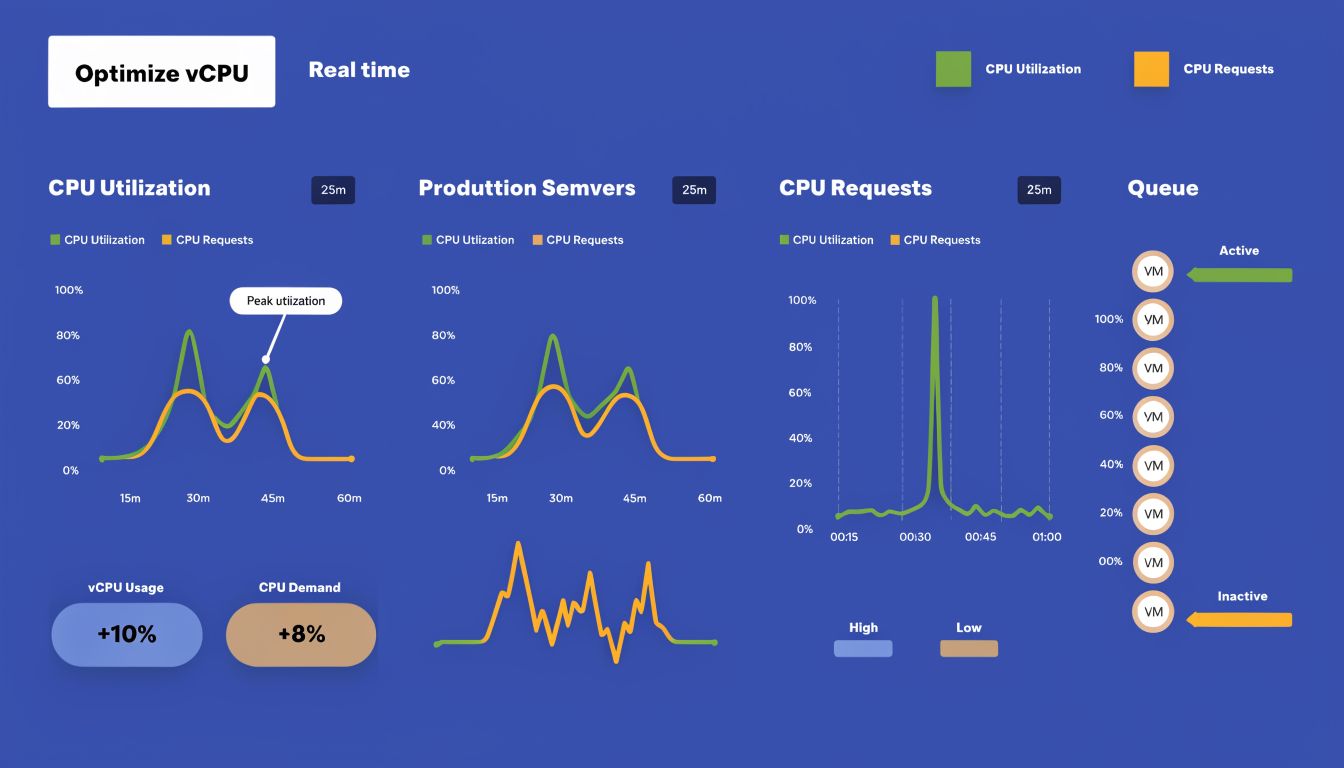
A VM with too few vCPUs usually doesn't hide the problem for long. You see sustained CPU pressure, slower app response, queue growth, or workers that never catch up during busy periods. Interactive systems feel inconsistent. Batch systems miss their windows.
In virtualized environments, contention can also show up as waiting. The guest thinks it should run, but the host is busy serving other workloads first. That's one reason application owners sometimes report slowness even though the VM size looks generous on paper.
What over-sizing looks like
Over-sizing is quieter. The service works. Dashboards look calm. Costs stay high for months.
Watch for patterns like these:
- Low average CPU use: The VM has more headroom than the workload uses most of the time.
- Memory-led sizing decisions: Teams picked a large instance for RAM and accepted extra vCPUs they didn't need.
- Long-running non-production VMs: Dev and test systems often keep production-like sizes without production-like demand.
- Static allocations: Nobody revisits the original instance choice after deployment.
A good reference for optimizing virtual machine performance is worth keeping around because vCPU decisions make more sense when you review them alongside VM monitoring, not in isolation.
A practical right-sizing loop
You don't need a perfect formula. You need a repeatable process.
Measure actual usage
Check CPU utilization trends, application latency, and workload timing. Look at normal days and busy days.Test one size down
For many business applications, the safest optimization is a small reduction, then watch behavior.Review host-side symptoms
In virtualized platforms, CPU ready time and CPU steal can tell you whether the VM is waiting on the host rather than the app itself.Separate CPU need from memory need
Some systems need large memory footprints but modest compute. Those are prime candidates for CPU optimization.
Here's a concise explainer that complements the operational side:
Watch for contention, not just allocation. A VM can have a respectable vCPU count and still perform poorly if the host is oversubscribed.
The teams that do this well don't chase idealized ratios. They monitor, test, and adjust. That's what keeps both performance and spend under control.
Optimizing vCPU Costs with Smart Scheduling
Rightsizing fixes one half of the waste problem. Scheduling fixes the other half.
A VM with the perfect vCPU count still costs money when nobody is using it. Many teams stall at this point. They spend time tuning instance sizes, then leave development, QA, training, and internal app servers running nights and weekends because shutdowns feel operationally annoying.

Why scheduling works
vCPUs are billable compute allocations. If the VM is powered on, the platform treats those resources as active infrastructure. Even when a server is functionally idle, you're still paying for the instance and, in some setups, software tied to active vCPU count.
That makes scheduling one of the most practical cost controls available to small and midsize teams. Non-production workloads are often predictable. Offices close. Test cycles end. Sandboxes sit untouched for long stretches. If those systems don't need to be online, they shouldn't be.
The two-part playbook
The most effective pattern is simple:
- Right-size first: Remove excess vCPUs from VMs that don't need them.
- Schedule second: Power off idle systems outside their useful hours.
This works especially well in environments where engineering teams need flexibility but finance teams need predictable controls. A schedule creates a default. An override handles the exception.
For teams trying to quantify the waste from always-on non-production machines, this breakdown of the hidden cost of idle VMs and how scheduling reduces it is a practical follow-up.
What tends to fail
Manual shutdown policies don't last. Someone forgets. A release runs late. An environment stays on "just in case" and never goes back to normal. Native scripts can work, but they usually become one more small internal tool nobody wants to maintain.
The better model is policy-based scheduling with easy exception handling. When the default state matches actual business hours, teams stop paying for idle vCPUs merely because nobody remembered to click stop.
Frequently Asked Questions About vCPUs
Is vCPU overcommitment bad
Not by itself. Overcommitment is a normal part of virtualization and one reason cloud platforms are efficient. Problems start when too many active workloads compete for the same underlying CPU resources at the same time. For bursty services, that can be fine. For steady compute-heavy jobs, it can turn into latency and inconsistent performance.
Can a vCPU be more powerful than a physical core
In a narrow sense, yes. Hyve notes that vCPUs are scheduled across available cores rather than existing as fixed hardware slices, so actual performance depends on the host and scheduler behavior rather than a simple one-to-one mental model. That's why a vCPU isn't best understood as a miniature core. It's better understood as a managed unit of compute access.
What should I check before increasing vCPUs on a VM
Start with the bottleneck. If the application is waiting on storage, memory, or external services, adding vCPUs won't solve much. Review CPU utilization trends, app response time, and host-side contention signals. If the workload is CPU-bound, add cautiously and retest rather than jumping straight to a much larger size.
Are more vCPUs always better
No. More vCPUs can improve throughput for the right workload, but they can also increase cost, raise license charges, and complicate scheduling on busy hosts. Extra CPU only pays off when the application can use it.
Do cloud providers all map vCPUs the same way
No. The meaning of a vCPU depends on processor architecture and platform implementation. On many Intel Xeon systems with Hyper-Threading, one vCPU usually maps to one hyperthread. On some ARM-based systems without multithreading, one vCPU maps more closely to one physical core. That difference matters when you're comparing price and expected performance.
If your team already knows some VMs are oversized or sitting idle after hours, CLOUD TOGGLE gives you a clean way to act on it. You can automate start and stop schedules across AWS and Azure, give the right people safe access to scheduling controls, and cut waste from idle servers without turning cloud cost management into another engineering project.