A lot of teams meet cloud based architecture the same way. Not through a clean architecture review, but through a cloud bill that lands higher than expected.
The pattern is familiar. A few virtual machines stay on after office hours. A test environment runs all weekend. Storage keeps growing because nobody defined a retention rule. The architecture still works, but the economics are off.
That’s why cloud architecture isn’t just a diagramming exercise. It’s an operating model that decides how fast you can ship, how reliably you can recover, and how much waste you allow into the system.
What Is Cloud Based Architecture and Why It Matters

Cloud based architecture means building and running applications on rented cloud infrastructure instead of buying and maintaining all of your own hardware. Compute, storage, networking, databases, and platform services come from providers such as AWS, Azure, and Google Cloud. Your team decides how to assemble them.
For a new team lead, the easiest way to frame it is this. You can buy a fleet of trucks, insure them, maintain them, and hope demand stays steady. Or you can lease delivery vans as needed, add more during peak periods, and return capacity when demand drops. Cloud architecture follows that second model.
Why teams moved this way
The major turning point came when AWS Elastic Compute Cloud (EC2) launched in 2006, making on-demand virtual compute broadly accessible and changing how businesses provision infrastructure, as noted in IBM’s history of cloud computing discussion at https://community.ibm.com/community/user/discussion/history-of-cloud-computing.
Before that shift, teams often had to plan around hardware lead times, data center capacity, procurement cycles, and geographic constraints. With cloud services, those barriers got smaller. The decision moved from “Can we get servers in time?” to “What’s the right architecture for this workload?”
If you’re sorting through service models, this overview of https://www.cloudtoggle.com/blog-en/cloud-services-solutions/ is useful because it breaks down how teams consume cloud capabilities at different layers.
Why it matters to the business
A good cloud based architecture supports three outcomes:
- Agility: Teams can provision environments quickly and test changes without waiting on hardware.
- Scalability: Applications can handle changing demand without constant manual intervention.
- Cost control: You can align spending more closely to actual usage instead of fixed infrastructure bets.
Practical rule: If your architecture can scale technically but can’t scale financially, it isn’t finished.
That last point gets missed. Plenty of systems are cloud-hosted but not cloud-efficient. They still behave like old on-prem estates, just with monthly billing instead of capital expense. For SMBs, that gap matters more because the same team usually owns delivery, support, and budget pressure at the same time.
The Foundational Principles of Cloud Design
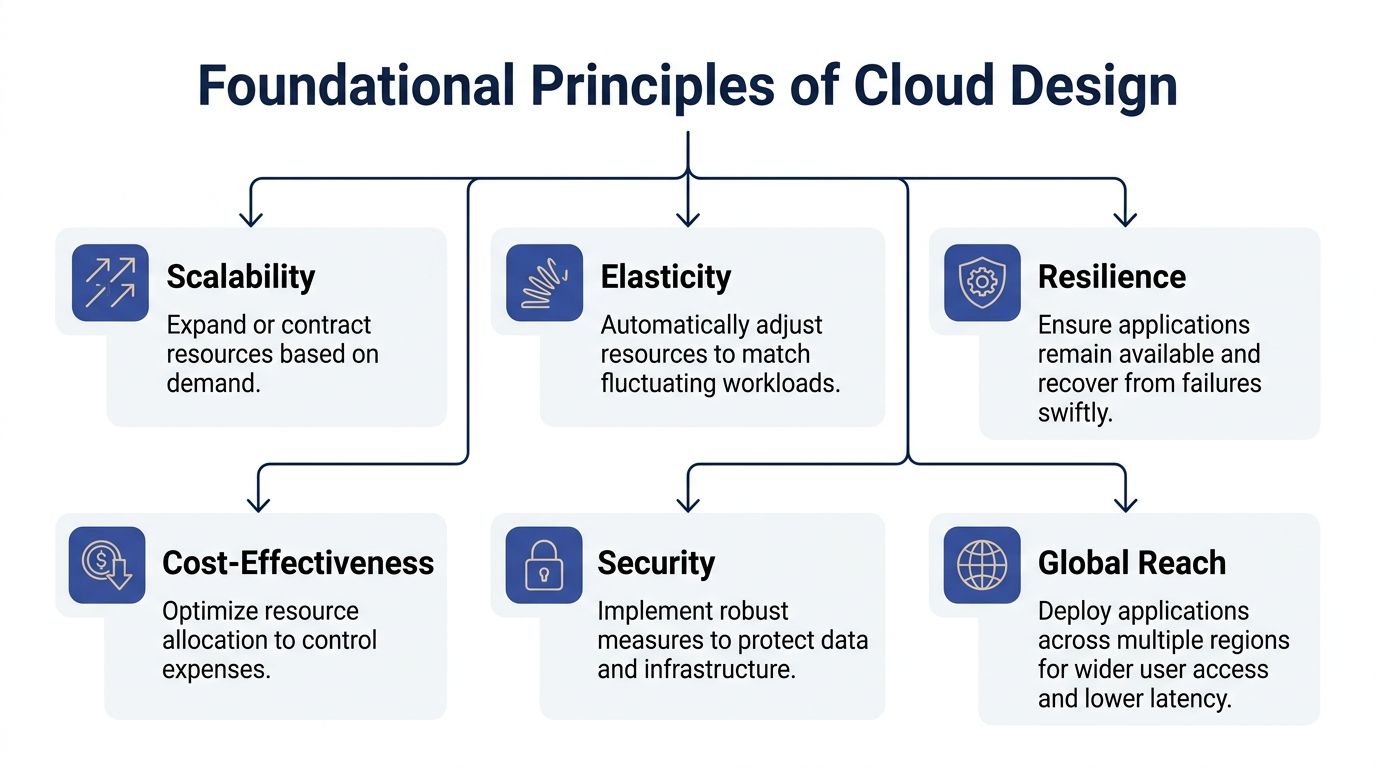
Most architecture mistakes happen before code becomes the problem. They start when a team treats the cloud like a remote server rack instead of a dynamic platform.
Elasticity and pay as you go
Elasticity is the ability to adjust resources to match workload changes. Think of a retail store adding cashiers for the holiday rush and reducing staffing when traffic returns to normal. In cloud systems, that means compute capacity grows or shrinks with demand rather than staying fixed.
That principle only pays off if your application can use it. Stateless services, queue-driven workers, and externalized session state usually scale more cleanly than tightly coupled applications.
For a plain-language refresher, https://www.cloudtoggle.com/blog-en/what-is-elasticity-in-cloud-computing/ is a useful reference for explaining elasticity to non-specialists.
Pay as you go sounds simple, but it changes engineering behavior. Instead of sizing for peak and absorbing idle capacity, you pay for what you run. That can reduce waste, but only if teams regularly clean up old resources, shut down dev systems, and review whether managed services are replacing operational effort.
High availability and loose coupling
High availability means you design for failure because failures will happen. A zone can degrade. A node can die. A deployment can break a dependency. Strong cloud architecture assumes those events are normal and limits blast radius.
Common patterns include:
- Multi-zone deployment: Spread instances or services across availability zones.
- Health-based replacement: Let orchestrators or scaling groups replace unhealthy nodes.
- Dependency isolation: Prevent one failing service from taking down unrelated paths.
Loose coupling is what makes those patterns practical. If every service depends directly on every other service, one fault becomes a system-wide event. If components communicate through APIs, queues, or events with clear contracts, you can change or replace parts with less collateral damage.
Build services like LEGO bricks, not poured concrete. Replaceable parts age better.
Security and global reach
Security belongs in the design, not at the end of the project. Identity boundaries, network segmentation, access policies, secrets handling, and auditability all shape the architecture itself.
Global reach matters too. Users don’t all sit near one region, and some workloads have locality or regulatory constraints. If you’re planning deployments in Oceania, this guide to AWS local cloud regions helps teams think through latency, region choice, and service placement with more realism than a generic global map.
Exploring Core Cloud Architecture Patterns
Architectural patterns aren’t labels for slides. They’re ways to trade cost, speed, flexibility, and operational burden against each other. The right choice depends on the shape of the problem, not what’s fashionable.
Microservices
Microservices split an application into smaller services that each handle a focused capability. A billing service, authentication service, reporting service, and notification service can evolve independently.
This pattern helps when different parts of the product change at different rates or need separate scaling behavior. A team can deploy the reporting service without redeploying the whole platform. It also works well when ownership is divided across product teams.
The downside is operational complexity. You now manage more deployments, more service-to-service communication, more observability requirements, and more security boundaries. Teams that move to microservices too early often spend months rebuilding platform basics they got for free in a monolith.
Microservices usually make sense when:
- Domains are clear: Service boundaries map to real business capabilities.
- Teams are independent: Different groups need to release on different cadences.
- Scale varies by function: One part of the system needs far more resources than another.
They’re a poor fit when a small team is still learning the product and the main need is delivery speed.
Serverless
Serverless lets you run code in response to events without managing traditional servers directly. It’s often a strong fit for image processing, scheduled jobs, webhook handlers, lightweight APIs, and data transformation tasks.
The attraction is obvious. You stop thinking about base operating system management, idle instances, and a chunk of capacity planning. For event-driven systems, this can be cleaner than maintaining a fleet of virtual machines for intermittent workloads.
But serverless isn’t free of architectural consequences. Cold starts, execution limits, local testing friction, and dependency sprawl can all become issues. Teams also underestimate how quickly a simple function estate turns into a distributed application with all the usual debugging challenges.
Use serverless when the trigger model matches the workload. Don’t force long-running processes or highly stateful applications into it just because it looks operationally lighter.
Containers
Containers package an application and its dependencies so it runs consistently across environments. That consistency is why teams use Docker and orchestration platforms like Kubernetes.
Containers sit in the middle ground between full virtual machines and serverless functions. They give more control than serverless and more portability than provider-specific managed runtimes. They’re useful for APIs, worker services, internal tools, and workloads that need predictable packaging.
What works well:
- Standardized delivery: The same container image moves through dev, test, and production.
- Better density: Multiple containers can share host capacity efficiently.
- Operational consistency: Platform teams can build repeatable deployment patterns.
What doesn’t work well is adopting Kubernetes before the team is ready to operate it. Managed Kubernetes reduces infrastructure toil, but it doesn’t remove the need for cluster policy, networking decisions, workload security, and platform ownership.
Hybrid and multi-cloud
Hybrid cloud combines cloud services with on-premise systems. Multi-cloud uses more than one cloud provider. The two often overlap, but they solve different problems.
Hybrid is usually about practicality. Some systems stay local because of latency, compliance, legacy dependencies, or sunk investment. Multi-cloud is often about avoiding concentration risk, using provider-specific strengths, or supporting acquisitions and regional requirements.
These patterns can be valid, but they raise coordination costs. Identity gets harder. Networking gets harder. Governance gets harder. So does troubleshooting.
A lot of SMBs reach for multi-cloud too early. In practice, many teams do better by becoming excellent on one primary platform first, then adding complexity only when a concrete business reason exists.
The architecture pattern with the most logos on a slide is rarely the cheapest to run.
Comparing Cloud Architecture Patterns
| Pattern | Best For | Cost Model | Management Overhead |
|---|---|---|---|
| Microservices | Complex products with multiple domains and independent teams | Costs can be efficient when services scale separately, but sprawl can increase spend | High |
| Serverless | Event-driven tasks, intermittent workloads, lightweight APIs | Usage-based charging aligns well with bursty demand | Medium |
| Containers | Applications that need portability, consistency, and controlled runtime behavior | Flexible, but depends on cluster and host utilization discipline | Medium to high |
| Hybrid cloud | Workloads split across local systems and public cloud due to compliance, latency, or legacy needs | Can optimize placement by workload, but integration overhead is real | High |
| Multi-cloud | Organizations with clear resilience, regional, or vendor strategy requirements | Can improve negotiation and fit, but duplicated tooling often raises costs | High |
A practical selection lens
When I review architecture options with a team lead, I usually ask four questions:
- What changes most often? That points to where independence matters.
- What has the sharpest traffic variation? That affects scaling and pricing behavior.
- What can the current team operate well? Operational maturity is part of the architecture.
- What failure would hurt the business most? That drives resilience choices.
If the answer to the third question is “we don’t yet have platform depth,” a simpler pattern often wins even if it’s less elegant on paper.
The Critical Trade-offs of Performance Security and Cost

Cloud based architecture gives you options. It also gives you more ways to make expensive mistakes.
Performance rarely fails in obvious places
Teams often assume performance is mostly about CPU and memory sizing. In distributed systems, the harder problems usually show up between components. A chatty service mesh, cross-region database calls, or too many synchronous dependencies can add latency long before any host looks saturated.
Multi-cloud designs add another layer. Moving data between providers or regions may solve one resilience problem while creating a latency or data gravity problem somewhere else. A design that looks clean at the service diagram level can still feel slow to users.
Security gets harder as systems spread out
The cloud provider secures part of the stack. Your team still owns a lot. Identity design, secrets handling, patching decisions, network boundaries, permissions, and application-layer controls remain your responsibility.
Distributed systems also create more edges to defend. More APIs, more roles, more automation, and more integration points usually mean a larger attack surface. Teams that scale architecture without scaling operational discipline end up with policy drift and unclear ownership.
A useful way to think about it is this:
- Simple systems are easier to inspect manually.
- Distributed systems need stronger automation and guardrails.
- Hybrid estates need explicit ownership because nobody sees the whole picture by default.
Cost is not automatically lower in the cloud
Many new leads find this surprising. Cloud can be cheaper, but only when the architecture and operating habits fit the pricing model.
The pandemic years made both sides of that clear. The 2019-2022 COVID-19 pandemic accelerated cloud expansion as remote work increased demand for elastic resources, and pay-as-you-go models saved firms 20-30% on compute amid fluctuating demand, according to CloudZero’s cloud history summary at https://www.cloudzero.com/blog/history-of-the-cloud/.
That same flexibility also exposed weak cost discipline. If environments never shut down, if data lifecycle rules are missing, or if teams overprovision to avoid incidents, the bill grows.
Cloud billing rewards precision. It punishes convenience left unattended.
How experienced teams handle the balance
They don’t optimize one dimension in isolation. They define service tiers, recovery targets, access boundaries, and spending guardrails together.
A practical approach looks like this:
- For performance: Keep hot paths short and reduce cross-service chatter.
- For security: Treat identity and permission design as first-class architecture work.
- For cost: Review idle resources and non-production usage with the same seriousness as incident review.
The right answer is rarely the fastest possible system, the strictest possible control, or the cheapest possible deployment. It’s the design that gives the business enough speed, enough protection, and predictable economics.
Practical Cloud Cost Optimization for Growing Teams
The fastest cloud savings usually don’t come from heroic refactoring. They come from stopping obvious waste.

For growing teams, the biggest blind spot is idle compute. Organizations waste 30-35% of cloud spend on idle compute, and 68% of SMBs report cost overruns without simple policy-driven controls, according to Full Scale’s summary at https://fullscale.io/blog/cloud-architecture-best-practices-2025/.
That number tracks with what many DevOps teams see in practice. Dev environments stay up overnight. Internal tools run at production hours even when nobody uses them. Temporary instances become permanent by accident.
If you want a broader view of the discipline, this guide to https://www.cloudtoggle.com/blog-en/cloud-cost-optimisation/ is a useful starting point for framing cost optimization as an operational habit rather than a one-time clean-up.
Start with resource scheduling
For SMBs, scheduling non-production resources off when nobody needs them is often the simplest win. It doesn’t require a migration. It doesn’t force application redesign. It just aligns runtime with actual use.
Typical candidates include:
- Development servers: Needed during business hours, not all night.
- QA and staging environments: Useful during release windows, not continuously.
- Training or demo systems: Bursty by nature and easy to forget.
- Sandbox virtual machines: Common sources of drift and idle spend.
Native tools can do part of this, but they’re often awkward for smaller teams. AWS Instance Scheduler and equivalent cloud-native workflows can be powerful, though they usually assume deeper cloud access and more setup discipline than many SMBs want to maintain.
One option in that category is CLOUD TOGGLE, which handles scheduled power management for AWS and Azure virtual machines and servers with role-based access controls and simple override workflows. That matters when finance, ops, and engineering all need visibility into uptime policy without exposing the full cloud account.
Then right-size what stays on
Scheduling handles obvious waste. The next layer is right-sizing.
A lot of teams inherit instance types from earlier guesses. A workload that needed extra headroom during launch may now run comfortably on a smaller footprint. Others become memory-bound and need a different family, not just more cores.
What works:
- Review actual usage trends: Look for consistently low utilization or obvious mismatch.
- Separate prod from non-prod standards: They shouldn’t be sized by the same rule.
- Test smaller shapes safely: Validate before changing shared or sensitive workloads.
What doesn’t work is treating right-sizing as a one-off project. Usage changes as the application changes.
Use spot capacity where interruption is acceptable
Some workloads can tolerate interruption. Batch jobs, CI runners, parallel data processing, and dev workloads often fit well. In those cases, spot instances can reduce compute cost by up to 90% compared with on-demand pricing, according to the referenced arXiv summary at https://arxiv.org/html/2307.12479v2.
That saving comes with a clear condition. Spot capacity can disappear. If the workload can’t checkpoint, retry, or fail over, the discount won’t help much.
Good candidates for spot:
- CI and build agents
- Batch analytics
- Stateless workers
- Dev and test pools with fallback capacity
Poor candidates are stateful systems with hard availability requirements and no interruption strategy.
A short walkthrough helps make the operational side more concrete:
Automate storage lifecycle policies
Compute waste gets attention because it’s visible. Storage waste lingers because it’s quieter.
Data lifecycle policies can reduce storage costs by 80-90% through automated tiering, moving colder data to cheaper storage classes based on access patterns, according to Flexential’s cloud cost optimization overview at https://www.flexential.com/resources/blog/cloud-cost-optimization.
That usually means setting rules for logs, backups, exports, media assets, and dormant datasets so they don’t sit forever in premium tiers.
A practical storage checklist:
- Define cold data clearly: Teams need a common rule for when data becomes archival.
- Apply lifecycle rules by bucket or dataset: Don’t rely on manual cleanup.
- Watch retrieval needs: Cheap storage is only cheap if access patterns still fit.
Build a cost hierarchy your team can actually maintain
For most SMBs, I’d rank cost work in this order:
- Schedule off idle non-production compute
- Right-size always-on resources
- Apply storage tiering and retention
- Use spot where fault tolerance exists
- Refactor architecture only where savings justify the effort
That order matters. Teams sometimes jump straight to major redesigns while dozens of idle machines run every night. Fix the billing leaks before rebuilding the house.
Managing Operations Scalability Resilience and Observability
Architecture choices show up most clearly during ordinary weekdays. A system that looked elegant during design review becomes painful fast if scaling is noisy, recovery is manual, or nobody can see what failed.
Scalability is an operational setting, not a slogan
Auto-scaling only works well when the signal is good. If a scaling group reacts to the wrong metric, it either lags during real demand or adds capacity for no useful reason.
For stateless web services, request volume, queue depth, or response-time pressure often tell a better story than raw CPU alone. For workers, queue backlog is usually more meaningful. For data-heavy services, throughput and contention may matter more than instance count.
Good scaling policy has guardrails:
- Defined minimums: Enough baseline capacity to avoid constant cold starts.
- Reasonable maximums: Prevent runaway cost during noisy events.
- Warm-up behavior: Give new instances time to become useful before judging them.
Resilience starts before the incident
Resilience isn’t just backup and restore. It’s designing for routine faults. Multi-zone deployment, health checks, replacement automation, retry discipline, and circuit breaking all reduce the chance that a small issue becomes an outage.
Teams also need to know what can fail independently. If every service depends on one shared database or one internal API path, the system may be distributed but not resilient.
A practical resilience review asks:
| Operational area | What to confirm |
|---|---|
| Failure domains | Can one zone, node, or service fail without taking everything down? |
| Recovery path | Does the platform recover automatically, or does someone need to log in and fix it? |
| Dependency behavior | Do clients retry safely, back off, and fail gracefully? |
Resilience comes from removing single points of panic, not just single points of failure.
Observability is where many teams fall short
In cloud environments, logs, metrics, and traces are not optional. Without them, you can’t distinguish a bad deployment from a noisy dependency or a scaling issue from a database bottleneck.
One of the more common gaps is not collecting enough telemetry in the first place. This overview of missing cloud logging and monitoring is useful because it frames poor observability as both a security and operational weakness.
At minimum, teams should have:
- Centralized logs: Searchable across services and environments
- Metrics with alerting: Focused on service health, saturation, and user-facing impact
- Tracing where requests cross services: Especially important in microservice estates
What fails in practice is partial instrumentation. One service emits useful logs, another doesn’t. Infrastructure metrics exist, but application metrics don’t. Alerts fire on symptoms nobody can act on. A stable cloud based architecture depends as much on operability as on initial design quality.
Your Blueprint for a Smarter Cloud
Smart cloud based architecture is part engineering, part finance, and part operating discipline.
The technical side matters. Pattern choice matters. Resilience and security matter. But the teams that get the most value from the cloud are the ones that connect architecture decisions to the monthly bill and to day-to-day operational effort.
For SMBs, that usually means resisting unnecessary complexity. Use patterns that your team can run well. Design for failure where the business needs it. Add automation where humans are most likely to forget.
The easiest place to start is often the least glamorous one. Find what’s idle and stop paying for it when nobody needs it. A scheduled shutdown policy for non-production systems won’t make the architecture diagram prettier, but it often improves the economics faster than a major redesign.
That’s what mature cloud management looks like. Not constant reinvention. Clear decisions, repeatable controls, and fewer resources running without a reason.
Frequently Asked Questions
What’s the best first step when moving to the cloud?
Start with a non-critical workload. Pick something useful enough to learn from but not so central that every mistake becomes a business problem. This gives the team space to build deployment, monitoring, access, and cost habits before larger migrations.
Should a small team use multi-cloud?
Usually not at the start. Multi-cloud can improve resilience and provider flexibility, but it also adds operational complexity. Most small teams get better results by becoming disciplined on one primary platform first.
Is serverless always cheaper than virtual machines?
No. It depends on usage patterns, runtime behavior, and operational fit. Serverless often works well for event-driven and intermittent tasks. Always-on or predictable workloads may be more efficient in containers or virtual machines.
What kind of savings can teams realistically expect from scheduling?
The exact result depends on how many non-production resources sit idle and how consistently teams use them. In practice, scheduling is often one of the fastest ways to cut waste because it targets resources that provide no value outside working hours.
If your team is paying for servers and VMs that sit idle overnight, CLOUD TOGGLE gives you a practical way to enforce schedules across AWS and Azure without exposing full cloud account access. It’s a straightforward option for teams that want policy-driven uptime, quick overrides, and a cleaner path from architecture decisions to measurable cost control.