A Kubernetes app can look healthy all week, then fail the moment real traffic arrives. CPU is not maxed everywhere. Memory is not exhausted everywhere. Yet users see timeouts, retries, and partial outages because requests pile onto the wrong pods at the wrong time.
That is why load balancing in kubernetes matters more than many teams assume. It is not a networking feature. It is the control point between steady performance and noisy incidents, and between disciplined cloud spend and a cluster full of expensive idle capacity.
Teams first meet load balancing as a reliability problem. A service needs to stay up when traffic spikes, when pods restart, or when a node disappears. But the cost side shows up fast. If traffic distribution is poor, operators compensate by overprovisioning replicas, keeping extra nodes online, or creating too many external load balancers. The app survives, but the bill grows.
The practical goal is straightforward. Route traffic to healthy backends, avoid hotspots, and expose services in a way that matches the application instead of fighting it. The financial goal is equally important. Use the least expensive balancing model that still gives you the routing, observability, and resilience you need.
Teams that get this right do not treat Kubernetes Services, Ingress, and external load balancers as interchangeable plumbing. They make deliberate choices. Internal traffic stays simple. HTTP traffic gets consolidated. Stateful paths get affinity where needed. Cloud load balancers are used carefully because convenience has a price.
Introduction Why Smart Load Balancing Matters
A common Kubernetes incident starts with a symptom that looks like an application problem. Checkout slows down. A few pods run hot. Error rates rise on one node while other replicas sit underused. The first reaction is usually to add capacity.
That often treats the bill, not the cause.
Load balancing decides how requests reach pods, and that choice shapes reliability, latency, scaling behavior, and cloud spend at the same time. In Kubernetes, the routing layer is not just networking plumbing. It determines whether new replicas absorb traffic, whether unhealthy pods stop receiving requests quickly enough, and whether the platform team solves a traffic pattern problem by buying more nodes than the workload really needs.
What goes wrong in real clusters
The failure pattern in production is usually uneven traffic distribution, not a full outage.
A service can have enough total CPU and memory and still perform badly if requests pile onto the wrong backends. Autoscaling then reacts to the hottest pods, not necessarily to the service as a whole. Teams see latency spikes, raise replica counts, and keep extra headroom in the cluster to stay safe. That works, but it is an expensive way to compensate for poor request flow.
Kubernetes gives teams the building blocks to avoid that trap. Services provide a stable endpoint for pods behind changing IPs. Readiness probes help keep traffic away from pods that should not receive requests yet. Those defaults matter because they let the scheduler and the traffic layer work together instead of fighting each other.
Why this is also a cost decision
Load balancing has a direct FinOps impact.
A clean traffic path means fewer hot spots, more predictable autoscaling, and less pressure to overprovision for peak conditions that only affect part of the fleet. A messy traffic path pushes teams toward larger node groups, higher replica floors, and too many public entry points. In cloud environments, that last mistake shows up fast. Spinning up separate external load balancers for each service is convenient, but convenience has a recurring monthly cost.
Smart balancing lowers two risks at once. It reduces the chance of user-facing failures during spikes, and it cuts waste from infrastructure added only to mask uneven routing.
The practical choices are straightforward. Pick the cheapest exposure model that still fits the application. Keep internal traffic internal. Use L7 routing only when host-based rules, path-based rules, or TLS handling justify it. Consolidate public HTTP entry points with Ingress when possible instead of paying for multiple external load balancers with overlapping jobs.
The Four Core Kubernetes Service Types
Think of Kubernetes service exposure like a company phone system.
Some numbers are internal only. Some are reachable from the outside by dialing a direct extension. Some go through a public reception desk. Some go through a smart operator who listens to what the caller needs and routes them accordingly.
That is the easiest way to think about ClusterIP, NodePort, LoadBalancer, and Ingress.
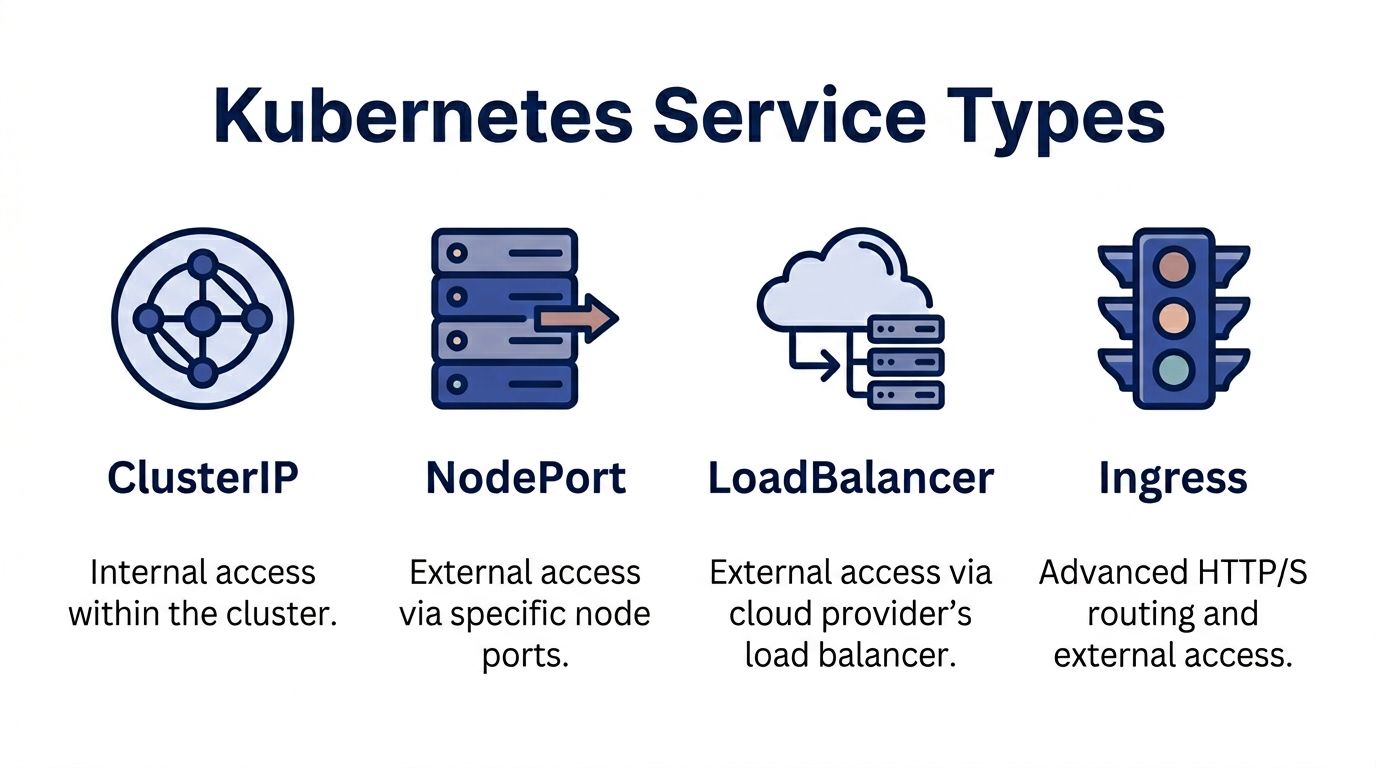
ClusterIP for internal traffic
ClusterIP is the default Service type. It creates an internal virtual IP that other workloads inside the cluster can call.
Use it when one service talks to another service and there is no reason to expose that traffic publicly. Internal APIs, background workers, and datastore side services usually belong here.
Example:
apiVersion: v1
kind: Service
metadata:
  name: payments-api
spec:
  type: ClusterIP
  selector:
    app: payments-api
  ports:
    - port: 80
      targetPort: 8080
This is the cheapest and simplest option in cloud environments because it does not provision an external entry point. It is also the cleanest default. If a service does not need public access, do not expose it.
NodePort for direct external access
NodePort exposes a service on a port across each node.
It works, but it is a transitional tool rather than an ideal production interface. You might use it for testing, for simple bare-metal access, or as a building block behind another routing layer.
Example:
apiVersion: v1
kind: Service
metadata:
  name: payments-api
spec:
  type: NodePort
  selector:
    app: payments-api
  ports:
    - port: 80
      targetPort: 8080
      nodePort: 30080
The trade-off is obvious in operations. You are now depending on node-level entry points. That creates awkward firewall rules, uneven exposure patterns, and more manual networking decisions.
LoadBalancer for managed external entry
LoadBalancer asks the cloud provider to provision an external load balancer and connect it to your Service.
Example:
apiVersion: v1
kind: Service
metadata:
  name: payments-api
spec:
  type: LoadBalancer
  selector:
    app: payments-api
  ports:
    - port: 80
      targetPort: 8080
This is the fastest path to public exposure on AWS, Azure, or GCP. It is also where many teams start overspending. One service becomes one external load balancer. Then another team adds another service. Then another. Soon the cluster has many public entry points that could have been consolidated.
Ingress for HTTP and HTTPS routing
Ingress is not a Service type in the same sense, but it is the most important way to expose HTTP and HTTPS applications efficiently.
It sits in front of one or more Services and routes based on hostnames, paths, and controller-specific rules. Such rules enable path-based routing, TLS termination, and shared public entry.
Example:
apiVersion: networking.k8s.io/v1
kind: Ingress
metadata:
  name: storefront
spec:
  rules:
    - host: shop.example.com
      http:
        paths:
          - path: /api
            pathType: Prefix
            backend:
              service:
                name: api-service
                port:
                  number: 80
          - path: /images
            pathType: Prefix
            backend:
              service:
                name: image-service
                port:
                  number: 80
If you run several web services, Ingress is the right front door.
Kubernetes Service Types At a Glance
| Service Type | Accessibility | Primary Use Case | Cost Implication |
|---|---|---|---|
| ClusterIP | Internal to cluster | Service-to-service communication | Lowest cost. No external balancer |
| NodePort | External via node ports | Testing, simple exposure, infrastructure building block | Low direct cost, higher operational friction |
| LoadBalancer | External public access | Quick cloud-native exposure for one service | Convenient, but can become expensive when used per service |
| Ingress | External HTTP and HTTPS access | Shared routing for multiple web services | Usually better cost efficiency when many apps share one entry point |
Practical rule: Default to ClusterIP for internal workloads. Use Ingress for web traffic. Reach for LoadBalancer when a service needs its own dedicated external entry.
Choosing Your Path L4 versus L7 Load Balancing
The next decision is not about exposure. It is about intelligence.
Layer 4 load balancing looks at connection details such as IP and port. Layer 7 load balancing understands application traffic such as HTTP paths, headers, and hostnames.
A simple way to frame it is this. L4 routes the envelope. L7 reads the label on the document inside.
Where L4 works well
Kubernetes Services handled by kube-proxy are an L4 model. They are good for straightforward TCP and UDP traffic where every backend is interchangeable and the balancer does not need to understand the request itself.
For internal services with uniform pods, this is enough. It is operationally simple. It avoids adding another controller. It matches the Kubernetes default model.
But scale changes the equation. In Kubernetes, kube-proxy uses iptables for L4 round-robin balancing, and that can increase tail latency by 10-50% in large clusters. For clusters with over 100 nodes, switching to IPVS mode with --proxy-mode=ipvs can reduce latency by up to 3x, as noted in this technical explanation of Kubernetes load balancing.
That one detail matters operationally. If your cluster is growing, the default path may be correct, but the default implementation may not be.
Where L7 becomes necessary
L7 is the better fit when the request itself matters.
An e-commerce application is the standard example because it maps cleanly to reality:
/apigoes to one backend/imagesgoes to another/checkoutmay need stricter controls, session handling, or different scaling
You cannot express that kind of logic with plain L4 balancing. You need an Ingress controller such as NGINX or Envoy.
Later-stage teams also adopt L7 because they want:
- TLS termination at the edge
- Host and path routing across many services
- Canary or weighted delivery
- Sticky sessions for some workloads
- Better control over HTTP behavior
A lot of AWS-focused architecture decisions follow the same pattern, especially when teams start comparing dedicated balancers versus consolidated ingress models. This overview of load balancing on AWS is useful context if your cluster sits behind cloud-native networking decisions.
Here is a short explainer before the practical decision table.
A simple decision rule
| If your application needs | Better fit |
|---|---|
| Basic internal TCP routing | L4 Service |
| Minimal operational overhead | L4 Service |
| Path-based or host-based routing | L7 Ingress |
| Shared public entry for many apps | L7 Ingress |
| HTTP policy and traffic shaping | L7 Ingress |
L4 is simpler. L7 is smarter.
If all pods are equivalent and the protocol is simple, keep it simple. If the application has multiple routes, customer-facing paths, or cost pressure from too many public entry points, move to L7.
Cloud Native vs On-Premises Solutions
The biggest operational divide in load balancing in kubernetes is not technical elegance. It is who owns the edge.
In cloud environments, the default habit is to let the provider handle it. In on-premises environments, or in private clouds that behave like on-prem, your team owns more of the networking surface.
Managed cloud load balancers
A Kubernetes Service of type LoadBalancer is appealing because it is fast. You create the Service, and the cloud platform provisions the external entry point.
That is a good default when speed matters more than optimization. It is also the path of least resistance for teams new to Kubernetes.
The problem shows up later. Managed load balancers are easy to create and easy to forget. A cluster with many public services can accumulate recurring edge costs without anyone challenging the design.
For HTTP workloads, an Ingress controller gives better technical and financial shape. According to Apptio's Kubernetes load balancer best practices, an NGINX Ingress on GKE handled 500k requests per second with 1ms latency, compared with kube-proxy at 200k requests per second with 5ms latency. That same source also notes that MetalLB can allocate thousands of external IPs via BGP, avoiding the typical ~$20/month cost per cloud load balancer in on-prem style environments.
On-prem and self-managed options
On-prem does not have a native cloud load balancer waiting for you. That is where MetalLB becomes useful.
MetalLB lets bare-metal or private-cloud clusters advertise external IPs using standard network mechanisms such as BGP. It fills the gap that managed cloud platforms solve for you automatically.
This gives you more control, but it also gives you more responsibility. Your networking team must understand the advertisement model, the failure domains, and how external routing interacts with the cluster.
Cost and control side by side
Managed LoadBalancer
- Fast to deploy
- Low platform friction
- Less network ownership
- Can sprawl into unnecessary recurring spend
Ingress plus one shared external entry
- Better consolidation for web traffic
- Cleaner public architecture
- Stronger FinOps posture
- Requires controller management and routing policy discipline
MetalLB on-prem
- Strong control
- Avoids per-balancer cloud charges in self-managed environments
- Requires network expertise
- Better fit when you already own the infrastructure edge
Tip: If you operate message-heavy platforms, event systems, or broker clusters, edge design matters as much as application design. This guide to Kafka on Kubernetes is a solid companion read because it highlights the operational consequences of exposing distributed systems the wrong way.
The right answer depends on who owns networking, how many public services you run, and whether your organization values convenience over edge efficiency.
Advanced Patterns for Performance and Resilience
Once the baseline is stable, the next improvements come from making traffic decisions more context-aware.
Round-robin is fine when every pod behaves the same. Production systems rarely stay that simple. Some pods run hotter. Some requests are heavier. Some rollouts need careful exposure. Some user flows are sensitive to even small latency changes.
Weighted routing for safer releases
Weighted routing is one of the most practical advanced patterns because it changes how teams deploy, not how they route.
With weighted traffic, a new version can receive a smaller share of requests while the old version keeps most production load. That is cleaner than an all-or-nothing cutover. It also works well for canary and blue-green strategies where the purpose is to validate behavior before broad exposure.
Ingress controllers and service meshes commonly provide this feature. The operational value is not safety. It is cost control during rollout. Teams can validate new code without doubling infrastructure for longer than needed.
Utilization-aware traffic distribution
Google Kubernetes Engine introduced utilization-based load balancing in 2023, which analyzes pod CPU usage and redistributes traffic based on actual backend load. Google states that this improves application availability by up to 30% during overload scenarios and has shown a 15-20% average improvement in P99 latency for performance-critical applications in the GKE utilization-based load balancing documentation.
Static balancing assumes every healthy pod has equal headroom, but this is often false in real systems.
A pod can be technically ready but practically overloaded. A utilization-aware system can route away from that pod before the situation becomes a visible incident.
Where service meshes fit
A service mesh such as Istio or Linkerd gives you a deeper toolbox:
- Traffic shaping between internal services
- Retries and circuit breaking
- Fine-grained telemetry
- mTLS and policy controls
The trade-off is operational weight. Meshes add components, policy surface area, and debugging complexity. For some teams, that is justified. For others, a well-run Ingress layer plus clean Services is enough.
A practical maturity ladder
Start with healthy Services
Stable readiness checks and sensible exposure models matter more than fancy routing.Add Ingress for web workloads
This delivers the clearest gain in both control and cost discipline.Use weighted routing for releases
This reduces rollout risk without forcing oversized parallel environments.Adopt utilization-aware balancing where available
This is valuable when workloads are bursty or pod behavior is uneven.Choose a mesh for clear reasons
Security, policy, and service-to-service traffic control are valid reasons. Curiosity is not.
Advanced balancing pays off when it matches a real operational pain. If you add these layers before you need them, you buy complexity before you buy value.
Health Checks Session Affinity and Monitoring
A checkout service can look healthy in Kubernetes and still fail customers in production. The usual pattern is simple. Pods start accepting traffic before they are ready, sticky sessions pin too many heavy users to a few replicas, and the first signal the team notices is a latency spike followed by an expensive scale-out.
Health checks and traffic visibility prevent that kind of waste.
Readiness first, then liveness
Readiness decides whether a pod should receive traffic. Liveness decides whether Kubernetes should restart it.
That separation matters in real systems. A process can be running while the application is still warming caches, reconnecting to a database, or waiting on a dependency that is slow but not fully down. If readiness is too shallow, the Service keeps sending requests to pods that are technically up and operationally useless.
Good readiness checks test the ability to serve real requests, not just whether the process exists. For HTTP services, that often means validating critical dependencies and checking that the app has finished startup work. For message-driven or stateful services, it may mean confirming the worker has joined the consumer group or loaded the data it needs.
Liveness should stay conservative. If it is too aggressive, Kubernetes restarts pods that were only slow for a moment, which turns a temporary slowdown into churn.
Session affinity for stateful behavior
Session affinity has a place. It is not free.
Some applications still need continuity across requests. Legacy authentication flows, shopping carts stored in memory, WebSocket workloads, and older applications with local session state often behave better when repeat traffic lands on the same backend. Kubernetes Services can use session affinity, and many Ingress controllers support cookie-based stickiness.
The trade-off is uneven load. A small set of users can become much heavier than the rest, and sticky routing keeps that imbalance in place. Teams then read the symptom as a scaling problem, add more pods, and wonder why one or two replicas still run hot.
Therefore, use affinity only when the application requires continuity. If the workload can externalize session state to Redis, a database, or another shared store, balancing gets simpler and capacity planning gets cheaper.
What to monitor
A service is balanced only if traffic is distributed in a way the system can absorb predictably.
Watch these signals closely:
Per-pod request volume
Large differences between replicas usually point to stickiness, endpoint churn, or poor upstream balancing.Latency by replica
Cluster-wide averages hide hot pods. Compare replicas directly.Error rate by backend
One failing pod can disappear inside an acceptable aggregate error rate.Endpoint changes over time
Frequent add and remove cycles often mean readiness probes are misconfigured or too sensitive.Autoscaler behavior
If HPA keeps adding capacity while some pods remain lightly used, distribution is off and you are paying to mask a routing problem.
For teams building dashboards and alerts around these patterns, this guide to monitoring in the cloud is a useful reference for designing visibility without turning observability into its own cost problem.
Common mistakes that break healthy balancing
Readiness checks that only confirm the process is running
The pod stays in rotation even when it cannot serve meaningful work.Probe timing that ignores startup reality
Slow-start applications flap in and out of readiness, which creates avoidable instability.No replica-level visibility
The Service appears healthy while one backend absorbs the damage.Sticky sessions enabled by default
User continuity improves, but traffic fairness degrades and compute waste follows.
Good load balancing depends on feedback loops. Health checks keep bad targets out of rotation. Monitoring shows whether traffic distribution matches the design, and whether the current strategy is saving money or forcing the cluster to carry more spare capacity than it should.
The FinOps Angle Optimizing Cost with Smart Balancing
The cheapest load balancer is not always the smallest one. It is the one that lets you run the least waste around it. This makes load balancing in kubernetes a FinOps issue instead of a networking detail.
Consolidate public entry points
The biggest cost mistake is simple. Teams create a separate cloud LoadBalancer for every public-facing service because it is easy.
That works technically. It fails financially.
A shared Ingress layer usually gives the same business outcome with less edge sprawl. One public entry point can route to many internal Services. That reduces the number of managed external balancers you operate, simplifies certificate management, and centralizes policy.
This is not only about the load balancer line item. It also reduces the operational drag around security groups, DNS management, and endpoint ownership.
Better traffic distribution reduces compute waste
Poor balancing creates hot spots. Hot spots trigger reactive scaling. Reactive scaling pushes teams to keep more idle buffer than they should.
That is how traffic management becomes a compute waste problem.
When traffic is distributed more evenly, clusters behave more predictably. Pods scale for actual demand instead of local overload. Node pools can be sized with tighter confidence. Capacity discussions become based on service behavior instead of fear.
A useful way to frame this for finance and engineering stakeholders is that balancing quality affects utilization quality. Better utilization quality means less money spent on standby capacity whose main purpose is masking uneven traffic flow.
Evaluate convenience as a billable feature
Managed cloud load balancers are not wrong. They are a convenience product.
That convenience is worth paying for when:
- a service needs a dedicated entry point
- the protocol does not fit well behind shared HTTP ingress
- the team lacks time or skill to operate an ingress layer safely
- isolation requirements justify the extra spend
It is not worth paying for by default.
If your environment is under active cost review, align these decisions with broader FinOps practices. The right conversation is not “Can Kubernetes expose this service?” It is “What is the cheapest reliable way to expose this service at our required level of control?”
A practical cost review checklist
Count external load balancers
If the number keeps growing with each new service, question the pattern.Group HTTP workloads behind Ingress
Web traffic is the easiest place to consolidate.Keep internal services internal
ClusterIP should be the default unless a real access need exists.Review idle capacity caused by traffic skew
If one replica is always hot and others are not, scaling numbers are lying to you.Match routing sophistication to workload value
Do not buy complexity for low-value services, but do not under-engineer critical paths.
The financial upside of good balancing is indirect, which is why teams miss it. It appears as fewer emergency replicas, cleaner autoscaling, less edge duplication, and less infrastructure that exists only to compensate for imbalance.
Conclusion From Traffic Manager to Cost Optimizer
Load balancing starts as a reliability concern. In mature teams, it becomes part of infrastructure economics.
The practical path is straightforward. Use the right Service type for the job. Keep internal traffic on ClusterIP. Avoid exposing services publicly unless there is a real need. Put HTTP and HTTPS workloads behind an Ingress controller when consolidation makes sense. Add health checks that reflect real readiness, not just process survival.
From there, make balancing smarter where the workload justifies it. Weighted routing helps with safer releases. Utilization-aware balancing helps when pod behavior is uneven. Session affinity helps where continuity matters. Monitoring tells you whether the balancing policy is working or whether the cluster is hiding a skew problem.
The cost angle is what many technical guides leave out. Every unnecessary external load balancer, every overprovisioned replica set, and every idle node kept online to absorb poor traffic distribution is a budgeting decision, whether the team labels it that way or not.
Strong platform engineering and strong cost control are closely related. Teams that understand load balancing in kubernetes do more than keep traffic moving. They decide how much reliability to buy, where to simplify, and where to consolidate. That is the difference between operating a cluster and running a platform responsibly.
If your team is working on the broader cost side of infrastructure, CLOUD TOGGLE is worth a look. It helps organizations reduce AWS and Azure spend by automatically powering off idle servers and virtual machines on defined schedules, with role-based access and simple controls that non-engineering teams can use safely. For small and midsize businesses trying to pair sound Kubernetes architecture with tighter cloud governance, it is a practical way to cut waste outside the cluster as well.