A team needs ten servers by this afternoon. The request sounds simple until the follow-up questions start. Which instance type fits the workload. Which base image is approved. What security controls go on before anyone deploys code. Who adds logging, monitoring, backups, and access rules. If those answers are inconsistent, the servers go live with hidden risk and a bigger bill than expected.
That whole setup process is server provisioning.
In plain terms, server provisioning is the work required to make a server ready for use. That can mean a physical machine in a rack, a virtual machine in VMware, an EC2 instance in AWS, or a container host in a cloud platform. The job includes allocating compute and storage, installing the operating system, applying baseline security, wiring up networking, and handing the system off in a usable state.
The initial question regarding server provisioning often seeks a technical definition. What matters more is why it deserves attention. Provisioning affects delivery speed, operational consistency, security exposure, and cloud cost. A server that is oversized, left running all week, or built by hand with one-off settings becomes a long-term expense and support problem. A server that is provisioned with clear standards and lifecycle rules becomes a reliable building block.
Introduction
A product team asks for ten new servers before the end of the day. The technical work is straightforward if the standards already exist. The expensive part starts when they do not. One team picks larger instances than the workload needs, another forgets shutdown schedules for test environments, and a third builds by hand with settings nobody documents. Those choices show up later as waste, security drift, and longer recovery times.
That is why provisioning matters to more than the infrastructure team. It sets the starting point for delivery speed, operational consistency, and monthly cloud spend.
Good provisioning starts with a few decisions that should be made before anyone clicks "create":
- What job the server needs to do. A build runner, database node, staging box, and internal app server have different performance and uptime needs.
- What standard build it should inherit. Approved images, access rules, logging, monitoring, and backup settings should be part of the starting state.
- How long it should exist. Some systems are permanent. Others should expire after a project, shut down at night, or be rebuilt on demand.
- Who owns it after launch. Every server needs a clear team responsible for changes, patching, and retirement.
A simple rule helps here. If nobody can name the server's purpose, owner, and end-of-life plan, the company is one approval away from paying for idle capacity.
Provisioning works best when it is treated as an operating discipline with cost controls built in. The goal is not only to get a server online. The goal is to get the right server online, with the right guardrails, for the right length of time. That reduces rework for engineers, lowers exposure for security teams, and keeps cloud spending tied to actual demand instead of habit.
What Server Provisioning Actually Means
Provisioning is the difference between ordering office furniture and opening a ready-to-work office. The desks exist, but someone still needs to choose the layout, connect power, assign machines, set access rules, and make the space usable. Servers work the same way.

At a practical level, server provisioning means allocating the base resources a workload needs and delivering them in an operationally safe form. That usually includes picking a server type, assigning CPU and memory, attaching storage, enabling network access, installing the operating system, and applying a baseline hardening profile.
The foundation that gets built first
Provisioning is about the foundation, not the app-specific tuning. A team might choose an instance family, decide how much RAM the workload needs, select the OS image, attach the right storage class, and make sure the server can reach approved internal services. It also means putting the server under monitoring and logging early, not after something breaks.
A concrete example helps. Flexential's cloud cost optimization guide describes server provisioning as the end-to-end process of allocating, configuring, and deploying server resources so they're ready to run workloads, including selecting instance types with specific profiles such as AWS M6i.large with 2 vCPU, 8 GiB RAM, and up to 10 Gbps network bandwidth. The same source notes that many workloads run on instances that are 30 to 50 percent oversized, which inflates cost because billing follows provisioned capacity rather than actual usage.
That last point is where beginners usually underestimate provisioning. The first sizing choice doesn't just affect performance. It shows up on the invoice every month.
What good provisioning includes
A well-built provisioning process usually covers these areas:
- Compute sizing. Enough vCPU and memory for the workload's real pattern, not just the scariest possible day.
- Storage selection. Fast enough for the job, durable enough for the data, and matched to how the server reads and writes.
- Network setup. Correct subnet placement, security groups, firewall rules, and routing.
- Base operating system. Approved image, patch level, and package baseline.
- Security hardening. Access controls, encryption settings, and a standard hardening benchmark.
- Observability hooks. Logging agents, metrics collection, and alerts before traffic arrives.
Later in the process, application teams add middleware, services, and business logic. Provisioning should hand them a dependable starting point, not a mystery box.
A short visual overview helps if you're newer to the topic:
Provisioning should create a predictable server. If every build starts from a different baseline, every incident starts from guesswork.
The Two Paths Manual vs Automated Provisioning
It's common to start with manual provisioning because it's easy to begin. Someone logs into AWS, Azure, VMware, or a hosting portal, clicks through forms, launches a server, and then repeats the process for the next one. That works for one urgent machine. It breaks down fast when the environment grows.
Manual provisioning also creates a bad habit. Because engineers know new servers may take time to build, they often create extra capacity in advance. Servers.com's explanation of server provisioning notes that when servers take hours or days to provision manually, teams often over-provision buffer capacity up front, which locks in unnecessary spend. The same source points out that manual work creates inconsistent configurations that require remediation and can lead to unplanned downtime.
Where manual provisioning still shows up
Manual builds still appear in smaller teams, in one-off recovery situations, and in environments where cloud usage grew faster than process discipline. You can usually spot it when people say things like "I know the settings by memory" or "we'll clean it up later."
That approach causes three recurring problems:
- Inconsistency. One engineer enables a setting another forgets.
- Slow delivery. Every request waits for someone to be available.
- Weak auditability. It's hard to prove exactly how a server was built.
Teams trying to move away from that pattern usually benefit from learning how cloud automation changes day-to-day operations, because provisioning is often the first place where manual habits become visible.
Why automation wins over time
Automated provisioning turns the build process into a repeatable workflow. Instead of clicking through a console, engineers use templates, scripts, APIs, and policy checks to produce the same result every time. The first version takes more effort than manual work. After that, the economics flip.
| Metric | Manual Provisioning | Automated Provisioning |
|---|---|---|
| Speed | Depends on engineer availability and repeat effort | Repeatable and fast once templates exist |
| Consistency | Varies by person and checklist discipline | Standardized across environments |
| Scalability | Gets harder with every added server | Handles larger fleets far better |
| Auditability | Usually weak unless heavily documented | Stronger when changes live in code and pipelines |
| Error rate | Higher because steps are repeated by hand | Lower when validated templates are reused |
| Long-term cost | Hidden rework, idle buffer capacity, remediation | Better control when paired with policy and review |
Field note: Automation doesn't remove mistakes. It removes random mistakes. That's a major upgrade.
Automated provisioning isn't just for large enterprises. Smaller teams often feel the savings earlier because they have less time to absorb rework and less budget to carry idle capacity.
Understanding Infrastructure as Code Provisioning
A team spins up ten test environments for a release cycle. Six are forgotten after validation, two drift from the security baseline, and nobody is fully sure which tags map those resources to a cost center. That is the kind of waste Infrastructure as Code is meant to prevent.
Infrastructure as Code, or IaC, stores infrastructure definitions in files that can be reviewed, versioned, and applied repeatedly. Instead of asking an engineer to manually create a Linux VM with the right subnet, storage class, tags, monitoring agent, and access rules, the team defines that state in Terraform, AWS CloudFormation, Pulumi, or a similar tool. The code becomes the operating record for how environments should be built.
That matters for more than consistency.
IaC helps control cloud spend because it makes resource choices visible before they hit production. Instance size, attached storage, autoscaling settings, load balancers, idle public IPs, retention periods, and tagging standards all show up in code review instead of appearing later on the monthly bill. When teams provision from approved modules, they are less likely to overbuild by default or leave expensive extras running after a project ends.
A solid IaC practice usually gives teams:
- Repeatable builds that do not depend on one engineer remembering every step
- Version history so infrastructure changes can be reviewed and traced
- Policy enforcement for tags, network placement, encryption, and access controls
- Cleaner cost allocation because standards are applied at creation time
- Faster cleanup of short-lived environments that should not linger for weeks
If you're comparing platforms and frameworks, Toolradar's IaC category is a useful starting point for evaluating options across different operating models.
The hard part is not writing the first template. The hard part is building a disciplined system around modules, naming, secrets, ownership, policy checks, and change review. Teams that skip that work often end up with IaC files that still produce inconsistent environments, or worse, create resources nobody feels responsible for cleaning up.
For a practical view of the tooling around this process, cloud infrastructure automation tools for provisioning and operations shows how IaC fits with the rest of the automation stack.
As noted earlier, many organizations are still immature in how they apply IaC. That tracks with what I see in real environments. Teams often adopt the tool before they adopt the operating discipline. The result is partial automation, weak standards, and cloud sprawl that keeps costs high.
IaC earns its keep when infrastructure changes are reviewable, predictable, and easy to remove when demand disappears.
The best rollout is usually narrow at first. Start with a small set of shared modules, a standard image, and required tags tied to ownership and budget. Then enforce teardown rules for temporary environments. That approach improves security and auditability, but it also cuts one of the most common forms of cloud waste: resources nobody intended to keep paying for.
A Typical Server Provisioning Workflow
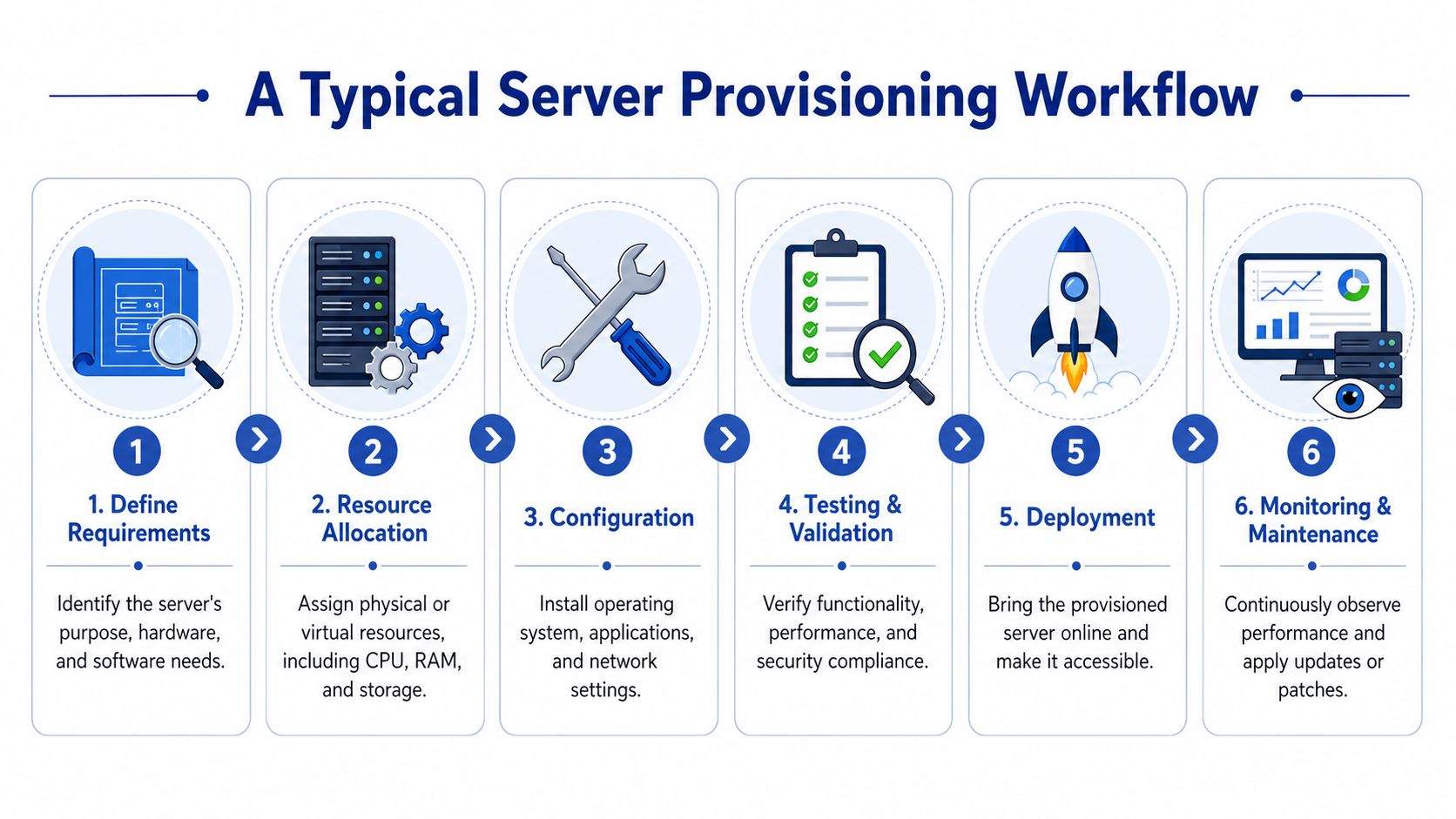
Provisioning feels abstract until you walk through it as a sequence. In real operations, the process is usually more structured than people expect.
The flow most teams follow
A typical workflow looks like this:
Define requirements
Start with purpose. Is the server running a customer-facing app, an internal database, a jump host, or a short-lived test environment. That answer drives sizing, uptime expectations, access rules, and backup requirements.Allocate resources
The team chooses the environment and allocates CPU, memory, storage, and network placement. In cloud platforms, that means selecting instance types, volumes, regions, and connectivity patterns.Install the OS and baseline controls
This stage prepares the machine itself. Teams apply the approved image, create the initial access model, attach logging and monitoring, and put baseline security in place.Validate
Before handoff, the server should pass a basic test. It needs to boot correctly, register with monitoring, meet patch expectations, and expose only the intended access paths.Deploy and hand off
Once the platform layer is ready, application teams can deploy services on top of it.Maintain
Good provisioning doesn't end at creation time. Ownership, patching, observability, and retirement should already be part of the workflow.
Provisioning is not the same as configuration
This is one of the most common points of confusion. Provisioning creates the base system. Configuration management shapes that system for its job.
IBM's explanation of provisioning makes that distinction clearly: provisioning sets up foundational resources such as hardware and the operating system, while configuration optimizes those resources for workloads through things like firewall rules and application settings. That gap matters because teams often provision for peak demand but fail to adjust the environment afterward, which becomes a source of waste.
A simple way to remember it:
- Provisioning builds the house
- Configuration furnishes it
- Operations keeps it livable
If a server exists but can't be safely used, provisioning is incomplete. If it exists and is expensive for no reason, optimization is incomplete.
Tools often map cleanly to those stages. Terraform or CloudFormation typically handle the base infrastructure. Ansible, Puppet, or Chef often handle post-provisioning configuration. Monitoring platforms, patch systems, and policy engines carry the server through the rest of its life.
How Provisioning Choices Impact Your Cloud Bill
A cloud bill is just infrastructure decisions translated into line items. Provisioning sits near the top of that chain. If you choose a larger instance than the workload needs, attach more storage than it uses, or leave the machine running after people stop working, the waste becomes recurring instead of temporary.
Oversizing is expensive, but idle time is worse
Many teams know overprovisioning is bad in theory. In practice, they still size for fear. They choose more CPU or memory "just in case," especially when the process for changing capacity later feels slow or risky. That caution is understandable, but it often becomes the default rather than the exception.
The more expensive pattern is idle infrastructure. Sedai's cloud cost optimization discussion reports that 15 to 30 percent of cloud compute spend in small and midsize businesses is attributable to idle or chronically underused servers that remain powered on outside active working hours. The same source says that automated tools that power off those idle servers can cut those specific costs by 30 to 60 percent.
That lines up with what operations teams see every week: development VMs that stay on overnight, test environments that survive long after a sprint ends, and internal tools that run full-time despite daytime-only demand.
Lifecycle rules belong in provisioning
The strongest provisioning strategies treat lifecycle behavior as part of the initial build, not as an afterthought. If a server is for a dev team, decide at creation time whether it should stop at night. If it's for QA, define whether it should expire after a project window. If it's for production, specify the autoscaling or shutdown boundaries that match service requirements.
Useful references like NineArchs' cloud cost strategies can help teams think beyond instance selection and into broader cloud spending discipline. The key operational move is to make cost controls part of the provisioning template itself.
That usually means embedding policies such as:
- Scheduled stop and start windows for non-production systems
- Automatic expiration rules for temporary environments
- Tagging standards so owners and business purpose are visible
- Review points for right-sizing after real usage appears
Teams focused on budget control usually benefit from practical guidance on reducing ongoing cloud costs, because the biggest savings often come after the server has already been launched.
A server can be technically healthy and financially wrong at the same time.
That's the cost angle many technical explainers miss. Provisioning isn't finished when the machine boots. It's finished when the machine is aligned with demand, policy, and a realistic operating schedule.
Creating a Modern Provisioning Strategy
A modern provisioning strategy is simple to describe and harder to practice. Build from standards, automate what repeats, and treat cost controls as part of the server's design.
Three moves that improve provisioning quickly
Standardize the baseline first.
Before adding more tools, define the approved images, network patterns, tags, monitoring hooks, and access rules your team wants every server to inherit. Consistency removes a surprising amount of operational noise.
Adopt IaC on a narrow surface area.
Don't try to codify the whole estate in one push. Start with one common pattern such as a Linux application server, a staging environment, or a development VM template. Get reviews, version control, and rollback habits in place.
Attach lifecycle controls from day one.
Provisioning should include the server's operating schedule, owner, and retirement conditions. If an environment isn't meant to run continuously, make that explicit at creation time.
The teams that do this well don't treat provisioning as a ticket queue with scripts attached. They treat it as an operating model. That shift changes more than speed. It improves auditability, reduces drift, and keeps cloud spending tied to actual business use instead of leftover infrastructure.
What is server provisioning, then. It's the discipline of turning raw infrastructure into a usable, governed, and cost-aware platform for work. Done casually, it creates sprawl. Done well, it gives teams faster delivery and fewer surprises.
If your team is paying for servers that don't need to run around the clock, CLOUD TOGGLE gives you a simple way to schedule shutdowns and restarts across AWS and Azure without exposing full cloud account access. It's a practical fit for teams that want provisioning decisions to carry through into day-to-day cost control.