A savings plan is a simple but powerful idea: you commit to setting aside resources now to get a bigger benefit later. In personal finance, this is the classic advice for retirement or other big goals. In the world of cloud computing, it means committing to a certain level of usage with a provider like AWS to lock in significant discounts on your hourly rates.
Understanding Savings Plans from Personal Finance to Cloud Costs
At its heart, a savings plan is just an agreement you make for a future payoff. Think about your personal retirement account. You contribute a set amount on a regular schedule, building a more secure financial future through consistent, planned action. It's that discipline that drives better long-term results.
This exact principle commitment for reward translates directly to cloud computing. Instead of money, you're committing to spend a specific amount per hour on compute services, usually for a one or three-year term. In return for that loyalty, cloud providers slash your rates compared to standard on-demand pricing.
It’s a win-win. The provider gets predictable revenue, and you get lower, more predictable costs.
The Power of Structured Commitments
This structured approach is proven to work. A recent Vanguard report, for instance, showed that a record number of retirement plan participants bumped up their contribution rates, leading to a 10% rise in their total account balances. This just goes to show how a formal plan encourages consistent behavior that builds real value over time.
For anyone looking to take personal finance to the next level, exploring concepts like FIRE investment portfolio strategies offers a fascinating look into aggressive wealth-building.
Bridging Two Worlds
The analogy between personal finance and cloud savings plans isn't just a gimmick; it really helps clarify what they're all about. Both are designed to optimize how you use your resources over the long haul.
- Personal Savings: You commit dollars to a 401(k) or IRA to grow your wealth for the future.
- Cloud Savings: You commit a certain hourly spend to a cloud provider to shrink your operational expenses.
Here's a quick table to break down the similarities.
Savings Plans at a Glance: Personal vs. Cloud
| Attribute | Personal Savings Plan (e.g., 401k) | Cloud Savings Plan (e.g., AWS) |
|---|---|---|
| Commitment | Regular monetary contributions ($/month) | Fixed hourly spend commitment ($/hour) |
| Term | Long-term (decades until retirement) | Fixed term (1 or 3 years) |
| Benefit | Tax advantages, employer match, compound growth | Heavily discounted compute rates (up to 72%) |
| Goal | Financial security, retirement, wealth building | Lower cloud bills, predictable infrastructure costs |
| Flexibility | Varies by plan; may have withdrawal penalties | Varies by plan; some offer instance flexibility |
As you can see, the core idea is identical trading a bit of short-term flexibility for a much better long-term outcome.
A savings plan, whether for your retirement or your cloud infrastructure, is fundamentally a tool for converting consistency into value. By committing to a predictable pattern, you unlock efficiencies that aren't available with ad hoc, reactive strategies.
This guide will pull back the curtain on cloud savings plans, showing you exactly how to apply this powerful financial concept to your technology stack. We'll break down the different types, weigh the pros and cons, and give you practical steps to start saving.
How Cloud Savings Plans Actually Work
At its heart, a cloud savings plan is a simple, powerful trade. You promise a cloud provider, like AWS, that you'll spend a certain amount on their compute services every hour for a one or three-year term. In return for that commitment, they give you a major discount on those services.
It’s a bit like getting a bulk discount at a warehouse club or subscribing to a service you know you'll use. Your upfront commitment unlocks much better pricing than what’s available to casual, on-demand users. This simple mechanic is how a long-term promise turns into real, tangible cost reductions for your business.
Once you’ve bought a plan, the savings kick in automatically. Every hour, the provider’s billing system checks your eligible usage and applies the discounted rate up to your commitment amount. If your usage spikes beyond your hourly promise, that extra bit is simply billed at the normal on-demand rate. No fuss, no manual work.
Exploring the Main Types of Savings Plans
Not all savings plans are built the same; they’re designed to strike a balance between deep savings and operational flexibility. With a provider like AWS, you’ll mainly encounter two types: Compute Savings Plans and EC2 Instance Savings Plans. Each one serves a different strategic purpose, depending on how predictable your infrastructure is.
Getting these options right is a cornerstone of effective AWS cost optimization. To really dig into this, you can explore our detailed guide on strategies for slashing your AWS bill. For now, let’s break down the two main plan types.
1. Compute Savings Plans
Think of this as your most flexible option. A Compute Savings Plan offers discounts that automatically apply across a wide range of services, giving you the freedom to evolve your architecture without losing your savings.
- Broad Coverage: It applies to usage across EC2 instances, AWS Fargate, and AWS Lambda.
- Total Flexibility: The discount works regardless of instance family, size, operating system, tenancy, or even the AWS Region you're using.
- Best For: This plan is a perfect fit for companies with dynamic workloads, teams planning to modernize (like moving from EC2 to containers), or businesses operating across multiple geographic regions.
A Compute Savings Plan is like having a universal gift card for compute services. It doesn’t matter what you buy or where you buy it; the discount applies automatically, so you can innovate without being locked in.
2. EC2 Instance Savings Plans
For workloads that are more stable and predictable, this plan offers an even bigger discount in exchange for a little less flexibility. It’s for when you know what you need and where you need it.
- Deeper Discounts: This plan can deliver savings of up to 72% compared to on-demand rates a significantly deeper cut than a Compute Savings Plan.
- Narrower Scope: The commitment is tied to a specific EC2 instance family (like
m5orc6g) within a particular AWS Region (likeus-east-1). - Some Flexibility Remains: Even within your chosen family and region, you can still change instance sizes, operating systems, or tenancies without losing your discount.
For example, a commitment to the m7i family in us-east-2 would cover an m7i.large running Linux just as easily as an m7i.2xlarge running Windows. This makes EC2 Instance Savings Plans a powerful tool for cutting costs on established, steady-state applications where your hardware needs are already well-understood.
Picking the right cloud pricing model is one of the most important decisions you'll make in keeping your budget in check. To get it right, you need to understand the trade-offs between the big three: Savings Plans, Reserved Instances (RIs), and good old On-Demand pricing. Each one strikes a different balance between cost, commitment, and flexibility.
On-Demand pricing is the simplest of the bunch. You pay for what you use, by the hour or second, with zero long-term commitment. This gives you maximum flexibility, which is perfect for unpredictable workloads, short-term projects, or apps still in development. Of course, that freedom comes at a premium it's the most expensive option.
Reserved Instances: The Original Discount Model
Before Savings Plans came along, Reserved Instances (RIs) were the go-to method for securing discounts on cloud compute. With an RI, you commit to a very specific instance type like a t3.medium in a particular region for a one or three-year term. In exchange for that highly specific promise, you get a deep discount that can sometimes be a touch higher than what a Savings Plan offers.
The big catch with RIs is how inflexible they are. If your application's needs change and you want to move to a different instance family, that RI discount is staying put. This can lock you into older technology or create waste if your infrastructure evolves, making RIs best for workloads that are incredibly stable and predictable.
Savings Plans: Where Flexibility and Savings Meet
AWS introduced Savings Plans as a more modern, flexible alternative to RIs. Instead of committing to a specific instance, you commit to a certain dollar amount of compute spend per hour (like $5/hour). This discount then automatically applies across any eligible usage, giving you a ton of freedom.
This simple decision tree can help you figure out which Savings Plan is the right fit.
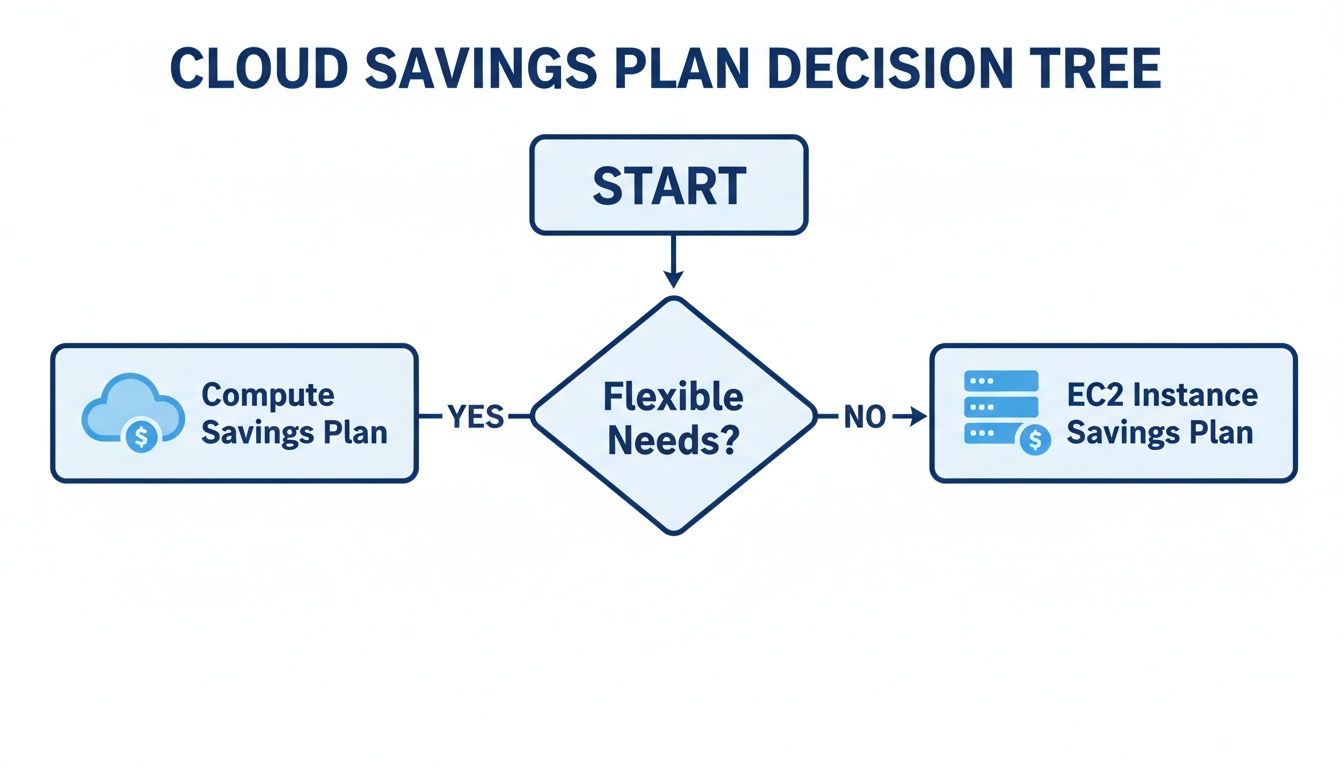
As you can see, Compute Savings Plans are built for flexible, evolving workloads, while EC2 Instance Savings Plans deliver deeper discounts when you know you'll be sticking with a specific server family.
While an RI might occasionally give you a slightly better discount for one hyper-specific use case, Savings Plans provide a much better balance for most modern businesses. For instance, a Compute Savings Plan lets you switch instance families, move between regions, or even shift workloads from EC2 to services like AWS Fargate or Lambda without losing your discount. It’s a much smarter approach for dynamic environments.
The core difference is what you're committing to. RIs lock you into specific instances, but Savings Plans lock you into a level of spending. That gives you the freedom to innovate your infrastructure without getting penalized for it.
Cloud Pricing Models Compared: Savings Plans vs. RIs vs. On-Demand
To make the choice even clearer, let's break down how these three models stack up against each other side-by-side. This table highlights the key differences in flexibility, savings potential, and commitment terms.
| Feature | Savings Plans | Reserved Instances (RIs) | On-Demand Instances |
|---|---|---|---|
| Commitment | 1 or 3-year term | 1 or 3-year term | None |
| Commitment Unit | Hourly spend ($/hour) | Specific instance type | Pay-as-you-go |
| Flexibility | High (change instance, region, OS) | Low (locked to instance family) | Highest |
| Discount Level | High (up to 72%) | Highest (up to 75%) | None |
| Best For | Stable baseline usage with evolving tech | Extremely stable, predictable workloads | Unpredictable, short-term workloads |
| Management | Simple (automatically applied) | Complex (requires careful planning) | Easiest |
Ultimately, the best choice boils down to how predictable your workloads are. On-Demand is for total uncertainty, RIs are for absolute stability, and Savings Plans hit that perfect middle ground. They’re ideal for organizations with a predictable baseline of usage that still need the agility to adapt and modernize over time.
The Real Pros and Cons of Committing to a Savings Plan
Making a long-term commitment is a big decision, whether it's in your personal life or your cloud infrastructure. Before you jump into a savings plan, it’s critical to look at both sides of the coin. The upside is huge, but the risks are just as real if your workloads aren't the right fit.
The biggest win is obvious: predictable and significant cost savings. By committing to a certain level of spend, you can slash your hourly compute rates in some cases by up to 72%. This turns a wild, unpredictable operational expense into a stable, budgeted line item. That makes financial forecasting easier and frees up cash for other priorities.
Another key benefit is flexibility, especially when you compare them to older models like Reserved Instances. A Compute Savings Plan, for instance, lets your team modernize your setup by moving from EC2 instances to AWS Fargate or Lambda without losing the discount. You aren't penalized for adopting newer, more efficient tech.
The Potential Downsides and Risks
But all these benefits hinge on one major condition: you have to use what you pay for. The number one risk of any savings plan is underutilization.
The core trade-off of a savings plan is simple: you gain a lower rate in exchange for a promise of consistent use. If your usage drops below your commitment, you still pay for the agreed-upon amount, effectively paying for resources you never consumed.
This reality makes savings plans a poor choice for certain kinds of work.
- Highly Unpredictable Workloads: If your app has dramatic, unforeseeable swings in demand, committing to a fixed hourly spend is a gamble.
- Early-Stage Projects: A startup or a new product with an uncertain future might see its needs change overnight. A one or three-year commitment is probably premature.
- Sporadic or Temporary Tasks: Workloads that only run for short bursts, like temporary batch processing jobs, are almost always better suited for on-demand pricing.
Striking the Right Balance
So, how do you decide? It all comes down to knowing your own usage patterns. A savings plan is an incredibly powerful tool for any organization with a stable, predictable baseline of compute usage. It delivers the cost benefits of a long-term deal while still offering enough flexibility to evolve.
For businesses with a clear picture of their core infrastructure needs, the pros easily outweigh the cons. The real challenge is to accurately identify that stable usage baseline and commit only to that amount. Let your more volatile workloads run on-demand. This balanced approach ensures you lock in maximum savings without taking on the unnecessary financial risk of paying for cloud capacity you don't use.
How to Maximize Your Savings Plan ROI with Scheduling

A Savings Plan is a fantastic tool for getting a better price on the compute you use, but it only solves half the problem. It’s a rate optimization tool, meaning it lowers your cost per hour. But what about all the hours you’re paying for resources that are just sitting idle? That’s where the real money gets wasted.
To truly get the most out of your cloud budget, you need a two-part strategy. True optimization comes from pairing commitment-based discounts with smart usage management. This means using your Savings Plan alongside an automated scheduling tool that powers down resources when they aren’t needed. It’s a surprisingly simple combo that plugs major budget leaks.
The Power of Pairing Discounts with Scheduling
Just think about all your non-production environments for a second. Your development, testing, and staging servers probably sit completely idle for more than half the week especially at night and over the weekend. By automatically shutting them down during these off-hours, you can slash your baseline compute consumption.
This reduction has a direct, positive impact on your Savings Plan strategy. When your baseline usage is lower, you can commit to a smaller, more accurate spending level. This precision completely removes the risk of over-committing and paying for capacity you never actually use.
The ultimate goal is to get the best possible discount on the resources you actually use. Scheduling carves away the waste, and a savings plan discounts what remains.
Right-Sizing Your Commitment
Automated scheduling gives you the data and confidence to buy a Savings Plan that perfectly fits your team's real operational needs. Without it, you’re forced to guess and commit to a higher usage level that bakes in hours of waste, creating a huge financial risk.
- Before Scheduling: Your commitment has to cover a high baseline full of expensive idle time.
- After Scheduling: Your commitment covers a much lower, predictable baseline, which skyrockets your ROI.
This move toward automation isn't just happening in cloud tech; it’s a major trend in personal finance, too. For example, global forecasts predict a 40% jump in ETF Savings Plans, mainly because auto-enrollment features make saving effortless. In the same way automation makes personal saving easier, automatically powering off idle VMs stops wasteful spending in its tracks.
By combining these two approaches, you’re not just getting a lower rate you're fundamentally cutting down the total number of hours you have to pay for in the first place. It’s a complete strategy that attacks cloud waste from both angles. Layering on other cost-saving tactics, like optimizing software licenses, can boost these gains even further.
Ready to see how to set up these power-off cycles? Check out our Cloud TOGGLE scheduling guide for practical, step-by-step instructions.
Your Action Plan for Putting a Savings Plan to Work
Alright, let's move from theory to action. A good Savings Plan isn't a shot in the dark; it's a calculated move that starts with a clear, data-driven strategy. The first step is to get your hands dirty with your own usage data to figure out that stable, predictable workload baseline this is the bedrock of your commitment.
Analyze and Model Your Usage
First things first, you need to look back at your past cloud consumption. Fire up tools like AWS Cost Explorer and pull the data for the last three to six months. What you're looking for is the consistent, always-on compute spend. That number is the perfect starting point for your Savings Plan commitment.
Once you have that baseline, it's time to play out a few scenarios. How much would a one-year commitment save you compared to locking in for three years? How do the different payment options (All Upfront, Partial, No Upfront) change the discount? Answering these questions helps you strike the right balance between locking in maximum savings and keeping things flexible for your team.
The goal isn't to cover 100% of your usage with a Savings Plan. The real win is covering your most predictable, baseline usage. This guarantees you savings without the risk of paying for capacity you don't end up using.
Right-Size Before You Commit
Here’s a pro tip: before you buy any plan, get your house in order. Implement an automated scheduling policy for all your non-production resources. Just by shutting down development and staging environments on nights and weekends, you can dramatically lower your baseline usage.
This simple step lets you make a smaller, safer commitment while maximizing your ROI. For a deeper dive, check out our guide on managing AWS costs.
Think of it like a long-term investment strategy. Globally, top pension assets show massive growth, with Switzerland's reaching 152.1% relative to its GDP through structured, long-term planning. Combining a cloud Savings Plan with smart automation creates a similarly powerful strategy for your company's financial health. You can discover more insights on long-term asset growth and see how these principles apply directly to smart IT strategy.
Got a few questions about how Savings Plans work in the real world? You're not alone. Let's walk through some of the most common ones that come up.
Can I Change or Cancel a Savings Plan?
Once you hit "purchase" on a Savings Plan, that commitment is locked in for the full one or three-year term. Think of it as the core of the deal: in exchange for that deep discount, you’re committing to a certain level of spend.
This means you cannot cancel it or change the fundamental terms, like your hourly dollar commitment or the plan type itself (like swapping an EC2 Instance Plan for a Compute Plan).
However, AWS did add a small safety net. There’s now a seven-day return window for newly purchased plans with an hourly commitment of $100 or less. It’s a brief window, but it gives you a chance to reverse a purchase if you realize you made a mistake right after committing.
What if I Use More Than My Commitment?
This is actually a great scenario and exactly how the system is designed to work. If your compute usage in a given hour goes above your Savings Plan commitment, the extra usage is simply billed at the normal On-Demand rate. No penalties, no complications.
Your Savings Plan will always cover your usage up to the hourly amount you committed to, guaranteeing you get that discount on your baseline spend. This hybrid approach is perfect for covering your predictable, always-on workloads while still having the flexibility of On-Demand pricing for unexpected traffic spikes or temporary jobs.
How Do Savings Plans Work with Multiple Accounts?
For any company with more than a couple of AWS accounts, this is where Savings Plans really shine. Using AWS Organizations, you can centralize your cost management beautifully.
When you buy a Savings Plan from the management (or payer) account, the discounts are automatically shared and applied across every single linked member account. It’s incredibly efficient.
AWS handles all the heavy lifting, automatically applying the savings to whatever eligible usage offers the biggest discount first, no matter which team's account it's in. This way, you’re always maximizing the value of your commitment across the entire organization without the headache of buying and managing separate plans for each department.
Stop paying for idle cloud resources. CLOUD TOGGLE makes it easy to automatically power off non-production servers on nights and weekends, reducing your cloud bill and right-sizing your savings plan commitment. Start your free 30-day trial and see how much you can save.