Think of multi-cloud like this: instead of relying on just one public cloud provider like AWS, Azure, or Google Cloud, you strategically use services from several. It’s about diversifying your tech stack to pick the best tools for the job, dodge vendor lock-in, and build a more resilient operation.
You wouldn't put all your savings into a single stock, so why bet your entire business on a single cloud?
Why Multi Cloud Is the New Standard for Business Agility
Not long ago, committing to one cloud provider was the go-to strategy. It seemed simpler. But as businesses have scaled and the cloud world has matured, the cracks in that single-vendor approach have started to show.
What happens when your one provider has a major outage? Your whole operation can grind to a halt. What happens when they hike prices or discontinue a service you rely on? You’re stuck. This is why a smart multi-cloud strategy isn't just a trend; it's a necessity for staying agile.
The Driving Forces Behind Multi Cloud Adoption
So, what's really pushing companies to adopt a multi-cloud approach? It's more than just playing it safe. It’s about seizing a competitive edge through smarter innovation, greater efficiency, and better financial control. The end goal is to build an infrastructure that’s not just strong but also flexible enough to pivot when the market does.
Below is a quick overview of the main drivers.
Quick Overview of Multi Cloud Drivers
| Driver | Business Impact |
|---|---|
| Avoiding Vendor Lock-In | Gives you the freedom to negotiate and switch providers without being trapped by a single vendor's pricing or technology roadmap. |
| Best-in-Class Services | Allows you to mix and match. You can use Google Cloud for its AI, AWS for its databases, and Azure for its enterprise integrations. |
| Improved Resilience | Creates a powerful safety net. An outage on one cloud doesn't mean downtime for your business; you can failover to another. |
| Compliance & Data Sovereignty | Makes it easier to meet regulations that require data to be stored in specific geographic locations by using providers with local data centers. |
Ultimately, these drivers point to a fundamental shift in how businesses think about their cloud infrastructure, from a simple utility to a strategic asset.
A Non-Negotiable Reality for Modern Business
Make no mistake, the move to multi-cloud is here to stay. It's quickly becoming the standard operating model for any business that wants to compete.
Research shows that by 2026, over 85% of enterprises will be running on multiple cloud environments. They're not just doing it for show. Companies that have embraced a multi-cloud model report they can release new features 35% faster, giving them a serious leg up on innovation.
This data tells a clear story: multi-cloud is no longer a "what if" but a "how-to" for building a successful, resilient business. You can explore more about why this approach is becoming non-negotiable in 2026.
Common Multi Cloud Strategy Patterns That Work
Deciding to go multi-cloud is just the first step. The real work, and where you get the most value, is picking the right strategy. A solid multi-cloud strategy is your blueprint, guiding how you place applications and data to hit your business goals, whether that’s bulletproof uptime, serious cost savings, or getting your hands on the best tech out there.
Think of it like building a specialist team. You wouldn’t hire ten people with the exact same resume. You'd assemble a diverse crew, each with unique strengths, to cover all the bases. It’s the same with multi-cloud: you put workloads on the cloud provider that’s best for that specific job.
Distribution by Business Function
One of the most straightforward and popular strategies is Distribution by Function. This is all about picking cloud providers based on what they do best. You choose the "best-of-breed" service for each part of your application, piecing together a powerful, custom-built tech stack.
For example, a company might run its main e-commerce platform on AWS for its proven, scalable infrastructure. At the same time, it could tap into Google Cloud’s BigQuery and AI Platform for heavy-duty data analytics and machine learning. This approach lets you use market-leading tools without locking your entire business into one ecosystem.
When to use it: This pattern is perfect for teams focused on innovation and performance. If your business relies on having the absolute best tool for the job, whether that’s cutting-edge AI, a powerful data warehouse, or specific enterprise software integrations, this strategy gives you the freedom to choose.
This visual decision tree helps clarify if you're on the path to a multi-cloud setup based on your need for business agility.
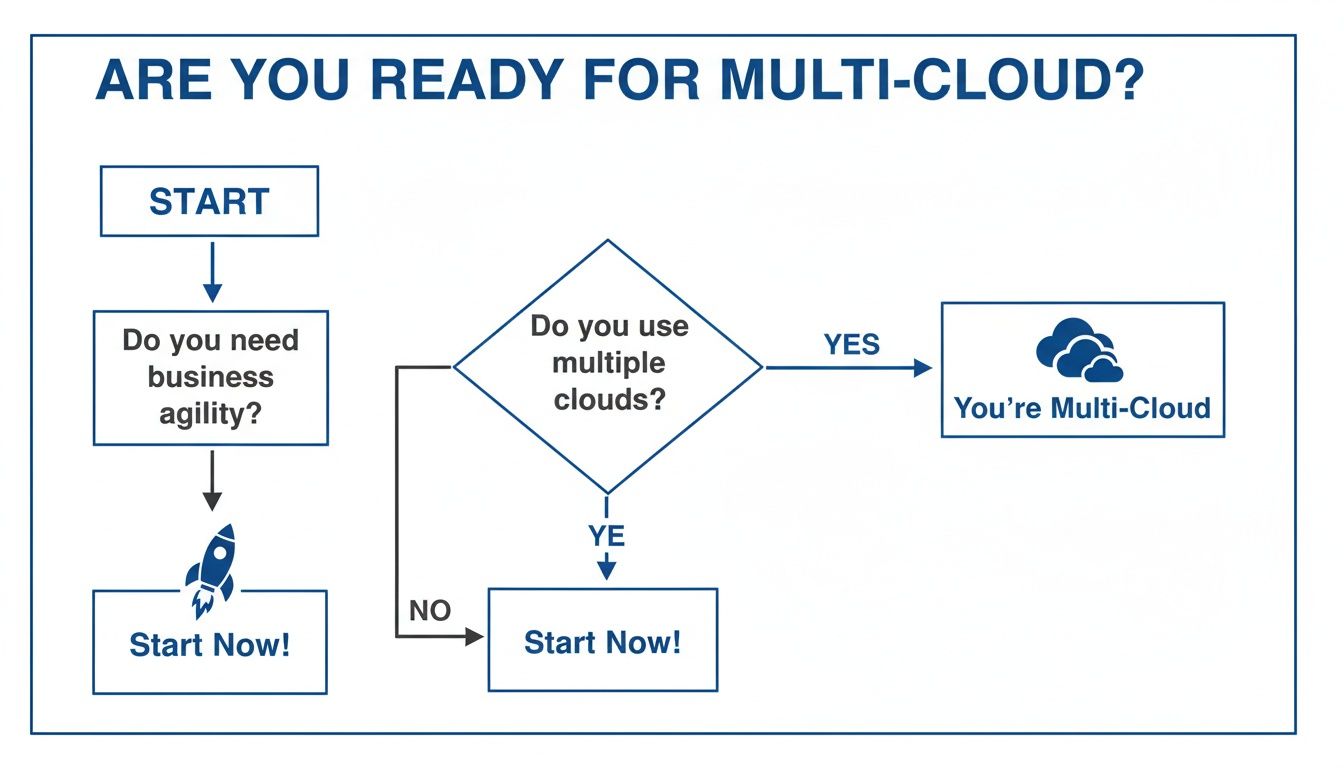
As the flowchart shows, if you’re prioritizing business agility but aren’t using multiple clouds yet, now is the time to get started.
Distribution by Business Unit
Another common path is Distribution by Business Unit. In big companies, different departments often have their own cloud preferences and in-house expertise. Instead of forcing everyone onto a single platform, this strategy gives each unit the autonomy to work on its preferred cloud.
Maybe the marketing team loves Azure's tools, but the engineering team is full of AWS experts. Forcing one team to switch would derail projects and trigger expensive retraining. By letting each unit stick with its chosen provider, you empower them to stay productive. To pull this off, you need a solid grasp of what each platform offers, which is where a good AWS vs Azure vs GCP comparison comes in handy.
When to use it: This strategy is a natural fit for large enterprises, especially those with distinct business units. It’s also extremely practical after a merger or acquisition, when the new company already has its infrastructure running on a different cloud.
Redundancy for High Availability and Disaster Recovery
Sometimes, it’s not about picking the best service. It’s about making sure your business never, ever goes down. These multi-cloud strategies are your ultimate insurance policy against provider outages or regional failures. There are two main ways to do this.
Active-Active Redundancy: In this setup, your application runs live across two or more clouds at the same time. Traffic is split between them, which provides fantastic availability and load balancing. If one cloud provider has a problem, traffic automatically shifts to the other, and your users never notice a thing.
Active-Passive Redundancy: This is a more budget-friendly approach to disaster recovery. Your main application runs on one "active" cloud, while a backup replica sits on a second "passive" cloud. If the active provider fails, you switch over to the passive environment. You might have a brief moment of downtime during the switch, but that’s a whole lot better than being offline for hours.
Getting the fundamentals right is what makes these patterns work. For a closer look at the building blocks that make up these systems, you can learn more about multi-cloud architecture in our related article.
Building Your Multi-Cloud Governance Framework
Jumping into multi-cloud without a plan is like building a city with no zoning laws. At first, things seem to move fast, but you'll quickly find yourself tangled in a chaotic mess of security risks, runaway costs, and operational headaches.
To get ahead of this, you need a solid multi-cloud governance framework. Think of it as the blueprint for your entire cloud ecosystem, giving you the control, visibility, and security you need from day one.
The point isn’t to lock down innovation; it’s to guide it. A good framework provides "guardrails, not gates," helping your teams move fast while still sticking to company-wide standards. It's about managing complexity proactively, not just reacting to fires.

Pillar 1: Governance and Policy
Your first step is to establish clear rules and a central authority. This starts with creating a Cloud Center of Excellence (CCoE). A CCoE is a dedicated team that provides leadership, sets best practices, and helps accelerate your cloud adoption across all providers. It’s the command center for your multi-cloud world.
This team is responsible for defining and enforcing policies for things like resource tagging, cost allocation, and compliance. For example, a non-negotiable rule should be a consistent tagging strategy across all your clouds. It’s the only way to track who owns what, what environment it’s for (dev, prod), and where the costs are going. If you can't identify a resource, it should be a candidate for removal.
The CCoE is becoming essential. By 2026, CCoE adoption is expected to hit 71% as companies face the reality that over 60% of data now lives in the cloud. But there's a big problem: 80% of organizations say they struggle to maintain visibility and control over their cloud operations. You can discover more insights in the Flexera State of the Cloud report.
Pillar 2: Security
Here's the hard truth: managing security across multiple clouds multiplies your attack surface. Each provider has its own way of handling identity, networking, and logging. If you treat them all separately, you’re just creating gaps for attackers to exploit. Your framework needs to unify security into one strategy.
Key security practices for multi-cloud include:
- Unified Identity and Access Management (IAM): Use a single identity provider (IdP) to manage user access everywhere. This stops permission headaches before they start and makes onboarding and offboarding simple.
- Centralized Threat Detection: Pipe all your security logs and alerts from every provider into a single security information and event management (SIEM) tool. This "single pane of glass" is critical for giving your security team a complete view of threats.
- Data Encryption: Enforce encryption for data at rest and in transit, both inside each cloud and between them. This is non-negotiable.
Pillar 3: Networking
Securely connecting different cloud environments is a massive technical challenge. You have to build a reliable network fabric that lets your apps and data talk to each other seamlessly, without ever touching the public internet.
This means getting beyond basic VPNs. Cloud-native tools like AWS Transit Gateway or Azure Virtual WAN can work, but a truly provider-agnostic strategy often requires a software-defined network (SDN) or a secure cloud exchange provider. These create a private, high-speed network that stitches your different cloud footprints together.
The goal is to make the network boundaries between clouds invisible to your applications while keeping everything secure and manageable for your ops team.
Pillar 4: Operations
Finally, your governance framework needs a plan for day-to-day operations. Trying to manage different toolsets for each cloud provider creates silos, wasted effort, and dangerous blind spots. You absolutely need a unified operations model.
Your checklist for unified operations should include:
- Unified Monitoring: Get a single monitoring platform that can pull in metrics, logs, and traces from all your environments. This is the only way to get a holistic view of application performance and health.
- Centralized Logging: Aggregate logs from every single service and application into one place. This makes troubleshooting and analysis infinitely easier.
- Cross-Cloud Automation: Use infrastructure as code (IaC) tools like Terraform or Ansible to provision and manage resources consistently across all providers. This cuts down on manual errors and ensures your policies are always enforced.
By building your multi-cloud governance on these four pillars, you lay a stable, secure, and efficient foundation for future growth. It's a journey, not a destination, and for teams just getting started, it helps to check out our guide on how to manage multi cloud environments to get the fundamentals right.
Mastering Cost Optimization In a Multi Cloud World
Even the best-laid multi-cloud strategy is only as good as its bottom line. While a strong governance plan gives you structure, it’s cost optimization that keeps your strategy profitable and sustainable. Without a firm grip on spending, it’s easy for the financial perks of multi-cloud to vanish, replaced by the sticker shock of a surprisingly high bill.
The biggest culprits behind runaway cloud budgets are almost always the same: idle and overprovisioned resources. Think of them as the digital equivalent of leaving the lights on in an empty office building. These are the virtual machines, databases, and test environments left running 24/7, even when they’re only needed during business hours. This digital waste quietly bleeds your budget, day in and day out.

Proven Strategies for Controlling Cloud Spend
Getting a handle on cloud costs isn't a one-off task; it requires a mix of smart purchasing and operational discipline. This is the heart of FinOps, a practice that brings financial accountability to the flexible, pay-as-you-go world of cloud computing.
Here are a few proven ways to get your spending under control:
- Right-Sizing Instances: This is all about matching your resources to your actual needs. Teams often overprovision instances "just in case," leading to massive waste. By analyzing performance metrics, you can downsize oversized resources and pay only for what you truly use.
- Leveraging Savings Plans: Cloud providers will give you a discount if you commit to them long-term. For your stable, predictable workloads, committing to plans like AWS Savings Plans or Azure Reserved Instances can lock in some serious savings.
- Automating Resource Scheduling: This is the fastest and most direct way to stop paying for idle time. By automatically shutting down non-production environments like development, staging, and QA outside of work hours, you immediately stop paying for compute you aren't using.
To build a truly cost-conscious culture, exploring a wide range of cloud cost optimization strategies is a must.
A Practical Solution for Automated Savings
While providers like AWS and Azure offer their own native scheduling tools, they come with their own headaches. They can be a real pain to configure, often require a deep engineering background, and work in silos, making a unified view across clouds almost impossible. This is where a dedicated tool changes the game.
A platform like CLOUD TOGGLE offers a straightforward answer to this problem. It was built from the ground up to automate the shutdown of non-production resources across both AWS and Azure from one simple, policy-driven interface.
Instead of wrestling with complex scripts or jumping between separate consoles for each provider, teams can set schedules, define policies, and see savings from a single, unified dashboard. This approach empowers both DevOps and FinOps teams to collaborate on cost reduction without creating technical bottlenecks.
Cloud Toggle vs Native Cloud Schedulers
The core advantage of a dedicated platform is its sheer simplicity and accessibility. Native tools are certainly powerful, but they're typically built for engineers. This creates a barrier for the finance and management teams who need visibility into cost controls. In a multi-cloud environment, these challenges are only magnified.
This table highlights how a unified tool stacks up against the built-in schedulers.
| Feature | CLOUD TOGGLE | Native Tools (e.g., AWS Instance Scheduler) |
|---|---|---|
| Multi-Cloud Support | Manages AWS and Azure from one dashboard. | Operates only within its own cloud ecosystem. |
| Ease of Use | Intuitive, policy-based interface for all users. | Requires technical scripting and console navigation. |
| Role-Based Access | Securely grant scheduling access to non-engineers. | Requires granting broader, riskier IAM permissions. |
| Visibility | Provides a single pane of glass for all scheduled resources. | Offers fragmented views across different accounts. |
Ultimately, centralizing control creates a much more efficient workflow and makes cost savings a team sport. This shift from complex, siloed tools to a simple, unified platform is key to truly mastering your costs in a multi-cloud world.
To go deeper on this topic, feel free to read our guide on multi cloud management best practices.
Real World Multi-Cloud Success Stories
Theory is one thing, but seeing how these strategies play out in the real world is where the rubber meets the road. The true value of a multi-cloud approach isn't in the tech buzzwords; it's in the real, measurable business outcomes.
Let's look at a couple of stories that show how businesses, both big and small, are using a mix of cloud providers to solve real problems, stay online when it matters most, and grow their bottom line. It's not about just using multiple clouds; it's about using them strategically.
The Small Business and Its Best-of-Breed AI
Picture a small tech startup. Their main application was humming along nicely on AWS, handling all the core user data and business logic. But they had a big idea: to add a powerful, predictive AI feature that would give their customers a serious advantage.
While AWS has its own AI services, the team discovered a specific machine learning model on Google Cloud that was a perfect fit for what they wanted to build. A full migration was out of the question: too costly, too slow.
Instead, they went with a best-of-breed multi-cloud strategy.
- The Problem: They needed to tap into a specialized AI service on Google Cloud without rebuilding their entire, stable AWS environment.
- The Strategy: They kept their main app on AWS. Then, they used secure APIs to pipe anonymized data over to the Google Cloud AI service for the heavy lifting. The processed results were then sent right back to their AWS application.
- The Outcome: The startup rolled out its new feature months ahead of schedule. They avoided getting locked into one vendor and got to use the absolute best tool for the job. The payoff? A 40% improvement in their predictive accuracy and a huge jump in customer satisfaction.
The E-commerce Retailer That Conquered Peak Season
An online retailer was facing the same nightmare every year: the looming threat of downtime during their busiest shopping seasons. A single cloud outage on Black Friday could easily cost them millions in lost sales and torpedo their reputation. They needed a rock-solid plan for staying online, no matter what.
Their answer was an active-passive disaster recovery strategy spread across Azure and AWS.
This approach is all about having a "hot standby." The main e-commerce site runs on the active cloud (Azure in this case), while a complete, ready-to-go replica sits waiting on the passive cloud (AWS). If the primary provider has an issue, traffic is automatically flipped over to the standby.
They set up automated data syncing and a global load balancer to handle the failover instantly. The result was a bulletproof infrastructure. Sure enough, during a regional provider incident the next year, their site stayed up and running while competitors went dark. They achieved 100% uptime during their most critical sales period.
These stories aren't outliers; they're part of a massive shift. By 2026, it's predicted that a whopping 89% of companies will be running on multi-cloud, with many reporting 10-20% lower total cloud spend. The catch? Keeping an eye on everything is tough, which makes simple, intuitive tools for cost control more important than ever. You can learn more about these cloud computing statistics.
These real-world wins prove it: a smart multi-cloud strategy isn't just a technical detail. It's a powerful tool for hitting your business goals.
Your Next Steps in Multi Cloud Adoption
Taking on a multi-cloud strategy can feel like a massive project, but the key is to avoid a "big bang" approach. Instead, think of it as a series of deliberate steps, broken down by team, that deliver clear wins along the way.
A successful rollout isn’t about flipping a switch. It’s about creating a manageable roadmap where every department knows its role, from running the first pilot project to establishing long-term cost controls.
A Roadmap for Your Teams
To get you started, here are a few concrete first steps tailored to the key players in your organization. Each one is designed to build momentum without creating chaos.
For Engineering Leaders: Start small and prove the concept. Identify a non-critical workload and launch a small-scale pilot project on a second cloud provider. Use this as an opportunity to document what you learn and start forming a Cloud Center of Excellence (CCoE) to standardize your approach.
For DevOps and IT Ops: Your main goal should be unification from day one. Start evaluating unified monitoring and automation tools that give you a single pane of glass across all your environments. This prevents the operational silos and inconsistent pipelines that can cripple a multi-cloud setup.
For FinOps Teams: Don't let cost control become an afterthought. Your first move is to implement a cost optimization tool that can track and manage spending across every provider you use. Building a culture of cost awareness starts with having the right tools to see what's happening.
Your First Practical Step to Savings
For any team, the most immediate and tangible win comes from tackling wasted spend. Idle resources are a universal problem, and a multi-cloud architecture only makes them harder to find and shut down. This is where you can take your first real action.
By automating the shutdown of non-production environments during off-hours, you can realize immediate and predictable savings. This isn't just about cutting costs; it's about building the operational discipline needed to manage a multi cloud budget effectively.
Tools like Cloud Toggle are built for exactly this. They offer a simple way to enforce scheduling policies across AWS and Azure without needing complex scripts or runbooks. You'll see the impact on your cloud bill almost immediately.
Ready to take control of your cloud costs? Start your free trial of Cloud Toggle today and make automated savings the first victory in your multi-cloud journey.
Common Multi-Cloud Questions, Answered
As you get deeper into multi-cloud, a few practical questions always pop up. Let's tackle the most common ones to clear up any confusion.
What’s the Difference Between Multi-Cloud and Hybrid Cloud?
These two get mixed up all the time, but they’re not the same thing. It’s a simple distinction, really.
Multi-cloud is when you use services from more than one public cloud. Think running some of your apps on AWS and others on Microsoft Azure.
On the other hand, hybrid cloud is a mix of public cloud and your own private setup, like an on-premise data center. A business might run its main website on a public cloud but keep sensitive customer records on its own private servers.
And yes, they absolutely can overlap. If you’re using two public clouds and your own private data center, you’ve got a hybrid multi-cloud strategy.
Is a Multi-Cloud Strategy Too Complex for a Small Business?
Not at all. While there’s no denying a multi-cloud setup adds some management overhead, the rewards like avoiding vendor lock-in, finding better pricing, and boosting resilience are just as valuable for small businesses as they are for giant enterprises.
The trick for a small business is to start simple. You don't need a massive, active-active architecture from day one. A great first step is to use a second cloud for one specific job, like disaster recovery or a specialized analytics project.
This way, your team can get their feet wet with multi-cloud without feeling overwhelmed. Most importantly, make sure you have a cost management tool in place from the start. That's the best way to keep complexity from turning into runaway spending.
How Do I Keep My Data Secure Across Multiple Clouds?
Trying to manage security separately for each cloud provider is a recipe for disaster. You’ll inevitably create dangerous gaps in your defenses. The only way to do it right is to shift from siloed thinking to centralized control.
A unified security strategy is non-negotiable. It boils down to a few core practices:
- Centralize Identity Management: Use a single identity provider (IdP) to manage who can access what across all your clouds. This makes permissions consistent and takes the headache out of onboarding and offboarding.
- Get a Single View of Threats: Don't chase alerts across different dashboards. Funnel all security logs from all your cloud environments into one centralized tool. This gives your team a true "single pane of glass" to spot and squash threats.
- Enforce the Same Rules Everywhere: Your Cloud Center of Excellence (CCoE) should set the security standards, like data encryption rules and network policies, that apply to every provider you use.
When you think centrally, you build a security posture that’s much stronger and easier to manage than the sum of its parts.
Ready to take your first practical step towards mastering your multi-cloud budget? With CLOUD TOGGLE, you can start automating savings in minutes. Sign up for a free 30-day trial and see how easy it is to stop paying for idle cloud resources.