A lot of small and midsize teams hit the same moment. A customer sends a security questionnaire, a partner asks about HIPAA or GDPR, or leadership asks a simple question that isn't simple at all.
Are we compliant on AWS?
If you're running lean, that question can feel uncomfortable. You know AWS provides strong security foundations, but you also know compliance doesn't happen just because your workloads run in the cloud. Someone still has to define controls, collect evidence, review access, and make sure the cloud bill doesn't climb just because every monitoring feature got switched on.
That tension sits at the center of aws regulatory compliance for SMBs. You need enough structure to satisfy auditors, customers, and internal stakeholders. You also need a way to operate that structure without hiring a large governance team or accepting waste as the price of doing business.
Navigating the Maze of AWS Regulatory Compliance
A familiar SMB scenario starts after the cloud migration is already live. The team moved to AWS to ship faster and avoid building security plumbing from scratch. Then a customer asks for proof of access reviews, audit logs, and data handling controls. What looked manageable in tickets and shared docs suddenly feels like trying to assemble a filing system while the audit clock is already running.
For smaller teams, the problem is rarely a total lack of security features. The problem is translation. AWS gives you many building blocks, but regulations ask a different question: can you show that the right controls exist, that someone reviews them, and that evidence is easy to produce without a week of manual screenshots?
That gap matters because compliance work has a cost side. You can switch on every log, buy multiple scanning tools, and collect more data than any auditor will ever request. You will also raise your AWS bill and create review work your team cannot sustain. SMBs usually need a narrower approach. Start with the obligations that affect revenue, contracts, or regulated data, then automate the repeatable proof.
A good way to frame the work is to separate four layers:
- Business trigger: A customer contract, industry rule, or internal policy that creates the requirement.
- Control objective: What you need to prove, such as restricted access, retained logs, or encrypted data.
- AWS implementation: The services and settings that support that objective.
- Evidence: The report, configuration record, ticket, or log showing the control ran.
That structure keeps compliance from turning into a vague documentation project. It also helps contain spend. If a control has no clear business trigger or audit purpose, it may not deserve another paid tool or a high-volume logging setting.
Identity is a good example. Many audits eventually come back to who had access, why they had it, and whether that access was reviewed. A lightweight cloud identity management process for AWS teams often reduces both audit risk and manual cleanup faster than adding another dashboard.
Framework choice matters too. A healthcare SaaS vendor, a B2B software company selling into enterprises, and a company processing card data are often asked for different kinds of proof. If you are sorting out which assurance model fits your customer base, this comparison of ISO 27001 vs SOC 2 helps explain why similar security programs can still produce different audit requests.
Practical rule: If your team cannot name the owner of a control, show how it is checked, and point to where the evidence lives, the compliance process is still manual and fragile.
The Shared Responsibility Model Explained
A small SaaS team launches on AWS, enables a few managed services, and assumes the hard compliance work is largely covered. The first customer security review usually corrects that assumption fast. Auditors rarely ask who guarded the AWS data center door. They ask who approved admin access, how logs are retained, whether production data is encrypted, and where the evidence lives.
AWS secures the cloud platform it runs. You secure the way your company uses that platform.
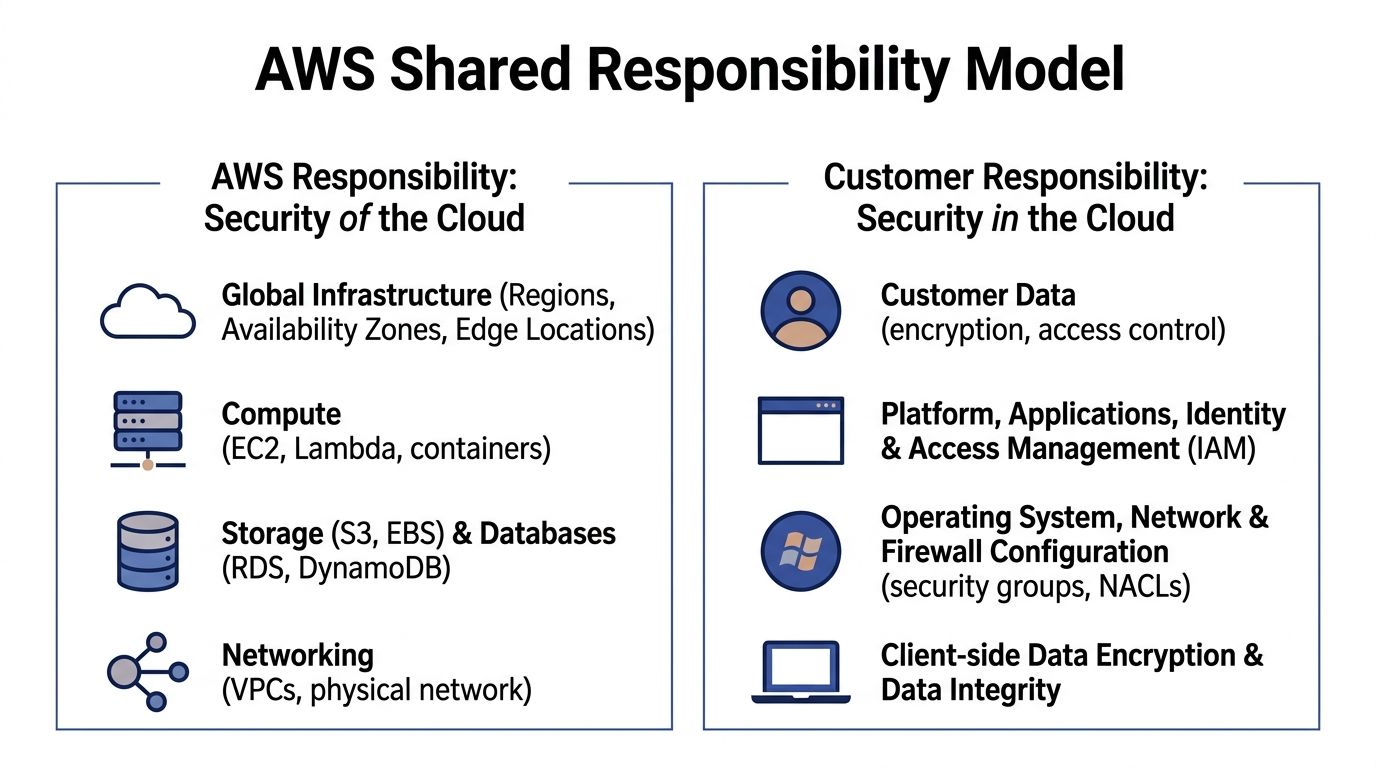
AWS works like the building operator. It handles the facility, hardware, core networking, and the managed service infrastructure customers share. Your team controls the rooms you rent inside that building. You decide who gets access, what data is stored there, how systems are configured, and whether your records are good enough for an audit.
The distinction is important because most audit pain happens on the customer side.
What AWS handles
AWS manages the underlying infrastructure for its cloud services and provides auditor-issued reports through AWS Artifact. For a smaller company, that removes a large amount of work you could never do yourself at a reasonable cost. You do not need to document physical badge access to an AWS data center or prove how AWS replaces failed storage hardware.
That matters for budget as much as compliance. SMBs often overspend when they buy extra tools to cover controls AWS already owns. A better approach is to collect the AWS-provided evidence once, store it in your audit repository, and spend your time on the controls auditors will test in your account.
If you need outside help validating the customer side of that boundary, Dr3am Security is one example of a partner focused on cloud security support.
What you handle
Your team owns the controls tied to daily operation of the account and workload. In practice, that usually includes:
- Identity and access. User access, role design, privileged activity, and periodic reviews.
- Data protection. Encryption choices, key usage, retention settings, backups, and data sharing rules.
- Logging and evidence. What gets recorded, how long logs are kept, and whether records can be produced quickly.
- Configuration. Network rules, storage settings, operating system patching for self-managed resources, and application hardening.
- Process. Change approval, incident handling, exception tracking, and control review.
Small teams feel the pressure. Every control can be implemented manually, but manual compliance gets expensive in hidden ways. Engineers spend time taking screenshots, searching logs, and answering the same auditor question in three different formats. Bills also grow when teams turn on every premium monitoring feature without deciding which logs are necessary for their audit scope.
Start with identity. A clean permission model reduces both audit findings and wasted effort because access control touches almost every framework. This guide to cloud identity management for AWS teams is a good starting point if your current process depends on spreadsheets, ad hoc approvals, or long-lived admin access.
Where teams usually get confused
Managed services reduce operational work, but they do not transfer accountability. If you use Amazon RDS, AWS handles the service infrastructure. Your team still decides who can connect, whether encryption is enabled, how backups are configured, and how long related logs are retained.
Service eligibility creates similar confusion. A service may be suitable for regulated workloads, yet your deployment can still fail an audit if settings, access patterns, or evidence collection are weak.
A practical rule helps here. If a control depends on a person remembering to check a console page, it is a weak control. If the same check can run on a schedule, create a ticket, and save evidence automatically, it is usually cheaper to maintain and easier to defend in an audit.
Managed services can reduce your scope of work. They do not remove your responsibility to configure, monitor, and prove the controls that remain.
Mapping Regulations to AWS Services and Controls
A small team often hits the same wall around month two of a compliance project. The auditor asks for proof of access control, logging, encryption, and review. AWS offers dozens of services that seem relevant. Suddenly the key question becomes not "what does HIPAA or PCI-DSS require?" but "which AWS settings create evidence we can maintain without hiring two more people or turning on expensive features we will barely use?"
That is the mapping job.
Regulations describe outcomes. AWS gives you building blocks. Your work is to connect the two in a way that is defensible, affordable, and simple enough to keep running after the audit is over. For SMBs, that last part matters as much as the control itself. A cheaper control with clean evidence is often better than an over-engineered setup that adds tool sprawl, alert fatigue, and storage costs.
Start with control families, not full regulations
Trying to map an entire framework line by line gets messy fast. A better method is to group requirements into control families that repeat across frameworks:
- Identity and access
- Logging and monitoring
- Encryption and key management
- Configuration management
- Data retention and deletion
- Incident response evidence
This works like sorting receipts into categories before filing taxes. You reduce noise first, then match each category to the AWS service that helps enforce it or prove it.
Here is a practical reference point.
| Regulation or framework | Control theme | AWS service commonly involved |
|---|---|---|
| HIPAA | Audit trails for user and system activity | AWS CloudTrail, Amazon CloudWatch |
| HIPAA | Protecting stored sensitive data | AWS Key Management Service, Amazon S3 default encryption, Amazon EBS encryption |
| PCI-DSS | Key management and encryption | AWS Key Management Service |
| PCI-DSS | Detecting unauthorized configuration changes | AWS Config, AWS Security Hub |
| GDPR | Restricting access to personal data | AWS Identity and Access Management |
| GDPR | Recording changes and processing activity | AWS CloudTrail, AWS Config |
| NIST 800-171 | Ongoing configuration assessment | AWS Config, AWS Security Hub |
| FedRAMP-aligned workloads | Auditability and traceability | AWS CloudTrail, Amazon CloudWatch |
Map one requirement to one service path
Confusion usually starts when teams attach too many services to one control. Keep the first pass narrow.
If a requirement says privileged actions must be logged, start with CloudTrail. If it says you must detect drift from approved settings, start with AWS Config. If it says access must be limited by role, start with IAM. You can add supporting services later, but your first question should be: what is the primary system of record for this control?
That keeps evidence collection cleaner and bills easier to predict.
For example, a HIPAA-focused SaaS company may use CloudTrail to record API activity, CloudWatch for alerts on sensitive events, and KMS for encryption key control. That is already enough to cover several common audit questions if retention, review, and ownership are documented clearly.
A PCI-scoped workload often pushes teams toward broader monitoring than they need. In practice, AWS Config plus a focused set of managed rules may be more cost-effective than enabling every available feed and trying to review everything. You need proof that approved settings stay approved. You do not need a giant pile of findings no one closes.
Choose services that enforce controls and create evidence
For lean teams, the best AWS compliance tools do two jobs at once. They reduce risk and produce records you can hand to an auditor or customer reviewer.
A useful split looks like this:
- IAM controls who can do what.
- CloudTrail records who did what.
- AWS Config records whether resources stayed within policy.
- Security Hub centralizes findings that need review.
- AWS Artifact provides AWS-produced reports and inherited control documentation.
If you want a clearer mental model for how these fit together, this guide to security controls in cloud computing helps separate preventive, detective, and corrective controls before you assign them to AWS services.
That distinction matters for cost control too. Detective tools can generate large volumes of logs and findings. Preventive controls, such as tighter IAM policies, encryption defaults, and approved configuration baselines, often reduce both risk and monitoring overhead. For SMBs, prevention usually gives a better return early on.
Avoid the expensive mapping mistakes
The first mistake is mapping every service you use to every framework you might face someday. That creates a spreadsheet nobody trusts.
The second is paying for data you do not need. Storing every log forever, enabling every high-volume event source, or sending all findings to multiple tools can turn a modest compliance program into a budget problem. Set retention based on actual requirements, define which events matter for your scope, and review whether each enabled service supports a real control objective.
The third is ignoring inherited controls. AWS handles parts of the underlying infrastructure, and your team can use AWS-produced audit artifacts instead of recreating that evidence from scratch. That saves time. It also keeps your documentation focused on the controls your team owns.
If you need an outside check on whether your control mapping will hold up in customer security reviews, Dr3am Security can help validate whether your planned controls line up with common reviewer expectations.
Build a control map your team will still maintain six months from now
A good control map is short enough to read and specific enough to defend. For each control, document four things:
- The requirement
- The AWS service or setting that supports it
- The owner
- The evidence produced
That last column is where many teams save the most time. If evidence is automatic, the control is easier to run. If evidence depends on screenshots and memory, the control will get weaker under pressure.
A smaller, well-maintained control map beats a long list of theoretical coverage every time.
Your AWS Compliance Implementation Checklist
A lean team needs an order of operations. If you try to build aws regulatory compliance from every direction at once, you'll end up with partial controls and weak evidence.
Start with the basics that reduce risk immediately and support later audit work.

Phase one harden the foundation
Lock down the root account
Don't use the root user for day-to-day work. Protect it with strong authentication and store recovery details under controlled ownership, as many auditors will ask how you secure your most privileged identity.Create role-based IAM access
Give people the access they need, and no more. Separate admin, operator, developer, and read-only functions. If one person has broad standing access to everything, your evidence story gets weak fast.Turn on logging early
Enable CloudTrail before you need it. Teams often delay logging until an audit is approaching, then discover they can't reconstruct earlier activity clearly.Set encryption defaults
Make encryption the default choice for storage services you use regularly, such as Amazon S3 and Amazon EBS. That reduces the chance of accidental misconfiguration later.
Small teams should prefer default-secure settings over exception-heavy processes. Defaults scale better than memory.
Phase two add visibility and drift detection
Once the basics are in place, focus on seeing where your environment drifts away from policy.
- Enable AWS Config: Use it to evaluate whether resources stay within expected settings.
- Review high-risk resource types first: Storage buckets, security groups, IAM policies, and compute instances tend to create the biggest surprises.
- Define a simple exception process: Some findings will be acceptable. Document who approves them and how long they remain valid.
AWS offers a lot of compliance material, but your implementation becomes practical only when someone can answer three questions for each control: what is the rule, how is it checked, and who handles exceptions?
Phase three organize evidence, not just controls
Teams often build controls before they build evidence management. That's backward for audit readiness.
Create a shared record for each control that includes:
| Control area | What to document |
|---|---|
| Access control | Role design, review cadence, privileged access process |
| Logging | Which services log activity, where logs are stored, who can access them |
| Encryption | Default settings, key ownership, exceptions |
| Configuration monitoring | Active Config rules, triage owner, remediation path |
| Incident handling | Escalation path, evidence preservation steps |
That record doesn't need to be fancy. A maintained control register is better than an abandoned governance platform.
Phase four test like an auditor would
Pick a few common audit questions and test whether your team can answer them without scrambling.
For example:
- Who changed this security-sensitive setting?
- Where is the proof that admin actions are logged?
- Which resources are out of policy today?
- How do you know encryption is applied consistently?
If those answers require five different people and three days of searching, your controls may exist but your compliance process doesn't.
A quick visual walkthrough can help your team align on core setup tasks before formal audits begin.
Keep the checklist realistic
A small team doesn't need perfect maturity on day one. It needs a repeatable baseline. Secure identities, centralized logs, visible configuration state, documented exceptions, and retrievable evidence will carry you much farther than a giant control library no one can operate.
Automating Compliance Audits and Evidence Collection
Manual audits usually fail in the same way. The controls may exist, but the evidence is scattered across consoles, screenshots, ticket threads, and tribal knowledge. Automation fixes that by turning cloud activity into a structured evidence stream.
AWS provides useful support here. The Compliance Center and automated enablers offer region-specific mappings for regulatory requirements and help teams validate workflows against frameworks such as FedRAMP and NIST 800-171, as described in this AWS compliance-focused video overview.
Build an evidence pipeline
Think in terms of flow, not isolated tools.
A practical evidence pipeline often looks like this:
CloudTrail records activity
API actions, administrative changes, and operational events become part of your audit trail.AWS Config records configuration state
It helps answer whether a resource was compliant at a point in time and whether it drifted later.Security Hub aggregates findings
Instead of checking each service manually, you review a consolidated finding stream.S3 stores evidence centrally
Logs, reports, and snapshots should land in a controlled bucket with restricted access and a clear retention policy.
That design gives you a durable answer to the question auditors ask repeatedly: show me the evidence behind your claim.
Automate the boring responses
Not every finding needs a human to intervene first. For recurring low-complexity issues, create automated responses.
Examples include:
- Tagging violations: Route them to the right owner automatically.
- Public exposure risks: Trigger alerts when a storage or network configuration breaks policy.
- Known noncompliant patterns: Use Lambda-based workflows to notify, quarantine, or revert changes according to approved procedures.
The goal isn't to automate every control. The goal is to automate the repetitive work that steals time from review and decision-making.
Compliance gets easier when engineers only touch exceptions, not every normal event.
Make evidence usable during audits
Evidence collection is only useful if someone can retrieve and explain it quickly. That means your team should define:
- A naming convention for reports and exports
- A retention approach for logs and snapshots
- A clear owner for each evidence source
- A review rhythm so silent failures don't go unnoticed
A common miss is enabling services without validating that they still feed the evidence path you expect. Logging can break because of account changes, policy updates, or bucket access errors. Build checks for the evidence system itself.
For teams that want deeper network-level observability as part of their detective controls, these notes on VPC Flow Logs are useful because traffic evidence often becomes important when reviewing segmentation, investigation trails, and unusual access patterns.
Keep regional rules in view
Compliance automation also has a geography problem. The same workload may face different expectations depending on customer location, industry, or contractual obligations. Region-specific mappings from AWS help, but your team still needs to decide which accounts, workloads, and data sets fall under which rules.
That's why centralized evidence matters so much. It lets you answer by scope, not by guesswork.
Balancing Compliance with Cloud Cost Optimization
A lot of compliance advice assumes you can keep every monitoring feature on, in every account, all the time, and absorb the bill. SMBs usually can't.
aws regulatory compliance functions as an operating trade-off, not just a control design problem. Continuous monitoring is useful. So are detailed logs and centralized findings. But they aren't free, and the costs can creep up subtly.
Recent benchmarks cited by ZenGRC on AWS regulatory compliance note that AWS Config and GuardDuty can add 15-25% to monthly bills for mid-sized setups with 100-500 instances. For a smaller organization, that may be the difference between a sustainable control set and a program that leadership starts questioning every month.
Where the bill usually grows
Compliance-related cost often comes from a few patterns:
- Always-on monitoring everywhere: Teams enable services broadly before deciding which resources are in scope.
- Excessive log retention: Logs are valuable, but not every log stream needs the same retention strategy.
- Idle regulated environments: Non-production systems stay running after hours because no one wants to risk breaking a control.
- Duplicate visibility tools: Teams pay for overlapping monitoring because ownership is unclear.
The smarter position
The answer isn't to weaken controls. It's to align controls with scope and automate the operational parts carefully.
That means asking questions like:
| Cost question | Better compliance question |
|---|---|
| Can we disable this service? | Which regulated workloads truly need it? |
| Do we need every log forever? | What retention period supports our obligations and investigations? |
| Should this server stay on all weekend? | Is it production, in active use, or part of a required evidence path? |
This reframing changes behavior. Instead of cutting blindly, you define what must stay continuously monitored and what can be governed by policy and schedule.
Safe savings come from disciplined scoping
Many teams overspend because they treat uptime as a compliance control. It usually isn't. A regulated workload may require logging, access control, encryption, and reviewability. That doesn't automatically mean every non-production instance needs to run outside business hours.
If an environment can be powered down without breaking evidence collection, change control, or business obligations, scheduled downtime can reduce waste without undermining your compliance posture. The key is to keep approvals, role-based access, and override activity visible.
Cost control becomes compliance-friendly when every shutdown rule has an owner, a scope, and an audit trail.
A cost-aware compliance program isn't lighter on governance. It's more deliberate about where governance matters.
Building a Sustainable Compliance Posture on AWS
Strong aws regulatory compliance doesn't come from one intense audit sprint. It comes from routines your team can keep running when deadlines, customer requests, and staffing constraints collide.
The durable model is simple. Understand the line between AWS responsibilities and your own. Map regulatory obligations to a small set of AWS controls you can operate well. Build evidence collection into daily operations. Then review the cost of those controls so compliance doesn't become an uncontrolled spend category.
What sustainable teams do differently
They don't chase every feature.
They choose controls that are defensible, observable, and maintainable by the people they have. They document exceptions. They centralize evidence. They reduce manual review where automation can do the work reliably.
Why this matters beyond audits
A mature posture does more than satisfy questionnaires. It helps you respond faster to incidents, support larger customers, and enter regulated markets with more confidence. It also reduces the stress that builds when compliance depends on memory and heroics.
AWS gives you a strong base. The main advantage comes when your team turns that base into a repeatable operating system for governance.
The best compliance program is the one your team can still run well six months after the auditor leaves.
If you're trying to cut idle cloud spend without losing control, CLOUD TOGGLE is worth a look. It helps teams automate server and VM schedules across cloud environments, apply role-based access, and keep shutdown workflows manageable for both engineers and non-engineers. That makes it easier to reduce waste while keeping operational guardrails in place.