At its core, cloud automation is about using software to manage and run tasks in a cloud environment, which cuts down on the need for people to do everything manually. This could be anything from spinning up new servers and scaling applications to applying security rules, all handled through code. It shifts cloud management from a reactive, hands-on chore to a proactive, rules-driven strategy.
What Is Cloud Automation and Why Does It Matter Now
Think of your cloud infrastructure as a huge, sprawling office building. If you were managing it by hand, you'd have one person frantically running around, switching off lights in empty rooms. It would be a constant, losing battle against waste. This is where automation in the cloud acts like your building's smart system, intelligently managing everything from who gets resources to security protocols, without a human needing to approve every single action.
This approach uses software to take care of all the repetitive, time-consuming, but absolutely critical tasks. Instead of an engineer manually clicking through menus to launch a new server, an automated script does it flawlessly in seconds, every single time. It's the only way to unlock the true potential of platforms like AWS, Azure, and Google Cloud, where the massive scale has made manual management totally impractical.
The Urgency of Automation Today
This shift to automation isn't just about making life easier anymore; it's a matter of financial survival. The sheer scale of modern cloud setups means that manual oversight isn't just inefficient; it’s a direct line to massive budget overruns, security holes, and operational headaches. As companies grow, the complexity of their cloud environments explodes, making automation an essential strategy, not an optional extra.
The market growth tells the same story. Businesses are scrambling to control their skyrocketing cloud bills by managing resources more intelligently, causing the cloud automation market to surge. The market was valued at $10.26 billion and is expected to climb to an impressive $30.03 billion by 2035, growing at a compound annual rate of 10.25%. This boom is fueled by the urgent need for cost optimization, especially with quarterly cloud infrastructure spending recently hitting $95.3 billion.
Moving Beyond Basic Scripts
But real cloud automation is much more than just writing a few scripts to turn servers on and off. It’s about creating a connected system where different processes work together to keep everything running in an ideal state. For a good primer on the basics, you can check out this guide on What Is Cloud Automation Explained Simply.
Modern automation is about establishing intelligent, self-governing systems. It's about setting rules for security, performance, and cost, then empowering the system to enforce those rules automatically, 24/7.
This proactive approach lets teams focus on building great products instead of getting bogged down in routine maintenance. The core reasons driving this change are clear and powerful:
- Cost Reduction: Automatically shutting down non-production resources during off-hours can slash cloud bills by 30% or more.
- Increased Efficiency: DevOps teams can deploy applications and infrastructure in minutes instead of hours or days, dramatically speeding up development cycles.
- Enhanced Security: Automation guarantees that security policies are applied consistently across every single resource, reducing the risk of human error and misconfiguration.
- Improved Reliability: Automated systems can spot and respond to problems like performance drops or outages much faster than a human operator ever could.
Understanding the 5 Core Patterns of Cloud Automation
To really get a handle on cloud automation, you have to know the fundamental building blocks. These aren't just separate tools; they're interconnected patterns that work together to create a smooth, self-managing system. Once you master these five core concepts, you unlock the door to serious savings and a much faster pace of operations.
The whole point is to deliver value across three key areas: cutting costs, tightening security, and scaling on demand.
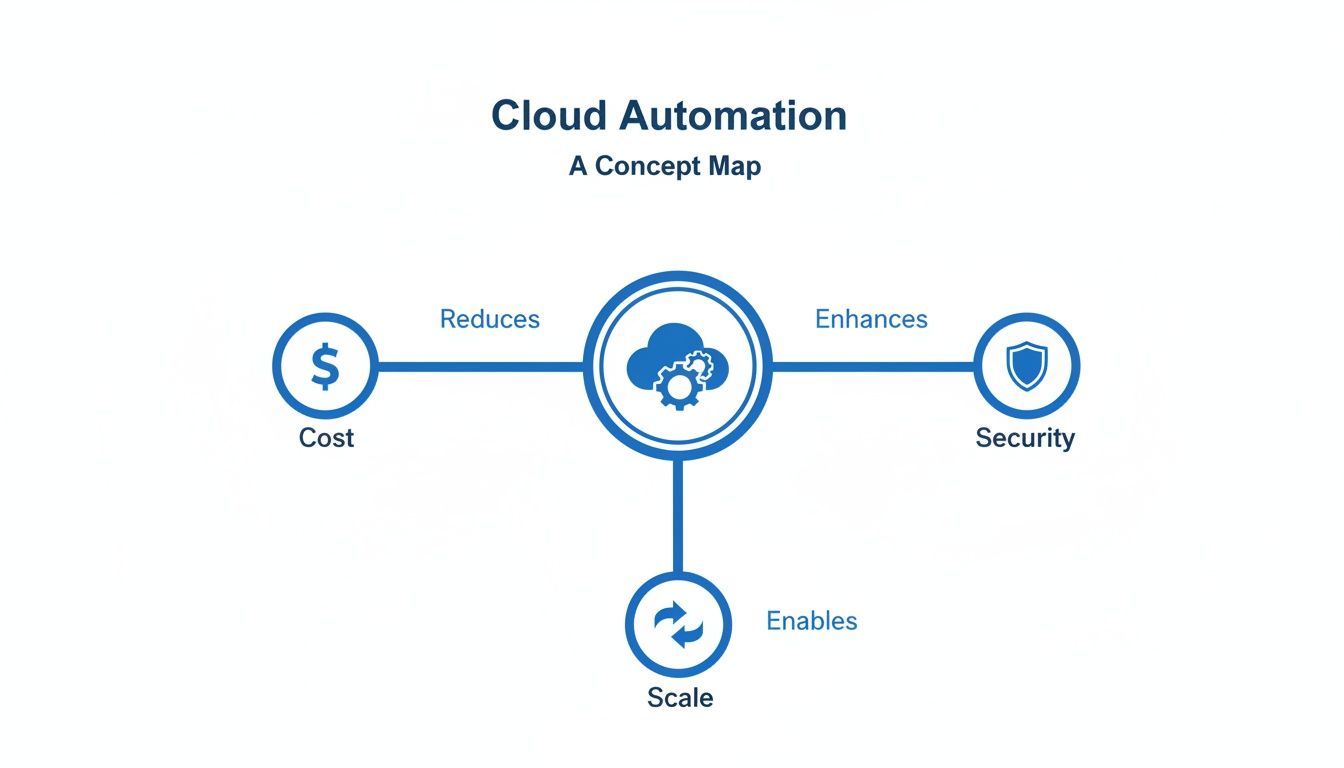
A good automation strategy isn't just a one-trick pony. It’s a balanced approach that improves the overall health and performance of your entire cloud environment.
To make sense of these patterns, let's take a closer look at each one and how they fit together.
The Core Patterns: A Quick Overview
Before we dive deep, here's a quick summary of the five automation patterns, what they do, and where you'd typically see them in action.
| Automation Pattern | Core Function | Common Use Case Example |
|---|---|---|
| Infrastructure as Code (IaC) | Defines infrastructure in text-based files for repeatable, consistent deployments. | Spinning up an identical testing environment for a new developer in minutes. |
| CI/CD Pipelines | Automates the process of building, testing, and deploying new software code. | Releasing a small bug fix to production an hour after the code is written. |
| Autoscaling | Automatically adjusts the number of resources based on real-time demand. | Adding more web servers during a Black Friday sale to handle the traffic surge. |
| Policy-Driven Automation | Enforces security, compliance, and cost rules automatically across the environment. | Automatically shutting down any server that isn't tagged with a project code. |
| Orchestration | Coordinates multiple automation tasks into a single, cohesive workflow. | A new customer signup automatically provisions their account, database, and sends a welcome email. |
Now, let's unpack what each of these really means.
1. Infrastructure as Code (IaC)
Imagine you had to build the same complex Lego model a hundred times. Doing it by hand would be painfully slow, and you'd definitely make mistakes. Infrastructure as Code (IaC) is like having a perfect, detailed blueprint for that Lego model.
Instead of manually clicking through a console to set up servers, networks, and databases, you define everything in simple text files.
Tools like Terraform or AWS CloudFormation read these blueprints and build your environment automatically, ensuring it’s identical every single time. This kills "configuration drift," those tiny, undocumented changes that creep in over time and cause huge headaches down the road.
With IaC, deploying a new testing environment is as easy as running one command. Tearing it down is just as simple, which stops resources from being left on by mistake and racking up costs.
2. CI/CD Pipelines
If IaC is the blueprint for your building, then a CI/CD pipeline is the automated assembly line that puts it all together. This pattern is all about automating the software delivery process, from the second a developer writes a line of code to the moment it goes live.
Here’s how it usually works:
- Continuous Integration (CI): When a developer commits new code, an automated process kicks off. It builds the software, runs a bunch of tests to catch bugs early, and merges the changes into a central codebase. This makes sure new code plays nicely with what’s already there.
- Continuous Deployment (CD): Once the code passes all the automated tests, it’s automatically pushed to a staging or production environment. This gets rid of the manual, error-prone steps of a traditional release, letting teams ship updates to users much faster and more reliably.
CI/CD pipelines are the engine of modern DevOps. They're how teams move fast without breaking things.
3. Autoscaling
Think of autoscaling as an elastic waistband for your cloud resources. When your application sees a huge spike in traffic, like during a holiday sale, autoscaling automatically adds more servers to handle the load. This keeps the experience smooth and fast for your customers, with no slowdowns or crashes.
Then, when traffic dies down in the middle of the night, it automatically removes those extra servers.
The result? You only pay for the exact resources you need, right when you need them. This dynamic adjustment is one of the biggest wins of cloud automation, perfectly matching supply with demand.
4. Policy-Driven Automation
Policy-Driven Automation is like your cloud's automated rulebook or security guard. You set specific rules and conditions, and the system enforces them 24/7, no questions asked. This is non-negotiable for maintaining security, compliance, and cost control as you grow.
For example, a policy could state that no database should ever be publicly accessible. If someone accidentally configures one to be open to the internet, the system can detect it and either send an alert or automatically fix the problem within minutes.
Another classic policy is to automatically shut down any server that isn't tagged with a project code, which stops "shadow IT" and unbilled resources from spiraling out of control. It shifts you from a reactive "find and fix" model to a proactive "prevent and enforce" strategy.
5. Orchestration
Finally, orchestration is the conductor making sure all the other automation patterns work together in perfect harmony. While each pattern is great at its specific job, orchestration coordinates the complex workflows that tie everything together.
For instance, deploying a new application might involve using IaC to provision servers, a CI/CD pipeline to deploy the code, and policy-driven automation to scan for security compliance. Orchestration manages that whole sequence, making sure each step happens in the right order and gracefully handles any errors.
It’s the intelligence layer that pulls everything together. To go deeper, you can learn more about the role of orchestration in cloud computing in our dedicated guide.
The Benefits and Hidden Risks of Automation

Jumping into cloud automation brings some serious advantages, but it's not a magic wand. To succeed, you need a clear-eyed view of both the rewards and the real-world challenges.
On one hand, the benefits are immediate and hit your bottom line, security, and speed right away. On the other, hidden complexities can pop up and cause new headaches if you're not careful. Let’s break down the tangible wins you can expect and the critical risks you need to keep on your radar.
The Clear Upsides of Cloud Automation
The biggest reason businesses flock to automation in the cloud is the straightforward return on investment. These aren't just abstract ideas; they are measurable improvements you'll see in your daily operations and your budget.
- Significant Cost Reduction: This is usually the first and biggest win. By automatically shutting down non-production environments on nights and weekends, companies consistently slash their cloud bills. It's not uncommon for a business to see a 30% reduction in its AWS or Azure spend just by getting rid of idle resource waste.
- Stronger Security and Compliance: Think of automation as a security guard that never takes a break. It enforces your security policies consistently across every single resource, which eliminates the risk of human error. Automated checks can scan your environment 24/7, spotting misconfigurations and fixing them before they ever become a vulnerability.
- Faster Deployments and Innovation: For any DevOps team, automation is a game-changer. It radically speeds up the entire software development lifecycle, letting teams push out new features and fixes in minutes instead of days. That kind of speed is a massive competitive advantage.
These benefits all work together. Automating your cost controls is a core piece of a smart financial strategy, which you can dig into deeper by understanding what is FinOps and how it impacts cloud spending. By taking over the repetitive work, automation frees up your best engineers to focus on what really matters: building better products.
The Hidden Risks You Cannot Ignore
While the upsides are huge, diving into automation without a solid plan can introduce some major risks. These problems are often less obvious at first but can have serious consequences down the road. Knowing what they are is the first step to avoiding them.
Automation is a powerful tool, but it amplifies everything it touches, including mistakes. A small misconfiguration in an automated script can propagate across thousands of resources in seconds, turning a minor issue into a major outage.
The initial setup can also be deceptively complex, especially if you're wrestling with native cloud provider tools. These solutions often demand deep technical knowledge, complicated scripting, and a PhD in permissions management. This creates a high barrier to entry for teams that don't have those specialized skills on hand.
Another thing to watch out for is vendor lock-in. If you choose a highly specific or proprietary automation tool, it can be incredibly difficult and expensive to switch to a different platform or cloud provider later. That lack of flexibility can really hold you back as your business needs change. Finally, it’s possible to over-automate, creating a system so rigid that it can’t handle exceptions, making it a nightmare for teams to respond to urgent one-off requests without jumping through hoops.
Automating Cloud Cost Optimization: A Practical Walkthrough
Theory is great, but the real magic of automation in the cloud happens when you see the immediate impact on your budget. Let's walk through a scenario I've seen play out dozens of times: a monthly cloud bill that just keeps creeping up, seemingly for no reason.
The culprit is almost always waste. Simple, unintentional waste, like developers leaving beefy test servers running overnight or on weekends.
This isn't carelessness; it's just a byproduct of moving fast. A developer wraps up their day and forgets to shut down a powerful virtual machine. A QA team leaves an entire staging environment active over a long weekend. On their own, these are tiny oversights. But add them up across a whole team, and you're suddenly burning thousands of dollars a month on compute time you never even used.
The Pain of Trying to Do it Manually
The first instinct for many businesses is to tackle this with manual processes. They send out reminder emails, post all-caps messages in Slack, or even create spreadsheets to track who owns which resource.
Let's be honest: this approach is doomed from the start. It adds friction, relies on people remembering one more administrative task, and ultimately just treats the symptom, not the root cause.
So, the next logical step is to look at the native tools from the cloud providers themselves, like AWS Instance Scheduler or Azure Automation. While these tools are certainly powerful, they often introduce a whole new set of headaches, especially for small to midsize businesses.
The Hidden Complexity of Native Tools
Using a native scheduler is rarely a simple "point and click" affair. It demands a serious time investment from a skilled cloud engineer.
Getting it set up usually involves:
- Deep Technical Knowledge: You need someone who lives and breathes IAM roles, Lambda functions, DynamoDB tables, and whatever scripting language is required.
- Complicated Permissions: Granting access means navigating a maze of permission models. It's risky, too. Give a developer the ability to schedule a server, and you might accidentally give them permission to alter critical production infrastructure.
- Clunky Interfaces: These tools are built for engineers, not project managers or the finance team. There’s no simple dashboard to see what's scheduled, make a quick change, or manage overrides.
For teams curious about what this actually entails, our guide on how to set up an AWS schedule for an instance breaks down the technical steps. This complexity often turns a cost-saving initiative into a purely engineering problem, creating a bottleneck that keeps the rest of the team from helping out.
A Simpler Path with a Specialized Platform
Now, contrast that with using a dedicated automation platform. The entire focus shifts from wrestling with technical implementation to setting straightforward business rules. Instead of fighting with code and permissions, the process becomes collaborative and accessible to everyone.
A clean, intuitive interface lets anyone with the right permissions create, view, and tweak schedules in seconds.

This approach puts cost optimization in everyone's hands. A team lead can easily set a default "power off at 7 PM" schedule for all their project's dev servers. If a developer needs to work late, they can request a simple, temporary override without having to file a ticket with IT. It’s the perfect balance of automated rules and easy exceptions.
Role-based access control is the secret sauce here. It allows you to safely hand out scheduling capabilities without exposing your entire cloud account. This empowers the whole team to pitch in on cost-saving efforts responsibly.
Of course, effective automation requires a solid governance framework to manage both costs and risks. For a deeper dive, check out this excellent guide on Mastering Governance in the Cloud.
This shift makes cost control a tangible, shared goal with a clear and immediate payoff. With the cloud automation market valued at $8.10 billion and projected to hit $20.30 billion by 2030, it's clear where the industry is heading. When companies are spending nearly $99 billion per quarter on cloud services, using automation for optimization isn't just a nice-to-have; it's a core business strategy.
7. Choosing Your Automation Tools: Native vs. Specialized Platforms
When it comes to cloud automation, picking the right tool is a make-or-break decision. You're essentially choosing between two very different paths: using the built-in, powerful-but-complex solutions from your cloud provider, or opting for a specialized platform built for speed and simplicity.
This choice isn't just about features. It’s about your team’s expertise, your security posture, and how fast you want to start seeing savings. Let's break down the real-world trade-offs between these two approaches.
The Native Tools Approach
Cloud giants like AWS and Azure offer their own automation toolkits, such as AWS Instance Scheduler and Azure Automation. These tools are baked right into their ecosystems, offering a ton of power and flexibility, if you have the deep technical know-how to use them.
For a dedicated cloud engineering team that lives and breathes scripting, complex permission models, and command-line interfaces, these native tools can feel right at home. They offer granular control for building highly customized automation workflows.
But that power comes with a steep learning curve. The setup is often a puzzle of configuring multiple services, writing scripts, and navigating intricate IAM policies just to get a basic schedule running. The user experience is built for engineers, which effectively locks out non-technical folks in finance or project management who could otherwise help manage costs. This creates a bottleneck, where every simple schedule change has to go through a busy IT department.
The Specialized Platform Approach
Specialized platforms are built on a completely different philosophy. They aim to make cloud automation accessible and safe for everyone in the organization, not just the DevOps gurus. The focus is on a clean user experience, lightning-fast setup, and robust security that empowers more people to get involved.
Take a platform like CLOUD TOGGLE, for example. You can set up automated power-off schedules in just a few minutes through a simple web dashboard. Better yet, you can safely delegate scheduling to team leads without handing over the keys to your entire cloud account, thanks to granular, role-based controls.
This approach turns cost optimization from an isolated engineering task into a shared, collaborative effort.
The total cost of ownership for native tools is often much higher than it looks on paper. While the services themselves might be cheap, the hidden costs in staff hours for setup, ongoing maintenance, and training can easily blow past the subscription fee for a specialized platform.
A Head-to-Head Comparison
So, how do you decide? You need to look at what your organization actually needs. What works for a massive enterprise with a huge DevOps team probably won’t work for a growing business that needs to move fast.
Here’s a practical look at how these tools stack up.
Comparing Cloud Cost Automation Tools
For teams weighing their options, this table cuts through the noise. It offers a side-by-side look at what you get with native schedulers versus what a specialized platform brings to the table, focusing on the features that matter most to DevOps and FinOps teams.
| Feature | Native Tools (AWS/Azure Schedulers) | Specialized Platforms (e.g., CLOUD TOGGLE) |
|---|---|---|
| Ease of Setup | Complex; often requires scripting and deep platform knowledge. | Simple; a guided setup that takes minutes, not days. |
| User Experience | Built for engineers; managed via command-line or complex consoles. | Intuitive web interface for both technical and non-technical users. |
| Security & Access | Requires tricky IAM policies; high risk of over-provisioning permissions. | Built-in role-based access for safe delegation of scheduling tasks. |
| Total Cost | Low direct cost, but high indirect costs from staff hours and expertise. | Transparent subscription fee; lower total cost due to fast setup and less upkeep. |
Ultimately, the best path forward depends on your team’s structure and priorities.
If you have the engineering firepower and need deep, custom integrations, native tools are a solid choice. But if your goal is simplicity, security, and getting your whole team involved in saving money fast, a specialized platform is the most direct and efficient route to getting it done.
Your First Steps with Cloud Automation
Getting started with automation in the cloud can feel like a massive undertaking, but it doesn't have to be. The secret isn't a huge, disruptive project. It’s about taking small, smart steps that deliver real wins from day one.
Forget about trying to boil the ocean. The real journey begins with a simple question: "Where can we get the biggest impact with the least amount of effort?" This approach helps you prove the value of automation early, making it much easier to get everyone on board for the long haul.
Identify the Low-Hanging Fruit
Before you even think about tools or scripts, look for the most obvious and painful process you can fix. For almost every company, the biggest culprit is wasted money on non-production resources left running after hours.
Scheduling shutdowns for development, testing, and staging environments is the perfect first target. It's a simple, repetitive task with a clear, measurable financial payoff and almost zero risk to your live operations. This gives you a crystal-clear objective to focus on.
Start Small and Measure Everything
Once you've picked your target, resist the temptation to roll out a solution across the entire company. Start with a single team or project as a pilot program. A controlled test lets you iron out the wrinkles and, most importantly, measure the results.
Track the "before" and "after" cloud bills for that specific group. Walking into a leadership meeting and saying, "We saved $2,500 last month with this pilot," is infinitely more compelling than talking about theoretical benefits. That data is your business case.
A successful pilot is your most powerful tool for change. It transforms automation from an abstract IT initiative into a proven cost-saving strategy with hard numbers to back it up.
Evaluate Options and Run a Trial
With a successful pilot under your belt, you can start looking at tools with real confidence. Now you can compare native cloud provider options against specialized platforms based on your team's actual experience. What problems did they run into? Would a simpler interface have saved them time?
This is the perfect time to use free trials. A platform like CLOUD TOGGLE offers a 30-day trial, giving you plenty of runway to prove its value with your own workloads before making any financial commitment. Hands-on testing is the only way to know if a tool truly fits your team's workflow.
Expand and Govern the Program
Finally, once you have a proven process and the right tool, it's time to scale your pilot program across the rest of the organization. As you grow, it's critical to establish clear governance.
Define who can set schedules, create a process for requesting overrides, and decide how new projects get onboarded. This last step turns your small win into a sustainable, long-term practice for optimizing costs and makes sure you maintain control as you reap the financial rewards of cloud automation.
Frequently Asked Questions About Cloud Automation
As teams start to explore automation in the cloud, some common questions always pop up. Getting these sorted out early on can build confidence and make the whole process a lot smoother. Here are the answers to a few we hear all the time.
What Level of Technical Skill Is Needed to Start?
Honestly, it depends entirely on the tools you pick. If you go with native cloud schedulers from AWS or Azure, you'll need some serious engineering chops. We're talking scripting, complex permissions, and a deep understanding of the cloud platform.
On the other hand, specialized platforms are built specifically to avoid that headache. They're designed so non-engineers can set up schedules through a simple, visual interface in just a few clicks.
How Do You Handle Exceptions and Overrides?
This is a big one. People worry that automation is too rigid. What happens if a developer needs a server after its scheduled shutdown time for an urgent bug fix?
Modern automation platforms have this figured out with easy override features. A user can simply pause the schedule for their specific machine without having to track down an administrator. It strikes the perfect balance between smart, cost-saving rules and the flexibility real-world work demands.
Good automation isn't about rigid enforcement. It’s about setting smart defaults while making exceptions easy. The goal is to make the right thing easy to do, not to make the wrong thing impossible.
Does Automation Improve or Weaken Security?
When you do it right, automation in the cloud is a massive security win. It takes human error out of the equation when applying security policies and configurations, ensuring nothing gets missed.
By using tools with proper role-based access control, you can safely delegate tasks like scheduling without handing out sensitive credentials or god-mode permissions. This actually shrinks your overall attack surface, making you more secure, not less.
Ready to see just how simple and safe cloud cost optimization can be? See what CLOUD TOGGLE can do for you and discover a smarter way to manage your cloud spend. Begin your 30-day free trial at cloudtoggle.com.