So, what exactly is a multi-cloud architecture? In simple terms, it's when a business uses services from more than one public cloud provider, think AWS, Azure, and Google Cloud. It's like not relying on a single shipping company for all your packages; you pick the best one for each specific need, whether it's for speed, cost, or special handling.
What Is Multi-Cloud Architecture and Why It Matters

Going multi-cloud isn't just a technical footnote; it's a core business strategy. It’s all about giving your organization the freedom to pick and choose the best tools for the job from different providers. This way, you sidestep the risks and pricing pressures that come from being locked into a single vendor's ecosystem, a problem we call vendor lock-in.
For instance, you might lean on Google Cloud for its top-tier AI and machine learning capabilities but turn to Amazon Web Services (AWS) for its powerhouse data warehousing solutions. This "best-of-breed" strategy lets your teams build far more powerful and cost-effective applications than they could with just one provider.
The Business Case for Going Multi-Cloud
The shift to multi-cloud isn't happening by accident. It’s a direct response to real-world business demands for more flexibility, stronger resilience, and tighter financial control. Let's face it: when you're all-in on one provider, a single service outage can grind your entire operation to a halt. A multi-cloud setup acts as a critical safety net, letting you failover to another provider to keep the lights on.
This strategy is quickly becoming the new normal. By 2026, it's predicted that over 85% of enterprises will be running their operations across multiple cloud environments. The market numbers back this up, with an expected jump from $12.39 billion in 2024 to $15.86 billion in 2025, a blistering 28.1% CAGR.
For small and midsize businesses, the advantages are immediate and tangible:
- Improved Resilience: Spreading your applications across multiple clouds means a regional outage or a provider-specific bug is a hiccup, not a catastrophe.
- Cost Optimization: You can actively shop around for the best deals on compute, storage, and data transfer, pitting providers against each other for your business.
- Access to Innovation: Your teams are free to use game-changing services from any provider without being stuck in one walled garden.
- Enhanced Negotiation Power: When it's time to renew contracts, having viable alternatives gives you real leverage to prevent price gouging.
Distinguishing Multi-Cloud from Hybrid Cloud
People often mix up multi-cloud and hybrid cloud, but they're not the same thing. It's important to get the distinction right. A multi-cloud architecture involves using multiple public clouds, while a hybrid cloud setup blends a public cloud with private infrastructure, like your own on-premise data center.
Of course, many organizations end up doing both, creating a hybrid, multi-cloud environment. To help clear things up, we've put together a detailed comparison of multi-cloud vs hybrid cloud that breaks it all down.
To make it even clearer, here's a quick table comparing the different approaches.
Cloud Strategy Comparison
| Strategy | Core Concept | Primary Benefit |
|---|---|---|
| Single-Cloud | Using one public cloud provider for all needs. | Simplicity and deep integration with one ecosystem. |
| Multi-Cloud | Using services from two or more public cloud providers. | Flexibility, cost optimization, and avoiding vendor lock-in. |
| Hybrid Cloud | Combining a public cloud with private, on-premise infrastructure. | Data sovereignty, security, and bridging legacy systems. |
Each strategy has its place, but multi-cloud is rapidly becoming the default for businesses that need agility and control.
A multi-cloud architecture is your organization's declaration of independence. It frees you from the limitations of a single provider, empowering you to build more resilient, cost-effective, and innovative solutions by choosing the right tool for every job, regardless of which cloud it lives on.
This freedom is a game-changer for DevOps, IT, and FinOps teams. They're the ones on the front lines, wrestling with spiraling cloud bills, operational headaches, and the constant pressure to keep applications running 24/7. A smart multi-cloud architecture gives them the framework to finally get ahead of these challenges and turn the cloud into the strategic asset it was always meant to be.
Understanding Key Multi-Cloud Architecture Patterns
So you've decided to go multi-cloud. Good call. Now for the tricky part: deciding how to actually build it. Just like you wouldn't build a house without a blueprint, you shouldn't jump into a multi-cloud setup without a clear architectural pattern.
These patterns are all about trade-offs between cost, complexity, and resilience. Getting to know the main blueprints is the first step to making smart decisions for your business. Let's break down the most common ones.
The Active-Passive Pattern for Disaster Recovery
The Active-Passive pattern is probably the most common starting point for a multi-cloud strategy. Think of it like having a backup generator for your house. All your primary operations run in one cloud (the "active" provider), while a second cloud provider sits on standby as a dormant environment (the "passive" one).
This passive environment doesn't handle any live traffic. Its only job is to be ready to take over if your main cloud provider goes down. To make this work, you have to regularly replicate your data from the active to the passive cloud, keeping the backup fresh.
- Primary Goal: Disaster recovery and business continuity.
- Best For: Applications that can handle a bit of downtime during a failover.
- Trade-Off: It’s much cheaper than running two full-power environments, but the failover isn't instant.
This approach gives you a solid safety net against a major provider outage without doubling your infrastructure costs.
The Active-Active Pattern for High Availability
When you absolutely cannot afford any downtime, the Active-Active pattern is the way to go. Picture a busy retail store with several cashiers open at once. If one register breaks, customers just move to the next one without skipping a beat. That’s an active-active architecture in a nutshell.
Here, your application is deployed and running across two or more cloud providers at the same time. A load balancer distributes traffic between them. If one cloud provider has a massive failure, traffic is automatically sent over to the other healthy environments, and your users never notice a thing.
An Active-Active pattern delivers the highest level of resilience you can get. By load-balancing traffic across clouds, your application stays up and responsive, even if one provider suffers a catastrophic failure.
But this level of availability doesn't come cheap. It’s the most complex and expensive pattern to set up and maintain. You'll need sophisticated traffic management and a rock-solid process for keeping data synchronized between all your active clouds.
Cloud-Specific Services vs. Portable Service Layers
Beyond how you deploy your apps, you also need to decide how you use the services inside each cloud. This choice leads to two very different approaches.
1. Using Cloud-Specific Services
This strategy is all about picking the "best-of-breed" service for the job, no matter which cloud it's in. For example, you might use Google Cloud's BigQuery for its amazing data analytics, AWS Lambda for serverless functions, and Azure AI for machine learning models.
You're basically creating a custom-built solution by integrating the top-tier, native services from different clouds. This can give you incredible performance, but it also increases complexity and can lock you into specific vendor services.
2. Using a Portable Services Layer
The other option is to build a consistent, portable layer of services that runs the same way on any cloud. This is usually done with technologies like Kubernetes for container orchestration or by using third-party databases that can be deployed anywhere.
This approach abstracts away the differences between the clouds, making it much easier to move your applications around and manage everything consistently. The trade-off? You might miss out on the peak performance or unique features that a provider's native services offer.
Alright, you've picked a multi-cloud pattern, now comes the engineering. Getting the architecture right from the start is the difference between a strategic advantage and a complete operational mess.
A successful multi-cloud setup rests on three core design principles. Nailing these gives your DevOps team a clear blueprint and helps you sidestep the most common headaches like security gaps, sluggish apps, and data disasters. Let's dig into what it takes to build a solid foundation.
Forging Secure and Fast Network Connections
The first thing to solve is networking. Think of your cloud environments as separate islands. For them to work as one, you need to build secure, low-latency bridges between them. Without solid connections, your apps can't talk to each other and your data stays locked in silos.
You’ve got a couple of good options for building these bridges:
- Virtual Private Networks (VPNs): VPNs create secure, encrypted tunnels over the public internet. They’re a fantastic, cost-effective starting point for connecting your clouds.
- Direct Interconnects: For mission-critical apps that need serious bandwidth and near-zero latency, nothing beats a dedicated private connection. Services like AWS Direct Connect or Google Cloud Interconnect bypass the public internet entirely, giving you unmatched performance and reliability.
A well-designed network is the central nervous system of your multi-cloud architecture. It ensures data can flow quickly and securely between providers, which is essential for both high-performance applications and effective disaster recovery strategies.
With robust network links in place, you create a single, cohesive environment where services interact seamlessly, no matter which cloud they live in. This is the bedrock for everything else.
This map shows how these core design choices support different multi-cloud patterns.
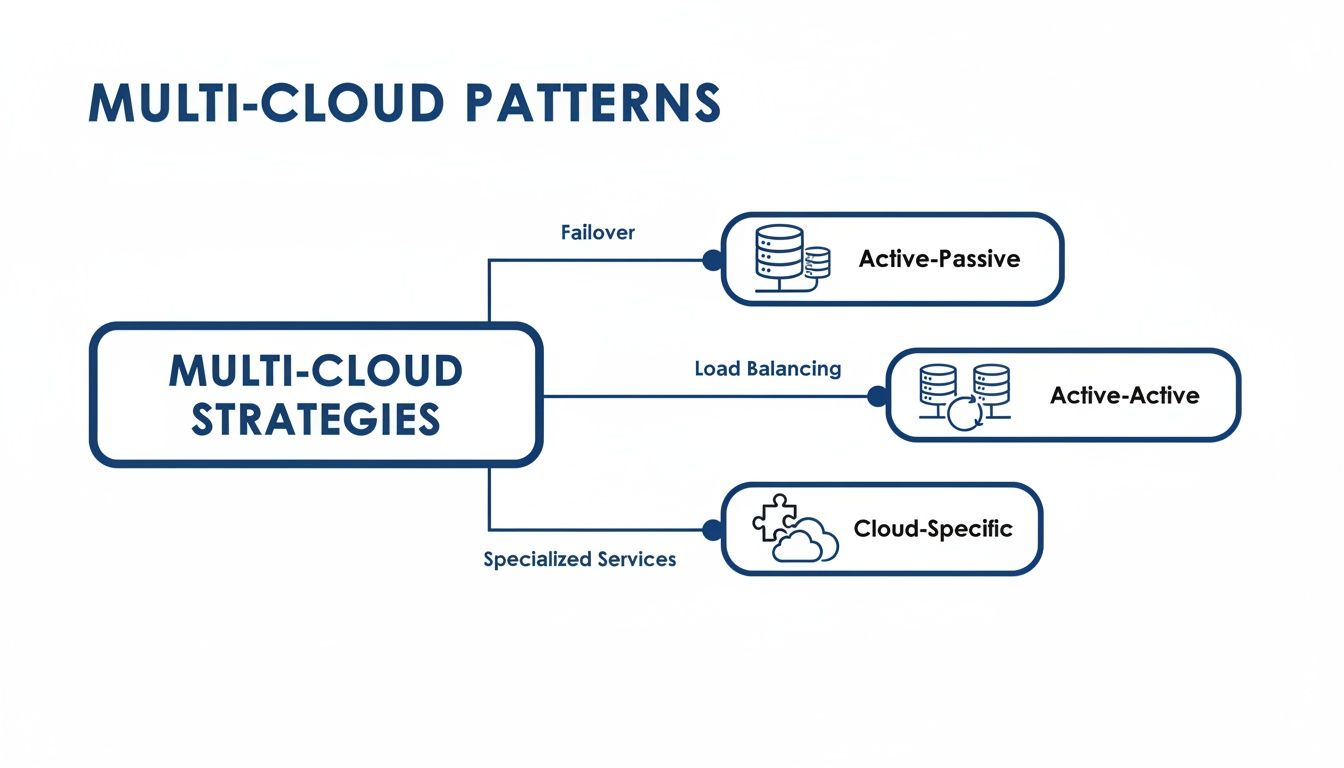
As you can see, strategies like an Active-Passive setup for disaster recovery and an Active-Active model for high availability depend entirely on the underlying architecture you build.
Centralizing Identity and Access Management
Next up is Identity and Access Management (IAM). When your teams and services are scattered across multiple clouds, figuring out who can access what becomes a nightmare. Juggling separate IAM systems for each provider is a recipe for security holes and administrative chaos.
The only sane solution is a centralized identity system. This gives you a single source of truth for all user permissions, so you can enforce consistent security policies across every cloud. It's like having one master keycard system for an entire campus instead of a different rusty key for every single building.
With a unified IAM, when an employee leaves, their access is cut off everywhere at once. It also makes compliance audits infinitely easier, since you can prove policy enforcement from one control plane. Fragmented policies are a top source of risk, so getting unified visibility is fundamental to securing your multi-cloud estate.
Ensuring Data Management and Resiliency
The final, and arguably most critical, pillar is data management and resiliency. Your data has to be consistent, available, and protected, regardless of which cloud it’s in or what happens to any single provider. This means having a smart strategy for synchronization, replication, and backups.
Your game plan should include:
- Data Synchronization: If you're running an active-active setup, you need tools that replicate data instantly and accurately between clouds. This is non-negotiable for preventing users from seeing stale or conflicting information.
- Data Replication: For an active-passive model, you need an automated process to constantly copy data and application states to your backup environment. This keeps your recovery point recent and minimizes data loss if you need to failover.
- Cross-Cloud Backups: Don't just rely on one provider's backup tools. A true resiliency strategy means backing up critical data from one cloud to another. This protects you from provider-specific outages or even account-level problems.
Getting these three pillars: networking, IAM, and data management, right is non-negotiable. They are the technical foundation of any secure, resilient, and high-performing multi-cloud architecture.
Mastering Multi Cloud Governance and Security
While a multi-cloud setup gives you incredible flexibility, it can also create absolute chaos. Without a solid, central plan for who does what, you'll end up with scattered policies, glaring security holes, and costs that spiral out of control. Getting a handle on governance and security isn't just a good idea; it's the only way to make your multi-cloud strategy actually work.
Think of multi-cloud governance as the official "rulebook" for your entire cloud footprint. It spells out who can do what, where, sets spending limits, and makes sure security standards are the same across every provider you use. Without this unified rulebook, each cloud environment becomes its own wild west, making it impossible to manage risk or keep your budget in check.
This demand for central control is causing the market to explode. The multi-cloud management market is projected to jump from $20.06 billion in 2026 to $50.76 billion by 2030, growing at a blistering 26.1% CAGR. This rush is all about security and cost control, especially since 87% of enterprises now use multiple clouds and the average company saw a 50% cloud overspend rate in 2023.
Establishing a Centralized Governance Framework
Your first move should be creating a single governance framework that applies to all your cloud environments. This framework becomes the single source of truth for all your security, compliance, and cost policies. It means that whether a developer spins up a server in AWS or Azure, they're playing by the same rules.
This central framework needs to cover a few key areas:
- Cost Management: Set clear budgets, enforce tagging policies so you know who spent what, and create alerts for any unexpected spending spikes.
- Security Policies: Make encryption mandatory, define who can access what in your network, and enforce strong identity practices everywhere.
- Compliance Guardrails: Put controls in place to meet regulations like HIPAA or GDPR consistently, no matter which cloud you're on.
By centralizing these rules, you get rid of guesswork and ensure everyone follows the same playbook. This is a non-negotiable step before you even think about scaling your multi-cloud architecture.
Implementing Automated Security Guardrails
A rulebook is useless if no one enforces it. Trying to manually check for compliance across several clouds is a recipe for disaster and human error. That’s where automated security guardrails come in, acting as a 24/7 security guard for your entire environment. If you want to build a solid multi-cloud strategy, you have to get serious about security. You can learn some great strategies for conquering multi cloud security challenges to better protect your business.
These guardrails can automatically spot, and even block, actions that violate your security policies. For instance, a guardrail could stop a developer from launching a publicly accessible storage bucket or deploying a VM without the right security tags. This kind of automation is your best defense against common misconfigurations, which happen to be a leading cause of data breaches.
Without solid governance and observability, the advantages of multi cloud are quickly lost to security risks and operational chaos. A unified control plane is the only way to maintain order and security at scale.
This proactive approach turns security from a reactive game of whack-a-mole into a preventive strategy. It gives your teams the freedom to move fast and innovate, all while staying within safe, pre-approved boundaries.
The Critical Role of Unified Observability
You can't govern what you can't see. In a multi-cloud world, observability is all about getting a single, real-time view into the health and performance of your entire system. It means collecting and analyzing three types of data from all your cloud providers:
- Logs: Detailed records of every event that happens in your applications and infrastructure.
- Metrics: Time-based data that tracks system health, like CPU usage or application response times.
- Traces: A complete map of a user's request as it travels through different services, even across multiple clouds.
Pulling all this data into one place is a complete game-changer for troubleshooting. Instead of your DevOps team jumping between multiple dashboards to hunt down a problem, they can see the whole story in a single view. This dramatically cuts down the time it takes to find and fix issues, which is essential for keeping your multi-cloud architecture resilient. For a deeper dive, check out our guide on how to manage multi cloud environments the right way.
Actionable Cost Optimization for Multi Cloud Environments

While going multi-cloud gives you incredible flexibility, it can also create a serious cost management headache. Without a sharp eye on your spending, bills can spiral, wiping out the financial benefits you were trying to achieve in the first place. The secret to keeping your budget in check is to focus on practical, high-impact changes that stop waste before it happens.
The biggest drain on any cloud budget? Paying for resources you aren’t even using. Idle and oversized virtual machines are the usual suspects, quietly burning through cash 24/7 when they’re only really needed during business hours. This is especially true for non-production environments like your development, testing, and staging servers.
The Power of Automated Scheduling
One of the most effective ways to get costs under control is to implement automated power scheduling. It’s a simple idea with a massive financial payoff: automatically shut down non-essential servers in AWS and Azure during off-hours, like nights and weekends, and power them back on just before your team starts their day.
The cost of unmanaged cloud environments is shocking. Nearly 50% of organizations overspent on cloud in 2023, largely because of growing complexity. This is why tools that can automatically power off idle servers across different providers are so critical. For FinOps teams, this simple act of scheduling can slash costs by 20-30%, an efficiency that native tools just can't match.
For instance, a mid-sized company with 50 non-production VMs spread across AWS and Azure can easily waste thousands each month. By scheduling these servers to be off for 12 hours overnight and all weekend, they could cut their runtime by over 70%. The savings are immediate and substantial.
Why Native Tools Fall Short in a Multi Cloud World
Sure, cloud providers like AWS have their Instance Scheduler and Azure has its Start/Stop v2 solution. But in a multi-cloud setup, these tools just don't cut it. They are built to work only within their own ecosystem, which means you're stuck managing separate schedules and policies for each provider. This creates a ton of administrative work and makes it nearly impossible to enforce a consistent cost-saving strategy.
A centralized platform is the only practical way to manage cost optimization across a multi-cloud architecture. It provides a single pane of glass to schedule resources, enforce policies, and track savings across all your cloud providers.
A unified platform solves this by giving you one dashboard to manage schedules for all your servers, whether they live in AWS or Azure. It simplifies the entire process and empowers your teams to manage their own resources without needing to be an expert in every cloud console. This doesn't just save money; it frees up your engineers to focus on more important work. For more ideas, check out our deep dive on cloud cost optimization strategies.
Essential FinOps Best Practices
Automated scheduling is a huge win, but there are other FinOps practices you need to adopt to get the most out of your cloud spend. Two of the most important are rightsizing and the strategic use of reserved instances.
Rightsizing Your Instances: This means looking at your VMs' performance data and making sure you’re using the right size for the job. Developers often overprovision resources "just in case," but paying for a server that barely cracks 10% CPU usage is like buying a V8 engine just to drive to the corner store.
Strategic Use of Reserved Instances: For workloads that run predictably around the clock, reserved instances or savings plans can offer massive discounts compared to on-demand pricing. The trick is to reserve capacity only for your baseline, always-on resources. Use on-demand and scheduled instances for everything else that has variable or temporary workloads.
To make sure your multi-cloud strategy stays on budget, it’s worth exploring all the effective strategies to control cloud costs. A mix of smart scheduling, rightsizing, and strategic reservations creates a powerful defense against wasted cloud spend.
Your Next Steps in Building a Multi Cloud Architecture
Alright, let's move from the drawing board to the real world. Getting started with a multi-cloud architecture can feel like a huge undertaking, but it’s really about taking small, deliberate steps. You don’t need a perfect, all-encompassing strategy on day one.
The goal is to make smart, incremental progress. Here’s a simple roadmap to get your DevOps and IT teams moving.
Your first job is to audit your current applications. You're looking for a low-risk candidate to be your guinea pig. A good starting point could be an internal tool or a non-critical app that won't cause a five-alarm fire if things go sideways.
Start Small and Build Momentum
Once you've picked an application, start with a simple, high-value pattern. A perfect first project is implementing an Active-Passive model for disaster recovery.
This approach gets your team's feet wet with a second cloud provider's environment. You'll build out replication processes and learn the ropes without the pressure of managing live traffic across both clouds. This first step immediately boosts your application's resilience and serves as a critical training ground for your team.
A successful multi-cloud journey begins with a single, well-planned step. Focus on a small win, like setting up a disaster recovery site. This builds the skills and confidence your team needs to tackle more complex setups later.
Implement Cost Controls from Day One
Don't wait for the first surprise bill to start thinking about cost management. You absolutely must implement a centralized cost management tool from the very beginning.
Getting a handle on your spending across all providers isn't just a "best practice"; it's essential to keeping your multi-cloud strategy financially viable. A unified platform gives you one place to see all your costs, set budgets, and apply cost-saving rules everywhere, preventing your spend from spiraling out of control.
Develop a Clear Governance Plan
Finally, before you even think about scaling, you need to develop a clear governance plan. Think of this as your rulebook for operating in a multi-cloud world. It needs to clearly define your policies, especially for two critical areas.
- Security: Outline your non-negotiable security controls. This includes things like encryption standards, network access rules, and vulnerability management processes that apply across all your cloud environments.
- Identity Management: Spell out exactly how you'll use a centralized Identity and Access Management (IAM) system. The goal is to enforce consistent user permissions and access policies no matter which cloud you're in.
This plan ensures that as you grow, you do it in a way that's secure, compliant, and organized. By following these steps, you can move from theory to a real, working multi-cloud architecture one piece at a time.
Ready to take control of your multi-cloud costs from the start? CLOUD TOGGLE makes it easy to automate shutting down idle servers in AWS and Azure, slashing your cloud bill with just a few clicks. Start your 30-day free trial and see how much you can save at https://cloudtoggle.com.