Let's be honest: an IT budget is way more than just a spreadsheet of expenses. Think of it as the financial engine for your company's growth and innovation. It’s the process of deliberately funding your technology—hardware, software, cloud services, and the people who run it all—to make sure it’s pulling in the same direction as your business goals.
A solid IT budget keeps your tech resources in check, heads off financial surprises, and makes sure the lights stay on.
Understanding the Core of IT Budgeting

Creating an IT budget is a lot like drafting the blueprint for a house. The plan has to account for everything: the foundation (your infrastructure), the plumbing and electricity (software and cloud tools), the security system, and even room for a future extension (your R&D projects). If you skip the blueprint, you end up with a shaky, overpriced structure that doesn't actually fit your needs.
In the same way, your IT budget is the roadmap for every dollar you spend on tech. It makes sure your investments are purposeful, supporting both the day-to-day grind and your biggest long-term ambitions. It’s what stops you from getting blindsided by unexpected renewal costs or cloud bills.
Why a Formal IT Budget Matters
In a world where tech changes in the blink of an eye, running without a formal budget is just asking for trouble. It leaves you open to financial instability and operational headaches. A thoughtful budget gives you the framework to make smart decisions, so you can adapt to new challenges without blowing up your finances.
This isn't just theory; the numbers back it up. Global IT spending is exploding, fueled by the AI boom and an insatiable demand for cloud infrastructure. In the first quarter of 2025 alone, worldwide IT spending shot up by 16%, the fastest quarterly jump in nearly three decades. The total market, including telecom and services, is on track to hit almost $7 trillion in 2025.
For small and growing businesses, this trend is a flashing warning sign: you need a precise budget to keep up without overspending. You can dig into the specifics in this report on global IT spending trends from ITPro.
A well-crafted IT budget does more than control spending. It transforms technology from a cost center into a strategic asset that actively drives business value and competitive advantage.
Key Components of a Modern IT Budget
A proper IT budget needs to cover every single technology-related expense. While the exact line items will differ from one company to the next, a few core components show up in almost every modern budget.
Here are the must-have categories you need to plan for:
- Hardware Costs: This is all your physical gear: servers, laptops, desktops, and networking equipment. Don't forget to factor in refresh cycles and maintenance contracts.
- Software Licenses and Subscriptions: This covers everything from operating systems and Microsoft 365 to specialized business apps. Most of this is now a recurring subscription cost, not a one-time purchase.
- Personnel Expenses: Your people are often the biggest slice of the pie. This includes salaries, benefits, and crucial ongoing training and certifications for your IT staff.
- Cloud Services: This is a huge, and often unpredictable, expense. It covers your Infrastructure-as-a-Service (IaaS), Platform-as-a-Service (PaaS), and Software-as-a-Service (SaaS) bills from providers like AWS, Azure, and Google Cloud.
- Cybersecurity: Protecting your assets is non-negotiable. This line item should cover firewalls, antivirus software, security audits, penetration testing, and employee awareness training.
4 Core IT Budgeting Models
Picking the right budgeting model is the first real step in getting your IT finances under control. There's no one-size-fits-all answer here; the best fit depends on your company's size, culture, and what you’re trying to achieve. Some methods give executives tight control from the top, while others make teams justify every single dollar they plan to spend.
Let's break down the four main ways businesses tackle their IT financial planning. Understanding these frameworks will help you build a budget that actually works for you, not against you.
Top-Down Budgeting
This is the classic, old-school approach. Senior leadership decides on a total budget for IT, often pegging it to a percentage of the company’s overall revenue or just basing it on last year's spending. That lump sum is then handed down to the IT department to slice up among different projects, teams, and operational needs.
The big win here is that it keeps IT spending perfectly aligned with the company's high-level financial goals. It's predictable and gives leadership firm control over the final number. The downside? It can create a huge gap between the money allocated and what IT teams actually need to get the job done. People on the ground can feel like their needs aren't really understood or properly funded.
For instance, a mid-sized manufacturing firm might decide to cap its IT spend at 3% of its projected annual revenue. The CFO and CEO hand that number to the IT director, who then has to figure out how to stretch it across infrastructure maintenance, software renewals, and new cybersecurity tools.
Zero-Based Budgeting
Zero-Based Budgeting (ZBB) is the complete opposite of the top-down model. Every budget cycle starts from a clean slate: or zero. Instead of just tweaking last year's budget, every single expense has to be justified from the ground up. It forces a hard look at every IT activity and its real value to the business.
ZBB is fantastic for sniffing out and killing wasteful spending. It makes sure every dollar is tied directly to a business goal. The catch? It's a ton of work. Forcing IT managers to build a case for every line item is a serious time sink.
Zero-based budgeting is the ultimate tool for financial discipline. It forces leaders to answer a powerful question for every expense: "If we weren't already paying for this, would we start today?"
Imagine a software startup getting ready for its next funding round. They might use ZBB to cut all the fat and show investors a lean, efficient operation. The cloud team would have to defend the cost of every server, every software license, and every third-party tool, proving how it helps build the product or win new customers.
Incremental Budgeting
Incremental budgeting is probably the most common model out there because it's so simple. You just take last year's budget as your starting point and make small adjustments. For example, you might add 5% to cover inflation and a few new hires.
Its main advantage is that it's fast and easy. Since you're just building on what you already have, it's way less demanding than ZBB. But that simplicity is also its biggest weakness. It tends to carry forward old inefficiencies and can make you miss big opportunities to save money or reinvest in something more strategic. It just assumes last year's plan was the right one, which isn't always true.
Showback and Chargeback Models
The rise of the cloud has led to more dynamic models like showback and chargeback. Both are all about making costs visible and holding people accountable by linking IT expenses directly to the business units that use the resources.
- Showback is purely informational. The IT department sends reports to department heads showing them how much their cloud usage is costing the company, but the bill still sits with the central IT budget.
- Chargeback is transactional. IT acts like an internal service provider and actually bills each department for the resources they consumed.
These models are great for encouraging everyone to be more cost-conscious, since teams see the direct financial impact of their tech decisions. This is a core idea in FinOps: getting engineers to take ownership of their cloud costs. To pull this off, though, you need really solid cost allocation and resource tagging, which can be tricky to set up.
Comparison of IT Budgeting Models
Choosing a budgeting model isn't just a financial decision; it shapes how your entire organization thinks about technology spending. Each of the four models we've discussed comes with its own philosophy and practical trade-offs.
The table below breaks down these models side-by-side to help you see which one might be the best fit for your business.
| Budgeting Model | Core Concept | Best For | Pros | Cons |
|---|---|---|---|---|
| Top-Down | Executives set the total budget, which is then allocated down to departments. | Companies where tight, centralized financial control is the top priority. | Simple, fast, and ensures alignment with overall business financial targets. | Can be disconnected from the actual operational needs of IT teams. |
| Zero-Based | Every expense must be justified from scratch for each new budget period. | Businesses looking to aggressively cut waste and optimize spending. | Eliminates inefficient spending and forces a focus on value. | Extremely time-consuming and requires significant effort from managers. |
| Incremental | Uses the previous period's budget as a baseline, with minor adjustments. | Stable organizations with predictable needs and limited time for budgeting. | Quick and straightforward, requiring minimal effort to prepare. | Can perpetuate past inefficiencies and overlook cost-saving opportunities. |
| Showback/Chargeback | Allocates IT costs back to the business units that use the resources. | Cloud-heavy organizations aiming to build a culture of cost accountability. | Drives cost-conscious behavior and improves resource visibility. | Requires mature tagging and cost allocation practices, which can be complex. |
Ultimately, the best approach often involves a hybrid. A company might use a top-down model for its overall budget cap but empower departments to use zero-based principles for new projects. The key is to find a system that gives you control without stifling the innovation your IT teams need to deliver.
A Repeatable Five-Step IT Budgeting Process
Let's be honest: for many IT leaders, the annual budgeting process feels like a mad dash to the finish line. It's often a stressful, once-a-year scramble. But it doesn't have to be.
By shifting from a one-off event to a repeatable, cyclical process, you can turn your budget from a simple expense sheet into a powerful strategic tool. This five-step approach provides a clear framework for planning, managing, and optimizing your IT investments all year long.
The image below shows a few of the common models that budgeting processes are built around.
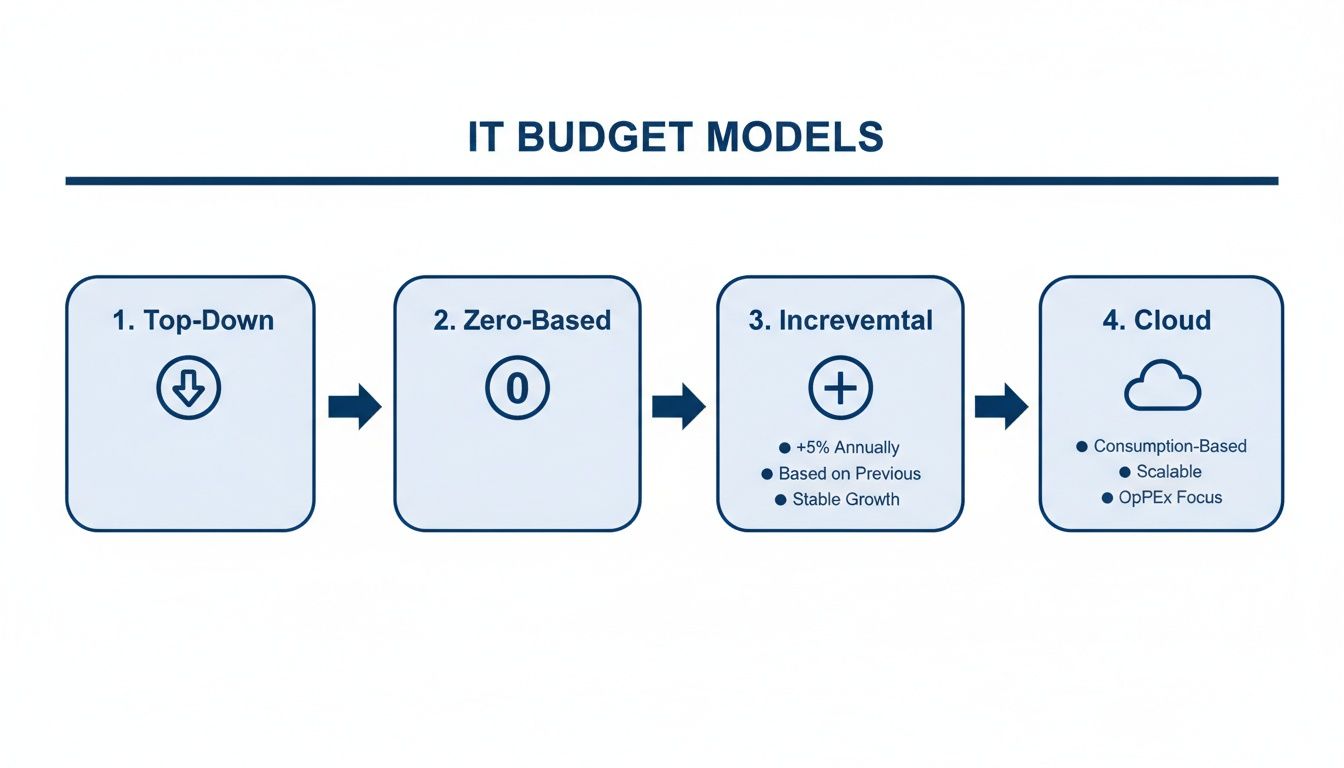
Whether you’re using a Top-Down, Zero-Based, or Incremental approach, having a consistent process is what makes the model work.
Step 1: Planning and Goal Setting
A strong budget always starts with one thing: alignment. Before you even think about crunching numbers, you need a crystal-clear picture of what the business wants to achieve in the coming year.
This means sitting down with the executive team and other department heads. Your job is to connect their goals to tangible technology initiatives. For instance, if the business wants to boost sales by 20%, your team might propose a CRM upgrade or new data analytics tools. The key is to ensure every dollar you ask for directly supports a recognized company priority.
Step 2: Forecasting and Estimation
Once you know what you need to accomplish, it's time to figure out what it will cost. This forecasting stage involves a deep dive into every potential expense, from hardware refreshes and software renewals to new hires and training.
You'll need to gather quotes from vendors, look at historical spending, and talk to project managers to get realistic estimates on timelines and resources. A huge piece of this today is forecasting variable cloud spend. It’s not just about fixed subscriptions; you have to predict usage-based costs from providers like AWS or Azure, which can swing wildly from month to month.
Step 3: Securing Approvals
This is where all your prep work pays off. Presenting the budget isn't about walking through a spreadsheet; it's about telling a story that connects every line item back to business value.
Your presentation should clearly justify each expense and show the return on investment (ROI). It's just as important to highlight the risks of not funding critical maintenance or security upgrades. When the CFO starts asking tough questions, you need to be ready with solid data. Frame your requests in terms of outcomes, like "This investment will improve system uptime by 15%," not just a list of technical specs.
Step 4: Monitoring and Tracking
Getting the budget approved is a huge milestone, but the real work is just beginning. You have to monitor spending continuously to catch overruns before they snowball. This means having tools and processes in place to track actuals against your budget in real-time.
Simple things like monthly budget reviews can make a huge difference. For cloud costs, this is non-negotiable. Use dashboards and set up alerts to flag any unexpected usage spikes so you can jump on them immediately.
A budget is a living document, not something you set and forget. Consistent tracking is what keeps it relevant and effective from the first day of the fiscal year to the last.
Step 5: Variance Analysis and Adjustment
The final step brings everything full circle. Here, you analyze the variance: the difference between what you planned to spend and what you actually spent. This isn't about pointing fingers; it's about learning.
If you're way over budget in one area, find out why. Was it a one-time emergency, or is there an underlying issue that needs a permanent budget change? On the flip side, coming in under budget might mean you've found a new efficiency you can replicate elsewhere. Or it could be a red flag that a critical project is falling behind.
The insights you gain here feed directly back into the planning phase for the next cycle, creating a loop of continuous improvement.
Modern Governance for Effective IT Budgets
A great IT budget isn't just about getting the numbers right. Without a solid governance framework, even the most carefully planned budget can go off the rails, especially in the anything-goes world of cloud computing.
This is where a cultural shift called FinOps comes into play. FinOps isn't another tool; it's a practice that gets finance, tech, and business teams on the same page, creating a shared sense of ownership over every dollar spent in the cloud. It’s all about empowering engineers to make smart, cost-aware decisions on the fly without bogging down innovation. You can dive deeper into this framework with our guide on what FinOps is.
This shift is more important than ever. As businesses double down on technology, CFOs and engineering leaders are funneling more cash into their IT budgets. A recent Gartner survey found that 75% of global CFOs plan to increase their IT budgets by 2026, with nearly half expecting a jump of 10% or more. With that money flowing into cloud and AI, strong governance is the only way to keep spending in check.
Core Governance Tactics for Cloud Budgets
You can't manage what you can't see. Effective cloud governance starts with total visibility and control, built on clear policies that show you exactly where your money is going and who's responsible for it.
Here are the foundational tactics:
- Strategic Resource Tagging: This is the bedrock of cloud accountability. By consistently tagging resources in AWS, Azure, or GCP by project, team, or environment, you can finally make sense of your cloud bill. A good tagging policy turns a giant, confusing invoice into a clean financial report.
- Cost Allocation: Once your tags are in place, you can accurately assign cloud costs to the specific teams or products that used them. This is what makes showback and chargeback models work, holding every department head accountable for their slice of the cloud pie.
- Leveraging Reserved Instances (RIs) and Savings Plans: If you have workloads that run predictably, RIs and Savings Plans are a no-brainer. Committing to a one- or three-year term can slash your costs by up to 72% compared to on-demand pricing, giving you a stable, predictable baseline for your budget.
Strong governance isn't about restricting engineers. It's about giving them the data and tools they need to make smart, cost-effective decisions that help the business win.
The Power of Automation in Cost Control
While manual oversight has its place, automation is your secret weapon for enforcing governance at scale. Let’s be honest: human error and forgetfulness are huge drivers of wasted cloud spend. Automation takes those variables out of the picture, ensuring your cost-control policies are followed 24/7 without fail.
Keeping your spending in line with your plan is crucial, and a solid budget vs actuals analysis will tell you how you're doing. Automation is what helps you keep that variance small.
Take the classic problem of idle resources. Dev and test servers often run around the clock, even though they’re only needed during business hours. That means they sit idle for over 70% of the week, burning cash for no reason.
Automated scheduling is the simple fix. By setting up rules to automatically shut down non-production environments during nights and weekends, you can stop this waste cold. A simple schedule that powers down a dev server from 7 PM to 7 AM on weekdays and all weekend can cut its operating cost by over two-thirds. Suddenly, a variable, unpredictable expense becomes a controlled, optimized part of your IT budget.
Practical Templates and an SMB Budget Example
Talking about budgeting in theory is one thing, but making it work in the real world is where the rubber meets the road. While every business is different, a good template gives you the skeleton you need to build a smart, clear IT budget. It’s a simple way to get your thoughts organized and make sure you don’t forget a critical spending category that could bite you later.
Think of a template as the framework that breaks down the sprawling world of IT spending into neat, manageable buckets. And as you're putting your plan together, it's always helpful to review some general tips for efficient budgeting to keep your overall financial strategy on track.
Key Template Categories for an SMB
For a small or medium-sized business, your budget template should be detailed enough to be useful but not so complex it becomes a chore. The goal is to capture both your fixed, predictable costs and the variable expenses that can creep up on you.
Here are the essential categories every SMB IT budget template should have:
- Hardware: This covers all your physical gear: laptops, servers, routers, you name it. You'll want to account for both brand-new purchases and any planned hardware refresh cycles.
- Software and Subscriptions: This is where you list all your software licenses and recurring SaaS fees. It’s everything from Microsoft 365 and antivirus to your CRM and marketing automation tools.
- Cloud Services: All your costs from providers like AWS, Azure, and Google Cloud go here. It’s really important to separate predictable costs (like reserved instances) from the on-demand, usage-based spending that can fluctuate wildly.
- Personnel: Don’t forget the people! This bucket includes salaries, benefits, and any ongoing training for your IT staff. This is often one of the biggest line items in the budget, and it's a critical investment.
- Contingency Fund: This is your "break glass in case of emergency" fund. A good rule of thumb is to set aside 5-10% of your total IT budget for unexpected hardware failures, urgent security patches, or other surprises. It's a non-negotiable.
Let's walk through what this looks like with a fictional company. Imagine "Innovate Solutions," a 50-employee tech startup mapping out its annual IT budget. Their big goals for the year are to beef up cybersecurity, support a growing remote team, and get their spiraling cloud costs under control.
For more on how to tie your financial plans directly to business objectives, our guide on budgets and forecasts dives deeper into this process.
Sample IT Budget for a Small Business (Annual)
Here’s a simplified look at how Innovate Solutions might break down their annual IT budget. This table provides a clear snapshot of where their money is going, helping them align every dollar with their strategic goals for the year ahead.
| Category | Description | Estimated Cost | Percentage of Total |
|---|---|---|---|
| Hardware | 15 new laptops, 2 network switches, misc. accessories | $22,500 | 15% |
| Software/SaaS | CRM, project management, productivity suite, security tools | $45,000 | 30% |
| Cloud Services | AWS hosting, backup services, development environments | $30,000 | 20% |
| Personnel | Salary and benefits for one IT Manager | $40,500 | 27% |
| Contingency Fund | For unexpected repairs, security incidents, or urgent needs | $12,000 | 8% |
| Total Annual Budget | $150,000 | 100% |
This structure gives them a clear, actionable plan. They know exactly how much they can spend on new gear, what their software renewals will cost, and how much headroom they have for cloud experiments.
The IT manager at Innovate Solutions started by listing all the known expenses, like the predictable renewal fees for their CRM and project management tools. They also budgeted for 15 new laptops to replace aging machines for the sales team. Easy enough.
Their biggest headache? Cloud spend. After digging into past invoices, the manager forecasted their baseline cloud costs but also set aside funds for a new production environment needed for a major product launch. To keep that variable spending in check, they also budgeted for a cost optimization tool to automatically shut down development servers after hours.
By breaking down the budget into these clear categories, Innovate Solutions turned a daunting financial exercise into a powerful strategic plan. They could directly trace every dollar spent to a specific business outcome: from keeping employees productive to launching new products.
Finally, they allocated a solid 8% of the total budget to their contingency fund. That one decision gives them the breathing room to handle an unforeseen security threat or a sudden spike in cloud usage without blowing up their entire financial plan for the year. The final budget isn't just a spreadsheet; it's a roadmap showing how technology will fuel their growth.
How to Optimize Cloud Spend and Your IT Budget
Taming cloud spend is easily one of the biggest headaches in modern IT budgeting. Unlike a predictable software subscription, cloud costs can balloon seemingly overnight, turning a carefully planned budget into a financial mess. The secret to getting these expenses back under control is to focus on specific, actionable strategies.
Simple, proven tactics can make a huge difference. Things like right-sizing instances to actually match what your workloads need, deleting "orphaned" storage volumes that are just sitting there unattached to any server, and using spot instances for tasks that can handle an interruption. Each one of these steps chips away at waste and contributes to a much healthier bottom line.
Eliminating Waste from Idle Resources
One of the biggest culprits of cloud waste, and one of the most persistent, is paying for idle resources. Think about it: your development, testing, and staging environments are often left running 24/7 by default. But they're really only being used during business hours.
That means you could be paying for servers sitting completely unused for over 70% of the week. That includes every single night and the entire weekend.
This constant drain is a massive drag on your IT budget. A single development server that costs a few bucks an hour doesn't sound like much, but leave it running all day, every day, and you're looking at thousands in wasted spend every year. Tackling this one issue is one of the fastest ways to make a real dent in your monthly cloud bill.
The most effective cloud cost optimization starts by answering a simple question: "Are we paying for resources that nobody is using right now?" Shutting down idle servers is the low-hanging fruit of IT budgeting.
When a Specialized Platform Is the Smart Choice
While native tools from providers like AWS and Azure do offer some scheduling features, they can be a real pain to set up and manage. You often need someone who knows their way around scripting just to get them working. For most small and midsize businesses, a dedicated platform like CLOUD TOGGLE is a much more direct path to savings.
It gives you a straightforward interface to set up automated on/off schedules in just a few minutes, no deep technical skills required. This approach doesn't just deliver an immediate ROI by slashing your idle resource costs; it also makes governance way easier by letting you hand out scheduling controls without giving away the keys to your entire cloud account. You can dig deeper into this in our guide on what is cloud cost optimization.
This kind of control is becoming more critical as IT budgets grow to support new tech. AI, for instance, is pouring fuel on the fire of IT spending. Investment is projected to hit $337 billion in 2025 and more than double to $749 billion by 2028. As companies weave AI into their daily operations, IT leaders have to balance that innovation with strict cost control. That makes stamping out waste from idle servers an absolute priority. You can check out the full IDC FutureScapes report to see where these trends are heading.
Frequently Asked Questions About IT Budgeting
Even the best-laid plans come with questions. When it comes to IT budgeting, a few common ones pop up again and again. Getting these sorted can sharpen your financial strategy and help you sidestep some costly traps.
Here are a few of the most pressing questions we see from business leaders planning their tech spend.
How Much Should a Small Business Spend on IT?
There’s no magic number here, but a solid rule of thumb is to allocate between 3% and 6% of your annual revenue to IT. Think of this as a starting point, not a final answer. A tech-heavy startup in a high-growth phase might lean toward the higher end, while a stable business with mature infrastructure could comfortably sit at the lower end.
What pushes the needle one way or the other?
- Business Maturity: A brand-new company building everything from scratch will have much higher initial costs than an established business focused on maintenance.
- Industry: It's no surprise that an e-commerce store or a software company will have a much bigger IT budget than a small construction firm.
- Strategic Goals: If your roadmap includes a big digital transformation project or launching a new mobile app, your IT spend has to reflect that ambition.
What Is the Biggest Mistake in IT Budgeting?
By far, the most common, and most damaging, mistake is forgetting to build in a contingency fund. Too many businesses map out a budget that accounts for every known expense but leaves zero wiggle room for the unexpected. When a server suddenly dies, a new security threat demands an urgent fix, or a vendor springs a price hike, the entire year's financial plan can go off the rails.
An IT budget without a contingency fund is just wishful thinking. Setting aside 5% to 10% of the total IT budget isn't a luxury; it’s an essential buffer that gives you the flexibility to handle emergencies without sacrificing your strategic goals.
Another classic error is underestimating just how variable cloud costs can be. Without tight monitoring, it's incredibly easy for cloud bills to spiral out of control and blow up your budget.
How Often Should We Review Our IT Budget?
The old "set it and forget it" annual budget is a recipe for disaster in today's world. Technology, and your business needs, simply change too fast. A rigid yearly plan can be obsolete in a matter of months, leaving you stuck and unable to jump on new opportunities or respond to threats.
That’s why quarterly reviews are the new standard. These regular check-ins are your chance to see how your planned spending stacks up against reality. This rhythm allows you to shift funds where they're needed most, adjust forecasts based on actual usage, and make sure your IT budget stays locked in with your company’s bigger picture.
Ready to stop wasting money on idle cloud resources? CLOUD TOGGLE makes it easy to automate server schedules, cutting your cloud bill without complex scripts or giving up control. Start saving today by visiting https://cloudtoggle.com to begin your free trial.