When you get down to it, the real difference between AWS, Azure, and GCP boils down to their core philosophies and who they're trying to win over. AWS has the most extensive and mature toolkit, making it the go-to choice for a massive range of applications. Azure plays to its strengths in the enterprise world, tying everything back into the Microsoft ecosystem many businesses already rely on. And then there's GCP, which has carved out a niche with its excellence in Kubernetes, data analytics, and AI.
The Three Titans of Cloud Computing
Picking a cloud provider is easily one of the biggest strategic calls a company can make today. The "Big Three" Amazon Web Services (AWS), Microsoft Azure, and Google Cloud Platform (GCP) are the undisputed leaders, each offering a powerful, yet distinct, set of services. Getting a handle on where each one stands and what drives them is the first step to making the right call for your team.
The global cloud market is absolutely booming, which just puts more pressure on this decision. In Q3 2025 alone, the market hit a staggering $107 billion in revenue, marking a 28% jump from the previous year. AWS still holds the top spot with a 29% market share, followed by Azure at 20% and GCP at 13%. Together, these three control a massive 62% of the entire market.
You can dig deeper into these numbers in our analysis of cloud providers market share. This explosive growth, largely fueled by the AI gold rush, also shines a light on a huge risk: paying for cloud resources you aren't even using. Idle compute can quietly drain your budget if you're not careful.
A High-Level Comparison
Each of these platforms has a pretty clear identity. AWS is the original trailblazer, known for its rock-solid reliability and an almost overwhelming catalog of services. Azure leverages decades of enterprise relationships, making it a natural fit for companies already deep into products like Office 365 and looking for smooth hybrid cloud setups. GCP, the challenger, is built on the same internal tech that powers Google Search and YouTube, attracting developers and data-heavy businesses with its top-tier networking, data tools, and open-source DNA.
To put it simply, here’s a quick rundown of how they compare at a glance.
Quick Comparison of AWS, Azure, and GCP
This table breaks down the core identity of each provider, giving you a high-level snapshot to start from.
| Feature | AWS (Amazon Web Services) | Azure (Microsoft) | GCP (Google Cloud Platform) |
|---|---|---|---|
| Market Position | The dominant leader with the largest market share and the most extensive service portfolio. | The strong number two, deeply integrated into the enterprise software ecosystem. | A fast-growing challenger known for innovation in specific, high-tech areas. |
| Core Strength | Unmatched breadth of services, platform maturity, and a massive community with extensive documentation. | Seamless hybrid cloud capabilities and tight integration with enterprise software like Microsoft 365 and Active Directory. | World-class data analytics, machine learning, AI, and container orchestration with Kubernetes. |
| Ideal User Profile | Just about any business, from startups to enterprises, needing a wide array of mature, scalable services. | Large enterprises, organizations heavily invested in Microsoft software, and anyone prioritizing hybrid cloud. | Startups and tech-forward companies focused on data, containers, and building AI-driven applications. |
While this gives a good overview, the best choice always depends on your specific needs, existing tech stack, and long-term goals. The devil, as they say, is in the details.
Comparing Core Compute, Storage, and Database Services
Let's get down to the nuts and bolts. The real foundation of any cloud platform rests on three pillars: compute, storage, and databases. These are the fundamental building blocks for almost any application you can imagine.
Getting this choice right is critical. While all three major players offer strong solutions, they each have their own philosophy on performance, variety, and how their services plug into each other. Subtle differences here can have a huge impact down the road.
All three giants build their core offerings on the Infrastructure as a Service (IaaS) model, giving you the raw server power, storage, and networking to build whatever you need.
Virtual Machines: The Compute Engine
At the heart of it all are virtual machines (VMs). This is where your code actually runs.
Amazon EC2 (Elastic Compute Cloud) is the old guard and the undisputed king of variety. With the most extensive list of instance types available, AWS has a tailored solution for nearly any workload you can dream up. From tiny, general-purpose instances to beastly, memory-optimized machines, they’ve seen it all and built an instance for it.
Microsoft’s Azure Virtual Machines are a powerful challenger, especially for companies already living in the Microsoft world. Their VMs offer a massive range of options that integrate beautifully with tools like Windows Server and Office 365, making it a natural fit for established enterprises.
Then there's Google’s Compute Engine (GCE). While it might offer fewer instance families, GCE wins hearts with its user-friendly approach. Features like custom machine types and genuinely impressive live migration capabilities which keep your apps running during host maintenance make it a developer favorite.
Object and Block Storage Solutions
When it comes to storage, the conversation usually splits into two camps: object storage for unstructured data (think media files and backups) and block storage that acts like a hard drive for your VMs.
For object storage:
- AWS Simple Storage Service (S3) is the industry standard for a reason. It’s been around for over a decade, and its reputation for durability, massive scale, and a rich feature set is well-earned.
- Azure Blob Storage delivers great performance and is often the most budget-friendly choice, especially if you can leverage its tight integration with other Azure services.
- Google Cloud Storage stands out with its unified access across different storage classes and incredibly low latency. This makes it a top pick for data-hungry applications that need lightning-fast access to large files.
For block storage, the competition is just as fierce. AWS Elastic Block Store (EBS), Azure Disk Storage, and Google Persistent Disk all deliver the reliable, high-speed performance you need. The real differentiators are in the details: specific performance tiers, how snapshots work, and the pricing models for IOPS (Input/Output Operations Per Second). Understanding how storage supports different growth strategies is key; our guide on horizontal vs vertical scaling dives deeper into this topic.
Relational and NoSQL Database Services
Managed databases are a game-changer. They handle all the tedious work maintenance, patching, backups so your developers can stay focused on building great products.
When you’re looking at managed databases, don’t just get fixated on raw performance specs. Think about the practical stuff: How easy is it to migrate your existing data? How good are the monitoring tools? How well does the service automate complex tasks like failover? These things will make or break your operational budget.
For relational databases, each provider brings a strong offering to the table. Amazon RDS (Relational Database Service) supports a huge range of engines, including PostgreSQL, MySQL, MariaDB, Oracle, and SQL Server. Azure SQL Database is a powerhouse for SQL Server workloads, but they also offer flexible options for open-source databases. Meanwhile, Google’s Cloud SQL is loved for its simple setup and hands-off management for MySQL, PostgreSQL, and SQL Server.
The differences become even clearer when you look at NoSQL:
- Amazon DynamoDB is built for one thing: insane speed. It's a key-value and document database designed for single-digit millisecond performance, no matter how much you scale.
- Azure Cosmos DB is a globally-distributed, multi-model database. It's incredibly flexible, supporting APIs for SQL, MongoDB, Cassandra, and more, all within a single service.
- Google Cloud Bigtable is a wide-column store, the very same tech that powers massive Google services like Search and Gmail. It's built for huge analytical and operational workloads.
Navigating Pricing Models and Cost Management
Trying to make sense of cloud pricing can feel like a losing battle, but it's where your budget is either won or lost. The big three AWS, Azure, and Google Cloud all offer similar-sounding models, but the devil is in the details. Subtle differences in how they bill can lead to wildly different monthly statements, so getting past the sticker price is key.
At a high level, all three platforms give you a mix of pay-as-you-go, commitment-based discounts, and deeply discounted ephemeral instances. While this gives you flexibility, the way each provider implements these options varies quite a bit. Your choice really comes down to how predictable your workloads are and how much you can tolerate potential interruptions.
Comparing Pay As You Go and Billing Increments
The simplest model is Pay-As-You-Go, where you just get billed for what you use. Sounds easy enough, but the billing increment is a huge differentiator.
Not long ago, per-hour billing was the norm, but the market has thankfully moved to much finer billing cycles.
- AWS and GCP both bill by the second for their main compute instances (EC2 and Compute Engine), though AWS often has a 60-second minimum charge to kick things off.
- Azure also offers per-second billing, but it isn't universal across all instance types; some of their services still default back to per-minute billing.
This might seem like a tiny detail, but it adds up fast. If you're running short, bursty workloads like automated tests or quick data processing jobs, per-second billing can save you a bundle by making sure you aren't paying for hundreds of unused minutes.
The most crucial takeaway when comparing cloud pricing is that the "cheapest" provider on paper often isn't the most cost-effective in practice. Things like data egress fees, storage operation charges, and billing increments can create unexpected costs that dwarf the initial compute price difference.
Commitment Discounts AWS vs Azure vs GCP
If you have predictable, long-term workloads, committing to a provider is the best way to lock in some serious discounts. All three will give you savings for a one or three-year commitment, but they package it up differently.
Here's a quick look at how their core pricing models and discounts stack up.
Pricing Model Comparison
| Pricing Model | AWS | Azure | GCP |
|---|---|---|---|
| Pay-As-You-Go | Per-second billing (60s minimum) | Per-second/per-minute billing | Per-second billing |
| Commitments | Reserved Instances & Savings Plans | Reserved Instances & Hybrid Benefit | Committed Use Discounts (CUDs) |
| Discount % | Up to 72% | Up to 72% | Up to 70% |
| Spot/Preemptible | Spot Instances | Spot Virtual Machines | Preemptible VM Instances |
Let's break that down a bit more.
AWS Reserved Instances (RIs) and Savings Plans can slash your on-demand costs by up to 72%. RIs are pretty rigid: you commit to a specific instance family in a specific region. Savings Plans are much more flexible, letting you commit to a certain dollar amount of spend across a variety of services.
Azure Reserved Virtual Machine Instances (RIs) work in a similar way, offering big discounts for a commitment. But Azure has a unique ace up its sleeve: Azure Hybrid Benefit. This lets customers with existing on-premises Windows Server and SQL Server licenses bring them to the cloud for massive savings.
Google Cloud's Committed Use Discounts (CUDs) are often praised for being the most user-friendly. Instead of reserving specific machine types, you just commit to a certain amount of vCPU and memory usage in a region. The discount gets applied automatically to any VMs that match, making it much easier to optimize without having to plan every last detail.
Spot Instances and Preemptible VMs
For any workload that can handle an interruption think batch processing, rendering, or even some dev/test environments you can tap into a provider's spare capacity for the deepest discounts out there. We're talking up to 90% off on-demand rates.
- AWS Spot Instances let you bid on unused EC2 capacity. Prices shift with supply and demand, and your instance can be pulled with a two-minute warning if AWS needs it back.
- Azure Spot Virtual Machines offer the same kind of deep discounts on spare capacity. They’re a great fit for batch jobs or temporary development environments.
- GCP Preemptible VM Instances are even more straightforward. They offer a fixed, low price but can be terminated with only a 30-second notice. These are built for truly fault-tolerant applications that can handle a sudden shutdown without breaking a sweat.
Understanding the true cost of cloud services means looking at every one of these models and carefully mapping them to what your applications actually need.
Evaluating Specialized AI and Serverless Capabilities
The foundational services compute, storage, databases are just the price of entry into the cloud market these days. The real fight between AWS, Azure, and GCP is happening in the specialized, high-value services. For any modern business, that means looking hard at the Artificial Intelligence (AI) and serverless computing ecosystems each provider brings to the table. This is where you build a real competitive edge.
Google Cloud Platform (GCP) has long been a beast in the AI space, running on the same internal research and infrastructure that powers Google Search. Its Vertex AI platform gives you a single, unified place to build, deploy, and manage machine learning models with surprising ease. If your business is all-in on data analytics and AI-driven products, GCP is often the natural place to start.
Not to be outdone, Microsoft's Azure Machine Learning is a powerhouse, especially in the enterprise world. It weaves itself deeply into the broader Microsoft ecosystem, offering robust tools for both seasoned data scientists and developers just dipping their toes into AI. Its real strength is providing a collaborative, end-to-end platform for the entire ML lifecycle that just feels right inside existing enterprise workflows.
AI and Machine Learning Platforms Compared
While all three platforms are incredibly capable, they’re definitely tuned for different audiences and use cases. The right choice really comes down to your team’s background and what you’re trying to build, whether it's a natural language model, a computer vision system, or a predictive analytics engine.
- AWS SageMaker: As the market leader, Amazon Web Services (AWS) offers the most comprehensive and mature AI/ML platform. SageMaker has a tool for pretty much every stage of the machine learning process, from labeling data to deploying and monitoring the model. Its sheer breadth makes it a fit for almost any AI project, but be prepared for a steeper learning curve.
- Azure Machine Learning: Azure’s biggest wins are user-friendliness and enterprise integration. It gives you both a no-code/low-code design interface (Azure ML Studio) for getting prototypes out the door fast and a full SDK for developers who want to get their hands dirty. This dual approach makes it super accessible for teams with mixed skill levels.
- Google Vertex AI: GCP’s Vertex AI gets a lot of praise for its powerful automation features (AutoML) and its tight integration with other Google data services like BigQuery. It takes a lot of the pain out of training high-quality custom models, making advanced AI accessible to a much wider audience.
The Serverless Computing Revolution
At the same time as the AI race, serverless computing has completely changed how we build and deploy applications. It lets developers run code without ever thinking about provisioning or managing a server, and you only pay for the exact compute time you use.
Serverless isn’t just about saving money; it's a strategic move that leads to faster development and incredible scale. The real difference between providers isn’t just the function’s performance, but the ecosystem of services that can trigger those functions and handle the results.
All three providers have compelling serverless platforms, but they each have their own personality.
- AWS Lambda: As the original pioneer, Lambda is the most mature and widely used serverless platform out there. It connects with over 200 AWS services, making it an unbelievably powerful and flexible tool for building event-driven systems.
- Azure Functions: This offering really shines with its developer experience, especially if you're already in the Microsoft world. It offers flexible hosting, great local debugging tools, and smooth integration with services like Azure DevOps, making it a favorite for enterprise dev teams.
- Google Cloud Functions: Google’s serverless tool is simple, fast, and, no surprise, tightly woven into the GCP ecosystem. It's fantastic at reacting to events inside Google Cloud like a file upload to Cloud Storage or a message in Pub/Sub and is known for its impressively quick cold start times.
How to Choose the Right Cloud Provider for Your Business
Picking the right cloud provider goes way beyond comparing feature lists and pricing calculators. It's about taking a hard look at your business goals, what your team already knows, and where you want your tech to go in the long run. The best answer in the Azure vs. GCP vs. AWS debate is almost never about which platform is "better" overall, but which one fits your specific situation like a glove.
A startup trying to move fast on an AI product might feel right at home with Google Cloud. GCP's deep roots in container orchestration with Kubernetes, paired with its user-friendly Vertex AI platform, creates the perfect launchpad for data-heavy products. Plus, its developer-centric vibe and generous free tiers are a huge draw for companies just getting started.
On the other hand, an established enterprise that's already deep into the Microsoft ecosystem will find Azure to be a no-brainer. The way it seamlessly connects with tools like Microsoft 365, Active Directory, and Windows Server is a massive advantage. Azure’s well-established hybrid cloud features make it the go-to for organizations that want to dip their toes in the cloud without throwing out their on-premise investments.
Aligning Cloud Choice with Business Scenarios
For businesses that need the biggest, most mature toolbox available, AWS is often the default choice. The sheer number of services they offer from specialized databases to global content delivery networks means there’s a proven solution for pretty much any problem you can think of. The massive community and wealth of documentation also provide a support system that’s second to none.
To give you a better idea of how technical needs drive these choices, the decision tree below maps out a common thought process for deploying AI versus Serverless workloads.
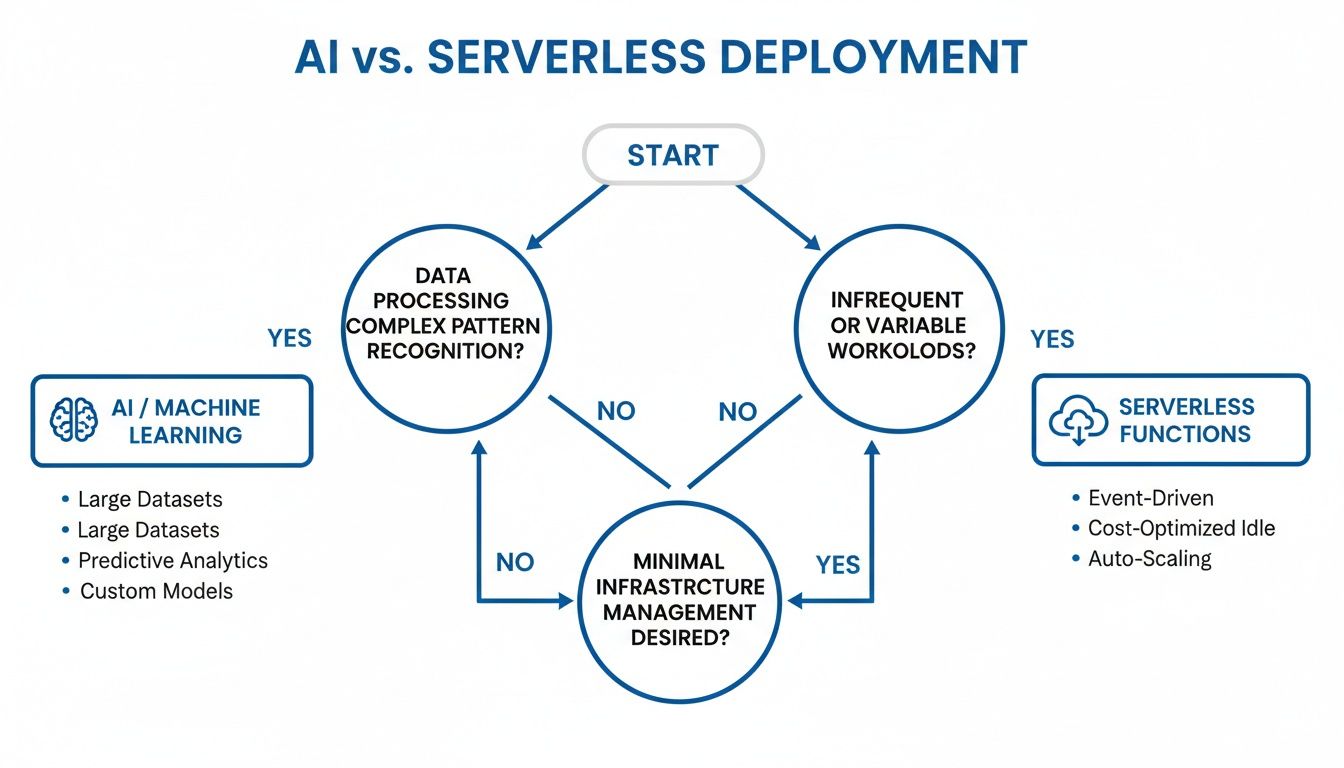
As you can see, the path you take depends heavily on things like data complexity, how predictable your workloads are, and how much you want to manage your own infrastructure.
Choosing a cloud provider is a strategic business decision, not just a technical one. Your selection should directly support your primary business goals, whether that's accelerating time to market, reducing operational overhead, or unlocking new revenue streams through data.
Sometimes, an outside perspective can make all the difference. Working with a cloud strategy consultant can give you a roadmap tailored to your business, connecting your goals with the right cloud platform. A consultant can help you evaluate your current tech, spot potential migration headaches, and build a cost-effective plan from day one.
Exploring Hybrid and Multi-Cloud Strategies
These days, the conversation isn't just about picking one provider and sticking with them. More and more companies are adopting hybrid and multi-cloud strategies to stay flexible and avoid getting locked into a single vendor.
- Hybrid Cloud: This is where you mix a private cloud or your own on-premise hardware with a public cloud. It’s perfect for businesses that have strict data sovereignty rules or need to keep legacy systems running on-prem while building new things in the cloud.
- Multi-Cloud: A multi-cloud approach means you use services from more than one public cloud provider. This lets you pick the best tool for the job from each platform for example, using GCP for its AI chops while running your core compute and storage on AWS.
This approach definitely adds a layer of complexity to management and cost control, but the payoff in resilience and access to top-tier technology can be huge. The key is to have a clear strategy and the right tools in place to manage everything effectively across different environments.
Optimizing Cloud Costs Beyond Native Tools
Picking a winner in the Azure vs. GCP vs. AWS debate is only half the battle. The real work begins when you have to control your spending inside their ecosystem. One of the biggest, and most overlooked, culprits is idle compute waste. These are your non-production servers for development, testing, and staging that run 24/7 but are only really used during business hours, quietly burning through your budget.
Each of the big three cloud providers offers native tools to help with this. AWS has its AWS Instance Scheduler, and Azure offers Start/Stop VMs v2. While they get the job done on a basic level, these tools often come with serious drawbacks that limit how effective they can be in a real-world team environment.
For starters, these native solutions can be a nightmare to set up. They often require you to deploy complex scripts or wrestle with fine-grained IAM roles, which is a big ask for anyone not deeply embedded in that specific cloud. They also lack simple, user-friendly interfaces, making it tough for non-technical team members to manage schedules. And if you're running a multi-cloud strategy with both AWS and Azure? Forget about it. You're stuck managing two completely separate, siloed systems.
A Streamlined Approach to Cloud Savings
This is exactly where specialized platforms come in and prove their worth. Instead of fighting with complicated configurations, you can use a single, unified dashboard to control server uptime across all your cloud environments. It’s a simple concept, but it targets one of the most effective cost-saving strategies you can implement.
A dedicated tool like CLOUD TOGGLE is built from the ground up to solve this one specific problem with elegance. It lets your team create and manage on/off schedules for servers in both AWS and Azure from one intuitive interface. No more jumping between different cloud consoles.
The core issue with native scheduling tools isn't a lack of capability, but a lack of accessibility. True cost optimization happens when you empower the entire team not just senior engineers to participate in managing resources responsibly and safely.
The platform gives you a clear, visual overview of your scheduled resources and, most importantly, how much you’re saving.
Empowering Teams with Secure Access
One of the biggest wins here is the ability to delegate control without opening up security holes. With the native tools, giving someone permission to manage server schedules often means granting them much broader permissions inside your cloud account a risk most security teams aren't willing to take.
In contrast, purpose-built platforms offer granular role-based access control (RBAC). This means you can:
- Empower Developers: Let them temporarily override a schedule for some late-night work without needing to create a support ticket.
- Involve Project Managers: Give them direct control over the uptime for their project's test environments.
- Maintain Security: Ensure users can only interact with the specific servers and schedules they're assigned to, without ever touching the rest of your cloud infrastructure.
By removing the friction and security headaches that come with native tools, businesses can finally implement a consistent and effective strategy to wipe out idle compute waste. This turns what was once a complex technical chore into a simple, collaborative process that delivers predictable savings, month after month.
Frequently Asked Questions
Choosing between AWS, Azure, and GCP isn't just about comparing feature lists. It often comes down to practical questions about your team, your goals, and your long-term strategy. Here are a few of the most common ones we hear.
Which Cloud Is Best for a Small Business or Startup?
Honestly, the "best" cloud for a startup really depends on your team's background and what you're building.
Many startups find a natural home on GCP. Its strengths in Kubernetes, data analytics, and machine learning are a huge draw, and its developer-friendly tools and generous free tiers make it incredibly accessible when you're just starting out.
That said, you can't go wrong with AWS. It has the largest ecosystem and the most extensive documentation out there, making it a solid, reliable choice for nearly any application you can dream up. If you're building for the enterprise market or your team already lives in Microsoft tools, Azure offers a familiar and powerful environment that just clicks.
For a startup, the most important decision after choosing a cloud provider is implementing a cost control strategy. Preventing non-production servers from running 24/7 from day one is a habit that will save thousands as the company scales.
How Difficult Is It to Migrate Between Cloud Providers?
The difficulty of a cloud migration depends almost entirely on your application's architecture. Moving straightforward workloads think virtual machines or simple databases is relatively painless. Each provider has its own set of tools designed to make these kinds of lifts as easy as possible.
The real challenge begins when your applications are deeply woven into platform-specific services like AWS Lambda, Google BigQuery, or Azure Cosmos DB. This is where vendor lock-in becomes a real headache, often requiring a significant re-engineering effort to move. To keep their options open, many teams now use containerization with tools like Docker and Kubernetes to build more portable applications from the get-go.
When Should I Choose a Single Cloud vs. a Multi-Cloud Strategy?
For most businesses, sticking with a single cloud provider is the smartest path. It simplifies management, lets your team build deep expertise on one platform, and often unlocks better volume discounts. This focused approach cuts down on operational chaos and streamlines your entire tech stack.
A multi-cloud strategy, where you use services from more than one provider, is a more advanced play. The main upsides are avoiding vendor lock-in, picking the absolute "best-in-class" service for a specific job, and boosting your application's resilience. A common pattern is using one primary provider for core workloads while tapping a second one for a specialized capability, like GCP for its AI services or Azure for its hybrid cloud management. Just be aware that this approach adds a layer of management complexity and can make cost optimization a much bigger challenge.
Stop wasting money on idle cloud resources. CLOUD TOGGLE provides a simple, secure way to schedule server shutdowns across AWS and Azure, empowering your whole team to contribute to savings. Start your free 30-day trial and see how much you can save.