Let’s get one thing straight right away: multi-cloud means using services from multiple public clouds like AWS and Azure, while a hybrid cloud strategy blends your private, on-premises gear with at least one public cloud. The one you choose really comes down to whether you’re chasing flexibility across vendors or need tight control over your sensitive data.
Understanding Multi-Cloud and Hybrid Cloud
Before we jump into a full-blown comparison, we need to nail down the definitions. People often throw "multi-cloud" and "hybrid cloud" around as if they're the same thing, but they describe two very different ways of setting up your IT infrastructure. Getting this right from the start is the key to making a smart decision for your business.
A multi-cloud strategy is all about spreading your apps and workloads across two or more public cloud providers. This setup lets you pick and choose the best tools for the job from each vendor, a "best-of-breed" approach. For instance, you might use Amazon Web Services (AWS) for its powerful computing muscle and Google Cloud Platform (GCP) for its specialized machine learning services. The main goals here are to dodge vendor lock-in, get better pricing, and build a more resilient system.
On the other hand, a hybrid cloud strategy connects your own private infrastructure, like an on-premise data center, to at least one public cloud, creating one cohesive environment. This approach gives you the scale of the public cloud while letting you keep sensitive data and critical apps safe and sound in your own private space. A classic example is a bank keeping customer data on-premise for compliance reasons but using the public cloud for developing and testing new applications.
Key Architectural Differences
It's also worth noting that these two models aren't mutually exclusive. You can absolutely have a hybrid cloud that is also multi-cloud by connecting your private data center to services from both AWS and Azure. This "hybrid multi-cloud" model is actually becoming pretty common as companies look for the ultimate in flexibility and control.
To make things clearer, let's break down the core differences in a simple table.
Quick Comparison: Multi-Cloud vs. Hybrid Cloud
| Attribute | Multi-Cloud | Hybrid Cloud |
|---|---|---|
| Core Components | Two or more public clouds (e.g., AWS, Azure, GCP) | At least one public cloud and a private environment |
| Primary Goal | Avoid vendor lock-in and access best-of-breed services | Balance public cloud scalability with private control |
| Data Location | Distributed across various public cloud providers | Spans both private data centers and public clouds |
| Management Focus | Managing disparate APIs and services across vendors | Integrating and orchestrating between private and public |
This table gives you a snapshot, but the bottom line is that each approach solves a different set of problems. Your choice hinges on your specific technical requirements, compliance needs, and business goals.
These strategies are no longer niche; they're mainstream. Recent surveys show that 89–92% of companies are now using some form of multi-cloud, with the average business juggling services from about 2.2 public clouds. This shows a clear trend: companies are strategically picking services from different vendors instead of going all-in on one. As these environments get more complex, it's critical to know how to manage a multi-cloud strategy effectively to keep costs and chaos under control.
Comparing Cloud Architecture and Operations
Once you get past the basic definitions, the real differences between multi-cloud and hybrid cloud show up in the day-to-day grind. The model you pick has a direct impact on your team's workflows, the tools they’ll need, and the sheer complexity they'll have to manage. Both approaches bring challenges that you just don't see in a single-cloud or fully on-prem setup, demanding solid architectural planning from day one.
For any tech leader, grasping these operational implications is non-negotiable. As this CTO's guide to developing in the cloud points out, success is all about making sure your technical strategy actually serves the business's bottom line.
Multi-Cloud Operational Realities
Running a multi-cloud setup is, at its core, an exercise in managing diversity. Each provider, whether it's AWS, Azure, or Google Cloud, comes with its own unique set of APIs, security models, and service level agreements (SLAs). This isn't a copy-paste situation; your DevOps team can't just replicate processes from one cloud to the next.
They either need to become fluent in multiple cloud ecosystems or lean heavily on abstraction layers and specialized tooling to create some semblance of a unified command center. That means a steep learning curve and a whole lot more management overhead.
Here’s a look at the key operational hurdles in a multi-cloud world:
- Disparate APIs and Tooling: Teams end up writing and maintaining different automation scripts for each provider. This is a recipe for errors and inconsistencies.
- Inconsistent Security Policies: A security control you rely on in AWS might not have a clean equivalent in Azure. This forces your team to patch together custom policies just to maintain a consistent security posture.
- Complex Cost Management: Trying to track spending across multiple, completely different billing systems is a nightmare. Without tight controls, it’s an open invitation for shadow IT and budget blowouts.
The real challenge of multi-cloud isn't just using different services; it's orchestrating them. Success means weaving a cohesive operational fabric over a foundation that is, by its nature, distributed and fragmented.
Hybrid Cloud Operational Realities
With a hybrid cloud model, the name of the game is integration. The whole point is to build a seamless, functional bridge between your private, on-premise infrastructure and a public cloud. That takes some serious networking expertise to guarantee the connection is reliable, secure, and doesn't introduce crippling latency.
Unlike a multi-cloud setup where everything is cloud-native, a hybrid environment is about connecting two fundamentally different worlds. This shifts the operational focus squarely onto data synchronization, workload mobility, and finding a way to manage it all from a single pane of glass.
These are the primary operational headaches in a hybrid setup:
- Network Connectivity and Latency: You absolutely need a stable, high-speed connection between your data center and the public cloud. If that link goes down, so do any applications spanning both environments.
- Data Synchronization Hurdles: Keeping data consistent across both private and public clouds is incredibly complex, especially for stateful applications and databases that need real-time updates.
- Skills Mismatch: A true hybrid environment demands a unique blend of skills. Your team needs to be just as comfortable with traditional IT like storage, networking, and virtualization as they are with modern, cloud-native practices.
A Quick Comparison on the Ground
To make the operational differences clearer, let's break them down side-by-side. The table below dives into the practical, day-to-day realities of managing each environment, from complexity and security to performance and vendor lock-in.
Operational Deep Dive: Multi-Cloud vs. Hybrid Cloud
| Operational Aspect | Multi-Cloud Environment | Hybrid Cloud Environment |
|---|---|---|
| Management Complexity | High. Juggling disparate APIs, tools, and billing systems across multiple public clouds. Requires specialized expertise for each platform. | High. Focuses on integrating two different architectures (on-prem and public cloud). Networking and data sync are major challenges. |
| Security Implementation | Complex. Requires creating a unified security posture over multiple, distinct provider models. Policy enforcement is difficult. | Challenging. Involves extending on-prem security controls to the cloud and securing the connection between the two environments. |
| Performance | Can be optimized by placing workloads in the best-performing cloud for that specific task. Potential for latency between clouds. | Highly dependent on network connectivity. Latency between on-prem and public cloud can be a significant performance bottleneck. |
| Vendor Dependency | Low. The core benefit is avoiding lock-in to a single cloud provider, offering more negotiation leverage and flexibility. | Moderate. While you control the on-prem side, you're still dependent on a single public cloud provider for the "hybrid" part of the equation. |
Each model presents its own set of operational puzzles. Multi-cloud is about taming diversity, while hybrid cloud is about mastering integration.
Market forecasts show that both hybrid and multi-cloud are here to stay. The hybrid cloud market is expected to jump from USD 194.14 billion in 2026 to USD 347.82 billion by 2031. This growth is no surprise when you consider that 87–92% of enterprises are already using multiple clouds, and 70% of IT leaders view a solid hybrid strategy as essential.
No matter which path you take, the added complexity means you need a plan. A powerful cloud management platform is no longer a "nice-to-have" it's a critical tool for getting the visibility and control required to run either of these environments without chaos.
Analyzing Cost Models and Security Postures
Choosing between multi-cloud and hybrid cloud isn't just an architectural decision; it fundamentally shapes your budget and security strategy. Each model comes with its own financial quirks and risk profiles. Getting this right is critical for protecting both your bottom line and your data.
A multi-cloud setup can create amazing pricing leverage, letting you pick the cheapest service for any given job from a menu of providers. The catch? This diversity creates a ridiculously complex billing nightmare, making it tough to see where your money is actually going. A hybrid cloud, on the other hand, mixes the predictable capital costs of your own hardware with the flexible operational costs of a public cloud.
The Financial Implications of Each Model
In a multi-cloud world, cost management is a scattered, frantic exercise. You’re not just tracking one bill; you're trying to piece together spending data from several vendors, each with its own unique pricing and billing cycle. This complexity is the perfect hiding spot for redundant spending and wasted resources.
The hybrid cloud cost model is a tale of two budgets. You have the upfront investment and ongoing maintenance of your on-premise gear (CapEx), combined with the pay-as-you-go agility of the public cloud (OpEx). This gives you a solid grip on your baseline costs, but it also means you're on the hook for the entire lifecycle of your own hardware, from purchase to retirement.
The real financial question isn't just "which is cheaper?" It's "which model gives us better control and predictability?" Multi-cloud gives you leverage over vendors, while hybrid cloud offers a stable cost baseline for your most predictable workloads.
No matter which path you take, a disciplined approach to financial management is non-negotiable. To get a better handle on this, check out our detailed guide on what FinOps is and how it helps control cloud costs.
Comparing Security Postures
When we talk security, the multi-cloud vs. hybrid debate is all about where you draw your perimeter. Each approach creates a different set of vulnerabilities and demands a completely different security playbook.
A multi-cloud security posture is, by its nature, decentralized. Your security team has to become fluent in the native security tools and identity systems for every single cloud you use. Trying to enforce one consistent security policy across AWS, Azure, and GCP requires seriously sophisticated tools and deep expertise to avoid leaving gaping holes.
The biggest security headaches in a multi-cloud setup include:
- Inconsistent Configurations: A simple misconfiguration in one cloud's security settings can open up a vulnerability that doesn't even exist in your other clouds, making uniform policies a huge challenge.
- Fragmented Visibility: Without a central platform, getting a single, clear view of your security posture is next to impossible. This leaves dangerous blind spots for attackers to find and exploit.
- Increased Attack Surface: Every new cloud provider you add expands your digital footprint, creating more potential entry points that need to be constantly monitored and secured.
In a hybrid cloud environment, the main security worry is the connection point: the digital bridge between your private data center and the public cloud. This link has to be heavily fortified to keep intruders out and prevent data breaches. Your team is responsible for securing data both in transit and at rest, across two very different worlds.
The primary security challenges in a hybrid setup are:
- Securing Data in Transit: Data flowing between your on-premise servers and the public cloud is a prime target for attackers. Rock-solid encryption and secure network protocols are absolutely essential.
- Extending On-Premises Policies: Taking your strict, on-premise security rules and making them work in the flexible, dynamic public cloud is tricky and often requires new tools and a fresh mindset.
- Maintaining Compliance: You have to ensure that all data moving between your private and public environments meets strict regulatory rules like GDPR or HIPAA, which adds a whole other layer of complexity.
As you weigh your options, it's vital to understand the common cloud computing and security risks that can impact any distributed system. Both models demand a proactive, defense-in-depth security mindset, but where you focus your efforts will be vastly different. Multi-cloud requires mastering multiple public platforms, while hybrid cloud is all about perfecting the integration of two distinct worlds.
Finding Your Fit with Real-World Use Cases
Abstract definitions and technical breakdowns are a good start, but the real decision between multi-cloud and hybrid cloud happens when you see how they perform in the wild. The best strategy isn't about what's trendy; it's about what your business actually needs. Your goals, your constraints, and your industry. Looking at real-world scenarios is how you move from theory to a practical choice.
This decision tree is a great way to visualize the main drivers. More often than not, it boils down to a classic trade-off: cost control versus data security.
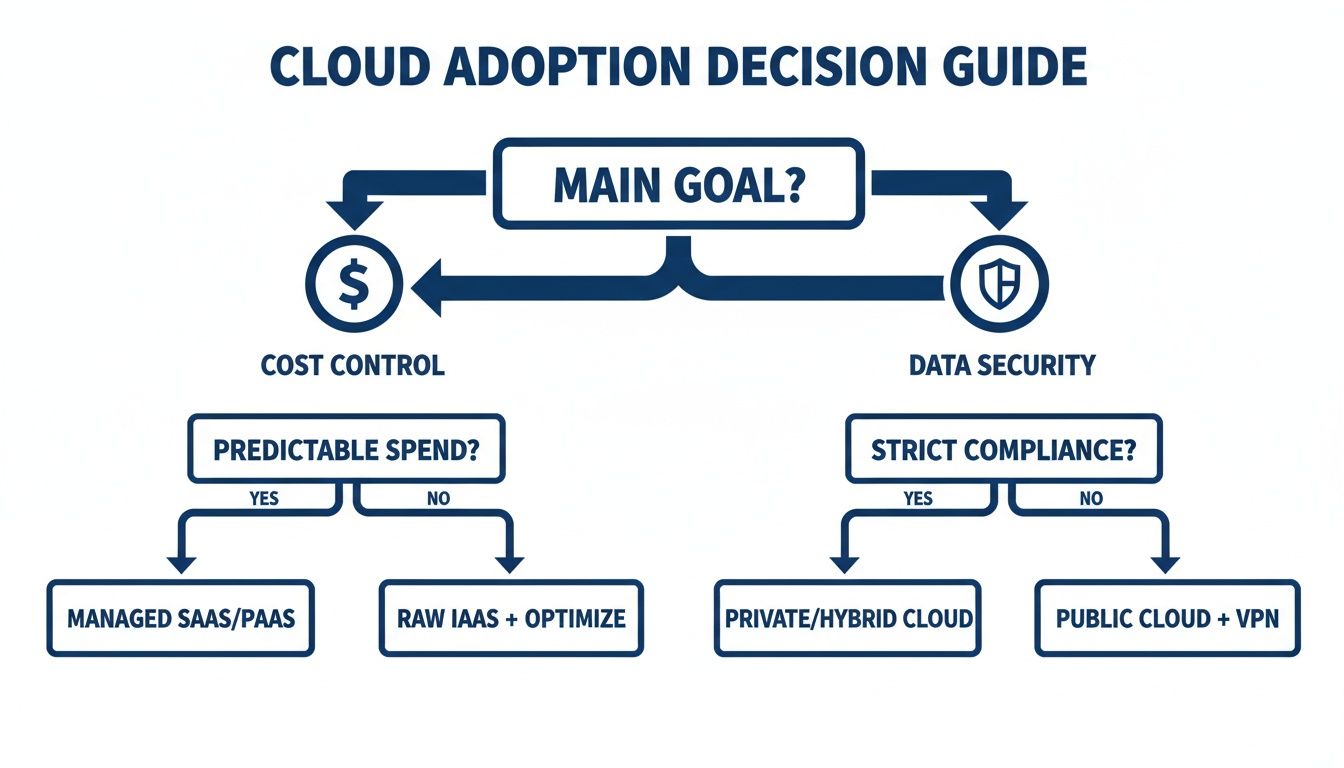
As the chart shows, companies that prioritize optimizing costs and having the flexibility to use the best tool for the job usually lean toward multi-cloud. On the flip side, those bound by strict data security and compliance rules often find that a hybrid model is the only practical option.
When Multi-Cloud Makes Sense
A multi-cloud architecture feels like a natural fit for cloud-native organizations that live and breathe flexibility. If your top priorities are performance, avoiding vendor lock-in, and hand-picking the best services from every provider, this is your strategy.
Picture a modern SaaS company building a new AI-powered analytics tool. Their cloud strategy might look something like this:
- Core Application Hosting: They could run their main app on Amazon Web Services (AWS), using its familiar EC2 instances and S3 storage.
- AI and Machine Learning: For the heavy-lifting AI work, they might tap into Google Cloud Platform (GCP) to use its best-in-class BigQuery and Vertex AI services.
- Global Content Delivery: To guarantee speedy load times for users worldwide, they could integrate Cloudflare's CDN and security services, adding yet another "cloud" to their stack.
In this setup, the company isn't stuck in a single ecosystem. They're free to use the best tool for each specific task, optimizing both performance and cost. An e-commerce business could do something similar, using one provider for its North American operations and another to meet data residency rules and improve performance in Europe.
The secret to a great multi-cloud strategy is to stop thinking of cloud providers as monolithic platforms. Instead, treat them like a portfolio of specialized services. This mindset empowers your teams to innovate by giving them access to the best tools on the market, no matter whose logo is on them.
When Hybrid Cloud Is the Right Call
A hybrid cloud model shines in scenarios where data governance, regulatory compliance, and integrating with legacy systems are completely non-negotiable. It creates a secure, controlled home for your most sensitive data while still giving you a bridge to public cloud innovation.
Think of a regional bank or a healthcare provider. These organizations are swimming in personally identifiable information (PII) and operate under strict regulations like GDPR, HIPAA, or PCI DSS. For them, a hybrid strategy is almost always the only path forward.
Here’s how a financial institution might set it up:
- On-Premises Private Cloud: All core banking platforms, customer transaction histories, and sensitive financial data stay locked down in their private, on-premises data center. This gives them total control over security and makes it simple to prove compliance to auditors.
- Public Cloud for Development and Analytics: They can use a public cloud like Microsoft Azure to build new customer-facing mobile apps or run analytics on anonymized data sets. This lets their developers work in a modern, agile environment without ever exposing sensitive data.
- Scalable Web Applications: Customer portals or marketing websites that don't touch core transaction data can live in the public cloud. This allows them to easily handle traffic spikes without having to over-provision expensive on-prem hardware.
This approach truly offers the best of both worlds. They meet all their regulatory obligations by keeping critical data in-house, but they still get to tap into the public cloud's scale and flexibility for less sensitive workloads. It’s also a smart, measured path for any organization with a heavy investment in existing infrastructure that wants to modernize gradually.
A solid multi-cloud or hybrid cloud strategy is about more than just technology. To make it work, you need a rock-solid governance framework to wrangle the complexity, keep costs in check, and lock down security across every single one of your environments.
Without clear rules of the road and some smart automation, even the most brilliant cloud plans can spiral into budget blowouts and glaring security holes. Think of a good governance plan as your roadmap, making sure every team is playing by the same set of rules. This is absolutely critical whether you’re comparing multi-cloud vs. hybrid cloud, as your resources are spread out and can get messy fast.
Planning a Successful Cloud Migration
Don't even think about moving a single workload until you've gone through a detailed planning phase. This is the step that saves you from the classic migration headaches and paves the way for a smooth, well-managed deployment. Rushing it is a recipe for misconfigured resources and sticker shock when the bill arrives.
First up is a thorough workload assessment. You need to get under the hood of each application. Analyze its performance needs, its dependencies, and how sensitive its data is. This analysis is what helps you decide what can happily live in a public cloud and what might be better off staying on-prem in a hybrid setup.
Next, it's all about dependency mapping. Apps today are rarely islands; they're constantly talking to databases, APIs, and a dozen other services. Mapping out these connections is non-negotiable. It ensures that when you move one piece of the puzzle, you don't accidentally break something else. This process also shines a light on tricky data portability issues you need to solve before you start the move.
Effective governance isn't a barrier to speed; it's a guardrail. It allows teams to move quickly and innovate safely by establishing clear, automated policies for security, compliance, and cost management from day one.
Building Your Cloud Governance Framework
Once your migration plan is solid, it's time to build a governance framework that can grow with you. This isn't a one-off task; it's about creating a centralized set of policies that apply everywhere, whether a resource is running on AWS, Azure, or in your own data center.
A practical governance framework needs a few key components to give you complete control.
Here’s a simple checklist to get you started:
- Identity and Access Management (IAM): Create a central IAM strategy built on the principle of least privilege. This is fundamental. It means users and services only get access to the specific resources they need to do their job, dramatically shrinking your attack surface.
- Resource Tagging and Organization: Make resource tagging mandatory. No exceptions. Using consistent tags for things like department, project, and environment (
dev,prod,qa) is the only way to get accurate cost allocation, reliable automation, and effective security monitoring. - Automated Policy Enforcement: Don't rely on manual checks. Use infrastructure-as-code (IaC) tools and cloud-native services to put your policies on autopilot. This could be a script that automatically shuts down non-compliant resources or an alert that flags a security misconfiguration the second it happens.
- Cost Management and Optimization: Get proactive with your spending. Set hard budgets, create spending alerts, and schedule automatic shutdowns for non-production environments. This approach stops surprise bills in their tracks and builds a culture where everyone on the team is accountable for costs.
By tackling these areas one by one, you build a robust framework that truly supports your cloud strategy. It’s what keeps your multi-cloud or hybrid environment secure, compliant, and cost-effective as it scales.
Optimizing Your Cloud Spend with CLOUD TOGGLE
Whether you land on a multi-cloud or hybrid cloud strategy, you’ll quickly run into the same problem: complexity. And one of the most immediate, cash-burning consequences of that complexity is wasted spend on idle resources. Servers left running overnight, on weekends, or during holidays can quietly eat up a huge chunk of your cloud bill.
This is the exact problem CLOUD TOGGLE was built to solve. It hits the financial waste inherent in complex cloud setups head-on by making it absurdly simple to schedule server shutdowns. Instead of juggling multiple, clunky consoles, you get one unified platform to manage costs across providers like AWS and Azure.
Centralized Control for Distributed Teams
One of the biggest headaches in managing a multi-cloud or hybrid setup is giving teams enough power to control their costs without handing over the keys to the kingdom. CLOUD TOGGLE nails this balance with features designed for secure, delegated management.
Here’s how it empowers your teams:
- Role-Based Access Controls: You can give team members permission to manage server schedules without granting them full, risky access to your cloud account.
- Easy Scheduling Overrides: If a developer needs a server after hours for a critical push, they can override the shutdown schedule in seconds. No admin ticket required.
- Multi-Team Support: The platform is built to grow with you. You can create separate teams with their own users, cloud connections, and schedules, keeping everything clean and organized as you scale.
This screenshot from the CLOUD TOGGLE dashboard gives you a feel for the intuitive interface used to create and manage these schedules.
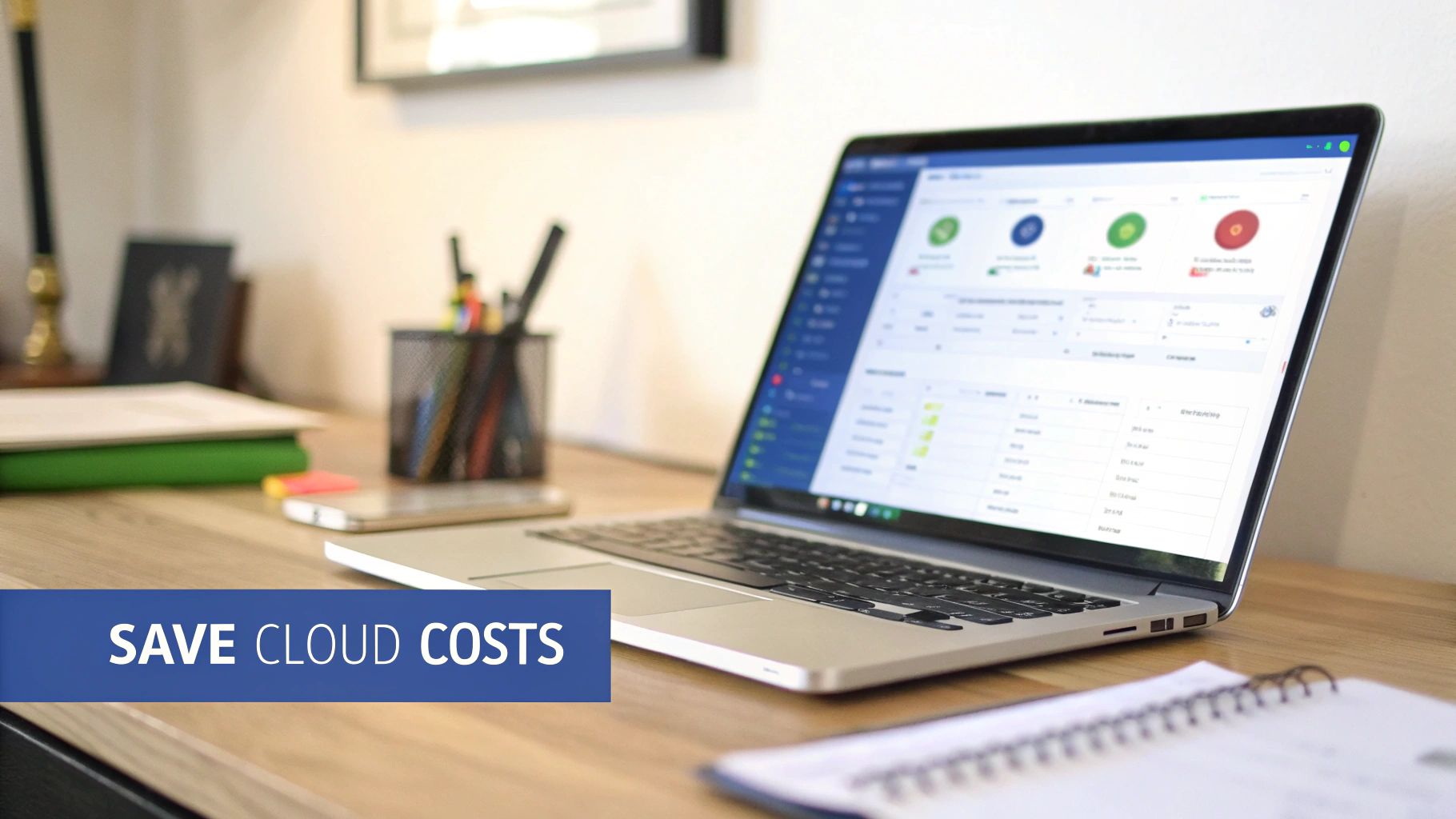
The clean, user-friendly layout shows just how easily teams can see, edit, and create shutdown schedules for their resources.
A Strategic Asset for FinOps
Ultimately, CLOUD TOGGLE isn’t just a scheduling tool; it's a strategic asset for putting FinOps principles into practice. FinOps is all about bringing financial accountability to the cloud's variable spending model, helping distributed teams make smart trade-offs between speed, cost, and quality.
By providing a simple, safe way for everyone to participate in cost savings, you move from a reactive cost-cutting model to a proactive, predictable one. This is the core of a successful FinOps culture.
Instead of a central IT team playing budget police, CLOUD TOGGLE empowers your whole organization. Developers, QA testers, and project managers can all chip in on savings safely and predictably. This kind of shared responsibility is vital for taming costs in sprawling multi-cloud and hybrid environments. By automating the shutdown of non-production resources, it's common to see savings of 60% or more on those specific workloads, turning a major expense into a predictable operational win.
Common Questions, Answered
Even after breaking down the architectures, operations, and costs, a few specific questions always pop up when teams are trying to decide between multi-cloud and hybrid cloud. Let's tackle them head-on to clear up any final confusion.
Can You Use Both Multi-Cloud and Hybrid Cloud?
Yes, absolutely. In fact, many organizations are already doing it, creating what’s known as a hybrid multi-cloud environment. This just means you're connecting your on-premise hardware to services from more than one public cloud provider.
A common scenario is a company keeping its most sensitive customer data locked down in its private data center (the hybrid part) while using AWS for its database workloads and Google Cloud for machine learning services (the multi-cloud part). This approach gives you the ultimate in flexibility, but be warned: it's also the most complex to manage.
Which Model Is Better for a Small Business?
For most small businesses, diving into multi-cloud is the more sensible and practical path. It lets you pick and choose the best tools from different providers without the massive upfront investment and ongoing headache of managing your own physical hardware.
Think of a small e-commerce shop. They could easily use one provider for reliable web hosting and another for a specialized marketing analytics platform, all without needing to buy a single server. A hybrid setup really only comes into play if a small business already has existing on-premise gear or is bound by strict regulatory rules from day one.
The core idea is to align your cloud strategy with your capital and operational realities. Multi-cloud is generally more OpEx-friendly, which suits smaller businesses, while hybrid cloud requires a mix of CapEx and OpEx that larger enterprises are better equipped to handle.
What Are the Hidden Costs of a Multi-Cloud Setup?
While multi-cloud lets you shop around for the best prices, it has a few "gotchas" that can inflate your bill if you're not careful. The biggest offender is data egress fees, the charges providers hit you with anytime you move data out of their cloud. If your applications are constantly shuffling large datasets between different cloud environments, these fees can stack up fast and wipe out your expected savings.
Other hidden costs to keep an eye on include:
- Increased Management Overhead: You'll need engineers who are fluent in multiple cloud platforms. Finding, hiring, and training that talent costs more.
- Tooling and Integration: You almost always need to invest in third-party management and security tools just to get a single, unified view across all your clouds.
- Redundant Services: Without strong governance, it's easy for different teams to spin up similar services in different clouds, leading to duplicated and wasted spending.
Ready to take control of your cloud costs in any environment? With CLOUD TOGGLE, you can easily automate server shutdowns across AWS and Azure, eliminating wasted spend from idle resources. Start your 30-day free trial and see how much you can save.