When people talk about cost optimization on AWS, they're not just talking about slashing budgets. It's really about the strategic practice of cutting out waste and making sure every dollar you spend on the cloud delivers real business value. This means getting into a continuous cycle of monitoring, analyzing, and tweaking your AWS environment so you only pay for what you actually need, at the best possible price.
Building Your Foundation for AWS Cost Control
Before you can cut costs, you have to understand where your money is going. It’s tempting to jump right into rightsizing instances or buying a bunch of Savings Plans, but without a clear picture of your spending, those actions are just shots in the dark.
The first and most critical step is getting total visibility into your cloud spend. This is what turns cost management from a reactive guessing game into a proactive, data-driven strategy. It’s all about creating a clear map of your expenses, which lets you pinpoint waste and make decisions you can stand behind. Skip this groundwork, and any savings you find will likely be temporary.
The Power of a Consistent Tagging Strategy
Tagging is the absolute bedrock of cost visibility. Think of tags as simple metadata labels you attach to every single AWS resource. For any serious cost optimization effort, having a consistent tagging strategy is completely non-negotiable. It’s what allows you to slice and dice your cost data in ways that actually make sense for your business.
A simple but incredibly effective strategy is to apply a few key tags to everything:
- Project/Application: Pinpoints the specific application or service the resource is for.
- Team/Owner: Assigns cost responsibility to the engineering team that owns the resource.
- Environment: Differentiates between production, staging, dev, and test environments.
- Cost Center: Ties the resource back to a specific department's budget for accounting.
Once these tags are in place, you can finally move from staring at a giant, monolithic bill to seeing a detailed breakdown of expenses. You can answer crucial questions like, "How much is our dev environment costing us this month?" or "Which project is driving up our S3 storage bill?" That level of detail is where real analysis begins.
Unlocking Insights with AWS Cost Explorer
With your resources properly tagged, AWS Cost Explorer becomes your best friend. It’s way more than just a billing dashboard; it's a powerful analytics tool that helps you visualize spending trends and zero in on your biggest cost drivers.
Start by using Cost Explorer to group your spending by the tags you just created. This will immediately show you which projects, teams, or environments are eating up the most budget. You can also dig into historical data to spot weird anomalies or seasonal patterns, which helps you forecast future spend with much better accuracy. Setting up saved reports for key views, like "Monthly Dev Team Spend," makes it easy to keep an eye on things.
If you're just getting started, it can be helpful to understand the basic concepts behind What Is Cloud Cost Optimization and How to Start Saving, as this process lays out the practical first steps.
The goal isn't just to see the numbers, but to understand the story they tell. A sudden spike in EC2 costs for the marketing team's project might indicate a forgotten test environment, presenting an immediate opportunity for savings.
Fostering a FinOps Culture of Shared Responsibility
At the end of the day, technology alone can't solve your cost problems. The most successful organizations build a FinOps culture, which is just a framework for getting finance, engineering, and business teams to work together on cloud financial management. It’s about creating shared ownership and making cost everyone’s responsibility.
In a FinOps model, engineers get the visibility and tools they need to make cost-aware decisions while they're building things, not after the invoice shows up. Finance teams can actually forecast cloud spend accurately, and business leaders can clearly see the ROI on their cloud investments. You can get a deeper dive in our guide covering what cloud cost optimization is.
Building this foundation of visibility and shared responsibility is the true first step toward getting your AWS costs under control for good.
Rightsizing and Modernizing Your Compute Resources
With a clear picture of your spending, the next logical step is to tackle the biggest line item on most AWS bills: compute. Services like Amazon EC2 are almost always the top spend category, which makes them the perfect place to hunt for major savings.
The most common culprit here is overprovisioning, paying for way more capacity than you actually use. It’s an easy trap to fall into. An engineer, laser-focused on performance, might pick a larger instance to make sure an application never hits a ceiling. While that comes from a good place, this "just in case" strategy leads to a ton of idle capacity that just quietly bleeds your budget dry, month after month.
The goal is to match your resources precisely to what your workload really needs. We call this rightsizing.
Using Data to Drive Rightsizing Decisions
Guesswork has no place in rightsizing. Making changes based on a hunch is a recipe for performance disasters that will cost you far more than you save. This is where AWS's native tools shine, turning what could be a risky guess into a data-backed decision.
Your first stop should be AWS Compute Optimizer. This tool uses machine learning to chew through your past usage data like CPU and memory and then spits out concrete recommendations for your EC2 instances. It doesn't just say an instance is underused; it will suggest a specific, smaller instance type that can handle the job for less money. It might even point you to a different instance family that offers better price-performance.
These insights are gold. Properly rightsizing your resources can unlock 10-30% savings on your compute bill. When you realize that many overprovisioned instances are chugging along at just 10-20% utilization, you start to see just how much cash is being wasted.
Modernize Your Infrastructure for Better Price-Performance
Rightsizing isn't just about shrinking instances; it's also about getting smarter with your instance selection. AWS is constantly rolling out new generations of instances that deliver way better performance for the same price or even less. Sticking with older instance families is like leaving free money on the table.
A perfect example is the shift to AWS Graviton processors. These custom-built chips often provide a massive price-performance boost over the old-school x86 instances. For many common workloads, simply moving from an older M5 instance to a newer, Graviton-based M7g can give you a noticeable performance kick while cutting your costs at the same time.
Don't treat your instance selection as a "set it and forget it" task. Get in the habit of reviewing your most-used instance families every quarter. See if a newer generation offers a better deal. This simple audit can turn up some seriously impressive savings.
Exploring Serverless Alternatives
Sometimes, the best way to optimize compute is to just get rid of the server altogether. Serverless models like AWS Lambda and AWS Fargate completely flip the cost equation on its head. Instead of paying for a server to sit around waiting for work, you only pay for the exact compute time your code uses, down to the millisecond.
Think about going serverless for these kinds of jobs:
- Event-Driven Tasks: Functions that kick off when something specific happens, like processing a new file that's been uploaded to an S3 bucket.
- APIs with Spiky Traffic: Workloads that get slammed with traffic in short bursts but are quiet the rest of the time.
- Background Jobs: Tasks that run on a schedule but don't need a server running 24/7.
Moving to serverless does require a different way of thinking about your architecture, but for the right workload, it's the ultimate form of rightsizing because idle compute is completely eliminated. For other workloads, another great strategy is using deeply discounted spare capacity. Check out our guide on EC2 Spot Instances to see how they can fit into your cost-saving plan.
Automating Savings and Eliminating Idle Resources

After you've rightsized your active workloads, the next big win in AWS cost optimization is tackling resources that are sitting completely idle. One of the biggest and most preventable sources of cloud waste comes from non-production environments running 24/7.
Think about it: your development, staging, and testing servers don't need to be burning cash while your team is asleep or enjoying the weekend. Leaving them on is like keeping the lights on in an empty office building. It adds zero value and just inflates your bill. Implementing a simple "on/off" schedule is a high-impact move that delivers immediate savings.
The opportunity here is massive. AWS compute services like EC2, Lambda, and Fargate often make up a staggering 60% or more of a company's total AWS bill before any discounts are applied. This makes them the perfect target for optimization, especially for small and midsize businesses trying to get their cloud spend under control.
Choosing Your Scheduling Method
When it comes to scheduling shutdowns, you've got a few options, each with a different balance of power and ease of use. A key part of cutting out waste is learning how to automate repetitive tasks efficiently, which frees up both your team's time and your compute resources.
Native AWS tools can be a good starting point if your team has the technical chops.
- AWS Instance Scheduler is a solution you deploy with a CloudFormation template. It uses Lambda functions and DynamoDB to manage schedules based on how you've tagged your resources.
- Custom Scripts written with the AWS CLI or SDKs offer the most flexibility, but you need to be comfortable with coding and running them on a schedule.
The catch? These native solutions often require a lot of setup, ongoing maintenance, and deep technical expertise. They're not exactly user-friendly for non-engineers, which creates a bottleneck if a developer needs to burn the midnight oil and override a schedule.
The Advantage of Dedicated Scheduling Tools
This is where third-party platforms like CLOUD TOGGLE really shine. They're built specifically to solve the idle resource problem, focusing on making it simple, secure, and accessible for the entire team.
Imagine a QA tester needs a staging environment for some late-night testing. With a native script, they'd probably have to file a ticket with DevOps, wait for an engineer to manually change the schedule, and then remember to ask them to change it back. This friction is exactly why many teams just give up on scheduling altogether.
A dedicated tool completely changes this dynamic by safely putting the power in the users' hands.
By providing a simple, intuitive interface, you democratize cost savings. A project manager or a QA lead can adjust a schedule for their specific needs without needing deep AWS knowledge or waiting on an engineer, making cost management a true team effort.
Our complete guide on how to schedule AWS instances dives deeper into these options, helping you figure out the best approach for your company.
Comparing AWS Instance Scheduler vs CLOUD TOGGLE
A feature-by-feature comparison can help you choose the right scheduling tool for your team's needs, focusing on ease of use, security, and flexibility. The decision often boils down to your team's technical depth and what you prioritize in your day-to-day operations.
| Feature | AWS Instance Scheduler | CLOUD TOGGLE |
|---|---|---|
| User Interface | Managed via AWS Console, tags, and config files (technical) | Intuitive web-based GUI (accessible to non-technical users) |
| Setup & Maintenance | Requires CloudFormation deployment and ongoing maintenance | Simple setup in minutes with minimal ongoing management |
| Access Control | Relies on complex IAM policies to grant permissions | Built-in Role-Based Access Control (RBAC) for safe delegation |
| Overrides | Requires manual tag changes or script adjustments | Easy, one-click temporary overrides directly from the interface |
| Multi-Cloud Support | AWS-only solution | Supports multiple cloud providers like AWS and Azure |
While native tools are powerful, platforms like CLOUD TOGGLE are designed to remove operational friction. For example, its built-in RBAC lets you give a team lead permission to manage schedules only for their project's resources, without ever exposing your entire AWS account. This blend of simplicity and security makes it possible for any organization to adopt a consistent scheduling habit, leading to significant and lasting cost reductions.
Once you've right-sized your instances, the next big win in AWS cost reduction comes from getting smart about how you pay. Sticking with the default On-Demand pricing for everything is like leaving money on the table. Instead, you can match your purchasing strategy to your actual usage patterns and slash your bill without changing a single instance.
Think of it like this: paying On-Demand is like buying a single bus ticket for every trip. It's flexible but costs the most. Committing to a different pricing model is like buying a monthly transit pass. You get a huge discount because the provider knows you'll be a regular customer.
Decoding Savings Plans and Reserved Instances
For workloads that have predictable, steady usage, committing to AWS is a financial no-brainer. The two best tools for this are Savings Plans and Reserved Instances (RIs), both of which can knock off up to 72% compared to On-Demand rates.
Savings Plans are the newer, more flexible option. You commit to spending a certain amount on compute per hour (say, $10/hour) for a one or three-year term. The beauty is that this discount automatically applies to your EC2, Fargate, and Lambda usage across different instance families, sizes, and even regions. This makes them a perfect fit for modern, dynamic environments where your instance types might change but your overall compute usage stays pretty consistent.
Reserved Instances (RIs) offer similar discounts but are more rigid. With RIs, you commit to a specific instance family in a particular region for a set term. They're best for extremely stable, predictable workloads, like a production database that you know will run on the same m5.large instance in us-east-1 for the next three years.
Many savvy organizations use a blended approach: they cover their most stable, "always-on" workloads with RIs for the deepest possible discounts, then layer Savings Plans on top to cover the rest of their predictable compute.
Leveraging Spot Instances for Massive Savings
Ready for even bigger discounts? For certain types of workloads, you can unlock jaw-dropping savings with Spot Instances. These are spare EC2 instances that AWS offers at a discount of up to 90% off On-Demand prices.
So, what's the catch? AWS can reclaim these instances with just a two-minute warning if they need the capacity back.
This "reclaim risk" means Spot is a terrible idea for critical production workloads like your main web server or primary database. However, they are a perfect match for any task that is fault-tolerant and can be interrupted.
Spot Instances are a game-changer for:
- Big data processing and analytics jobs
- CI/CD build and test pipelines
- Batch processing and media rendering
- High-performance computing (HPC) simulations
The key to using Spot successfully is designing your application to handle interruptions gracefully. If a Spot instance gets terminated, your workload manager should be able to pause the job and simply resume it on a new Spot instance when one becomes available.
Building a Blended Pricing Strategy
The most effective way to optimize AWS costs isn't to pick just one model. It's about creating a layered, blended strategy that uses the right tool for the right job.
Start by covering your absolute baseline, predictable usage with a foundation of Reserved Instances or Savings Plans. Then, handle spiky, temporary, or fault-tolerant workloads with a mix of On-Demand and Spot Instances. This hybrid model gives you the best of both worlds: deep discounts for your core infrastructure and total flexibility for everything else.
This approach turns AWS pricing from a simple expense into a strategic advantage. As the experts at Flexera often point out, while Spot Instances offer huge discounts, blending them with Savings Plans and RIs is what truly maximizes efficiency. Of course, you have to monitor your commitment utilization closely to avoid waste.
You can dive deeper into these blended strategies and their benefits by checking out insights on AWS cost optimization approaches from TierPoint. By carefully matching each workload to the most cost-effective pricing model, you ensure you're never paying more than you need to for the resources that power your business.
Implementing Governance for Continuous Optimization
Getting your AWS bill under control is a great first step, but the real challenge is keeping it that way. Effective cost optimization isn't a one-time project you can just check off a list. It's an ongoing discipline that needs a strong governance framework to deliver lasting results.
Without a system in place, even your best work will slowly unravel as new resources get deployed and teams change. This is where you make the critical shift from reactive cleanups to proactive management. The goal is to build a system that keeps your cloud environment financially healthy as your business evolves. It boils down to creating visibility, setting guardrails, and establishing a regular rhythm for review and action.
Setting Up Proactive Alerts and Dashboards
You can't afford to wait for the end-of-month bill to discover a cost problem. The first piece of a solid governance framework is setting up automated systems that flag issues in near real-time.
AWS Budgets is your best friend here. Don't just set one massive budget for the entire account. Get granular. Create specific budgets for individual projects, teams, or environments using those tags you set up earlier. You can configure alerts to ping you via email or Slack when spending is forecasted to exceed your threshold, not just when it already has.
Next, make sure you have AWS Cost Anomaly Detection enabled. This is a free tool that uses machine learning to learn your normal spending patterns and automatically flags unusual spikes. It’s the kind of thing that can catch a misconfigured Lambda function or a forgotten EC2 instance within hours, stopping a small mistake from turning into a four-figure surprise.
Creating a Cadence for Cost Reviews
Alerts are only useful if they trigger action. To build accountability, you need to establish a regular rhythm for reviewing costs with key players from engineering, finance, and operations.
A monthly cost review meeting is a great place to start. A tight agenda keeps everyone focused:
- Who are the top spenders? Pinpoint which services, projects, or teams drove the most cost last month.
- How are we trending? Compare this month’s spend to last month and what you forecasted.
- What's our next target? Based on the data, where are the next-best opportunities for optimization?
- Celebrate the wins. Publicly acknowledge teams that successfully cut waste or implemented new savings.
These meetings transform cost optimization on AWS from a back-office finance task into a shared engineering responsibility. When developers see the direct financial impact of their architectural choices, they become partners in building a more efficient cloud.
True governance isn’t about restricting developers. It's about empowering them with the data and context they need to make cost-aware decisions while keeping their agility and speed.
This flowchart offers a simple decision tree to help you match the right AWS pricing model to your specific workload.
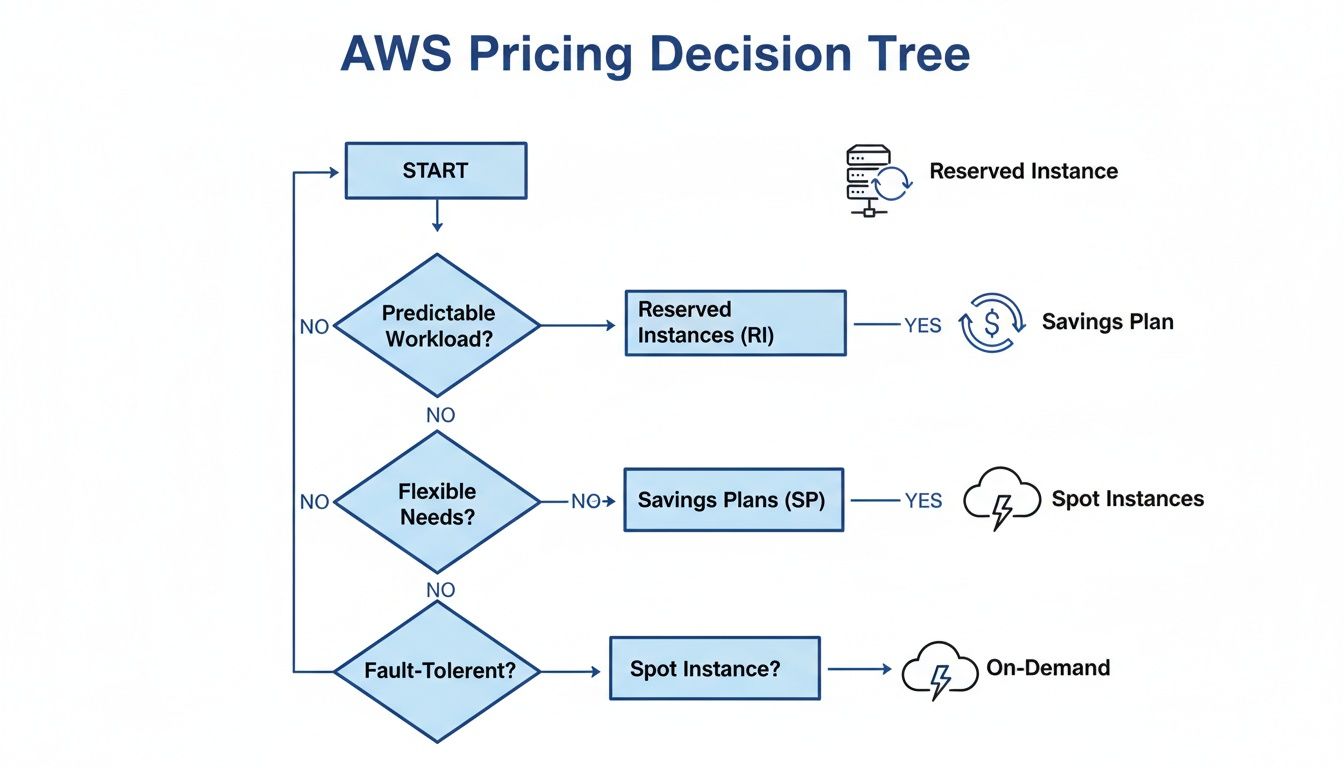
The key takeaway is that your purchasing strategy is a core part of cost governance. You have to match it to your workload's predictability and fault tolerance to really be effective.
Demonstrating Value to Stakeholders
Finally, your hard work needs to be visible. Use AWS Cost Explorer or third-party tools to build simple, insightful dashboards that track your key metrics and show off the savings.
Create a few key widgets that show:
- Total monthly spend vs. budget
- Savings generated from rightsizing and scheduling
- Utilization of Savings Plans and Reserved Instances
- Cost trends for your most critical applications
These dashboards tell a clear, data-backed story of your progress. They prove the ROI of your optimization efforts to leadership and reinforce the value of a cost-conscious culture across the entire organization. This continuous feedback loop is what makes governance stick, turning it into a strategic advantage that keeps your cloud spend efficient and predictable.
Frequently Asked Questions About AWS Cost Optimization
Getting a handle on your AWS bill can feel overwhelming, and it's natural to have questions. Let's tackle some of the most common ones I hear from teams who are just starting their cost optimization journey.
What Is the First Step for Cost Optimization on AWS?
Before you do anything else, you need visibility. Seriously, you can't optimize what you can't see.
The absolute first step is to implement a rock-solid tagging strategy. Tag every single resource with labels that make sense for your business, think project, department, application, or owner. This simple discipline is the foundation of everything that follows. Once you have tags in place, tools like AWS Cost Explorer instantly become useful, showing you exactly where your money is going. Without it, you're just guessing.
A classic mistake is jumping straight to buying Savings Plans or RIs. I've seen teams lock in savings on wasteful, oversized instances because they skipped the visibility step. Get your house in order first.
How Much Can I Realistically Save on My AWS Bill?
This is the million-dollar question, and the answer varies, but the potential is almost always huge. For most organizations, a 20% to 50% reduction is completely achievable. Sometimes, it's even more.
Here’s where those savings typically come from:
- Rightsizing instances: Just by matching instance sizes to actual workload needs, you can easily shave 10-30% off your compute bill.
- Scheduling shutdowns: This is the low-hanging fruit. Turning off development and staging environments at night and on weekends can slash their costs by over 70%.
- Using commitments: For your steady, always-on workloads, using Savings Plans or Reserved Instances can get you discounts of up to 72%.
Your total savings really just depends on where you're starting from and how committed you are to making these practices a routine.
Is It Better to Use Savings Plans or Reserved Instances?
It's not an either/or question. The best strategy often involves using both. The right choice really comes down to your workload's needs.
Savings Plans are fantastic for flexibility. They automatically apply to your EC2, Fargate, and Lambda usage across different instance types and even regions. If your environment is dynamic and constantly changing, Savings Plans are your best friend.
Reserved Instances (RIs), on the other hand, are for your predictable, stable workloads. You get a slightly deeper discount, but you're locked into a specific instance family and region. If you know you'll be running that m5.large in us-east-1 for the next three years, an RI is a great way to maximize savings.
How Often Should I Review My AWS Costs?
Cost optimization is a process, not a project. You can't just set it and forget it. Your environment is always changing, new projects spin up, old ones wind down, and your costs will drift if you're not paying attention.
A great starting point is a monthly cost review meeting. Get the key players from DevOps, Finance, and Engineering in a room to go over the bill. What changed? What looks weird? Where can we improve?
Beyond that, you absolutely need automated alerts. Set up daily or weekly budget alerts in AWS to catch spending spikes before they turn into a nasty surprise at the end of the month. The goal is to build cost awareness into your team's DNA, making it a natural part of how you operate.
Ready to stop paying for idle cloud resources? CLOUD TOGGLE makes it easy to automate server shutdowns and cut your AWS bill. Start your 30-day free trial and see how much you can save.