Your website runs fine most days. Then a campaign lands, traffic spikes, pages slow down, and someone on your team asks the question that usually starts a cloud migration: why are we still betting the business on a server we have to babysit?
That’s the practical context for what is amazon ec2. It isn’t just an AWS product name. It’s a way to get computing power when you need it, change it when your workload changes, and stop treating server capacity like a fixed asset you guessed at last year.
For many CTOs and IT managers, the appeal of EC2 isn’t abstract. It’s operational. You can launch a server in minutes instead of buying hardware, waiting for delivery, installing it, and hoping demand matches your forecast. But that same flexibility creates a second problem. If teams leave virtual servers running when nobody needs them, cloud convenience turns into quiet waste.
Introducing Amazon EC2
Amazon EC2, short for Amazon Elastic Compute Cloud, is AWS’s virtual server service. You rent computing capacity in the cloud instead of buying and maintaining physical machines in your office or data center.

That shift matters because physical hardware is rigid. If you buy too little, performance suffers. If you buy too much, capital sits idle. EC2 changes the model by letting your team provision compute resources on demand, scale them up or down, and pay for usage rather than for ownership.
AWS launched the first EC2 instance, m1.small, in August 2006. That move helped define modern cloud infrastructure by making compute capacity available in minutes instead of through long procurement cycles. By 2021, AWS had expanded EC2 to over 400 instance types, and AWS says the broader public cloud market reached over $980 billion in 2025, growing at a 17.12% CAGR, with AWS holding nearly 30% market share largely because of EC2’s foundational role in cloud infrastructure (AWS EC2 history and cloud market context).
Why businesses adopt it
EC2 solves three recurring business problems:
- Capacity uncertainty because demand changes faster than hardware refresh cycles
- Deployment speed because teams want environments today, not after a procurement process
- Operational flexibility because dev, test, analytics, and production workloads rarely need the same size server all the time
Practical rule: Treat EC2 as rented capacity, not owned infrastructure. That mindset changes how you size, schedule, and govern it.
For a growing business, EC2 is often the first AWS service that turns cloud from a technology discussion into an operating model.
The Core Concepts of EC2 Explained
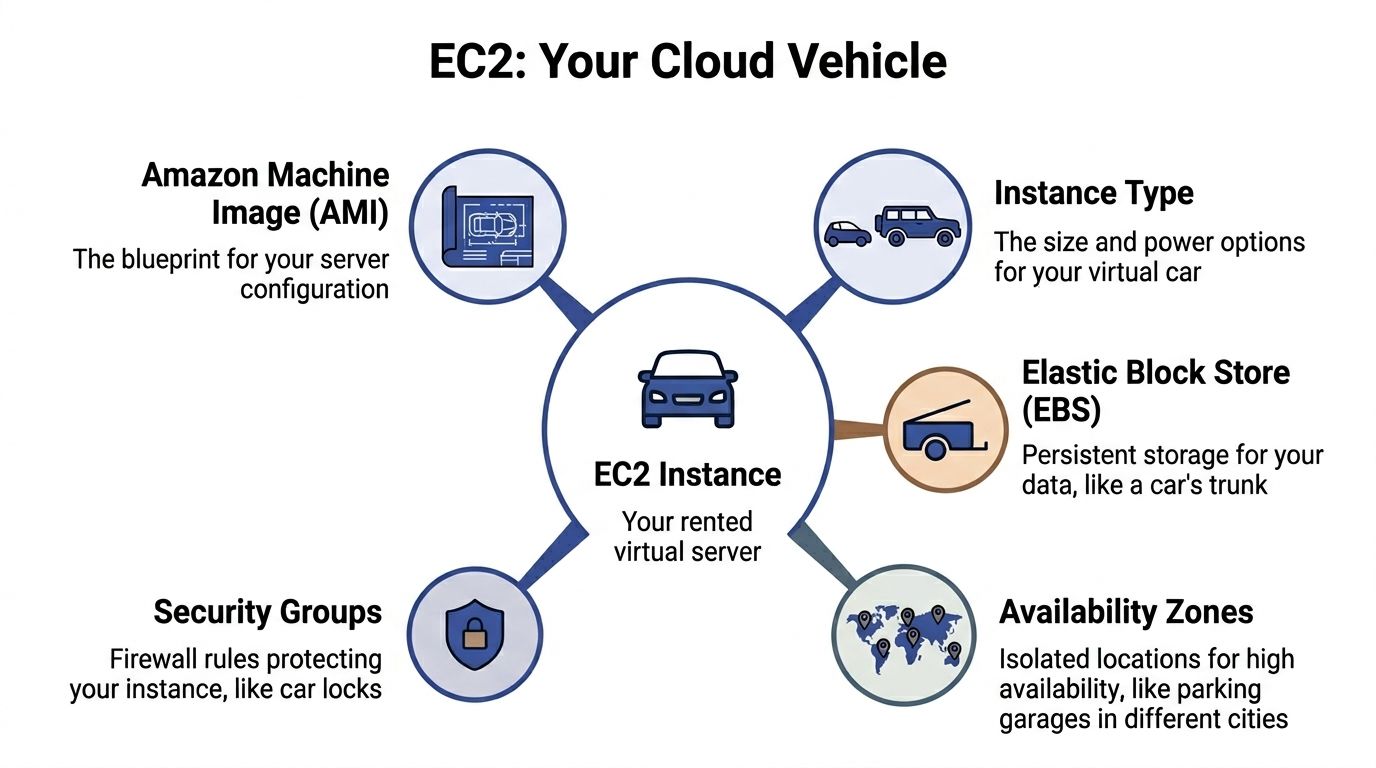
The easiest way to understand EC2 is to think about renting a vehicle.
An EC2 instance is the vehicle you rent. You choose the size, engine, and capabilities based on what you need to carry or how fast you need to go. An Amazon Machine Image, or AMI, is the blueprint for that vehicle. It defines what gets launched, including the operating system and the starting software setup.
What an instance actually is
An EC2 instance is a virtual machine running in AWS. It behaves like a server you’d recognize in any data center. It has CPU, memory, storage options, networking, and an operating system.
What makes it different from a physical server is how quickly it can be created, replaced, resized, or removed. If a team needs another web server, they don’t rack new hardware. They launch another instance from a known configuration.
That’s why EC2 became so important in production environments. During Prime Day 2025, AWS says more than 40% of Amazon.com’s EC2 compute ran on Graviton processors, showing the scale at which EC2 can support real commercial demand, and AWS notes that EC2 had grown to over 400 instance types by 2021 (EC2 scalability and instance growth).
What an AMI does
An AMI is the starting template for your instance. It can include:
- Operating system such as Linux or Windows
- Preinstalled software like a web server, monitoring agent, or runtime
- Configuration defaults so every launched server starts from the same baseline
Readers frequently find this point confusing. The AMI isn’t the running server. It’s the reusable image used to create the running server.
If your team wants ten identical application servers, you don’t build ten machines by hand. You build one good AMI and launch ten instances from it.
A well-managed AMI gives you repeatability. A poorly managed one gives you configuration drift at cloud speed.
Other parts you’ll hear about
A working EC2 deployment also depends on a few surrounding pieces:
| Component | Plain-English meaning |
|---|---|
| Instance type | The amount of CPU, memory, storage, and networking you rent |
| EBS | A persistent disk attached to the instance |
| Security groups | Firewall rules controlling inbound and outbound access |
| Availability Zone | A separate AWS location used for resilience and high availability |
These terms sound more complicated than they are. Most of EC2 becomes easier once you separate the server template from the running server and the running server from the supporting infrastructure around it.
Choosing Your Virtual Server Instance Types
Picking an EC2 instance type is where technical design and cloud economics meet. If you mismatch the workload and the server shape, you either pay for resources you don’t use or you throttle an application that should be responsive.

A simple analogy helps. You wouldn’t use a sports car to move a sofa. It might look powerful, but it’s the wrong tool. EC2 works the same way. High CPU doesn’t automatically mean it’s right for a memory-heavy database, and lots of RAM doesn’t help much if the application spends its life crunching processor-intensive jobs.
The main families
AWS groups EC2 instances into families designed for different patterns of work. The core idea is specialization.
- General purpose fits broad, balanced workloads. Web servers, small application tiers, internal tools, and common business apps often land here.
- Compute optimized fits processing-heavy workloads. Batch jobs, media processing, build systems, and some analytics tasks benefit from more CPU emphasis.
- Memory optimized fits workloads that keep large datasets in RAM, such as in-memory databases or caching layers.
- Storage optimized fits systems that need fast, heavy local storage access.
- Accelerated computing fits specialized workloads such as machine learning or graphics-heavy processing.
- High memory fits very large memory footprints where standard instance shapes aren’t enough.
AWS-focused coverage notes that EC2 families include general purpose, compute optimized, and memory optimized, among others. It also highlights that M7g general purpose instances balance compute and memory for workloads like web servers, while C7g compute optimized instances can offer up to 25% better price-performance for batch processing or HPC workloads (EC2 instance family overview).
How to match workload to family
The easiest way to choose is to ask what resource becomes constrained first.
If users complain the application is slow while CPU is consistently busy, compute optimized is worth testing. If the database keeps paging or the cache hit rate is poor because the working set doesn’t fit in memory, memory optimized is a more logical direction. If the application is broadly balanced and still early in its lifecycle, general purpose is usually the safest starting point.
Here’s a practical way to think about common workloads:
| Workload | Usually a good starting family | Why |
|---|---|---|
| Public website or internal business app | General purpose | Balanced CPU and memory |
| CI runners and batch processing | Compute optimized | Processor-heavy tasks |
| Large relational or in-memory database | Memory optimized | More RAM for active datasets |
| Log-heavy or I/O-heavy system | Storage optimized | Faster local storage behavior |
| AI or graphics workloads | Accelerated computing | Specialized hardware support |
The decision doesn’t end at launch. Instance choice should be revisited as usage patterns become clear. That’s where utilization data matters more than assumptions.
Two common mistakes
First, teams often choose too large an instance because they’re worried about risk. That’s understandable, but over-caution in EC2 has a direct monthly cost.
Second, teams choose familiar instance families instead of appropriate ones. If you’ve always used a general purpose instance, that habit can hide a poor fit for years.
A more detailed family-to-family comparison can help when you’re deciding between older and newer compute generations, especially for CPU-bound workloads. This breakdown of C4 vs C5 EC2 instances is useful if you’re evaluating compute-focused options in practical terms.
A short explainer can also help visualize the decision before you get into benchmarks:
Choose instance families based on bottlenecks, not labels. “Bigger” and “faster” aren’t architecture decisions. They’re billing decisions until proven necessary.
Understanding EC2 Pricing and Cost Models
EC2 pricing makes sense once you stop thinking in terms of “buying a server” and start thinking in terms of “buying usage with a commitment level.”
The pricing model you choose reflects how certain you are about your workload. Stable systems reward commitment. Unpredictable systems reward flexibility.
The main pricing approaches
Here’s the simplest side-by-side view:
| Pricing model | Best for | Trade-off |
|---|---|---|
| On-Demand | New workloads, uncertain demand, short-term use | Highest flexibility, less commitment-based savings |
| Savings Plans | Predictable ongoing usage | Lower cost in exchange for commitment |
| Reserved capacity approaches | Steady long-running workloads | Better economics if usage is stable |
| Spot Instances | Interruptible jobs, fault-tolerant processing | Lowest cost potential, but capacity can be reclaimed |
On-Demand is the default mental model. Launch what you need, keep it running, and stop paying when you stop using it. This works well for experimentation, migrations, and applications whose usage pattern you don’t trust yet.
Savings Plans make more sense when you know a baseline level of compute will be needed over time. A production application with steady usage usually fits here better than a dev environment that sits idle all night.
The cost mistake most teams make
The phrase “pay only for what you use” is true, but incomplete. In practice, many teams pay for what they launched, not what they actively needed.
That distinction matters. A test server left on overnight is still “in use” from a billing perspective even if no developer touched it. A staging stack that runs through the weekend still incurs cost. So the key pricing question isn’t just which purchase model to use. It’s whether the instance should have been on at all.
For interruptible workloads, this EC2 Spot Instances guide is a helpful starting point because Spot is cost-effective only when the application can tolerate interruption.
A practical buying pattern
For many midsize teams, the sensible path looks like this:
- Start flexible with On-Demand while you learn the workload
- Commit selectively once a baseline becomes obvious
- Use Spot for jobs that can restart or resume safely
- Schedule non-production systems so you’re not optimizing purchase models while ignoring idle runtime
The biggest EC2 savings often come before discounts. They come from not running unnecessary servers in the first place.
Essential EC2 Networking Storage and Security
An EC2 instance by itself doesn’t do much. It needs a network to live in, storage to keep useful data, and security controls that limit who can reach it and what it can do.
Networking starts with a private boundary
Most EC2 deployments run inside an Amazon VPC, or Virtual Private Cloud. Think of it as your fenced-off section of AWS where you decide how systems are arranged and which paths are allowed.
Inside that boundary, you typically separate public-facing components from internal ones. A public web tier might accept traffic from the internet. An application tier and database tier often sit in more restricted network segments. That separation limits blast radius and makes access policies easier to reason about.
Storage choices change how the server behaves
For many EC2 workloads, Amazon EBS acts like the instance’s attachable hard drive. It persists independently from the running server, which matters when you stop, replace, or recover an instance.
That makes EBS useful for operating systems, databases, and application data that must survive instance lifecycle changes. By contrast, object storage such as S3 serves a different purpose. It’s better for files, backups, logs, and assets that don’t need to behave like a mounted system disk.
If you’re planning budgets or evaluating storage trade-offs, this breakdown of Amazon EBS pricing helps connect architecture choices to actual cloud spend.
Security is layered, not singular
EC2 security usually starts with security groups, which act like instance-level firewall policies. They define what traffic is allowed in and out. Teams then add network-level controls and identity policies on top.
A practical baseline often includes:
- Restricted inbound access so only necessary ports and sources are allowed
- Role-based permissions so applications and users get the minimum access they need
- Hardened images so each launched instance starts from a trusted baseline
- Patch and configuration routines so drift doesn’t create silent exposure
For a broader operational checklist, this guide to cloud computing security best practices is a useful companion because it frames security as an ongoing discipline rather than a one-time setup task.
Security groups answer “who can talk to this server.” Governance answers “who in our company is allowed to change that.”
The governance gap teams run into
Many growing organizations encounter friction. EC2 documentation, despite talking about users having “precise control” and “administrative access to their instances,” doesn’t really solve the governance question of how to let non-engineers manage instance uptime safely without handing over broad AWS access (governance gap in EC2 operations).
That becomes an operational problem, not just a security one. Finance may want to participate in cost control. Operations staff may need to manage schedules. Junior team members may need narrow, safe powers. Native tools don’t always make that delegation simple.
Common EC2 Use Cases and Architectures
A useful way to understand EC2 is to look at what companies run on it.
A standard web application
A common pattern is a three-tier web application. The public tier receives traffic through a load balancer. Behind it, multiple EC2 instances run the application logic. A separate database layer stores transactional data.
This layout gives teams resilience and flexibility. If one application server fails, another can keep serving requests. If demand rises, the application tier can grow without redesigning the whole stack.
Backend processing and internal platforms
EC2 is also a strong fit for jobs that don’t serve users directly. Teams run background processing, report generation, file transformation, queue consumers, and integration services on EC2 because they want control over the runtime and operating environment.
Development and test systems are another common use case. They’re easy to launch and useful for isolated work, but they’re also a frequent source of waste because nobody remembers to shut them down after business hours.
Data and AI workloads
Some organizations use EC2 for analytics pipelines and model-serving infrastructure where managed services don’t fit cleanly. That usually happens when they need custom runtimes, unusual dependencies, or tighter control over the compute layer.
For leaders trying to connect infrastructure choices to broader AI delivery, this guide on moving AI pilots to production) is helpful because it focuses on the operational shift from experimentation to repeatable systems.
EC2 is often the “control” option. Teams choose it when they want flexibility over the operating system, software stack, and runtime behavior instead of accepting the constraints of a fully managed platform.
In practice, many businesses mix patterns. The same AWS account may contain a public web app, scheduled internal tools, and temporary dev environments. That variety is why EC2 is powerful, and also why governance and cost discipline matter so much.
Optimizing EC2 Costs and Operations
The hardest part of EC2 usually isn’t launching a server. It’s deciding who can run it, when it should run, how large it should be, and how often those decisions get revisited.
The biggest blind spot is idle time. AWS documentation emphasizes elasticity and scaling, but the hidden cost of idle EC2 usage remains underexplored in mainstream guidance, even though organizations often overprovision and leave instances running unnecessarily (AWS EC2 concepts and the idle-cost gap). For small and midsize businesses, that’s where a lot of cloud waste begins.
Start with visibility
You can’t optimize what you don’t measure. EC2 exposes operational metrics through CloudWatch, including CPU utilization, network activity, and storage-related metrics. Used well, those metrics tell you whether an instance is actually busy or just powered on.
A practical review cadence should answer a few direct questions:
- Is this instance active or merely available
- Is the size justified by actual usage
- Does it need to run all day, every day
- Who owns it and can that owner still explain its purpose
Teams often discover that dev, test, staging, internal tools, and periodic jobs don’t need continuous uptime. They need reliable uptime during a defined window.
Right-size before you discount
A company can spend weeks fine-tuning purchase commitments while keeping oversized instances online. That’s backward.
Right-sizing means matching the instance to the workload’s real demand. If CPU and memory remain consistently low, the instance may be too large. If a server is needed only during office hours, scheduling matters as much as family selection. Native AWS tools such as CloudWatch and Compute Optimizer can support that analysis, but they still require process discipline from your team.
Here’s a practical order of operations:
- Find low-activity instances using utilization and ownership reviews
- Resize obvious overprovisioning where usage doesn’t justify the current shape
- Schedule predictable downtime for non-production systems
- Apply pricing commitments only after the runtime pattern is stable
The operational problem behind the cost problem
Most cloud waste is not caused by bad intentions. It’s caused by unclear ownership and cumbersome workflows.
A developer knows a staging box can be off at night, but doesn’t want to be the person who accidentally shuts down the wrong thing. Finance sees rising spend, but shouldn’t have broad console access. An IT manager wants guardrails, but not a ticket queue for every start and stop request.
That’s why EC2 optimization is partly a governance design exercise. The question isn’t only “what can AWS do.” It’s “how can our team safely participate in controlling uptime.”
Native automation helps, but access design still matters
AWS offers scheduling and automation options, and they’re useful. But many teams still struggle with day-to-day usability, especially when cost control needs to be shared beyond a narrow admin group.
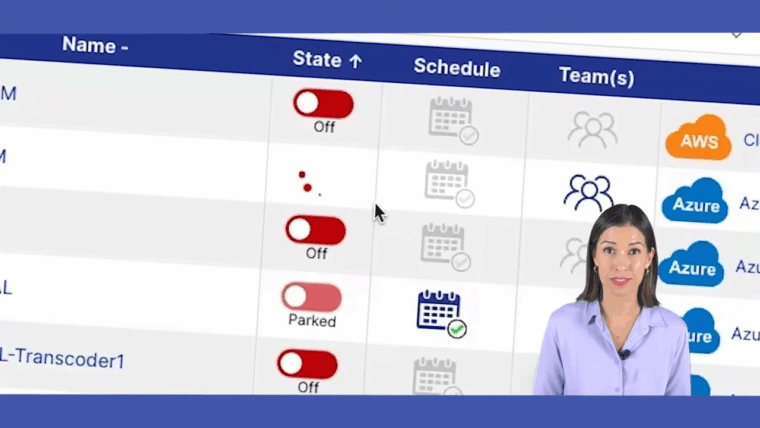
One approach is to use a scheduling tool with scoped access. CLOUD TOGGLE is one option for that use case. It lets teams schedule EC2 start and stop times, automate shutdowns for idle environments, and share scheduling access without exposing the full AWS account. That addresses a real gap for organizations that want DevOps, IT operations, or finance-adjacent stakeholders to participate in cost control safely.
The strongest EC2 cost policy is simple enough that people will actually follow it and safe enough that leadership will approve it.
Build an operating policy, not a one-time cleanup
A one-off optimization project won’t hold if the environment keeps growing. What works better is a lightweight policy that answers:
| Policy question | What to decide |
|---|---|
| Runtime | Which systems must be always on and which can follow a schedule |
| Ownership | Who is responsible for each instance or application group |
| Access | Who can start, stop, or override schedules |
| Review | How often rightsizing and idle checks happen |
That policy matters most in businesses with multiple teams. Without it, EC2 turns into a warehouse of “temporary” machines that nobody wants to touch.
The simplest savings often come from mundane changes. Shut down dev systems at night. Turn off test stacks over the weekend. Revisit oversized instances after applications stabilize. Give people safe, limited ways to act on cost signals. That’s less glamorous than cloud architecture diagrams, but it’s usually where operational efficiency shows up first.
If your team wants a simpler way to control EC2 uptime without handing out full AWS access, CLOUD TOGGLE is worth evaluating. It focuses on a specific operational problem: scheduling idle servers off, letting the right people manage those schedules safely, and making cloud cost control part of normal daily operations instead of an occasional cleanup project.