At its core, a capacity plan is the strategic blueprint for your digital infrastructure. It’s all about matching your IT resources, like servers, storage, and network bandwidth, with your actual business needs.
This process keeps you from running out of horsepower during a traffic surge or, just as bad, paying for a fleet of expensive servers that do nothing but collect digital dust.
Unpacking Your Digital Blueprint

Think of it like the blueprints a city planner uses before building a new highway system. The planner has to predict future traffic, account for population growth, and anticipate peak travel times. Without that foresight, the city ends up with two massive problems.
First, you get gridlock. The roads are too small for all the cars, leading to frustrating traffic jams that slow everyone down. In the digital world, this is called under-provisioning. It's what happens when a sudden spike in users crashes your application because your servers can't handle the load.
The second problem is the opposite: building massive, six-lane highways that sit empty most of the day. It’s a colossal waste of money, materials, and space. In IT, we call this over-provisioning, paying for powerful, oversized servers that sit idle, draining your budget for no reason.
The Core Purpose of a Capacity Plan
A good capacity plan helps you find that sweet spot right between gridlock and ghost town. It’s not just a technical exercise; it's a core business strategy that directly impacts your financial health and customer satisfaction.
Let's break down the main objectives of a well-executed capacity plan.
| Key Objectives of Capacity Planning | ||
|---|---|---|
| Objective | Description | Business Impact |
| Prevent Service Outages | Ensure you have enough resources to handle peak demand, keeping your services online and reliable. | Protects revenue and brand reputation by avoiding costly downtime and delivering a consistent user experience. |
| Control Costs | Stop paying for unused cloud resources by accurately matching your infrastructure to real-world usage. | Reduces operational expenses, improves budget predictability, and frees up capital for growth initiatives. |
| Support Growth | Make informed decisions about when and how to scale your infrastructure for new features or market expansion. | Enables the business to scale confidently without performance bottlenecks, ensuring technology keeps pace with ambition. |
In short, a solid plan defines how your infrastructure can support both current and future demands, making sure your operations are built on truly capacoius systems. This kind of strategic foresight is no longer a "nice-to-have"; it's essential.
Why It Matters More Than Ever
In the explosive world of cloud computing, where global public cloud spending surged 21% in 2023 to hit $591.79 billion, effective capacity planning has become mission-critical. This is especially true for businesses trying to manage complex AWS and Azure environments.
Without a plan, companies are flying blind, risking both poor performance and runaway costs. This is where you can clearly see the link between technical planning and financial strategy. For a deeper dive into this, check out our guide on the fundamentals of what is cloud cost optimization.
The Building Blocks of an Effective Capacity Plan
A solid capacity plan isn't a single document you create once and forget about. It's a living strategy built from several key components that work together. Think of it like building a high-performance engine: every part has a specific job, and the engine only runs smoothly when they're all perfectly calibrated.
By understanding these essential building blocks, you can turn capacity planning from an abstract idea into a practical, data-driven tool for your DevOps and FinOps teams.
Demand Forecasting Future Needs
First things first: you have to predict what you're going to need. This is demand forecasting. It isn't about gazing into a crystal ball; it's about digging into your past data and lining it up with your company's future plans.
For example, you might look at last year's traffic during the Black Friday sale to estimate this year's server needs. But then, you'd adjust that forecast based on the marketing team's plan to boost ad spend by 20%. This systematic approach helps you get ahead of demand instead of constantly reacting to it.
Auditing Your Resource Inventory
Once you have an idea of what you'll need, you have to get a crystal-clear picture of what you already have. A resource inventory is just a detailed audit of your current infrastructure: servers, databases, storage, network bandwidth, you name it.
Knowing your inventory helps you spot underused assets that you can either repurpose or shut down. To make sure your plan uses everything you've got, including people, time, and budget, it's worth looking into strategies for Resource Allocation Optimization. This step is fundamental to stop wasteful spending and get the most out of your existing investments.
A capacity plan details resource utilization trends, peak demand projections, and mitigation strategies, often spanning 12-36 months. This long-term view is vital for cloud cost optimization in hybrid environments.
Establishing Performance Baselines
With a forecast and an inventory in hand, the next step is to figure out what "normal" looks like for your systems. Performance baselines are established by measuring how your systems perform under a typical workload. These metrics define your standard operating level.
These baselines are your early warning system. When metrics start straying too far from that baseline, you know it's time to investigate before a small hiccup turns into a major outage. You can learn more about which performance indicators matter most by exploring essential metrics and KPIs.
Headroom Analysis for Spikes
Finally, no plan is complete without a buffer for the unexpected. Headroom analysis is how you calculate the extra capacity needed to handle sudden, unforeseen spikes in demand. This "headroom" is your safety net.
This is especially critical in the cloud, where costs can spiral out of control in a heartbeat. Consider that 33% of organizations now spend over $12 million a year on public cloud, partly driven by the 72% adoption rate of generative AI. Without a solid capacity plan, those cloud bills can balloon overnight. A well-planned buffer ensures you can absorb a surge without over-provisioning (and overpaying for) your infrastructure 24/7.
A Practical Guide to Creating Your Capacity Plan
It's one thing to talk about capacity planning in theory, but where the rubber really meets the road is in building one. This isn't about guesswork; it's a systematic process of turning historical data and future business goals into a concrete roadmap for your infrastructure. Let's walk through how to build a plan that actually prevents overspending and keeps your services online.
Think of this process less like a one-time project and more like a continuous cycle. It's all about refining your approach to keep your technical resources perfectly aligned with where the business is headed, making data-driven decisions to stay one step ahead of demand.
Start by Collecting Historical Data
Every good plan starts with good data. The first step is to pull historical performance metrics from your monitoring tools. If you can get at least the last 12 months of data, you’ll be in great shape. This information is the factual bedrock for everything that follows.
You'll want to look for key metrics like:
- CPU Utilization: Find out your average and peak usage times to see what the computational load really looks like.
- Memory Consumption: Track how much memory your applications are actually using and when they spike.
- Network Throughput: Look at data transfer patterns to spot any potential bottlenecks before they become a problem.
- Storage I/O: Measure your read/write operations to make sure your storage can keep up when things get busy.
This historical context is what separates a wild guess from an informed projection. It shows you real trends, seasonal peaks, and what "normal" actually looks like for your systems.
This visual breaks down the core loop of capacity planning: you forecast future needs, baseline what you have now, and analyze the gap between them.
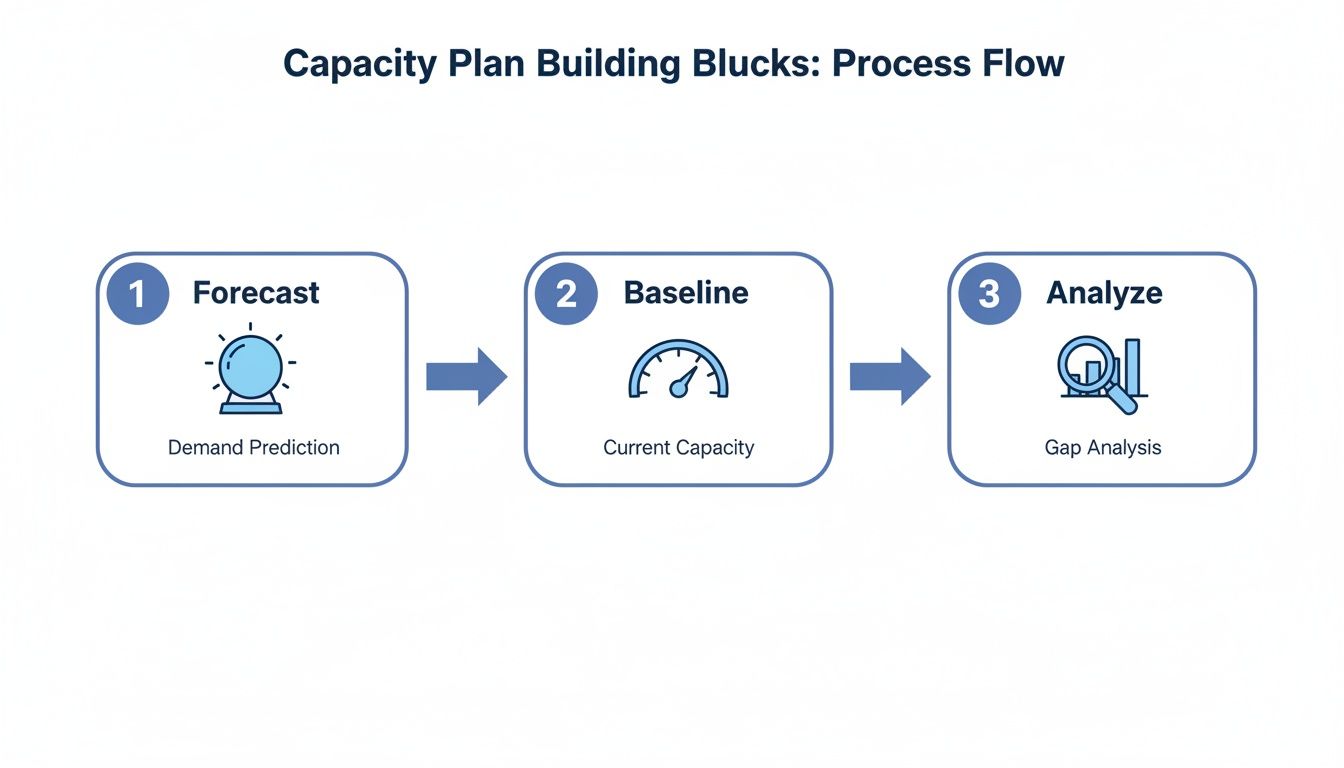
The key takeaway here is that these steps aren't a one-and-done deal. It's a continuous loop that keeps your plan relevant as the business inevitably changes.
Forecast Future Demand and Model Scenarios
With a solid baseline of historical data, you can start looking ahead. This is where you need to talk to other departments. Sync up with marketing and sales to get the inside scoop on their pipeline. Are they about to launch a new product? Is a big promotional campaign in the works that could drive traffic up by 30%?
Now you can start modeling some "what-if" scenarios.
A capacity plan should be a living document. Regularly review and adjust it quarterly or semi-annually to ensure it remains aligned with evolving business needs, new technology adoption, and shifting market conditions.
For example, what would a successful marketing campaign actually do to your server load? Model it out. What if a cool new feature doubles user engagement? Model that, too. Building these scenarios helps you quantify what you'll need for multiple potential outcomes, not just the most likely one.
Modern tools can automate a lot of this analysis, making your forecasts more accurate and saving a ton of time. Once you have a plan, put it into action and, most importantly, schedule regular reviews to keep it from going stale.
How Cloud Environments Change Capacity Planning
Capacity planning in the cloud is a completely different game than it was with on-premise servers. The old model of buying physical hardware months or even years in advance is gone.
In its place is a dynamic, flexible environment where resources can be provisioned and de-provisioned in minutes. This demands a total shift in mindset from long-term procurement to real-time, continuous management.

For teams managing environments on AWS, Azure, or Google Cloud, the focus moves from static, upfront purchases to intelligent, continuous resource allocation. It’s all about embracing the flexibility the cloud offers.
Embracing Cloud-Native Strategies
In the cloud, effective capacity planning means using the platform's native tools to your advantage. It’s less about having a massive buffer "just in case" and more about responding to demand as it happens.
This involves several key practices:
- Auto-scaling: This is probably the biggest game-changer. Instead of provisioning for peak traffic 24/7, you configure your environment to automatically add or remove servers based on real-time demand. This ensures you have the power you need during a surge but aren't paying for it during quiet periods.
- Right-sizing Instances: Cloud providers offer hundreds of instance types, each optimized for different workloads. Right-sizing means analyzing your application's performance to select the most cost-effective instance, ensuring you don't pay for CPU, RAM, or storage you don't actually use.
- Choosing Instance Families: A step beyond right-sizing is selecting the correct instance family. A memory-optimized instance is perfect for a database, while a compute-optimized one is better for a data processing job. Aligning the instance family with the workload is a core part of modern capacity management.
This constant adjustment is crucial for your financial health. In fact, proactive planning helps combat the "bill shock" that affects a staggering 53% of businesses trying to optimize their IT operations. To get a better handle on this, check out our detailed article on how does scaling work.
The table below breaks down just how different the approach is today.
Traditional vs. Cloud Capacity Planning
This table contrasts the old and new approaches, highlighting the shift in focus required for cloud environments.
| Aspect | Traditional On-Premises | Modern Cloud (AWS/Azure) |
|---|---|---|
| Timeframe | Long-term (6-12+ months) | Real-time and short-term (minutes to weeks) |
| Procurement | Capital Expenditure (CapEx): Large, upfront hardware purchases | Operational Expenditure (OpEx): Pay-as-you-go, variable costs |
| Flexibility | Low. Fixed resources, hard to scale up or down. | High. Elastic resources, scale on demand. |
| Risk | High risk of over-provisioning (waste) or under-provisioning (downtime). | Lower risk; can adjust to demand, but requires active management. |
| Core Activity | Forecasting demand and buying hardware to meet peak load. | Monitoring usage, right-sizing instances, and automating scaling rules. |
| Goal | Ensure enough hardware is available for the next 1-3 years. | Ensure performance SLAs are met at the lowest possible operational cost. |
Ultimately, the cloud turns capacity planning from a static, infrequent task into a dynamic, ongoing process that directly impacts your bottom line.
The Strategic Value of Scheduling
One of the most direct ways to control costs in the cloud is through strategic scheduling, especially for non-production environments. Your development, testing, and staging servers rarely need to run 24/7.
Shutting them down during nights and weekends is a simple yet powerful capacity planning tactic. It directly reduces waste without impacting performance or development cycles, perfectly embodying the modern cloud approach: pay only for what you actively use.
In the cloud, capacity planning is no longer a one-time capital expense decision. It has become a continuous operational practice focused on optimizing variable spending.
While 90% of IT decision-makers credit the cloud with enabling resource reinvestment, this benefit only materializes with proactive planning. This is especially true when cloud spending hits $57 billion in a single quarter, a figure that just keeps growing.
By embracing these dynamic strategies, you can turn your cloud infrastructure from a potential cost center into a lean, cost-effective asset that scales precisely with business demand.
Common Capacity Planning Mistakes to Avoid
Even the best-laid plans can get derailed by a few common missteps. Knowing where others trip up is the first step toward building a capacity plan that's resilient and cost-effective.
When these mistakes happen, they almost always lead to the same things: wasted money, sluggish applications, and an IT team stuck in a reactive, firefighting mode. By sidestepping these traps, you can shift from a strategy of guesswork to one driven by solid data and a plan that actually supports your business goals instead of getting in their way.
Relying on Gut Feelings Instead of Data
This is probably the single most common and costly mistake. A manager feels like traffic will jump 50% after a new feature launch, so they spin up a fleet of expensive, oversized instances just in case. Those servers then sit idle, burning through the budget.
Every decision needs to be grounded in data, not intuition. Look at past performance metrics from similar launches to build a realistic projection. This is how you replace risky assumptions with informed, defensible decisions. It turns your capacity plan from a liability into a reliable business tool.
The goal of capacity planning isn't to be perfect, but to be less wrong over time. By using data, you can systematically shrink the margin of error in your forecasts and make much better financial decisions.
Another classic error is treating capacity planning as a one-and-done project. A team builds a beautiful, detailed plan, files it away in a shared drive, and then doesn't look at it again for a year. In a dynamic cloud environment where business needs can pivot in a matter of weeks, this static approach is pointless.
Your capacity plan has to be a living document. It needs regular check-ins and adjustments, at least quarterly, to stay in sync with new business initiatives, market shifts, and technology updates. An outdated plan is an irrelevant plan.
Overprovisioning Just in Case
The "just in case" mindset is a hangover from the old on-premise hardware days, where getting a new server took months of procurement and racking. In the cloud, this way of thinking is just financially irresponsible.
Paying for 40% extra capacity 24/7 to handle a potential spike that may never arrive is a massive source of wasted spend. The cloud gives you a much better way.
The answer is to lean into cloud-native tools like auto-scaling. Configure your systems to automatically add resources when demand climbs and, just as critically, to remove them when it subsides. This lets you pay for performance precisely when you need it, without bankrolling a huge, expensive buffer around the clock.
Forgetting to Talk to the Business
Finally, many organizations fail to connect their technical plans to the bigger business picture. A capacity plan created in an IT silo is doomed from the start.
If the engineering team has no idea that marketing is about to launch a massive promotional blitz, they can't possibly prepare for the traffic surge. The result? A slow, frustrating experience for all those new customers.
Effective capacity planning is a team sport. It demands cross-functional collaboration. Set up regular syncs with your sales, marketing, and product teams to get a clear view of their roadmaps. This is the only way to ensure your infrastructure strategy is always aligned with business objectives, preventing nasty surprises and paving the way for growth.
A Few Common Questions About Capacity Planning
To wrap things up, let's tackle some of the most common questions people have about capacity planning. Think of this as a quick way to solidify the key ideas we've covered.
How Often Should a Capacity Plan Be Updated?
A capacity plan should never be a static document gathering dust on a shelf. In today's world, a plan you create and then ignore for a year is pretty much useless.
As a rule of thumb, you should formally review and update your capacity plan on a quarterly basis. But you should also be ready to revisit it anytime a big business event is on the horizon, for instance a major product launch, a new marketing campaign, or breaking into a new market.
This rhythm keeps your infrastructure strategy locked in with your business goals, helping you dodge nasty surprises and keep your resources in check. For teams in really fast-moving industries, a monthly check-in might even be necessary to stay ahead of the curve.
Is Capacity Planning the Same as Performance Management?
They're definitely related, but they're not the same thing. They answer different questions and work on different timelines. It’s a bit like driving a car.
Performance management is like glancing at your dashboard while you're driving. It’s giving you real-time feedback: your current speed, engine temperature, and how much gas is in the tank. Its focus is entirely on the present: Is everything running okay right now?
Capacity planning, on the other hand, is like planning a long road trip before you even leave the driveway. It’s about looking at the entire journey ahead. Do we have enough fuel to get to our destination? Are the tires in good shape for the distance? It focuses on the future: Will we have what we need to handle the trip over the next few months or years?
In short, performance management is tactical and immediate. Capacity planning is strategic and forward-looking. They work hand-in-hand, though, as today's performance data is a critical ingredient for tomorrow's capacity plan.
Do Small Businesses Really Need a Capacity Plan?
Absolutely. A small startup might not need the same massive, hundred-page document as a huge enterprise, but the core thinking behind it is just as important. For a small business, a single server crash or a surprisingly massive cloud bill can be a business-ending event.
Here’s why it’s a big deal for smaller teams:
- Protecting the Budget: Small businesses usually run on tight margins. Every dollar wasted on idle cloud resources is a direct hit to the bottom line. A simple capacity plan helps make sure every dollar you spend on infrastructure is actually doing something valuable.
- Keeping Customers Happy: For a growing business, your reputation is everything. A website that crashes right when you get a surge of traffic can destroy customer trust for good. Planning for capacity helps you deliver a reliable, professional service.
- Planning for Growth: A good plan gives you a roadmap for scaling up. It helps you make smart, steady investments in your infrastructure as you grow, so you can avoid costly mistakes and headaches down the line.
Even a basic capacity plan, maybe one that just focuses on your most important services and gets a look-over each quarter, can give a small business the foresight it needs to run smoothly and scale with confidence. It’s not about complexity; it’s about being deliberate.
Ready to stop paying for idle cloud resources? CLOUD TOGGLE makes it simple to automate server schedules, cutting your AWS and Azure bills without complex configurations. Start your free 30-day trial and see how much you can save at https://cloudtoggle.com.