EC2 Spot Instances are your ticket to unlocking some truly massive savings on your AWS bill. By tapping into Amazon's unused compute capacity, you can often run workloads for up to 90% off the standard On-Demand price.
The concept is brilliantly simple: you get access to powerful computing resources for pennies on the dollar. The catch? AWS can reclaim those instances with a two-minute warning if they need the capacity back for customers paying full price.
Understanding EC2 Spot Instances and Their Value
Think of Spot Instances like finding a last-minute, deeply discounted luxury hotel room. The hotel has empty rooms it isn't making money on, so it offers them at a huge discount just to fill them up. In the same way, AWS has a colossal amount of spare computing power sitting idle at any given moment. Spot Instances are simply how AWS sells off this excess capacity at a variable market price, which is almost always a steal compared to standard rates.
This creates a fascinating trade-off. You get the exact same powerful EC2 hardware for a fraction of the cost, but you give up the guarantee of 100% uptime. When AWS needs that capacity back for On-Demand customers, it triggers an "interruption," giving you a two-minute heads-up to save your work and shut down gracefully.
The Core Financial Advantage
Let's be clear: the number one reason to adopt spot instances ec2 is the incredible potential for cost reduction. For any workload that's flexible and can handle a restart, this pricing model can slash your cloud infrastructure bill.
We've seen companies running large-scale data processing, batch jobs, or dev/test environments save a fortune. Those savings add up fast, freeing up budget for innovation and other critical projects.
This guide is all about helping you navigate that trade-off effectively. We’ll show you how to design applications that are resilient to these interruptions, turning a potential hiccup into a massive financial win. For a deeper dive into building a complete cost-saving plan, check out our detailed article on AWS cost optimization.
Who Benefits Most from Spot Instances?
While the savings are tempting for everyone, some workloads are practically made for the Spot model. These are applications designed from the ground up to handle interruptions gracefully, making the cost benefit a no-brainer.
Here are a few prime examples:
- Big Data and Analytics: Platforms like Apache Spark or Hadoop are built for this. If a worker node disappears, the cluster simply shrugs, marks the task as failed, and reschedules it on another available node.
- CI/CD Pipelines: Build and test jobs are usually short-lived and stateless. If an instance gets interrupted mid-build, the CI/CD server can just restart that specific job on a new instance without a fuss.
- High-Performance Computing (HPC): Think scientific research or financial modeling. These jobs often involve massive, parallel computations that can be checkpointed. If an instance is terminated, the job can resume from the last saved state.
- Containerized Applications: This is where Spot really shines today. Orchestration tools like Kubernetes can automatically manage the lifecycle of Spot Instances, seamlessly replacing terminated nodes without any manual intervention.
By identifying these types of workloads in your own organization, you can start swapping out expensive On-Demand instances and watch the savings roll in without hurting performance.
How Spot Pricing and Interruptions Actually Work

To really get the hang of EC2 Spot Instances, you have to understand its two core mechanics: how pricing is set and how interruptions happen. These two pieces work hand-in-hand, defining both the risk and the massive reward of this cost-saving model. Mastering them is the key to turning AWS's spare capacity into your strategic advantage.
First, forget the old days of complex bidding wars. Today, Spot Instance pricing is much more predictable. The price you pay is simply determined by the long-term supply and demand for spare EC2 capacity in a specific AWS Region and Availability Zone.
This modern approach means you get smoother, more stable price changes. Instead of wild, minute-by-minute fluctuations, prices adjust gradually. This predictability lets you forecast costs more accurately and make smarter decisions about when and where to deploy your workloads.
The Dynamics of Spot Pricing
The Spot price isn't some random number; it’s a direct reflection of the available computing power across the vast AWS infrastructure. Think of it like airline ticket pricing. When a flight has lots of empty seats (high supply), prices drop to fill them. When the flight is nearly full (low supply), prices go up.
It’s the same idea here. When an Availability Zone has a surplus of a particular instance type, its Spot price will be low. As more On-Demand and Reserved Instance customers start using that capacity, the supply of spare resources shrinks, and the Spot price might gradually increase.
A key takeaway is that you are never in a bidding war against other Spot users. You simply pay the current Spot price for the instance you're using, which only changes when AWS adjusts it based on those broader supply and demand trends.
This model is built for stability. You can even set a maximum price you're willing to pay, though it's a best practice to just leave this at the On-Demand price. As long as the Spot price stays below your maximum (or the On-Demand price), your instance will keep running.
Understanding the Interruption Signal
Now for the most critical concept to master: the interruption. This is the "catch" that comes with those steep discounts. When AWS needs the capacity back for an On-Demand customer, it sends a two-minute warning before terminating your instance.
This isn't an error or a failure, it's a designed feature of the Spot model. This two-minute notification arrives as a signal to the instance's metadata, and your application needs to be built to catch this signal and act on it.
During this two-minute window, your instance is still fully operational. This is your chance to gracefully handle the shutdown. A well-designed automation script can perform several crucial actions:
- Checkpointing: Save the current state of a long-running job to persistent storage like Amazon S3 or an EBS volume.
- Draining Connections: Stop accepting new tasks or connections and let existing ones finish up.
- Uploading Logs: Transfer final log files or output data before the instance disappears for good.
- De-registering: Remove the instance from a load balancer or a container orchestrator's service discovery.
Amazon EC2 Spot Instances offer a powerful way to slash costs by tapping into idle EC2 capacity, often reducing your compute bill by up to 90% compared to On-Demand rates. While these savings are huge, they're balanced by that risk of interruption. Historically, interruption rates have often been below 5%, but this can vary a lot by region and instance type, so building resilient workloads is non-negotiable. You can check the Spot Instance Advisor to help estimate capacity and make more informed decisions.
Architecting Resilient Applications for Spot
Alright, let's move from theory to action. This is where mastering spot instances ec2 gets exciting. The real trick isn't just knowing that interruptions happen; it's about designing your applications to treat them as normal, predictable events. A truly resilient architecture doesn't fear interruptions, it expects them and automates the response, letting you bank massive savings without sacrificing uptime.
The best workloads for Spot are inherently fault-tolerant. They're built to handle a compute node vanishing without causing a catastrophe. Think of it like a colony of ants: if one ant disappears, the work continues without a hitch because the entire system is decentralized and resilient by design.
Ideal Workloads for Spot Instances
Some application types are practically made for the Spot model. Because they are stateless or can be easily broken down, they're perfect candidates for this interruption-friendly approach.
- Batch Processing Jobs: These tasks can be sliced into smaller, independent chunks. If an instance working on one piece gets terminated, a master node simply hands that chunk to another available worker. No big deal.
- Big Data Analytics: Frameworks like Apache Spark are built with fault tolerance in their DNA. They manage a cluster of worker nodes, and if one drops, the work is automatically rescheduled to another. The system just keeps chugging along.
- Containerized Microservices: Modern apps managed by an orchestrator like Kubernetes are prime candidates. If a Spot Instance running a few container pods is terminated, Kubernetes sees the node disappear and immediately reschedules those pods onto healthy nodes in the cluster.
- CI/CD Pipelines: Build and test jobs are usually short-lived and don't hold onto any critical state. If a job gets interrupted, it can just be restarted on a new instance with almost no impact on your development cycle.
Building Resilience Through Diversification
The single most powerful strategy for a tough-as-nails Spot architecture is diversification. Seriously, don't put all your eggs in one basket. By spreading your workload across different instance types and locations, you dramatically lower the chance that a large-scale interruption will take down your application.
Let's say you need 100 vCPUs of compute power. Instead of asking for 25 instances of a single type (like m5.xlarge), you tell your Auto Scaling Group to be flexible. You specify that you'll happily take m5.xlarge, m5a.xlarge, c5.xlarge, c5a.xlarge, and maybe even some older generation instances. This simple move lets you tap into multiple, separate Spot capacity pools.
The core idea is simple: the more instance types and sizes you're willing to use, the less likely it is that a capacity shortage in any single pool will impact your application's availability. This makes your entire setup far more stable.
The Power of Multi-AZ Deployments
You can and should take diversification a step further by spreading your instances across multiple Availability Zones (AZs) in a region. An AZ is just a distinct data center with its own power, cooling, and network. A capacity crunch for a specific instance in one AZ rarely affects another.
When you configure your Auto Scaling Group to launch instances across, say, us-east-1a, us-east-1b, and us-east-1c, you're building in another powerful layer of resilience. This approach, paired with instance type diversification, is the gold standard for running production workloads on Spot. These strategies often go hand-in-hand with smart traffic management, which you can read more about in our guide on load balancing in AWS.
Handling Interruptions Gracefully
Even with a perfectly diversified fleet, individual instances will eventually get that two-minute warning. This is where your shutdown logic needs to kick in. Your application has to be able to catch that signal and act fast to preserve its state.
Two techniques are absolutely crucial here: checkpointing and shutdown scripts.
-
Checkpointing to Persistent Storage: For any long-running job, this is a lifesaver. Checkpointing is just the process of periodically saving your work's progress to a durable place like Amazon S3 or an EBS volume. For example, a scientific simulation could save its state every 15 minutes. If its Spot Instance gets a termination notice, a shutdown script can trigger one final save. When a new instance spins up, it can resume from the last checkpoint instead of starting from square one, potentially saving hours of lost work.
-
Implementing Graceful Shutdown Scripts: Think of this as your two-minute drill. When the termination signal arrives, a script can run critical cleanup tasks. This could mean draining connections from a load balancer, uploading final log files, or telling a service discovery system that the node is going away. This ensures a clean exit that doesn't leave behind orphaned connections or lost data.
By combining these architectural patterns, you turn Spot interruptions from a scary risk into a routine, manageable event. This is how you build highly available and incredibly cost-effective systems that take full advantage of the spot instances ec2 pricing model.
Comparing Spot Instances to Other EC2 Pricing Models
To really get a handle on your AWS bill, you need to think beyond a single pricing model. Sticking to just one is like trying to build a house with only a hammer. The real cost savings come when you understand the pros and cons of each option, letting you match the right workload to the most efficient price. Think of Spot Instances as your high-powered, specialty tool for massive savings, but you still need to know when a standard wrench or screwdriver is the better choice for the job.
Let’s break down the four main ways to pay for EC2: Spot, On-Demand, Reserved Instances, and Savings Plans. We'll look at what really matters: cost, commitment, flexibility, and the risk involved with each.
This flowchart boils down the very first question you should ask when you're thinking about using Spot for a particular job.
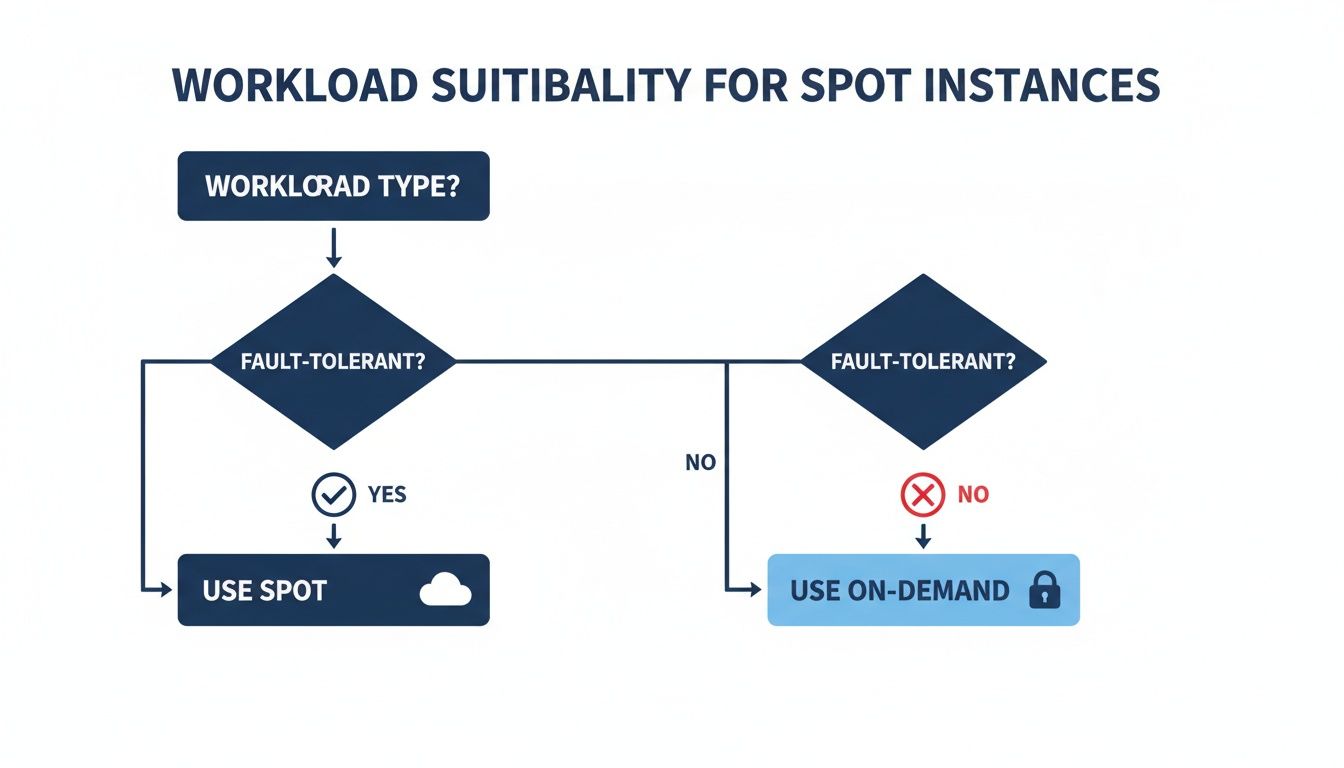
As you can see, if your workload can handle an interruption (is fault-tolerant), Spot is a great fit. If not, On-Demand or another committed-use model is the safer bet.
To help you visualize how these models stack up, here’s a quick side-by-side comparison.
EC2 Pricing Model Comparison
This table gives you a clear, at-a-glance look at the four main EC2 pricing models, helping you decide which is best for your specific needs.
| Feature | Spot Instances | On-Demand | Reserved Instances | Savings Plans |
|---|---|---|---|---|
| Cost Savings | Highest (up to 90%) | None (baseline price) | Significant (up to 72%) | Significant (up to 72%) |
| Commitment | None | None | 1 or 3-year term | 1 or 3-year term |
| Flexibility | High (can stop anytime) | Highest (pay by the second) | Low (tied to instance family/region) | Medium (tied to compute spend) |
| Best For | Fault-tolerant, stateless workloads | Critical, stateful applications | Predictable, steady-state workloads | Steady workloads needing some flexibility |
| Interruption Risk | High (2-min notice) | None | None | None |
Each model has its place in a well-architected cloud environment. The key is to use them in combination to cover all your bases without overspending.
On-Demand: The Foundation of Stability
On-Demand instances are your straightforward, pay-as-you-go option. You pay a fixed rate per hour (or second) for the compute you use, with zero long-term strings attached. This model gives you total flexibility and guaranteed availability.
- Best For: Critical applications that absolutely cannot tolerate downtime. Think production databases, core user-facing web servers, or any service where an interruption would be a disaster.
- Drawback: It's the most expensive option. You're paying a premium for that peace of mind.
Reserved Instances: The Predictable Powerhouse
Reserved Instances (RIs) are designed for workloads with a predictable, long-term need. You commit to a specific instance type in a specific region for a one or three-year term. In return, AWS gives you a hefty discount compared to On-Demand pricing.
RIs aren't about flexibility; they're about locking in savings for your baseline, always-on infrastructure. If you know you'll be running a particular database server 24/7 for the next three years, an RI is a fantastic way to slash costs on that predictable usage.
Savings Plans: A Flexible Commitment
Savings Plans are a more modern, flexible way to commit. Instead of locking yourself into a specific instance type, you commit to a certain dollar amount of compute usage per hour (like $10/hour) for a one or three-year term.
This model gives you discounts similar to RIs but applies them much more broadly across different instance families, sizes, and even other AWS services like Fargate. It's a great middle ground, offering solid discounts without the rigid constraints of old-school Reserved Instances.
Savings Plans offer the financial upside of a long-term commitment while letting you keep the architectural flexibility to change instance types as your application evolves. This makes them a go-to choice for a huge range of steady-state workloads.
Spot Instances: The Ultimate Cost Saver
And that brings us back to Spot Instances. As we’ve covered, they deliver the biggest discounts, up to 90% off On-Demand prices, by letting you use AWS's spare EC2 capacity. The catch? The risk of interruption.
Adopting Spot Instances is part of a bigger trend in smart cloud cost management. While interruption rates can change depending on the instance type (some, like m5.2xlarge, see higher termination rates), the overall reliability often stays around 95%. This variability highlights why it's smart to diversify your instance choices to keep things stable and cheap. You can discover more insights about these usage patterns on CloudZero.com.
- Best For: Fault-tolerant, stateless, and flexible workloads. This is perfect for big data processing, CI/CD pipelines, containerized apps, and high-performance computing.
- Drawback: That two-minute interruption notice means your application has to be built for resilience.
By blending these four models, you can build a truly cost-optimized infrastructure. Use RIs and Savings Plans for your predictable baseline, On-Demand for critical services that need 100% uptime, and Spot Instances for everything else that can handle a brief interruption. This balanced approach ensures you’re never paying more than you have to for the capacity you need.
Best Practices for Managing Your Spot Fleet

Moving from a handful of individual Spot Instances to a full-blown, cost-saving fleet isn't something you just stumble into. It requires a real strategy. We're talking about shifting from trial and error to building a robust, automated system that keeps your applications running smoothly while slashing your compute bill.
The secret to managing a fleet of spot instances ec2 is to stop worrying about individual interruptions and start designing for resilience from the ground up. Tools like EC2 Fleet and Auto Scaling Groups are your best friends here, letting you set the rules and then stepping back as they automatically provision, manage, and scale your instances.
Embrace Instance Flexibility
If you take only one thing away from this guide, let it be this: instance flexibility is the key to winning with Spot. The most common mistake we see is teams being too picky with their instance types. When you lock your request to a single option, like m5.large, you're fishing in just one tiny capacity pool. If that one pool dries up, your workload is dead in the water.
A much smarter approach is to diversify. By giving AWS a list of different instance types, sizes, and even generations that work for your application, you're letting it pull capacity from dozens of separate pools. This massively boosts your chances of both getting and keeping the compute power you need.
A well-configured Auto Scaling Group, for instance, might be set up to allow:
- Multiple Families: If your workload isn't picky, let it use general-purpose (m5, m6i) and compute-optimized (c5, c6i) instances.
- Different Sizes: Be open to using two
largeinstances to get the same vCPU count as onexlarge. This is a classic trick. - Across Generations: There's no harm in including slightly older generations (like
m5) alongside the newer ones (likem6i). More options are always better.
Think of flexibility as your ultimate defense against interruptions.
Automate Fleet Management with Auto Scaling Groups
Nobody has the time to manually manage hundreds of Spot Instances. It's just not realistic. This is exactly what AWS Auto Scaling Groups were built for. By setting up a mixed instances policy, you can create an Auto Scaling Group that intelligently maintains your target capacity by blending Spot, On-Demand, and even Reserved Instances.
You define how much compute you need, and AWS does the heavy lifting of launching and replacing instances to meet that goal. You can set a baseline of rock-solid, uninterruptible capacity with On-Demand instances and then let Spot Instances handle the rest to drive down costs.
A pro tip is to use the capacity-optimized allocation strategy in your Auto Scaling Groups. This tells AWS to hunt for Spot Instances in the deepest capacity pools, the ones least likely to be interrupted. It's a simple change that makes your fleet far more stable.
Monitor Key Metrics in CloudWatch
You can't fix what you can't see. Using Amazon CloudWatch to keep a close eye on your fleet is non-negotiable for a serious Spot strategy. The right metrics give you a clear picture of your fleet's performance, stability, and just how much money you're actually saving.
To get started, make sure you're tracking these metrics:
- FulfilledSpotCapacity: This tells you how much of your requested Spot capacity is actually running. If this number starts to drop, it’s an early warning that your chosen instance pools might be running low.
- SpotInterruptionRate: Keep tabs on how often your instances are being terminated. A rising rate is a clear signal that you need to diversify your instance types even more or maybe shift workloads to a different Availability Zone.
- EstimatedSavings: This is the metric you show your boss. Track your savings in real-time to prove the value of your Spot strategy and find new ways to optimize.
Since they first launched, Amazon EC2 Spot Instances have completely changed the economics of cloud computing. They turn AWS's spare capacity into an incredibly affordable resource that powers massive workloads in finance, machine learning, and beyond, with savings up to 90%. Yes, there’s a risk of interruption, but that trade-off has pushed us all to build more resilient cloud architectures.
These practices, diversification, automation, and monitoring, are the pillars of a successful Spot strategy. They turn spot instances ec2 from a risky bet into a reliable tool for achieving huge cost reductions. And if you're managing workloads that run on a predictable schedule, check out our guide on scheduling AWS instances to power them down when they aren't needed.
Common Questions About EC2 Spot Instances
As you start thinking about using spot instances ec2, a few practical questions always pop up. Getting straight answers to these is the key to using them confidently and successfully. Let's tackle the most common ones I hear from teams just getting started.
How Can I Run a Stateful Application on Spot Instances?
This is a big one. It's easy to see how Spot is perfect for stateless jobs, but what about applications that need to remember things? The good news is, you absolutely can run stateful apps on Spot, but it requires a shift in thinking. The trick is to separate the application's state from its compute. If the instance gets pulled, the data needs to live on somewhere else.
The core strategy here is checkpointing. Think of it like hitting the save button in a video game. You periodically save your application's progress to a durable, separate storage service. If the game (your instance) crashes, you don't have to start from the beginning, you just load your last save.
Here’s how that looks in the real world:
- Persistent Storage: You’ll use services like Amazon EBS (Elastic Block Store) or Amazon S3 (Simple Storage Service) to hold your application's state. An EBS volume can be detached from a terminated Spot Instance and simply reattached to a new one, bringing all its data with it.
- Graceful Shutdown: That two-minute termination notice is your cue. A good shutdown script should trigger one final checkpoint, ensuring you save the absolute latest state before the instance vanishes.
- Automated Recovery: Your Auto Scaling Group will spin up a new Spot Instance to replace the old one. This new instance can then mount the EBS volume or pull the latest state from S3, picking up right where the other one left off.
What Happens to My Storage When a Spot Instance Is Terminated?
This is a critical detail to get right, as misunderstanding it can lead to lost data. What happens to your storage depends entirely on what kind of storage you're using.
By default, the main "root" EBS volume that boots the operating system is deleted when the instance is terminated. Any additional EBS volumes you attach, however, are preserved by default. You can also change the "Delete on Termination" setting for the root volume if you need it to stick around.
A quick breakdown:
- Root EBS Volume: By default, it's gone when the instance terminates.
- Additional EBS Volumes: By default, these stick around after termination.
- Instance Store Volumes: This is temporary storage physically attached to the host machine. Any data on an instance store is lost forever when the instance stops, hibernates, or is terminated. It's fast, but it's fleeting.
For any data you can't afford to lose, your best bet is to use EBS volumes with the "Delete on Termination" flag set to false, or better yet, store it in an external service like Amazon S3. Never, ever rely on Instance Store for anything important.
Can I Use Spot Instances with Kubernetes?
You bet. In fact, Kubernetes and Spot Instances are a fantastic combination for running resilient, cost-effective containerized apps. Kubernetes is built for handling dynamic infrastructure, which makes it a natural fit for the come-and-go nature of Spot.
The magic ingredient is the Cluster Autoscaler. This tool keeps an eye on your cluster and automatically adjusts the number of nodes. When it sees pods waiting for a home because there aren't enough resources, it can go out and request new nodes from AWS.
You can configure the Cluster Autoscaler to pull from diverse Spot pools. If a Spot node gets terminated, Kubernetes just sees it as an unhealthy node. It then automatically reschedules the pods that were running on it to other healthy nodes in the cluster. For your application, it's a seamless handoff that keeps everything running smoothly.
What Are the Most Common Mistakes to Avoid?
Spot Instances are incredibly powerful, but a few common slip-ups can turn a cost-saving win into a frustrating mess. Steer clear of these, and you'll be in great shape.
Here are the top mistakes to watch out for:
- Lack of Instance Diversification: This is the #1 rookie mistake. Putting all your eggs in one instance-type basket makes you extremely vulnerable if that one Spot pool dries up. Always give your Auto Scaling Group a list of several instance types and sizes that your application can handle.
- Ignoring the Termination Notice: That two-minute warning is a gift. Not having a plan for it is a recipe for disaster. You absolutely need a graceful shutdown script to save state, drain connections, and clean up before the lights go out.
- Using Spot for the Wrong Workloads: Don't try to shoehorn a critical, single-node database onto a Spot Instance without a bulletproof, well-rehearsed recovery plan. It's about matching the workload's interruption tolerance to the pricing model.
- Setting a Max Price Too Low: In the old days, you had to bid for Spot. Now, setting a custom max price is mostly unnecessary and can actually backfire, causing your instances to get terminated for no good reason. It's usually best to just leave the max price at the default On-Demand rate.
Keep these points in mind, and you can build a smart, resilient Spot strategy that turns AWS's spare capacity into a major cost advantage for your business.
Ready to take control of your cloud costs without complex configurations? CLOUD TOGGLE helps you save money by automatically shutting down idle servers on a schedule you define. Start your free 30-day trial and see how simple cloud cost optimization can be. Learn more at https://cloudtoggle.com.