An AWS Savings Plan is a flexible pricing model that offers significantly lower prices on your compute usage compared to the standard On-Demand rates. In return, you commit to spending a consistent amount of money measured in dollars per hour for a one or three-year term.
Think of it like getting a bulk discount on your electricity bill. You're telling AWS, "I promise to use at least X dollars' worth of your compute power every hour," and they reward that commitment with a lower rate.
Taming Your Cloud Bill With AWS Savings Plans
Let's be honest, navigating cloud costs can feel like a full-time job. But AWS has a pretty straightforward way to cut down your expenses without tying your hands. The core idea behind a Savings Plan is simple: commit to a certain level of spending, and AWS gives you a substantial discount for your loyalty. This model is a perfect fit for businesses with predictable, ongoing compute needs.
Unlike older discount options that were notoriously rigid, Savings Plans bring a much-needed dose of adaptability. Instead of being locked into a specific instance family in a specific region, you just commit to an hourly dollar amount. This commitment then gets automatically applied to eligible usage across a variety of services, making it a powerful tool for modern, dynamic infrastructures.
Why Savings Plans Are Gaining Popularity
The shift toward these plans is undeniable. For a lot of companies, the headache of managing older discount models created too much overhead. Savings Plans strip away much of that complexity, offering a simpler path to cost reduction. This simplicity is a huge reason why they've become a go-to strategy for FinOps teams and small to medium-sized businesses alike.
Here are the key advantages driving this trend:
- Automatic Application: The discounts just show up on your bill. There’s no manual intervention needed, so you never miss out on potential savings for the usage you've already paid for.
- Broad Coverage: Depending on the plan you choose, discounts can cover compute services like EC2, Lambda, and Fargate. This is great for diverse and evolving application architectures.
- Simplified Management: Focusing on a simple hourly dollar commitment means you don't have to constantly monitor and adjust things the way older models demanded.
This strategic shift isn't just anecdotal. Recent data shows that 51% of organizations now rely solely on Savings Plans for their rate optimization, which speaks volumes about their effectiveness and ease of use. You can explore more data on these cloud cost optimization trends to see how businesses are adapting.
At the end of the day, an AWS Savings Plan gives you a predictable way to manage your budget. It creates a direct path to lowering your hourly compute rates, which is the first and most critical step in any serious cost optimization strategy. This guide will walk you through everything you need to master these plans and squeeze every last drop of value out of them for your organization.
Once you've decided a Savings Plan is the right move for your business, the next big question is: which one? AWS gives you two main flavors, Compute Savings Plans and EC2 Instance Savings Plans. Each one strikes a different balance between savings and flexibility, and picking the right one is crucial for getting the most bang for your buck.
Let's break it down with an analogy.
A Compute Savings Plan is like having a flexible gift card for a giant online marketplace. You can use it on almost anything: a new server (EC2), a containerized app (Fargate), or even a serverless function (Lambda). It works across different "warehouses" (AWS regions), giving you incredible freedom.
On the other hand, an EC2 Instance Savings Plan is like a high-value coupon for a very specific brand of TV. It slashes the price dramatically, but you have to use it for that exact brand (instance family) and at one specific store location (AWS region). The discount is deeper, but your choices are much more limited.
Compute Savings Plans: The Flexible Option
If your workloads are dynamic, evolving, or you're just not sure what the future holds, the Compute Savings Plan is almost always the best place to start. Its major win is that the discount applies broadly across different services and even different parts of the world.
A Compute Savings Plan automatically discounts your usage on:
- Amazon EC2 instances, regardless of family, size, or operating system
- AWS Fargate for your container workloads
- AWS Lambda serverless functions
This means you can modernize your applications, say, by migrating from EC2 instances to Fargate containers, without messing up your savings. The plan just rolls with the punches and applies the discount to whatever new service you're using. For companies with a global footprint, a single Compute Savings Plan can cover usage across all AWS regions, which really simplifies management.
EC2 Instance Savings Plans: The High-Savings Option
Now, if your organization has stable, predictable applications humming along on EC2, this is the plan for you. The EC2 Instance Savings Plan offers the deepest discounts you can get, promising up to 72% off On-Demand rates. But there's a catch: you have to commit to a specific instance family within a single AWS region.
For example, you could commit to the m7i instance family in the us-east-1 region. You still get some wiggle room. You can change instance sizes (like going from m7i.large to m7i.2xlarge) or switch operating systems. But you can't apply those savings to a different family, like c7g, or to any usage outside of us-east-1.
This makes it a perfect fit for things like legacy applications or long-running production databases where you know the underlying hardware isn't going to change anytime soon.
Compute vs EC2 Instance Savings Plan Comparison
To make the choice even clearer, here’s a side-by-side look at how the two plans stack up.
| Feature | Compute Savings Plan | EC2 Instance Savings Plan |
|---|---|---|
| Services Covered | EC2, Fargate, Lambda | EC2 only |
| Discount Potential | Up to 66% | Up to 72% |
| Flexibility | Very high; change instance family, size, OS, region, or even service (EC2/Fargate/Lambda) | Limited; change instance size or OS, but locked to a specific instance family and region |
| Best For | Dynamic, evolving, or uncertain workloads. Multi-region or multi-service environments. | Stable, predictable workloads with consistent infrastructure needs. |
| Management Overhead | Low; "set it and forget it" across your AWS account. | Higher; requires careful planning to match commitments to specific workloads. |
Ultimately, the best choice depends entirely on your workload's predictability. If you value flexibility above all, the Compute Savings Plan is your go-to. If you can confidently commit to specific hardware for a year or more, the deeper discounts of the EC2 Instance Savings Plan are hard to beat.
This flowchart helps visualize how a commitment-based strategy like Savings Plans fits into the broader cost optimization journey.
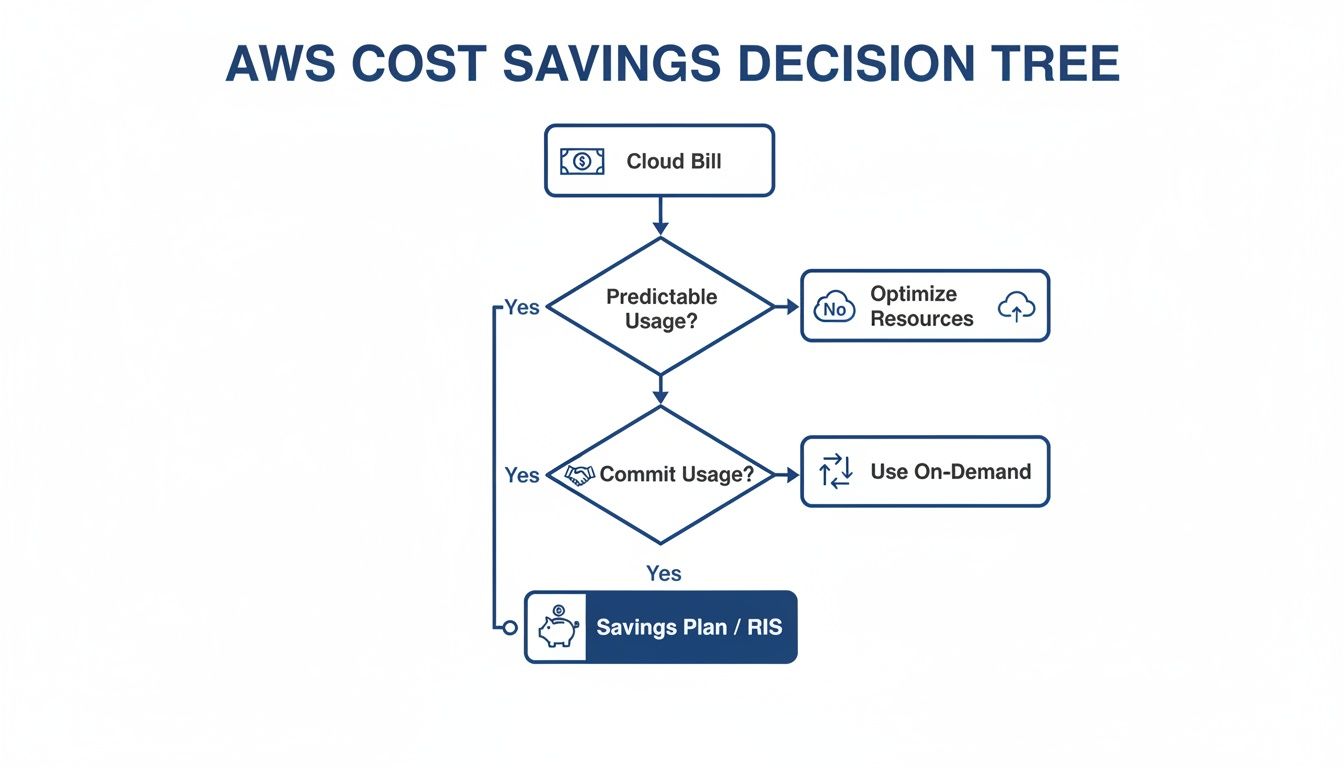
As the graphic shows, once you've decided to commit to a certain level of usage, a Savings Plan becomes a foundational tool for driving down your cloud bill.
The core decision really boils down to one question: Do you need the freedom to change instance families and regions, or is your workload stable enough to lock in a deeper, more specific discount? Your answer will point you directly to the right Savings Plan for your organization.
Understanding the Financials of AWS Savings Plans
So, you’ve picked the right type of Savings Plan. Now for the fun part: the numbers. This is where you lock in your commitment term and payment options, the two main levers that dictate your discount level and cash flow. Getting this right is just as crucial as choosing the plan type in the first place.

Think of it like a cell phone contract. You can go month-to-month for total flexibility but pay a premium, or you can sign a longer contract to get a much better deal. AWS Savings Plans work on the same principle: the longer you commit, the more you save.
Choosing Your Commitment Term
Your first big financial decision is how long you want to commit. AWS keeps it simple with two options, each built for different levels of confidence and risk tolerance.
- 1-Year Term: This is the safe bet. It’s perfect for businesses whose future usage is a bit hazy or for anyone just dipping their toes into cost optimization. You get solid savings over On-Demand rates without being locked into a long-term financial relationship.
- 3-Year Term: This option unlocks the biggest possible discounts. It’s designed for organizations with stable, predictable workloads that are confident about their cloud needs for the foreseeable future. The savings can be massive, but it demands a solid forecast.
Going for a three-year term is a power move. It shows you have a mature FinOps practice and a deep understanding of your cloud architecture, and you're ready to maximize your ROI.
Selecting a Payment Option
Once you’ve set your term, you need to decide how to pay. This choice directly hits your cash flow and your final discount rate. AWS gives you three ways to handle it.
Your payment option, term length, and plan type all work together to set your final discount. The rule is simple: the more you pay upfront, the more you save. It's a classic trade-off between cash on hand and long-term savings.
Here’s how they stack up:
- No Upfront: Pay for your commitment in monthly installments. This requires zero initial capital, making it the easiest on your cash flow. The trade-off? It comes with the lowest discount of the three options.
- Partial Upfront: This is the middle ground. You pay a chunk of the total commitment upfront and cover the rest with monthly payments. You get a better discount than the "No Upfront" option while keeping some cash free.
- All Upfront: Pay for the entire commitment when you sign up to get the maximum possible discount. This is the go-to for businesses that have the cash and want the absolute lowest hourly compute rates over the long run.
The Math Behind the Savings
When you combine the term, payment, and plan type, the savings potential really starts to shine. We're talking impressive numbers. A three-year, all-upfront Compute Savings Plan can cut your bill by up to 66%. An EC2 Instance Savings Plan can push that even higher, up to a massive 72% off On-Demand prices.
Even the lower-commitment options deliver value. A one-year, no-upfront Compute plan typically saves you around 28%, which jumps to 44% if you switch to a three-year, no-upfront commitment. You can discover more insights about AWS Savings Plans options and how they stack up.
Let's make it real. Say your baseline EC2 usage costs $10 per hour at On-Demand rates. If you lock in a 3-year, all-upfront EC2 Instance Savings Plan with a 70% discount, your cost for that exact same usage plummets to just $3 per hour.
How AWS Applies Your Savings
It’s important to know how AWS applies these discounts behind the scenes. Once you buy a Savings Plan, AWS automatically applies it to eligible usage across all your accounts. It’s smart, too. It always starts with the usage that gets the biggest discount first.
For example, a Compute Savings Plan will first target the instance family or service where the savings percentage is highest, ensuring you get the most bang for your buck.
Any usage that goes beyond your hourly commitment is simply billed at the normal On-Demand rate. This automatic, prioritized system means you always get the maximum financial benefit from your commitment, no manual work required. To get a really good handle on these patterns, you’ll want to dig into your AWS Cost and Usage Reports.
Savings Plans vs Reserved Instances
Choosing between an AWS Savings Plan and the older Reserved Instances (RIs) can feel like comparing a modern smartphone to a classic flip phone. Sure, both get the job done, but one is built with far more flexibility for the way we actually work today. RIs were the original way to lock in discounts on AWS, but Savings Plans are a major evolution, designed for the dynamic, ever-changing nature of the cloud.
The real difference boils down to what you’re committing to. With Reserved Instances, you’re locking yourself into a very specific instance type in a specific region, say, a t3.large in us-east-1. A savings plan aws, on the other hand, is a commitment to a simple dollar amount per hour, which gives you a ton of freedom.
Flexibility The Deciding Factor
The biggest win for Savings Plans is, without a doubt, their flexibility. Let's walk through a common scenario: your development team wants to modernize an application, moving it from an older m5 instance family to the newer, more powerful m6g family.
- With a Reserved Instance, that upgrade just broke your discount. Your RI is hard-wired to the
m5family, so all that newm6gusage gets billed at pricey On-Demand rates. Meanwhile, your RI commitment sits there, unused and wasting money. - With a Compute Savings Plan, this change is a non-event. The plan just sees the new
m6ginstances and automatically applies your hourly dollar commitment to them. No frantic calls to FinOps, no manual changes needed. Your savings just keep flowing.
This "follow the workload" behavior is a game-changer. It empowers your engineering teams to innovate and adopt better, faster, cheaper technology without being handcuffed by a rigid discount model.
Reducing Management Overhead
That flexibility has a direct impact on your team's time by slashing management overhead. Anyone who has managed a large RI portfolio knows it can be a complex, soul-crushing task. It involves hours of analyzing usage reports, trying to modify RIs, or attempting to offload unused capacity on the RI Marketplace.
Savings Plans wipe away most of this operational pain. Because the commitment is just a dollar figure, you don’t have to constantly babysit specific instance reservations. The "set it and forget it" nature of a savings plan frees up your FinOps and engineering talent to focus on bigger, more strategic initiatives.
This simplicity is a massive advantage for growing businesses where infrastructure is always in flux. You can stop worrying about instance attributes and focus on what really matters: maintaining a healthy savings coverage for your total compute spend.
Key Differences Between Savings Plans and Reserved Instances
To bring it all together, here's a quick look at how the two models compare on the attributes that matter most when you're trying to get your cloud costs under control.
| Attribute | AWS Savings Plans | Reserved Instances (RIs) |
|---|---|---|
| Commitment Unit | A flexible dollar-per-hour commitment ($/hr). | A rigid commitment to a specific instance type. |
| Instance Flexibility | High. Compute Plans let you change instance families, sizes, OS, and even services (EC2, Fargate, Lambda). | Low. Locked into a specific instance family and region. Changes demand manual exchanges or modifications. |
| Management Effort | Minimal. Discounts are applied automatically to eligible usage, adapting as your infrastructure evolves. | High. Requires constant monitoring, manual changes, and potential marketplace sales to prevent waste. |
| Best For | Dynamic environments, modern architectures, and teams that value agility and low operational overhead. | Stable, predictable, legacy workloads where instance types are set in stone for years to come. |
While RIs are still around and might offer slightly deeper discounts in niche, static scenarios, the vast majority of companies find the flexibility and simplicity of a savings plan aws delivers far better long-term value. The modern cloud demands a modern discount instrument. For almost every use case, that instrument is a Savings Plan.
This is just one piece of the puzzle. To see how this fits into a broader approach, you can learn more about comprehensive AWS cost optimization strategies that build on these foundational choices.
The Winning Combo: Savings Plans + Scheduling
An AWS Savings Plan is a fantastic tool for what we call "rate optimization." It's your first major step to a healthier cloud bill because it slashes your hourly compute costs. But it only solves half the problem.
Think of it this way: a Savings Plan gets you a great discount on your hotel room, but you're still paying for every single night you've booked, even if you're not sleeping there. You've lowered the rate, but you haven't addressed the wasted usage from idle resources.
This is where the real strategy kicks in. The goal isn’t just to pay less per hour, but to pay for fewer hours altogether.

Adding Automated Scheduling to the Mix
Automated scheduling is the missing piece. It’s the simple practice of shutting down non-production resources, like your development, testing, and staging environments, when nobody is using them. This means evenings, weekends, and holidays, when those instances often just sit there, silently burning through your budget.
By putting your resources on a schedule, you drastically cut the total number of compute hours you get billed for each month. This is "usage optimization," and it’s the perfect partner to the rate optimization you get from a Savings Plan.
The Power of a Dual Strategy
When you combine a Savings Plan with automated scheduling, the savings don't just add up; they multiply. The two strategies amplify each other's benefits.
Here’s how it works:
- Savings Plans Lower Your Rate: You commit to a baseline of usage and AWS gives you a huge discount on the hourly cost.
- Scheduling Reduces Your Hours: You automatically turn off idle resources, wiping thousands of unnecessary billing hours off your monthly statement.
The result is a one-two punch for cost savings. You pay a deeply discounted rate for the hours you actually need, and you completely eliminate the cost of the hours you don't. This combined approach is how companies see dramatic reductions in their cloud spend, often cutting their bills by 75% or more. You can explore a detailed guide on how to schedule AWS instances to see just how simple it is.
A Practical Savings Scenario
Let's walk through an example. Imagine a company has 10 EC2 instances for their development and testing environments. The team works a standard 40-hour week, but the instances run 24/7.
Scenario 1: No Optimization
- On-Demand Rate: $0.20 per hour per instance
- Total Hours per Month: 730 hours (24/7)
- Monthly Cost: 10 instances * 730 hours * $0.20/hour = $1,460
Scenario 2: Savings Plan Only
The company buys a Savings Plan that gives them a 50% discount.
- Discounted Rate: $0.10 per hour per instance
- Total Hours per Month: 730 hours (24/7)
- Monthly Cost: 10 instances * 730 hours * $0.10/hour = $730 (A 50% saving)
This is a good start, but half of this cost is still pure waste, spent on instances running while no one is working. This is where scheduling makes a world of difference.
Scenario 3: Savings Plan + Scheduling
Now, the company uses an automated schedule to run these instances only during work hours (around 176 hours per month). They keep the same Savings Plan.
- Discounted Rate: $0.10 per hour per instance
- Total Hours per Month: 176 hours (work hours only)
- Monthly Cost: 10 instances * 176 hours * $0.10/hour = $176
By combining both strategies, the company slashed its monthly spend from $1,460 to just $176. That’s a total saving of nearly 88%! This example proves that a savings plan aws is most powerful when you pair it with a smart approach to eliminating waste.
Frequently Asked Questions About AWS Savings Plans
Even with a great strategy in place, you’re bound to have some practical questions when it’s time to actually pull the trigger on a Savings Plan. Let's walk through some of the most common ones that pop up.
What Happens If My Usage Drops Below My Commitment?
This is a big one. If your actual usage for an hour dips below what you’ve committed to, you still pay for the full committed amount. Think of it like a monthly gym membership: you pay the same whether you go once or thirty times.
Those unused commitment dollars for that hour are simply lost; they don't roll over. This is exactly why it's so important to get a solid handle on your baseline usage before you commit. Combining your Savings Plan with a tool that shuts down idle resources creates a much more stable and predictable baseline. You dramatically lower the risk of usage dropping out from under you, protecting your investment.
Can I Use AWS Savings Plans Across Multiple Accounts?
Yes, and this is one of their best features. If you're using AWS Organizations, any Savings Plan you buy in the main management account is automatically shared across all the other accounts in your organization. The discounts just flow to wherever there's eligible usage.
The system is pretty smart about how it does this, too. It first applies the discount to usage in the account that actually bought the plan. Then, it shares any leftover savings with the other accounts. For any company with more than a couple of AWS accounts, this centralized approach is a lifesaver for maximizing savings without the headache of managing individual plans everywhere.
How Do I Choose the Right Hourly Commitment?
You don't have to guess. AWS gives you recommendations right inside the AWS Cost Management console, and they're based on your own historical usage data. A fantastic starting point is to find your lowest, most consistent hourly spend, what some people call your "always-on" usage. That's your safe zone.
It's almost always better to start with a conservative commitment that you know will cover that baseline. You can always buy another Savings Plan later to stack on top of it as you get more comfortable with your usage patterns. This step-by-step approach keeps your risk low while still delivering some serious savings.
Getting these common questions answered should give you the confidence to move forward with your savings plan aws strategy and start cutting those costs.
Ready to slash your cloud bill by eliminating wasted hours? CLOUD TOGGLE makes it easy to schedule your idle AWS and Azure resources, perfectly complementing your Savings Plan strategy. Start your 30-day free trial and see how much you can save at https://cloudtoggle.com.