Staring at an AWS bill can feel like trying to read a foreign language. It's easy to get overwhelmed, especially when you realize your S3 bucket costs are driven by a lot more than just how much data you're storing.
A great way to think about it is like a modern self-storage facility. You pay for the size of your unit (storage volume), but you also get charged for how often you visit (API requests) and if you have them ship items for you (data transfer). Getting a handle on these different charges is the first real step to reining in your cloud spend.
Decoding Your AWS Bill
At first glance, an Amazon S3 bill can be a bit of a maze. The most common mistake is assuming your costs are all about the total gigabytes you have stored. This is a huge misconception and exactly why so many people get hit with surprise charges.
The reality is much more nuanced. Your final bill is a blend of how you store your data and how you and your applications interact with it. To really get a grip on S3 bucket costs, you have to look past that simple storage number. Once you understand each component, you gain the power to actually manage your spending instead of just paying the bill.
The Four Main Pillars of S3 Costs at a Glance
S3's pricing model really boils down to four main pillars. Each one represents a different way you can rack up charges, and they all work together. For example, storing a massive archive that you rarely touch might end up being cheaper than storing a small, popular file that gets downloaded by users all over the world, all day long.
Understanding these pillars helps you quickly diagnose where your money is going.
| Cost Component | What It Means for Your Bill | Real-World Example |
|---|---|---|
| Storage Volume | The most basic cost. You pay for the amount of data (in gigabytes) stored in your buckets each month. | Storing 100 GB of photos and videos. This is the "rent" for the space your data occupies. |
| API Requests | Every interaction with your data is a request. Uploading (PUT), downloading (GET), or even just listing files (LIST) has a tiny fee. | A web application that lists thousands of image thumbnails for users, generating millions of LIST and GET requests. |
| Data Transfer | Moving data out of S3 to the public internet or another AWS region almost always costs money. Moving data in is usually free. | A user downloading a 1 GB video file from your S3 bucket to their computer. |
| Management Features | Extra services you enable on your buckets, like analytics, replication for backups, or advanced object tagging. | Setting up Cross-Region Replication to automatically copy critical data from a bucket in the US to one in Europe for disaster recovery. |
Once you start thinking in these terms, you can pinpoint exactly where your money is going and take action.
Think of it this way: your baseline cost is the rent for your storage space (storage volume). Every time you or your applications go to that space to add, retrieve, or organize items, you pay a small service fee (API requests). If you ship those items out, you pay for delivery (data transfer).
This foundational knowledge is absolutely crucial. When you break down your bill into these categories, you can see the full story. You might discover that a high volume of tiny files is driving up your request costs, or that a surprise spike in your bill was really caused by unexpected data transfer fees.
For a deeper dive into how these factors play out, you can explore our detailed guide on Amazon's S3 storage costs. Armed with this understanding, you can shift from just reacting to your bill to proactively managing your S3 usage for maximum efficiency.
Choosing the Right S3 Storage Class to Save Money
The single biggest lever you can pull to control your S3 bucket costs is choosing the right storage class. Think of it like booking a hotel room; you wouldn't book the penthouse suite just to stash a backpack for a few months. Likewise, you wouldn't keep your most critical, frequently-used files in a budget locker down the hall.
Matching your data's access patterns to the right "room" is the absolute foundation of S3 cost optimization. Each storage class strikes a different balance between storage price, retrieval fees, and access speed. Just defaulting everything to S3 Standard is one of the most common and expensive mistakes we see.
Before we dive into the classes themselves, it's helpful to see how the costs break down. It's not just about storage; access and management play a huge role in your final bill.
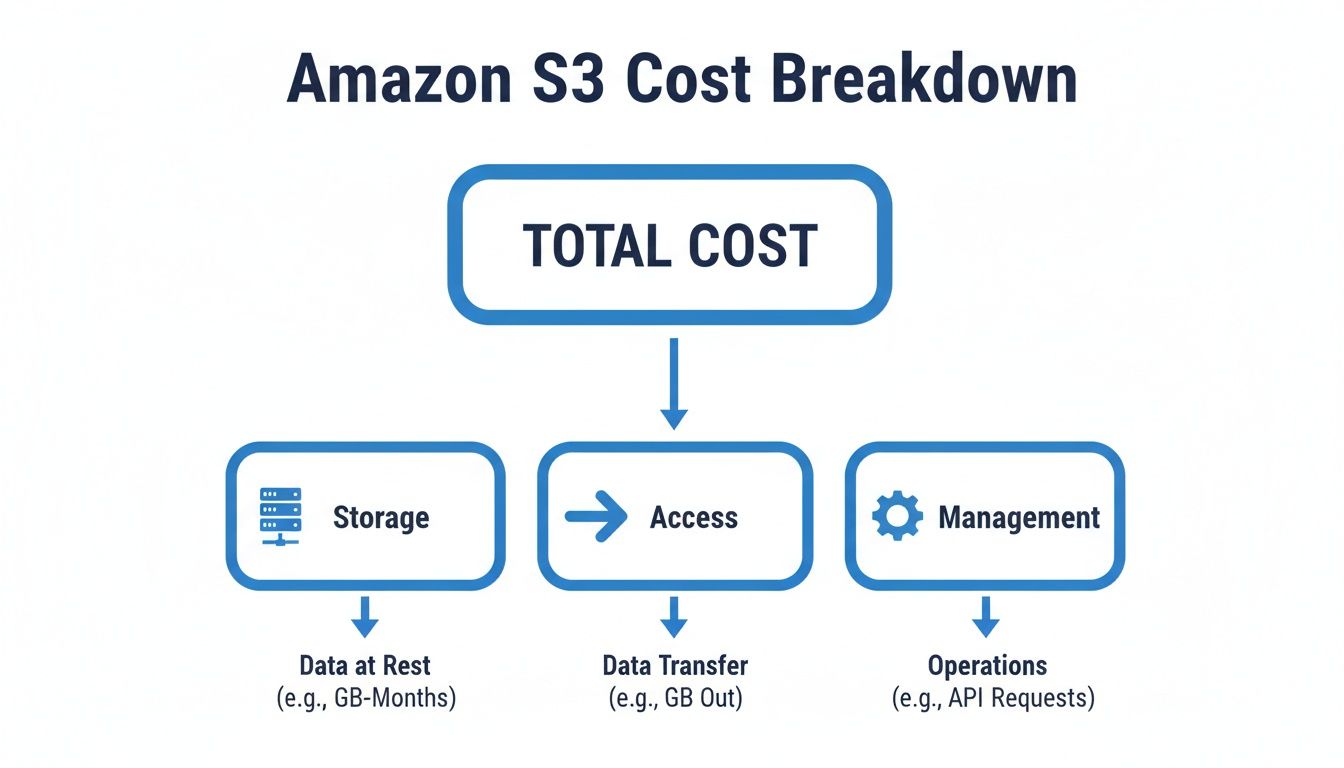
This shows that while storage is the core cost, how you interact with your data is a massive driver of your total S3 spend.
For Frequently Accessed Data
When your data needs to be available at a moment's notice for apps, websites, or analytics, you need a high-performance tier. These classes are built for speed and reliability, but they come with the highest storage price tag.
S3 Standard: This is the default, do-it-all storage class. It offers incredible durability and availability for data that's constantly in use. If you need low latency and high throughput for things like dynamic websites, content delivery, or mobile apps, S3 Standard is your go-to.
S3 Intelligent-Tiering: What if you have no idea how often your data will be accessed? Or if access patterns are totally unpredictable? S3 Intelligent-Tiering was built for exactly this problem. It automatically shifts your data between frequent and infrequent access tiers based on actual usage, saving you money without you lifting a finger.
For Infrequently Accessed Data
Not all data is needed every day. For backups, disaster recovery files, and other long-term data that you still need to get to pretty quickly, the Infrequent Access (IA) tiers offer a great trade-off. You pay less to store the data but a bit more to retrieve it.
S3 Standard-IA: This class is perfect for data that's accessed less often but requires rapid access when you do need it. You get a lower per-GB storage price than S3 Standard but get hit with a per-GB retrieval fee. It’s a fantastic fit for long-term file shares and backup archives.
S3 One Zone-IA: If you have less-critical data that can be easily recreated, One Zone-IA is an even cheaper option. Unlike other S3 classes that store data across at least three Availability Zones (AZs), this one uses a single AZ. This makes it 20% cheaper than Standard-IA, but it comes with a catch: if that AZ goes down, your data is gone.
For Archival and Long-Term Retention
For data archives and compliance data that you rarely, if ever, expect to touch, the S3 Glacier storage classes offer the absolute lowest storage costs on AWS. The trade-off? Retrieval times can range from milliseconds to several hours.
The price difference here is staggering. Premium S3 Standard storage costs $0.023 per GB-month, while S3 Glacier Deep Archive is just $0.00099 per GB-month, which is a 95.7% price drop. A middle ground, S3 Glacier Instant Retrieval, costs $0.004 per GB-month, making it 82.6% cheaper than Standard. This massive pricing spectrum is a huge opportunity for savings, but it's also a risk if you choose wrong. You can learn more about these S3 cost trade-offs on cloudtech.com.
Choosing the right archive tier is critical. Paying for millisecond retrieval on compliance data you only access once a year is a waste of money. Conversely, waiting 12 hours for data needed for an urgent restore could be a business disaster.
Your main Glacier options are:
- S3 Glacier Instant Retrieval: Best for archive data that needs immediate access, like medical images or news media assets. Retrieval is in milliseconds.
- S3 Glacier Flexible Retrieval: A versatile choice with retrieval times from minutes to hours. It's great for backups or disaster recovery where you can afford a slight delay.
- S3 Glacier Deep Archive: This is Amazon S3’s cheapest storage class, built for long-term retention of data you might access once or twice a year. Standard retrieval time is within 12 hours.
Comparing S3 Storage Classes Key Differences
To make the choice clearer, here’s a detailed comparison of the most common S3 storage classes. This table focuses on the price, access patterns, and ideal use cases to help guide your selection.
| Storage Class | Price (Per GB/Month) | Best For | Key Consideration |
|---|---|---|---|
| S3 Standard | ~$0.023 | Active websites, content distribution, mobile apps, big data analytics. | Highest storage cost, but no retrieval fees. Designed for frequent access. |
| S3 Intelligent-Tiering | Varies | Data with unknown or changing access patterns. | Small monthly monitoring fee per object. Automates cost savings. |
| S3 Standard-IA | ~$0.0125 | Long-term file storage, backups, disaster recovery files. | Lower storage cost but has a per-GB retrieval fee. |
| S3 One Zone-IA | ~$0.01 | Recreatable data like secondary backup copies or thumbnail images. | 20% cheaper than Standard-IA, but data is stored in a single AZ. No resiliency. |
| S3 Glacier Instant Retrieval | ~$0.004 | Archive data that needs millisecond access (e.g., medical images, news). | Low storage cost, but higher retrieval fees than other Glacier tiers. |
| S3 Glacier Flexible Retrieval | ~$0.0036 | Backups and archives where retrieval times of minutes to hours are fine. | Flexible retrieval options (free bulk retrievals take 5-12 hours). |
| S3 Glacier Deep Archive | ~$0.00099 | Long-term data retention for compliance and digital preservation. | The absolute lowest storage cost. Retrieval takes 12+ hours. |
Ultimately, picking the right storage class isn't a one-time decision. As your data ages and its access patterns change, your storage strategy should adapt with it. This is where tools like S3 Lifecycle policies become incredibly powerful, which we'll cover next.
Uncovering the Hidden Costs in Your S3 Bill
It’s a story we hear all the time. A team carefully calculates their expected S3 storage costs, only to get a nasty surprise when the monthly AWS bill lands. This sticker shock is incredibly common because the real cost of S3 goes way beyond just paying for the gigabytes you store.
A handful of easily overlooked charges can sneak up on you and turn a predictable line item into a real financial headache.
These aren't "hidden" costs in the sense that AWS is trying to trick you; they’re just buried in the fine print of the S3 pricing model. The biggest culprits are almost always data transfer fees and API request costs. These charges are tied directly to how you and your users interact with your data, not just how much of it sits there. Getting a handle on these is the first step to truly understanding your S3 spend.
The True Cost of Data Transfer
One of the most common sources of a runaway S3 bill is data transfer. While AWS is generous enough not to charge for data moving into an S3 bucket from the internet (data ingress), they almost always charge for data moving out (data egress).
This is a critical distinction to grasp. If you’re hosting a popular application or a website with downloadable files, every single time a user on the public internet downloads something, it adds to your bill. For high-traffic applications, these egress costs can quickly dwarf your base storage fees.
Data transfer fees also pop up when you move data between different AWS regions. For example, if you're replicating a bucket from a US region to one in Europe for your disaster recovery plan, you'll pay for every gigabyte that makes the trip. At scale, this can get expensive fast.
Simply put, a high-traffic 10 GB file can easily cost more than a 100 GB file that is never accessed. The activity surrounding your data is often a bigger cost driver than the data itself.
Why a Million Tiny Files Cost More Than One Big One
Another major expense hiding in plain sight is API request costs. Every single time you, a user, or an application does something to an object in S3, it counts as a request. This includes uploading (PUT), copying (COPY), listing the contents of a bucket (LIST), and retrieving files (GET).
The cost per request is tiny, fractions of a cent, but these actions can happen millions or even billions of times a month.
This is exactly why storing a massive number of small files can be surprisingly expensive. A single 1 GB file needs just one PUT request to upload and one GET request to download. In contrast, one million 1 KB files, which add up to the same 1 GB of storage, require one million PUT requests and one million GET requests.
- Example 1 (A Single Large File): Storing and retrieving a 1 GB video file involves minimal request costs.
- Example 2 (Many Small Files): A photo gallery app storing thousands of small thumbnail images will generate a huge number of GET requests, driving up your bill even if the total storage size is small.
This per-object overhead becomes a major factor for workloads dealing with logs, IoT sensor data, or user-generated content where countless tiny files are the norm.
Advanced Features That Add Up
Once you move beyond basic storage and access, enabling advanced S3 features introduces another layer of costs that can catch you off guard. These features are powerful, but they are not free. It's crucial to understand their pricing before you flip the switch.
Several key features come with their own price tags:
- S3 Versioning: This is a lifesaver for protecting against accidental deletions by keeping multiple copies of an object. The catch? You pay for the storage of every single version. If you frequently update a large file, your storage costs can multiply without you even realizing it.
- Cross-Region Replication (CRR): This feature is great for resilience, as it automatically copies objects to a bucket in another AWS region. However, you pay for the data transfer costs to move the data and for storing the duplicate copy in the second region.
- Specialized Storage Services: As AWS pushes into AI, new services bring unique cost models. For instance, vector storage for AI applications can be 3 to 10 times more expensive than standard S3. A team experimenting with AI might find that storing 2,354 GB of vector data costs over $140 per month, a huge premium. You can find more details about how these specialized services impact AWS S3 cloud storage pricing explained on cloudfest.com.
By looking beyond that simple per-gigabyte storage rate, you can start to anticipate these "hidden" fees and build a more realistic budget. Actively monitoring your data transfer, request patterns, and feature usage is the only way to keep your S3 costs from spiraling.
Actionable Strategies to Reduce Your S3 Spend
Knowing what drives your S3 costs is half the battle. Actively cutting them is where the real savings kick in. Luckily, AWS gives you a powerful set of tools to automate these savings, so you don't have to constantly babysit your buckets.
By putting a few key strategies into play, you can make sure you’re only paying for what you actually need. The best techniques are all about automating how your data moves and when it gets cleaned up. Think of it like a smart filing system that automatically moves old files from your expensive office desk to a cheaper off-site storage unit. This approach stops costs from creeping up as your data grows.
Implement S3 Lifecycle Policies
One of the most powerful tools in your S3 toolbox is a Lifecycle Policy. This feature lets you create rules that automatically move objects to cheaper storage classes or delete them altogether after a set time. It’s the perfect "set it and forget it" solution for data that loses its value over time.
For instance, imagine your company generates daily transaction logs. For the first 30 days, they're critical for immediate troubleshooting. After that, you only need them for quarterly analysis, not instant access. A year later, they’re just kept for compliance.
A Lifecycle Policy for this scenario would be simple:
- After 30 days: Automatically shift the log files from S3 Standard to S3 Standard-IA. That simple move cuts your storage costs for those files by about 45%.
- After 90 days: Transition the files again, this time from S3 Standard-IA to S3 Glacier Flexible Retrieval for cheap, long-term archiving.
- After 365 days: Set the objects to expire and be deleted permanently, stopping all future storage costs.
This automated workflow ensures your data is always in the most economical tier for its current relevance. No more paying premium prices for old, dusty files.
Use S3 Intelligent-Tiering for Unpredictable Data
But what about data with unpredictable access patterns? Think about customer-uploaded content, user profiles, or product images. You have no idea how often they'll be needed. This is exactly what S3 Intelligent-Tiering was built for.
Intelligent-Tiering acts like a smart assistant for your storage. It automatically monitors access patterns for each object. If a file hasn't been touched for 30 consecutive days, it's moved to the Infrequent Access tier. The moment someone accesses it again, it zips right back to the Frequent Access tier. You get the fast performance of S3 Standard with the cost savings of an IA class, all without any guesswork on your part.
S3 Intelligent-Tiering is your best bet for workloads with shifting or unknown access patterns. It takes on the heavy lifting of cost optimization, freeing up your team to focus on other priorities while still achieving significant savings.
For a broader look at managing your finances in the cloud, you can explore other cloud cost optimization strategies that work well alongside these S3-specific tactics.
Compress and Consolidate Files Before Upload
Two of the simplest yet most effective strategies happen before your files even hit S3. Compressing files using formats like Gzip or Zstandard can shrink their size dramatically. This leads to direct savings on both storage and data transfer fees. For text-heavy data like logs or JSON files, compression can often slash the file size by up to 90%.
Similarly, bundling lots of small files into a single larger archive (like a .zip or .tar file) can massively cut your API request costs. Remember, S3 charges per request. Uploading one 10 MB archive is far, far cheaper than uploading ten thousand 1 KB files. This is a must-do for workloads that spit out tons of tiny outputs, like IoT sensor data or event logs.
Enable Requester Pays Buckets
Do you store large datasets that other people or organizations need to access? If so, you know that data transfer costs can pile up fast. The Requester Pays feature flips the script on billing.
When you enable this, the person or account requesting the data from your bucket foots the bill for the data transfer, not you. This is a game-changer if you're hosting public datasets, scientific research data, or software packages. It effectively offloads a major cost driver from your AWS bill and puts it on the party actually using the data.
Beyond just S3, looking into how to host a static website for free can be another great way to cut your overall cloud spending on certain projects. By implementing these practical strategies, you can transform cost management from a reactive chore into a proactive, automated process that continuously saves you money.
How to Monitor and Visualize Your S3 Costs
You can't optimize what you can't see. Trying to get your S3 costs under control without the right data is like trying to save money on your electric bill without knowing which appliances are the real power hogs. You might unplug a few lamps, but you're completely missing the air conditioner that’s been running nonstop.
Without proper visibility, you could waste weeks tweaking minor S3 settings while a single, misconfigured bucket quietly burns through your budget. Moving from just reacting to your monthly bill to proactively managing costs is crucial, and thankfully, AWS gives you the tools to do it.
Use AWS Cost Explorer for High-Level Trends
Your first port of call should always be AWS Cost Explorer. This is your 30,000-foot view of S3 spending, giving you an interactive way to see how costs are trending over time. You can easily filter the dashboard to show only the S3 service, letting you track your spending on a daily or monthly basis.
Cost Explorer is perfect for spotting anomalies and asking the right questions. Did your bill suddenly jump 40% last week? Cost Explorer will pinpoint the exact day it happened, helping you connect the dots to a recent code deployment or a change in how your application uses storage. This high-level view is the ideal starting point for any cost investigation.
Implement Cost Allocation Tagging for Granular Insights
While Cost Explorer tells you what you're spending, cost allocation tagging tells you who is spending it. Tagging is simply the practice of applying labels (key-value pairs) to your S3 buckets. These tags can represent anything you want: a project name, a team, a specific customer, or an environment like production or development.
Once you activate these tags in your billing console, they become powerful filters in Cost Explorer, unlocking a much deeper level of analysis.
- Project-Based Costing: See exactly how much the "new-feature-launch" project is costing in S3 storage.
- Team Accountability: Attribute S3 costs directly to the
data-science-teamor themarketing-analyticsgroup. - Environment Breakdown: Compare the S3 spend of your
stagingenvironment against yourproductionenvironment.
Tagging transforms your S3 bill from a single, monolithic number into a detailed breakdown of expenses. It's the difference between seeing one charge for "groceries" and getting an itemized receipt that shows you exactly what you spent on produce, dairy, and snacks.
For a deeper dive into the raw data that fuels these tools, check out our guide on how AWS Cost and Usage Reports are explained.
Set Up AWS Budgets for Proactive Alerts
Dashboards are great for after-the-fact analysis, but you also need an early warning system that tells you before costs spiral out of control. That's exactly what AWS Budgets is for. This service lets you set custom spending thresholds and get alerts when your costs or usage either exceed or are forecasted to exceed your budgeted amount.
You can set a budget for your total S3 spend or get even more specific by tying budgets to your cost allocation tags. For example, you could configure an alert to notify the project lead if the video-processing-project is projected to go over $500 for the month. These proactive notifications empower your teams to take corrective action early, preventing small overages from becoming major financial surprises.
Why S3 Cost Optimization Matters for Business Growth
Managing your S3 costs is more than just trimming a line item on your monthly AWS bill; it’s a critical business discipline. To really get why, it helps to look at how S3 pricing has changed over the years. A decade ago, storing data was a pricey affair. Today, the cost to store a single gigabyte has plummeted, making cloud storage feel incredibly cheap on the surface.
This massive price drop has fueled an explosion in data. Businesses are now collecting, storing, and analyzing more information than ever before. But here's the catch: the paradox of cheaper storage and skyrocketing data volumes means that without a solid strategy, your S3 costs can spiral out of control before you even notice.
The Shifting Landscape of Storage Costs
Looking back at historical pricing tells a powerful story. Back in November 2012, S3 Standard storage in the US East region would have set you back $0.095 per GB. Fast forward to today, and that same storage class costs just $0.023 per GB, a staggering reduction of over 75%.
Let’s put that into perspective. An organization storing a petabyte of data in 2012 was looking at a monthly bill of roughly $157,286. Today, that same amount of data costs around $22,583, an 86% cost reduction. You can dig into a more detailed timeline of these AWS pricing changes over on hidekazu-konishi.com.
This dramatic decrease proves that while the cost per gigabyte is lower, the sheer scale of modern data makes cost management more essential than ever. The game has changed from managing scarce, expensive storage to governing vast, affordable capacity.
S3 cost optimization is no longer just about saving money today. It's about building scalable, cost-effective data infrastructure that can support your future growth without becoming a financial sinkhole.
Building a Foundation for Scalable Growth
Getting into good cost optimization habits early, even when your data footprint is small, sets you up for long-term success. Simple things like implementing lifecycle rules, choosing the right storage classes, and tagging your resources from day one build a culture of financial accountability.
These practices become part of your operational DNA. As your data grows, and it will, your costs won't grow uncontrollably with it.
For any data-driven business, this is a huge competitive advantage. It means you can afford to store and analyze more data, unlock deeper insights, and innovate faster than competitors who are getting bogged down by inefficient cloud spending. Ultimately, mastering your S3 costs turns your data from a potential liability into a powerful asset for sustainable growth.
S3 Cost FAQs
When you're wrestling with an AWS bill, the details matter. Let's tackle some of the most common questions that pop up when managing S3 costs.
How Can I Find My Most Expensive S3 Bucket?
The fastest way to hunt down your most expensive S3 bucket is with the AWS Cost Explorer. Just filter the service down to "S3" and then group your costs by "Usage Type." This instantly shows you which specific operations and, more importantly, which buckets are driving up your bill.
For a more powerful, granular view, check out S3 Storage Lens. It gives you a comprehensive dashboard that breaks down everything by bucket, prefix, and storage class. It’s perfect for digging deep into why a particular bucket is so expensive.
Is S3 Intelligent Tiering Always the Best Choice?
Not necessarily. S3 Intelligent-Tiering is fantastic for data where you have no idea how often it will be accessed, but it isn't a silver bullet for every situation. Remember, the service charges a small monthly monitoring and automation fee for every single object it manages.
If you have data with a predictable access pattern, like monthly backups you know will rarely be touched, it’s often cheaper to move it directly to a class like S3 Standard-IA. This way, you skip the per-object management fee entirely.
What Is the Most Common Mistake That Causes High S3 Bills?
The number one mistake, hands down, is leaving everything in the default S3 Standard storage class and never setting up S3 Lifecycle Policies. It’s an easy oversight, but it means you're paying top dollar for data that might not have been touched in years.
Another sneaky and expensive issue is forgetting about incomplete multipart uploads. These are hidden data fragments from failed uploads that can accumulate quietly in the background. You get charged for storing this useless, invisible data, and it can add up surprisingly fast.
Stop wasting money on idle cloud resources. CLOUD TOGGLE helps you automatically shut down servers when you aren't using them, cutting your cloud bill with zero effort. Start your 30-day free trial and see how much you can save at https://cloudtoggle.com.