Getting role-based access control (RBAC) right is about more than just ticking a security box. Think of it as a strategic framework that brings order to your operations and discipline to your cloud spending.
Instead of giving permissions to individual people, you map access rights to their actual job functions. This simple shift ensures everyone has precisely the access they need to do their job: nothing more, nothing less.
Why Modern Cloud Environments Demand Robust RBAC

Let's be honest: managing who can access what in a sprawling cloud environment is a massive headache. As your team grows and your infrastructure scales, the old way of handing out direct permissions becomes a ticking time bomb of security risks and operational chaos. This is where a well-planned RBAC strategy becomes a cornerstone of modern cloud management, connecting the dots between security, operations, and your bottom line.
The business case is crystal clear. The global RBAC market is on track to hit USD 26.4 billion by 2034, and there's a good reason for that growth. The hard truth is that 62 percent of data breaches are linked to the abuse of privileged credentials, making disciplined access control an absolute must-have. You can find more details in this industry report on market growth.
Beyond Security: A Framework for Efficiency
While security is often the main driver, the benefits of RBAC run much deeper, especially for the teams on the front lines. For DevOps, FinOps, and IT, it solves the persistent challenges that kill productivity and inflate costs.
A solid RBAC framework delivers some key advantages:
- Reduced Administrative Overhead: Stop managing permissions for hundreds of individual users. Instead, you manage a smaller, more logical set of roles. It’s a game-changer.
- Improved Compliance and Auditing: When an auditor asks who has access to sensitive data, you can give them a straight answer. Clearly defined roles make demonstrating compliance a breeze.
- Enhanced Operational Agility: Need to bring a new developer onto the team? Just assign them the "Developer" role, and they get all the permissions they need in one go. Onboarding becomes instant.
A mature RBAC implementation acts as a force multiplier. It allows you to delegate tasks confidently, knowing that guardrails are in place to prevent accidental misconfigurations or unauthorized actions.
Empowering Teams Without Sacrificing Control
Here’s a real-world scenario we see all the time. A FinOps analyst needs to help cut cloud costs by scheduling non-production servers to shut down overnight. Without a proper RBAC setup, your only option might be giving them broad, risky access to your entire AWS or Azure account. That’s a massive security hole waiting to be exploited.
This is exactly where a tool like CLOUD TOGGLE comes in. With a granular RBAC implementation, you can give that analyst permission to do one thing: control server schedules through a simple interface. They never have to touch the complex and sensitive cloud console, yet they can directly and safely contribute to cost savings.
This kind of secure delegation is what modern RBAC is all about. It transforms a simple permission model into a powerful enabler for your entire organization.
Don't even think about touching the AWS or Azure console to create roles until you have a plan. Seriously. Just jumping in and clicking around is the fastest way to create a tangled, insecure mess of permissions that you'll be untangling for months.
A solid role-based access control (RBAC) implementation starts with a blueprint, not with code. This upfront strategic work is the foundation for everything that follows, ensuring your access controls are secure, scalable, and actually manageable.
Think of it this way: you wouldn't start building a house without an architectural plan. The same logic applies here. Proper planning is your best defense against "permission creep": that slow, dangerous process where users gradually accumulate far more access than they need, opening up massive security holes.
Identifying and Defining Functional Roles
First things first, you need to figure out who actually does what in your organization. Forget job titles for a moment. A "Software Engineer" title is too broad. Is that person a "Frontend Developer," a "Database Administrator," or a "Mobile Engineer"? Each of those functions has wildly different access needs.
The best way to get this information is to talk to people. Schedule time with team leads and key folks from different departments. Your mission is to understand their day-to-day reality. Ask them pointed questions about their tasks, the tools they use, and the specific cloud resources they need to touch to get their job done.
Here are a few common functional roles to get you started:
- DevOps Engineer: Needs to deploy applications, manage CI/CD pipelines, and keep an eye on infrastructure health.
- Finance Analyst: Only requires read-only access to billing dashboards and cost reports to track cloud spend.
- QA Tester: Needs just enough permission to deploy builds to staging environments and pull application logs for debugging.
- Application Developer: Requires access to specific code repos and the ability to run applications in an isolated development sandbox.
Getting this part right is foundational. If you want to go deeper on this discovery phase, check out these role-based access control best practices for more structure.
Applying the Principle of Least Privilege
Once you've got your list of functional roles, it's time to apply the principle of least privilege (PoLP). This is a non-negotiable security concept: a user should only have the absolute minimum permissions required to do their job. Nothing more.
Sticking to the principle of least privilege is the single most effective thing you can do to limit the blast radius of a compromised account. If a user's account is breached, an attacker who gets in can't delete your production database if that user only had permission to read metrics.
This means you have to get granular. Don't just give a "QA Tester" broad contributor access to an entire resource group. Define exactly what they need. Can they restart a specific virtual machine? Can they read logs from a particular storage account? Be specific, and document the justification for every single permission. This will be invaluable for audits and future maintenance.
Creating an Access Matrix for Clarity
Now that you have roles defined and permissions mapped, you need to visualize and document this structure. An access matrix is a surprisingly simple yet powerful tool for this. It’s basically a table that lays out who can do what, to what, and why.
A clean access matrix gives you a single source of truth for your entire permission model. It's an absolute game-changer for security reviews, troubleshooting access problems, and onboarding new team members quickly and safely.
Here’s a quick template you can adapt to build your own matrix.
Core Role Definitions and Permissions Matrix
This matrix serves as your blueprint, mapping each functional role to the specific actions and resources they need, always justified by the principle of least privilege.
| Functional Role | Primary Responsibilities | Required Actions (e.g., Start/Stop VM, Read Metrics) | Resource Scope (e.g., Specific Resource Group, Tagged Instances) | Justification |
|---|---|---|---|---|
| DevOps Engineer | Deploy and monitor production apps | Microsoft.Compute/virtualMachines/start/action |
Production Web App Resource Group | To restart servers during deployments |
| Finance Analyst | Analyze monthly cloud expenditure | Microsoft.Billing/billingAccounts/read |
Entire Billing Account | For generating cost analysis reports |
| QA Tester | Test new features in a safe environment | Microsoft.Compute/virtualMachines/restart/action |
Staging Environment Resource Group | To reset the application state during testing |
| App Developer | Build and debug application features | Microsoft.Web/sites/start/action |
Development Sandbox Resource Group | For local development and debugging cycles |
Going through this methodical planning process ensures your RBAC implementation is built on a logical, secure, and maintainable foundation right from the start. It's work, but it pays off enormously in the long run.
Implementing RBAC Policies in AWS and Azure
Okay, you've got your strategy mapped out. Now it’s time to get our hands dirty and turn those plans into actual policies that live and breathe in the cloud. This is where the rubber meets the road, translating your well-defined roles into the specific JSON syntax that AWS and Azure understand.
We're going to move past theory and look at real, copy-and-paste-ready examples for both platforms. The whole point here is to show you exactly how to enforce the principle of least privilege using the native tools at your disposal. I’ll break down each policy line by line, so the syntax is crystal clear, even if you’re not an AWS Identity and Access Management (IAM) or Azure JSON guru.
Crafting a Tag-Based Policy in AWS IAM
One of the most powerful and scalable ways to manage permissions in AWS is by using resource tags. It's a game-changer. Instead of constantly updating policies with new resource IDs, you can grant access dynamically based on tags. For example, you can give a team access only to the EC2 instances tagged for their project. Simple and effective.
Let's build an IAM policy for a "QA Tester" role. This person only needs to start and stop EC2 instances tagged with Project: Alpha. This is the principle of least privilege in its purest form.
{
"Version": "2012-10-17",
"Statement": [
{
"Effect": "Allow",
"Action": [
"ec2:StartInstances",
"ec2:StopInstances"
],
"Resource": "arn:aws:ec2:::instance/",
"Condition": {
"StringEquals": {
"ec2:ResourceTag/Project": "Alpha"
}
}
},
{
"Effect": "Allow",
"Action": "ec2:DescribeInstances",
"Resource": ""
}
]}
You'll notice this policy is split into two statements, and there’s a good reason for that.
- The First Statement: This is the heart of the policy. It allows the
ec2:StartInstancesandec2:StopInstancesactions, but the magic is in theConditionblock. It explicitly checks if the instance has a tag key ofProjectwith the valueAlpha. If that tag doesn't match, the action is denied flat out. - The Second Statement: A user can't manage what they can't see. This part grants
ec2:DescribeInstancespermission on all resources (*). This lets the user list and view instances in the console or CLI, but only theStart/Stopactions are gated by our tag condition.
Building a Custom Role in Azure RBAC
Azure RBAC uses a similar concept but structures it around "role definitions" that you can assign to users or groups at a specific scope. Let's create a custom role for an "App Developer" who needs contributor-like access but strictly within a single resource group called Dev-Sandbox-RG.
First, you’ll define the custom role with a JSON template like this:
{
"Name": "Virtual Machine Operator – Dev Sandbox",
"IsCustom": true,
"Description": "Can start, stop, and restart VMs within the Dev Sandbox resource group.",
"Actions": [
"Microsoft.Compute/virtualMachines/start/action",
"Microsoft.Compute/virtualMachines/stop/action",
"Microsoft.Compute/virtualMachines/restart/action",
"Microsoft.Compute/virtualMachines/read"
],
"NotActions": [],
"AssignableScopes": [
"/subscriptions/YOUR_SUBSCRIPTION_ID/resourceGroups/Dev-Sandbox-RG"
]}
This simple three-step process is the foundation of solid RBAC planning. You identify roles, map out what they need, and then visualize how it all fits together.
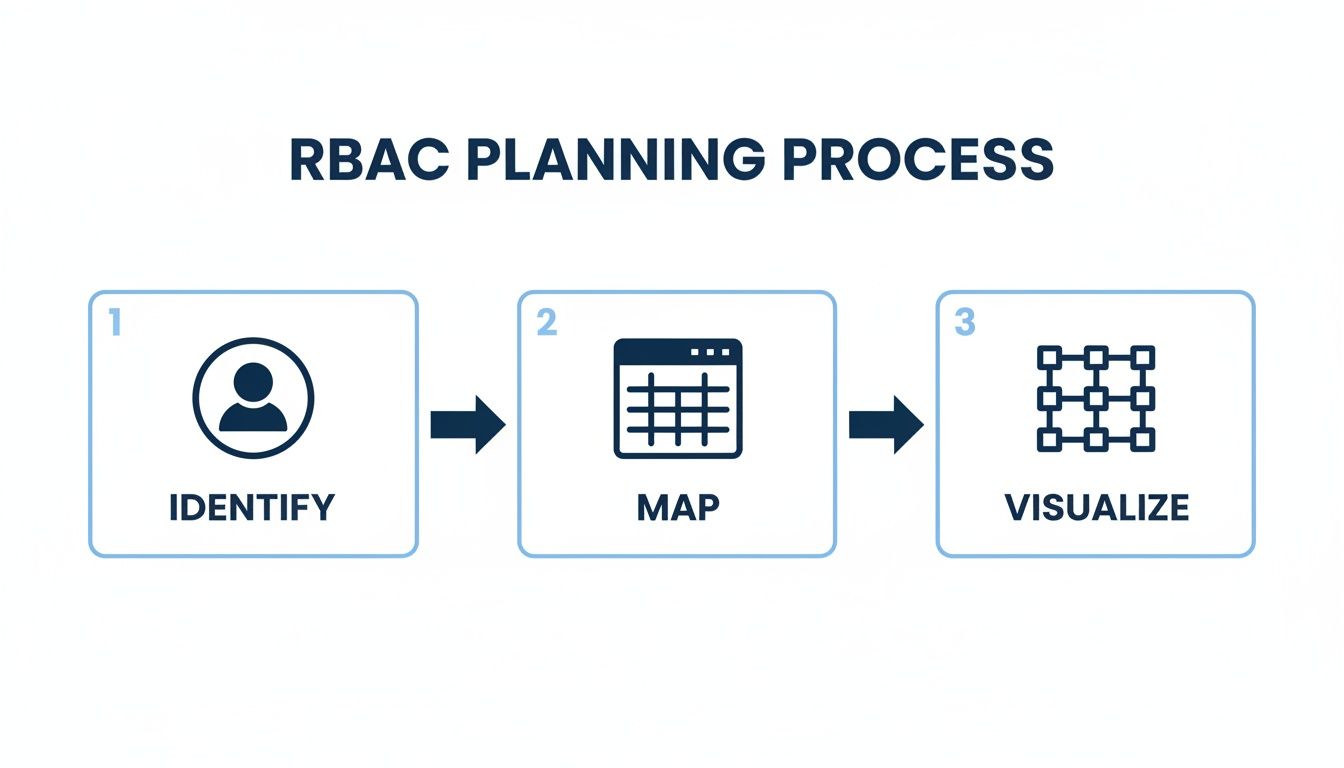
Following this ensures every policy you write, like the ones above, is grounded in a solid strategy, not just a knee-jerk reaction to an access request.
Let's pull apart the key pieces of that Azure role definition:
- Actions: This array is an explicit allow-list of operations. Here, we're granting the ability to start, stop, restart, and read virtual machine properties, nothing more, nothing less.
- AssignableScopes: This is where you lock things down. By setting the scope to a specific resource group, we guarantee that a user with this role cannot perform these actions anywhere else in the entire Azure subscription.
Once you create this custom role, you just assign it to your developer and scope it to the Dev-Sandbox-RG. It effectively puts a wall around their permissions, limiting them to only the resources they need and dramatically shrinking the blast radius if their account is ever compromised. Of course, managing these assignments is an ongoing process. You can find out more about how to manage users with Cloud Toggle and keep things organized.
The real power of these examples isn't just the code, but the specificity. By using conditions and scopes, you graduate from simply granting permissions to shaping access contextually. That's what a mature RBAC implementation is all about.
Placing these cloud-native controls within the context of broader SaaS implementation strategies can also help you see the bigger picture of how RBAC fits into your application lifecycle. Whether you're in AWS or Azure, the principles are identical: define what a role needs to do, grant the exact permissions required, and strictly limit the scope to only where those actions are allowed.
Connecting Cloud Roles to External Tools for Secure Delegation

Crafting those granular policies in AWS IAM or Azure is a huge step, but it's only half the battle. The other, equally important half? Connecting those roles to an external tool that acts as a secure buffer between your users and the cloud console.
This approach lets you safely delegate specific tasks to non-technical users. You avoid ever having to expose them to the overwhelming, and potentially risky, complexity of the native cloud environment.
Tying your cloud roles to a platform like CLOUD TOGGLE is how you turn raw, technical permissions into safe, user-friendly actions. The whole point is to empower people outside your core engineering team to help with operational goals, like FinOps, without compromising security. It’s the bridge between a dense JSON policy and a simple, intuitive button.
Translating Cloud Roles into Business Functions
Here's where the magic really happens. This model lets you map a complicated cloud role to a simple, everyday business function.
For example, an AWS IAM policy granting ec2:StartInstances and ec2:StopInstances permissions doesn't mean much to someone in accounting. But once you map that role inside CLOUD TOGGLE, it becomes the "Server Scheduler" permission for the Finance team.
This is more than just convenient; it's a fundamental security upgrade. A user on the "Finance Team" in CLOUD TOGGLE can manage schedules for cost-sensitive servers without ever needing direct AWS credentials. They just log into a clean dashboard, see only the resources they're allowed to touch, and perform only the actions you've permitted.
It's a perfect example of self-service VM access that boosts efficiency while tightening your security posture. You can explore more on how to enable CLOUD TOGGLE self-service VM access for your own teams.
Onboarding Teams and Assigning Resources
The process for hooking these systems together is methodical and secure by design. It all starts by establishing a secure link between your cloud provider and the external tool, usually with a dedicated service account locked down with read-only permissions.
Once that connection is live, you can kick off the onboarding workflow:
- Create Your Teams: First, you replicate your organizational structure inside a tool like CLOUD TOGGLE by creating teams like "Finance," "Marketing," or "QA." This mirrors the functional roles you already defined in your planning phase.
- Invite Users: Next, you invite specific people to those teams. This crucial step links individuals to their business function, keeping it totally separate from any cloud identity.
- Assign Resource Access: This is where you connect the dots. You can grant the "Finance" team access to manage only the EC2 instances tagged with
CostCenter:Finance. The platform uses those tags to dynamically show the right resources to the right team.
This method of delegation is powerful because the user's scope is locked down before they even log in. They are physically unable to see or interact with anything outside their team's assignment, a perfect real-world application of the principle of least privilege.
Testing and Auditing Your RBAC Implementation
Rolling out role-based access control isn't a "set it and forget it" task. Think of it as a living system that needs regular care to stay effective. Without consistent testing and auditing, even the most carefully designed RBAC strategy will eventually degrade, falling victim to permission creep and opening up new security holes.
Simply put, an RBAC implementation is only as good as its last review. Managing access is a continuous cycle of verifying, auditing, and tweaking to make sure it still aligns with your security policies and the real-world needs of your business.
Verifying Permissions with a Practical Testing Methodology
Before you push a new role live or even tweak an existing one, you have to test it thoroughly. The goal here is twofold. First, confirm the role gives a user everything they need to do their job. Second, and this is the part people often miss, verify it strictly blocks access to everything else.
The best way to do this is by creating dedicated test users for each of your core roles. Assign a "Finance Analyst" test user to the new role you've built and walk through their daily tasks. Can they pull up the billing dashboard? Check. Can they read cost reports? Check.
Now, try to break it. Attempt to spin up a new EC2 instance or modify a production database using that same test user. Every single one of these attempts should be met with a hard "access denied" error. Documenting both these successful and failed test cases is vital for validation and serves as a great reference down the line.
The most important question in RBAC testing isn't "Can the user do their job?" but rather "What else can they do?" A successful test is one where a user can perform their duties and absolutely nothing more.
Establishing a Cadence for Audits and Access Reviews
Regular audits are your best defense against bloated permissions and hidden security gaps. This is where cloud-native tools really shine. For example, AWS CloudTrail logs every single API call, giving you a perfect audit trail of who did what, where, and when. In the same vein, Azure Monitor offers detailed logs and metrics you can query to review user activity.
Use these tools to run periodic access reviews, paying close attention to unused or overly permissive roles. If a role hasn't been touched in 90 days, or if a user holds permissions they clearly never use, it’s time to clean house. To get a better handle on this process, it’s worth exploring some general auditing best practices.
A structured quarterly access review is non-negotiable for maintaining both compliance and security.
- Review Privileged Roles: Always start with your most powerful roles, like "Administrator" or "DevOps Engineer." Scrutinize every single permission and confirm it’s still absolutely necessary.
- Identify Dormant Accounts: Run a report of all users who haven't logged in for over 90 days. Disable their access immediately.
- Validate Role Assignments: Check in with team leads. Have them verify that every person on their team still needs the roles they've been assigned. People move projects and responsibilities shift.
- Check for Overlapping Permissions: Look for users assigned to multiple roles. Do they have redundant permissions that could be simplified into a single, cleaner role?
Automating Access Revocation A Critical Security Step
One of the biggest security gaps I see in many organizations is the manual, often forgotten, process of revoking access when someone leaves. The numbers are telling: only 23 percent of businesses have automated the allocation of access rights, and a mere 35 percent have automated the process of revoking system access.
This manual drag is a huge risk. When an employee leaves the company or even just changes teams, their old access needs to be shut down immediately. The only reliable way to do this is to integrate your RBAC system directly with your HR Information System (HRIS). When an employee's status changes in the HR system, it should automatically trigger a workflow to disable their accounts and revoke their roles, closing a very common, and very dangerous, security vulnerability.
Got Questions About Your RBAC Rollout?
Putting RBAC into practice always sparks a few questions. Even the best-laid plans run into tricky scenarios or technical details that need a closer look. Let's tackle some of the most common questions we hear from teams on the ground.
What’s the Real Difference Between RBAC and ABAC?
This one comes up all the time, and it's easy to get them confused. Here’s a simple way to think about it:
-
Role-Based Access Control (RBAC) is about who you are. It gives you permissions based on your job title or function, like "Developer" or "Billing Admin." It’s a fairly static model, making it straightforward to manage, and honestly, it’s the right fit for the vast majority of companies out there.
-
Attribute-Based Access Control (ABAC) is all about context. It's way more dynamic, granting access based on a mix of attributes: who you are, what you're trying to access, and the current situation. It can look at things like the time of day, your physical location, or how sensitive the data is.
ABAC offers incredibly fine-grained control, but that power comes with a ton of complexity. For most organizations, starting with a solid RBAC model gives you the perfect balance of strong security and manageable overhead.
How Do You Handle Emergency Access Without Blowing Up Security?
Your standard roles won't cover every fire drill. When something goes wrong, you need a plan for temporary or emergency access that doesn't leave the doors wide open.
For planned situations, like a contractor needing temporary access, use tools with built-in time limits and approval workflows. Services like AWS IAM Identity Center let you create permission sets that expire after a set time. Over in Azure, Privileged Identity Management (PIM) is perfect for just-in-time (JIT) access that goes away automatically.
For a true, system-down emergency, you need a "break-glass" procedure. This is a highly secured, super-user account that’s only touched in a crisis. Any login should blast alerts to your security team, and every single action taken must be logged and audited afterward.
A well-documented break-glass procedure is a sign of a mature security posture. It acknowledges that emergencies happen but ensures they are handled in a controlled, auditable manner.
What Are the Biggest RBAC Mistakes Teams Make?
So many teams stumble into the same pitfalls. Just knowing what they are can help you sidestep them completely.
Here are the top four mistakes we see again and again:
- Role Explosion: You create so many specific roles that the system becomes impossible to track. A dead giveaway? When you have more roles than people.
- Generous Permissions: It's tempting to grant extra access "just in case," but that’s a massive security risk. Stick to the principle of least privilege, no exceptions.
- Set It and Forget It: RBAC is not a one-and-done project. You have to schedule regular audits to clean up stale permissions and get rid of unused accounts.
- No Plan, Just Clicks: Diving into the cloud console to create roles without a strategy is a recipe for an inconsistent, insecure mess. Always start with a plan.
Is RBAC Just for Big Companies?
Absolutely not. RBAC is for everyone, from a two-person startup to a global enterprise.
Even in a tiny company, creating distinct roles like "Admin" and "Developer" builds good security hygiene from day one. It stops the all-too-common (and dangerous) practice of everyone sharing a single, all-powerful root account.
As your team grows, that RBAC foundation is already there, ready to scale securely. Onboarding new hires becomes faster and safer because you aren't forced to reinvent your entire security model from the ground up.
Ready to simplify how you manage cloud server schedules while strengthening your security? CLOUD TOGGLE uses your RBAC policies to let non-engineers safely contribute to cloud cost savings. Find out how you can delegate access without the risk by visiting https://cloudtoggle.com.