Let’s start at the beginning. Cloud optimization is the ongoing work of fine-tuning your cloud services to get the absolute most value out of them. It's a balancing act between cost, performance, security, and reliability. This isn't a one-and-done project; it’s a strategic mindset to make sure every dollar you spend in the cloud is working as hard as it can for your business.
Think of it as moving beyond just renting space in the cloud. Now, you're actively managing that space to cut waste and boost efficiency.
Why Cloud Optimization Is a Must-Do, Not a "Nice-to-Have"
Getting to the cloud used to feel like crossing the finish line. But many companies quickly learned that just "lifting and shifting" their infrastructure without a real plan creates a whole new set of headaches. An unmanaged cloud environment almost always turns into a money pit.
It's not just about wasted cash. These messy environments create performance bottlenecks that slow your teams down and leave security holes wide open. Simply "being on the cloud" isn't a strategy, it's an expensive mistake.
The numbers here are staggering. Global public cloud spending is on track to hit $723.4 billion in 2025. With 33% of companies already spending over $12 million a year on the cloud, the pressure is on. It’s no surprise that 67% of CIOs now call cloud cost optimization their top priority. You can dig into more of these figures in this comprehensive report on cloud computing statistics.
The Real Cost of Doing Nothing
Ignoring cloud optimization just isn’t an option anymore. The consequences of letting your cloud environment run wild are too big to ignore, hitting both your bottom line and your ability to compete. This isn't just about a bigger monthly bill; it's a chain reaction of problems that can stall your company's growth.
Here’s what usually happens when things are left unchecked:
- Skyrocketing Costs: Idle servers, oversized virtual machines, and forgotten storage start piling up. Before you know it, your cloud budget is out of control, pulling money away from things that actually grow the business.
- Sluggish Performance: A poorly configured setup means slow applications and a frustrating user experience. That directly impacts customer happiness and, ultimately, your revenue.
- Bigger Security Risks: A sprawling, messy cloud footprint is a nightmare to secure. Every forgotten VM or outdated service is a potential backdoor for attackers.
- Stifled Innovation: When your DevOps team is constantly putting out fires, fixing performance issues and manually tweaking infrastructure, they have no time left to build new features. Innovation grinds to a halt.
Cloud optimization changes the conversation. It stops being a technical chore for the IT department and becomes a core business strategy that’s essential for growth.
This guide is your roadmap to turning that costly cloud environment into a powerful asset. We’ll walk through the four pillars of cloud efficiency: cost, performance, security, and reliability, and give you real, actionable strategies you can start using today.
Understanding The Four Pillars Of Cloud Optimization
Effective cloud optimization is a careful balancing act, not just a frantic race to slash costs. To truly get a handle on your cloud environment, you need to look at it through four distinct but deeply connected lenses. It helps to think of your cloud infrastructure as a high-performance race car.
Each pillar represents a critical system of that car. If you focus on just one while ignoring the others, it’s like tuning the engine for maximum speed but forgetting to check the brakes or fuel efficiency. You might go fast for a little while, but you're heading for a breakdown.
An unmanaged cloud creates a perfect storm of problems, leading to wasted money, increased security risks, and sluggish performance that grinds innovation to a halt.
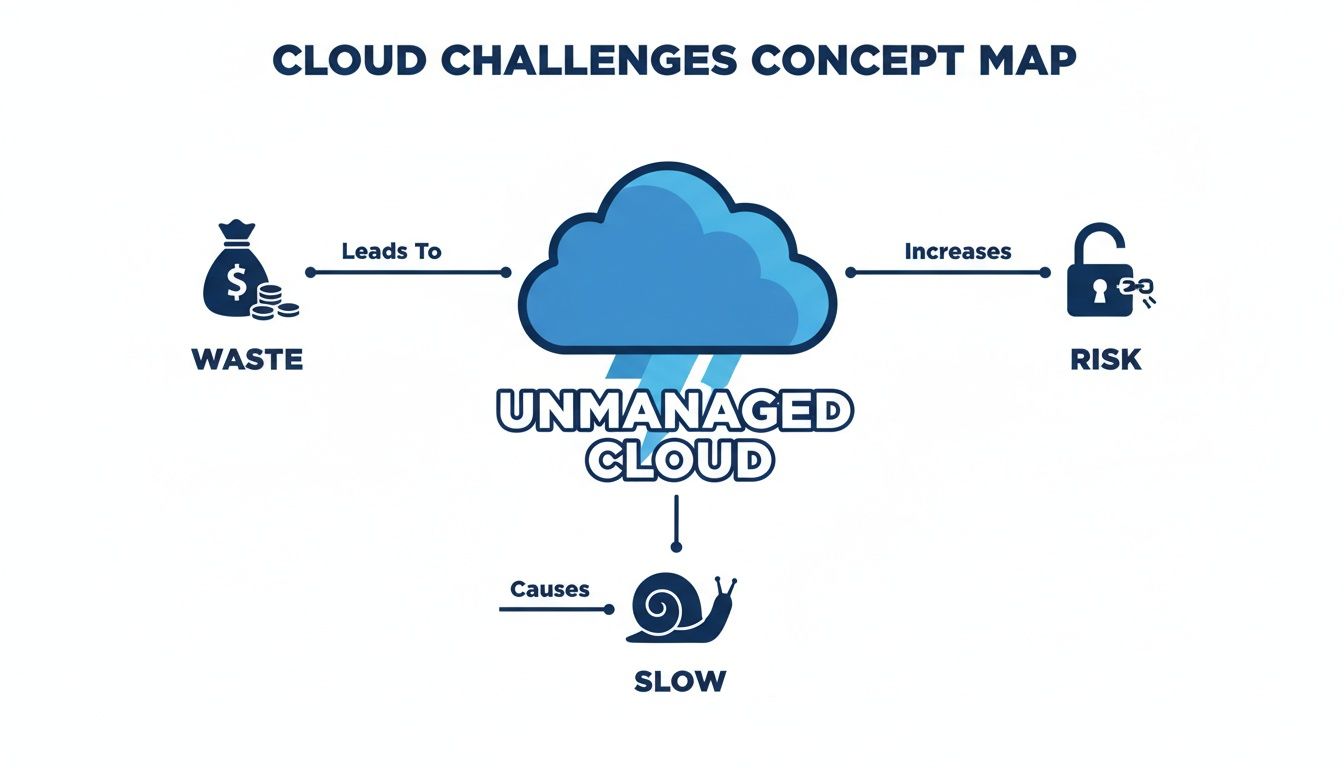
This map shows how ignoring optimization inevitably causes a cascade of issues that can damage your entire business. Let's break down how each pillar works together to prevent this.
The Four Pillars of Cloud Optimization
To build a robust and efficient cloud strategy, it's essential to understand these four pillars. Each one addresses a unique aspect of your cloud health, but they all work in concert to deliver a balanced, high-performing environment. The table below provides a quick summary.
| Pillar | Core Concept | Primary Goal | Key Metrics to Watch |
|---|---|---|---|
| Cost | Getting the most value from every dollar spent on cloud resources. | Eliminate waste and pay only for what you truly need. | Cost per unit (customer, transaction), idle resource count, rightsizing savings. |
| Performance | Ensuring applications are fast, responsive, and efficient. | Deliver a seamless user experience by removing bottlenecks. | Application response time, CPU/memory utilization, network latency. |
| Reliability | Building resilient systems that can withstand failures without disruption. | Maximize uptime and ensure business continuity. | Uptime/availability (SLAs), Mean Time Between Failures (MTBF), Mean Time To Recovery (MTTR). |
| Security | Protecting data, applications, and infrastructure from all threats. | Minimize risk by implementing robust controls and monitoring. | Number of vulnerabilities, access control violations, security incidents. |
By keeping an eye on the metrics for each pillar, you ensure no single area is neglected, creating a truly optimized and dependable cloud infrastructure.
Cost Optimization: Fuel Efficiency For Your Cloud
Cost optimization is the pillar that gets the most attention, and for good reason. In our race car analogy, this is your fuel efficiency. The goal here is simple: eliminate waste and ensure every dollar you spend on cloud services delivers maximum value.
This goes way beyond just hunting for discounts. True cost optimization means digging into your usage patterns to find and shut down idle resources, correctly size services for their actual workloads, and choose the right pricing models. It's about paying only for what you need, precisely when you need it.
Performance Optimization: Tuning The Engine
A cheap, slow application isn’t a win, it’s a business liability. Performance optimization is all about tuning your cloud engine for maximum speed and responsiveness. It’s what ensures your applications deliver a fast, flawless experience for your users.
This process involves analyzing application response times, compute utilization, and network latency to identify and crush any bottlenecks that slow things down. A high-performing application not only keeps customers happy but often becomes more cost-effective because it uses resources more efficiently.
A well-performing cloud environment is the foundation of a great user experience. When applications are fast and responsive, customer satisfaction and retention improve, directly impacting revenue.
Reliability Optimization: Structural Integrity And Safety
Reliability is the structural integrity and safety system of your race car. It’s all about building resilience into your architecture, making sure your applications can withstand failures and keep running without disruption.
This pillar focuses on designing for fault tolerance, implementing solid backup and disaster recovery plans, and proactively monitoring system health. The objective is to achieve high availability and minimize downtime, which is non-negotiable for maintaining business continuity and customer trust. You need to know your car can finish the race, even if a tire blows.
Security Optimization: Advanced Driver Protection
Finally, security optimization acts as the advanced anti-theft and driver protection system for your cloud. It involves safeguarding your data, apps, and infrastructure from threats and vulnerabilities at every single layer. In the cloud, the attack surface can be massive and complex.
Securing your cloud means implementing strong access controls, encrypting data everywhere, and continuously monitoring for suspicious activity. A security breach can lead to devastating financial losses, reputational damage, and legal headaches. This pillar ensures your valuable assets are protected from every angle, turning your high-performance car into a fortress on wheels.
Core Strategies For Immediate Cloud Cost Reduction
Alright, let's move from theory to action. While the four pillars give us a great high-level framework, real savings come from practical strategies you can put into motion today. These are the workhorses of cloud optimization, each one built to chip away at a specific type of waste and make a real dent in your monthly bill.
And make no mistake, that waste is a bigger problem than most people realize. A shocking 32% of all cloud budgets are simply squandered every year. What’s worse, 75% of organizations report that this waste just keeps growing as their spending increases. When you dig into why, the culprits are pretty clear: 66% of that squandered cash comes from idle or underused resources, and 54% is due to a simple lack of visibility into where the money is going. Faddom's 2025 market analysis paints a pretty stark picture of the challenge.
So, let's explore four powerful ways to start reclaiming that wasted spend.

Master The Art Of Rightsizing
Rightsizing is easily one of the most fundamental yet impactful moves you can make. It's all about looking at the actual performance data for your cloud resources, like CPU and memory usage, and then adjusting their size to match what your workload really needs. Too many teams provision massive instances "just in case," which leads to a constant, silent drain on the budget.
Think of it like renting a moving truck. If all your furniture fits in a small van, renting a giant semi-truck is just burning money. You’re paying for capacity you'll never touch. Rightsizing is simply choosing the van instead of the semi, making sure you only pay for the space you actually use.
Getting started is straightforward:
- Analyze Performance Data: Use your cloud provider’s native monitoring tools (like AWS CloudWatch or Azure Monitor) to pull at least two to four weeks of utilization data.
- Identify Mismatched Instances: Hunt for resources with consistently low utilization. Anything hovering below 20% CPU usage is a prime candidate for downsizing.
- Modify And Monitor: Swap the instance for a smaller, more appropriate type. Crucially, keep an eye on its performance afterward to make sure the application still runs smoothly without any negative impact.
Implement Smart Scheduling
One of the biggest money pits in any cloud environment is non-production resources. Your development, staging, and QA environments are often left running 24/7, even though they're really only needed during standard business hours. It's the digital equivalent of leaving every light in the office on all night and over the weekend.
Scheduling, sometimes called "start/stop automation," is the simple fix. By setting up automated schedules to power down these non-production servers every evening and weekend, you can slash their costs by over 60% without anyone noticing a difference in their workflow.
Scheduling non-production resources is often called the "low-hanging fruit" of cloud cost optimization. It provides substantial, predictable savings with minimal technical effort.
Harness The Power Of Autoscaling
Your application's traffic is rarely flat. It has peaks and valleys, throughout the day, during a marketing campaign, or seasonally. Autoscaling is a dynamic approach that automatically adds or removes resources based on real-time demand.
Picture it as a smart thermostat for your cloud environment. When traffic spikes (it gets hot), autoscaling spins up more servers to handle the load and keep performance snappy. When traffic dies down (it cools off), it automatically removes those extra servers so you’re not paying for idle capacity. This ensures you have the perfect amount of power at any given moment, striking an ideal balance between cost and performance.
Leverage Reservations And Commitments
For workloads that are predictable and always on, sticking with pay-as-you-go pricing is like throwing money away. Cloud providers offer massive discounts if you commit to using their services for a longer term through models like Reserved Instances (RIs) or Savings Plans.
This is like buying a monthly transit pass instead of paying the full fare for every single trip. If you know you're commuting to work every day, the pass delivers huge savings. In the same way, if you have a production database that must run 24/7, committing to a one or three-year term for its compute power can cut its cost by up to 72% compared to on-demand rates. These deep discounts make reservations a cornerstone for any serious cost-cutting plan.
If you want to dive deeper into these and other methods, check out our complete guide on cloud cost optimization strategies.
Building a Culture of Cloud Governance and FinOps
Technical strategies like rightsizing and scheduling are powerful, but they’re a bit like treating the symptoms of a bigger problem. To get sustained, long-term efficiency, you need a genuine cultural shift in how your organization thinks about the cloud. This is where governance and FinOps come in, moving your cloud optimization from a reactive chore to a proactive, shared responsibility.
Simply put, you can't fix what you can't see, and you can’t control what you don't own. Without a culture of accountability, even the best optimization tools will fall short. It’s all about building a framework where every single team understands the financial impact of their work in the cloud.
What Is FinOps
FinOps is the practice that finally gets your Finance, DevOps, and business teams speaking the same language. It brings financial accountability to the cloud's dynamic, pay-as-you-go world. Think of it as applying the speed and agility of DevOps to financial management.
Instead of Finance getting a surprise bill at the end of the month, FinOps creates a continuous conversation. Engineering teams get the visibility they need to make cost-aware decisions during development, and business leaders can finally connect cloud spending directly to the value it creates. To get a deeper dive into this cultural shift, check out our guide on what is FinOps.
This collaborative model empowers every team to take ownership of their cloud consumption, turning cost control into a shared goal rather than just another top-down mandate.
A strong FinOps culture ensures that cost becomes a first-class metric, right alongside performance and security. It empowers engineers to innovate responsibly, fully aware of the financial ripple effects of their architectural choices.
Implement a Robust Tagging Strategy
One of the first, most essential steps in any governance program is a rock-solid tagging strategy. Think of tags as a meticulous inventory system for every single asset in your cloud environment. They're simple key-value pairs (like project:phoenix or env:production) that you attach to resources like virtual machines, storage buckets, and databases.
Without proper tagging, your cloud bill is just one big, mysterious number. With it, you can slice and dice your costs with incredible precision.
A good tagging policy should answer critical questions at a glance:
- Who owns this resource? (e.g.,
owner:dev-team-alpha) - What project does it belong to? (e.g.,
project:new-feature-launch) - What is its environment? (e.g.,
env:staging) - What is its cost center? (e.g.,
cost-center:R&D-123)
This level of detail isn't a "nice-to-have"; it's non-negotiable for accurate cost allocation and hunting down waste.
Enforce Role-Based Access Control
Another critical piece of the puzzle is Role-Based Access Control (RBAC). The idea behind RBAC is simple: grant users only the permissions they absolutely need to do their jobs, and nothing more. This is often called the principle of least privilege.
In the cloud, RBAC is your best defense against unauthorized or accidental resource deployments, a massive source of unexpected costs. For instance, a junior developer probably shouldn't have the permission to fire up a fleet of the most expensive GPU instances on a whim.
By defining clear roles (like "Developer," "QA Tester," or "SysAdmin") and assigning specific permissions to each, you create guardrails that prevent costly mistakes before they even happen. This is as much about financial discipline as it is about security.
Establish Proactive Budgeting and Alerts
Finally, you need to arm your teams with real-time spending visibility and control. This is where budgeting and alerts become your best friends. Instead of waiting for the end-of-month bill shock, you can set proactive spending thresholds for different projects, teams, or departments.
When a team's spending starts creeping up on its budget, an automated alert gets triggered. This lets them take corrective action immediately, like shutting down unused resources or rethinking their architecture, and stops overages before they spiral out of control. This immediate feedback loop is absolutely crucial for building a truly cost-conscious culture.
Choosing Your Cloud Optimization Toolkit
Putting all these strategies into practice really comes down to having the right tools for the job. When you get into the nitty-gritty of cloud optimization, you generally have two paths to choose from: stick with the tools your cloud provider gives you, or bring in a specialized third-party platform. Each approach has its own set of perks and is built for different kinds of teams and different levels of complexity.
Figuring out which way to go can feel like a lot, but it really boils down to what you need in terms of visibility, automation, and handling multiple clouds. Let's break down the two main options so you can see what makes the most sense for your team.
Native Cloud Provider Tools
Every big cloud provider, like Amazon Web Services (AWS) and Microsoft Azure, gives you a free suite of built-in tools to help you keep an eye on your spending. Services like AWS Cost Explorer and Azure Cost Management + Billing are fantastic starting points for any team just beginning their optimization journey. They’re designed to give you a solid, basic overview of your spending habits.
The main benefits of these native tools are pretty clear:
- Seamless Integration: They just work, right out of the box. They’re perfectly integrated into their own ecosystem, pulling data directly without any finicky setup.
- No Initial Cost: These tools are free for all customers, which makes them a zero-risk way to dip your toes into cloud cost management.
- Basic Reporting: They offer foundational dashboards and reports that help you spot the big-ticket spending items and track your costs over time.
But their limitations start to show as soon as your cloud environment gets a little more complicated. They’re built to live inside their own walled gardens, so they offer zero visibility if you’re using services from more than one provider. And while they’re great at telling you what you spent, they often fall short on the advanced automation needed to actually control those costs, like smart scheduling for your non-production resources.
This kind of dashboard shows how specialized tools can deliver clear, actionable insights into resource scheduling and potential savings. A dedicated platform often moves beyond simple cost reports to give you direct control over when your resources are running, and costing you money.
Third-Party Optimization Platforms
As your team and your cloud usage mature, your needs will probably outgrow what the native tools can offer. That’s where third-party platforms come in. They provide a much more powerful and complete approach to cloud optimization, built specifically to solve the problems that native tools don't.
When you need to automate complex tasks, manage a multi-cloud setup, or give non-technical folks safe access to cost-saving controls, investing in a specialized platform becomes a real strategic advantage.
These dedicated tools offer a few game-changing benefits:
- Multi-Cloud Visibility: They give you a single dashboard to see and manage costs across AWS, Azure, GCP, and others. This is a must-have for the 80% of organizations running on multiple clouds.
- Advanced Automation: Platforms like CLOUD TOGGLE are brilliant at sophisticated automation. Think automated scheduling to power down idle development and staging environments, a task that’s often a huge manual pain with native tools.
- Granular Access Control: They let you hand out specific permissions safely. For instance, you could let a project manager adjust a server's schedule without giving them the keys to your entire cloud account.
- Actionable Insights: Third-party tools often use smarter tech to give you better recommendations for rightsizing, buying reserved instances, and sniffing out waste.
To really dig into the differences and find the best fit, a comparison table can be a huge help.
Native vs. Third-Party Optimization Tools
| Feature | Native Tools (e.g., AWS Cost Explorer) | Third-Party Platforms (e.g., CLOUD TOGGLE) |
|---|---|---|
| Cost | Free (included with your cloud account) | Subscription-based (monthly/annual fee) |
| Setup | No setup required, instantly available | Quick setup, usually involves connecting cloud accounts |
| Cloud Support | Single-cloud only (e.g., AWS only) | Multi-cloud (AWS, Azure, GCP, etc.) |
| Automation | Basic, often requires manual scripting | Advanced, with features like automated scheduling |
| User Access | Limited to technical users with cloud access | Granular, role-based access for any user type |
| Best For | Startups, single-cloud environments, basic reporting | SMBs, enterprises, multi-cloud setups, automation needs |
Ultimately, the choice hinges on your specific needs. Native tools are a great, no-cost starting point, but specialized platforms are built to handle the complexity that comes with growth.
Making The Right Decision
So, how do you choose? It really comes down to where you are on your cloud journey and how complex your setup is. If you want to dive deeper into the options out there, our guide to the best cloud cost optimization tools breaks it all down.
Here’s a simple way to think about it:
- Stick with native tools if: You're just starting, you're all-in on a single cloud provider, and you just need some basic cost reports for now.
- Invest in a third-party platform if: You're juggling a multi-cloud environment, need to automate things like resource scheduling, or want to empower your whole team to save money safely.
For a lot of growing businesses, the limitations of native tools become a roadblock pretty quickly. When manually shutting down idle resources starts eating up too much time, or when you can't get a clear picture of your multi-cloud spend, a dedicated platform stops being a "nice-to-have" and becomes essential for keeping things efficient.
Your Actionable Cloud Optimization Playbook
Alright, let's turn all this insight into impact. Real cloud optimization isn’t about random fixes; it’s about following a structured plan. We've broken the process down into four straightforward phases that any team can follow.
This playbook is designed to build momentum and make the whole journey less overwhelming. We'll start with the foundational stuff, grab some quick wins to prove it’s working, and then move toward a smarter, more automated system. Each phase builds right on top of the last, creating a cycle of continuous improvement.
Phase 1: Gain Visibility
You can't optimize what you can't see. Simple as that. The very first step is getting a crystal-clear picture of your entire cloud environment and exactly where the money is going. This phase is all about setting a baseline and making your infrastructure easy to read.
Here are your primary goals:
- Implement a Tagging Policy: This is non-negotiable. Enforce a consistent tagging strategy for every single resource. At a minimum, you need tags for project, environment (like
prod,dev,qa), and the team that owns it. This is the only way you'll ever get accurate cost allocation. - Set Up Dashboards: Whether you use native tools from your cloud provider or a third-party platform, get some cost and performance dashboards running. Visualizing spending trends by service, project, and team will immediately show you who, and what, your biggest cost drivers are.
Phase 2: Target Quick Wins
Now that you can see everything clearly, it's time to go after the low-hanging fruit. This phase is all about making high-impact changes that don't take a ton of effort. These quick wins deliver immediate savings and build confidence that this whole optimization thing actually works.
Focus on these two actions:
- Schedule Non-Production Environments: Go find all of your development, staging, and QA resources. Set up an automated schedule to shut them down completely outside of business hours and on weekends. This single action can slash costs for these environments by 60% or more.
- Eliminate Idle Resources: Run reports to hunt down all the unattached storage volumes, idle load balancers, and "zombie" VMs just sitting there racking up charges. Once you confirm they're no longer needed, terminate them and stop the bleeding.
Phase 3: Implement Automation
Doing all of this by hand just doesn't scale. This phase is about putting automation to work so your environment stays efficient as it grows. You're moving from one-time fixes to a self-optimizing system that can intelligently adapt to whatever you throw at it.
Here are the key automation steps:
- Configure Autoscaling: For any application with variable traffic, set up autoscaling groups. This ensures you automatically scale up resources to handle peaks and, just as importantly, scale back down during quiet periods. You'll perfectly match capacity to real-time demand.
- Establish Budget Alerts: Create automated alerts that ping your teams when their spending gets close to a preset budget threshold. This is a proactive way to stop overspending before it spirals out of control.
Phase 4: Refine And Govern
Optimization isn't a one-and-done project, it's a cultural practice that needs to be part of your team's DNA. This final phase is all about embedding these principles for the long haul through continuous refinement and solid governance.
Embed these practices into your workflow:
- Conduct Regular Reviews: Put monthly or quarterly meetings on the calendar to review spending reports, analyze performance metrics, and hunt for new optimization opportunities.
- Integrate FinOps: Get Finance, DevOps, and your business teams talking to each other. Foster a culture where cost becomes a shared metric of success for everyone, not just an afterthought.
Frequently Asked Questions About Cloud Optimization
Diving into cloud optimization always kicks up a few practical questions. Whether you're just starting out or trying to sharpen your existing strategy, getting clear answers is the key to building momentum. We’ve pulled together some of the most common queries we hear to help you on your way.
What Is The First Step In Cloud Optimization?
The absolute first step is always gaining visibility. You simply can't optimize what you can't see.
Start by getting a consistent tagging strategy in place for all your resources. This is what lets you track costs and usage by project, team, or environment. Once you know exactly where your money is going, you'll immediately spot the first few places you can start making improvements.
How Often Should We Optimize Our Cloud Environment?
Cloud optimization isn’t a "set it and forget it" project; it's a continuous process. Think of it like tuning an engine. While you might do a major tune-up quarterly, some checks need to happen more often.
- Weekly: Hunt down and eliminate idle or unused resources. This is the low-hanging fruit.
- Monthly: Take a good look at your spending reports and performance dashboards to spot trends.
- Quarterly: Do a deep dive into rightsizing opportunities and review your reserved instance coverage to make sure your commitments still make sense.
Can Optimization Hurt Application Performance?
If it's done carelessly, absolutely. For example, aggressively rightsizing a server without properly analyzing its workload can starve an application of the resources it needs, leading to slowdowns or crashes.
This is exactly why optimization has to be a balanced effort. You have to consider performance, reliability, and security right alongside cost. The real goal is efficiency, not just slashing expenses no matter the consequence.
A smart cloud optimization strategy always involves monitoring performance metrics before and after making any changes. This careful approach ensures you're building a more efficient system, not just a cheaper, and weaker, one.
Ready to stop paying for idle cloud resources? CLOUD TOGGLE makes it easy to automate server schedules, cutting costs by over 60% on non-production environments with just a few clicks. Start your free trial and see the savings for yourself.