An operation management suite (OMS) is like a central command center for your entire IT world. It gives you one dashboard to see and manage everything at once, pulling together data from your cloud platforms, on-premise servers, and any hybrid setups you’re running.
What Is a Modern IT Command Center?
Think about trying to run an airport without a control tower. Planes, ground crews, and baggage handlers would all be doing their own thing. The result? Chaos, delays, and a lot of unhappy travelers. That’s pretty much what it feels like to manage a modern IT stack without a central system.
An operation management suite is built to prevent that kind of chaos. Instead of your teams juggling dozens of separate tools for monitoring, security, and automation, an OMS brings all those functions together into one place.
A Unified View of Your Entire Operation
The whole point of an OMS is to create a single source of truth. It does this by collecting and organizing data from every corner of your IT environment. This gives your DevOps, IT Ops, and FinOps teams a real-time, complete picture of what’s happening across the business.
This central command center is designed to cut through the noise and complexity of today's tech infrastructure. It helps you do three critical things:
- Spot problems faster: By connecting the dots between data from different systems, an OMS can pinpoint the root cause of an issue much quicker than siloed tools ever could.
- Automate repetitive tasks: Think about all the time spent on server patching or scaling resources. Automation handles that, freeing up your engineers for more important work.
- Make smarter decisions: When you have a clear view of system health, performance, and cost, you can make informed choices that keep things running smoothly.
A big part of how an OMS works is through efficient application integration. By connecting all your different systems, it tears down the data silos that cause so many headaches, creating a more responsive and manageable operation.
At its heart, an OMS fundamentally changes how you see and manage technology. It shifts your teams from a reactive, fragmented mode to a proactive, unified one where data drives every action and improves efficiency.
At the end of the day, using an operation management suite means you have fewer blind spots and a whole lot more control. It provides the visibility and automation you need to make sure your systems aren’t just running, they’re running efficiently and affordably. If you're focused on managing cloud resources, our guide on choosing a cloud management platform is a great next read.
The Evolution of Unified IT Management
The dream of having a single dashboard to rule all your IT isn't new. To really get what a modern operations management platform can do, it helps to look back at how we got here. The story shows how early ideas paved the way for the powerful, data-driven suites we rely on today.
The need for a better way became painfully obvious when businesses started mixing on-premises servers with public cloud services. This hybrid world created massive blind spots and a ton of operational headaches.
Teams were stuck using separate tools for each environment. This meant data was siloed, response times were slow, and security was a mess of inconsistent rules. It was clear this couldn't last. A new, integrated approach was the only way to get back in control.
The Rise of Centralized Platforms
Pioneering solutions started to appear to tame this growing chaos. A perfect example is Microsoft's original Operations Management Suite, which launched back in 2016. It was built specifically to solve the hybrid cloud problem by bundling key services like Log Analytics and Automation into one offering. This was more than just a convenience; it was a totally new way of thinking about centralized management.
This move proved just how valuable a single view across all systems could be. Instead of jumping between multiple consoles trying to piece together what was happening, IT teams could finally see everything in one place. This history is important because it established the core principles that still define a modern operation management suite.
Early adopters discovered that a unified platform was a game-changer. It allowed them to move from a reactive, firefighting mode to a more proactive stance, where they could anticipate issues and automate solutions.
As cloud adoption exploded in the mid-2010s, these early platforms quickly showed their worth. By 2017, thousands of businesses reported they could resolve system issues up to 30% faster using real-time insights from tools like Log Analytics.
What’s more, data showed that organizations using prepackaged tools like Update Management hit 95% patch compliance within weeks. This slashed their vulnerability windows by an average of 40%. You can read more about these early advancements in Azure's OMS on certlibrary.com.
The success of these early platforms proved that integrated management wasn't just a nice idea; it delivered real, measurable results. This foundation set the stage for the sophisticated, AI-powered suites available now, which give us even greater power to automate, secure, and control costs across today's incredibly complex infrastructures.
The Core Capabilities of a Modern Operation Management Suite
An operation management suite is much more than just a fancy dashboard. Think of it as the central nervous system for your IT operations. It’s built on five core capabilities that work in concert to build a resilient, secure, and cost-effective infrastructure.
Getting a handle on these pillars is key to understanding how an OMS turns a flood of raw data into smart, automated actions.
This chart shows how we got here, moving from tangled, chaotic IT management to the kind of centralized control that a modern OMS delivers.
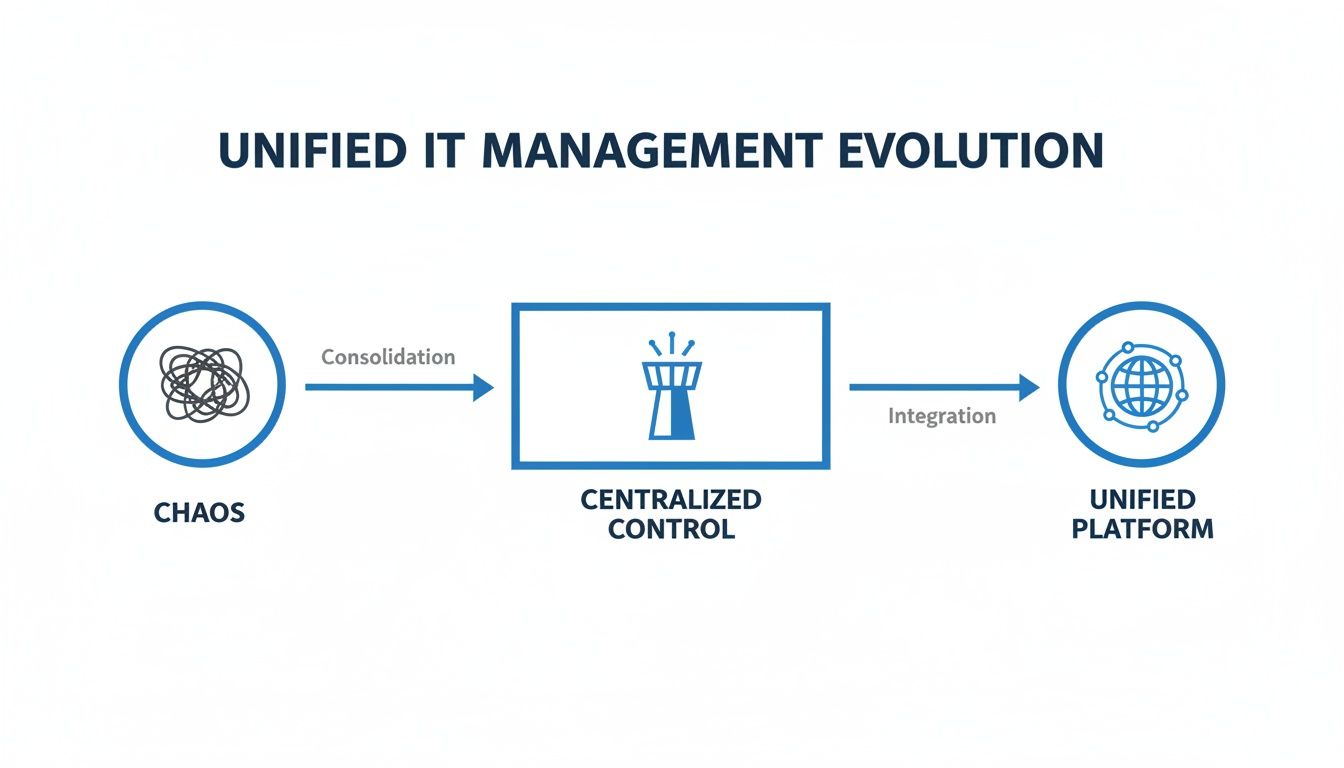
It’s a journey from messy, disconnected processes to a unified command center, which is exactly what an OMS is designed to provide.
To make this clearer, let's break down what these platforms actually do. The table below outlines the primary functions of an OMS and the real-world business outcomes you can expect from each one.
Core OMS Capabilities and Their Business Impact
| Core Capability | Function | Business Impact |
|---|---|---|
| Monitoring and Analytics | Gathers logs and performance data across all systems (cloud and on-prem) to find patterns and anomalies. | Finds and fixes issues before they affect customers, boosting uptime and protecting revenue. |
| Automation and Orchestration | Executes routine and complex tasks automatically based on predefined rules and monitoring alerts. | Reduces manual errors, frees up engineering time for valuable work, and improves cost efficiency. |
| Security and Compliance | Continuously scans for vulnerabilities, misconfigurations, and threats while checking against compliance rules. | Strengthens your security posture, simplifies audit preparation, and prevents costly compliance penalties. |
| Backup and Disaster Recovery | Automates data backups and manages failover procedures to ensure services can be restored after an outage. | Minimizes downtime and data loss during an incident, ensuring business continuity and resilience. |
Each of these capabilities builds on the others, creating a powerful loop of insight, action, and protection for your entire technology stack.
1. Monitoring and Analytics
At its heart, an operation management suite is a powerful monitoring and analytics engine. It pulls in performance data and logs from every corner of your environment, whether it's running on-premises or in the cloud. It’s like having an early warning system for your entire tech stack.
Instead of just waiting for something to break, it spots the subtle signs of trouble. For example, it might notice a database query that’s getting slower over time, giving your team a chance to fix it long before it ever impacts a user. This proactive insight is what keeps services running smoothly.
2. Automation and Orchestration
This is where the magic really happens. Automation turns those monitoring insights into action without anyone needing to lift a finger. An OMS can automate all sorts of tasks, from patching servers to managing complex configurations.
Picture an e-commerce site on Black Friday. An OMS can be set up to automatically:
- Scale up resources: As traffic explodes, it spins up more web servers to handle the demand, keeping the site fast and responsive.
- Scale down resources: When the rush is over, it shuts down those extra servers so you’re not wasting money on idle cloud capacity.
This kind of dynamic automation delivers peak performance when you need it and saves money when you don't, letting engineers focus on building new features instead of firefighting.
A modern OMS doesn't just tell you there's a problem; it combines monitoring with automation to create a self-healing and self-optimizing environment. In many cases, it can fix the issue for you.
3. Security and Compliance
A good OMS bakes security directly into your daily operations. It stands guard, constantly scanning your infrastructure for vulnerabilities, misconfigurations, and any suspicious activity. It gives you a single pane of glass to view your security posture across hybrid environments.
For instance, it can continuously check your systems against compliance frameworks like PCI-DSS or HIPAA. If a configuration ever drifts out of compliance, you get an alert instantly. This helps you maintain a strong security footing and makes audit season far less painful.
4. Backup and Disaster Recovery
Making sure the business can survive a disaster is another core function. An OMS integrates backup and recovery processes to protect your critical data and applications. It handles the tedious work of automating backups and orchestrating failover plans if something goes wrong.
This means if a primary data center goes offline, the OMS can automatically trigger a failover to a replica in another location with minimal downtime. It ensures your data isn't just backed up, but that you can actually recover it quickly when it matters most.
Improving Security and Compliance Across Your Infrastructure
In today's sprawling IT environments, a scattered approach to security isn't just inefficient, it's a massive liability. An operations management suite (OMS) changes the game by acting as your central command center, shifting your security posture from reactive to proactive.
It does this by weaving advanced threat detection, compliance monitoring, and automated patching into a single, cohesive strategy.
Instead of scrambling to contain a breach after the damage is done, an OMS helps you spot and neutralize threats as they happen. Picture this: it flags an unusual login from a new country and automatically blocks access before an intruder gets a foothold. This integrated approach is worlds more effective than juggling a dozen standalone security tools.
Proactive Compliance and Configuration Management
An OMS is like a tireless watchdog for your system configurations. It constantly checks your infrastructure against established standards like PCI DSS or CIS benchmarks, making sure everything stays in line.
This constant vigilance catches any "configuration drift" before it can snowball into a major audit finding or a gaping security hole. The return on investment here is crystal clear: you reduce risk and breeze through audit preparations.
A core part of this modern security mindset is learning how to implement Zero Trust Security. This model, which assumes no user or device is trustworthy by default, fits perfectly with the continuous monitoring and verification that a strong management suite provides.
The track record for these suites speaks for itself. Back in the day, a standout stat from Microsoft's OMS showed its Security & Compliance package could block 85% more advanced persistent threats than siloed tools. On top of that, its automation features scripted 70% of routine tasks like fixing configuration drift, freeing up engineers to focus on more valuable work.
By centralizing security intelligence and response, an OMS creates a powerful feedback loop. It not only detects threats but also provides the context and automation needed to remediate them swiftly, strengthening your defenses with every event.
Key Security Benefits of a Unified Suite
When you integrate security into a central management platform, you unlock tangible advantages that siloed tools simply can't offer. Security is no longer a periodic chore; it becomes a continuous, automated process embedded in your daily operations. You can learn more about overcoming common security challenges in cloud computing in our other guide.
Here are the biggest security wins an OMS delivers:
Unified Threat Visibility: It pulls security signals from your entire hybrid environment into a single pane of glass. You can identify and investigate threats without toggling between a dozen different consoles.
Automated Remediation: The suite can instantly respond to security events. Think quarantining an infected machine or rolling back a non-compliant change automatically, slashing your response times from hours to seconds.
Simplified Auditing: With all your compliance data in one place, generating reports for auditors becomes a quick, painless process. It provides a clear, documented trail of your consistent security posture.
How an OMS Supports FinOps and Cost Optimization
You can't optimize what you can't see. That's the core problem an operation management suite (OMS) solves for any team practicing FinOps. These platforms draw a straight line from your operational data to your financial results, giving you a clear view of cloud spending.
An OMS goes way beyond a simple monthly bill by digging into real-time performance data. It shines a light on waste you might not even know you have, like over-provisioned servers, forgotten databases, or underused storage.
Suddenly, those abstract operational metrics become concrete financial insights. You can forecast future costs based on actual usage, track spending against department budgets in real time, and stop overruns before they snowball. This deep visibility is the bedrock of good cloud cost management.
Turning Data into Savings
An operation management suite gives FinOps teams the context behind the costs. Instead of just a massive bill from your cloud provider, you can see exactly which services, apps, or business units are driving the spending. This granular view is what you need to make smart optimization decisions.
A great example is how an OMS improves capacity planning. Log Analytics tools within an OMS can crunch performance data from thousands of sources, forecasting future needs with up to 92% accuracy. This helps companies sidestep the common 20-30% overprovisioning trap in AWS and Azure.
For instance, one mid-size firm with 200 VMs used its OMS dashboard to discover 35% idle time on its servers. By scheduling shutdowns that mirrored the auto-off features of tools like CLOUD TOGGLE, they reclaimed over $100K annually. You can find more examples of OMS cost-saving capabilities on pragmaticworks.com.
This data-driven approach gives you the hard evidence needed to take decisive action. If you want to learn more about this financial discipline, check out our guide on what FinOps is and why it matters.
The true power of an OMS in a FinOps context is its ability to translate technical performance data into a financial language that business leaders can understand and act upon, bridging the gap between engineering and finance.
Practical Cost Optimization Strategies
Once an OMS gives you that much-needed visibility, you can start implementing some seriously effective cost-cutting strategies. These aren't just about basic monitoring; they touch every part of your cloud footprint.
Here are a few key strategies an OMS makes possible:
- Right-Sizing Resources: The suite flags virtual machines and databases that are consistently underutilized. It then provides specific recommendations to downsize them to smaller, cheaper instances that still meet performance needs.
- Identifying Idle Assets: It acts like a cleanup crew, spotting resources like unattached storage volumes or idle load balancers that are costing you money every hour without providing any value. This allows you to safely decommission them.
- Automating Cost Controls: Based on what it sees, an OMS can trigger automated scripts. Think shutting down developer environments after 6 PM or scaling down services during a weekend lull.
These actions, all guided by the data from an operation management suite, lead to real and sustainable reductions in your cloud bill.
When to Augment Your OMS with Specialized Tools
An operations management suite gives you a powerful, wide-angle view of your infrastructure. But let's be honest, it can sometimes be a jack of all trades and master of none. This is especially true when you get into specific, tricky tasks like cloud cost optimization.
Your OMS is brilliant at telling you what the problem is. It’s not always so great at helping you fix it.
For instance, your OMS can easily spot waste. It might flag a group of development servers that run 24/7 but only see real activity during business hours. That’s valuable information, for sure. But acting on it is a whole different ballgame. The native automation tools inside an OMS can be a headache, often demanding specialized scripting skills just to safely turn resources on and off without breaking something. This creates a huge barrier to actually doing anything about the waste you've found.
Bridging the Gap Between Insight and Action
This is exactly where bringing in a specialized tool becomes a smart, strategic move. For the specific job of shutting down idle cloud resources, a tool like CLOUD TOGGLE acts as the perfect partner to your OMS. It doesn’t try to do everything; it complements your existing setup by providing a precision instrument for a single, high-impact job.
Think of your OMS as the advanced diagnostic system in a modern car. It’s fantastic at telling you a tire is low on air. A specialized tool like CLOUD TOGGLE is the portable, simple-to-use air compressor that lets anyone fix the problem in minutes, no mechanic required.
While your OMS handles the broad monitoring and alerts, a specialized scheduling tool provides the simple, user-friendly controls needed to execute on cost-saving insights immediately and safely. This separation of duties makes your entire operation more efficient.
Making Cost Savings Accessible to Everyone
The real difference comes down to accessibility. A specialized cost optimization tool focuses on making one of the most effective savings strategies, resource scheduling, incredibly simple. This is an area where a general-purpose operation management suite often falls short because they are built for technical experts, not the wider team.
Here’s where a focused tool really shines:
- No Complex Scripting: It completely replaces the need for custom PowerShell or Python scripts with an intuitive, point-and-click interface. Anyone can set up an uptime schedule in minutes.
- Safe for Non-Engineers: It gives department heads or project managers a safe way to control schedules for their own resources without needing risky, full-blown access to the cloud provider's console.
- Immediate ROI: The tool is built to deliver savings from day one. By focusing only on eliminating waste from idle resources, the financial impact is direct, immediate, and easy to measure.
By pairing your powerful, all-seeing operation management suite with a dedicated scheduling tool, you create a far more complete and effective system. Your OMS provides the 30,000-foot view to identify opportunities, and a specialized tool like CLOUD TOGGLE gives your teams the simple, on-the-ground controls to capture those savings instantly.
Your Questions About Operation Management Suites Answered
Let's clear up a few common questions that pop up around Operation Management Suites. We'll cut through the noise and get to the practical answers you need to understand their real-world value.
OMS Versus Monitoring Tools
People often mix up an operation management suite with a basic monitoring tool, but they are worlds apart. Think of a monitoring tool like the engine warning light on your car's dashboard. It flashes to tell you something's wrong, but that's about it. You get an alert, but not much context.
An OMS, on the other hand, is the entire mechanic's workshop. It doesn't just flag the problem; it gives you the full diagnostic report and the tools to actually fix it. It brings monitoring together with automation, security, and cost management to give you a complete picture and control.
The key takeaway is that a monitoring tool just watches and alerts. An operation management suite helps you watch, understand, and act across your entire infrastructure.
Is an OMS Only for Large Enterprises?
This is a classic myth that's stuck around from the early days of IT management, but it's completely outdated. Back then, OMS platforms were massive, complex, and came with a price tag to match. The game has changed.
Modern, cloud-based suites run on scalable, subscription-based models. This makes them accessible and affordable for small and mid-sized businesses, not just corporate giants. You can start with what you need and expand your capabilities as your business grows.
How Hard Is It to Implement an OMS?
Getting an OMS up and running is often much more straightforward than people imagine. Most modern platforms use simple, agent-based deployments and come with pre-built integrations for the services you already use, which gets you off the ground quickly.
But just flipping the switch on the software is only step one. To really get your money's worth, you need a strategy. It's not just about installing a tool; it's about weaving its powerful capabilities into your daily operations and aligning them with your business goals. That’s where the real impact happens.
Ready to stop wasting money on idle cloud resources? CLOUD TOGGLE provides the simple, focused tool to schedule your servers and deliver immediate savings. Start your 30-day free trial today.