Cloud cost problems rarely start with one bad architectural decision. They start with small, ordinary choices that nobody revisits. A dev environment runs overnight. A VM gets sized for peak load and never adjusted. Data moves between services in ways that seemed harmless during setup. Then finance gets a bill that doesn't match anyone's expectations.
The scale of that waste is often underestimated. 28% of public cloud spending is wasted annually because of overprovisioning, unused resources, and poor scheduling, according to G2's cloud cost management statistics roundup. For a growing company, that changes managing cloud cost from a reporting task into an operating discipline.
That matters well beyond infrastructure. If you're already modeling engineering budgets, vendor spend, and delivery timelines, a realistic software development costs guide helps put cloud spend in context. Cloud waste doesn't live in isolation. It distorts product margins, slows hiring plans, and makes roadmap bets look more expensive than they really are. Teams that want a clear baseline should also understand the broader cost of cloud ownership before they decide where to cut.
The fix isn't mystery or magic. It usually comes down to four things done in the right order. Get visibility. Optimize what you've already provisioned. Automate the waste out of routine usage. Put lightweight rules around who can create, schedule, and approve spend.
The High Cost of Unmanaged Cloud Spend
A cloud bill becomes dangerous when nobody can explain it in plain English.
That sounds obvious, but it's common in SMBs. Engineering knows the workloads. Finance sees the invoice. Procurement may own the vendor relationship. Nobody owns the full picture, so waste hides in the gaps between those groups. By the time someone notices a spend spike, the root cause is usually old news.
Unmanaged cloud spend creates two problems at once. The first is direct waste. The second is decision paralysis. Leaders stop trusting the numbers, so every infrastructure request turns into an argument about risk, not value.
Practical rule: If a team can't say who owns a resource, why it exists, and when it should be off, that resource is a cost problem waiting to happen.
The hard part isn't finding abstract optimization opportunities. The hard part is picking the changes that save real money without creating operational drag. Many teams jump straight into complex commitment models or broad architecture changes. That's usually backwards.
A more reliable approach looks like this:
- See the bill clearly: Break spend down by team, environment, and owner.
- Shrink the oversized parts: Match compute and storage to real usage.
- Automate repeatable savings: Shut down non-production resources when nobody needs them.
- Control change: Make ownership, access, and approvals explicit.
That sequence works because it respects how SMBs operate. Most don't have a dedicated FinOps team. They need fast wins that don't require a months-long platform program. In practice, the fastest win is usually not a deep redesign. It's stopping resources from running when no one is using them.
A Framework for Total Cloud Cost Control
Managing cloud cost gets simpler when you stop treating it like one giant problem. It helps to split it into four pillars that map to real operational work.

Visibility means turning on the lights
Visibility is the foundation. If your bill is one large total with no useful allocation, you're managing guesses, not cost. Good visibility tells you which team created the spend, which environment generated it, and whether the resource supports production, staging, development, or something forgotten.
Imagine walking into a dark warehouse. You know inventory is inside, but you can't manage what you can't see.
Optimization means shrinking what doesn't need to be big
Optimization starts after you have enough usage context to act. This includes rightsizing instances, choosing the right storage tier, and reviewing pricing models that fit predictable workloads.
It's also where hidden line items show up. Egress fees can account for 15% to 30% of total bills for data-intensive SMBs, based on Backblaze's 2025 reporting on hidden egress cloud fees. Teams often focus on compute first and overlook the cost of moving data between clouds, regions, or downstream services.
Operation means automating the obvious
Some savings shouldn't depend on someone remembering to act. Non-production VMs don't need a human reminder every evening. Idle server cleanup shouldn't wait for a monthly review. If a task is repetitive and low-risk, automate it.
That's especially important in mixed AWS and Azure environments, where native controls exist but often live in separate consoles with different permission models.
For teams formalizing cloud operating standards, this is similar to the discipline used in migration planning. A good reference is Cloud migration frameworks explained, because the same principle applies here. Repeatable frameworks reduce improvisation. Cost control benefits from the same mindset, especially when you're building a cloud center of excellence.
Governance means deciding who gets to do what
Governance sounds bureaucratic, but good governance removes friction. It answers practical questions. Who can provision? Who can approve exceptions? Who can schedule resources off? Who gets alerted when spend changes unexpectedly?
Good cloud governance doesn't slow engineers down. It stops expensive ambiguity from spreading across accounts, teams, and environments.
A simple mental model helps:
| Pillar | Core question | What it looks like in practice |
|---|---|---|
| Visibility | What are we paying for? | Tags, allocation, dashboards |
| Optimization | Are we paying too much? | Rightsizing, purchasing reviews, egress checks |
| Operation | Can savings happen automatically? | Schedules, automation, cleanup workflows |
| Governance | Who owns the decision? | RBAC, approvals, budget policies |
Gain Cost Visibility with a Tagging Strategy
Tagging is where cost management stops being abstract and starts becoming usable.
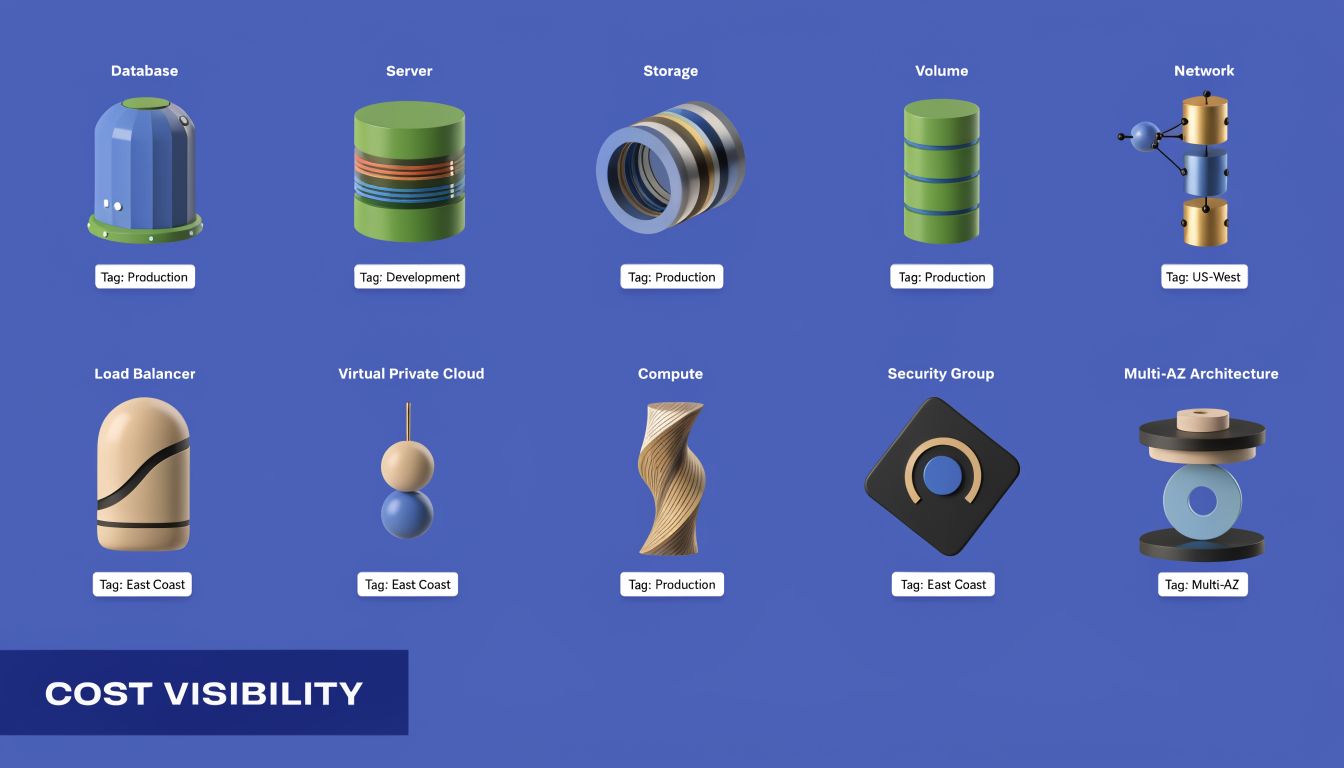
A cloud bill without tags is like a company card statement with no receipts. You can see the total, but you can't assign responsibility. That makes every cost review slow, political, and frustrating. Engineers end up defending spend they didn't create, while finance teams try to categorize line items that don't map to the business.
Start with tags that answer business questions
Most companies overcomplicate tagging on day one. They create a giant taxonomy that nobody follows. A better approach is to begin with a small set of required tags that support allocation, ownership, and operational decisions.
Use a starter policy like this:
- owner: The human or team responsible for the resource
- environment: Production, staging, development, or test
- project-code: The application, initiative, or internal cost reference
- cost-center: The financial bucket finance recognizes
- service: The business service or platform component
- lifecycle: Persistent, temporary, or scheduled
Those tags answer the questions that come up in real reviews. Who owns this? Is it revenue-generating? Should it even be running all the time? Is it temporary but still alive months later?
Enforce the minimum, not the ideal
A tagging policy fails when it depends on perfect human behavior. Native cloud policies can help enforce required tags at provisioning time, but process matters just as much. If your provisioning path allows untagged resources to slip through, they will.
A practical model is:
- Require a small mandatory tag set on creation
- Block or flag resources missing core tags
- Review untagged spend weekly
- Make one team responsible for fixing drift
This is also the point where cost allocation methods matter. Shared platforms, data stores, and network services don't map neatly to one team. If you need a cleaner model for chargeback or showback, review these cloud cost allocation methods.
After you define the policy, walk people through a concrete example:
- A staging database with
environment=stagingandowner=payments-teamis easier to review for uptime schedules. - A shared logging cluster tagged only as
infratells you almost nothing. - A temporary test VM with
lifecycle=temporarybecomes easy to flag during cleanup reviews.
This walkthrough is worth watching if your team needs a quick visual explanation before rollout:
Untagged resources don't stay neutral. They become disputed costs, and disputed costs tend to survive longer than they should.
Use tagging to drive action, not just reporting
Good tagging should trigger decisions. A development VM tagged correctly should be a candidate for scheduling. A project tagged as sunset should go into cleanup review. A cost center with unexpected growth should get attention before month-end.
If tagging only produces prettier dashboards, you haven't finished the job. The point is to make the next action obvious.
Optimize Spend with Rightsizing and Purchasing
Once you've got enough visibility to trust the bill, optimization becomes much less emotional. You're no longer debating whether cloud spend feels high. You're deciding which specific resources and commitments deserve attention.
Rightsizing is usually the first serious lever
Rightsizing sounds technical, but the logic is simple. Check historical CPU, memory, and storage behavior. Compare actual usage to the instance type you're paying for. If the workload consistently uses much less than provisioned capacity, reduce it.
The reason this matters is straightforward. Rightsizing cloud instances can yield 30% to 50% cost reductions per instance, and a Flexential analysis found 20% to 40% overall savings from rightsizing alone because 70% of compute resources are typically oversized, as described in Flexential's guide to cloud cost optimization and rightsizing.
In practice, rightsizing works best when teams review:
- Steady underuse: VMs that stay far below expected utilization
- Peak-driven sizing: Resources chosen for a rare event that never became routine
- Family mismatch: General-purpose instances that should be compute-optimized or memory-optimized
- Old assumptions: Workloads that changed after code, traffic, or architecture updates
Purchasing models save money only when usage is stable
After rightsizing, then look at commitments. AWS Savings Plans, Reserved Instances, and Azure Reservations can help with this. But they only save money if the underlying usage is real and persistent. Buying commitments before cleaning up waste locks bad habits into a discount plan.
The trade-off is simple:
| Option | Best for | Risk |
|---|---|---|
| On-demand | New or variable workloads | Highest unit cost |
| Savings Plans or similar flexible commitments | Predictable usage with some change expected | You still need good forecasting |
| Reserved capacity | Stable workloads with low change tolerance | Less flexibility if architecture shifts |
A lot of teams overfocus on the headline discount and underfocus on commitment fit. That's the mistake. A smaller discount on a well-understood baseline beats a larger discount applied to resources you should've removed.
Architecture decisions affect the bill too
Optimization isn't only about instance size and contracts. Product and platform teams also need to ask where workloads should run and why. Some latency-sensitive or distributed use cases behave differently at the edge than in centralized cloud environments. For product leaders comparing those trade-offs, this overview on how to compare cloud and edge for product teams is useful because cost follows architecture, not just procurement.
Buy commitments for the workload you can defend six months from now, not the one that looked busy during one review window.
A practical sequence works well here. Rightsize first. Remove obvious waste second. Commit only after the remaining usage looks boring and predictable. Boring workloads are the ones that produce reliable savings.
Automate Savings by Eliminating Idle Compute
Organizations often waste a meaningful share of cloud spend on compute that sits powered on with no business reason to run. For SMBs, that makes idle compute one of the fastest places to recover budget without touching production architecture or renegotiating contracts.
Development, QA, training, demo, and staging environments are common offenders. They stay online overnight, through weekends, and long after a project slows down because nobody set schedules, ownership, or shutdown rules.
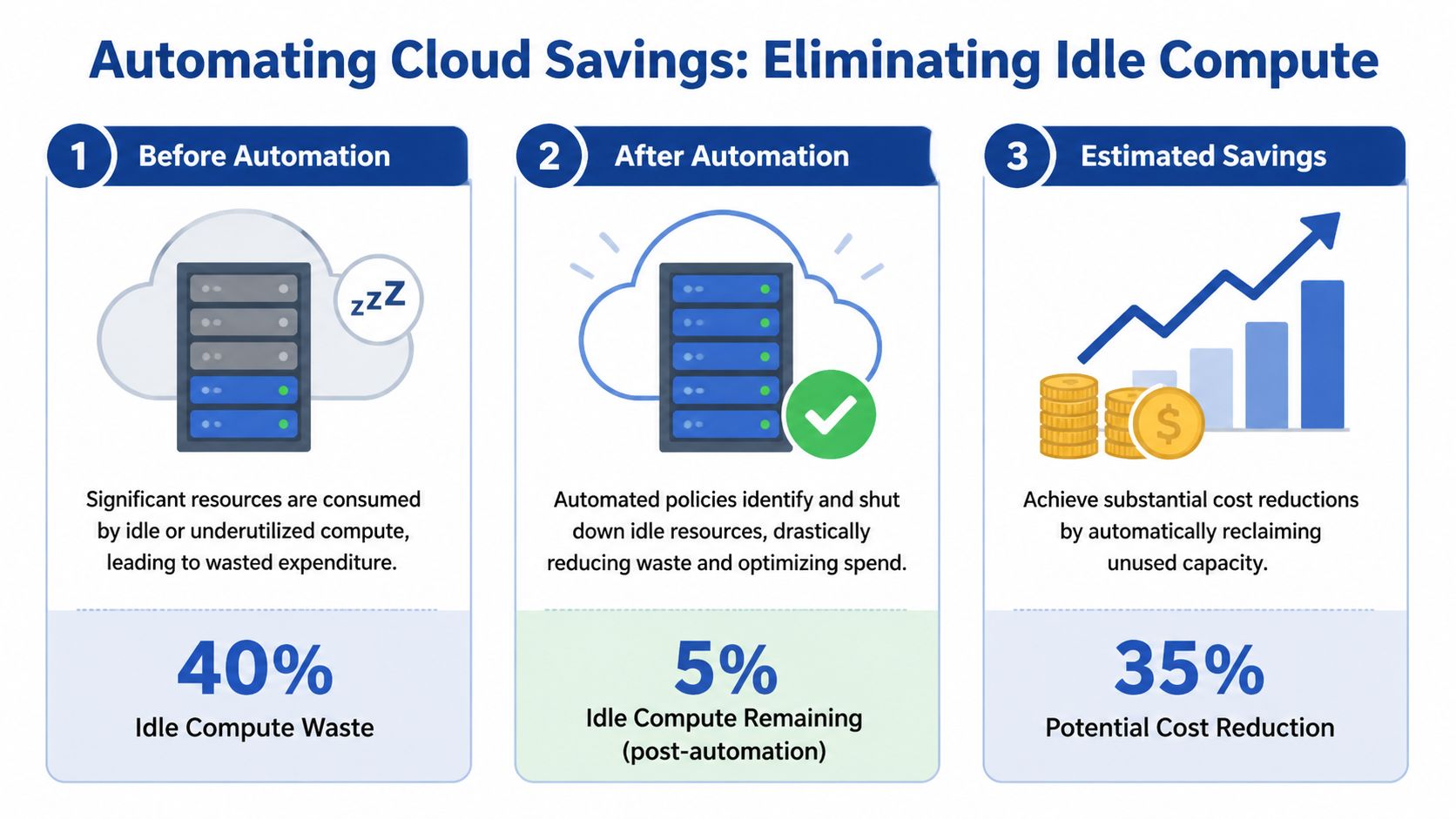
Organizations lose 20% to 35% of cloud spend to idle compute, according to Ternary's analysis of cloud cost optimization strategies. Ternary also points to a problem many smaller teams hit early. Native schedulers such as AWS Instance Scheduler can require IAM configurations that feel too broad for comfortable delegation. That complexity delays action, even when the savings case is obvious.
Idle compute is the low-effort, high-impact target
Idle compute should be the first automation use case, not a later optimization project. The reason is simple. It has clear business rules, low implementation risk in non-production environments, and savings that show up quickly on the next bill.
Non-production uptime usually follows human schedules. If a staging VM is only used from 9 a.m. to 6 p.m., every extra hour is a conscious trade-off between convenience and cost. In some teams, that convenience is worth paying for during a release week. In many teams, it becomes the default because no one owns the decision.
Start with resources that have predictable idle windows:
- Development VMs: Used during work hours and left running after the team signs off
- Test environments: Active during validation periods, quiet outside release cycles
- Training or demo systems: Easy to schedule because usage windows are planned
- Temporary project resources: Frequently forgotten after delivery pressure drops
- Internal tools with office-hour demand: Good candidates if they do not support customer traffic
Native tooling works, but the operating cost is easy to underestimate
AWS and Azure both give teams enough building blocks to create schedules. That can be the right choice if you already have platform engineering capacity and strict requirements around custom control. It is rarely the lowest-effort option for a growing company.
The trade-offs are usually clear once implementation starts:
| Approach | Strength | Friction |
|---|---|---|
| Native schedulers and automation services | Deep provider integration | Setup complexity, fragmented interfaces, broader permission concerns |
| Homegrown scripts | Full control | Ongoing maintenance, weak auditability, key-person risk |
| Dedicated scheduling platform | Faster rollout and easier delegation | Another vendor, another policy surface to review |
For SMBs, the hidden cost is not lack of features. It is the time spent building, documenting, securing, troubleshooting, and handing off the process. I have seen teams save less from the first wave of automation than they spent in engineering hours trying to make native tooling safe and usable for non-engineers.
The cheapest automation is not the one with the lowest license cost. It's the one your team will maintain correctly.
Access control determines whether scheduling becomes normal
Automation stalls when the people who understand usage patterns cannot make schedule changes safely. Finance wants predictable savings. Engineering wants tight permissions. Team leads want to extend a test environment for one evening without opening a platform ticket.
That is where many native approaches become awkward. They can automate start and stop behavior, but safe delegation often takes extra policy work, custom interfaces, or manual approval steps. For a lean team, that overhead matters.
A tool like CLOUD TOGGLE fits this use case by letting teams schedule AWS and Azure server uptime with daily or weekly rules, role-based access controls, and temporary overrides without exposing the full cloud console. The practical difference is not cosmetic. It changes scheduling from a platform-only task into a routine operating process teams can follow.
Start small and make exceptions visible
A narrow rollout works better than a perfect design on paper. Choose a small set of non-production resources with clear owners, set schedules around real working hours, and give teams an override path for late testing or urgent work.
A rollout that sticks usually follows this sequence:
- Identify candidates with reliable idle periods
- Assign an owner to every scheduled resource
- Apply default schedules based on actual team usage
- Create temporary overrides for releases, incidents, or after-hours work
- Review repeated exceptions to find bad schedules or workloads that should stay on
That last step matters. Repeated overrides usually indicate one of two things. The schedule is wrong, or the workload was never a good scheduling candidate in the first place.
The goal is not to shut down everything possible. The goal is to stop paying for compute nobody needs.
Establish Governance with Roles and Policies
Cost optimization without governance fades fast.
A team can rightsize aggressively one month and still end up back in the same position the next quarter if nobody owns provisioning standards, schedule rules, or budget review. Savings don't stick because the organization treats cloud cost as a cleanup exercise instead of an operating policy.
Give people clear jobs
In a small company, one person may wear three hats. That's fine. The point isn't organizational purity. The point is making responsibility visible.
A workable model usually includes:
- Engineering owner: Approves technical fit and operational safety
- Finance or procurement owner: Tracks spend against budget and vendor expectations
- Team manager: Confirms whether resources still need to exist
- Platform or DevOps owner: Maintains policy enforcement, tagging rules, and automation standards
Without those roles, reviews turn into group discussions with no endpoint. With them, cloud cost decisions become much faster because each question already has an owner.
Policies should be small and enforceable
Most companies don't need a long governance manual. They need a few rules people follow.
Start with policies such as:
- Provisioning approval: New persistent resources need an owner and a business reason
- Tagging requirement: Core tags must exist at creation
- Idle schedule default: Non-production compute follows a standard schedule unless approved otherwise
- Exception handling: Overrides expire unless renewed
- Review cadence: Teams review spend, anomalies, and old resources on a fixed schedule
These aren't bureaucratic hurdles. They're cost controls disguised as operational hygiene.
Governance works when it answers routine questions before someone has to ask them in Slack.
Reviews should focus on decisions, not just dashboards
A cost review meeting shouldn't be a screen-share of line items. It should produce action. Remove this. Resize that. Approve this exception. Challenge that transfer pattern. Confirm whether an environment is still needed.
If your meeting ends with everyone understanding the bill but nobody changing anything, governance isn't doing its job.
The strongest governance models also treat exceptions seriously. Temporary spend is normal. Permanent temporary spend is not. That distinction is what keeps cost management from sliding back into passive observation.
Your Path to Predictable Cloud Savings
The most useful way to think about managing cloud cost is as a system with four parts. Visibility tells you what exists and who owns it. Optimization reduces waste in the resources you need. Operation automates the savings that shouldn't rely on memory or manual effort. Governance keeps the gains from disappearing a quarter later.
All four matter. But they don't matter equally at the start.
For most SMBs, the fastest route to measurable savings is idle compute automation. It's operationally straightforward, easy to explain to finance, and low risk when applied to non-production environments with clear owners. It also exposes a bigger truth. Cloud cost problems often aren't caused by exotic architecture. They're caused by routine resources running longer than the business needs them.
That's why simple scheduling tends to outperform ambitious cost programs in the early stages. It creates a visible win, builds trust in the process, and gives teams room to tackle more complex work like rightsizing, commitment planning, and data transfer review.
If you're trying to bring cloud spend under control, start where the waste is obvious and the implementation burden is low. Get ownership clear. Schedule what doesn't need to run. Review the exceptions. Then build outward from that first result.
If idle servers and always-on non-production environments are driving unnecessary spend, CLOUD TOGGLE gives teams a practical way to act on it. You can set daily or weekly schedules for AWS and Azure resources, delegate access with role-based controls, and let non-engineering stakeholders help reduce waste without exposing the full cloud account. For companies that want predictable savings without building and maintaining scheduling logic themselves, that's a sensible first step.