It's easy to get tangled in the Kubernetes vs Terraform debate, but most of that confusion comes from a simple misunderstanding. These two tools aren't competitors. In practice, they're partners that handle different jobs in the cloud-native world.
Put simply: Terraform builds your foundational infrastructure, the virtual networks, servers, and databases. Kubernetes then takes over to manage and run your containerized applications on top of it. It’s like Terraform building the concert stage and Kubernetes managing the performance.
A Partnership, Not a Competition

The real question isn't which tool to choose, but how to use them together to create a powerful and efficient workflow. Each one plays a distinct and critical role, and understanding those roles is the first step toward building a solid, automated system.
Terraform is all about provisioning. As an Infrastructure as Code (IaC) tool, it’s designed to declare, create, and manage resources across cloud providers and on-premise data centers. Think virtual machines, databases, networking rules, and IAM policies, the static components your applications need.
Kubernetes, on the other hand, excels at runtime orchestration. It focuses on the lifecycle of containerized applications, making sure they are running exactly as you’ve defined. This involves dynamic, ever-changing tasks like scaling, self-healing, and service discovery.
The core difference is simple but important. Terraform's job is to create and update infrastructure. Kubernetes' job is to continuously manage the state of applications running within that infrastructure. One builds the house; the other runs the home.
Comparing Their Primary Roles
To really see how they complement each other, it helps to look at their functions side-by-side. While both tools are declarative, they apply that principle at completely different layers of the stack. Terraform declares what infrastructure should exist, while Kubernetes declares how applications should run.
Imagine you're building a new environment in the cloud. You would almost certainly use Terraform first to:
- Provision a Virtual Private Cloud (VPC) with the right subnets.
- Create a managed Kubernetes cluster, like Amazon EKS or Azure AKS.
- Set up a cloud database instance and the security groups needed to access it.
Once that foundation is in place, Kubernetes takes over to handle all the application-level jobs.
This clean separation of duties is what makes the combination so effective. It lets platform teams manage the underlying infrastructure with one toolset, while development teams can manage their own applications with another. This synergy prevents a messy overlap and creates a clean, maintainable, and scalable architecture for any organization.
The following table gives a high-level snapshot of their core differences, which sets the stage for a more detailed look.
| Feature | Terraform | Kubernetes |
|---|---|---|
| Primary Function | Infrastructure Provisioning | Container Orchestration |
| Scope of Control | Cloud Resources (VPCs, VMs, DBs) | Application Runtime (Containers, Pods) |
| Operational Model | Plan & Apply (Discrete Changes) | Continuous Reconciliation Loop |
| Core Abstraction | Resources and Providers | Pods, Services, and Deployments |
Understanding Their Core Philosophies and Architectures

To really get the difference in the Kubernetes vs Terraform debate, you have to look at why they were built. They’re not interchangeable tools because they solve fundamentally different problems.
Think of it this way: Terraform is the architect that designs and builds the house. Kubernetes is the smart-home system that keeps everything running smoothly once you move in. One is about initial creation, the other about continuous operation.
Terraform: The Infrastructure Architect
Terraform operates on a simple, powerful principle: Infrastructure as Code (IaC). Its job is to provision and manage the lifecycle of your foundational resources, the servers, databases, and networks your applications need. It does this using a human-readable configuration language called HCL (HashiCorp Configuration Language).
Terraform’s architecture is built around a brilliant concept called providers. A provider is just a plugin that lets Terraform talk to a specific API. It could be a cloud provider like AWS, a SaaS platform like Datadog, or even on-premise hardware. This model is what makes Terraform so incredibly versatile.
The workflow is straightforward but incredibly effective. You write a configuration file declaring what you want. When you run terraform apply, it follows three key steps:
- Reads Your Configuration: It parses your HCL code to understand the infrastructure you want.
- Compares to State: It checks its state file, a JSON map of the real-world resources it manages, to see what actually exists.
- Executes a Plan: It calculates the difference between your desired state and the current one, then creates a plan to add, modify, or destroy resources to make reality match your code.
This "plan and apply" cycle gives you precise control and prevents configuration drift, ensuring your environments are consistent and reproducible.
Kubernetes: The Application Conductor
Kubernetes, on the other hand, was built for the chaotic, dynamic world of runtime application management. Its entire philosophy is based on a continuous control loop that actively manages your application's state. It doesn’t just build something once; it constantly watches and corrects it.
At its core, Kubernetes is a sophisticated automation engine for containerized applications. It has a control plane that makes high-level decisions (like scheduling) and a fleet of worker nodes that run the actual containers.
You tell Kubernetes what you want by defining your application's desired state in YAML manifest files. These files describe core Kubernetes objects:
- Pods: The smallest deployable units, usually holding one or more containers.
- Services: An abstraction that gives a group of Pods a stable network endpoint.
- Deployments: A higher-level object that manages Pods, making it easy to handle scaling and rolling updates.
Terraform's job ends once the infrastructure is provisioned. Kubernetes' job is just beginning. It takes that provisioned infrastructure and uses it to ensure applications are always running as intended, no matter what happens.
Once you apply a manifest, the Kubernetes control plane works tirelessly to make the cluster's actual state match your desired state. If a Pod crashes, Kubernetes automatically replaces it. If traffic spikes, it can scale your application up. This self-healing and auto-scaling is the magic of orchestration in cloud computing.
This focus on continuous reconciliation is why Kubernetes has become the go-to for managing unpredictable applications. Its adoption is massive, with over 84% of organizations using or evaluating it in production. In fact, teams using both tools often see 30-50% faster environment provisioning by pairing Terraform’s IaC with Kubernetes’ runtime control, a combination that also helps slash costs by minimizing idle resources.
Comparing State Management and Operational Models
The biggest difference between Terraform and Kubernetes really comes down to one thing: how each tool thinks about state. This isn't just a technical footnote; it's the core philosophy that dictates how they operate and why they solve fundamentally different problems.
Terraform uses an explicit, out-of-band state. It keeps a dedicated state file, usually a JSON file stored in a remote location, that acts as a detailed blueprint of all the infrastructure it manages. This file is the single source of truth for every virtual machine, network, and firewall rule Terraform has provisioned.
This external state file is what makes Terraform's workflow so deliberate and predictable.
Terraform's "Plan and Apply" Workflow
Terraform's operational model is a two-step dance: plan and apply. When you ask it to do something, it doesn't just go off and make changes. It stops to perform a careful comparison first.
- Reads Desired State: It looks at your HCL configuration files to see what you want to exist.
- Reads Actual State: It then checks its state file to see what it last built.
- Creates a Plan: Finally, it generates an execution plan showing you exactly what it will do to make the actual state match your desired state. This might mean creating resources, updating others, or destroying things you’ve removed from your code.
This deliberate pause gives you a chance to review every single change before it happens, which is a lifesaver for preventing accidental deletions or costly misconfigurations.
Terraform is designed for immutable infrastructure creation. Its goal is to provision a specific, version-controlled state and then get out of the way. The 'plan and apply' cycle is a discrete, human-triggered event for managing deliberate, architectural changes.
Kubernetes' Continuous Reconciliation Loop
Kubernetes couldn't be more different. It manages a live, active state right inside the cluster. The source of truth isn't some external file; it's the cluster's own internal database, etcd. This is where the desired state from your YAML manifests is stored.
The magic of Kubernetes is its continuous control loop. A team of controller processes is constantly on watch, comparing the desired state (from etcd) with the actual, real-time state of your running containers and nodes.
If it ever spots a difference, Kubernetes automatically takes action to fix it. This process, called reconciliation, is always on.
- A Pod crashes? The ReplicaSet controller notices and launches a replacement.
- You edit a Deployment to scale from 3 to 5 replicas? The Deployment controller immediately creates two new Pods.
- A node fails? The node controller marks it as unhealthy, and its Pods are automatically rescheduled on healthy nodes.
This self-healing, automated model is purpose-built for the messy, dynamic reality of application runtimes. Getting this right often means leaning on solid DevOps practices to keep everything in sync.
Kubernetes embodies dynamic runtime management. It’s an active system constantly working to enforce a desired state against the chaos of reality. It doesn't wait for a human to run a command; its entire job is to react and correct in real-time.
To make the distinction crystal clear, here’s a side-by-side look at their core philosophies.
Core Differences Between Terraform and Kubernetes
| Aspect | Terraform (Provisioning Tool) | Kubernetes (Runtime Orchestrator) |
|---|---|---|
| Primary Job | Provisions and manages foundational infrastructure (VMs, networks, databases). | Manages and orchestrates application containers on existing infrastructure. |
| State Management | Explicit state: A separate state file is the source of truth. | Active state: The cluster's internal database (etcd) is the live source of truth. |
| Workflow | Plan & Apply: A human-triggered, discrete process to review and execute changes. | Continuous Reconciliation: An always-on, automated loop that enforces the desired state. |
| Operational Model | Declarative Provisioning: You declare what infrastructure you want; it plans how to create it. | Declarative Runtime: You declare how you want your app to run; it actively keeps it running that way. |
This table highlights that they aren't competitors. They are two different tools for two different stages of the infrastructure and application lifecycle.
A Real-World Example
Let's walk through deploying a web application to see how they work together.
Terraform's Role (Provisioning): First, you write Terraform code to build an Amazon EKS cluster, the VPC it lives in, and all the necessary subnets. You run
terraform apply, wait about 10-15 minutes, and voilà, you have an empty, ready-to-use Kubernetes cluster. Terraform's job is now done until you need to resize the cluster or upgrade its version.Kubernetes' Role (Orchestration): Next, you write a Kubernetes Deployment YAML file for your application, specifying you want three replicas of your container. You run
kubectl applyto send it to the cluster. Kubernetes instantly gets to work, scheduling three Pods across your nodes and making sure they're running. If one of those Pods crashes an hour later, Kubernetes automatically replaces it without you lifting a finger.
This shows the perfect partnership. Terraform handles the slow-moving, foundational pieces with a safe, predictable process. Kubernetes then takes the baton to manage the fast-moving, dynamic application workloads with its resilient, automated loop.
Practical Scenarios: When to Use Each Tool
Thinking about Kubernetes vs. Terraform isn't about picking a winner. It's about knowing what job you need to do and grabbing the right tool for that specific task. The real answer comes from looking at practical, real-world situations where one tool clearly beats the other, or where they work beautifully together.
To cut through the noise, this decision tree shows you exactly what each tool was built for.
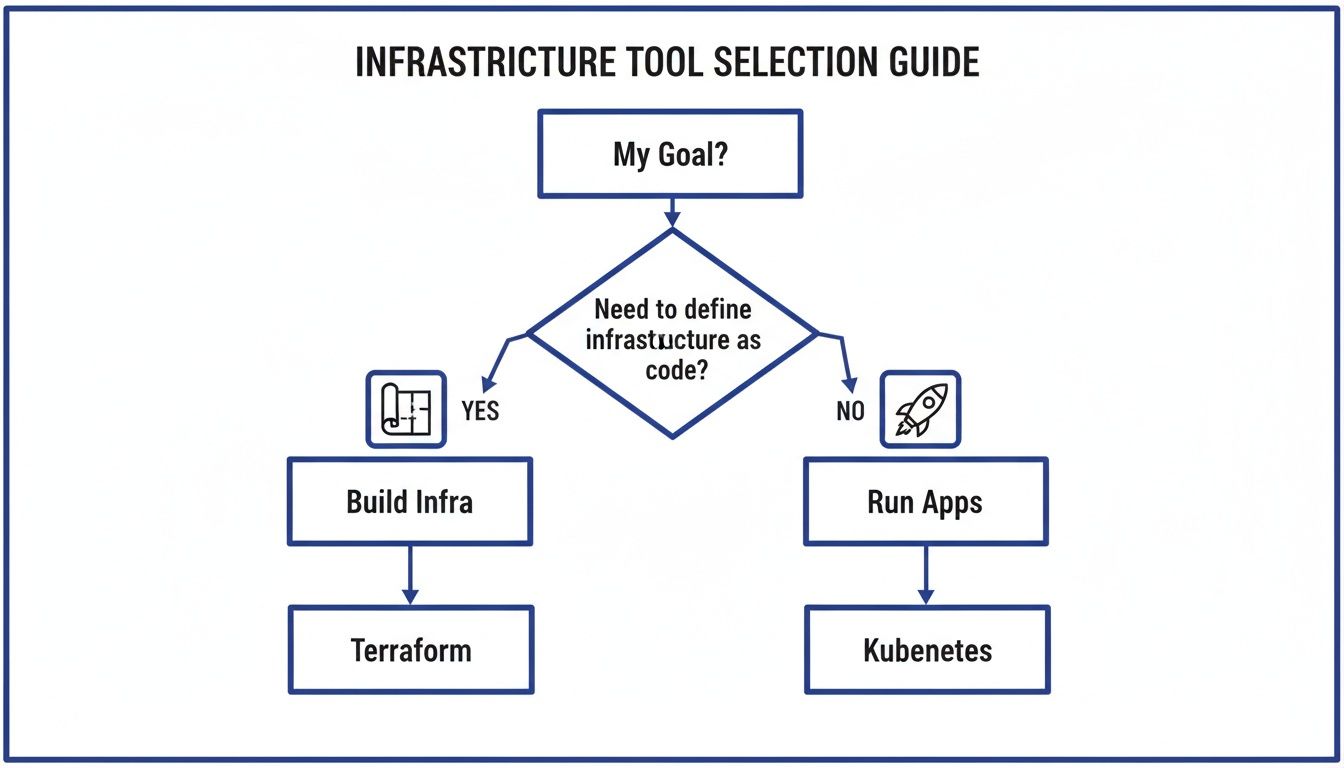
The flowchart makes it simple: if you're building the foundation, the networks, servers, and databases, you want Terraform. If you're running the actual applications on top of that foundation, you need Kubernetes.
When to Use Terraform Exclusively
Terraform is your go-to for defining the static, foundational pieces of your cloud environment. Its whole purpose is to create a repeatable, version-controlled blueprint for your resources.
You'll want to reach for Terraform in these classic scenarios:
- Provisioning Cloud Networks: Laying down the networking backbone by defining a Virtual Private Cloud (VPC), subnets, route tables, and internet gateways.
- Setting Up Managed Services: Spinning up resources that you don't manage directly, like a managed database (Amazon RDS, Azure SQL), a message queue, or a storage bucket.
- Managing Identity and Access: Defining IAM roles, users, and policies to lock down security and permissions across your entire cloud account.
In all these cases, you're defining infrastructure that doesn't change very often. Terraform’s plan and apply workflow is perfect for this, giving you a deliberate, reviewable process for any architectural changes.
When to Use Kubernetes Exclusively
Once the infrastructure is built, Kubernetes takes over to manage the application layer. Its focus is squarely on the dynamic, fast-moving world of containerized workloads.
Kubernetes is the clear choice when you're:
- Managing Complex Microservices: Juggling dozens or even hundreds of containerized services. It handles service discovery, load balancing, and communication between them automatically.
- Automating CI/CD Pipelines for Containers: Pulling off zero-downtime rolling updates, canary deployments, and automated rollbacks for your applications.
- Running Stateful Applications: Kubernetes offers powerful objects like StatefulSets and PersistentVolumes to make sure stateful services (like databases or key-value stores) run reliably with stable network identities and durable storage.
These jobs demand a system that can react to changes in real time. The continuous reconciliation loop in Kubernetes is built for exactly this; it automatically self-heals and scales applications without needing a human to step in.
The decision often comes down to lifecycle. Use Terraform for resources with a long, slow-changing lifecycle (infrastructure). Use Kubernetes for resources with a short, fast-changing lifecycle (applications).
The Best of Both Worlds: A Combined Workflow
The most powerful setup in modern DevOps isn't an "either/or" choice; it's using both tools together. This combination creates a clean separation of duties where each tool does what it's best at.
Here’s what a typical end-to-end workflow looks like:
Terraform Provisions the Cluster: A platform engineer writes Terraform code to create a managed Kubernetes cluster, like Amazon EKS or Google GKE. This code also sets up the underlying VPC, node pools, and IAM roles. Running
terraform applymight take 10-15 minutes to build everything out. After that, Terraform's main job is done.Kubernetes Manages the Application: A developer writes a Kubernetes manifest (a YAML file) that defines their application, including the container image, resource needs, and how many replicas they want.
Deployment via kubectl: The developer uses the
kubectl applycommand to send this manifest to the cluster. Instantly, the Kubernetes control plane starts scheduling the application Pods onto the nodes that Terraform created.Runtime Management: From here on out, Kubernetes is in charge. It makes sure the right number of application replicas are always running, restarts any that crash, and scales them up or down based on traffic.
This combined strategy is a cornerstone of effective infrastructure management. It gives you reproducible infrastructure and a resilient, automated application runtime. For a deeper look into this space, you might find our guide on other leading cloud infrastructure automation tools helpful. This approach solves the Kubernetes vs. Terraform puzzle by making them partners, not competitors.
How to Integrate Both Tools for Better Cloud Cost Control

This is where the real magic happens, connecting technical tools to real business value. Using Kubernetes and Terraform together isn't just about smoother deployments. It’s about creating a system that enforces cost efficiency at every single layer of your cloud stack.
It all starts with Terraform. By defining your Kubernetes clusters as code, you can set firm standards for your node pools right out of the gate. This is huge. It stops the all-too-common problem of over-provisioning, where teams request massive or excessive VMs that blow up the budget before an application even runs.
The synergy between Terraform and Kubernetes creates a powerful cost-control flywheel. Terraform builds a right-sized foundation, and Kubernetes runs applications efficiently on top of it, stamping out waste at both the infrastructure and runtime levels.
Enforcing Cost Controls with Terraform
Before a single container is launched, Terraform is already working to save you money. When you codify your infrastructure, you can bake cost-control policies directly into the provisioning pipeline.
This lets you get ahead of the spend by:
- Standardizing Instance Sizes: You can define a clear menu of approved VM types for Kubernetes nodes. This prevents developers from accidentally choosing a high-cost, oversized instance for a simple dev/test environment.
- Enforcing Tagging Policies: Automatically apply cost-allocation tags to every resource Terraform creates. This gives your FinOps team total clarity on who is spending what, making chargebacks and budget tracking simple.
- Implementing Auto-Scaling Rules: Use Terraform to configure your cluster auto-scalers with smart, conservative settings. This ensures you only scale up when you truly need to and, just as importantly, scale down aggressively when traffic subsides.
Think of these as preventative measures. They ensure your clusters are built on a cost-effective foundation, stopping waste before it ever hits your bill.
A Three-Tiered Cost Optimization Stack
Terraform and Kubernetes create the first two layers of a complete cost-control system. But to truly get your cloud spend in check, you need a third layer: automated scheduling to tackle the massive problem of idle resources.
This creates a powerful, end-to-end savings model:
- Terraform for Efficient Provisioning: It builds the right infrastructure with the right instance sizes and cost-allocation tags from day one.
- Kubernetes for Efficient Runtime: It orchestrates your containers, packing them onto nodes to maximize resource utilization and keep your server count low.
- Scheduling for Idle Time: A dedicated tool automatically shuts down non-production environments during off-hours, like nights and weekends. This eliminates the pointless cost of paying for compute that nobody is using. You can learn more about how this works with our overview of automation in the cloud.
This layered approach delivers tangible results. The market reflects how well these tools work together, with Kubernetes’ valuation projected to hit $8.2 billion by 2030 and Terraform already past 4 billion downloads.
More importantly, businesses that combine IaC and orchestration see 30-50% cost reductions by tackling idle server waste, a problem affecting 70% of typical cloud setups. While the tools are a great start, adopting a broader mindset around Essential Cloud Cost Optimization Strategies is what ultimately drives maximum efficiency.
Frequently Asked Questions About Kubernetes and Terraform
When you start blending Kubernetes and Terraform, a lot of practical questions pop up. The whole "Kubernetes vs. Terraform" debate quickly turns into a puzzle of how to make them work together. Here are some straightforward answers to the common hurdles teams face.
Can Terraform Manage Kubernetes Resources Directly?
Yes, absolutely. You can manage Kubernetes resources straight from Terraform by using the official Kubernetes Provider. This lets you write HCL code to define your Deployments, Services, ConfigMaps, and anything else you’d run inside a cluster.
This works best for bootstrapping a cluster with its core, foundational services. Think of a platform team using it to install an ingress controller, a monitoring stack like Prometheus, or a service mesh like Istio. It’s a great way to ensure these critical components are version-controlled right alongside the infrastructure.
But for day-to-day application deployments, you'll want to stick with native Kubernetes tools. Workflows built around Helm, Kustomize, or GitOps operators like ArgoCD and Flux are designed for the application lifecycle. They give you features like easy rollbacks and continuous delivery that are a much better fit for managing apps, not the underlying platform.
Key Takeaway: Use the Terraform Kubernetes Provider to handle the initial, infrastructure-level setup of your cluster. For deploying and managing your actual applications, lean on GitOps tools or Helm. This creates a clean line between the platform and the applications running on it.
What Are the Main Alternatives to These Tools?
While Terraform and Kubernetes dominate the market, they're not your only choices. Knowing the alternatives can help you pick the right tool based on your team’s skills, your cloud provider, and how much complexity you’re willing to take on.
Alternatives to Terraform (Infrastructure as Code):
- Cloud-Specific IaC: Tools like AWS CloudFormation, Azure Resource Manager (ARM) templates, and Google Cloud Deployment Manager are deeply integrated with their own clouds. The tradeoff? You're locked into that specific ecosystem.
- Programming Language-Based IaC: Pulumi is a powerful competitor that lets you define infrastructure using languages developers already know, like Python, TypeScript, or Go. It’s a fantastic option for dev teams who'd rather write code than learn HCL.
- Open-Source Forks: After HashiCorp changed its license, OpenTofu was created as a community-driven, open-source fork of Terraform. It's managed by the Linux Foundation and offers a truly open-source path forward while staying compatible.
Alternatives to Kubernetes (Container Orchestration):
- Simpler Orchestrators: Docker Swarm is a much simpler, easier-to-learn option for smaller projects or for teams who find Kubernetes overwhelmingly complex.
- Serverless Container Platforms: Services like AWS Fargate, Azure Container Apps, and Google Cloud Run take orchestration completely off your plate. You just give them a container, and they run it, handling all the scaling and server management for you.
Is It Better to Use a Managed Kubernetes Service?
For the vast majority of companies, the answer is a resounding yes. Using a managed service like Amazon EKS, Google GKE, or Azure AKS is almost always the right call.
These services lift the immense operational weight of managing the Kubernetes control plane. They handle the etcd database, the API server, cluster upgrades, and all the other complex, mission-critical tasks you don't want to be responsible for. Research has even shown that provisioning an AKS cluster on Azure can be quicker than EKS on AWS, clocking in at 6 to 8 minutes for AKS compared to 10 to 11 minutes for EKS in similar regions.
Using Terraform to spin up these managed services gives you the best of both worlds: reproducible, version-controlled infrastructure from Terraform and a production-grade, managed control plane from your cloud provider. The only time you should consider building a cluster yourself is if you have highly specialized security or networking needs and a team with deep Kubernetes expertise ready to maintain it.
Managing cloud costs is a critical part of any infrastructure strategy. CLOUD TOGGLE helps you take control by automatically shutting down idle development and staging servers. Instead of paying for resources 24/7, you can create simple schedules to turn them off during nights and weekends, cutting waste and reducing your cloud bill. Start your 30-day free trial and see how much you can save at https://cloudtoggle.com.