You sign up for AWS because you want to build something, not because you want to become an expert in billing. Maybe it's a demo app, a lab environment, a lightweight API, or your first serious attempt to learn cloud infrastructure. EC2 looks simple enough. Launch a small instance, connect to it, install a package, and start experimenting.
Then the second thought shows up. What if I forget something and get billed?
That concern is justified. free tier aws ec2 is useful, but it isn't forgiving. The people who stay within it usually don't get there by luck. They get there by understanding which free tier model applies to their account, choosing configurations carefully, monitoring usage, and automating shutdowns so a missed click doesn't turn into a charge.
The Promise and Peril of the AWS Free Tier
A lot of teams start the same way. Someone opens a new AWS account for a proof of concept, picks EC2 because it's familiar, and assumes "free tier eligible" means "safe by default." That's where problems begin.

The promise is real. AWS gives new users a practical way to learn infrastructure, test ideas, and run small workloads without paying upfront. For lightweight experiments, EC2 in the free tier is often enough to get hands-on experience with Linux, security groups, storage, IAM, and application deployment.
The peril is operational, not technical. AWS doesn't charge you because EC2 is hard to use. It charges you because cloud resources keep existing until someone stops or deletes them. Storage stays attached. Snapshots remain in the account. IPs can sit unattached. Logs continue accumulating. The bill usually comes from what nobody checked after the demo ended.
Why new users get nervous fast
The fear usually starts right after the first successful launch. You see the instance running, the app responds, and then you realize the environment now has a lifecycle. It needs to be stopped, monitored, and cleaned up.
Three patterns cause most of the anxiety:
- The learning project problem. A personal lab becomes a semi-permanent server because nobody tears it down.
- The team sandbox problem. Multiple people share one account, so free allowances get consumed faster than expected.
- The hidden resource problem. Someone deletes an instance and assumes the billing risk is gone.
Practical rule: Treat the AWS Free Tier like a budget with strict guardrails, not like an unlimited trial.
Used that way, it's excellent. Used casually, it's where small mistakes become line items on the bill.
Understanding the AWS EC2 Free Tier in 2026
In 2026, the AWS EC2 Free Tier has two different models, and the one that applies depends on your account's creation date.
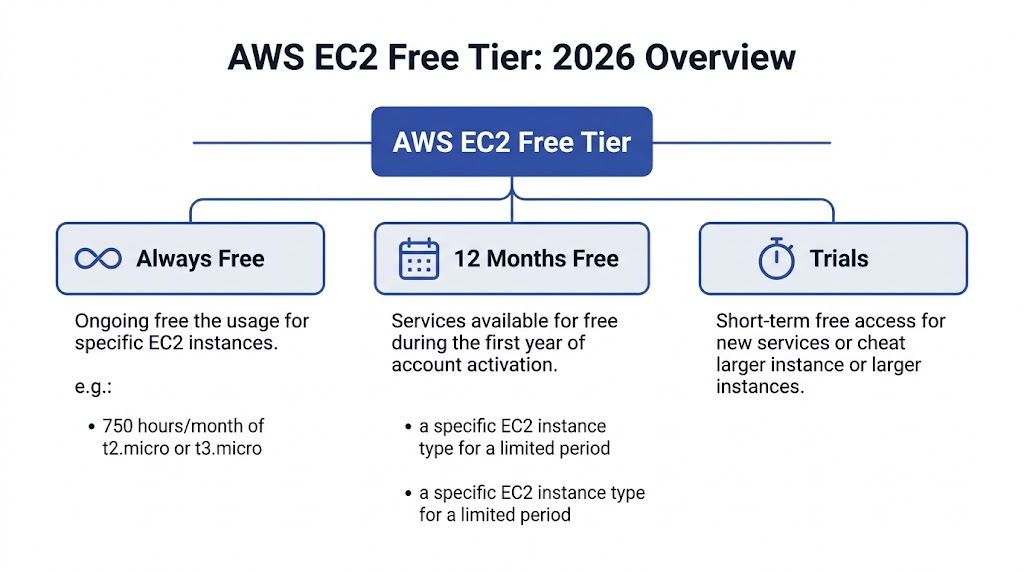
AWS changed the Free Tier structure in mid-2025. Accounts created before that change stay on the older service-based model. Newer accounts start on a credit-based plan with a fixed time window. That split matters because the same EC2 tutorial can be safe advice for one account and expensive advice for another.
Legacy accounts versus newer accounts
Here is the operational difference:
| Account type | How free usage works | What you manage |
|---|---|---|
| Account created before July 15, 2025 | Service-level allowance | Hours and resource limits |
| Account created on or after July 15, 2025 | Credit-based free plan | Credit burn rate over time |
Under the legacy model, EC2 usage is constrained by service-specific monthly limits. For a beginner, that usually means tracking instance hours and keeping attached resources small and temporary.
Under the newer model, the account starts with promotional credits and can receive more credits for completing onboarding tasks, up to a stated cap, during a 6-month free plan period. The practical shift is simple. You are no longer managing only eligibility. You are managing spend velocity.
That changes team behavior. A micro instance left running for a few days under the old model might still fit inside the monthly allowance. Under the credit model, the same habit eats into a finite balance that does not reset each month.
What changed for EC2 specifically
EC2 is affected more than many new users expect.
Older accounts still follow the familiar pattern. Launch an eligible micro instance, keep an eye on hours, and stay inside the monthly limits.
Newer accounts do not get that dedicated monthly EC2 hour pool. EC2 usage draws down credits instead, and AWS also allows a broader set of instance types under that newer free plan than the old micro-only pattern many guides still describe.
That sounds more flexible, and in some cases it is. It also creates a new trap. Broader instance choice makes it easier to launch something larger than a beginner needs, which burns through credits faster. Free Tier discipline in 2026 is less about finding the right checkbox in the console and more about controlling what gets launched, how long it runs, and who can leave it on.
For newer accounts, Free Tier behaves like a time-limited credit balance. If nobody is watching the burn rate, "free" ends quietly.
What this means in practice
Before giving anyone EC2 setup advice, check the account creation date.
That one fact determines the right guardrails:
- Older accounts need tight control over eligible instance hours and related resource limits.
- Newer accounts need credit monitoring, budget alarms, and cleanup habits from day one.
- Shared accounts need even more discipline because one person's test instance can consume the allowance or the credit pool for everyone else.
Old screenshots and outdated tutorials are a real billing risk here. Many still assume every new AWS account gets the classic monthly micro-instance allowance. In 2026, that assumption is wrong often enough to cause surprise charges. The safest approach is to confirm which model the account uses, then put automation around stop schedules, alerts, and cleanup before anyone starts experimenting.
Decoding Your Exact Free Tier Allowances
The fastest way to lose control of the EC2 Free Tier is to read the allowance table once and treat it like a safety guarantee. It is only a limit. Staying under it takes day-to-day discipline, especially in shared or short-lived lab accounts.
AWS EC2 Free Tier Allowances under the legacy hourly model
| Service | Free Tier Limit | Practical Meaning |
|---|---|---|
| EC2 compute | 750 hours per month of t2.micro or t3.micro in regions where t2.micro is unavailable | Usually one small instance running for the full month |
| Amazon EBS storage | 30 GB monthly allowance | Enough for a modest root volume and a little headroom, not enough for careless snapshots, extra volumes, or repeated rebuilds |
| Amazon S3 standard storage | 5 GB monthly, plus 20,000 GET and 2,000 PUT requests | Fine for light testing and a few artifacts, easy to outgrow with logs, backups, and exported data |
On paper, the legacy model looks simple. In practice, the allowance is account-wide, and the buffer is thin. One always-on instance is usually fine. A second instance, a forgotten detached volume, or a bucket collecting logs can push the account out of the free range faster than new users expect.
What these limits look like in real use
Compute is the obvious cap, but storage is where many beginner accounts drift into charges. I see this pattern often: someone terminates an instance, assumes the cleanup is complete, and leaves behind an EBS volume or snapshot. The server is gone. The billable storage is not.
S3 creates a different kind of problem. Teams often treat it as harmless scratch space for installer files, test exports, or application logs. That works for a quick lab. It stops working once several people use the same account and nobody owns cleanup.
The practical rule is simple. Free Tier capacity is small enough that every leftover resource matters.
Operational rules that keep the math on your side
A clean Free Tier account usually follows a few boring habits:
- Keep one primary EC2 instance running unless there is a specific reason to test parallel workloads.
- Use a small root volume and review delete-on-termination settings before launch.
- Check for detached EBS volumes and old snapshots after every experiment.
- Treat S3 as temporary storage and delete logs, exports, and backups on a schedule.
- Use tags from day one so automation can find and clean up test resources.
That last point matters more than many teams realize. Manual cleanup works for a week. After that, scheduled stop rules, budget alerts, and tag-based cleanup do a better job than memory.
The Free Tier gives you enough room to learn. It does not forgive messy operations.
For accounts on the newer credit model, the unit changes from service quotas to credit burn. The operating model stays the same. Know what is running, know what is stored, and automate cleanup before the account turns into a small monthly bill.
How to Launch a Free Tier Eligible EC2 Instance
Launching the instance is the easy part. Launching it in a way that stays safely inside the free tier is where people need a checklist.
Start in the EC2 console and slow down at every selection screen. Most surprise bills start with one "that should be fine" decision during setup.
Pick the account-aware instance type
Before you choose an instance type, confirm whether your account follows the legacy hourly model or the newer credit-based model. That determines what "free tier eligible" means for you.
When you're in the launch wizard:
- Choose a small, standard AMI that clearly shows free tier eligibility in the console.
- Select an eligible instance type for your account model.
- Avoid upsizing casually. A slightly larger instance can change the cost profile immediately.
- Stick to one region for the learning environment so usage stays predictable.
For older accounts, the safe default is the classic micro path. For newer accounts, the key is not just eligibility but how quickly the selected instance burns through the available credits.
Configure storage like someone who expects cleanup
Storage decisions are where otherwise careful users get sloppy. The instance feels temporary, so they don't think about the disk. AWS does.
Use a root volume that fits inside the free tier storage envelope and resist adding extra volumes "just for testing." If you need more disk later, add it deliberately and remove it deliberately. Don't let temporary storage become permanent clutter.
Good launch discipline looks like this:
- Set the smallest practical root volume for the operating system and app.
- Delete unused volumes promptly after tests.
- Name and tag the instance so cleanup is obvious later.
- Review the final summary before clicking launch.
The instance is only half the resource. The attached storage is the part many beginners keep paying for after the server is gone.
A visual walkthrough can help if you're launching your first server and want to compare the console flow with a real example.
Keep security groups narrow
A free tier launch isn't just about price. It's also your first chance to build good habits. Don't open access broadly because it's a lab. Create the minimum inbound rules needed for the test you are running.
That usually means:
- Allow only the protocol you need for the workload you're testing.
- Avoid broad inbound rules unless there's a temporary, documented reason.
- Reuse reviewed security groups instead of creating a new permissive group every time.
End with a shutdown plan
Before you launch, decide who will stop or terminate the instance and when. If there isn't an answer, the instance is already on the path to becoming a billing surprise.
This is the operational habit that matters most. Launching is easy. Closing the loop is what keeps the free tier free.
Monitoring Usage and Setting Up Billing Alarms
A free tier account usually stops being free in a very ordinary way. Someone launches a test instance, forgets about the attached storage, and notices the bill after the month closes. The fix is not more attention. The fix is a repeatable monitoring setup that catches drift early and gives one person a clear signal to act.
Start in the AWS Billing and Cost Management console. For accounts on the newer credit-based model, watch how quickly credits are being consumed. For legacy accounts, watch the actual usage against the monthly free tier allowance. Cost Explorer helps with trend checks, but the better habit is to combine billing visibility with alerts that arrive outside the console.
Build a usage check into the workflow
Treat every EC2 change as something that needs confirmation. After you launch, verify that the instance, storage, and any related services match what you intended. After you terminate, confirm that the billable pieces are gone.
That second check is where new teams miss charges.
The EC2 Instances page does not show the whole cost picture. EBS volumes, snapshots, elastic IPs, and log storage can continue billing after the server that created them is gone. If you want a clearer record of where usage is accumulating, review your AWS Cost and Usage Reports data and how to read it before the account gets busy.
Set alarms before the first experiment
Billing alarms are cheap insurance. Set them up before anyone starts testing.
A simple baseline works well:
- Create an AWS Budget for a low monthly amount that should never be exceeded in a true free tier lab.
- Send alerts to a shared mailbox or team channel that someone actively monitors.
- Add a second threshold so the first alert warns and the second tells the owner to investigate immediately.
- Turn on SNS notifications if you want the alert to fan out to email or automation.
For a solo account, email is enough. For a team account, I prefer SNS tied to a mailbox, chat notification, or ticketing flow so the alert survives vacations and ownership changes.
What works in practice
The setups that hold up over time are operational, not fancy:
- One named owner for the account or sandbox
- A required post-test cleanup check
- A weekly review of billing and leftover resources
- Automation for stop, terminate, or notify actions where possible
What fails is the assumption that AWS will stop you before charges happen. It usually will not. AWS shows usage clearly, but cost control still depends on the team setting limits, watching them, and acting fast when something drifts.
The free tier is a billing allowance, not a guardrail. Keep it free by treating monitoring and alerts as part of the build, not admin work you do later.
Common Gotchas That Trigger Unexpected Charges
A new user spins up a "free tier eligible" EC2 instance on Monday, runs a second one for comparison on Wednesday, deletes both on Friday, and still sees charges at the end of the month. That pattern is common because the free tier is an allowance with billing rules, not a safety system that prevents chargeable resources from existing.
Running more instance hours than the account can absorb
Free tier eligible does not mean unlimited, and it does not apply per instance. The allowance is shared across the account, so two small test servers can consume it faster than expected. I see this in lab accounts all the time. Someone launches one instance for SSH practice, another for a quick app test, and the combined runtime pushes the account past the monthly limit.
If you want a practical checklist of the patterns behind these bills, this guide to AWS unexpected charges maps closely to what shows up in real sandbox accounts.
Leaving storage behind after terminating compute
EC2 charges often continue after the instance is gone because EBS volumes, snapshots, and other attached resources follow their own lifecycle. Terminate only removes the server. It does not guarantee cleanup of every billable component around it.
A typical failure path looks like this:
- Launch a test instance
- Increase the root volume size or attach another volume
- Terminate the instance
- Leave the volume or snapshot behind
- Get billed for storage that nobody is using
This is one reason mature teams treat deletion as a workflow, not a click. The workflow needs a post-termination check, tags, and ideally automation that finds unattached volumes before they sit for weeks.
Sharing one free tier across a whole team
Small teams get caught by this early. One person builds a Linux test box, another copies the setup for a demo, and a third leaves a staging instance running over the weekend. Each decision looks reasonable on its own. The account pays for the total.
That is why cost control for free tier accounts is operational before it is technical. Clear ownership, tag rules, and scheduled cleanup matter more than memorizing the marketing page. Broader habits from these essential cloud cost optimization strategies apply even in tiny AWS environments.
Missing the quiet resources that keep billing
The charges that surprise people are usually not the instance itself. They are the leftovers. Detached EBS volumes, old snapshots, idle Elastic IPs, and log retention can linger in the account long after the original test is forgotten.
A weekly audit should check for:
- EBS volumes in
availablestate with no owner or purpose - Snapshots that were created for testing and never expired
- Elastic IPs not attached to a running resource
- CloudWatch log groups with retention left at default or set longer than needed
The safest approach is simple. Assume anything you create can outlive the instance unless you explicitly clean it up or automate the cleanup. That discipline is what keeps "free tier" from turning into a small but avoidable bill.
Pragmatic Cost Control with Automated Scheduling
Manual discipline is necessary, but it isn't enough. People forget. They leave a dev instance running overnight. They finish testing on Friday and don't come back until Monday. They assume someone else shut things down. That's why scheduling matters.
The strongest argument for automation isn't convenience. It's consistency.
Why manual shutdown habits break down
Teams often start with good intentions. They write a checklist, ask people to stop non-production instances after use, and maybe pin a reminder in Slack. That works for a week or two.
Then real work gets in the way. A bug appears. A meeting runs long. Someone leaves a server on because they might need it later. The free tier doesn't care why it was left running.
The Hyperglance article on AWS EC2 cost optimization points to the core problem clearly: 70-80% of Free Tier exceedances are tied to persistently running instances when automation isn't in place. The same source says schedulers such as AWS Instance Scheduler or third-party tools can reduce idle time by 50-70%.
Native scheduling works, but it isn't lightweight
AWS gives you ways to automate start and stop behavior. Native approaches can be effective, especially for engineering-heavy teams that are comfortable with Lambda, IAM roles, event-driven workflows, and ongoing maintenance.
That said, native doesn't always mean simple.
For small teams, the pain points are usually operational:
- IAM and permissions complexity gets handed to whoever understands AWS best.
- Exception handling becomes awkward when someone needs a temporary override.
- Visibility stays too technical for finance, operations, or support staff who also need to participate in cost control.
Cost discipline isn't only an engineering task; engineering leaders, IT operations, and FinOps stakeholders all benefit when on-off schedules are visible and easy to manage.
Scheduling is one part of a broader cost culture
If you're building a more mature cost practice, it helps to pair EC2 scheduling with broader policies around ownership, tagging, reviews, and cleanup. A good outside reference is TekRecruiter's overview of essential cloud cost optimization strategies, which frames automation as part of a larger operating model rather than a one-off trick.
That framing is right. Scheduling works best when the team agrees on which environments should run continuously and which should shut down outside working hours.
What good automation policy looks like
The strongest implementations are simple enough that people follow them:
- Non-production defaults to off-hours shutdown. If an environment doesn't need to run overnight, schedule it off.
- Production is explicitly excluded. Never rely on assumption for critical systems.
- Overrides are temporary and visible. A team member should be able to keep a machine on when needed, without breaking policy permanently.
- Ownership is clear. Every scheduled resource should belong to someone.
If your team is comparing native options with simpler policy-driven approaches, this explanation of the AWS Instance Scheduler is a good place to evaluate the trade-offs before you standardize.
Automation doesn't replace discipline. It enforces it on the days when human discipline fails.
For free tier AWS EC2 use, that's often the difference between a learning environment that stays harmless and one that slowly turns into avoidable spend.
Conclusion Keeping Your Free Tier Free
AWS gives you a real chance to learn and build on EC2 without paying immediately. That's valuable. It also comes with rules that are easy to misread if you treat "free tier eligible" as the whole story.
The safer way to use free tier aws ec2 has three parts. First, know which free tier model applies to your account. Second, monitor usage and billing so you catch drift early. Third, automate shutdown and cleanup wherever possible, because memory is not a reliable cost-control strategy.
The teams that avoid surprise bills usually aren't doing anything advanced. They're doing the basics consistently. They launch smaller. They review storage. They watch billing. They clean up after testing. They schedule non-production compute to turn off when nobody needs it.
That's the right mindset for AWS in general. Cloud is flexible, but it isn't passive. If you manage the resource lifecycle deliberately, the free tier stays useful. If you don't, the bill becomes the thing that teaches the lesson.
Frequently Asked Questions About the AWS Free Tier
What happens after the AWS Free Tier ends
The meter does not care why a resource is still there. If free usage expires and anything billable remains in the account, AWS starts charging for it.
New users usually focus on the EC2 instance and miss the attached parts around it. EBS volumes, snapshots, Elastic IPs, and log storage are the common leftovers. I have seen accounts with no running instances still generate charges because someone deleted the server but left the storage behind.
Can I run multiple EC2 instances and still stay free
Yes, but only if the combined usage stays inside your allowance model.
Under the older account-wide hourly model, multiple free tier eligible instances can still create charges if their total runtime goes past the monthly limit. Under the newer credit-based model, running several instances at once burns through credits faster. The label "free tier eligible" only means the instance type can participate. It does not promise the final bill will stay at zero.
For a new team, the practical rule is simple. Start with one instance, measure usage, then add more only if someone owns the budget check.
Why am I billed for a stopped EC2 instance
Stopping compute is not the same as stopping cost.
A stopped instance usually stops instance-hour charges, but the attached EBS volume still exists and still bills. Snapshots keep billing. Reserved public IPv4 addresses can bill. CloudWatch logs can bill. If the goal is zero cost, check the full resource set, not just the instance state.
Why did I get billed after deleting the instance
Deleting the instance removes the server. It does not always remove everything the server used.
AWS often leaves related resources in place unless you explicitly clean them up or configured deletion at launch time. The usual suspects are EBS volumes with delete-on-termination turned off, manual snapshots, Elastic IPs, load balancer pieces, and log groups. This is why cost control on the Free Tier is partly an operations problem. The safe pattern is to terminate, verify storage, verify networking, then confirm billing data the next day.
What's the best habit for beginners
Use the same shutdown routine every time and automate as much of it as possible.
A good closeout checklist looks like this:
- Stop or terminate the instance
- Review EBS volumes and confirm whether they should be deleted
- Check for snapshots created during testing
- Release any Elastic IPs you no longer need
- Review CloudWatch log groups and other leftover resources
- Check Billing and Cost Management before you sign off
Manual discipline works at very small scale. It breaks fast once a team launches test servers regularly. If your team wants a safer way to keep non-production servers from running longer than necessary, CLOUD TOGGLE is worth a look. It helps teams automatically power off idle cloud servers across AWS and Azure, apply schedules without exposing the whole cloud account, and give non-engineers a controlled way to participate in cost savings. For small and midsize teams, that is often the shortest path from good intentions to consistent cost control.