EC2 Spot Instances are one of the best ways to slash your Amazon Web Services (AWS) bill, offering a massive discount of up to 90% compared to standard On-Demand pricing. But there’s a catch. In exchange for those deep savings, AWS can reclaim these resources at any time, giving you just a two-minute warning.
This trade-off makes them perfect for flexible, fault-tolerant workloads that can handle an interruption without breaking a sweat.
What Are EC2 Spot Instances?
Think of it like an airline selling its last few empty seats at a huge discount right before takeoff. That’s the core idea behind EC2 Spot Instances. You’re getting the exact same powerful computing resources as a standard On-Demand instance, just at a much, much lower price.
AWS offers up its spare, unused computing capacity with one important string attached: they can take it back whenever an On-Demand customer needs it. This model lets you tap into serious computing power for pennies on the dollar, making it a game-changer for tasks that aren’t time-critical or can easily pick up where they left off. Thankfully, the old, confusing bidding-war pricing is long gone; today, it’s a stable model based on long-term supply and demand.
To make the difference clear, here’s a quick rundown of how Spot Instances stack up against their On-Demand counterparts.
Spot Instances vs On-Demand at a Glance
| Feature | EC2 Spot Instances | On-Demand Instances |
|---|---|---|
| Pricing | Up to 90% discount, market-driven | Standard, fixed hourly/secondly rate |
| Availability | Dependent on spare AWS capacity | Guaranteed as long as you pay |
| Interruption | Can be reclaimed with a 2-minute warning | Not interrupted by AWS |
| Best For | Fault-tolerant, flexible workloads | Mission-critical, stateful applications |
| Use Cases | Batch processing, big data, CI/CD, rendering | Production websites, databases, enterprise apps |
While On-Demand offers stability at a premium, Spot Instances provide incredible savings for workloads that are designed to be resilient.
The Trade-Off: Cost vs. Interruption
The main draw of EC2 Spot Instances is, without a doubt, the cost savings. For workloads like big data analysis, scientific computing, or batch processing, these savings aren't just small, they're huge. A data processing job that might run you $100 on standard instances could cost as little as $10 on Spot.
So, what's the "catch"? The possibility of interruption. When AWS needs that capacity back for a full-price customer, it sends a two-minute warning before terminating your instance. This means your application has to be built for resilience. It needs to handle a sudden shutdown gracefully, maybe by saving its progress or handing the work off to another instance.
This dynamic, trading potential interruptions for massive cost savings, is the heart of the Spot Instance model. Once you learn to manage this trade-off, you can unlock incredible value without putting your applications at risk.
How Reliable Are They, Really?
A common myth is that Spot Instances are constantly being shut down, making them too unreliable for any real work. While interruptions are a core feature, they happen far less often than you might think.
In reality, the interruption rate across all instance types and regions has historically averaged under 5%. This means you can often get high availability with very infrequent disruptions, making Spot a fantastic option for a surprisingly wide range of applications. You can even dig into official AWS Spot facts and figures to see the trends for yourself.
Understanding this balance is the first step. This guide will give you a solid foundation, showing you both the incredible cost-saving potential and the reality of the interruption trade-off. The goal is to shift your thinking from seeing interruptions as a risk to seeing them as a manageable part of a highly optimized cloud strategy.
Understanding Spot Pricing and Interruptions
To really get the most out of EC2 Spot Instances, you have to get comfortable with two key ideas: how they're priced and what happens when they get interrupted. If you're still thinking of Spot as a chaotic, live-bidding auction, it's time for an update. That old model is long gone.
Today's Spot pricing is much more predictable, driven by the long-term supply and demand for spare compute capacity in AWS. This means prices change gradually, not wildly from one minute to the next.
Amazon dynamically sets Spot Instance prices and adjusts them based on what’s available for specific instance types in each Availability Zone. While they do move, AWS gives you up to 90 days of historical data, which is a goldmine for planning. You can look at the trends to make smart calls about when and where to launch your instances, keeping your costs down. You can learn more by checking out Amazon's guide on how to analyze this historical Spot pricing data on aws.amazon.com.
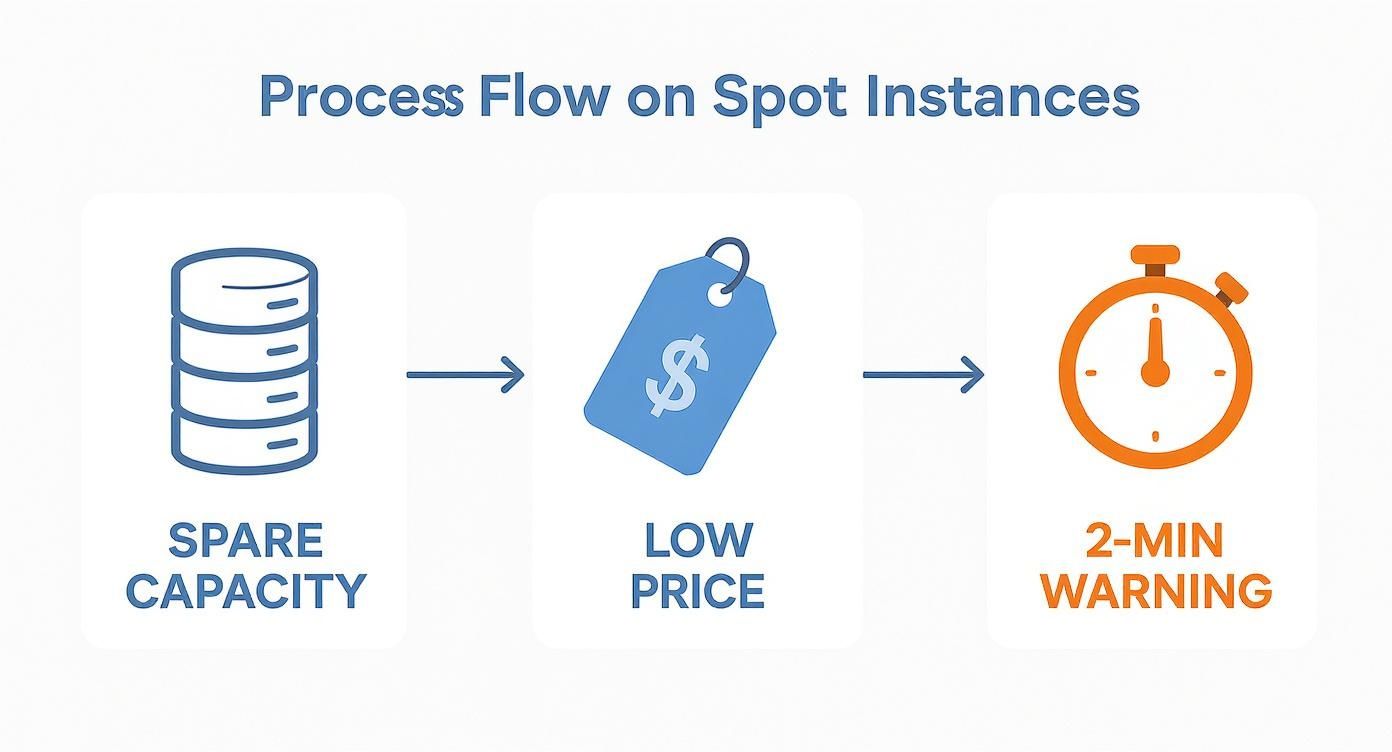
This whole process is about turning spare capacity into big savings. The critical part you need to master is that two-minute warning.
The Modern Spot Pricing Model
Forget everything you thought you knew about outbidding other users. The price you pay for an EC2 Spot Instance today is just the market rate at the moment your instance is running. Simple as that. Better yet, the price is always capped at the regular On-Demand rate, so you'll never get a surprise bill that's higher than you expected.
This stability turns Spot from a gamble into a real strategic advantage. While you can set a maximum price you're willing to pay, the common best practice is not to. By letting the price default to the On-Demand rate, you ensure your instance runs as long as capacity is available, giving you the best shot at getting the compute you need for the lowest price. Getting a handle on your spending is crucial, and you can learn more by exploring our guide on understanding AWS Cost and Usage Reports.
Mastering the Interruption Model
The other half of the Spot equation is gracefully handling interruptions. When AWS needs that capacity back for a customer paying the On-Demand price, it reclaims your instance. This isn't a random crash, it's a manageable event, as long as you're ready for it.
AWS gives you a heads-up by sending an instance reclaim notice a full two minutes before it terminates the instance. That two-minute window is your time to shine. A well-built application can use this time to react gracefully.
- Save its state: Checkpoint your job's progress to an S3 bucket or a database so it can pick up where it left off.
- Drain connections: Finish up any active network requests to avoid corrupting data.
- Upload logs: Ship final log files to a central storage location for analysis.
- Deregister from load balancers: Tell the load balancer to stop sending any new traffic its way.
By treating this two-minute warning as a predictable part of the lifecycle, not a sudden failure, you can build incredibly resilient systems. This is the secret to running serious, production-level workloads on Spot Instances.
Gauging Interruption Rates with Spot Instance Advisor
So, how do you pick instances that are less likely to disappear on you? AWS gives you a free tool called the Spot Instance Advisor that does just that. It provides hard data on how often different instance types get interrupted across various AWS Regions.
The advisor shows an estimated "frequency of interruption" as a percentage, which helps you steer clear of volatile options. For instance, you might see that a c5.xlarge in us-east-1 has an interruption rate of less than 5%, making it a pretty stable bet. By staying flexible with your instance types and using this data, you can dramatically improve the reliability of your Spot workloads.
Best Practices for Managing Spot Interruptions
With EC2 Spot Instances, the big question isn't if an interruption will happen, but when. Instead of seeing this as a weakness, the smart move is to treat interruptions as a normal, predictable part of the instance lifecycle. When you build applications that expect these events, you turn a perceived risk into a massive operational advantage.
The trick is to architect for fault tolerance right from the start. This simple shift in mindset lets you confidently run real production workloads on Spot, moving way beyond basic batch jobs to unlock their full cost-saving power. The strategies below are battle-tested methods for building resilient applications that don't just survive, but thrive in the dynamic Spot environment.
Gracefully Handle the Two-Minute Warning
When AWS needs a Spot Instance back, it doesn’t just pull the plug. You get a two-minute termination notice, and this window is your single most important tool for handling interruptions gracefully. A well-designed application can catch this signal and kick off a shutdown script to tie up loose ends before the instance disappears.
This ensures your workload doesn't just crash but instead finishes its final tasks cleanly.
Here’s what you absolutely need to do in that two-minute window:
- Save Your Application State: This is priority number one. Checkpoint your application's progress by saving data to Amazon S3, writing the current state to a database like DynamoDB, or sending a final update to a message queue. This lets a replacement instance pick up right where the old one left off.
- Drain Connections: If your instance is behind a load balancer, it needs to stop taking new requests and finish processing anything in flight. This simple step prevents users from seeing abrupt disconnections or, worse, corrupted data.
- Upload Critical Logs: Before the instance is gone for good, push any final logs or diagnostic data to a central service like Amazon CloudWatch Logs. This information is pure gold for debugging and understanding how your application behaves during shutdowns.
Architect for Fault Tolerance
Reacting to the termination notice is good, but a truly resilient system is designed with the assumption that any component can fail at any time. This principle is the bedrock of building effective applications on Spot Instances.
For stateless applications like web servers or API gateways, this is pretty straightforward. Since these instances don't store any session data locally, losing one is no big deal. An Auto Scaling group simply launches a new one to take its place, and the load balancer adds it back to the pool. Users never notice a thing.
Stateful applications, on the other hand, require a bit more planning.
The core idea is to decouple your application's logic from its state. By moving the state to a durable, managed service (like S3, a database, or a cache), the instance itself becomes disposable. This is the secret to making stateful workloads interruption-proof.
A common technique here is checkpointing. Imagine a long-running data processing job that saves its progress every 15 minutes. If its Spot Instance gets interrupted, the replacement only has to redo a small chunk of work instead of starting from scratch.
Leverage AWS Services for Automation
Trying to manage interruptions by hand just doesn't scale. The real power comes from using AWS services to automate the entire process of replacement and recovery. This is how you ensure your application maintains capacity and performance without anyone needing to lift a finger.
Auto Scaling Groups are your foundation. You configure a group to maintain a specific number of instances, and if a Spot Instance is terminated, the Auto Scaling group automatically detects the loss and launches a replacement to get the fleet back to full strength.
For even more power, look into an EC2 Fleet or Spot Fleet. These services let you request capacity across multiple instance types, sizes, and Availability Zones with a single API call. This diversification is your best defense against interruptions. If capacity for one instance type dries up in one zone, the fleet automatically tries to get you a different type somewhere else, dramatically increasing the odds of keeping your application running.
For example, energy giant Petrobras slashed costs by 43% to 90% by using automated frameworks to manage Spot revocations for their complex simulation workloads.
Ideal Use Cases for Spot Instances
Alright, we've covered the mechanics of pricing and interruptions. Now for the fun part: seeing where EC2 Spot Instances can make a real-world impact. Their unique blend of huge savings and potential interruptions makes them a perfect match for specific jobs, usually tasks that are fault-tolerant, easy to parallelize, or simply not on a tight deadline.
When you match the right workload to the right pricing model, you unlock massive savings without putting your operations at risk. Think of this section as a playbook of proven scenarios where Spot Instances really deliver, giving you a blueprint you can adapt for your own cloud setup.
Big Data and Analytics Processing
Large-scale data processing is hands-down the most popular use case for Spot Instances. Frameworks like Apache Spark and Hadoop were built from the ground up to chop up massive jobs and spread them across a cluster of machines. These systems are inherently resilient; if one instance gets pulled, the framework just reassigns its work to another available node.
This fault-tolerant design makes big data workloads a natural fit for the Spot model. You can spin up a massive cluster for a complex ETL job or machine learning model training, pay just a fraction of the On-Demand price, and then tear it all down when you’re done. An interruption becomes a minor hiccup, not a critical failure.
High-Performance Computing (HPC)
Scientific research, financial modeling, and complex engineering simulations often need a colossal amount of computing power, but only for a short time. These High-Performance Computing (HPC) workloads are usually made up of thousands of parallel tasks that can all run independently of one another.
Just like big data jobs, HPC applications are often designed for resilience. The ability to checkpoint progress and restart failed tasks means that the sudden loss of a few Spot Instances rarely jeopardizes the entire computation. This makes Spot an ideal way to build massive, cost-effective supercomputers in the cloud for research and analysis.
CI/CD Pipelines for Build and Test Environments
Continuous Integration and Continuous Deployment (CI/CD) pipelines are another perfect home for EC2 Spot Instances. The individual tasks, such as compiling code, running automated tests, and packaging applications, are almost always stateless and don't run for very long.
If a Spot Instance running a test suite gets terminated, the CI/CD system can simply restart that stage on a new instance. A small delay is a tiny price to pay for the dramatic cost reduction on your build infrastructure, especially for teams running hundreds or even thousands of builds a day. This keeps your development costs low without getting in your team’s way.
Scalable Containerized Applications
Container orchestration platforms like Amazon ECS (Elastic Container Service) and EKS (Elastic Kubernetes Service) are brilliant at managing applications running on Spot Instances. These systems are designed to handle the entire lifecycle of containers, which includes automatically rescheduling them if the underlying server fails.
This opens the door to a powerful, cost-optimized architecture: a hybrid cluster mixing On-Demand and Spot Instances.
- On-Demand Instances: Use these to run your critical, stateful services that absolutely cannot go down, like a control plane or a small core of essential application pods.
- Spot Instances: This is where the bulk of your stateless application workers live. You can scale this part of your fleet up and down aggressively to handle traffic spikes, absorbing any interruptions without impacting your core availability.
This hybrid approach gives you the best of both worlds: the low cost of Spot for the scalable parts of your app and the rock-solid stability of On-Demand for the essential components. The flexibility here is a key reason many teams explore different scaling strategies, and you can learn more by reading our guide on horizontal vs vertical scaling. It's a balanced strategy that really works.
Comparing Spot Instances to Other AWS Cost Saving Methods
To build a cost-optimization strategy that actually works, you need to understand every tool in the AWS toolbox. While EC2 Spot Instances offer the deepest discounts, they're just one piece of a much larger puzzle. Let's put them side-by-side with other heavy hitters like Reserved Instances (RIs) and Savings Plans to see where each one truly shines.
This isn't about finding a single "best" option. It’s about creating a smart, blended strategy that matches the right purchasing model to the right workload. That's how you maximize savings across your entire infrastructure.
Reserved Instances: A Commitment to Stability
Think of Reserved Instances (RIs) like leasing an apartment instead of booking a hotel room every night. You commit to a specific instance type in a particular region for a one or three-year term. In exchange for that commitment, AWS knocks up to 72% off the On-Demand price.
This model is a perfect fit for your most predictable, always-on workloads. We're talking about production databases, core application servers, or any system that runs 24/7 with very consistent needs. The tradeoff here is flexibility, as you're locked into that instance family, which can be a pain if your requirements change unexpectedly.
Savings Plans: Flexibility with a Commitment
Savings Plans are the more modern, flexible cousin to RIs. Instead of committing to a specific instance type, you commit to a certain dollar amount of compute usage per hour (say, $10/hour) for a one or three-year term. This discount then automatically applies to any EC2, Fargate, or Lambda usage, up to your committed amount.
This flexibility makes Savings Plans a fantastic choice for companies with dynamic or evolving infrastructure. You get discounts similar to RIs but can freely change instance types, sizes, or even regions without penalty. They are tailor-made for workloads that have consistent overall usage but vary in their specific instance needs from day to day.
Spot Instances: Maximum Savings for Fleeting Workloads
And that brings us back to EC2 Spot Instances. They operate on a completely different premise: no commitment, but absolutely no guarantee of availability. This inherent risk makes them a terrible choice for the steady, mission-critical workloads that RIs and Savings Plans cover so well.
Instead, Spot Instances are the undisputed champions for workloads that are fault-tolerant, short-lived, or can be paused and resumed without issue. They deliver the highest potential savings, often slashing costs by up to 90%. This makes them the go-to choice for batch processing jobs, CI/CD pipelines, and big data analytics.
The most effective AWS cost strategy layers these models. You cover your predictable baseline with Savings Plans or RIs, then run all your flexible, interruptible workloads on Spot Instances. Anything left over runs On-Demand.
AWS Cost Saving Methods Compared
Seeing these options together makes it easier to pick the right tool for the job. Spot Instances offer the biggest discounts but come with the risk of interruption, while RIs and Savings Plans provide reliable discounts for committed use.
Here’s a quick table to break it all down:
| Method | Discount Potential | Commitment | Best For |
|---|---|---|---|
| Spot Instances | Up to 90% | None, pay per second | Fault-tolerant, stateless, or short-lived workloads |
| Savings Plans | Up to 72% | 1 or 3-year hourly spend | Predictable usage with evolving instance needs |
| Reserved Instances | Up to 72% | 1 or 3-year instance type | Stable, long-term workloads with fixed needs |
| On-Demand | 0% | None | Unpredictable, short-term, or critical spiky workloads |
Each of these methods, including Spot, Savings Plans, and RIs, plays a crucial role in a comprehensive cost-saving plan. By layering them, you can build a highly efficient and cost-effective infrastructure.
Of course, for workloads that don't need to run 24/7, another powerful method is simple scheduling. By automatically shutting down instances during idle periods like nights and weekends, you only pay for what you truly use. To learn more, check out our guide on how an AWS schedule instance can complement these other strategies.
Navigating the Shifting Spot Instance Landscape
The market for EC2 Spot Instances isn't some static pool of cheap compute. It's a living, breathing marketplace shaped by supply, demand, and even broader economic trends. As more companies catch on to Spot for slashing their cloud bills, the competition for that spare capacity heats up. This means the old, simple strategies just don't cut it anymore. You need a more sophisticated approach to keep your workloads running and the savings rolling in.
Success in this dynamic environment really boils down to one word: flexibility.
Being flexible means you're willing to cast a wide net, using a broad mix of instance types, sizes, and families across different Availability Zones. When you diversify your requests like this, you dramatically increase your odds of finding available capacity at a rock-bottom price. Think of it as a hedge against interruptions; if demand suddenly spikes for one popular instance type, your workload can simply pivot to another.
Reading the Market Tea Leaves
The Spot market can change on a dime. We've seen some major shifts recently, with both Spot prices and interruption rates climbing due to new supply and demand pressures. It’s not just a feeling; the data backs it up.
For instance, one analysis of roughly 5.5 million Spot Instances between October 2022 and 2023 found that preemption rates nearly quadrupled in just a few months. That’s a clear signal that the supply of spare capacity is getting much tighter. If you want to dive into the details, you can find a great breakdown of these Spot pricing trends and their implications on pauley.me.
This kind of data makes it crystal clear: a "set it and forget it" approach is a recipe for failure. You have to actively monitor what the market is doing and, more importantly, design your workloads to adapt.
Your Secret Weapon: The Spot Placement Score
Thankfully, AWS gives you some powerful tools to make smarter decisions in this competitive space. One of the most useful is the Spot Placement Score. This handy feature, available right in the EC2 console and API, gives you a simple rating from 1 to 10 for any Spot request you're considering.
A higher score means there's a better chance your Spot request will be fulfilled and a lower chance it will be interrupted later. It’s a simple metric that delivers incredibly powerful, actionable insight before you even launch an instance.
By leaning on the Spot Placement Score, you can:
- Compare Regions: Quickly see which AWS Regions offer the best availability for the instances you need.
- Optimize Your Mix: Test out different instance combinations to find the one with the highest placement score and lowest risk.
- Build More Resilient Fleets: Guide your Spot Fleet or Auto Scaling Group to pull capacity from pools with a lower interruption risk.
This kind of strategic insight helps you navigate the choppy waters of the Spot market, ensuring you can keep banking those deep cost savings without putting your applications at risk.
Got Questions About EC2 Spot Instances?
Let's wrap up with a few common questions that come up when teams first start exploring Spot. Think of this as a quick reference guide to clear up any final fuzzy points.
How Much Cheaper Are Spot Instances, Really?
The headline number is a massive 90% discount compared to regular On-Demand pricing. That's the main draw.
Of course, the actual discount bounces around based on the instance type, the AWS Region you're in, and how much spare capacity is available at that moment. But no matter the exact percentage, they consistently deliver the biggest cost reduction you can get for raw compute power on AWS.
Can I Stop or Terminate a Spot Instance Myself?
Yes, you have full control. You can stop or terminate a Spot Instance just like any other EC2 instance you manage.
But here’s the crucial difference: AWS can also terminate them. They'll give you a two-minute warning when they need that capacity back for an On-Demand user. This is the whole reason fault-tolerant design isn't just a suggestion, it's a requirement for using Spot effectively.
What's the Real Difference Between Spot and On-Demand?
It all boils down to a simple trade-off: cost versus reliability.
- On-Demand Instances are your workhorses. You get guaranteed availability at a fixed, predictable price. AWS won't pull the plug on you.
- Spot Instances are the opportunistic bargain. You get huge discounts on spare capacity, but you accept the risk that your instance could be interrupted.
A smart architecture often uses both. You run your critical, must-not-fail components on On-Demand and then use Spot for the scalable, interruptible parts of your workload to save a ton of money.
So, Are Spot Instances Actually Worth It?
For the right job? Absolutely. The cost savings can be game-changing.
If you're doing things like big data processing, running CI/CD pipelines, rendering 3D graphics, or training machine learning models, the economic benefits are too good to ignore. The entire game is about designing your application to handle interruptions gracefully.
For any task that can be paused and restarted or is part of a distributed, fault-tolerant system, Spot Instances offer almost unbeatable value.
Ready to stop paying for idle cloud resources? CLOUD TOGGLE makes it easy to automate server schedules, cutting your AWS or Azure bill without complex configurations. Start your free 30-day trial and see the savings for yourself at https://cloudtoggle.com.