If your AWS bill feels like it's written in another language, you’re not alone. Understanding EC2 instance costs isn't just about the sticker price for a server. It’s a mix of compute power, storage, and data transfer that all combine into one complex monthly total.
Why Are Your EC2 Instance Costs So High?
When you first look at your Amazon Web Services bill, the numbers can be a real shock. The advertised price for an EC2 instance is just the starting point. Several other factors pile on top, quickly turning what seems like a small expense into a major operational cost if you're not paying close attention.
Think of it this way: your EC2 instance is like a powerful new appliance, and you pay for the electricity it uses (compute power). But your final utility bill also has charges for water (storage) and gas (data transfer). Each one is a separate line item that adds to the total you owe.
The Core Components of Your Bill
To get a real handle on your cloud spend, you have to break it down. The main culprits behind high EC2 costs almost always fall into these categories:
- Compute Charges: This is the hourly or per-second rate for the instance type you selected. It's the most obvious cost but rarely the whole story.
- Storage Costs: Your instances need a place to store data, usually on Amazon EBS volumes. You pay for the amount of storage you provision, not just what you use.
- Data Transfer Fees: Moving data in and out of your instances, especially out to the internet or between different regions, can rack up fees faster than you'd think.
- Attached Services: Things like Elastic IP addresses, Load Balancers, and other connected services all add their own costs to the monthly bill.
All these pieces work together, and ignoring even one of them can lead to some nasty billing surprises. We have other guides that dive deeper into how you can prevent AWS unexpected charges.
A Real-World Cost Breakdown
Let's put this into perspective. A fairly standard setup with four t3a.xlarge Linux instances and their attached storage might run you about $439 per month. But that's not the end of it. Once you add in necessary services like a Network Load Balancer, a managed database, and DNS services, the total monthly bill can easily shoot past $1,000.
This simple example shows how core compute instances often account for just 41% of the total infrastructure cost. You can see a full breakdown of this exact scenario in the official AWS pricing documentation.
To make it even clearer, here’s a table that illustrates how quickly these different services add up for a typical mid-sized application.
Example Monthly AWS Cost Breakdown for a Mid-Sized Application
| Service Component | Example Monthly Cost |
|---|---|
| Amazon EC2 Instances (4x t3a.xlarge) | $439.16 |
| Network Load Balancer | $87.60 |
| Amazon RDS (Database) | $272.66 |
| Route 53 (DNS) | $183.00 |
| VPC Data Transfer | $92.07 |
| Total Estimated Monthly Cost | $1,074.49 |
Seeing the numbers laid out like this really drives the point home. A clear management strategy isn't just a "nice-to-have"; it's absolutely essential for keeping your cloud budget from spiraling out of control.
Choosing the Right EC2 Pricing Model
Picking the right EC2 pricing model is one of the most powerful ways to get a handle on your EC2 instance costs. AWS knows a one-size-fits-all approach doesn't work. Instead, they offer a few different options built for different kinds of workloads, budgets, and how long you're willing to commit.
It’s a bit like figuring out how to get around town. You could grab a taxi anytime you need a ride. It’s super flexible but adds up fast. Or, you could lease a car for a year. You get a much lower monthly payment but you're locked into a contract. Each method makes sense in different situations, and the same logic applies to EC2 pricing.
This decision tree gives you a great visual for where to start when tackling your EC2 spend. It all begins with one simple question: are you over budget?
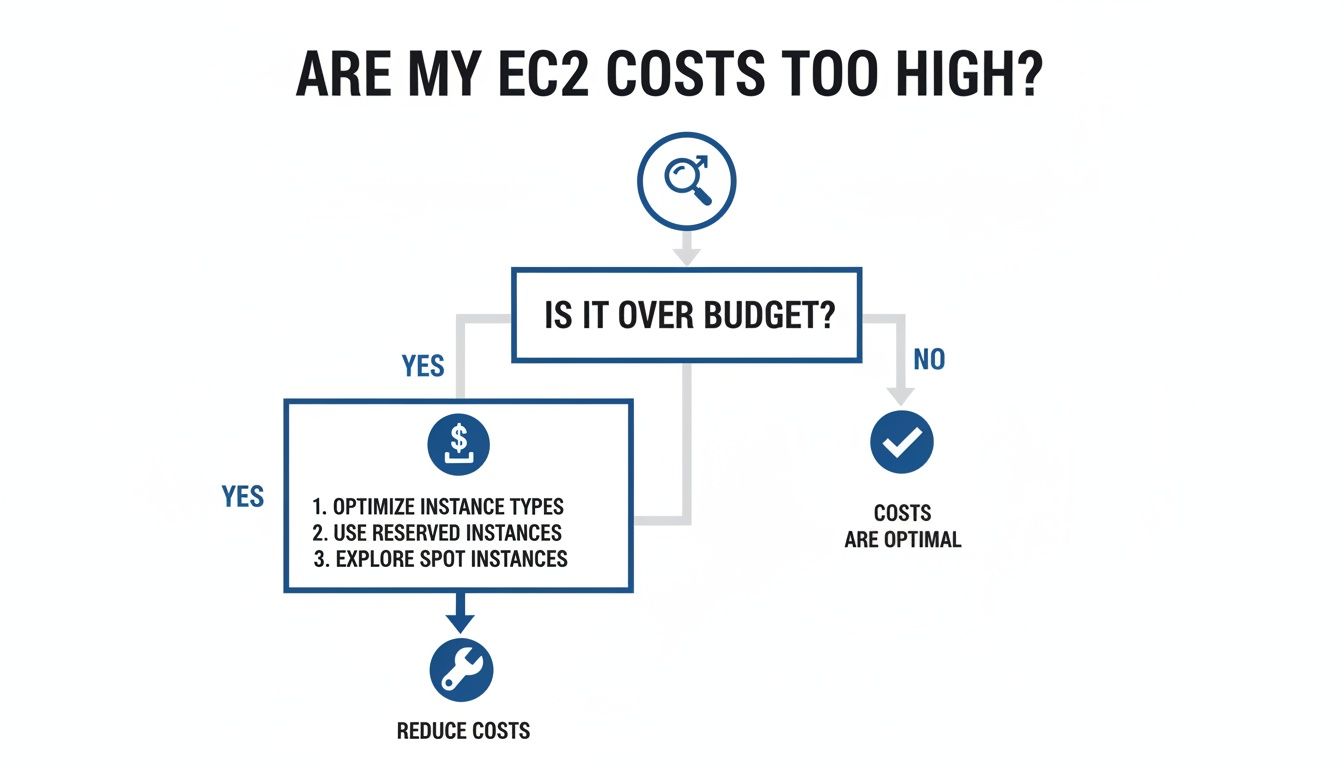
As the flowchart shows, the first step is always spotting a budget issue. Once you have, the door opens to a whole world of optimization strategies, starting with choosing the right pricing model. Let's walk through the four main options so you can make a smart decision.
On-Demand Instances
On-Demand is the default and most flexible way to pay for EC2. You pay for compute power by the second, with absolutely no long-term contracts or upfront cash. This is your "hail a taxi" model; you use it exactly when you need it and pay the standard rate.
This model is a perfect fit for:
- Applications with spiky or totally unpredictable traffic.
- Dev and test environments you need to spin up and shut down on the fly.
- Any workload that absolutely cannot be interrupted.
But while On-Demand gives you total flexibility, it's also the priciest option. A classic mistake that sends EC2 instance costs soaring is relying on it for predictable, long-running applications.
Reserved Instances and Savings Plans
If you have steady, predictable workloads, then Reserved Instances (RIs) and Savings Plans will be your new best friends. Think of them as leasing a car or buying a monthly transit pass. You commit for a period of time and get a huge discount in return.
Reserved Instances offer the biggest discount, up to 72% off On-Demand rates, but you have to commit to a specific instance family, region, and term (1 or 3 years). Savings Plans give you a similar discount but with more flexibility, as the savings apply to any instance usage regardless of family or region.
Often, the best strategy is a mix of both. Use RIs for the rock-solid servers at the core of your application, then layer Savings Plans over them to cover usage that's a bit more dynamic. This approach helps you save the most money without sacrificing all your agility.
Spot Instances
Spot Instances are the equivalent of a ride-share during off-peak hours. You’re essentially bidding on spare EC2 capacity, which can unlock massive discounts, historically up to 90% off On-Demand prices. The catch? AWS can take that capacity back with just a two-minute warning.
This makes Spot Instances great for workloads that can handle interruptions, like:
- Big data analysis and processing jobs.
- CI/CD pipelines and other batch processing tasks.
- High-performance computing simulations.
Just be aware that the Spot market has changed. Prices for many instance types jumped significantly between late 2022 and early 2023, eating into those once-guaranteed savings. AWS now adjusts spot prices more slowly based on long-term trends, which means they rarely go above On-Demand rates but don't always deliver the 50-70% savings they used to. You can explore the analysis of spot price trends on pauley.me to see the data for yourself.
If you’re interested in this powerful but volatile model, our guide to EC2 Spot Instances is a great place to learn how to get started. Matching the right pricing model to your workload is the first major step toward a cost-effective cloud setup.
Finding the Hidden Drivers of Your EC2 Bill
When you get your monthly AWS bill, it’s easy to focus on the main hourly rate for your EC2 instances. But the truth is, your total ec2 instance costs are far more complex. A dozen other services and configuration choices are quietly working in the background, and if you’re not paying attention, they can lead to some expensive surprises.
Think of it like getting a bill from a contractor after a big project. You expect the main charge, but then you see all the smaller line items for materials, delivery, and extra labor. On their own, they seem small, but together, they can blow your budget. Getting your cloud spending under control starts with understanding these hidden cost drivers.

To really get a handle on your AWS budget, you have to look past the instance itself and audit every single component attached to it. These often have a way bigger impact on your final bill than you’d think.
Instance Families and Their Cost Implications
Not all EC2 instances are built the same. AWS offers a zoo of specialized instance families, each one optimized for a different kind of job, and your choice directly impacts your bill. For example, a compute-optimized instance (from the C-family) is perfect for heavy data processing, but it's a terrible and expensive choice for a database that needs more RAM than CPU power.
Sure, you can run a memory-hungry application on a general-purpose instance, but you're probably paying a premium for CPU cores you’ll never use. Switching to a memory-optimized instance (R-family) would likely give you better performance for less money. This mismatch between workload and instance family is one of the most common ways businesses waste money in the cloud.
The True Cost of EBS Storage
Every EC2 instance needs a place to store data, and that usually means attaching an Amazon Elastic Block Store (EBS) volume. The cost here isn't just about how many gigabytes you provision. The type of volume you pick is a massive factor.
Just look at these common scenarios:
- General Purpose SSD (gp3/gp2): This is your workhorse. It’s a balanced, cost-effective choice for most things, like boot volumes and dev environments.
- Provisioned IOPS SSD (io2/io1): This is the high-octane fuel for mission-critical databases and I/O-heavy applications. It's also significantly more expensive and a classic source of overspending when used for the wrong task.
- Throughput Optimized HDD (st1): A much cheaper option that’s great for large, frequently accessed datasets, like log processing.
Using a high-performance io2 volume for a basic web server that gets a handful of hits is like paying for a sports car just to get stuck in city traffic. It's a costly and completely avoidable mistake.
Here’s a critical cost that often gets missed: unattached EBS volumes. When you terminate an EC2 instance, the EBS volume attached to it doesn't always get deleted automatically. AWS will keep billing you for that "zombie" storage until you go in and manually delete it.
Data Transfer Fees: The Silent Budget Killer
Data transfer fees are probably the most infamous hidden cost in AWS. While getting data into an AWS region is almost always free, getting it out is a different story. These charges can pop up in several places and can inflate your bill faster than you can say "budget overrun."
Here are the key areas to watch:
- Data transfer out to the internet: This is the most common one and usually the biggest data transfer expense on the bill.
- Inter-region data transfer: Moving data between different AWS regions (like from US East to EU West) comes with a fee.
- Inter-Availability Zone (AZ) transfer: This one surprises a lot of teams. Even moving data between different data centers (AZs) within the same region costs money, which can add up for high-availability architectures.
A tiny misconfiguration in an application can accidentally trigger terabytes of unnecessary data transfer, leading to a massive, unexpected spike in your monthly ec2 instance costs.
Attached Services and Supporting Resources
Your instances almost never run in a vacuum. They depend on a whole network of supporting AWS services, and each one has its own pricing. A true cost audit has to include all of them.
- Elastic IP Addresses: An Elastic IP is free when it's attached to a running instance. But AWS charges a small hourly fee for any EIP that’s sitting in your account but not attached to anything.
- Elastic Load Balancers: They’re essential for distributing traffic, but they come with their own hourly charges plus fees based on how much data they process.
- NAT Gateways: If you have instances in a private subnet that need to reach the internet, you need a NAT Gateway. These have both an hourly charge and a per-gigabyte data processing fee.
Understanding how all these pieces fit together is the only way to get a complete picture of your spending. The calculation of effective hourly pricing for reserved instances requires spreading total acquisition costs, including any substantial upfront payments, across the entire commitment term to determine true amortized rates. This historical context helps organizations make better purchasing decisions. Discover more insights about analyzing long-term compute pricing trends on Zenodo.org.
Actionable Strategies to Reduce EC2 Costs
Knowing what’s driving your EC2 instance costs is one thing. Actually cutting that bill is another. Now it’s time to move from theory to action with some proven strategies you can put to work today.
These tactics range from simple housekeeping to smart automation. Each one is a clear, practical step you can take to make a real dent in your AWS bill.
Rightsizing Your Instances
One of the most common and expensive mistakes we see is overprovisioning. It's easy for teams to launch instances that are way more powerful than an application actually needs, "just in case." Rightsizing is the simple process of matching your instance's horsepower to what your workload really requires.
You don't have to guess, either. AWS provides tools like the AWS Compute Optimizer to analyze your instance's performance metrics, like CPU usage, and suggest more cost-effective instance types. Just switching from a large instance to a medium one can often cut that resource's cost by 50% with zero impact on performance.
Implement Automated Scheduling
This is the single biggest opportunity for immediate cost reduction, especially for your non-production environments. Think about it: your development, staging, and testing servers probably run 24/7, but they’re only actively used during business hours. Leaving them on overnight and on weekends is like leaving the lights on in an empty office all year long.
By simply shutting down non-production instances for nights and weekends, which adds up to about 128 idle hours out of a 168-hour week, you can slash their costs by up to 70%. This is a massive, recurring saving that requires no changes to your application's architecture.
This is exactly where an automation platform like CLOUD TOGGLE shines. It lets you create simple "on" and "off" schedules for your resources, ensuring you only pay for compute when you’re actually using it.
Leverage Spot Instances Strategically
As we covered earlier, Spot Instances let you tap into spare AWS capacity for a huge discount. The catch is they can be terminated with only a two-minute warning, but they are a fantastic choice for any workload that is fault-tolerant and can handle interruptions.
Here are a few perfect use cases for Spot Instances:
- Batch processing jobs: Tasks that can be easily stopped and restarted without causing problems.
- Data analysis: Running large-scale analytics that don't need to be finished in real-time.
- CI/CD build agents: Spinning up temporary instances to run automated tests and builds.
Working Spot Instances into your architecture for these specific jobs can have a major impact on your compute spend. Even if you only use them for a small part of your workloads, the savings add up fast.
Clean Up Orphaned and Unused Resources
Over time, your AWS account can become a graveyard of "zombie" resources that you're paying for but no longer using. This often happens when you terminate an instance but forget to delete all the bits and pieces associated with it. Regular housekeeping is a simple but surprisingly effective way to trim your bill.
Be on the lookout for:
- Unattached EBS Volumes: When you terminate an EC2 instance, its associated EBS volume isn't always deleted by default. AWS will keep billing you for this storage until you manually remove it.
- Old Snapshots: EBS snapshots are essential for backups, but they can pile up and consume a lot of expensive storage space. It's wise to set up a retention policy to automatically delete old snapshots.
- Unused Elastic IPs: An Elastic IP address is free when attached to a running instance, but you get charged a small hourly fee for any EIP that is allocated but not attached to anything.
A quick audit every month or quarter to find and delete these orphaned resources can uncover some surprising savings. To help you decide where to start, the table below compares these key strategies.
EC2 Cost Optimization Strategy Comparison
Not all optimization strategies are created equal. Some offer massive savings for minimal work, while others require significant architectural changes. This table breaks down the most common methods to help you prioritize your efforts.
| Strategy | Ideal Use Case | Potential Savings | Effort Level |
|---|---|---|---|
| Rightsizing | Overprovisioned instances | 20-50% per instance | Medium |
| Automated Scheduling | Non-production environments | Up to 70% | Low |
| Spot Instances | Fault-tolerant workloads | 50-90% (variable) | High |
| Resource Cleanup | Zombie volumes and IPs | 5-15% | Low |
As you can see, Automated Scheduling and Resource Cleanup offer some of the best returns for the lowest effort, making them fantastic starting points for any small business looking to cut cloud costs quickly.
Automating Your Savings with Scheduling Tools
Knowing you should shut down idle resources is one thing; actually doing it consistently is another. Manual shutdowns might deliver some savings, but the process is clumsy, prone to human error, and just doesn't scale. Automation is the only way to lock in reliable, long-term reductions to your EC2 instance costs.
This is the entire point of scheduling tools. They enforce the "off" hours for your non-production environments, making sure you only pay for compute when your team is actually using it. But not all automation tools are built the same.
The Challenge with Native AWS Tools
AWS offers its own solutions for automation, like the AWS Instance Scheduler. While they get the job done, these native tools come with a steep learning curve. They often demand deep technical knowledge and involve setting up complex configurations, juggling IAM roles, and sometimes even writing code.
This complexity is a huge barrier. It turns cost optimization into a task that gets stuck in the engineering or IT department. A project manager who needs a staging server for a quick client demo can't just turn it on; they have to file a ticket and wait. This friction kills productivity and keeps cost-saving responsibility in the hands of a select few.
A Simpler Approach to Scheduling
A far better strategy is to use a tool built for the whole team. This is where a platform like CLOUD TOGGLE makes a massive difference. It hides the complexity of the AWS console behind a simple, intuitive interface for managing resource schedules.
Imagine your project manager could safely turn a server on for a demo without needing full AWS access or filing an IT ticket. That’s the power of user-friendly automation. It makes cost optimization a team sport, allowing non-engineers to participate safely and efficiently. If you want to dive deeper into this topic, you can learn more about how to schedule AWS instances with our detailed guide.
When scheduling is accessible to everyone, it stops being an IT chore and becomes a collaborative effort.
Empowering Your Team with Secure Controls
Of course, one of the biggest worries with giving more people access to cloud resources is security. You can't give a non-technical team member the keys to your entire AWS kingdom just so they can toggle a server on and off. This is where role-based access controls are non-negotiable.
An effective scheduling tool must allow you to:
- Grant Limited Access: Give specific users or teams control over only the resources they need. The marketing team might get access to a demo server, while the QA team controls the testing environment.
- Set Clear Schedules: Define default "on" and "off" times for groups of instances, ensuring they power down automatically every night and weekend.
- Enable Quick Overrides: Let authorized users temporarily override a schedule with a single click when they need extra time, with the system automatically reverting to the schedule afterward.
This blend of simplicity and security empowers your whole organization to become more cost-conscious.
When your team can confidently manage their own resources without creating security risks or operational bottlenecks, you build a culture of financial accountability. Cost optimization stops being a monthly fire drill and becomes part of your team's daily workflow.
This approach doesn't just drive down your EC2 instance costs; it also boosts operational efficiency. Engineers are freed from the endless stream of "on/off" requests, and other team members are empowered to manage their own work. It's a win-win that pays off with immediate financial savings and long-term cultural change.
Frequently Asked Questions About EC2 Costs
Digging into your AWS bill usually brings up a few common questions. Let's tackle some of the most frequent ones about EC2 instance costs, clearing up the key concepts and giving you some practical advice to get your spending under control.
How Is AWS EC2 Billed?
For most EC2 instances, AWS bills you by the second, but with a one-minute minimum. So, if you run an instance for just 30 seconds, you pay for a full minute. If you run it for 95 seconds, you pay for exactly 95. This applies to On-Demand, Reserved, and Spot instances alike.
These tiny charges add up over your billing cycle and show up as a single line item on your monthly bill. Getting a handle on this is crucial, because it shows how even short-lived, idle instances can pile up into a surprisingly large expense if you’re not watching them.
What Is the Easiest Way to Cut EC2 Costs Now?
The single fastest way to slash your EC2 costs is to shut down your non-production resources when nobody is using them. Think about it: your development, staging, and testing environments often run 24/7, but they’re only really needed during business hours.
Simply automating the shutdown of these instances on evenings and weekends can immediately cut their costs by as much as 70%. It’s a simple move that requires zero changes to your architecture and delivers a quick, massive win for your budget.
This strategy is so effective because it targets pure waste. You're not touching production performance or getting in the way of your team's workflow.
Can I Use Reserved Instances and Savings Plans Together?
Yes, absolutely. In fact, a smart cost optimization strategy often involves both. You can use Reserved Instances for your most predictable, always-on workloads where you know you'll need a specific instance family in a specific region. This will get you the biggest discount possible for that predictable base.
Then, you can layer Savings Plans on top to cover the rest of your usage, which might be more dynamic or fluctuate. Savings Plans give you the flexibility to switch between instance types and even regions. This blended approach lets you lock in maximum savings on your baseline compute while staying agile enough to handle everything else.
What Is a Common Mistake in Managing EC2 Costs?
One of the most frequent and expensive mistakes is the "set it and forget it" mentality. Teams will often spin up a powerful instance to handle peak performance but then never go back to check if that much capacity is actually being used. This leads to paying a premium for resources that are sitting idle most of the time.
Another classic mistake is leaving unattached EBS volumes and old snapshots just hanging around in your account. AWS keeps billing you for that storage even when it’s not connected to a running instance. Regularly auditing and deleting these "zombie" resources is a simple housekeeping task that can save a surprising amount on your monthly bill.
Ready to stop wasting money on idle cloud resources? CLOUD TOGGLE makes it easy to automate your EC2 schedules, empowering your entire team to reduce costs with just a few clicks. Start your free trial and see your savings grow.