The biggest point of confusion when people start with containers is thinking they have to choose between Kubernetes and Docker. The truth is, they aren’t competitors at all. They solve different problems and, in most modern applications, work together.
Think of it this way: Docker gives you the tools to build a single, self-contained unit, like a pre-fabricated, portable tiny home. Kubernetes is the city planner and construction foreman who takes hundreds of those homes and arranges them into a fully functioning, resilient neighborhood.
Kubernetes vs Docker A Direct Comparison

To really get it, you have to see that they operate on different levels. Docker is all about containerization. Its job is to package your application with all its code, libraries, and dependencies into a single, standardized unit: a container. This ensures your app runs the exact same way on a developer's laptop as it does on a production server.
Kubernetes, on the other hand, handles container orchestration. Once you have a bunch of containers, Kubernetes steps in to manage their entire lifecycle across a cluster of machines. It takes care of the hard stuff like deployment, scaling, load balancing, and self-healing, making sure your application stays online and responsive no matter what.
The market data makes this distinction crystal clear. Docker completely dominates the containerization space with 87.67% market share, while Kubernetes commands 92% of the container orchestration market. This shows just how specialized each tool is. You can find more details on these adoption statistics on commandlinux.com.
Docker vs Kubernetes at a Glance
For a quick reference, here’s a high-level summary that breaks down their primary roles.
| Aspect | Docker | Kubernetes |
|---|---|---|
| Primary Function | Packages and runs single applications in isolated containers. | Manages and orchestrates many containers across multiple servers. |
| Scope | Single node or small, simple multi-node setups (with Docker Swarm). | Distributed, multi-node clusters designed for high availability. |
| Ideal Use Case | Local development, building/testing images, simple single-server apps. | Production-grade, multi-service applications requiring scaling and resilience. |
This table shows they aren't interchangeable. You can't just "use Kubernetes instead of Docker" to build your app, and using only Docker for a large, complex system is asking for trouble.
The core takeaway is simple: You use Docker to build and run a container, and you use Kubernetes to manage a fleet of those containers in production. One builds the "what," and the other manages the "how" and "where."
Understanding this partnership is the first step for any team trying to build modern, scalable applications. It directly impacts your development workflow, operational stability, and, most importantly, your cloud bill. Grasping their complementary roles is fundamental to achieving efficient cloud operations and cost control.
Understanding Each Tool's Core Purpose
To really see the difference between Kubernetes and Docker, you have to look at their individual missions. They aren't competitors; they're partners that solve different problems in the world of containerization.
Docker’s job is simple but powerful: it packages an application and all its dependencies into a single, standardized unit called a container. This finally puts an end to the age-old "it works on my machine" headache that developers know all too well. By creating a self-contained package, Docker ensures an app runs the same way, everywhere.
Docker: The Packaging Specialist
Think of Docker as the specialist that builds and standardizes shipping containers. Its tools all work together to build and run these containers flawlessly.
- Dockerfile: This is your blueprint. It's a plain text file with step-by-step instructions on how to build a container image, detailing everything from the base OS to the code and libraries required.
- Docker Engine: This is the runtime environment that takes the Dockerfile blueprint and actually builds the image and runs the container. It's the engine that brings the "shipping container" to life.
- Docker Hub: A massive public registry where developers can store and share their container images. It works like a huge warehouse full of pre-built containers, letting teams borrow and build on each other's work.
Kubernetes, on the other hand, steps in to manage these containers once they’re built. It’s a container orchestrator.
Kubernetes: The Fleet Commander
If Docker builds the individual containers, Kubernetes is the fleet commander in charge of deploying, managing, and scaling them across a massive fleet of servers. Its entire purpose is to wrangle the complexity of running distributed systems at scale.
Kubernetes was born from the need to run containerized applications reliably in a large, distributed environment. It automates the tasks, like scaling and self-healing, that would be impossible for a human team to manage manually.
Its architecture is designed for this command-and-control role:
- Nodes: These are the workhorses, the individual servers (physical or virtual) that run your containers.
- Cluster: A group of nodes that Kubernetes manages as a single unit.
- Pods: The smallest unit Kubernetes can deploy. A Pod holds one or more containers (like those you built with Docker) that live and work together.
- Control Plane: This is the brain of the entire operation. It makes the big-picture decisions for the cluster, like scheduling new pods, and constantly watches for and responds to problems.
By taking command of a fleet of Docker-built containers, Kubernetes delivers the high availability and effortless scaling that modern applications demand. For a deeper dive into how this all works, check out our guide on orchestration in cloud computing.
Comparing Key Architectural Differences
To really get the difference between Kubernetes and Docker, you have to look at how they're built. Their core designs solve completely different problems, and that directly shapes how your team will use them and how your applications will behave under pressure.
Docker’s architecture is, at its heart, built for a single-node experience. Everything centers on the Docker Engine, a daemon running on one host machine. This engine is your workhorse for building, running, and managing containers on that specific machine. It's brilliant for local development or simple, single-server deployments.
When you need to manage more than one host, Docker offers its own native orchestrator, Docker Swarm. It extends Docker’s simple model to a small group of machines, but it prioritizes simplicity over a deep feature set. Think of it as a straightforward way to create a cluster, but it just doesn't have the sophisticated, automated muscle needed for large-scale production environments.
A Tale of Two Architectures
Kubernetes, on the other hand, was born to be a distributed system. Its architecture is multi-node by default, engineered from day one for high availability and resilience. A Kubernetes cluster has a Control Plane (the brain) and a fleet of worker nodes (the muscle) that all work in concert to run your applications. There is no single point of failure.
This distributed-first approach completely changes how fundamental operations are managed.
Kubernetes operates on the assumption that failure is a certainty. It's designed to automatically recover from crashed containers, dead nodes, and network hiccups. With a standard Docker setup, those events would almost always demand a late-night page and manual intervention. This is the most critical architectural difference between the two.
How They Handle Core Functions
Because they were designed with different goals, Docker and Kubernetes take wildly different paths for networking, storage, and security. Getting these distinctions right is crucial for picking the tool that matches your operational needs.
Networking: By default, Docker sets up a simple bridge network that lets containers on a single host talk to each other. Getting containers on different hosts to communicate means getting your hands dirty with manual port mapping or other network configurations. Kubernetes flips the script with a flat network model where every Pod gets a unique IP address. All Pods can find and talk to each other across the entire cluster, no complex network translation required.
Storage: Docker uses Volumes to save data, but these are generally tied to the specific host machine they're on. If that host goes down, getting to that data becomes a real headache. Kubernetes abstracts this problem away with Persistent Volumes (PVs) and Persistent Volume Claims (PVCs), which separate the idea of storage from any individual node. This is a game-changer for stateful applications, allowing Kubernetes to simply remount the storage on a healthy node if the original one fails.
Security: Docker provides a solid foundation for security at the container level using Linux kernel features like namespaces and cgroups for isolation. Kubernetes takes that foundation and builds a fortress on top of it. It adds powerful security tools like Role-Based Access Control (RBAC) for defining who can do what, and Network Policies for locking down traffic between Pods to create a true zero-trust environment.
Architectural Feature Comparison
The table below gives you a quick side-by-side look at these operational differences. It really brings home the trade-off you’re making: Docker’s out-of-the-box simplicity versus the powerful, production-grade features that Kubernetes brings to the table.
| Feature | Docker (and Swarm) | Kubernetes |
|---|---|---|
| Architecture | Single-node daemon; simple multi-node clustering. | Distributed system with a control plane and worker nodes. |
| Networking | Bridge network on a single host; multi-host is manual. | Flat network model; all Pods are routable across the cluster. |
| Storage | Host-dependent Volumes. | Abstracted Persistent Volumes (PVs) independent of any single node. |
| Security | Basic container isolation. | Advanced RBAC, Network Policies, and Secrets management. |
Ultimately, choosing between them comes down to your scale and complexity. For simple, single-host apps or small clusters, Docker's lean approach is often enough. For complex, mission-critical applications that need to be resilient and scalable, the robust architecture of Kubernetes is the clear winner.
How Daily Workflows Change with Each Tool
The real difference between Kubernetes and Docker snaps into focus when you look at the day-to-day work of your development and ops teams. Each tool creates a completely different rhythm and set of priorities. A developer using Docker has a very close, direct relationship with their code, focused on packaging one specific piece of the application.
On the other hand, an operations engineer using Kubernetes is thinking at a much higher level. They aren't just managing one container; they're conducting an entire fleet of applications as a single, coordinated system. This shift in perspective is the biggest change your teams will feel.
The Developer-Centric Docker Workflow
Working with Docker is a hands-on, developer-first experience. The whole point is to build, test, and ship individual application components cleanly and reliably. The daily routine is pretty straightforward and circles around a few core commands.
A developer’s Docker workflow usually looks like this:
- Write code for a microservice or a new application feature.
- Create a
Dockerfile, which is just a simple text file that acts as a blueprint, listing all the steps to package the code. - Build the container image using the
docker buildcommand. This step bundles everything into a portable, self-sufficient package. - Test the image locally by running it on their own machine with
docker run. This is crucial for making sure the app works as intended before it goes anywhere else. - Push the validated image to a container registry like Docker Hub, which makes it ready for deployment.
This workflow is imperative: you tell Docker exactly what to do, step-by-step. The focus is on the what: "What am I building right now?" That direct, granular control is perfect for the creative, iterative nature of software development.
A developer's job with Docker is to create a clean, efficient, and reproducible container image. The entire workflow is built around the life of a single application instance.
The Operations-Centric Kubernetes Workflow
It's a different story with Kubernetes. The workflow is the polar opposite of Docker's; it's designed for operations teams and is all about deploying and managing services in production, not building individual containers. The goal is to maintain a specific, desired state for your application at all times.
Instead of running direct commands, an ops engineer works with declarative configuration files, usually written in YAML. You don't tell Kubernetes how to do something; you simply describe the end result you want, and Kubernetes figures out the rest.
An engineer’s Kubernetes workflow involves:
- Defining the application state in a YAML manifest. This file specifies which container images to use, how many copies (replicas) to run, and which network ports to open.
- Applying the configuration to the cluster with a single command:
kubectl apply -f your-config.yaml. - Letting Kubernetes take over. From there, Kubernetes automatically schedules the pods, handles the networking, and constantly works to make sure the live state of the cluster matches what's in your YAML file.
This is the key difference. Kubernetes automates the complex operational headaches, like self-healing when a container crashes or performing rolling updates without downtime. Need to scale up? You just change a single number in your YAML file and apply it. You can learn more about how Kubernetes manages this in our guide on the cluster auto scaler. With Kubernetes, the focus is on the how: "How do I run this application reliably and at scale?"
When to Use Docker, Kubernetes, or Both
So, when do you actually need Docker, Kubernetes, or both? This is a question every team faces, and the right answer depends less on the tools themselves and more on your project's real-world needs, your team's size, and your plans for growth. The practical difference between the two becomes obvious once you map them to specific jobs.
The decision tree below gives you a great visual guide. It shows how the workflow splits, with Docker owning the developer-focused tasks and Kubernetes taking over for production operations.
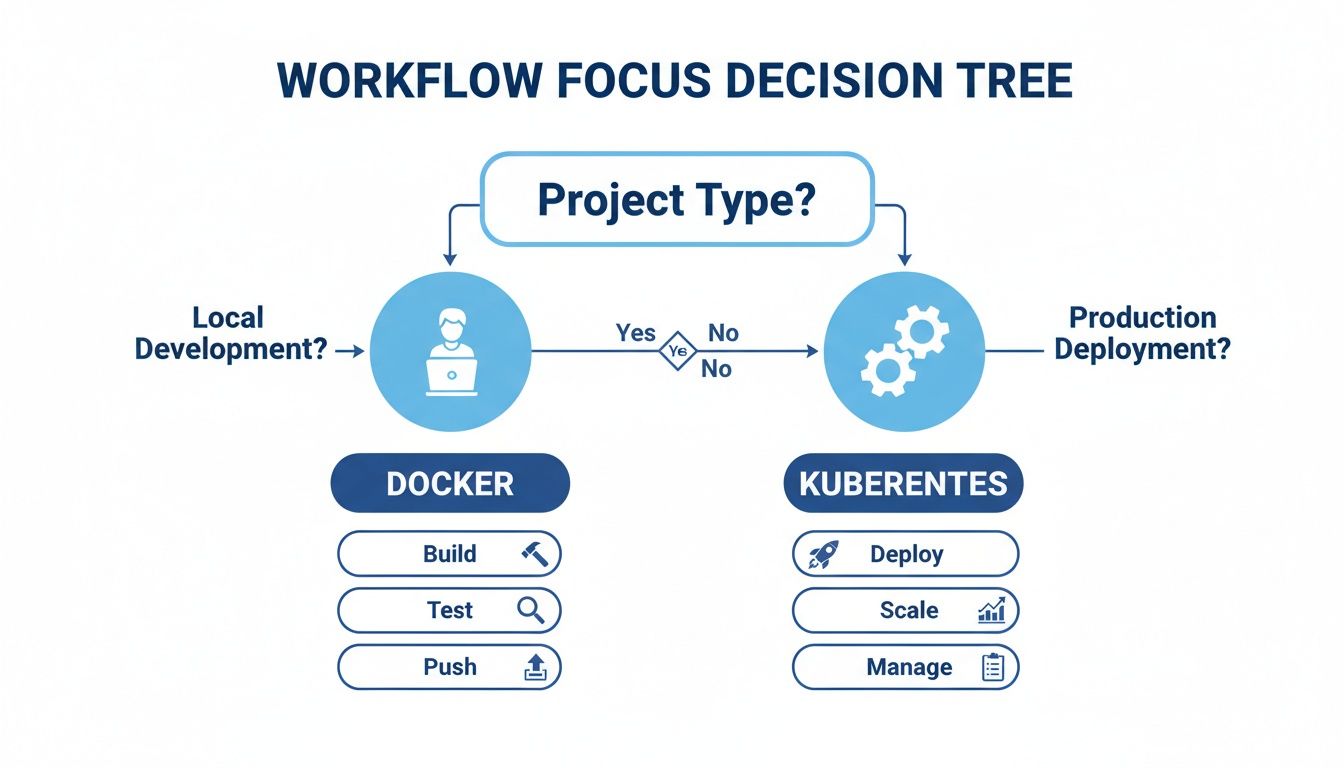
The flow is clear: Docker is your workshop for building and testing, while Kubernetes is the factory for deploying and managing those applications in the wild.
Sticking With Just Docker
You can get a lot done with just Docker, especially in simpler, more contained scenarios. It’s the go-to tool for local development. Developers can build and test their code in a perfectly consistent environment without the complexity and overhead that comes with a full orchestration system.
A Docker-only setup is also the right call for:
- Simple, single-host applications: If your app is just a handful of containers running on one server, adding Kubernetes is overkill. Docker is all you need.
- Building CI/CD pipelines: Use Docker to build, test, and package your application into a reliable container image. This happens long before it ever needs to be deployed at scale.
When to Bring in Kubernetes
Kubernetes really starts to shine when your application has to be rock-solid, resilient, and ready to scale. If you're managing a distributed system with many different services that absolutely cannot go down, Kubernetes is the industry standard for a reason.
You should reach for Kubernetes when your needs include:
- High availability and fault tolerance: Kubernetes will automatically restart failed containers and move them to healthy nodes, no human intervention required.
- Automated scaling: It can grow your application's resources when traffic spikes and shrink them when things quiet down, all on its own.
- Zero-downtime deployments: With Kubernetes, you can perform rolling updates, deploying new versions of your application without ever taking it offline.
The most powerful pattern isn't choosing one tool over the other, it's using them together. Developers build and package their applications with Docker, and the operations team deploys and runs them at scale with Kubernetes.
The Power of Both: The DevOps Standard
This "Docker to build, Kubernetes to run" workflow is the very foundation of modern DevOps. It creates a smooth and predictable handoff from the development team to the operations team.
Of course, this decision is often tied to a bigger architectural choice. To really know if your project will benefit from this stack, you first need to understand the trade-offs of a modern application design like microservices vs monolithic architecture.
For teams that find Kubernetes too complex for their needs but have outgrown a single Docker host, Docker Swarm is a solid alternative. It offers basic orchestration features with a much gentler learning curve, making it a great middle-ground for smaller teams or less complex multi-container apps. Ultimately, the best choice comes from a realistic look at what your application actually needs and what your team can confidently manage.
Optimizing Your Cloud Costs

The choice between Kubernetes and Docker has a direct impact on your wallet. How you use these tools can either tighten up your cloud budget or send it spiraling. Without a solid plan, both technologies come with their own financial traps.
With Docker, the most common pitfall is underutilization. If you’re only running a handful of containers on a massive server, you're paying for resources that are just sitting there. Think of it like renting a giant warehouse but only using one small corner; you still have to pay for the whole space.
The Kubernetes Cost Challenge
Kubernetes brings a different flavor of cost-related headaches. The biggest risk here is cluster over-provisioning. This is where teams, trying to be safe, allocate far more resources than their applications actually need. Because Kubernetes is so complex, it's easy for these idle resources to fly under the radar, making it tough to spot the waste.
On top of that, the Kubernetes control plane itself uses up resources, adding a fixed overhead cost to your bill. This is a baseline expense you pay before you even deploy a single application. If you’re not careful, these costs can add up fast.
A common trap with Kubernetes is assuming its resource packing automatically saves you money. While it's great at efficiently fitting containers onto nodes, it won’t stop you from paying for an oversized cluster that’s mostly empty.
Practical Strategies for Cost Control
Actively managing your cloud spend is non-negotiable. One of the single most effective strategies is to schedule non-production Kubernetes clusters to shut down during off-hours, like nights and weekends. This move alone can slash costs on platforms like AWS and Azure.
But automating this kind of shutdown isn't always straightforward. You need a system that can gracefully stop and restart services without your engineers having to step in manually. This is where dedicated tools really prove their worth.
Here are a few actionable ways to get your costs under control:
- Implement Auto-scaling: Put Kubernetes' built-in features to work by automatically adjusting resource allocation based on real-time demand. Our guide on autoscaling in Kubernetes breaks down how to do this.
- Set Resource Requests and Limits: Be specific about the CPU and memory each container requires. This stops individual apps from hogging resources and helps Kubernetes make smarter scheduling decisions.
- Monitor and Analyze Usage: Make it a habit to review your cluster’s resource consumption to find and cut out waste. Using tools that visualize usage can quickly expose oversized nodes and idle pods.
Frequently Asked Questions
When you're figuring out the difference between Kubernetes and Docker, a few common questions always seem to pop up. Let's tackle the big ones and clear up any lingering confusion.
Can I Use Kubernetes Without Docker?
Absolutely. While Docker was the original and most well-known container runtime for Kubernetes, the platform has grown up. Kubernetes now works with any runtime that follows the Container Runtime Interface (CRI), including popular alternatives like containerd and CRI-O.
What's interesting is that containerd actually started life as a component inside Docker. Today, most Kubernetes clusters use containerd directly, so even when you’re not using "Docker" per se, you're still often using technology that originated from it.
Is Kubernetes Replacing Docker?
No, and this is probably the biggest misconception out there. Kubernetes isn't replacing Docker because they don't solve the same problem. They are most effective when they work together as part of a modern DevOps pipeline.
Think of it like this:
- Docker is for building and packaging your applications into tidy, standardized containers.
- Kubernetes is for running and managing all those containers at scale.
Docker gives you the building blocks. Kubernetes takes those blocks and orchestrates them into a resilient, highly available system.
Should a Small Business Start with Docker or Kubernetes?
For most small businesses, the answer is clear: start with Docker. It’s the pragmatic first step. You get immediate value by containerizing your applications, which cleans up your development and testing workflow without a massive learning curve.
As your application grows and you find yourself needing to manage multiple services across different servers for high availability, that’s your cue to bring in Kubernetes. This phased approach lets you orchestrate the Docker containers you're already comfortable with, avoiding a mountain of complexity right at the start.