Your team is probably already living the hybrid reality, whether you call it that or not.
A few systems still run in a server room, colocation rack, or VMware cluster because they are stable, regulated, or already paid for. Newer services keep landing in AWS or Azure because the business wants speed, elasticity, and less waiting on hardware. Then the finance review arrives, and the questions get sharper. Why are some workloads still on-prem? Why are cloud bills climbing? Why does moving one application suddenly involve networking, identity, backup, and three different teams?
At that point, cloud hybrid architecture stops being a buzzword and starts becoming an operating model.
What Is Cloud Hybrid Architecture and Why Does It Matter
Think of on-prem infrastructure like owning a car. It gives you control, predictable access, and no surprises about where your data or systems physically live. Public cloud is closer to rideshare. You can scale up quickly, pay for what you need, and avoid buying capacity for every peak in advance.
Cloud hybrid architecture combines both. You keep some workloads in a private environment, usually on-premises or in dedicated hosted infrastructure, and connect them to public cloud services such as AWS or Azure so applications and data can move where they make the most operational and financial sense.

Why CTOs keep choosing hybrid
Most SMBs do not have the luxury of a clean slate. They have line-of-business systems that cannot move easily, compliance boundaries that matter, and developers who need public cloud services now, not after a multi-quarter migration plan.
Hybrid solves a practical problem. It lets teams keep sensitive systems under tighter control while using public cloud for burst capacity, analytics, dev environments, backup targets, or newer customer-facing applications.
That is one reason adoption keeps rising. The hybrid cloud market is projected to reach $158 to $173 billion in 2025, growing from $112 to $148 billion in 2024, and projections indicate 90% of organizations will adopt hybrid models by 2027 according to Pump’s hybrid cloud statistics roundup.
What hybrid is not
Hybrid is not merely “we use AWS and still have a server room.” It becomes hybrid architecture only when those environments are deliberately connected, governed, and operated as part of one design.
A useful distinction is the one between hybrid and multi-cloud. If you need a sharper breakdown, this guide on multi-cloud vs hybrid cloud is worth reviewing before making platform decisions.
Key takeaway: Hybrid works when you choose placement intentionally. It fails when on-prem and cloud grow as separate islands with separate policies, separate visibility, and separate cost models.
Why it matters now
The strongest argument for hybrid is not ideology. It is fit.
Some workloads want cloud elasticity. Some want local control. Some need both at different times in their lifecycle. A well-run hybrid architecture gives a CTO room to modernize without forcing every system into the same operating model.
Understanding the Core Components of a Hybrid Cloud
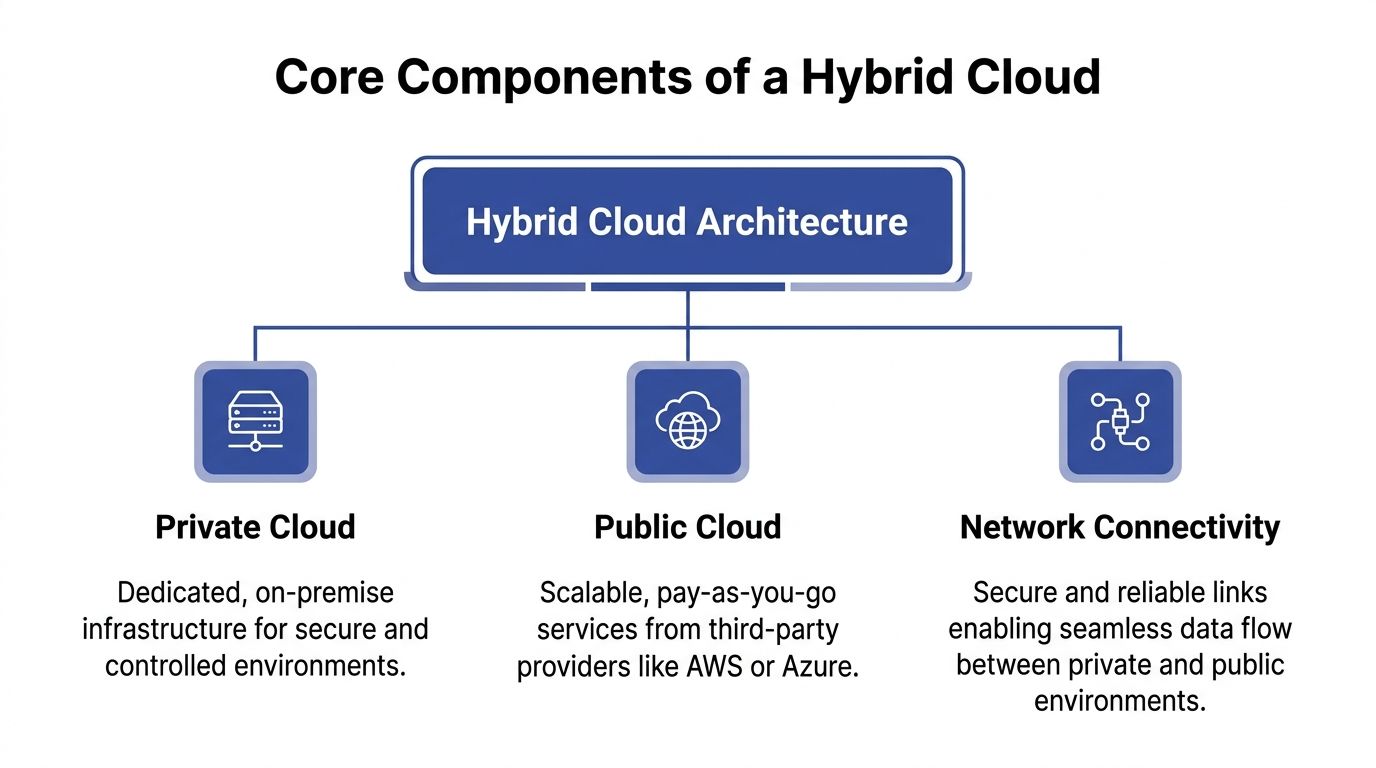
A hybrid environment looks complicated from the outside because people describe it with vendor terms. Underneath, it has three building blocks.
If you strip away the product names, cloud hybrid architecture is just private infrastructure, public infrastructure, and a reliable connection between them.
The private cloud side
It is your “home” in the house analogy. It is the part you control most directly.
For SMBs, that usually means one of these:
- A virtualized on-prem cluster: VMware is still common. Some teams run Hyper-V. Others build private environments on OpenStack.
- A hosted private environment: Colocation or managed infrastructure can still serve the same role if the environment is dedicated and governed to your standards.
- A compliance or latency zone: In this zone, teams keep sensitive records, local processing, domain services, or systems that are expensive to refactor.
Private infrastructure is rarely the most flexible option. It is often the most controllable one. That matters when a workload needs predictable behavior, data locality, or access to hardware and systems that are already integrated with the business.
The public cloud side
This is the utility company in the analogy. You do not own the global platform, but you can consume it quickly.
In practice, SMB teams usually rely on AWS or Azure for things like:
- Elastic compute for spikes
- Development and test environments
- Managed databases and analytics services
- Backup and disaster recovery targets
- Rapid deployment for new applications
Public cloud is not automatically cheaper. It is better suited to workloads that benefit from on-demand scale, managed services, and fast provisioning. If a workload changes constantly or sees irregular traffic, cloud pricing often aligns better with that pattern than buying infrastructure up front.
The connectivity layer
This is the piece teams underestimate.
A hybrid architecture is only as good as the network and identity fabric that ties both sides together. A standard VPN can be enough for some use cases, especially early on. For workloads that are latency-sensitive, bandwidth-heavy, or business-critical, teams often look at more dedicated connectivity models such as AWS Direct Connect or Azure ExpressRoute.
What matters most is not the product name. It is whether the connection supports:
- Reliable traffic flow between environments
- Consistent security controls
- Predictable latency for application dependencies
- Clear routing and segmentation
- Operational visibility when something breaks
Practical rule: If your application chatters constantly between on-prem and cloud, fix the architecture before you buy more bandwidth. A bad placement decision is not a networking problem.
One control plane matters more than one location
The biggest maturity jump comes when teams stop thinking in terms of locations and start thinking in terms of policy.
A private cluster, an AWS account, and an Azure subscription do not become a hybrid platform until identity, logging, deployment standards, and cost ownership work across all three. That usually means shared authentication, centralized monitoring, infrastructure-as-code, and a tagging or labeling model that survives across environments.
Without that, hybrid becomes a collection of exceptions.
Exploring Common Hybrid Cloud Design Patterns
The best hybrid designs are not built around ideology. They are built around workload behavior.
Some applications need temporary scale. Some need hard separation between public-facing and sensitive components. Some need a recovery path that does not require a second full data center. The pattern should follow that reality.
The three patterns I see most often
Cloud bursting is the classic example. A core workload runs in private infrastructure most of the time, then extends into AWS or Azure during demand spikes. This works best when the workload is stateless at the burst layer or can scale horizontally without dragging sensitive dependencies across the network.
Tiered application placement separates the front end from the sensitive back end. Web and API layers can run in public cloud for elasticity and reach, while core databases or regulated records remain in a private environment. This is common when the business wants modern customer-facing delivery without moving the entire data estate.
Disaster recovery in public cloud keeps production local or in private infrastructure but uses cloud as the recovery target. This makes sense when a second physical site is difficult to justify, but the business still needs a credible continuity plan.
Comparison of Hybrid Cloud Design Patterns
| Design Pattern | Primary Use Case | Key Advantage |
|---|---|---|
| Cloud bursting | Handling temporary demand spikes | Avoids building permanent capacity for occasional peaks |
| Tiered application placement | Separating public-facing services from sensitive systems | Balances elasticity with tighter data control |
| Disaster recovery in cloud | Business continuity and recovery readiness | Improves resilience without duplicating all infrastructure locally |
Where each pattern works well
Cloud bursting
Bursting looks elegant in architecture diagrams. In production, it only works when the application can tolerate split execution.
It is a good fit for:
- Batch-oriented jobs
- Stateless web tiers
- Seasonal or event-driven demand
- Development environments that temporarily expand
It is a poor fit for:
- Tightly coupled applications
- Workloads with large, constant data transfer
- Systems that depend on low-latency chatter with on-prem databases
If the burst path requires moving too much data or too many dependencies, costs and complexity rise quickly.
Tiered placement
This is the most practical pattern for many SMBs. It reflects how businesses modernize.
Teams keep sensitive data stores, authentication dependencies, or legacy processing private. They move customer-facing interfaces, content delivery, or API gateways to public cloud. This lets engineering move faster without forcing a risky rewrite of the systems of record.
The trade-off is integration discipline. Once you split tiers across environments, you need to manage:
- Network latency
- Identity propagation
- Consistent policy enforcement
- Failure handling between layers
Disaster recovery in public cloud
This pattern often delivers value faster than a full migration because it solves a specific business problem.
A cloud DR design can be straightforward if runbooks are tested and recovery assumptions are realistic. It becomes fragile when teams replicate data but never verify application startup order, authentication dependencies, DNS failover behavior, or operator access during an incident.
Tip: A DR design is only real if the ops team can execute it under pressure without hunting through old wiki pages.
Pattern selection should start with two questions
First, what does the system do throughout the day? Steady-state, bursty, latency-sensitive, regulated, or all of the above?
Second, what are you trying to optimize for? Speed, control, resilience, or cost?
CTOs get into trouble when they choose a pattern because it sounds modern instead of because it matches the workload. Hybrid design gets simpler once you accept that not every application deserves the same architecture.
Implementing and Operating Your Hybrid Environment
Architecture diagrams are easy. Operations are where hybrid succeeds or starts draining team time.
Most of the painful failures come from four areas: networking, security, data handling, and governance. Treat those as operating disciplines, not side tasks.

Networking without guesswork
Hybrid networking should be designed from application paths outward, not from whatever circuit or VPN is easiest to provision.
Start by mapping which services talk to each other, how often, and with what tolerance for latency. Teams often discover that one “small” dependency crosses environments constantly. That can turn a clean design into a noisy, expensive one.
A practical checklist:
- Map traffic flows first: Identify app-to-app, app-to-database, backup, and user-access paths before choosing network topology.
- Separate east-west from north-south thinking: Internal service communication needs different controls than user ingress.
- Design for failure: If the private-to-cloud link degrades, know which systems fail open, fail closed, or queue work.
- Avoid accidental tromboning: Poor routing can send traffic on long paths that add delay and confusion.
What works
Network segmentation, clear routing domains, and documented dependency maps. Dedicated links can help, but only if the application design justifies them.
What does not
Using the network to compensate for bad workload placement.
Security as one policy model
Hybrid environments break down when cloud and on-prem security evolve separately.
Identity should be unified as much as possible. Teams need consistent authentication, role assignment, and auditability across private infrastructure and public cloud accounts. If developers use one access pattern on-prem and another in cloud, drift starts immediately.
Use these principles:
- Centralize identity where possible: Operators should not need separate account habits for every platform.
- Standardize secrets handling: Do not leave one side using manual credentials while the other uses managed secret stores.
- Align policy enforcement: Firewall rules, access approvals, and privileged workflows should follow the same intent everywhere.
- Log with context: Security events are hard to investigate when on-prem logs and cloud logs live in different silos.
Data placement and synchronization
Data creates most of the hidden complexity in cloud hybrid architecture.
Keeping a database private while scaling application tiers in public cloud can be sensible. It can also produce slow transactions, synchronization pain, and difficult failure modes if the design assumes network links are free and instantaneous.
Data decisions should answer four questions:
- Where is the system of record?
- Which copy is authoritative during failure?
- How much freshness does each consumer need?
- What data is not allowed to leave a given boundary?
A lot of hybrid pain disappears when teams stop trying to synchronize everything. Some systems need replication. Others need caching. Others are better exposed through APIs so the data stays put.
Governance and visibility
In this area, many hybrid programs become unmanageable.
According to IDC’s 2026 Hybrid Cloud Monitor, 55% of organizations struggle with observability gaps, leading to 18% higher downtime in edge-hybrid setups versus pure cloud, as cited in ScienceLogic’s overview of hybrid cloud architecture and observability challenges.
That lines up with what operators see in practice. A cloud console shows cloud resources. A virtualization console shows private resources. Neither gives a complete operational picture.
Reviewing cloud management platform options is useful here because hybrid needs a broader control plane than any single provider console gives you.
Operational rule: If incidents require three dashboards and two teams just to confirm where the problem lives, your visibility model is incomplete.
A governance baseline worth enforcing
- Shared tagging or labeling: Cost, owner, environment, and criticality should exist on both sides.
- Unified alerting: Alerts should land in one operational process, not split by hosting location.
- Change discipline: Infrastructure-as-code and approved templates reduce one-off exceptions.
- Ownership clarity: Every workload needs a business owner and an operator, not just a host location.
Hybrid does not reward improvisation. It rewards teams that standardize aggressively and make exceptions expensive.
Hybrid Cloud in Action Real World Use Cases
Hybrid becomes easier to understand when you look at why companies keep certain boundaries in place.
Finance keeps control where it matters most
A financial services team may keep core transaction systems and sensitive records in a private environment because auditability, data locality, and control are essential. At the same time, they can put digital channels, analytics layers, or customer-facing services in public cloud where scaling and rapid release cycles matter more.
The architecture choice is not philosophical. It reflects a hard business split between systems of record and systems of engagement.
Healthcare mixes privacy with analytical scale
Healthcare teams often need strict handling for patient data, but they also want cloud services for reporting, application modernization, and operational analytics.
A common pattern is to keep protected clinical data and tightly governed workloads in private infrastructure while using public cloud for less sensitive supporting services, integration layers, or analytics pipelines with carefully controlled data movement.
That approach reduces risk without freezing modernization.
E-commerce uses hybrid for uneven demand
Retail and e-commerce workloads rarely behave evenly across the year. Core inventory systems, ERP integrations, or warehouse dependencies may remain in private infrastructure because they are tightly integrated and stable. Front-end commerce, search, and promotional traffic can benefit from cloud elasticity.
Such scenarios demonstrate hybrid's value. The business avoids building permanent internal capacity for short, intense peaks while preserving control over the systems that would be expensive to untangle.
What these examples share: The winning design keeps the most changeable and demand-sensitive layers closest to cloud elasticity, while the most sensitive or tightly integrated layers stay where control is strongest.
The products that make this practical
Two product families come up often in real deployments.
AWS Outposts extends AWS infrastructure and operational patterns into customer locations. It is useful when teams want closer alignment with AWS services and tooling but still need workloads to run on-site.
Azure Arc focuses on extending Azure management and governance across environments, including infrastructure that does not physically live in Azure. It is useful when the main problem is fragmented control rather than merely where the compute sits.
If you are comparing providers and operational models, this overview of hybrid cloud computing providers helps frame the trade-offs.
Neither tool removes architectural responsibility. They make hybrid easier to manage when the operating model is already clear.
How to Optimize Costs in a Hybrid Cloud Architecture
Hybrid can lower costs. It can also hide waste in more places.
The biggest gains usually come from two decisions: where workloads run, and how much data moves between environments. Most cost overruns in hybrid stem from getting one of those wrong.
Put steady workloads where economics favor them
Public cloud is excellent for variability. It is often a poor deal for predictable, steady-state compute if the workload does not benefit from cloud-native services.
A real-world case showed 26% monthly cost savings by rehosting internal analytics from premium AWS instances to a private OpenStack environment, as described in ITC Group’s write-up on optimizing cloud spending with hybrid architecture and usage analytics.
That is the core lesson. Do not ask whether cloud is cheaper in general. Ask whether this specific workload is:
- Steady or bursty
- Compute-heavy or service-heavy
- Latency-sensitive
- Bound by compliance
- Expensive to move because of data gravity
If a workload runs around the clock, changes slowly, and does not need managed cloud services, private infrastructure may be the better financial home. If demand is irregular or temporary, public cloud still wins on flexibility.
Build a placement matrix, not a debate
I recommend a simple workload matrix with practical attributes:
| Workload trait | Better default fit |
|---|---|
| Steady-state and predictable | Private infrastructure |
| Bursty or seasonal | Public cloud |
| Sensitive data with strict control needs | Private infrastructure |
| Rapid experimentation or short-lived environments | Public cloud |
| Deep dependency on managed cloud services | Public cloud |
This does not replace engineering judgment. It gives teams a repeatable starting point.
Watch data transfer costs carefully
Hybrid bills often drift because teams focus on compute and ignore movement.
CloudAware notes that unoptimized inter-environment egress can account for up to 20% to 30% of total bills, and that strategic caching and partial replication can reduce the hybrid baseline to $45/TB, blending public cloud rates with internal transfer economics, in its analysis of hybrid cloud cost optimization.
That matters because hybrid can create accidental chatter. A front end in cloud that repeatedly pulls data from a private back end may look fine in testing and turn expensive in production.
To reduce that risk:
- Cache selectively: Keep frequently read data closer to the consuming application.
- Replicate only what is needed: Full duplication is often unnecessary.
- Avoid chatty architectures: Minimize repeated cross-environment calls.
- Measure unit cost: Normalize usage by compute and storage units so teams can compare environments directly.
Here is a useful explainer before you review your own cost model:
Cost control has to become operational
The companies that manage hybrid costs well do not rely on one-time architecture reviews. They turn cost control into a recurring operating motion.
That usually means:
- Reviewing several months of usage before moving workloads
- Tracking spend by project or owner
- Comparing normalized unit costs across environments
- Revisiting placement after application behavior changes
Cost takeaway: The cheapest location for a workload is not fixed forever. A system that belongs in cloud during growth can belong in private infrastructure once demand stabilizes.
The financial upside in hybrid comes from discipline, not from splitting workloads for its own sake.
The Final Step Reducing Idle Compute with CLOUD TOGGLE
Once workload placement and data movement are under control, the next leak is usually obvious. Idle compute keeps running because nobody owns start-stop discipline across all environments.
That problem gets worse in hybrid. Some machines sit in AWS or Azure. Others live in private infrastructure or hosted environments. Native scheduling tools can help inside a single platform, but they often become awkward when teams need shared access, policy guardrails, and simple overrides without handing out broad cloud permissions.
Rubrik’s hybrid cloud overview highlights a major gap around idle resource management, noting that idle resources cause up to 35% of cloud waste, and that 62% of hybrid adopters overspend, with intuitive platforms able to deliver 20% to 30% savings on idle compute in the right scenarios according to the cited summary at Rubrik’s hybrid cloud architecture page.
That is why the last mile of hybrid FinOps is usually not another architecture workshop. It is operationalizing schedules, ownership, and exceptions.
The most effective approach is simple:
- Set schedules around business hours: Turn off non-production servers when teams are not using them.
- Give non-engineers safe control: Product, QA, and support teams often need temporary overrides without full infrastructure access.
- Use role-based access: Savings disappear when the only options are full admin access or no access.
- Keep policies easy to audit: A schedule nobody understands will eventually be bypassed.
CLOUD TOGGLE fits well in this context. It gives teams a straightforward way to power off idle servers and virtual machines across AWS and Azure, apply daily or weekly schedules, share limited access safely through role-based controls, and let users override schedules quickly when work changes. For SMBs running a mixed estate, that is often the fastest way to turn hybrid cost discipline into a repeatable practice instead of a spreadsheet exercise.