Cloud cost optimization is really just the ongoing process of spending less on the cloud without hurting performance, reliability, or security. It’s not about slashing budgets indiscriminately. It's about getting the absolute most value from every dollar you put into your cloud environment. This strategic mindset is the bedrock of a financially healthy and efficient cloud operation.
Why Cloud Cost Optimization Is a Top Priority
Imagine leaving a tap running in an empty house. That water bill just keeps growing, silently and relentlessly, for no good reason. That's pure waste. Unmanaged cloud spending is exactly like that running tap, a financial drain that can quietly cripple a budget and stop growth in its tracks. This is why cloud cost optimization has moved from a niche IT task to a critical boardroom conversation.

This shift is being driven by a perfect storm of factors. In 2025, cloud cost optimization shot to the top of IT priorities, with a staggering 67% of CIOs worldwide calling it their number one focus. This huge jump is a direct reaction to ballooning expenses from AI adoption and ever-expanding cloud infrastructures.
With public cloud spending projected to blow past $1000 billion by 2028, the stakes have never been higher. This is especially true when you realize that nearly a third of all that spending is wasted on pure inefficiency.
The Main Causes of Soaring Cloud Bills
To get a handle on your cloud bill, you first need to understand why it’s climbing. A few common culprits are behind the financial leaks in most cloud environments. These problems tend to pile up over time, turning small oversights into major financial headaches.
Here are the big ones:
- Idle and Unused Resources: This is the lowest-hanging fruit. Think of virtual machines running 24/7 for development tasks that only happen during business hours. Or storage volumes left hanging around after the server they were attached to was shut down.
- Overprovisioning: This is the "just in case" problem. Teams often pick larger, more expensive instances than they actually need, leading them to pay for capacity that sits there completely unused.
- Lack of Governance and Visibility: Without clear tagging policies and a central way to monitor costs, it's impossible to know which teams or projects are responsible for what spend.
The greatest strength of the cloud, its instant scalability and on-demand nature, is also its biggest financial risk. Engineers can spin up resources with a few clicks, often without any real oversight of the cost implications, leading to unchecked spending.
To get a better sense of the financial pressures driving this trend, you might find some great insights in this article about why your tech spend feels high and technology ROI feels low.
Ultimately, tackling these challenges isn't just about cutting costs. It’s about building a sustainable, efficient, and financially responsible cloud strategy that actually supports your long-term business goals.
Finding and Measuring Hidden Cloud Waste
Before you can rein in your cloud spending, you have to become a bit of a financial detective. Your mission is to find the clues buried in your cloud environment that point directly to waste. This means turning the vague idea of 'cloud waste' into real, measurable problems you can actually solve.
Think of it like an auditor combing through financial statements to find discrepancies. The same principle applies here.

The process kicks off with getting a clear view of where your money is actually going. Cloud bills are notoriously complex, and the decentralized way teams can spin up resources often creates massive blind spots. It's surprisingly easy for companies to pay for resources they don’t even know exist.
This isn't a small problem. A staggering 78% of companies catch cloud cost variances far too late, leading to runaway spending. To make matters worse, 42% of CIOs name cloud waste as their biggest headache, with budgets often being blown by 17% or more. If you want to dig deeper, this report on cloud computing statistics has more details.
Common Sources of Cloud Waste and Their Solutions
So, where do you start looking? Certain types of resources are famous for silently draining cloud budgets. By focusing on these common culprits, you can find some quick wins and make a real impact on your bill.
The table below breaks down the usual suspects.
| Source of Waste | Description | Primary Optimization Strategy |
|---|---|---|
| Idle Compute Instances | Virtual machines left running with little to no CPU or memory usage. They're essentially digital zombies, costing you money every hour. | Resource Scheduling (stopping them when not in use) or Rightsizing (matching the instance to the actual workload). |
| Unattached "Orphan" Storage | Disk volumes that are not attached to any active server. These are leftovers from terminated instances that you're still paying for. | Automated Cleanup Scripts to identify and delete unattached volumes after a certain grace period. |
| Untagged Resources | Assets with no tags are like unlabeled expenses on a credit card bill. You can't tell who owns them or what project they belong to. | Tagging Policies and Governance to enforce mandatory tagging at the time of creation for cost allocation and accountability. |
| Outdated Snapshots | A massive buildup of old backups that are no longer needed for recovery. These archives can lead to surprisingly high storage costs over time. | Snapshot Lifecycle Policies to automatically delete snapshots after they reach a certain age. |
By tackling these common issues first, you're not just cutting costs. You're building a foundation for better financial hygiene in the cloud.
Think of your cloud environment as a big, shared warehouse. If nobody labels their boxes or cleans out old inventory, the space quickly fills with junk, and you end up paying for a much larger warehouse than you actually need.
Moving From Basic Metrics to Unit Economics
Once you’ve cleared out the obvious waste, it’s time to get more strategic. The next level of cloud financial maturity is connecting every single dollar of cloud spend to real business value. This is where unit economics comes into play.
Instead of just staring at the total cloud bill, you start measuring costs in terms that actually matter to the business. This means you'll need to dig into more detailed billing data. For example, learning to navigate your AWS Cost and Usage Reports is a must for anyone on AWS.
To get started with unit economics, you can begin by calculating metrics like:
- Cost Per Customer: How much cloud infrastructure does it cost to support one active user?
- Cost Per Transaction: What’s the expense for each sale, signup, or other key action on your platform?
- Cost Per Feature: How much are you spending each month to run a specific product feature?
Tracking these numbers completely changes the game. Cloud cost management stops being a purely technical chore and becomes a core business function. It gives you the data to make smarter decisions about product pricing, engineering priorities, and resource allocation, ensuring your cloud investment is directly fueling growth.
Core Strategies for Immediate Cost Savings
Once you've spotted where your money is going, it's time to act. Thankfully, there are several powerful strategies that can deliver immediate and substantial savings on your cloud bill. These aren’t complex, multi-year projects; they are practical, high-impact tactics you can start implementing today.
By focusing on four key pillars, Rightsizing, Scheduling, Reserved Instances, and Spot Instances, you can shift your cloud spending from reactive to proactive. Think of them as your toolkit for cost optimization. Some are for fine-tuning, while others deliver broad, sweeping savings. The trick is knowing which one to use and when.
Rightsizing Your Resources
Rightsizing is just what it sounds like: matching your cloud resources, like virtual machines and databases, to what they actually need to perform. It’s like buying clothes that fit perfectly instead of wearing a suit that’s three sizes too big. Many teams overprovision resources "just in case," paying a premium for capacity they never use.
The goal here is to look at performance data, like CPU and memory usage, over time. If a server consistently hums along at only 10% CPU utilization, it's a perfect candidate for downsizing to a smaller, cheaper instance type. This one move can often slash the cost of that resource by 50% or more without affecting performance one bit.
Scheduling Idle Resources
One of the simplest yet most effective cost-saving moves you can make is scheduling. Think about all your non-production resources, like development, staging, and testing environments. They only need to be running during business hours, but they’re often left on 24/7, racking up costs while everyone is asleep.
By simply shutting down non-production instances during nights and weekends, an organization can reduce the costs for those resources by up to 70%. This is a predictable and easily automatable win.
Imagine an office building where the lights and AC run at full blast all weekend. It's just wasted money. Scheduling is the cloud equivalent of putting those systems on a timer. It's a foundational practice for any organization that's serious about stopping unnecessary spend.
Using Reserved Instances and Savings Plans
For workloads with predictable, consistent usage, committing to a longer-term plan with your cloud provider can unlock massive discounts. Reserved Instances (RIs) and Savings Plans are purchasing models that offer huge savings, often up to 75% off on-demand prices, in exchange for a one or three-year commitment.
This strategy is perfect for production applications, databases, and other critical systems that run around the clock. By forecasting your baseline usage, you can commit to a certain level of compute capacity and lock in a much lower rate. It’s like getting a discount for buying in bulk. It requires a bit of upfront analysis, but the financial payoff is huge for any stable workload.
Leveraging Spot Instances for Fault-Tolerant Tasks
Spot Instances are the cloud's spare computing capacity, which providers offer at jaw-dropping discounts of up to 90% compared to on-demand prices. The catch? The cloud provider can take these instances back with very little notice. This makes them a bad fit for critical, always-on applications.
However, they are absolutely perfect for workloads that are fault-tolerant and can handle interruptions. Common use cases include:
- Batch processing jobs
- Data analysis and rendering
- CI/CD pipelines for software testing
- High-performance computing simulations
Using Spot Instances for these kinds of tasks is a game-changer. It allows you to access immense computing power for a fraction of the cost, dramatically lowering the expense of large-scale, non-urgent jobs.
Comparing Key Cost Optimization Strategies
Each of these strategies offers a different path to savings, with its own pros and cons. Choosing the right one depends entirely on your workload's predictability, criticality, and your team's ability to manage the implementation.
| Strategy | Best For | Potential Savings | Complexity |
|---|---|---|---|
| Rightsizing | Overprovisioned instances with low, stable utilization. | 30-50% | Medium |
| Scheduling | Non-production environments (dev, test, staging). | 60-75% | Low |
| Reservations | Stable, predictable production workloads running 24/7. | 40-75% | Medium |
| Spot Instances | Fault-tolerant, interruptible tasks (batch processing, CI/CD). | 70-90% | High |
Ultimately, a blended approach is almost always the best. You can schedule your dev environments, rightsize your production servers, and then cover that baseline with Reserved Instances, all while running your batch jobs on Spot.
The scale of potential savings from these strategies is enormous, especially when you consider the broader context. Cloud waste is still a massive issue, with recent research showing that nearly 33% of global cloud spending is squandered. This comes from things like rising storage costs and surprise bills, especially in AI-heavy environments. For a deeper dive, check out this analysis of global IT budget insights and AI integration.
Even in specific domains like data warehousing, targeted strategies can make a big difference. For instance, learning about optimizing Snowflake for lower costs using the Snowpipe Streaming API shows just how granular you can get to drive down costs.
Building a FinOps Culture for Sustainable Governance
One-off fixes like rightsizing a few servers or deleting old snapshots will only get you so far. If you want to achieve long-term, sustainable savings in the cloud, you need a fundamental cultural shift. This is exactly where FinOps comes in, transforming cloud financial management from a reactive chore into a proactive, strategic part of your business.
Think of FinOps as the operating model that brings financial accountability to the cloud's pay-as-you-go world. It does this by getting technology, finance, and business teams on the same page, all working toward a common goal: making smart, data-driven decisions about cloud spending. This collaboration ensures everyone understands the real-world cost impact of their actions.
The core idea is to give engineers the visibility and tools they need to take ownership of their cloud usage. When a developer can see the cost of the infrastructure they’re building in real-time, they naturally start making more cost-conscious choices. It’s a powerful change from the old model where a finance team would just get a massive, confusing bill at the end of the month.
Key Pillars of a Strong FinOps Practice
Building a true FinOps culture doesn't happen overnight. It requires a deliberate focus on a few foundational pillars that encourage teamwork, transparency, and accountability across your entire organization.
These aren't just abstract ideas; they're actionable principles that should guide your daily operations.
- Cross-Functional Collaboration: Don't work in silos. Create dedicated teams or "guilds" with members from engineering, finance, and product. These teams should work together to set budgets, analyze spending, and spot savings opportunities.
- Data-Driven Decision Making: Make real-time cost and usage data accessible to everyone. Dashboards should connect cloud spending directly to business metrics, answering questions like, "How much does it cost us to support a new customer?"
- Shared Ownership and Accountability: Shift the responsibility for cloud costs to the teams that actually create them. This model, often called a "showback" or "chargeback" system, makes engineering teams directly accountable for the resources they use.
FinOps isn't about telling engineers "no." It's about empowering them to make faster, more cost-effective decisions by giving them the same financial insights the finance team has. It changes the conversation from "How much did we spend?" to "How can we spend smarter?"
This decision tree gives you a simple framework for picking the right savings strategy based on your workload's consistency.
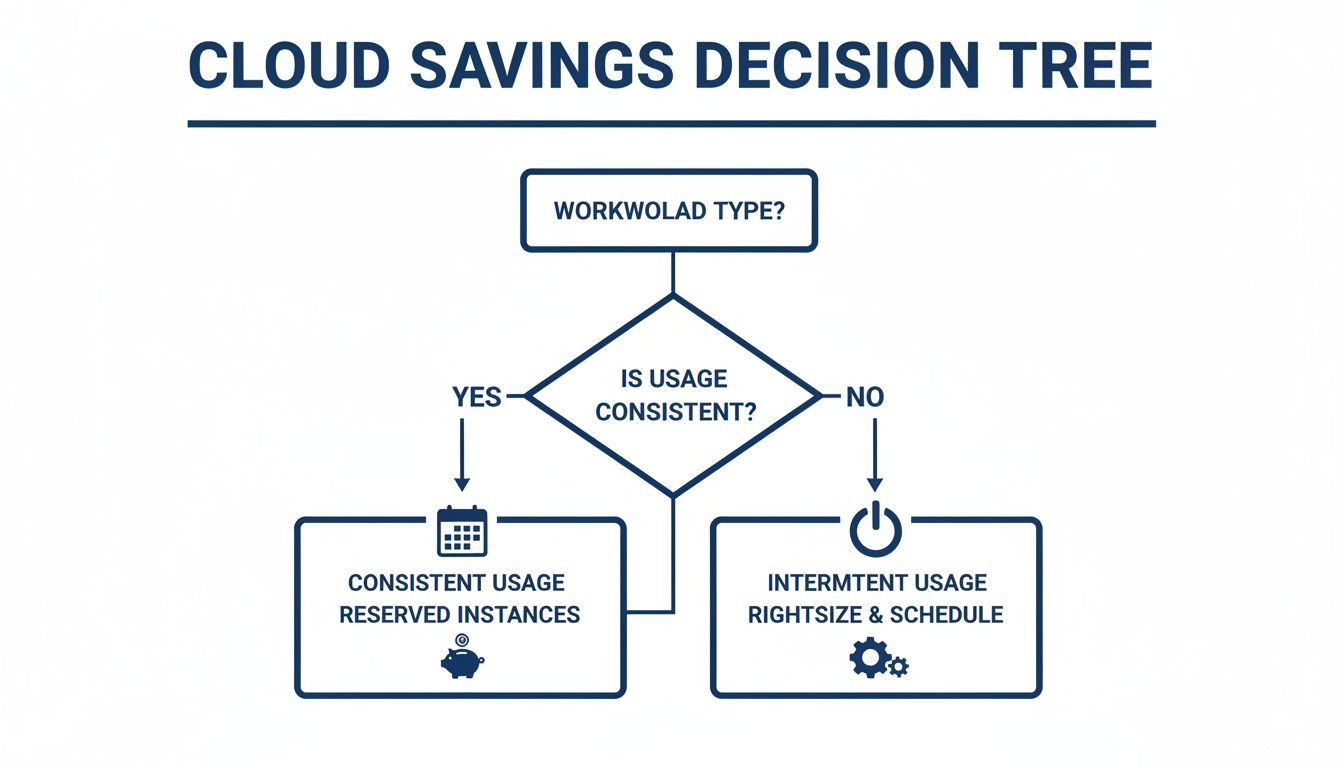
As you can see, consistent workloads are perfect for Reserved Instances, while intermittent ones are better suited for rightsizing and scheduling.
Practical Steps to Cultivate a FinOps Culture
Putting these principles into practice requires taking concrete steps. The journey starts with clear governance policies that act as the guardrails for your cloud environment, making sure cost awareness is baked into your operational DNA from day one. For a deeper dive into the framework, you can explore our detailed guide on what FinOps is and why it matters.
Here are a few initial steps you can take to get started:
- Implement a Comprehensive Tagging Policy: This is non-negotiable. Enforce a mandatory tagging strategy for all new resources. Tags should identify the owner, project, cost center, and environment (e.g., prod, dev). This is the absolute foundation for cost visibility.
- Establish Budget Alerts and Thresholds: No one likes surprises at the end of the month. Set up automated alerts that notify teams when their spending is projected to go over budget. This proactive approach helps teams manage their consumption throughout the billing cycle.
- Gamify Cost Savings: A little friendly competition goes a long way. Create leaderboards that highlight the teams with the biggest savings or the best budget adherence. Recognizing and rewarding cost-conscious behavior is a powerful motivator.
By embedding these practices into your daily workflows, cloud cost optimization becomes a shared responsibility, not a burden on a single team. You'll foster an environment where every employee is a steward of the company's cloud investment, driving both sustainable growth and financial health.
Using Automation and Tools to Scale Your Efforts
Trying to manage and optimize a sprawling cloud environment by hand is an unwinnable battle. It’s just not realistic. As your infrastructure grows, manual checks for idle resources or overprovisioned servers become impossible to sustain.
This is where automation and specialized tools become your best friends, turning cloud cost optimization from a constant firefighting effort into a scalable, systematic process.

The right technology stack acts as a force multiplier for your FinOps team. It gives you the visibility needed to spot waste, the intelligence to recommend savings, and the automation to execute changes without someone having to click a button. This frees up your team to stop hunting down wasted spend and start focusing on driving innovation.
Native Cloud Provider Tools
Your first line of defense comes directly from the cloud providers themselves. The big three, Amazon Web Services (AWS), Microsoft Azure, and Google Cloud Platform (GCP), all offer a suite of built-in tools designed to give you a basic handle on your spending.
These native tools are a great starting point for any organization. They’re already there, integrated directly into the console you use every day.
- AWS Cost Explorer: Lets you visualize, understand, and manage your AWS costs and usage over time. You can slice and dice the data by service, tags, or account to identify trends and figure out what’s driving costs.
- Azure Cost Management + Billing: Similarly, this Azure service helps you monitor cloud spend, set budgets, and get recommendations to optimize what you’re using. It gives you a single view across Azure and other Microsoft cloud services.
- Google Cloud Cost Management: GCP provides tools for cost reporting, setting budgets and alerts, and digging into cost drivers, helping you get control over your Google Cloud expenses.
While these are powerful for initial analysis, they often require significant expertise to configure and interpret correctly. They’re great at showing you the "what" but don't always automate the "how" of fixing the problems they find.
Third-Party Cost Management Platforms
As cloud environments get more complex, many organizations turn to specialized third-party platforms. These tools go way beyond basic reporting, offering advanced analytics, automated optimization, and multi-cloud support from a single dashboard. They’re built to simplify the messy reality of cloud financial management.
For instance, some platforms zero in on specific optimization strategies. A tool like CLOUD TOGGLE focuses on automating the scheduling of non-production resources, a simple yet incredibly effective way to cut costs by shutting down servers when they aren't needed. This type of focused automation can deliver predictable savings with almost no setup time. If you want to compare different options, you can find a helpful breakdown of the best cloud cost optimization tools in our detailed guide.
These platforms are built to translate complex billing data into actionable insights. They automatically flag savings opportunities, such as rightsizing recommendations or candidates for reserved instances, and can even execute these changes based on policies you define.
Custom Automation Scripts
For organizations with very specific needs or deep technical expertise, custom automation scripts offer the ultimate flexibility. Using APIs provided by the cloud platforms, your engineering teams can build their own solutions to enforce cost-saving policies.
A couple of common examples include:
- "Janitor" Scripts: These can be programmed to automatically find and delete unattached storage volumes or old snapshots, cleaning up "orphan" resources that silently inflate your bill.
- Tagging Enforcement: Automation can be used to scan for untagged resources and either flag them for review or automatically shut them down until they comply with your governance policies.
The key to scaling your cloud cost optimization efforts is building a smart tech stack. A good mix combines native tools for visibility, third-party platforms for specialized automation, and custom scripts for your unique needs. This multi-layered approach will help you stay ahead of your cloud bill effectively.
Common Cloud Cost Pitfalls and How to Avoid Them
The road to smart cloud cost management is paved with good intentions… and a few common traps. It’s easy to get sidetracked on this journey, and I’ve seen plenty of organizations fall into the same predictable pitfalls that end up costing them more in the long run. The good news? Knowing what they are is half the battle.
One of the biggest mistakes is treating cloud optimization like a one-off project. A team will dive in, do a big spring cleaning, rightsize a few servers, and then dust off their hands and declare victory. But a few months later, the costs have crept right back up. Cloud environments are always changing; new resources get spun up, and demand shifts. It’s not a "set it and forget it" kind of deal.
Chasing Savings at the Expense of Performance
Another classic misstep is getting so laser-focused on cutting costs that you end up hurting performance. Sure, aggressively shrinking a database instance might save a couple of hundred bucks a month, and that looks great on a spreadsheet. But if that change slows down your application and starts frustrating customers, the real cost to the business will be far greater than any savings you pocketed.
The real goal is efficiency, not just being cheap.
True cloud cost optimization is about finding the sweet spot between cost and performance. It’s not about running the cheapest possible infrastructure; it’s about running the right infrastructure to meet your business needs without any fat.
This means you can't just make blind cuts. You need to look at the performance data. Use monitoring tools to understand your workloads and make sure any changes you make will keep your services running smoothly, or even make them better.
Neglecting to Build a Cost-Aware Culture
This might be the most critical mistake of all: forgetting that people are at the heart of the equation. If your engineers have no idea what their decisions cost the company, waste is practically guaranteed. It’s not their fault; they’re just trying to get their work done. But that forgotten GPU instance spun up for a quick test can quietly rack up thousands of dollars in charges.
To fix this, you have to bring cost into the conversation and make it everyone’s responsibility.
- Make it Visible: Give your engineering teams dashboards that show them the real-time cost of the resources they’re using. No more mystery bills.
- Create Accountability: A solid tagging policy is non-negotiable. Every single resource should be tied to a team, a project, or a cost center.
- Reward Smart Savings: Set up programs that celebrate and reward teams who find creative ways to save money. A little recognition goes a long way.
By steering clear of these common blunders, you can graduate from just cutting costs. You’ll be on your way to building a sustainable culture of financial governance where every dollar you spend in the cloud is pulling its weight and driving real business value.
Common Questions About Cloud Cost Optimization
Diving into the world of cloud finances can feel overwhelming at first, and a few common questions always seem to pop up. Getting clear, practical answers is the best way to build a solid cost optimization strategy from the ground up. Let's tackle some of the most frequent queries we hear from organizations just starting their savings journey.
What Is the First Step in Cloud Cost Optimization?
The absolute first step is getting full visibility into what you’re spending right now. It’s a simple truth: you can't optimize what you can't see. This means pulling all your billing data into one place so you can finally understand which services, projects, or teams are really driving your costs.
Without this foundational view, any attempt to save money is just a shot in the dark. Once you can see everything clearly, you can start picking off the low-hanging fruit, like resources that are completely idle or forgotten. These quick wins are great for building momentum and showing everyone the immediate value of paying attention to cloud spend.
How Is Cost Optimization Different from Cost Management?
It’s easy to mix these two up, but the difference is simple. Think of it as knowing versus doing.
- Cost Management is all about tracking and reporting. It's the process of monitoring your expenses, setting budgets, and figuring out who spent what. It answers the question, "Where is our money going?"
- Cost Optimization is about taking action based on that information. It uses the data from cost management to make intelligent changes that improve efficiency. It answers the question, "How can we spend this money smarter?"
For example, your cost management report might show you’re spending $5,000 a month on development servers. Cost optimization is the act of scheduling those servers to shut down on nights and weekends, potentially cutting that specific bill in half.
Why Is a FinOps Culture So Important?
A FinOps culture is a game-changer because it turns cloud cost optimization into a shared responsibility, not just a task for the IT or finance department. It’s about making cost a part of everyone’s job.
When engineers have easy access to cost data, they start making more cost-aware decisions right from the start, like choosing a more efficient instance type or questioning if a resource needs to run 24/7. This proactive mindset prevents waste before it even happens, creating sustainable, long-term savings that one-off cleanup projects can never match.
Without this cultural shift, you’ll forever be stuck in a reactive loop of finding and fixing waste. A strong FinOps practice weaves cost awareness directly into your company’s DNA.
Stop paying for idle cloud resources. CLOUD TOGGLE makes it simple to automate server schedules, cutting your cloud bill by shutting down infrastructure when you don't need it. Start your free 30-day trial and see the savings for yourself.