Cloud cost management is the ongoing work of keeping your cloud spending in check, making sure every dollar you put into services like AWS or Azure actually drives the business forward. It's about preventing money from being wasted on resources that are either sitting idle or are way too powerful for the job at hand.
What Is Cloud Cost Management and Why It Matters

Think of your cloud bill like the electricity bill for a huge, constantly changing office building. If you don't have a plan, you'll inevitably end up paying to light up empty rooms. The cloud is amazing because it lets teams spin up new servers and services in minutes, but that same ease of use is exactly why costs can spiral out of control.
This flexibility is a double-edged sword. It creates a handful of classic problems: a dev team leaves a staging environment running all weekend, or someone provisions a massive virtual machine for a task that barely scratches the surface of its power. These small oversights seem harmless at first, but they add up to a huge amount of unnecessary spending over time.
Where does all this wasted money come from? It's usually a mix of over-provisioning, idle resources, and a simple lack of visibility. Here’s a quick breakdown of the usual suspects.
Key Drivers of Uncontrolled Cloud Spend
| Driver of Waste | Common Example | Typical Impact |
|---|---|---|
| Idle Resources | Dev/test servers running 24/7, even on nights and weekends. | 30-40% of spend on non-production environments is pure waste. |
| Over-provisioning | Launching an instance with 8 vCPUs when only 2 are needed. | Paying for capacity you never use, leading to inflated monthly bills. |
| Orphaned Storage | Unattached storage volumes left behind after a VM is deleted. | "Zombie" assets that quietly accumulate storage fees indefinitely. |
| Lack of Visibility | Bills arrive with thousands of line items and no clear owner. | Impossible to assign accountability or pinpoint where to optimize. |
| Complex Pricing | Not taking advantage of Reserved Instances, Savings Plans, or Spot. | Missing out on discounts of up to 70% by sticking to on-demand pricing. |
Ultimately, these issues aren't just technical problems; they create real financial strain and operational headaches.
The Growing Urgency for Control
As more companies lean heavily on the cloud, getting costs under control has become a top-tier business priority. With global public cloud spending projected to hit an eye-watering $723.4 billion in 2025, financial discipline is no longer optional. This explosion is fueled by AI and hybrid cloud strategies, but it also ramps up the financial risk.
Consider this: 33% of organizations already spend over $12 million a year on public cloud. Yet, a shocking 84% of them admit they have a hard time managing that spend effectively. You can dig deeper into these numbers with these cloud cost management trends.
This disconnect puts serious pressure on key leaders:
- CTOs are expected to innovate faster but are constantly battling budget constraints.
- DevOps leads need to maintain velocity and reliability without breaking the bank.
- FinOps practitioners are charged with the tough job of weaving financial accountability into the engineering culture.
From Reactive Problem Solving to Proactive Strategy
Let's be clear: effective cloud cost management isn't about slashing budgets or saying "no" to engineers. It’s about maximizing the value you get from every dollar spent. The real goal is to cut the waste so you can pour those savings back into things that actually grow the business.
A successful cloud cost management strategy transforms spending from an unpredictable operational expense into a predictable, strategic investment. It empowers teams to make smarter decisions without slowing down their workflow.
By putting the right processes in place to monitor, analyze, and optimize your cloud environment, you can turn a major financial headache into a genuine competitive advantage. This guide will walk you through the practical steps and frameworks to get a handle on your cloud bill, starting with figuring out where the money is really going.
Pinpointing Your Biggest Cloud Cost Culprits

Before you can start trimming the fat, you have to play detective in your own cloud environment. You can't fix what you can't find. True cloud cost management starts with pinpointing exactly where your money is going to waste, and these culprits are often hiding in plain sight.
The problem is rarely a single, massive leak. It's usually death by a thousand cuts, an accumulation of small, seemingly harmless oversights that multiply over time. Think about a dev team spinning up a few servers for a short-term project. Once the work is done, those resources are often forgotten but keep on running, silently bleeding your budget dry month after month.
This isn't a rare occurrence; it's the norm. Cloud waste is a massive, industry-wide problem. Heading into 2025, a staggering 44% of executives believe at least 30% of their cloud spend is wasted. The number one reason? A lack of visibility into resource usage, which accounts for 54% of cases, followed closely by paying for idle resources. You can see more of these surprising cloud computing statistics for yourself.
The Usual Suspects: Idle and Oversized Resources
The most common source of wasted cloud spend comes from paying for things that aren't actually doing anything useful. This waste almost always falls into two buckets that every company should check first.
- Idle Compute Instances: These are the virtual servers left running 24/7, even when they're only needed during business hours. A single staging environment left on over the weekend can burn through hundreds of dollars for zero benefit.
- Oversized Resources: This is classic "eyes bigger than your stomach" provisioning. You configure a virtual machine with eight CPU cores because you might need them, but its workload never actually uses more than two. You're paying for performance you never touch.
Here's a quick win: by simply identifying and shutting down idle non-production resources after hours, many businesses can slash their cloud bills by 30% or more. It's often the lowest-hanging fruit in the entire cost management orchard.
The Problem of Orphaned Assets
Another huge cost culprit is the "orphaned" resource. These are the digital leftovers from old projects or decommissioned applications. They stick around long after their parent resources are gone, quietly racking up charges.
Some common examples include:
- Unattached Storage Volumes: These are the virtual hard drives (like EBS volumes in AWS) that remain even after the server they were attached to gets deleted.
- Detached IP Addresses: Static IP addresses that are no longer assigned to an active instance but still incur a monthly fee.
- Old Snapshots and Backups: Data snapshots created for recovery that are never cleaned up, leading to storage costs that just grow and grow.
Since storage often makes up a big chunk of any cloud bill, mastering cloud storage solutions like AWS S3 is a critical skill for keeping costs in check. A thorough audit is your first step. For a deeper dive, check out our guide on analyzing your AWS Cost and Usage Reports.
Running this kind of self-audit turns abstract numbers on a bill into tangible problems you can actually solve. Once you pinpoint these wasteful patterns, you can build a targeted action plan to reclaim your budget and put that money back into things that truly matter.
Key Metrics for Tracking Cloud Efficiency
You can't manage what you don't measure. Glancing at your total monthly cloud bill is one thing, but to really get a handle on costs, you have to dig deeper. The first real step toward effective cloud cost management is tracking specific metrics that tell the true story of your spending.
Think of these KPIs as a diagnostic tool for your cloud environment. They help you shift from asking, "How much did we spend?" to the much more important question: "Are we getting the most value from what we're spending?" That shift in mindset is everything.
Foundational Metrics for Cost Visibility
Before you can get into the fancy stuff, you have to nail the basics. It all starts with visibility, which is powered by a rock-solid tagging strategy. Think of tagging as putting a price tag on every single resource, labeling it with the project, team, or product it belongs to.
Without good tagging, your cloud bill is just one big, confusing number. With it, you can start tracking the essentials.
- Cost per Service: This metric is simple but powerful. It breaks down your total bill to show you exactly how much each application or service costs to run. It immediately points to your most expensive services, telling you where to focus your optimization efforts first.
- Wasted Spend Percentage: This calculates the slice of your bill going to idle or oversized resources. Tracking this percentage month-over-month is a clear, direct indicator of how well your optimization strategies are actually working.
- Cost by Tag: By filtering costs using specific tags (like 'team-gamma' or 'project-phoenix'), you can pin financial responsibility directly to the teams racking up the bills. This is the bedrock of accountability.
Effective cost management is impossible without granular visibility. When you bring key cost data into the same dashboards engineers already use to monitor performance, teams start treating cost with the same seriousness as uptime and security.
Understanding Your Unit Economics
Once you’ve got basic cost allocation figured out, you're ready to level up to a much more powerful metric: unit economics. This concept connects your cloud spending directly to your core business metrics. Instead of just knowing what a service costs, you can figure out the exact cloud cost of a specific business action.
For example, a SaaS company might calculate:
- Cost Per Customer: How much does it cost in cloud infrastructure to support a single paying customer?
- Cost Per Transaction: What's the cloud expense for every single transaction your platform processes?
- Cost Per Feature Usage: How much does it cost when a user engages with that one resource-heavy feature you just launched?
Calculating unit economics is a total game-changer for strategy. If you know that acquiring a new customer costs you $5.75 in monthly cloud resources, you can make much smarter decisions about pricing, marketing spend, and product development. It transforms your cloud bill from a boring expense report into a powerful tool for measuring business efficiency, profitability, and growth.
Proven Strategies for Cloud Cost Optimization
Once you can see where the money is going, it’s time to start plugging the leaks. Effective cloud cost management isn't about one magic bullet; it's a collection of practical, hands-on techniques designed to claw back your budget.
These aren't just theories. They are direct attacks on the biggest sources of waste, like idle servers and oversized infrastructure. The need for action is real. A recent report showed that a staggering 94% of IT leaders are watching their cloud storage costs climb, and for 59% of them, it’s a major driver of their total cloud bill. With that kind of pressure, sitting back and doing nothing isn't an option.
Rightsizing Your Infrastructure
Think of rightsizing as picking the right tool for the job. You wouldn't use a sledgehammer to hang a picture frame, right? Yet, companies do the digital equivalent all the time by paying for massive servers that are barely breaking a sweat.
Rightsizing is simply the process of matching your infrastructure’s power to its actual workload. Take a look at your CPU and memory usage over time. If a server is consistently cruising along at 20% CPU utilization, you are burning cash on capacity you don’t need. Moving it to a smaller, cheaper instance is a quick win that delivers immediate savings without hurting performance.
Automating with Scheduling
One of the easiest yet most powerful cost-saving moves is scheduling. Your development, testing, and staging environments probably don't need to be running at 3 AM on a Sunday. Leaving them on 24/7 is like keeping the lights on in an empty office building all weekend.
By setting up an automated schedule, you can power these resources down when nobody is using them.
- Shut down servers every evening.
- Keep them off over weekends and holidays.
- Power them back up automatically before the team logs in.
This simple change can slash your non-production environment costs by as much as 70%. It’s a straightforward way to stop paying for idle time.
Leveraging Commitment-Based Discounts
Cloud providers like AWS and Azure will give you a great deal if you commit to them long-term. Instead of paying the standard on-demand (or "rack rate") price, you can use commitment models to lock in deep discounts for your predictable workloads.
The main discount models are Reserved Instances (RIs), Savings Plans, and Spot Instances. Each has its own purpose, but they all help you pay less for the exact same compute power.
Reserved Instances (RIs) and Savings Plans are perfect for your steady, always-on production workloads. By committing to one or three years of usage, you can get discounts of up to 75% off what you’d normally pay.
Spot Instances are a totally different game. Here, you bid on spare, unused computing capacity for discounts that can reach a massive 90%. The catch? The cloud provider can take that capacity back with just a few minutes' notice. This makes Spot Instances a perfect match for workloads that can handle interruptions, like batch processing, data analysis, or certain types of testing.
Fostering a FinOps Culture
All the technical tweaks in the world won't stick without a cultural shift. This is where FinOps comes in. FinOps is all about creating a culture of financial accountability where engineers feel empowered to make smart, cost-aware decisions without slowing down their work.
It builds a bridge between your finance and engineering teams. When developers can see the cost impact of the code they ship, they naturally start finding creative ways to build more efficient applications.
By combining these technical tactics with a company-wide commitment to efficiency, you can build a cost management practice that actually works. To get started, you can explore these actionable cloud cost optimization strategies that put FinOps principles into practice.
Building Your Cloud Cost Management Plan
Knowing the right optimization strategies is a great start, but turning those ideas into real, sustained savings? That takes a structured plan. The most successful cloud cost management isn't a one-off project; it’s a continuous cycle of improvement that gets baked right into your company's operational DNA.
To get out of the reactive fire-drill mode and build a proactive process, you can follow a straightforward, four-phase roadmap. Each step builds on the last, creating a sustainable loop of visibility, analysis, and action that keeps your cloud spend in check.
This cycle is the core of any effective cost management practice.
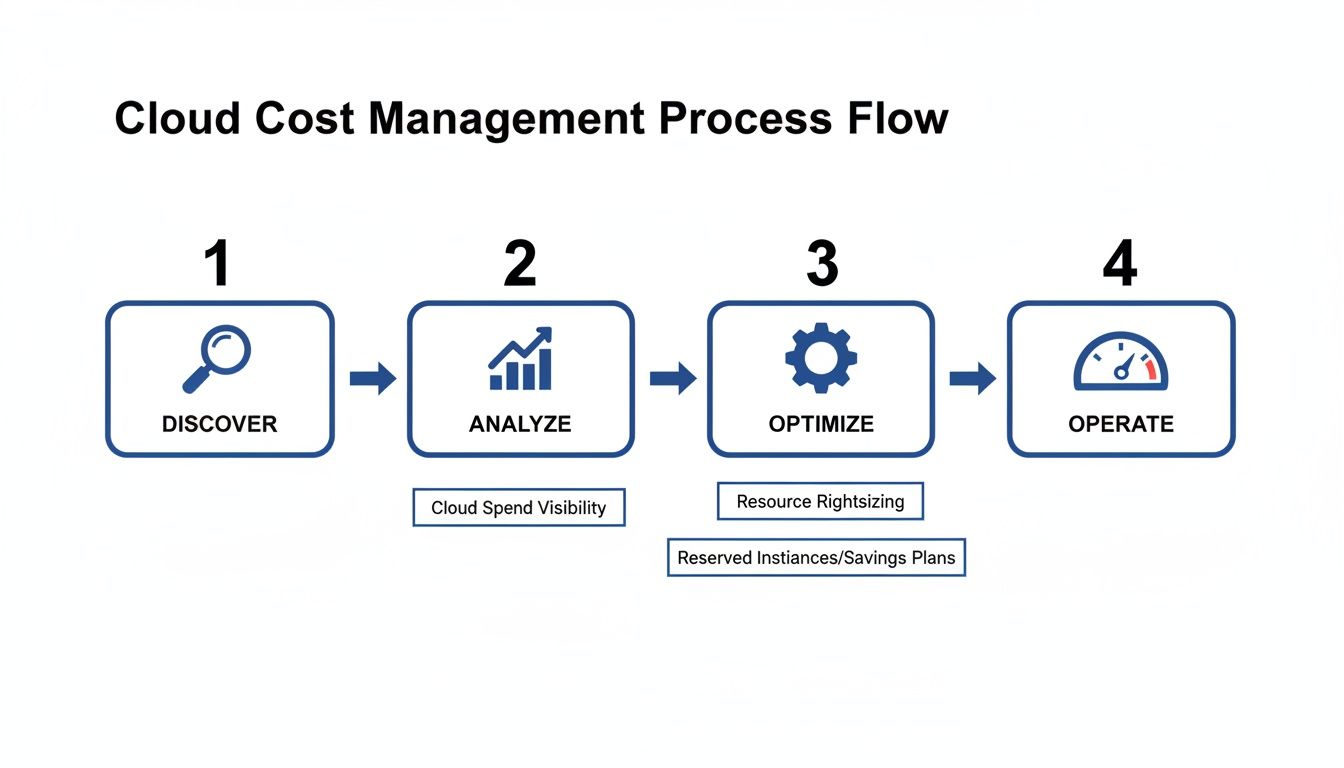
It shows how you move from just figuring out what you have to truly governing your cloud environment for the long haul.
Phase 1: Discover
You can't control what you can't see. The first step, always, is to gain complete visibility into your cloud environment. This is where you map everything out.
It starts with implementing a rigorous tagging strategy to label every single resource with its owner, project, cost center, and environment. With proper tags in place, cost exploration tools can finally show you exactly where your money is going. The goal is to create a single source of truth, eliminating those nasty surprises when the monthly bill lands.
Phase 2: Analyze
Once your spending is out in the open, you can start digging into the data to pinpoint specific areas of waste. This is where you hunt down the usual suspects we talked about earlier, like idle resources spinning 24/7 or oversized instances chugging along with low utilization.
In this phase, you'll be comparing your spend against your key metrics. Is a particular service suddenly spiking in cost? Is your wasted spend percentage creeping up? The analysis phase is all about asking the right questions and using the data you gathered to get concrete answers.
Phase 3: Optimize
Now for the fun part. With a clear list of problems in hand, you can apply targeted optimization strategies to stop the bleeding. This is the action phase where your team actually implements changes to cut waste and boost efficiency.
- Rightsizing: Swap out instance types to better match what your workloads actually demand.
- Scheduling: Set up automated start/stop schedules for non-production resources so they aren't running on nights and weekends.
- Storage Tiering: Move data that isn't accessed often to cheaper storage classes.
- Commitment Discounts: Buy Reserved Instances or Savings Plans for your steady, predictable workloads to lock in big discounts.
Treat every optimization as a mini-experiment. You make the change, then you measure its impact on both cost and performance to make sure you're getting the savings you expected.
Phase 4: Operate
The final phase is what separates a one-time cleanup from a true, ongoing discipline. Here, you operationalize everything by establishing continuous monitoring and governance to keep costs under control and prevent new waste from creeping back in.
This is where a FinOps culture really takes root. By embedding cost data into daily dashboards and workflows, you empower engineers to make cost-aware decisions on their own, instead of waiting for the finance team to sound the alarm weeks later.
This phase includes setting up automated budget alerts, creating accountability reports for team leads, and regularly reviewing your optimization posture. If you want to dive deeper into this cultural shift, you can learn more about what FinOps is and how it builds that crucial bridge between finance and engineering.
A simple ROI calculation can make the impact crystal clear. Imagine a dev team with 10 medium-sized virtual machines that only need to run during a 40-hour work week. If you let them run 24/7, those servers are idle for 128 hours every week. That's 76% of the time you're paying for nothing! By simply scheduling them off during nights and weekends, you could reclaim a massive chunk of that spend, often adding up to thousands of dollars in annual savings from just a handful of servers.
Choosing the Right Cloud Management Tools
Picking the right tool for cloud cost management can be the difference between wrestling with manual fixes and achieving effortless savings. As you start putting strategies like scheduling and rightsizing into practice, your choice of tooling becomes absolutely critical. The options really boil down to two main camps: native tools from your cloud provider and specialized third-party platforms.
A smart decision starts with understanding what your provider, like AWS or Azure, gives you right out of the box. These native tools are powerful and can definitely get the job done. For example, AWS offers the Instance Scheduler, a solution that automatically stops and starts your instances based on a set schedule.
But these native solutions often come with some serious trade-offs. They usually demand a complicated setup, involving a maze of scripts, IAM roles, and different service configurations. This complexity doesn't just require deep technical expertise; it also opens the door to security risks if permissions aren't configured with surgical precision.
Native Tools vs. Specialized Platforms
The biggest problem with native tools is that they’re built for engineers who are comfortable living in the deep end of the cloud console. Handing those tools over to a project manager or someone from the finance team is usually a non-starter. The risk of someone accidentally deleting a critical resource or making a costly mistake is just too high.
This is where specialized, purpose-built tools come into the picture. These platforms are designed from the ground up to make specific tasks, like scheduling non-production resources, incredibly simple. Instead of a complex, code-heavy setup, they offer an intuitive interface that anyone can use safely.
The secret sauce of purpose-built platforms is their focus on secure, role-based access control (RBAC). You can empower non-technical team members to manage schedules for their own projects without ever giving them broad, risky permissions in your main cloud account.
This approach takes cloud cost management out of the "engineers-only" silo and makes it a shared responsibility. When a project manager can safely shut down their team's staging environment for the weekend with just a few clicks, you’re embedding cost-consciousness right into their daily workflow.
When to Invest in a Dedicated Tool
So, when does it make sense to look beyond native tools and pay for a dedicated platform? That tipping point usually arrives when the manual effort and security headaches of native solutions start to eclipse their benefits. A dedicated platform like CLOUD TOGGLE becomes a smart investment when you want to empower more of your team to contribute to savings, safely and easily.
To help you decide, here’s a direct comparison of the two approaches.
Native Cloud Schedulers vs. CLOUD TOGGLE
| Feature | Native Tools (e.g., AWS Instance Scheduler) | CLOUD TOGGLE |
|---|---|---|
| Setup & Maintenance | Requires complex setup with scripts, IAM roles, and multiple services. You own all maintenance. | Minutes-long setup through a web interface. No maintenance required; we handle it all. |
| Ease of Use | Best for technical users comfortable with cloud consoles and coding. High learning curve. | Intuitive, point-and-click interface designed for both technical and non-technical users. |
| Security Model | Requires granting broad IAM permissions, increasing the risk of accidental changes or security gaps. | Granular, schedule-only access for users. No need for broad permissions in your cloud account. |
| Multi-Cloud Support | Natively supports only one provider (e.g., AWS tools only work for AWS). | Manages AWS and Azure from a single, unified dashboard for true multi-cloud control. |
| Team Empowerment | Risky to give access to non-engineers, creating a bottleneck with the DevOps team. | Safely empowers project managers and developers to manage their own resource schedules. |
| Time to Value | Can take days or weeks to deploy, configure, and troubleshoot across all teams. | Delivers immediate savings and operational efficiency from day one. |
Ultimately, while native tools are a decent starting point for small, technically-savvy teams, they don't scale well as your organization grows. The complexity and security risks become a major drag on efficiency.
Consider the tangible benefits a specialized tool brings to the table:
- Simplicity and Speed: Build complex schedules for multiple resources in minutes through a simple UI, not hours of scripting.
- Enhanced Security: Give users limited, schedule-only access without exposing your entire cloud infrastructure.
- Team Empowerment: Let non-engineers safely manage their own resource uptime, which builds a culture of cost accountability.
- Centralized Control: Manage schedules across different teams, projects, and even cloud providers from one central dashboard.
While native tools offer a foundation, specialized platforms provide the security, simplicity, and accessibility you need to make cloud cost management a sustainable, company-wide habit. For a detailed breakdown of different options on the market, you can explore some of the best cloud cost management tools available today.
Frequently Asked Questions About Cloud Costs
Diving into cloud cost management always brings up a few common questions. Whether you're just getting started or trying to fine-tune your strategy, getting straight answers is the key to making real progress. Let's tackle some of the most frequent queries with practical, no-nonsense advice.
How Often Should We Review Our Cloud Costs?
Think of it this way: cloud cost review isn't a quarterly chore; it's a continuous habit. Your teams need dashboards they can glance at daily or weekly to spot weird spending spikes before they snowball into a five-figure problem.
On top of that, a deeper, more strategic review of your usage patterns and optimization opportunities should happen every month. You should also absolutely set up automated budget alerts. They’re your early warning system, letting you know the second a spending threshold is crossed and turning cost management from a reactive headache into a proactive process.
What Is the First Step I Should Take to Manage My Cloud Costs?
The very first thing you need to do is get total visibility into your spending. It’s an old saying for a reason: you can't control what you can't see. This is the bedrock of any successful cost management plan.
Start by rolling out a consistent tagging strategy for every single resource. Tagging by project, team, and environment (like dev, test, and prod) is non-negotiable. Once that’s in place, your cost analysis tools suddenly become incredibly powerful, showing you exactly where the money is going and pointing you directly to the biggest offenders.
By putting actionable cost data into the hands of your engineering teams, you can successfully identify and eliminate inefficiencies. When engineers can see the financial impact of their work, they become key partners in building a cost-conscious culture.
Is It Safe to Give Non-Engineers Access to Cost Tools?
Handing over the keys to native cloud provider consoles to non-technical staff is a risky game. These tools often demand broad permissions that can easily lead to accidental and expensive changes or security holes. A single wrong click can have serious consequences.
This is where specialized platforms with built-in role-based access control (RBAC) really shine. You can give your finance or project managers safe, sandboxed access to do just what they need, like setting up a resource schedule. It empowers them to contribute to savings without putting your entire cloud infrastructure at risk, making cost optimization a truly shared and secure responsibility.
Stop wasting money on idle cloud resources. CLOUD TOGGLE makes it simple and safe to automate server schedules, empowering your entire team to cut costs without complex setups or security risks. Start your free 30-day trial and see how much you can save at https://cloudtoggle.com.