That sinking feeling when you open your monthly cloud bill is something we see all too often. With 95% of new digital workloads now being cloud-native, a good capacity planning template isn't just a nice-to-have; it's your first real step toward taking back control of your budget. It moves you from guesswork to a data-backed strategy, so you can finally stop overprovisioning and start cutting costs.
Why Cloud Capacity Planning Is No Longer Optional
In the cloud, "set it and forget it" is a one-way ticket to budget blowouts. Teams spin up resources for new projects, test environments, and development sandboxes, but what happens next? Far too often, these virtual machines are left running, sitting idle for up to 70% of the time, especially outside of core business hours.
Each idle server is like leaving the lights on in an empty office building: a constant, silent drain on your finances and a source of needless energy consumption. This isn't just a small leak; it's a hidden cost bomb waiting to detonate in your budget.
This problem is only getting bigger. As companies rush to adopt AI and machine learning, the hunger for computing power is exploding. This has a direct and immediate impact on both your wallet and the environment.
The Soaring Cost of Idle Cloud Resources
The scale of cloud adoption is staggering. Projections show public cloud spending will account for over 45% of all enterprise IT budgets by 2026, a massive leap from less than 17% back in 2021. For small and midsize businesses running on AWS and Azure, this growth makes the financial risk of every unused resource even greater. Without a solid plan, your costs can quickly spiral out of control.
A capacity planning template gives you the visibility to start challenging the status quo. It helps you ask the tough but necessary questions: Does this server really need to run 24/7? What's the true cost of this non-production environment?
This proactive approach is fundamental for any modern IT or FinOps team. You can dive deeper into the core concepts by reading our guide on what is capacity planning.
Environmental and Financial Impacts
Beyond the direct hit to your bottom line, there’s a growing environmental price to pay. The International Energy Agency has forecasted that electricity consumption from data centers will more than double by 2030, with AI being the main driver. Every server left idling contributes directly to this massive power demand.
Using a capacity planning template is the foundational first step to getting a handle on these challenges. It empowers you to:
- Identify Idle Resources: Pinpoint exactly which servers in your development, staging, or QA environments are running for no reason.
- Create Smart Policies: Use real data to build scheduling rules that power down resources when they simply aren't needed.
- Forecast Accurately: Shift from reactive, panicked cost-cutting to proactive, predictable budget management.
Ultimately, a good template paves the way for automated solutions like CLOUD TOGGLE, which can turn your cost-saving policies into reality. It’s all about building a cloud infrastructure that is both cost-effective and sustainable.
How to Use Your Capacity Planning Template
So you’ve got your template. Now what? A good capacity planning spreadsheet is more than just a data dump; it’s the bridge between a raw export from your cloud provider and an organized inventory that shows you exactly where the money is going. This is how you move from guessing about cloud spend to making data-driven cuts.
Without a structured plan, it’s all too easy for overprovisioning to quietly drain your budget. A simple template helps you regain control and see the waste hiding in plain sight.
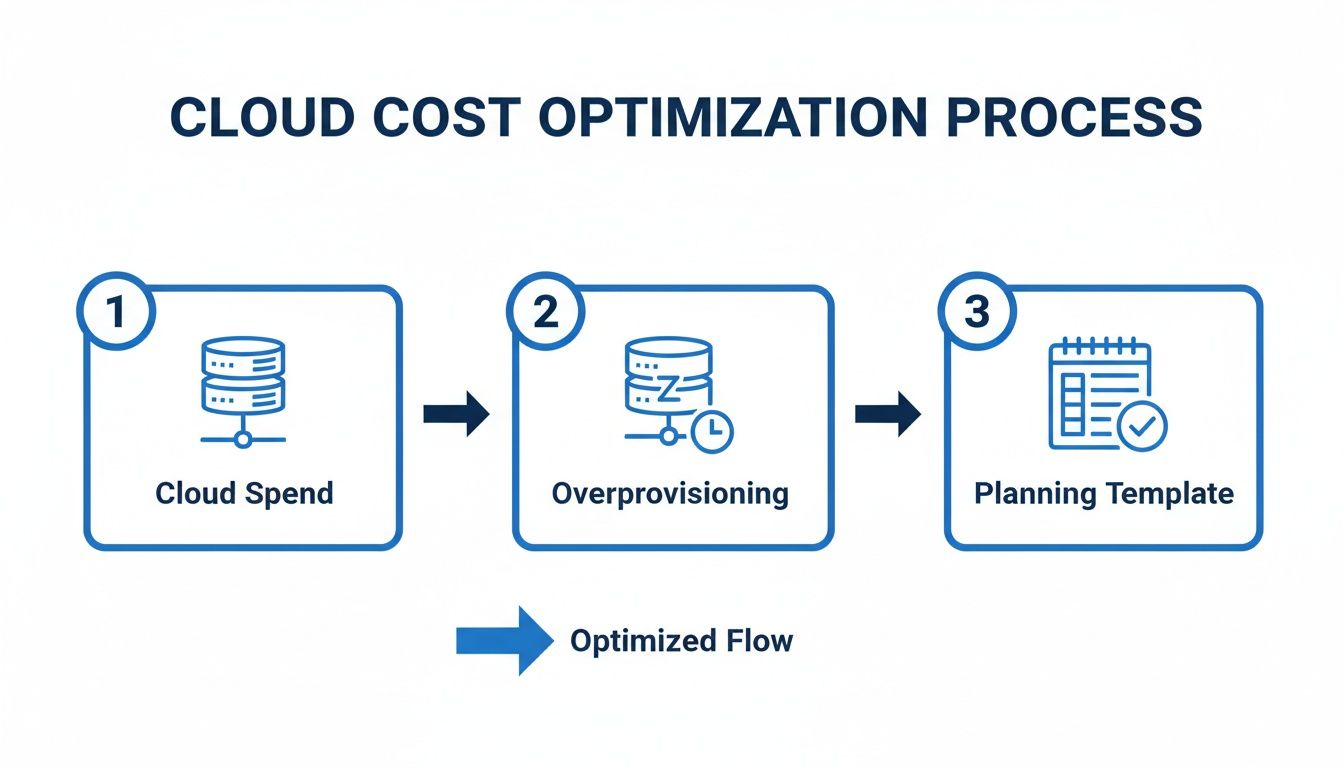
The goal is to know precisely what you have, what it costs, and most importantly, whether you actually need it running.
Gathering Your Core Data
First things first, you need to pull the right information from your cloud provider. This data is the foundation of your entire analysis, so getting a complete inventory of your virtual machine instances is a must.
For those on Amazon Web Services, your main source of truth is the AWS Cost and Usage Report (CUR). If you're running on Microsoft Azure, you’ll be working with the cost analysis and billing portal. Both tools give you a detailed look at your resource consumption and costs.
To build out your template, you'll need to collect a handful of critical data points for every single VM.
Essential Data Points for Your Capacity Template
This table breaks down the crucial information you need to pull from your cloud provider to make your capacity planning template truly effective.
| Data Point | What It Is | Where to Find It (AWS/Azure) |
|---|---|---|
| Instance ID/Name | The unique identifier for each resource. | AWS EC2 Console, Azure Portal |
| Instance Type | The specific VM size (e.g., t3.medium or Standard_D2s_v3). |
AWS EC2 Console, Azure Portal |
| vCPUs and Memory | The allocated compute and RAM for the instance. | Instance details in AWS/Azure consoles |
| Current Monthly Cost | The billed amount for the last full month. | AWS Cost & Usage Report, Azure Cost Analysis |
| Tags | Metadata identifying environment, project, owner, etc. | Resource tags in AWS/Azure consoles |
Getting these basics into your sheet is a great start, but the real insights come from adding your own context.
Populating Your Template for Maximum Insight
With your raw data collected, it's time to bring it to life in your spreadsheet. Don't just copy and paste; this is where you start connecting the dots to find real savings.
The biggest wins often come from non-production environments. Create a dedicated column to tag each instance by its purpose, like development, staging, and QA. These are notorious for being left on and forgotten, racking up costs with zero value.
A simple list of resources isn't enough. The real power comes from tracking usage patterns to distinguish between what’s needed for baseline operations versus what’s only required during peak demand.
Next, add columns to track when each server is actually used. Is it a 24/7 production machine, or is it only needed during business hours? This single data point is gold. A dev server running around the clock when the team only works 9-to-5 is a prime candidate for scheduling.
For a deeper dive into tracking these kinds of expenses, check out our guide on building a cloud forecast and budget template.
By organizing your data this way, your spreadsheet transforms from a static list of assets into a strategic map. It will point you directly to where you can cut costs without touching performance, the foundation for all your optimization efforts to come.
Analyzing Your Data to Find Hidden Savings
Having an organized inventory of your cloud resources is a great first step, but the real magic happens when you start interpreting that data to find concrete savings. Now that your capacity planning template is filled out, you can switch gears from just cataloging assets to actively hunting for optimization opportunities. This is where your analysis turns raw data into a powerful business case for cutting wasted spend.

First things first, let's go after the most obvious targets: chronically underused or completely idle instances. I've seen it time and again. This is the low-hanging fruit of cloud cost optimization.
Calculating Utilization and Spotting Waste
Your spreadsheet is now your best friend for spotting these inefficiencies. A good place to start is by filtering for your non-production environments like development, staging, and QA. These are almost always the biggest culprits because they're often left running 24/7, even though they're only needed during business hours.
Here’s a classic example you’ll probably find. Your template might show an AWS t3.large instance tagged for "QA-Testing" that costs roughly $60 per month. If your team works a standard 40-hour week, that server sits completely idle for 128 hours every single week. That's about 76% of the time, and it's pure waste.
The same story plays out in Azure. A Standard_D2s_v3 VM used for development might run you over $70 per month. If it’s only required from 9 AM to 5 PM, Monday to Friday, you're paying for it to do nothing on nights and weekends. To get a better handle on pulling this kind of detailed cost data, it's worth getting familiar with your AWS Cost and Usage Reports.
Estimating Your Potential Savings
Once you've identified these idle resources, figuring out the potential savings is surprisingly straightforward. This simple math is what helps you build a compelling case for implementing scheduling policies across your organization. It takes an abstract idea ("we should turn things off") and turns it into a real financial impact.
The formula for estimating your cost reduction is simple:
(Monthly Cost of Instance / Total Hours in Month) * Idle Hours = Potential Monthly Savings
Let's apply this to our Azure dev server example:
- A month has roughly 730 hours.
- The dev server is idle for about 530 hours per month (all those nights and weekends).
- ($70 / 730 hours) * 530 idle hours = $50.82 in potential savings per month.
That’s a 72% cost reduction for just one server. Imagine multiplying that across all your non-production instances. The savings can quickly add up to hundreds, or even thousands, of dollars every month.
As you get more advanced, you can even incorporate techniques like predictive modeling to anticipate future needs and optimize resources even further. But for now, this data-driven approach gives you clear, actionable numbers to justify your next move.
Developing Smart Scheduling and Rightsizing Policies
Once you've crunched the numbers in your spreadsheet and identified the idle resources, it’s time to put that data to work. This is where your capacity plan goes from a simple report to a real, actionable roadmap for cutting costs. The goal is to build clear policies for scheduling and rightsizing that deliver predictable savings.

The quickest win is almost always standardized server schedules. Just by defining clear "on" and "off" hours, you can make a huge dent in the costs coming from your non-production environments. I'm talking about the dev, testing, and staging resources that often get left running and contribute to massive waste.
Establishing Effective Scheduling Policies
A good scheduling policy doesn't have to be complicated. In fact, the simpler it is, the easier it is to enforce. The aim is to sync up server uptime with the hours your teams are actually working, shutting things down when nobody is there to use them.
You can start by defining standard operating hours for different teams. A development environment, for instance, might only need to be online from 8 AM to 6 PM on weekdays.
Here are a few key policies I’ve seen work wonders:
- Non-Production Shutdown: Get aggressive with "off" hours for all your dev, staging, and QA environments. A server that only runs for 40 hours a week instead of the full 168 can have its cost slashed by over 75%. It's a no-brainer.
- Time-Zone Specific Schedules: If you have distributed teams, don't just leave everything running 24/7. Create schedules that align with each team's local working hours so resources are there when they need them, but off when they don't.
- Opt-Out for Critical Services: You'll always have a few exceptions. Set up a clear process for teams to request an exemption for critical test servers or other resources that must run around the clock. This prevents any accidental shutdowns of business-critical services.
This approach immediately brings a level of operational hygiene that most cloud accounts desperately need.
The most successful scheduling policies are the ones that are automated. Manually stopping and starting servers is prone to human error and inconsistency; automation ensures policies are applied correctly every single day.
Combining Rightsizing with Reserved Instances
Scheduling is just one piece of the puzzle. Your capacity analysis will also shine a bright light on all the rightsizing opportunities you have. This is simply the practice of matching instance types to what your applications actually need, instead of the oversized guesses made during initial deployment.
If your template shows a server consistently humming along at 20% CPU utilization, it’s a perfect candidate for a smaller, and much cheaper, instance type.
Now, combine that with a smart purchasing strategy. For your baseline workloads, the production web servers that genuinely need to run 24/7, you should be using Reserved Instances or Savings Plans from providers like AWS and Azure. These offer huge discounts for that predictable, always-on usage.
This gives you a powerful, three-pronged strategy for cost optimization:
- Reserve for the Baseline: Use discounted purchasing models for predictable, always-on production resources.
- Schedule the Variables: Enforce aggressive on/off schedules for all variable, non-production workloads.
- Rightsize Everything: Continuously monitor and adjust instance sizes across the board to match real-world demand.
This combination of smart purchasing and automated operational hygiene is invaluable for any DevOps or FinOps team. It’s how you shift from being reactive about cloud costs to running a proactive, policy-driven financial operation.
Automating Your Plan with CLOUD TOGGLE
A brilliant plan is only as good as its execution. You've gone through the capacity planning template, crunched the numbers, and mapped out some smart scheduling policies. Now it's time to bridge the gap between that plan and real, tangible savings.
This is where you turn your findings into predictable, automated cost reductions.
The policies you just developed can be put into action in minutes. While you could use native tools like AWS Instance Scheduler or Azure Start/Stop v2, they often require deep technical expertise and complex setup. This can create a bottleneck, limiting who can actually manage these cost-saving initiatives.
This is a complete game-changer for businesses that need a simpler way to enforce savings. With cloud adoption now over 94% globally, companies desperately need better controls. A staggering 72% of them spend more than $1.2 million a year on cloud, and 36% fly past the $12 million mark. Even tiny inefficiencies at that scale create a massive financial drain.
From Spreadsheet to Automated Action
The real value of your capacity planning template is unlocked when it drives action. CLOUD TOGGLE is designed to take the exact schedules and policies you've defined and put them on autopilot.
Here’s how the platform directly implements the findings from your spreadsheet:
- Intuitive Scheduling: Recreate the "on/off" times you identified for your dev, staging, and QA environments using a simple, visual calendar. No scripting needed.
- Role-Based Access: Give project managers or team leads control over their own resource schedules without exposing your entire cloud account. It's safe and empowering.
- Multi-Cloud Dashboard: If you're running workloads on both AWS and Azure, you can manage all your schedules from a single, unified interface.
This approach transforms cost management from a reactive, technical chore into a proactive, collaborative effort. To get a better feel for how this works in practice, you can explore real-world capacity planning use cases.
The CLOUD TOGGLE Advantage
The difference really comes down to simplicity and accessibility. Instead of wrestling with command line interfaces or confusing IAM roles, you get a straightforward dashboard built for getting things done quickly.
This screenshot from CLOUD TOGGLE shows just how easily a user can set a daily schedule for a group of servers.
The visual interface clearly shows the active "on" times, making it incredibly simple to verify that your cost-saving policies are actually running as planned.
The core advantage is breaking down silos. When non-engineers can safely participate in cost optimization, your entire organization becomes more efficient. It removes the friction that often prevents well-laid plans from ever being implemented.
Imagine a project manager needs a test environment online for an extra two hours. Instead of filing an IT ticket and waiting, they can use a temporary override in CLOUD TOGGLE. This flexibility ensures productivity isn't blocked, all while the baseline cost-saving schedule remains intact.
This combination of powerful automation and user-friendly control is what turns your capacity plan into an active, money-saving asset.
Frequently Asked Questions About Capacity Planning
Even with the best template in hand, a few questions always pop up. Let's walk through some of the common ones we hear from teams diving into capacity planning for the first time.
How Often Should We Update Our Capacity Planning Template?
For most teams, a quarterly review is the sweet spot. This rhythm is frequent enough to catch new projects, retired services, and shifts in seasonal demand without turning into a full-time job.
However, if your business is in a high-growth spurt or constantly launching new features, you might need to bump that up to a monthly review.
The real key is to bake this process into your regular operational or FinOps meetings. When it’s part of your routine, it stops being a chore that gets pushed aside and becomes a consistent, valuable practice.
Can This Template Be Used for Kubernetes Clusters?
It can, but you'll need to shift your thinking a bit. This spreadsheet is built around traditional virtual machines (VMs) like AWS EC2 instances and Azure VMs, but the core principles translate perfectly to Kubernetes.
Instead of looking at individual VMs, you'll focus on your node pool capacity. You’re still trying to match supply with demand, but the metrics you track will be different.
- You’ll want to monitor CPU and memory requests vs. limits for your pods.
- Keep a close eye on overall node utilization to find where you're overprovisioned.
- Consider tools like Karpenter or the standard Cluster Autoscaler to help manage this dynamically.
The goal is exactly the same: make sure you have just enough resources to do the job, and not a penny's worth more. The template can be a huge help in planning the underlying node infrastructure, especially for scheduling non-production clusters to save costs.
What Is the Biggest Mistake in Capacity Planning?
The single biggest mistake we see is treating capacity planning as a purely technical exercise. It’s easy to get lost in CPU charts and memory graphs, but that data is only half the story.
A server might look "idle" and like a prime candidate for shutdown, but what if it's a critical, low-traffic disaster recovery instance that must run 24/7? The metrics alone won't tell you that.
Without actually talking to application owners and understanding the business needs behind each workload, you're flying blind. You risk shutting down something essential and causing a real headache for the business.
Always combine the hard data from your capacity planning template with the human intelligence you get from the teams who own the services. This collaborative approach not only prevents costly mistakes but also builds a shared sense of responsibility for cloud spend. That’s how you make optimization efforts stick for the long haul.
Ready to turn your capacity plan into automated savings? CLOUD TOGGLE makes it easy to implement scheduling policies, giving you control over your cloud costs without complex scripting. Start your free trial and see how much you can save at https://cloudtoggle.com.