When you're comparing C4 and C5 instances on AWS, the main takeaway is simple: C5 is a massive architectural leap forward. It delivers far better performance and efficiency. While C4 instances were built on older hardware, the C5 family runs on modern processors, boasts faster networking, and is built for today's heavy-duty workloads, often at a lower price.
Key Differences Between C4 and C5 at a Glance
Choosing between AWS C4 and C5 instances goes deeper than just a version number. For engineers and CTOs, the real question is how this evolution translates into real-world benefits. The move from C4 to C5 wasn't just an incremental update; it was a fundamental shift in architecture designed to meet the demands of modern applications. C5 brings significant improvements in raw compute power, networking speed, and storage throughput.
This chart gives you a quick side-by-side of the older C4 generation against the modern C5.
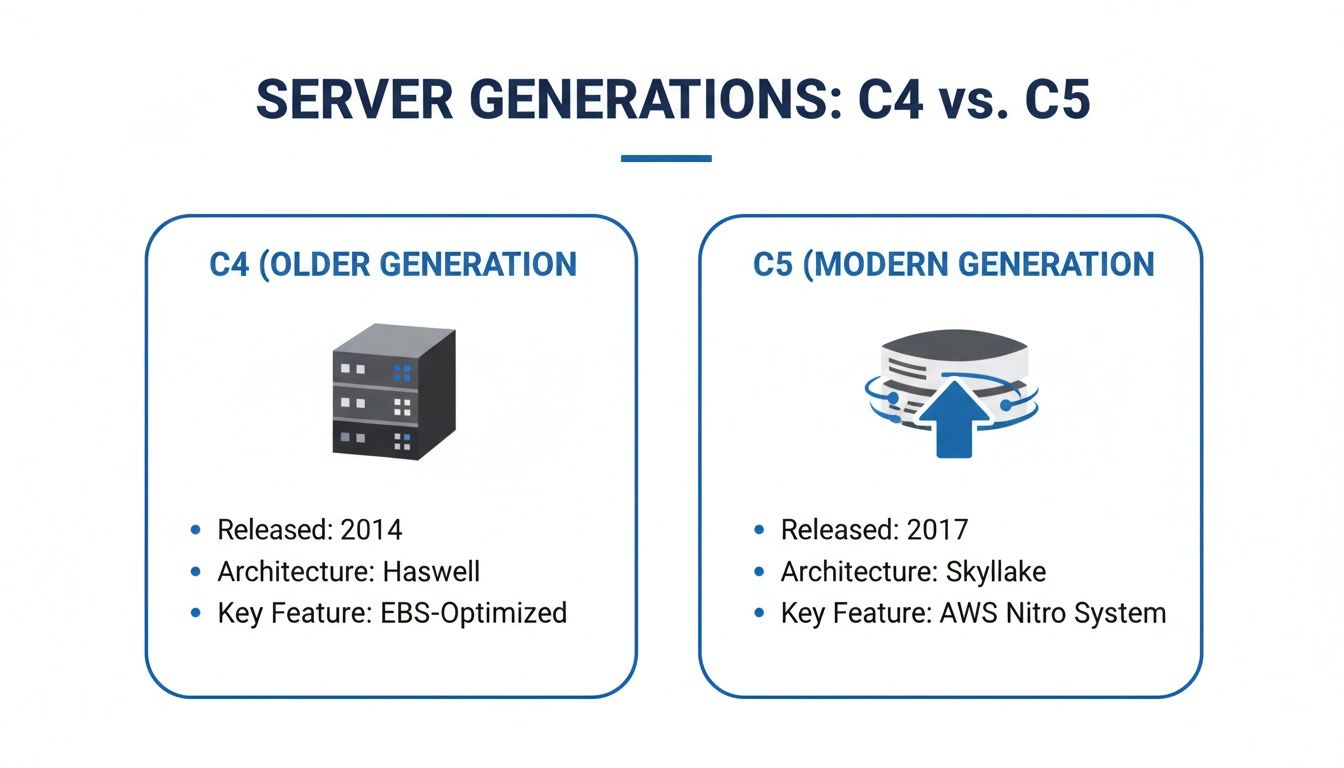
As you can see, C5 instances are built on a newer, more powerful foundation, making them the clear winner for both performance and value.
To make this even clearer, here's a quick comparison table breaking down the most important spec differences. This overview really highlights the performance and cost benefits you get by moving to the C5 family.
C4 vs C5 Quick Comparison
| Specification | AWS C4 Instance (c4.xlarge) | AWS C5 Instance (c5.xlarge) | Key Improvement |
|---|---|---|---|
| Processor | Intel Xeon E5-2666 v3 (Haswell) | Intel Xeon Platinum 8000 Series (Skylake/Cascade Lake) | Higher clock speeds, AVX-512 support |
| vCPUs | 4 | 4 | Higher performance per core |
| Memory (GiB) | 7.5 | 8 | Slightly more memory |
| EBS Throughput | Up to 750 Mbps | Up to 4,750 Mbps | ~6x increase in storage speed |
| Networking | High | Up to 10 Gbps | Dedicated, higher bandwidth |
The numbers don't lie. The jump in EBS and networking performance alone makes a compelling case for migrating your workloads. It's a strategic move that pays off in both speed and efficiency.
Comparing CPU Architecture and Compute Power
When you pop the hood on C4 and C5 instances, the biggest difference is right there in the silicon. The c4 vs c5 story really starts with the CPU, and it’s a classic tale of generational evolution. C4 instances run on the older Intel Xeon E5-2666 v3 processors, built on the Haswell architecture. For its time, this was a perfectly capable chip, but technology marches on.
C5 instances, on the other hand, represent a massive leap forward. They’re powered by much newer Intel Xeon Platinum 8000 series processors, which includes chips from the Skylake-SP and Cascade Lake families. This isn't just a minor refresh; it’s a completely different class of performance.
The Impact of Modern Processors
This CPU upgrade is about more than just raw clock speed. The newer chips in C5 instances bring a powerful new tool to the table: Advanced Vector Extensions 512 (AVX-512). These instructions are purpose-built to chew through complex computational workloads far more efficiently than older instruction sets.
If your workload involves a lot of floating-point math, AVX-512 is a game-changer. It lets the CPU process double the number of floating-point operations per second (FLOPS) compared to the AVX2 instructions found in C4 instances. For the right kind of application, this translates directly into getting your results much, much faster.
The move to AVX-512 in C5 instances gives a dramatic boost to specific workloads. Think scientific modeling, financial risk analysis, or high-resolution video encoding. For these jobs, the performance gains go way beyond what you'd expect from just a clock speed bump.
Translating Specs into Business Benefits
So what does this architectural jump actually mean for your business? When AWS first rolled out C5, they showed it delivered up to 24% better performance on compute-heavy benchmarks. This boost comes from the combination of the newer Intel Xeon processors and that powerful AVX-512 support.
On larger instances like the c5.18xlarge, the difference is even more stark, with a massive 200% improvement in FLOPS. This blows past the capabilities of the C4 family, which maxed out at 36 vCPUs and 60 GiB of memory. For a deeper dive, you can explore a detailed analysis of these performance metrics to see the full picture.
This extra horsepower creates real, tangible advantages:
- Faster Batch Processing: Your data analytics and batch jobs finish in a fraction of the time. That means lower costs and faster insights for making decisions.
- Improved Application Responsiveness: High-traffic web servers and ad-serving platforms can handle more users with less latency, which means a happier end-user.
- Accelerated Scientific Computing: Researchers and engineers can run complex simulations and models quicker than ever, speeding up the entire cycle of innovation and discovery.
Ultimately, the superior CPU in the C5 family means you're getting more raw compute power for your dollar. It lets you run tougher workloads more efficiently, making the C5 a no-brainer for any application that is truly compute-bound.
Unpacking the Leap in Networking and Storage Speed
It's not just about the CPU. The real story when comparing c4 vs c5 is the massive leap forward in how these instances talk to the network and their storage. For any modern, data-hungry application, these upgrades are just as important as the faster processors. This is often the difference between a snappy, responsive system and one that’s constantly hitting I/O bottlenecks.
C4 instances were decent for their time, offering what was considered moderate to high networking performance. The catch? This bandwidth was often shared, meaning it could dip and spike unpredictably under heavy load. This was a serious headache for things like distributed databases or high-traffic web server fleets that need consistent, reliable communication.
A Major Boost in Network Throughput
C5 instances completely changed the game with the introduction of the Elastic Network Adapter (ENA). This wasn't a minor tweak; it meant dedicated, high-speed network bandwidth that scales up with the instance size. Even smaller C5s get impressive speeds, while the larger ones can hit a dedicated 25 Gbps.
This kind of predictable, high-throughput networking is a lifeline for modern architectures. Think about where this really shines:
- Distributed Applications: Microservices are constantly chattering with each other. C5's dedicated bandwidth ensures this inter-service traffic doesn't grind everything to a halt.
- High-Traffic Web Servers: If you're serving millions of users, C5 instances can handle the flood of incoming requests and outgoing data way more efficiently, leading to a much better user experience.
- Data Streaming and Analytics: Any workload processing real-time data streams relies on fast networking to pull in and crunch that information without falling behind.
Revolutionizing Storage Performance with EBS
The performance gap gets even wider when you look at storage. C4 instances had a pretty low ceiling on their Elastic Block Store (EBS) throughput. This often meant you had to overprovision, picking a bigger, more expensive instance than you needed for compute, just to get the disk I/O you required.
C5s blew these limits away. They were built from the ground up to be EBS-optimized by default, giving them a much bigger, dedicated pipe to storage. This makes sure your powerful CPU isn't sitting around waiting for data. We're talking about a huge generational leap here, with C5's EBS throughput reaching up to 4,000 Mbps on larger instances, dwarfing the caps on the C4s. For a full breakdown of how EBS costs are calculated, you can check out our guide on Amazon EBS pricing.
C5 instances essentially remove the two biggest I/O bottlenecks that held back applications on the older C4 architecture. By giving you dedicated, high-speed channels for both networking and storage, they let your applications finally take full advantage of their CPU power.
A Practical Guide to Price and Performance Value
Whenever you're weighing an infrastructure upgrade, the conversation always comes back to cost versus benefit. The jump from C4 to C5 instances is a textbook case where the newer generation delivers massive value, not just in raw performance, but in direct, bottom-line price cuts. Honestly, moving to C5 is one of the fastest ways for a team to lower its cloud bill without sacrificing an ounce of computational power.
On-demand pricing alone tells a compelling story. A quick look shows that a c5.xlarge instance is typically 14-15% cheaper than its c4.xlarge predecessor. To get specific, a c5.xlarge runs at $0.170 per hour compared to the c4.xlarge's $0.199 per hour. That’s a 14.66% discount that scales up as you use larger instances. You can explore these cost comparisons in detail to model out the savings for your exact needs.
Beyond Sticker Price to Total Cost of Ownership
But the real financial win goes beyond the simple hourly rate. The superior muscle of C5 instances opens the door to huge savings through a strategy called rightsizing. Because a C5 can get more work done in less time than a similar C4, you might not even need a one-to-one replacement.
This is a core principle of smart cloud financial management. Instead of just migrating a c4.2xlarge straight over to a c5.2xlarge, your own benchmarks might reveal that a smaller c5.xlarge can easily handle the same workload.
Rightsizing is where the C5 generation truly shines from a financial perspective. The combination of lower per-hour costs and higher performance means you can often run fewer or smaller instances, creating a compounding effect on your savings.
This is a fundamental play for any FinOps team looking to get cloud spending under control. By carefully analyzing your performance data after migrating, you can spot opportunities to scale down your C5 instances and slash your total cost of ownership even further. If you want to build a more formal savings plan, check out our complete guide on AWS cost optimization.
A Simple Pricing Breakdown
To make the direct savings crystal clear, here’s a quick look at the on-demand hourly rates for common instance sizes in the US East (N. Virginia) region. This table shows just how obvious the financial benefit is.
On-Demand Pricing Comparison (US East)
| Instance Size | C4 On-Demand Price/Hour | C5 On-Demand Price/Hour | Direct Savings |
|---|---|---|---|
| large | $0.100 | $0.085 | 15.0% |
| xlarge | $0.199 | $0.170 | 14.6% |
| 2xlarge | $0.398 | $0.340 | 14.6% |
| 4xlarge | $0.796 | $0.680 | 14.6% |
Ultimately, the numbers speak for themselves. The C5 family offers a powerful one-two punch of lower prices and better performance, making it the financially smarter option for just about any compute-intensive application. The data gives any team a solid foundation to justify the migration effort.
Matching Your Workload to the Right Instance
Choosing between C4 and C5 isn't just a technical exercise; it's about matching the right tool to the job. The architectural upgrades in C5 instances give them a serious edge for most modern, compute-heavy tasks where every millisecond counts. Knowing which workloads get the biggest boost can make your migration decision a no-brainer.
The jump in CPU power, networking, and storage I/O means C5s are built for applications that used to get stuck on older hardware. If your task involves crunching large datasets or handling a flood of traffic, the benefits will be obvious right away.
Where C5 Instances Excel
While just about any application will run better on a C5, certain workloads see a massive performance lift. These are the use cases where the advanced features of the C5 family directly translate into faster results, lower latency, and better overall efficiency.
Here are a few prime examples:
- High-Performance Computing (HPC): Think scientific modeling, financial simulations, and genomic research. These all depend on heavy floating-point math. The AVX-512 instruction set in C5 processors can practically double the performance for these tasks, slashing computation times.
- Video Encoding and Transcoding: Processing high-resolution video is incredibly CPU-intensive. The powerful cores and faster EBS throughput of C5 instances mean quicker encoding jobs, which is a must-have for media and entertainment platforms.
- High-Traffic Web Servers and Ad Serving: For applications juggling thousands of simultaneous requests, the dedicated networking bandwidth of up to 25 Gbps is a game-changer. It eliminates network bottlenecks and guarantees low-latency responses for your users.
- Batch Processing and Data Analytics: Big data jobs that scan and process terabytes of data get a huge boost from the high-speed, EBS-optimized storage. This cuts down I/O wait times, letting the CPU run at its full potential.
The core takeaway is simple: if your application is CPU-bound or I/O-bound, C5 instances offer a direct path to breaking through those performance ceilings. The upgrades aren't just minor tweaks; they solve specific, common bottlenecks.
Making the right call comes down to really understanding your application's resource profile. For teams looking to put a formal process around this, our guide on resource and capacity planning offers a structured way to map your needs to the right infrastructure. By analyzing your workload's specific demands, you can confidently pick the instance that delivers the best performance and value in the c4 vs c5 comparison.
The Final Verdict: Is It Time to Move from C4 to C5?
Let's cut to the chase. Moving from C4 to C5 instances isn't just an incremental upgrade, it's a strategic move that sets your infrastructure up for the future. After comparing the two, the conclusion is crystal clear: the C5 family is the better choice for virtually any modern compute-intensive workload. You're getting a powerful mix of better performance, tighter security, and real cost savings.
The good news is that the migration path is usually painless. Both instance families are built on the common x86 architecture and support the same Amazon Machine Images (AMIs). For most teams, this means you can often launch a C5 instance from an existing C4 AMI, run it through its paces with some rigorous testing, and you’re good to go.
Building Your Business Case for the Migration
Justifying the switch to your leadership or finance team is straightforward once you lay out the long-term wins. The argument boils down to three core pillars that directly impact your bottom line and keep your operations humming.
-
Performance and Efficiency: C5 instances flat-out deliver more horsepower. We're talking higher compute, networking, and storage throughput. This means your applications run faster, handle more traffic, and chew through data more efficiently, which often lets you downsize or "rightsize" your instances for even more savings.
-
Cost Optimization: This one is a no-brainer. C5 instances come with on-demand prices that are 14-15% lower than their C4 equivalents. That's an immediate cost reduction right off the bat. When you combine that direct saving with the potential for rightsizing, the financial incentive becomes impossible to ignore.
-
Future-Proofing Your Stack: AWS is constantly rolling out new features and improvements, and they're focusing their efforts on the latest hardware generations. By standardizing on C5, you get access to all the latest and greatest, ensuring your architecture doesn't become a legacy bottleneck.
Adopting the C5 architecture is a proactive step. You're building a more resilient, scalable, and cost-effective cloud environment while leaving outdated tech behind.
A Simple Decision Framework
Not sure if a specific application needs to move? Just run it through this quick checklist. Ask yourself:
- Is my application sensitive to CPU performance, network latency, or storage I/O?
- Does the workload involve things like batch processing, data analytics, or high-traffic web servers?
- Are we actively looking for ways to trim our monthly AWS bill without taking a performance hit?
If you answered "yes" to any of these, migrating to the C5 family should be a high-priority task. The evidence is overwhelming. For performance, price, and a forward-looking architecture, C5 is the undisputed winner.
Frequently Asked Questions
Moving between instance families always brings up a few practical questions. Here are some clear, direct answers to the most common things people ask when moving from C4 to C5.
Can I Use My C4 AMI Directly on a C5 Instance?
Yes, for the most part. Since both C4 and C5 instances use the same x86 architecture, your existing Amazon Machine Images (AMIs) should work just fine.
But there's a catch. To get the massive networking performance boost C5 offers, you absolutely must have the Elastic Network Adapter (ENA) driver installed and enabled on your AMI before you launch it as a C5. Most modern, standard AMIs already include this, but if you're working with older or highly customized images, it's the first thing you should check.
Is Migrating from C4 to C5 Complicated?
The technical part of the migration is usually pretty simple. For a lot of setups, it's as easy as changing the instance type in your launch configuration or Auto Scaling group and rolling out the new instances. The real work is in the testing.
The real challenge isn't flipping the switch from C4 to C5. It's in validating that your application performs as expected and remains stable on the new hardware. This means proper load testing, performance benchmarking, and checking all your dependencies.
Will I See Performance Gains for Every Application?
Not always, and it really depends on your workload. The biggest winners are applications that are CPU-bound, network-bound, or I/O-bound.
A high-performance computing (HPC) job, for example, will see a huge speedup thanks to the AVX-512 instruction set. On the other hand, an application that sits idle most of the time or is limited by memory probably won't see a dramatic change. This is why thorough cloud migration testing for AWS environments is so important, it helps you measure the actual impact on your specific workload.
Are There Any Compatibility Issues to Watch For?
Compatibility problems are rare but not impossible. The main thing to look out for is your operating system's kernel. You need to be sure it supports the ENA driver for networking and the NVMe driver for instance store volumes if you use them.
An outdated kernel might be missing these drivers. Usually, a simple OS update or patch will fix it, but it’s a critical pre-flight check. Before you make the switch, always double-check the AWS documentation for your specific OS to confirm everything is compatible.
CLOUD TOGGLE helps you cut cloud costs by automatically shutting down idle AWS and Azure resources. Stop paying for servers you aren't using and see immediate savings with our easy-to-use scheduling platform. Start your free trial at https://cloudtoggle.com.