The biggest win from a cloud migration is flipping your IT from a rigid, expensive capital expense into a flexible, operational advantage. This isn't just about swapping out old hardware; it's a strategic business move that directly boosts your agility, performance, and financial health. A well-executed migration lays the groundwork for real, sustainable growth and innovation.
Why Cloud Migration Is a Strategic Advantage
Think about traditional on-premise servers like owning a private power plant for your house. You're looking at a massive upfront investment, constant maintenance headaches, and paying for capacity you almost never fully use. Cloud migration is like plugging into the national grid instead. You get instant access to all the power you need, pay only for what you actually consume, and let the experts worry about managing the complex infrastructure behind the scenes.
This shift delivers tangible results that ripple through the entire business, far beyond just moving some data. The proof is in the numbers: reports show that at least 50% of application workloads for both large enterprises and small businesses are now in the public cloud. It's a clear trend away from physical data centers for some very compelling reasons.
Key Drivers for Moving to the Cloud
For finance and technical leaders, the benefits are clear, measurable, and hard to ignore:
- Financial Flexibility: You get to swap large capital expenditures (CapEx) on hardware for predictable operational expenses (OpEx). This frees up cash for growing the business instead of tying it up in servers that start losing value the second you turn them on.
- Enhanced Performance: Cloud providers pour billions into top-tier hardware and global networks, offering performance levels that are incredibly difficult and expensive to match on your own.
- Increased Agility: Your teams can spin up new resources in minutes, not weeks or months. This speed means your business can react to market changes, test new ideas, and get applications out the door faster than the competition.
A successful cloud migration should leave you with an IT infrastructure that is scalable, resilient, and secure. The goal is a setup that can effortlessly adapt to your changing business needs while actively supporting innovation and growth.
This guide will break down these benefits in detail, from dramatic cost savings to stronger security. We'll also touch on how modern tools help you maximize these advantages by tackling common problems like resource waste, turning your move to the cloud into a powerful engine for growth.
To start, let's summarize the core advantages you can expect.
Key Benefits of Cloud Migration at a Glance
The table below outlines the primary advantages businesses gain when moving from on-premise infrastructure to a cloud environment.
| Benefit Area | Impact on Business |
|---|---|
| Cost Savings | Reduces hardware, maintenance, and energy costs by shifting from capital expenses (CapEx) to operational expenses (OpEx). |
| Scalability | Easily adjust resources up or down to meet demand, paying only for what you use. |
| Performance | Access enterprise-grade hardware and a global network for faster application delivery and lower latency. |
| Resilience & DR | Improves uptime and data protection with built-in redundancy and simplified disaster recovery solutions. |
| Security & Compliance | Leverages advanced security tools and expertise from cloud providers to protect data and meet regulatory standards. |
| Operational Efficiency | Automates routine tasks and frees up IT teams to focus on strategic initiatives instead of server maintenance. |
Each of these areas represents a significant opportunity to not just save money, but to build a more competitive and forward-thinking organization.
How Cloud Migration Reduces Your Total Spending
One of the biggest draws of moving to the cloud is, without a doubt, the potential for serious cost savings. This isn't just about switching to a pay-as-you-go model; it's a fundamental shift that lowers your Total Cost of Ownership (TCO). Instead of sinking huge amounts of cash into servers and hardware upfront, you free up that capital for what really matters: growing your business.
This move also gets you out of the expensive business of running a physical data center. Suddenly, costs for power, cooling, real estate, and physical security are off your books. You pivot from a rigid capital expense model to a much more flexible operational one, giving you far more control over your finances.
Eliminating Waste from Idle Resources
A massive, often-hidden cost in any on-premise setup is idle compute resources. Just think about your development, staging, and quality assurance (QA) environments. How often do they run 24/7 by default? More often than not, right? Yet, your teams are probably only using them for a fraction of that time, typically an eight-hour workday.
Every single hour those non-production servers are humming along uselessly, you're burning money on electricity, cooling, and hardware depreciation for zero return. It's a quiet but constant drain that adds up to a shocking amount over the year. A major win from cloud migration is the ability to finally get a handle on this waste, especially when you follow expert guidance like these 10 cloud cost optimization best practices.
By identifying and shutting down idle resources, businesses can reclaim a significant portion of their IT budget. The cloud makes this possible through automation and precise scheduling, turning a hidden expense into a substantial saving.
A smart migration plan tackles this waste head-on. Cloud platforms are built for automation and scheduling, making it simple to ensure you only pay for resources when you’re actually using them.
The Financial Impact of Smart Cloud Use
The numbers speak for themselves. One of the most powerful benefits of cloud migration is the drop in TCO, with businesses often seeing savings between 20% to 66% compared to their old on-premise setups. Digging deeper, studies show that cloud infrastructure can have 51% lower operational costs than running an equivalent data center yourself.
This financial upside comes from a few key changes:
- Pay-for-Use-Only: You stop paying for servers that sit dormant overnight or on weekends.
- Reduced Maintenance: The cloud provider takes care of all the hardware upkeep, security patches, and physical facility management.
- Right-Sizing: You can easily scale your server instances up or down to perfectly match what your workload needs, eliminating the expensive guesswork of over-provisioning.
By getting a grip on problems like idle compute, your cloud migration becomes more than just a tech upgrade; it becomes a powerful financial strategy. To learn more about how to put this into practice, check out our guide on effective cloud cost optimisation. This approach makes sure your move to the cloud delivers a strong, measurable return on your investment.
Achieve Greater Scalability and Performance
One of the biggest wins from a cloud migration is how incredibly responsive your business becomes.
Imagine your on-premise infrastructure is like a retail shop with a fixed number of checkout counters. When a big holiday sale hits, the lines get crazy long, customers get frustrated, and you lose sales. Moving to the cloud is like having the magic ability to open more checkout lanes the second a crowd rushes in and then close them just as quickly when things quiet down.

This powerful concept is known as elasticity. It’s what ensures your applications perform flawlessly during a sudden traffic spike from a marketing campaign or predictable seasonal demand. You can deliver a smooth user experience without paying for over-provisioned hardware that sits idle during slow periods.
From Fixed Capacity to Dynamic Power
This shift from fixed to flexible resources completely changes the game for both your customer experience and your bottom line. It fundamentally alters how you approach growth. Instead of guessing your peak capacity needs months ahead of time and buying expensive hardware that collects dust most of the year, you can react in real-time.
For your technical teams, this agility means faster innovation. They can spin up powerful environments to run complex analytics or machine learning models on demand, without the crippling upfront cost of high-performance computing gear. This on-demand power fuels experimentation and dramatically speeds up development.
A key benefit of cloud migration is turning your infrastructure from a static, expensive limitation into a dynamic asset that scales precisely with your business needs. This ensures performance never becomes a bottleneck to growth.
The data backs this up. Organizations that partner with certified cloud providers often see 40% improved application performance alongside 25% cost reductions. For engineering leaders and CTOs at smaller businesses, this means handling traffic spikes without overprovisioning, as elastic compute automatically adjusts to cut waste.
Understanding the Types of Scaling
To really get the most from the cloud, it helps to know the two main ways to handle workload demands. We dive deep into this topic in our guide on how does scaling work in the cloud.
But in a nutshell, the two primary methods are:
- Vertical Scaling (Scaling Up): This is like giving an existing server more muscle by upgrading its CPU or RAM. It’s a great fit for applications that can't easily be spread across multiple machines.
- Horizontal Scaling (Scaling Out): This means adding more servers to share the load. It's the bedrock of modern cloud architecture, offering incredible flexibility and resilience for web apps and microservices.
Ultimately, achieving greater scalability and performance is a core benefit of cloud migration. It allows your business to serve customers better and operate more efficiently, no matter how much demand fluctuates.
Strengthen Your Security and Business Continuity
There’s a common myth that moving to the cloud is a security risk. I’ve heard it plenty of times. But in reality, migrating to a major provider like AWS or Azure is less like leaving your front door unlocked and more like moving your company’s most valuable assets into a world-class bank vault.
These providers pour billions into security infrastructure and personnel, offering a level of protection most businesses simply couldn't afford on their own.
This robust protection operates on a shared responsibility model. Think of it this way: the cloud provider is responsible for securing the physical building, the data centers, the servers, the core network. You, in turn, are responsible for what you put inside your "office," managing who has the keys (access), how you configure your space, and the data you store there.
This partnership lets you offload the heavy lifting of physical security and focus on what truly matters to your business.
Advanced Security Built In
One of the best parts about moving to the cloud is gaining immediate access to a suite of advanced security tools that are baked right into the platform. This is a huge step up from trying to juggle a dozen different point solutions in an on-premise setup.
Here’s what that practically means for you:
- Automated Security Patching: The provider handles the tedious work of patching the underlying infrastructure, shutting down vulnerabilities before they can be exploited.
- Advanced Threat Detection: Cloud platforms use machine learning and global threat intelligence to spot suspicious activity and alert you in real-time. It’s like having a 24/7 security guard you never could have hired yourself.
- Granular Access Control: You can implement incredibly precise identity and access management (IAM) policies. This ensures users and applications only have the permissions they absolutely need to do their jobs, and nothing more.
This layered approach massively strengthens your security posture. It shifts the burden of infrastructure security to the provider, freeing up your team to concentrate on protecting your actual applications and data.
Enhancing Business Resilience
Security isn’t just about preventing breaches; it’s also about keeping the lights on. Downtime from hardware failure, a natural disaster, or a cyberattack can be absolutely devastating for a business. The cloud offers powerful, straightforward tools for disaster recovery (DR) that used to be incredibly complex and expensive.
With just a few clicks, you can set up automated backups that store your critical data across multiple geographic regions. This multi-region redundancy means that if one data center goes down, your operations can automatically failover to another location with minimal disruption.
This isn’t just theoretical. Cloud migrants see 40% faster app performance with 99% data integrity, which directly helps slash vulnerability windows and prevent costly breaches. It's a game-changer for reducing business risk.
This capability transforms disaster recovery from a dreaded, periodic fire drill into a reliable, automated process. By exploring effective cloud management services, you can ensure your business stays operational and your data remains safe, no matter what happens.
Give Your Team an Operational Edge
Moving to the cloud is about so much more than swapping out your server racks. It’s about fundamentally changing how your team operates, freeing them from the daily grind of hardware maintenance and letting them focus on what they were hired to do: innovate.
Think about it. Your best people are your most valuable resource. When you take away the soul-crushing tasks of patching servers, troubleshooting hardware failures, and just "keeping the lights on," you unleash their real potential. The cloud removes the operational friction that kills morale and lets your smart people get back to solving important problems.
Automate Your Infrastructure and Ship Code Faster
One of the biggest game-changers the cloud brought to the table is a concept called Infrastructure as Code (IaC). Imagine defining your entire server environment, from networks and firewalls to databases and load balancers, in a simple text file. That's exactly what IaC lets you do.
Instead of a technician clicking through menus to manually configure a server (a process that’s slow and notoriously error-prone), your team can now spin up and manage entire environments with code. The result? Deployments are suddenly:
- Faster: Need a complete staging environment that mirrors production? You can have it in minutes, not days.
- Consistent: Finally, you can eliminate the dreaded "but it works on my machine!" problem for good. Every single environment is a perfect, identical clone.
- Repeatable: If something goes wrong, you can rebuild your entire infrastructure from scratch with a single command. Disaster recovery just got a whole lot simpler.
This level of automation injects pure speed into your development lifecycle. Teams can test new ideas and ship features far more frequently, and with a confidence that just wasn't possible before.
The cloud’s real power isn’t just about renting servers. It’s about automating away the repetitive, low-value work so your engineers can build better products, faster. That’s a direct line to your bottom line.
Tap into Advanced Services On-Demand
Beyond automation, the cloud gives your team instant access to an entire ecosystem of powerful, managed services. Think enterprise-grade databases, massive data analytics platforms, and even sophisticated machine learning tools, all available on-demand.
Building and maintaining these systems on-premises would be incredibly complex and eye-wateringly expensive. With the cloud, your team doesn't have to be experts in every piece of the underlying technology. They can focus on writing your application's core logic and creating a great user experience, while letting the cloud provider handle the tough backend management.
Ultimately, this means even a small team can build applications with capabilities that once required a massive, specialized IT department. Your entire organization becomes more agile and ready to compete on a whole new level.
Planning Your Cloud Migration Strategy
To really nail a cloud migration, you need more than a technical to-do list; you need a smart strategy. A successful move to the cloud isn’t about speed; it's about being deliberate. It all starts with careful planning that sidesteps the common traps and ties every single action back to what your business is trying to achieve.
The first, non-negotiable step is a thorough cloud readiness assessment. Think of this as your roadmap. It helps you inventory your current applications, untangle the critical dependencies between them, and get a realistic handle on what this is all going to cost.
As you get ready to make the jump, a methodical approach is everything. A detailed data center migration checklist can be your best friend here, making sure no critical detail gets missed along the way.
Choosing the Right Path for Each Application
Here’s a secret: not all applications are created equal, and they shouldn't be treated that way during a migration. The "6 Rs of Migration" is a well-known framework that gives you a structured way to decide the best approach for every piece of software in your portfolio. This ensures you're squeezing the most value out of the move while keeping disruptions to a minimum.
- Rehost (Lift and Shift): This is the quickest route. You move an application to the cloud with almost no changes. It's fast, but you won't get to use many of the cool cloud-native features right away.
- Replatform: A slight step up from rehosting. You make a few small tweaks to an application to get some cloud benefits, like switching to a managed database service to reduce your team's workload.
- Repurchase: Sometimes it's easier to just switch. This means ditching your current application for a new cloud-based solution, usually a SaaS product that does the job better.
- Refactor/Rearchitect: This is the big one. You completely redesign an application to take full advantage of cloud-native capabilities. It's more work upfront but delivers the biggest wins in performance, scalability, and long-term cost.
- Retire: Get rid of what you don't need. Decommissioning old or redundant applications is a great way to cut costs and simplify your IT environment.
- Retain: Some things just need to stay put for now. You might keep certain applications on-premise due to compliance rules, complex dependencies, or cost factors.
Picking the right strategy for each application is a game-changer. A simple lift-and-shift might seem like an easy win, but refactoring a core application could deliver a much bigger long-term return by unlocking massive scalability and slashing operational headaches.
This decision-making process is what separates the teams stuck maintaining old systems from the ones driving real innovation.
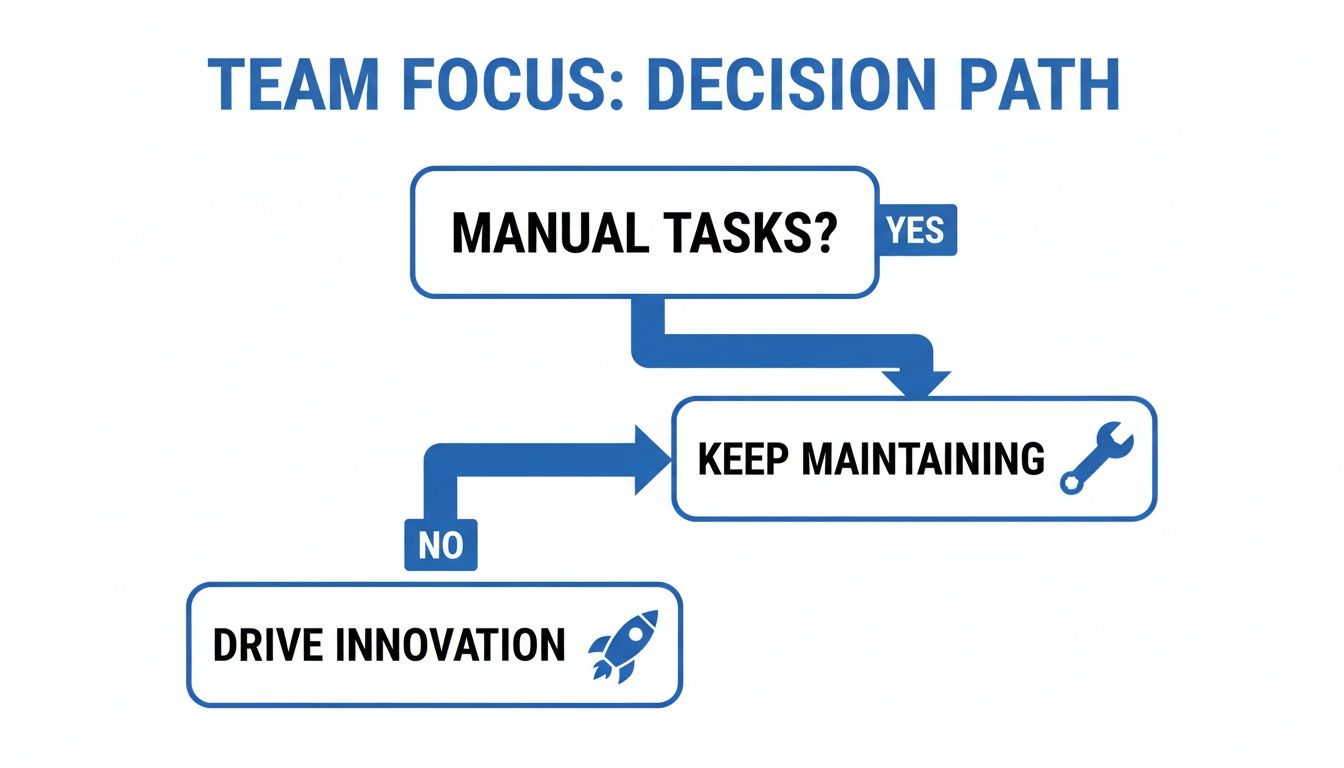
This simple visual nails it: a good strategy frees up your team's time to focus on growth. When you thoughtfully choose your approach for each workload, you're not just moving servers; you're building a migration plan that delivers powerful business outcomes.
Of course. Here is the rewritten section, designed to sound natural and human-written, following the provided style guide and examples.
Your Cloud Migration Questions, Answered
Even when the benefits are clear, moving to the cloud brings up a ton of practical questions. Let's tackle some of the most common things business and tech leaders ask when they're getting ready to make the switch, focusing on the real-world details around cost, security, and complexity.
How Much Does a Cloud Migration Actually Cost?
There's no single price tag for a cloud migration. The final cost really boils down to the complexity of your applications, how much data you have, and the migration path you take. A straightforward "lift and shift" will cost less upfront than redesigning an application from the ground up for the cloud.
But the real story isn't about the initial investment; it's about the long-term Total Cost of Ownership (TCO). This is where the cloud shines. The main financial win comes from a massive drop in TCO by saying goodbye to hardware purchases and data center upkeep. You’re essentially swapping large, infrequent capital expenses (CapEx) for a predictable, flexible operational expense (OpEx) model.
Is the Cloud Really More Secure Than Our Own Servers?
For the vast majority of businesses, the answer is a resounding yes. The big cloud providers like AWS, Azure, and Google Cloud pour billions into security, a level of investment that's just not feasible for most companies. They handle the physical security of the data centers and protect the core infrastructure from massive-scale attacks.
Think of it like this: they build the fortress, and you secure your own room inside it. This is called the "shared responsibility model." While you're still in charge of securing your data and applications, you get to build on a foundation that's almost always far more robust than what you could achieve on-premise.
This model lets you tap into enterprise-grade security tools without the eye-watering enterprise-grade price.
What’s the Single Biggest Mistake to Avoid During a Migration?
The most common pitfall is treating a cloud migration like it's just an IT project. When there's no solid business strategy driving the move, teams often rush to "lift and shift" everything over to the cloud without a second thought. This almost always leads to sticker shock when the first cloud bill arrives.
A successful move starts with a smart assessment of which applications belong in the cloud and how they should get there. But most importantly, you need to bake in cost controls from day one. That means two non-negotiable steps:
- Right-sizing resources: Make sure you aren’t paying for huge virtual machines that are barely being used.
- Scheduling shutdowns: Your development and staging environments don’t need to run 24/7. Turn them off when they’re not in use to stop paying for idle compute.
Nailing these two things is the key to unlocking the real financial power of the cloud.
Stop paying for idle cloud resources. CLOUD TOGGLE makes it easy to automate server schedules, reduce waste, and lower your AWS or Azure bill. Start your free 30-day trial and see the savings for yourself.