Think of an Azure Reserved Instance (or RI) like this: you're telling Microsoft you'll be using a specific chunk of their cloud services for the next one or three years. It’s a bit like leasing a car instead of renting one every day.
Because you're making a commitment, Microsoft gives you a massive discount compared to their flexible, pay-as-you-go pricing. This simple promise can dramatically lower your Azure bill.
Understanding The Core Concept of Azure Reservations

Imagine you rent a car every single day for your commute. That daily rate is going to be high. Why? Because the rental company has no idea if you'll show up tomorrow. This is the pay-as-you-go model in the cloud, maximum flexibility, but you pay a premium for it.
Now, what if you walked into that same rental agency and said, "I want to lease this car for a full year"? They'd offer you a much, much lower monthly rate. They can count on that revenue and plan their fleet better. That's exactly how an Azure Reserved Instance works.
By committing to a certain amount of computing power upfront, you give Microsoft predictability. They can manage their data center capacity more efficiently, and in return, they pass those savings on to you with a steep discount.
To give you a quick overview, here are the key aspects of Azure RIs at a glance:
Azure Reserved Instance At a Glance
| Feature | Description |
|---|---|
| Discount Model | Commitment-based pricing for a 1 or 3-year term. |
| Savings | Up to 72% off standard pay-as-you-go rates. |
| Billing | Option for upfront payment or fixed monthly installments. |
| Scope | Can be applied to a specific subscription, resource group, or shared across an entire account. |
| Flexibility | Offers instance size flexibility and options for exchanges or cancellations (with a fee). |
| Applicability | Covers Virtual Machines, Storage, Databases, and many other Azure services. |
This table highlights why RIs are a cornerstone of effective cloud cost management for any business with steady-state workloads.
Why This Commitment Matters For Your Budget
This model delivers two powerful financial wins for any company running on Azure. First and foremost is the massive cost reduction. We're talking about savings of up to 72% compared to pay-as-you-go prices on virtual machines and other core services. For any business with predictable workloads, this is a straightforward way to lock in huge discounts without sacrificing performance.
The second major benefit is predictable monthly billing. Instead of costs that swing wildly with usage, RIs create a stable, consistent expense line item. This is a game-changer for your finance team, making IT budget forecasting far more accurate and reliable.
An Azure RI transforms a variable operational expense into a predictable, fixed cost. This stability is the foundation of a mature and effective cloud financial strategy.
Setting The Stage For Smart Cloud Spending
Grasping this core concept is your first step toward building a smarter cloud cost strategy. RIs are a primary tool for optimizing costs within the Infrastructure as a Service (IaaS) model, so understanding IaaS basics helps put RIs into context.
Throughout this guide, we'll dive deeper into the nuts and bolts, helping you pick the right options and sidestep common mistakes. The primary benefits really boil down to this:
- Significant Cost Reduction: Slash your monthly Azure bill by locking in discounted rates.
- Budget Predictability: Get rid of billing surprises with a fixed commitment that simplifies financial planning.
- Guaranteed Capacity: In some cases, RIs can even secure your compute capacity in high-demand Azure regions.
By mastering RIs, you shift from simply paying for cloud resources to strategically investing in them. This mindset ensures every dollar you spend in the cloud is working as hard as it can for your business.
Navigating Azure RI Flexibility and Scope
Committing to an Azure Reserved Instance is how you unlock those deep discounts, but it doesn't mean you're locked into a rigid, inflexible contract. Microsoft gets that business needs change, and they’ve built in several features to help you adapt. Getting to know these options is the key to maximizing both your savings and your agility.
One of the most powerful of these is Instance Size Flexibility. This feature is a real game-changer. It automatically applies your RI discount to other virtual machine sizes as long as they are in the same VM family and Azure region. It’s a built-in safety net that makes sure your investment is never wasted, even if your specific VM needs shift.
Think of it like buying a discount voucher for a medium-sized sedan from a specific car brand. With instance size flexibility, that same voucher could be applied to a compact or even a full-size sedan from the same brand. The value just adjusts to cover the equivalent cost, so you don't lose out if you need to scale up or down.
Understanding Scope: Regional vs. Zonal
When you buy a VM reservation, you have to choose its scope. This decision dictates where your discount can be applied and, just as importantly, whether you get a capacity guarantee. There are two main choices, each serving a very different purpose.
A regional scope is the default for a reason; it offers the most flexibility. Your RI discount will apply to any matching VM instance running in any availability zone within your chosen Azure region. For most people, this is the way to go because it maximizes the chances that your reservation gets used.
On the other hand, a zonal scope (also called a capacity reservation) pins your RI to a specific availability zone within a region. Why would you want less flexibility? For one critical benefit: a capacity guarantee. This means Azure promises that the compute capacity will be there for you to launch that VM whenever you need it. For mission-critical apps in high-demand zones, this is non-negotiable.
Choosing your scope is a strategic trade-off. Regional scope maximizes discount application and flexibility, while zonal scope sacrifices some of that flexibility for the crucial assurance of guaranteed capacity.
Here’s a simple way to decide:
- Regional Scope: Perfect for most workloads where the main goals are cost savings and flexibility. Your discount will find a home anywhere in the region.
- Zonal Scope: The right choice for critical applications that demand high availability and can't afford the risk of being unable to deploy due to capacity issues in a specific location.
Options for Exchanges and Cancellations
So, what happens when business needs really change? Azure provides an escape hatch for your RI commitments. If your workloads evolve, you aren't necessarily stuck with your original purchase for the whole term. You can either exchange or cancel your reservation, though some rules apply.
An exchange lets you swap your existing Azure RI for a new one. The only catch is that the new reservation must be of equal or greater value than the prorated value of your original one. This is incredibly useful if you need to switch to a different VM family, move to another region, or even just adjust your term. Best of all, Microsoft doesn't charge a fee for the transaction itself.
A cancellation is also an option if an RI just isn't working for you anymore. You can cancel at any time, but you might face an early termination fee. Azure will refund the prorated balance of your RI, minus the fee, right back to your original payment method.
It's important to know there's an annual limit on the total value of reservations you can cancel. This policy is designed to let you fix major purchasing mistakes without leaving you completely locked into an unused commitment. This flexibility allows you to make long-term commitments with confidence, knowing you have options to adapt as your strategy evolves.
Calculating Your Potential RI Savings
Theory is one thing, but let's talk real money. The true power of an Azure Reserved Instance clicks into place when you apply it to your own cloud bill. So, let's walk through a practical, step-by-step calculation to make these savings tangible. Seeing the concrete benefits of cloud computing for business like this really drives the point home.
Imagine a small business running a couple of web server VMs around the clock. These servers are predictable, stable workhorses, the perfect candidates for a reservation. We'll pit the standard pay-as-you-go costs against both a one-year and a three-year RI to see just how much of a difference it makes.
Pay-As-You-Go Baseline
First, we need a starting point. Let's say the business is using two Standard_D2s_v3 VMs in the East US region.
- Hourly Rate (Pay-As-You-Go): Roughly $0.096 per hour for each VM.
- Total Hourly Cost: $0.096 x 2 VMs = $0.192 per hour.
- Monthly Cost: $0.192 x 730 hours (an average month) = $140.16.
- Annual Cost: $140.16 x 12 months = $1,681.92.
Stick with this for three years, and you're looking at a total bill of $5,045.76. That's our baseline.
One-Year Azure Reserved Instance Savings
Now, let's see what happens when the business commits to a one-year RI for those two VMs. For this particular VM type, a one-year term gets you a discount of about 40%.
- Discounted Monthly Cost: $140.16 x (1 – 0.40) = $84.10.
- Total Cost Over One Year: $84.10 x 12 = $1,009.20.
By committing for just one year, the business pockets $672.72 in savings ($1,681.92 – $1,009.20). That's a straight 40% cut on their compute costs for those servers, all without touching performance. The ROI is immediate.
Three-Year Azure Reserved Instance Savings
If you have workloads you know will be running for the long haul, a three-year commitment is where you'll find the deepest discounts. For our example VMs, the savings can jump to as high as 62%.
- Discounted Monthly Cost: $140.16 x (1 – 0.62) = $53.26.
- Total Cost Over Three Years: $53.26 x 36 = $1,917.36.
Remember that three-year pay-as-you-go total of $5,045.76? The savings here are a staggering $3,128.40. This simple move has effectively slashed the compute bill for these VMs by more than half.
The math doesn't lie: for any stable and predictable workload, an Azure Reserved Instance turns commitment directly into major financial savings. The longer you commit, the more you save.
Tools to Analyze Your Own Usage
Guessing which resources to reserve is a surefire way to waste money. The good news is that Azure gives you powerful, free tools to make decisions based on your actual, real-world usage data.
- Azure Pricing Calculator: This should be your go-to for forecasting. You can plug in different scenarios, comparing pay-as-you-go against one- and three-year RI costs for just about any Azure service. It's an essential first step for building a business case. For a deeper dive, check out our guide on the Azure virtual machine pricing calculator.
- Azure Advisor: Think of this as your personal, automated FinOps analyst. Azure Advisor scans your usage history over the last 7, 30, or 60 days. It then spits out specific, actionable recommendations for RI purchases, including the right VM family, quantity, term, and even the potential savings. It takes all the guesswork out of the equation.
Using these tools lets you move from our hypothetical examples to a savings plan built for your environment. It’s a data-driven approach that ensures you buy the right RI for the right workload, maximizing every dollar saved.
Reserved Instances vs Savings Plans vs Spot VMs
Picking the right discount model in Azure can feel like trying to solve a puzzle. You've got a few different pieces, and they all look pretty good, but they don't all fit in the same place. To really get a handle on your cloud bill, you need to understand how Azure's three main cost-saving tools, Reserved Instances, Savings Plans, and Spot VMs, work together.
Let’s break them down so you can see where each one shines. The real goal is to match the right tool to the right job, balancing your technical needs with your budget. Each option offers a unique mix of commitment, flexibility, and savings, making them perfect for very different kinds of work.
Comparing Azure Cost Saving Models
To make things clearer, let's put these three options side-by-side. Think of this as a quick reference guide to help you decide which model, or combination of models, makes the most sense for your workloads.
| Feature | Azure Reserved Instance | Azure Savings Plan | Azure Spot VM |
|---|---|---|---|
| Best For | Stable, predictable workloads (e.g., production servers) | Consistent spend with changing resource needs | Interruptible, non-critical tasks (e.g., batch jobs) |
| Commitment | 1 or 3-year term for a specific VM family/region | 1 or 3-year term for a specific hourly spend | No commitment, pay for spare capacity |
| Savings | Up to 72% | Up to 65% | Up to 90% |
| Flexibility | Lowest (tied to VM series and region) | High (applies across VM families and regions) | Highest (no long-term lock-in) |
| Risk | Medium (underutilization if workload changes) | Low (adapts to changing compute needs) | High (instances can be terminated with short notice) |
This table shows there’s no single "best" option; it's all about context. The right choice depends entirely on the workload's predictability, criticality, and your team's tolerance for managing potential interruptions.
Azure Reserved Instances: The Deepest Discounts
An Azure Reserved Instance is your go-to for workloads that are the bedrock of your operations. We're talking about the production web servers, core databases, and anything else you know will be running 24/7 for a long time. By committing to a specific VM family in a specific region for one or three years, you lock in the biggest discount possible, up to 72% off pay-as-you-go prices.
This is fantastic for budget predictability. It turns a fluctuating operational expense into a fixed, known cost. But, there's a trade-off for those deep savings. While you get some wiggle room with instance size flexibility, an RI is still fundamentally tied to that VM series and region. It's the least flexible of the bunch.
Azure Savings Plans: Flexibility for Dynamic Needs
What if you know you'll be spending a certain amount on compute each hour, but you aren't sure which VMs you'll need? That's where an Azure Savings Plan comes in. Instead of reserving a specific VM type, you commit to a fixed hourly spend on compute for a one or three-year term.
This model is a game-changer for flexibility. As your developers experiment with different VM types or your application architecture shifts, the savings plan discount just follows the spend. It automatically applies to the new resources, no questions asked. The savings cap out a bit lower than RIs, around 65%, but for dynamic environments, that adaptability often delivers far more value.
Spot VMs: Maximum Savings for Interruptible Workloads
For any workload that can be stopped and started without causing a catastrophe, Azure Spot VMs are a no-brainer. They offer absolutely massive savings, up to 90%, by letting you run on Azure's spare compute capacity. The catch? Azure can take that capacity back with very little notice.
This makes them completely wrong for mission-critical apps. But they are perfect for fault-tolerant jobs like:
- Large-scale data processing
- Batch rendering or encoding
- CI/CD build agents
- Development and test environments that don't need to be up all the time
This flowchart really drives home how savings increase as your commitment grows, from the total flexibility of pay-as-you-go all the way to a long-term RI.
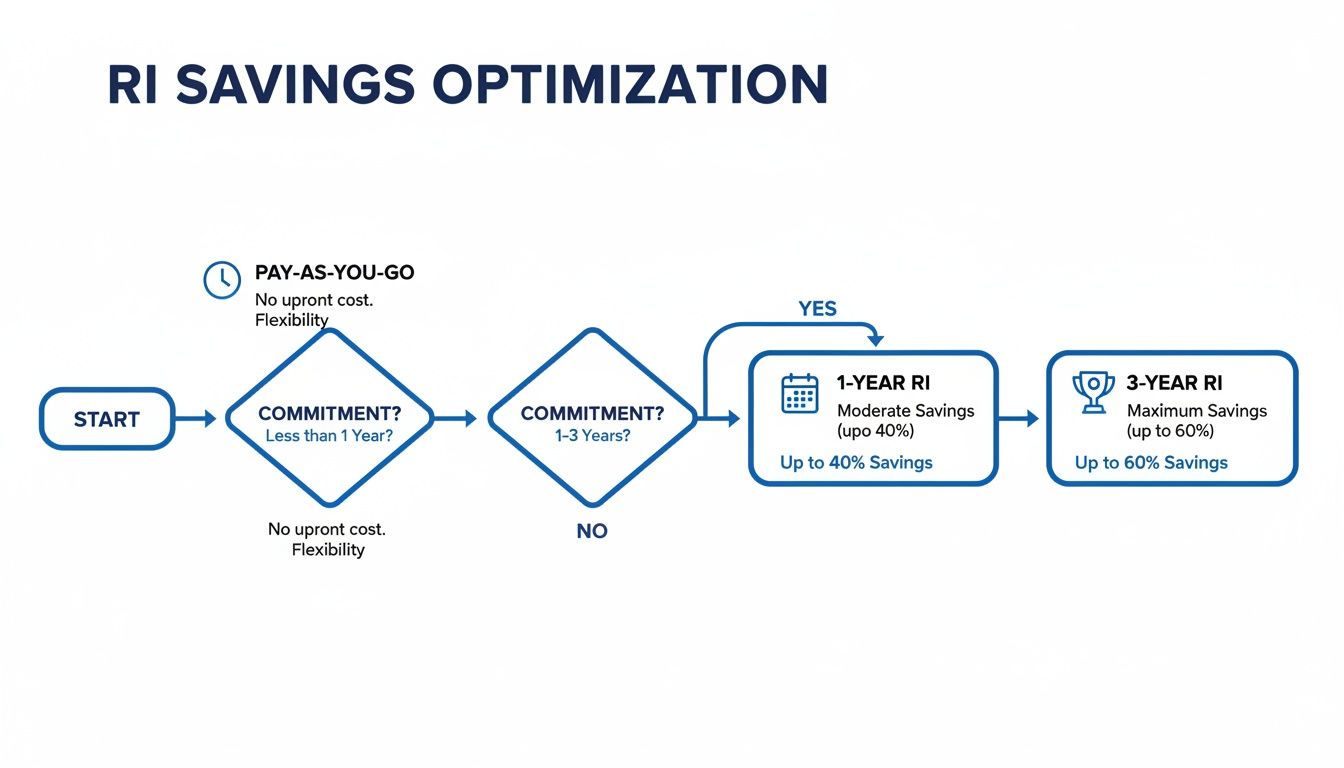
As you can see, the longer you commit to a reserved instance, the more you save, with the three-year plan offering the biggest discount.
Making the Right Choice
The smartest strategy usually isn't about picking just one of these. It's about blending them. Use an Azure Reserved Instance to cover your stable, baseline workload and lock in maximum savings. Layer an Azure Savings Plan on top to handle your more dynamic compute. Then, sprinkle in Spot VMs wherever you have non-critical, interruptible tasks.
Choosing the right model isn't about finding the single best option, but about building a blended strategy that aligns with the specific requirements of each workload in your portfolio.
And don't forget to stack your discounts. A key strategy is combining these models with other Azure programs. For example, you can learn more about how the Azure Hybrid Benefit for Windows Server and SQL Server licensing can be applied on top of your RI for even deeper savings. By truly understanding the strengths of each model, you can build a cost optimization plan that's both powerful and resilient.
Common Reserved Instance Mistakes to Avoid
While Azure Reserved Instances are a fantastic tool for cutting down your cloud spending, a few common missteps can easily turn potential savings into wasted money. Committing to a long-term plan requires a bit of homework, but steering clear of these frequent pitfalls will make sure your investment pays off.
One of the biggest and most costly errors is simply overcommitting. It’s easy to get excited by the prospect of a 72% discount and buy reservations for every VM you run. The reality is, RIs only deliver value when they’re applied to resources that are always on. Buying a three-year RI for a development server that gets shut down every night is a recipe for flushing money down the drain.
The core principle here is to reserve capacity only for your stable, predictable, baseline workloads. Anything temporary, experimental, or with fluctuating usage is often better left on pay-as-you-go or covered by a more flexible option like an Azure Savings Plan.
Selecting the Wrong Scope or VM Family
Another common mistake is locking in the wrong specs for your reservation. This can trap you in a commitment that doesn't actually match what you need, torpedoing your potential savings. The two most critical choices you'll make are the scope and the VM family.
For instance, choosing a scope that’s too narrow, like a single resource group when your workloads are spread across the entire business, will lead to low RI usage. On the flip side, a shared scope might be too broad if you need to do precise chargeback accounting for different departments.
Here’s how to get it right from the start:
- Match the Scope to Your Billing Model: Use a shared scope if your goal is maximum utilization across your entire billing account. Go with a subscription or resource group scope when you need more granular cost attribution.
- Analyze Usage Before Picking a VM Family: Don’t just guess which VM series you need. Use the recommendations from Azure Advisor, which are based on your actual historical usage data, to pick the right family.
- Always Enable Instance Size Flexibility: This is a non-negotiable safety net. It allows your RI discount to apply to different VM sizes within the same family, protecting your investment if your needs change down the road.
Making an informed choice upfront is far easier than trying to exchange an ill-fitting reservation later on.
The Danger of "Set It and Forget It"
Perhaps the most common mistake of all is treating your RI purchase as a one-and-done task. Neglecting to monitor your RI usage is like paying for a gym membership and never showing up; you've made the investment, but you aren't getting any of the benefits.
An unmonitored Reserved Instance is an invisible expense. Without regular reviews, you have no way of knowing if your commitment is saving you money or simply draining your budget.
You have to keep an eye on things to make sure you're getting the value you paid for. Underutilization can happen for all sorts of reasons: a project gets decommissioned, an application is re-architected, or a team simply shuts down a VM without realizing it was covered by an RI.
Fortunately, Azure gives you the tools you need to stay on top of this. You can use Azure Cost Management to set up alerts that notify you if your RI utilization drops below a certain threshold, like 90%. A quick monthly review of your RI utilization dashboard should be a standard part of your cloud financial operations. This simple habit ensures your investments are always working for you.
Getting More Bang for Your Buck Beyond Reserved Instances
An Azure Reserved Instance is a fantastic tool for slashing your cloud bill, but it shouldn't be the only one in your toolbox. To really hit peak financial efficiency, you need to think in layers. Combining RIs with other Azure programs and a bit of smart automation creates a complete strategy that attacks waste from every possible angle.
Think of it this way: your Azure Reserved Instance covers the stable, predictable workloads, while other cost-saving techniques handle everything else. This ensures you're not just saving money on your core infrastructure but also optimizing spend on dynamic or temporary resources, which adds up to a much bigger impact on your final bill.
Stacking Savings with Azure Hybrid Benefit
One of the most powerful ways to amplify your RI savings is to pair them with the Azure Hybrid Benefit. This program is a no-brainer for businesses that already own on-premises Windows Server or SQL Server licenses with active Software Assurance. Instead of paying for new licenses in the cloud, you can simply bring your existing ones over to Azure.
The result is pretty dramatic. When you apply the Hybrid Benefit to a VM that's already covered by a Reserved Instance, you're stacking two massive discounts. The RI cuts the cost of the underlying compute, and the Hybrid Benefit wipes out the software licensing fees, which can be a huge chunk of the total cost.
The combination of an Azure Reserved Instance and the Hybrid Benefit is one of the most potent cost-saving strategies you can use in Azure. It directly rewards your existing on-premises investment by dramatically lowering the cost of running Windows and SQL workloads in the cloud.
This layered approach gets you to the absolute lowest possible price for your Microsoft workloads, blowing the savings from an RI alone out of the water.
Intelligent Uptime Scheduling for Your Other Resources
Reserved Instances are perfect for servers that need to be on 24/7, but what about the rest? Dev, test, and staging environments often just sit idle overnight and on weekends, quietly burning through your budget. This is where intelligent uptime scheduling becomes the second critical layer of your savings plan.
By setting up automated start/stop schedules, you can make sure these non-production resources only run when people are actually using them. For instance, a development server that only runs during business hours Monday to Friday could see its monthly costs drop by nearly 70%. It's a simple but incredibly effective way to stop wasting money on resources that don't need an Azure Reserved Instance.
This strategy complements RIs perfectly:
- Reserved Instances cover your stable, always-on production workloads.
- Uptime Scheduling handles the temporary, intermittent workloads that aren't covered.
By using this two-pronged approach, you ensure that every single resource is optimized for its specific usage pattern. For a deeper look at different tactics, you might find our guide on Azure cost optimization helpful. This kind of holistic view turns your cloud spending from a reactive expense into a proactively managed investment, squeezing maximum value from every dollar.
Frequently Asked Questions
When you dig into the details of Azure Reserved Instances, a few common questions always pop up. Let's tackle them head-on to clear up any confusion and get you on the right track to saving money.
What Happens If I Need to Change My VM Family?
It's a common scenario: you buy an RI, and a few months later, your project's needs change. Luckily, you're not stuck.
You can exchange your Azure Reserved Instance for a different one, as long as the new reservation is of equal or greater value. Microsoft doesn't hit you with a fee for making the switch, though you will have to pay any prorated price difference. This flexibility is a huge plus, giving you room to adapt as your infrastructure evolves during the commitment term.
Can I Use an RI for a VM Not Running 24/7?
Technically, yes, but it almost always defeats the purpose. Think of an RI as pre-paying for a resource to be available around the clock. The discount is applied hourly, so you only get the full financial benefit when the machine is running constantly.
If your VM only runs for 12 hours a day, you're still paying for the full 24-hour reservation. For those kinds of intermittent workloads, you're much better off sticking with pay-as-you-go pricing and using an automated scheduling tool to shut down resources when they're not needed.
An Azure Reserved Instance is built for "always-on" resources. Using it for part-time workloads means you're just paying for reserved capacity to sit idle, which completely undermines your savings goals.
How Does Billing Work for Reserved Instances?
Azure gives you two ways to handle the payment. You can pay the entire cost upfront for the simplest billing experience, or you can opt for equal monthly installments with no extra fees.
Once the purchase is made, the discount is automatically applied to any matching resources you have running. Your bill will show the initial RI purchase, and then you'll see a heavily discounted, or even zero, hourly rate for the covered instances. This makes it incredibly easy to see your savings in black and white.