Your team finally fixed the app. Pages load fast, alerts are quiet, and the launch looks solid. Then traffic jumps, the web tier gets pinned, and the conversation shifts from growth to damage control.
That’s the moment many engineers recognize the value of an auto scaling group. It gives you a way to add capacity when demand rises and remove it when demand falls, without treating every traffic spike like a live-fire incident. But there’s a second lesson that usually shows up a little later. If you configure scaling only for uptime and ignore how idle capacity behaves at night, on weekends, or in non-production environments, the cloud bill starts climbing for reasons that feel annoyingly invisible.
A good auto scaling group design solves both problems. It protects reliability when demand is uncertain, and it helps you avoid paying for the wrong kind of capacity at the wrong time.
What Is an Auto Scaling Group and Why You Need One
Traffic is calm at 2 p.m. By 2:15, a campaign email lands, requests jump, CPU climbs, and the servers that looked comfortable a few minutes ago start queueing work. The application has not changed. Demand has.

An auto scaling group is AWS’s way of managing multiple EC2 instances as one pool of capacity. Instead of deciding server-by-server what to add, remove, or replace, you define the rules for the group. AWS then keeps the fleet near the capacity you asked for by launching new instances or terminating excess ones as conditions change.
That matters because cloud demand is uneven. A product launch, batch process, regional traffic surge, or noisy deployment can all change load faster than a human operator can react. An auto scaling group turns that response into a system instead of a scramble.
For a new DevOps engineer, the key idea is simple. You are not buying a fixed number of servers. You are defining a safe operating range.
That range usually answers three practical questions:
- What is the minimum capacity we must keep running?
- How far can we scale before cost or downstream systems become a problem?
- What signals should trigger the group to add or remove instances?
This is why teams use Auto Scaling Groups in production. They reduce the chance that a traffic spike turns into slow pages or failed requests, and they reduce the manual work of resizing infrastructure during every change in demand. If you want a clearer mental model before getting into policies and metrics, this guide on how scaling works in cloud environments connects elasticity to the mechanics behind it.
There is also a cost lesson here that catches teams later. Auto scaling helps you avoid paying for peak capacity all day, but it does not automatically solve idle-time waste. If your group keeps a minimum number of instances running overnight, on weekends, or in lower environments, you can still spend steadily on capacity the business does not need at that moment.
That is why a good ASG strategy balances two goals. First, keep enough capacity available for reliability and performance. Second, control the baseline you leave running when demand falls. ASGs are strong at reacting to changing load. They are less useful when the savings opportunity is predictable downtime, which is where scheduled shutdown tools such as CLOUD TOGGLE complement them. They help cut costs in periods when you already know the instances should not be running.
AWS Auto Scaling Groups support several scaling approaches, including manual scaling, target tracking, step scaling, simple scaling, and scheduled scaling. Choosing the right one is not just a technical preference. It affects user experience during spikes, recovery speed after failures, and how much idle capacity your team carries from hour to hour.
New engineers often ask, “Why not just run larger servers all the time?” Because fixed overprovisioning trades fewer decisions for higher ongoing cost, while undersized fixed capacity trades savings for risk. An auto scaling group gives you a way to choose a middle path with clearer guardrails.
The Core Architecture of an Auto Scaling Group
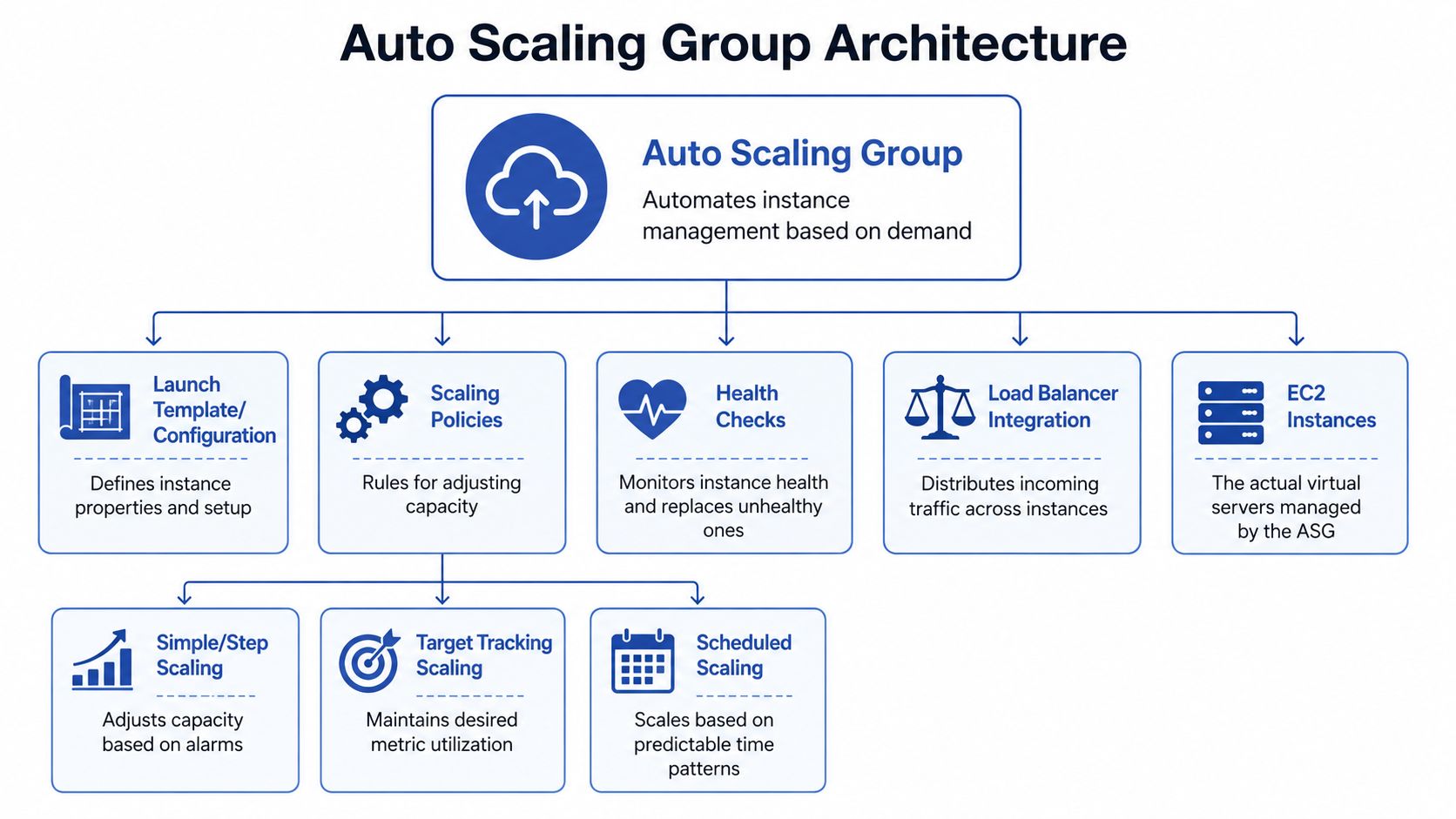
An auto scaling group works best when you stop thinking of it as a single feature and start seeing it as a small control system. It has a blueprint, guardrails, and placement logic.
The blueprint
The first piece is the launch template. This is the recipe the group uses whenever it needs a new EC2 instance. It defines the instance type, image, networking choices, and startup behavior.
If that recipe is wrong, scaling just creates more wrong servers. That’s why experienced teams treat the launch template as production code. Every instance launched by the group should be ready to join the fleet without a human logging in to finish setup.
A useful way to think about it is a bakery. The launch template isn’t the baker. It’s the standardized recipe card. If the recipe is clean and repeatable, every new loaf comes out consistent.
The guardrails
The second piece is the group configuration itself. It defines:
- Minimum capacity: the smallest number of instances the group should keep running
- Maximum capacity: the upper limit the group can scale to
- Desired capacity: the number the group tries to maintain right now
These settings matter because they define the operating envelope. Too low, and the application can starve. Too high, and you create expensive safety margins that no one revisits.
Here’s where new engineers often get confused. Desired capacity is not a hard-coded forever setting. It’s the current target the group tries to maintain, and scaling policies can move it up or down within the min and max boundaries.
The placement logic
The third piece is Availability Zone distribution. AWS Auto Scaling Groups distribute EC2 instances across multiple Availability Zones to improve fault tolerance and high availability, and if one zone becomes unavailable, the group can replace instances in healthy zones to maintain desired capacity without manual intervention, as described in this AWS auto scaling architecture explanation.
That behavior is one of the biggest reasons ASGs matter in production. You’re not just adding more instances. You’re reducing the chance that one infrastructure failure takes out the whole application tier.
| Component | What it does | Why it matters |
|---|---|---|
| Launch template | Defines how new instances are created | Keeps every instance consistent |
| Min, max, desired settings | Sets the capacity boundaries | Prevents runaway scaling or undersized fleets |
| Multi-AZ placement | Spreads instances across zones | Improves resilience during failures |
Practical rule: If you wouldn’t trust a freshly launched instance to serve traffic without manual fixes, your auto scaling group isn’t ready for production.
How Auto Scaling Groups Make Decisions
Auto scaling feels automatic from the outside, but under the hood it’s just disciplined if-then logic. Metrics go in. Policies evaluate them. Actions come out.
Metrics are the signals
An ASG needs a signal that reflects real demand. CPU utilization is common, but it isn’t always the best choice. A web application might scale better on request count or latency. A worker fleet might scale better on queue depth. The right metric is the one that tracks user demand or business work, not just machine stress.
CloudWatch is usually the monitoring layer teams rely on here. It can aggregate statistics for EC2 instances in an Auto Scaling Group, and scheduled scaling can adjust minimum, maximum, and desired capacity at specific times, either once or on a recurring schedule, according to this FinOps-focused guide to EC2 Auto Scaling Groups.
If you want a more EC2-specific walkthrough, this article on auto scaling for EC2 environments gives a practical view of how engineers connect metrics, alarms, and capacity changes.
Policies are the decision layer
Different workloads need different policy styles.
Target tracking
This is the easiest policy type to reason about. You define a target, such as keeping average CPU at a certain level, and AWS adjusts capacity to move the group toward that target.
It’s the thermostat model. You don’t say “turn on exactly two more heaters.” You say “keep the room at this temperature.”
Step scaling
This works well when the severity of the spike matters. A small breach might add a little capacity. A larger breach might add much more.
This is useful when demand arrives in uneven jumps. It gives you more explicit control than target tracking, but it also requires more tuning.
Scheduled scaling
Some demand patterns are predictable. Business-hour traffic, weekday testing, and known reporting windows don’t need reactive logic alone. Scheduled scaling lets teams set capacity changes at specific times, which is often simpler than waiting for a metric to drift upward.
Health checks keep the fleet usable
Scaling isn’t only about adding or removing instances. It’s also about replacing bad ones.
A healthy auto scaling group watches instance health and removes instances that fail checks. That gives you a self-healing pattern. Instead of an engineer noticing one bad node and intervening manually, the group does the replacement work for you.
- If demand rises, the group can launch more instances
- If demand falls, the group can terminate excess instances
- If an instance fails, the group can replace it
- If demand is predictable, scheduled policies can prepare capacity in advance
The most common design mistake is using a metric that’s easy to collect instead of one that reflects real application demand. Auto scaling then reacts correctly to the wrong signal.
Applying Scaling Strategies to Real World Use Cases
Theory gets clearer when you attach it to workloads people run.

E-commerce web tier
A customer-facing storefront is usually the classic ASG use case. Traffic can rise quickly, and the business cost of slow response is immediate. In that environment, you want instances that are stateless, boot consistently, and register cleanly behind a load balancer.
A team might use target tracking or step scaling here depending on traffic shape. If traffic rises in waves, target tracking often works well. If flash events create sharper bursts, step scaling can give more deliberate control.
The key design choice is this: the metric should represent customer demand, not just server pain. If you wait until instances are already saturated, the scale-out may arrive later than you want.
Batch and worker fleets
A worker fleet behaves differently. There may be no public traffic at all. The signal is often whether work is waiting.
For these systems, engineers usually think in terms of backlog. If work is queued, add workers. If the queue drains, scale in. That keeps compute aligned with actual throughput needs rather than with a generic machine metric.
ASGs are more than “just for websites”; they’re really a way to match compute supply to application demand, whatever form that demand takes.
A short walkthrough can help make those patterns more concrete:
Development and test environments
This is the use case many teams underestimate. Dev and test systems often don’t need to run continuously, but they still end up attached to auto scaling groups because teams want consistency with production.
That’s sensible from an architecture perspective, but it creates a cost trap. The ASG protects the environment and keeps the desired baseline alive, even during hours when nobody is using it.
Here’s the practical split:
- Production web apps: optimize for responsiveness and resilience
- Worker fleets: optimize for processing only when work exists
- Dev and test stacks: optimize for predictable usage windows and low idle time
The policy should follow the workload. Engineers get into trouble when they copy the same scaling pattern across all three.
Mastering Cost Optimization and Avoiding Common Pitfalls
A lot of teams stop at “the app stayed up,” then call the job done. That’s only half the job. The stronger approach is to design the auto scaling group so it meets demand without inadvertently turning flexibility into waste.
Use a purchasing mix, not a single instance strategy
The most effective cost pattern is usually a mix of capacity types. Strategically combining On-Demand instances, Reserved Instances or Savings Plans, and Spot Instances within an Auto Scaling Group can reduce EC2 costs by up to 90% on variable capacity, with the baseline or “floor” covered by RIs or Savings Plans and the burst capacity handled by Spot Instances, according to the FinOps Foundation working group on AWS EC2 autoscaling cost optimization.
That recommendation matters because it ties purchasing strategy directly to scaling behavior. Stable baseline capacity should be priced like something stable. Variable burst capacity should be priced like something interruptible.
If your team is building a wider FinOps practice, this guide to optimizing cloud budgets is a useful complement because it frames autoscaling decisions inside broader budget control.
Avoid the common tuning mistakes
The most expensive ASG mistakes usually don’t look dramatic in the console. They show up as a pattern of mediocre decisions repeated all day.
Wrong metric
If CPU is calm but request latency is rising, scaling on CPU may leave users waiting. If queue depth is growing but average utilization looks fine, scaling on utilization may underserve the workload.
Cooldowns that are too aggressive
If the group reacts too quickly to temporary spikes, it can launch and terminate instances in a loop. That kind of flapping creates noise, operational churn, and extra cost.
One group for unlike workloads
Putting very different workload types into one policy framework makes it harder to tune efficiently. A compute-heavy service and a memory-heavy service rarely want the same triggers or the same instance families.
Good cost optimization isn’t “scale in harder.” It’s “match the right capacity type and the right policy to the shape of the workload.”
Think in layers of cost
When engineers look only at EC2 rates, they miss the full operating picture. Auto scaling works best when capacity design, pricing model, and policy behavior are treated as one system. That’s how you avoid the classic result of an elegant autoscaling setup that still feels oddly expensive.
Auto Scaling vs Schedulers for Cloud Cost Control
An auto scaling group is reactive by design. It watches demand and changes capacity in response. That’s ideal when demand is uncertain.
A scheduler solves a different problem. It assumes you already know when a resource should be on or off. That makes it valuable for environments with clear business-hour usage, predictable maintenance windows, or long off-peak periods.
The difference matters because ASGs can carry hidden operating costs. Auto Scaling Groups incur hidden cost layers beyond EC2 instance pricing, including CloudWatch monitoring fees, Elastic Load Balancer charges, and operational costs from scaling events, which can increase overall spend by 15-25% for organizations with volatile scaling policies, according to this analysis of EC2 autoscaling cost behavior.
For a production storefront, those tradeoffs can be worth it. For a dev environment that nobody touches overnight, they often aren’t.
Auto Scaling Policies vs. Schedulers When to Use Each
| Criterion | Auto Scaling Group | Resource Scheduler (e.g., CLOUD TOGGLE) |
|---|---|---|
| Demand pattern | Unpredictable or variable | Predictable and calendar-based |
| Main strength | Adds or removes capacity based on live conditions | Powers resources on and off at known times |
| Best fit | Production applications, worker fleets, customer-facing services | Dev, test, staging, training, office-hour workloads |
| Operational style | Reactive | Proactive |
| Cost control method | Reduces overprovisioning during demand changes | Eliminates idle runtime during known downtime |
| Common limitation | Can leave minimum capacity running continuously | Not designed to absorb surprise load spikes on its own |
A simple decision rule
Use an auto scaling group when the question is, “How much capacity will we need?”
Use a scheduler when the question is, “Why is this environment still on at midnight?”
Those aren’t competing tools. They solve different cost and reliability problems.
Completing Your Strategy with Scheduled Shutdowns
The hardest cost problem with an auto scaling group often isn’t scaling out. It’s what happens when nothing is happening.
A key gap in standard ASG management is handling idle minimum capacity during predictable off-peak periods like nights and weekends. ASGs are strong at scaling up, but they don’t offer a simple native way to automatically power down all instances when demand is predictably zero, which leads to wasted spend, as noted in this discussion of ASG idle-capacity management gaps.
That’s why seasoned teams separate two ideas that beginners often blend together:
Elasticity is not scheduling
Elasticity means the system responds to changing load. Scheduling means the team decides in advance when something should be off. If an environment should sleep every night, reactive scaling alone is the wrong mental model.
For many non-production environments, the practical action is to set the group’s minimum, maximum, and desired capacity to zero during known downtime windows, then restore them when work resumes. That closes the gap between “dynamically sized” and “not running when nobody needs it.”
Control matters as much as automation
There’s also an operational issue beyond cost. Many teams want operations staff, finance stakeholders, or junior engineers to manage schedules without granting broad AWS console access.
That’s one reason scheduling tools exist outside the native cloud console. They make it easier to apply controlled start-stop policies, delegate access safely, and keep day-to-day cost actions separate from full infrastructure administration.
If your team is exploring that operating model, this guide on scheduling AWS instances for predictable uptime windows is a useful next step.
The mature pattern is simple. Let the auto scaling group handle uncertain demand. Let scheduled shutdowns handle predictable silence.
If your team wants a safer way to shut down idle cloud resources on schedule without handing out full cloud-console access, CLOUD TOGGLE is worth a look. It helps teams schedule power-down windows for cloud resources, apply role-based access controls, and cut spend from predictable idle time that autoscaling alone won’t remove.