Figuring out Amazon Redshift pricing can feel like a chore, but it really comes down to two main paths. You either go with Provisioned Clusters and pay a predictable hourly rate for capacity that's always on, or you pick Redshift Serverless and only pay for the exact compute power you use.
Your final bill is a mix of that choice plus a few other key ingredients like storage, data transfer, and more.
Your Quick Guide To Amazon Redshift Pricing
Getting a handle on the costs for a beast of a data warehouse like Amazon Redshift is non-negotiable if you want to keep your cloud budget in check. At its core, your biggest decision is whether to go with the Provisioned or Serverless model. This choice will set the stage for your entire spending pattern.
Think of the Provisioned model like leasing a dedicated office. You pay a flat, predictable fee for the space, whether your team is working around the clock or the office is empty overnight. This is a perfect fit for businesses with steady, high-volume workloads that need analytics horsepower available 24/7.
On the other hand, the Serverless model is like grabbing a desk at a co-working space. You only pay for the time you're actually sitting there working. This makes it a fantastic option for development teams, new projects, or any business with spiky, unpredictable query patterns. You stop paying the second you’re done, which completely wipes out any cost for idle time.
The Historical Context of Redshift Pricing
When Amazon Redshift hit the scene back in 2013, it completely shook up the data warehousing world. AWS came out of the gate with a price point of just $1,000 per terabyte per year, a tiny fraction of what legacy providers were charging. This move suddenly made enterprise-grade analytics accessible to almost everyone.
Of course, things have evolved since then. While compute is the main driver, a few other components will show up on your bill.
Here’s a quick look at the primary cost drivers for Amazon Redshift. This table breaks down what you're paying for and how each component is billed, giving you a clear snapshot of where your budget is going.
Key Amazon Redshift Cost Components At A Glance
| Cost Component | Description | How It Is Billed |
|---|---|---|
| Compute | Your main expense. This is the processing power that runs your queries. | Per node-hour (Provisioned) or per Redshift Processing Unit (RPU) hour (Serverless). |
| Managed Storage | The cost to store your data within Redshift's managed storage system. | Per gigabyte-month (GB-month). This is separate from compute for RA3 nodes and Serverless. |
| Data Transfer | Fees for moving data. Ingress from S3 in the same region is free, but egress costs money. | Per gigabyte (GB) for data moved out of Redshift to the internet or across AWS regions. |
| Concurrency Scaling | Automatically adds temporary cluster capacity to handle query spikes without making you wait. | Per-second, with one hour of free credits accrued for every 24 hours your main cluster runs. |
| Redshift Spectrum | Allows you to run queries directly against massive datasets stored in Amazon S3. | Per terabyte (TB) of data scanned from S3. |
| Snapshots | Backups of your cluster data. Some automated storage is free, but manual snapshots have a cost. | Per gigabyte-month (GB-month) for manual snapshots and automated snapshots beyond the free limit. |
As you can see, your total cost is more than just the compute model you choose. Each of these components plays a role in your final monthly bill.
To get a better feel for how these charges fit into the bigger picture, understanding pricing structures across different cloud services can be a huge help. Seeing how various models work will give you a stronger instinct for managing your overall cloud budget.
This gives you a solid map of the main cost drivers. Now, let’s dig into each one to uncover the details, find potential hidden costs, and figure out how to pick the right setup for your team.
Choosing Your Model: Provisioned vs. Serverless
When you first dive into Amazon Redshift, you'll hit a fork in the road right away. You have to pick between two core pricing models: Provisioned Clusters and Redshift Serverless. This isn't just a minor detail; it's the single biggest decision that will shape your monthly bill.
Think of it like getting an office space. You could sign a long-term lease for a dedicated office that's always yours, or you could grab a flexible membership at a co-working space and only pay for the desk time you actually use. Each one is built for a different way of working, and picking the right one for your data workload is the key to not overspending.
Let's break down how they work.
The Provisioned Cluster Model: Predictable Power
The Provisioned Cluster model is the classic way of using Redshift. It’s your "long-term office lease." You pick your hardware, like the modern RA3 nodes or older DC2 types, decide how many you need, and you're billed a flat hourly rate for that cluster.
It's always on, always available, and the compute power is all yours. You pay for it whether you're running a massive query or the cluster is sitting idle.
This model is a perfect fit for businesses with steady, predictable, and heavy-duty workloads. If your analytics team is firing off queries around the clock or your BI dashboards need constant refreshing, the fixed cost of a provisioned cluster is usually the most economical choice.
Here's what defines the Provisioned model:
- Fixed Hourly Billing: You pay a consistent rate for every hour the cluster is running. This makes budgeting and forecasting a breeze.
- Node Selection: You have to do a bit of capacity planning upfront, choosing the right instance type (like RA3 for separating compute and storage or DC2 for compute-heavy tasks) and the number of nodes.
- Always-On Availability: Your resources are dedicated and ready to go instantly, delivering consistent performance for mission-critical queries.
Because you're committing to capacity, this model also unlocks major discounts with Reserved Instances, which we'll get into later.
This decision tree helps frame the choice.
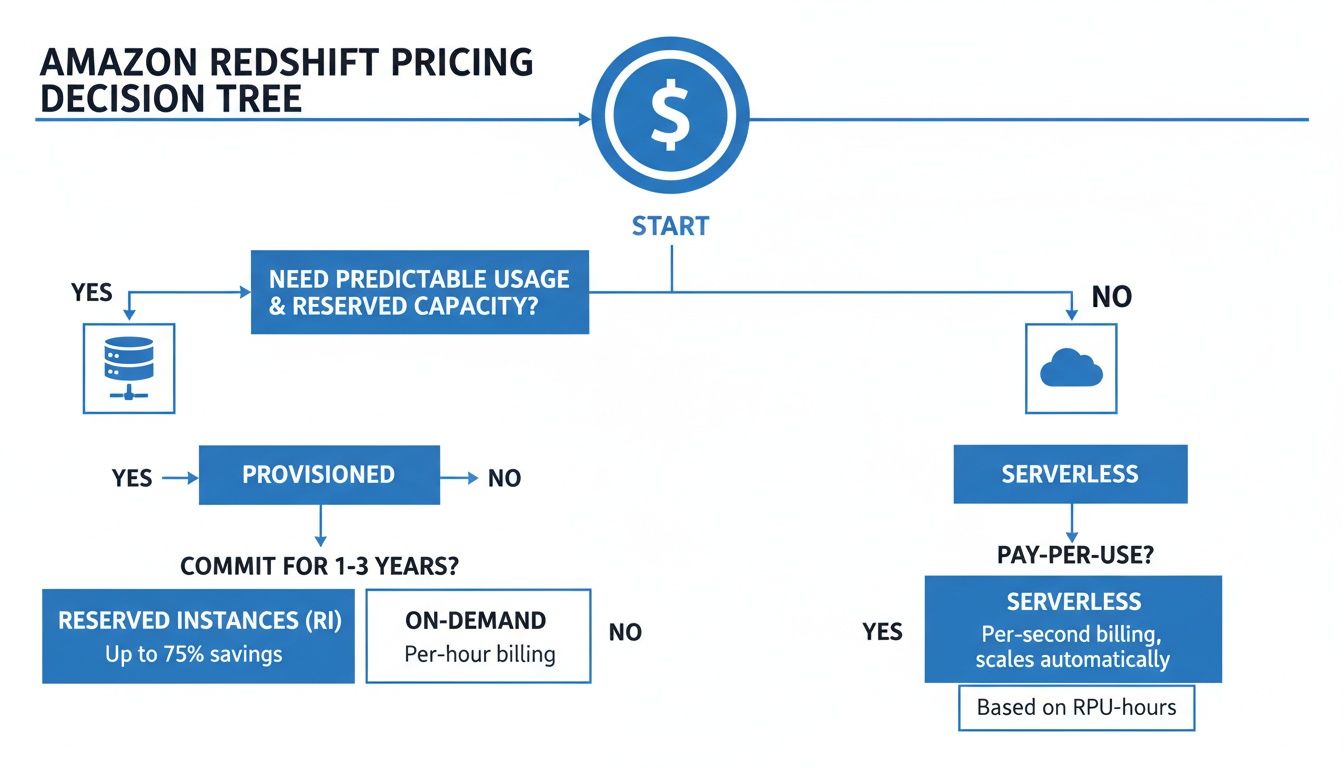
As you can see, if your workload is steady and consistent, the Provisioned model makes sense. But if your usage is all over the place, Serverless offers a more flexible path.
The Serverless Model: Pay-As-You-Go Flexibility
On the other side, you have Redshift Serverless. This is your "co-working space." Instead of leasing an entire cluster 24/7, you only pay for the compute power you use, right when you use it. This is a total game-changer for teams with sporadic or unpredictable data needs.
Here, you're billed in Redshift Processing Unit (RPU) hours. An RPU is just a measure of processing capacity. You get charged on a per-second basis (with a 60-second minimum) only for the time your queries are actively running. When things are quiet, the compute billing stops. Idle time costs you nothing.
Redshift Serverless automatically handles all the provisioning and scaling of resources behind the scenes. You never have to think about managing clusters, patching, or capacity planning again.
This model is a fantastic fit for a few common scenarios:
- Development and Testing: Perfect for environments that only get used during work hours.
- Ad-Hoc Analytics: Ideal when data scientists run complex but infrequent queries.
- New Projects: A great choice when you're not sure what your usage patterns will look like yet.
- Spiky Workloads: Works well for businesses with predictable peaks, like month-end reporting, but low usage the rest of the time.
For example, imagine a marketing team that only runs performance reports once a day. On a provisioned cluster, they’d be paying for a machine that sits idle for over 23 hours. With Serverless, they only pay for the few minutes of compute it takes to generate their reports, which can slash their costs dramatically.
Ultimately, the choice comes down to one thing: your workload patterns. If you have a steady, 24/7 demand, the predictable costs and reservation discounts of a provisioned cluster will likely win out. But if your usage is intermittent, spiky, or just plain unpredictable, the pay-per-use economics of Redshift Serverless are tough to beat.
Uncovering The Hidden Costs In Your Redshift Bill
Picking between Provisioned and Serverless compute is your first major decision with Amazon Redshift, but your final bill is always more than just that one line item. A handful of other services and usage-based charges can easily inflate your monthly spend if you aren't watching closely. Getting a handle on these "hidden" costs is the real key to forecasting your budget accurately and avoiding nasty surprises.

Now, these fees aren't hidden maliciously. They're just not part of the primary compute cost, which is why they so often catch teams off guard. Let's break down exactly where these charges come from.
Redshift Spectrum Data Scanning Fees
Redshift Spectrum is a fantastic feature. It lets you run SQL queries directly on huge datasets living in your Amazon S3 data lake without loading a single byte into Redshift first. While that gives you incredible flexibility, it has its own pricing model that can add up fast.
Spectrum’s price is based on how much data it scans from S3, not how much data your query returns. The going rate is $5 per terabyte of data scanned, and there's a 10MB minimum charge for every query.
This means a simple query returning just a few rows could get expensive if it has to scan a massive, unoptimized terabyte-sized file. To keep Spectrum costs under control, you absolutely have to use best practices. That means storing data in columnar formats like Parquet or ORC, compressing your files, and partitioning data in S3. This all helps limit how much data each query needs to touch.
The Nuances Of Data Transfer Costs
Data transfer fees are a classic source of surprise bills across every AWS service, and Redshift is no different. It’s critical to know when you pay for moving data and, just as importantly, when you don’t.
The good news? Some transfers are completely free. You won’t get charged for:
- Data transferred into Redshift from Amazon S3, as long as it's in the same AWS Region.
- Data moving between your Redshift cluster and other hosts inside the same Availability Zone.
But the meter starts running the moment data leaves its local neighborhood. You'll see charges for:
- Data transferred out of Redshift to the public internet.
- Data moved between different AWS Regions (like from a cluster in
us-east-1to an app ineu-west-1). - Data transferred across different Availability Zones, even within the same region.
Keeping an eye on these transfers is vital. For the most detailed breakdown of your spending, you'll want to get familiar with analyzing AWS Cost and Usage Reports, which gives you the most granular data you can get.
Other Important Cost Contributors
Beyond Spectrum and data transfers, a few other line items can show up on your bill. Keeping these on your radar will give you full command over your Amazon Redshift pricing.
Concurrency Scaling: This feature is a lifesaver, automatically adding temporary cluster power to handle sudden query spikes and prevent slowdowns. You get free credits, one hour for every 24 hours your main cluster runs, but any usage beyond that is billed per second at your cluster’s on-demand rate.
Managed Storage for Snapshots: Redshift backs up your data automatically, which is great. The storage for these automated snapshots is free, but only up to the total provisioned storage size of your cluster. If you take manual snapshots or your automated backups grow larger than your free allowance, you'll be charged standard Amazon S3 rates.
Data Sharing: This feature lets you securely share live, transactionally consistent data across different Redshift clusters. There’s no charge for the feature itself, but you still pay for the compute resources used on the cluster that's consuming the data and any data transfer costs if the clusters are in different AWS regions.
By proactively monitoring these areas, you can turn your Redshift bill from a monthly guessing game into a predictable and manageable expense.
Real-World Cost Scenarios For Redshift Users
Understanding the individual cost components of Amazon Redshift is one thing, but seeing how they all come together for a real business is what really matters for your budget. Theory only takes you so far.
To make this tangible, let's walk through three distinct scenarios: a lean startup, a growing e-commerce company, and a large enterprise. By breaking down their potential monthly bills, you can get a much clearer picture of what your own Redshift spending might look like.
Scenario 1: The Lean Startup With Intermittent Queries
Imagine a small tech startup with a couple of developers and one data analyst. Their analytical needs are pretty irregular. They run ad-hoc queries a few times a day to check user behavior metrics, with a more intense reporting job happening once a week. They definitely don't need a data warehouse running 24/7.
For this kind of use case, Redshift Serverless is a perfect fit. It completely eliminates any cost for idle time, which is exactly what a startup needs to keep its cloud bill from spiraling out of control.
Let's estimate their monthly costs:
- Workload: Roughly 2 hours of query processing on weekdays (22 days/month) and a 4-hour heavy job on Saturdays (4 days/month).
- Total Compute Time: (2 hours/day * 22 days) + (4 hours/day * 4 days) = 60 hours of active compute per month.
- Serverless Configuration: They use a base of 8 RPUs (Redshift Processing Units) to get the performance they need for their queries.
- RPU Rate: In the
us-east-1region, the RPU rate is about $0.375 per RPU-hour.
Calculation:
60 active hours/month * 8 RPUs * $0.375/RPU-hour = $180 per month for compute.
This predictable, pay-for-what-you-use cost is ideal for a company that can't justify a large, fixed monthly expense for a data warehouse that would sit empty most of the time. They only pay for the exact moments their queries are running.
Scenario 2: The Mid-Sized E-Commerce Company
Now, let's consider a mid-sized e-commerce business. This company runs daily sales reports, analyzes customer trends, and powers internal BI dashboards that are hit constantly during business hours. Their workload is predictable, running like clockwork from 9 AM to 5 PM, Monday through Friday.
A Provisioned Cluster makes more sense here, but running it 24/7 would be a huge waste of money. They wisely choose a DC2.Large node, which hits the sweet spot between performance and cost for their dataset. They also use a scheduling tool to automatically shut the cluster down outside of business hours.
Here’s a breakdown of their on-demand pricing:
- Node Type: 1x
dc2.largenode. - On-Demand Rate: Approximately $0.25 per hour in
us-east-1. - Uptime: 8 hours/day, 5 days/week, which comes out to around 176 hours per month.
On-Demand Calculation:
176 hours/month * $0.25/hour = $44 per month.
That's already pretty good, but this company knows its workload is incredibly stable. By committing to a 1-Year Reserved Instance (RI) with no upfront payment, they can unlock a serious discount.
- 1-Year RI Rate: The effective hourly rate drops to around $0.155 per hour.
Reserved Instance Calculation:
176 hours/month * $0.155/hour = $27.28 per month.
Just by committing to a year, they save nearly 40% on compute costs for a workload they know they'll have. This is a classic example of how reservations pay off for stable usage. If you want to see how this works for another AWS database, you can learn more about how Amazon Relational Database Service pricing works in our related guide.
Scenario 3: The Large Enterprise With Petabyte-Scale Analytics
Finally, let's look at a large enterprise sitting on a massive, multi-petabyte data lake. They run incredibly complex analytics, train machine learning models, and serve data to hundreds of concurrent users around the globe. Their workload is constant, mission-critical, and demands high performance and scalability 24/7.
This enterprise goes with a Provisioned Cluster using modern RA3 nodes, which cleverly decouple compute and storage. This lets them scale storage into the petabytes without having to over-provision expensive compute nodes they don't need.
- Cluster Configuration: 4x
ra3.4xlargenodes. - On-Demand Rate: Roughly $3.26 per node-hour.
- Storage: 100 TB of Redshift Managed Storage (RMS).
- RMS Rate: About $0.024 per GB-month.
On-Demand Compute Calculation:
4 nodes * $3.26/hour * 730 hours/month = $9,519.20 per month.Managed Storage Calculation:
100 TB * 1024 GB/TB * $0.024/GB-month = $2,457.60 per month.Total On-Demand Cost: $9,519.20 + $2,457.60 = $11,976.80 per month.
That's a significant monthly bill. But since this is a 24/7 workload, a 3-Year Reserved Instance with an All Upfront payment offers the deepest discount possible, often up to 76%.
- 3-Year RI Effective Rate: The hourly rate could plummet to around $0.90 per node-hour.
Reserved Instance Compute Calculation:
4 nodes * $0.90/hour * 730 hours/month = $2,628 per month.Total RI Cost: $2,628 (compute) + $2,457.60 (storage) = $5,085.60 per month.
By making a long-term commitment, the enterprise slashes its monthly Redshift bill by over 57%. These examples drive home the most important point: matching your pricing model and purchase options to your specific workload is the key to managing your Amazon Redshift costs.
Proven Strategies to Optimize Your Redshift Spend

Knowing what goes into your Redshift bill is one thing; actually lowering it is another. It's time to move from theory to practice with a clear playbook for cutting costs. By mixing smart financial moves with solid technical practices, you can dramatically reduce your monthly spend without hurting the analytical performance your business relies on.
These strategies cover everything from choosing the right hardware to shutting down clusters you aren't even using. Let’s dive into the most effective ways to get more out of your Redshift investment.
Choose The Right Node Types And Purchase Options
The hardware and payment model you select form the bedrock of your cost structure. If you have predictable, always-on workloads, Reserved Instances (RIs) are a no-brainer. Committing to a one or three-year term for your provisioned cluster can cut your on-demand compute bill by as much as 76%. For any steady-state environment, this is the biggest financial win you can get.
For more modern setups, moving to RA3 nodes is a game-changer. RA3 instances separate compute from storage, so you can scale each one independently. This solves the age-old problem of paying for beefier compute nodes just because you ran out of storage space, a common headache with older DC2 nodes.
And don't overlook Serverless for the right jobs. For dev/test environments or spiky, unpredictable analytical queries, Redshift Serverless is perfect. It completely gets rid of the cost of idle time.
Implement Technical Best Practices For Efficiency
Beyond hardware, the way you design your tables and write your queries has a massive impact on performance and cost. Efficient queries use fewer resources, which means direct savings, especially if you're paying by the query.
Here are a few technical tweaks that make a real difference:
- Data Compression: Always compress your columns. Redshift is smart enough to analyze your data and recommend the best encoding. This shrinks your storage footprint and makes read operations much faster.
- Distribution Keys: A good distribution key (
DISTKEY) is crucial. It tells Redshift how to spread data across nodes, minimizing how much data has to be shuffled around for joins and aggregations. Your queries will run faster and more efficiently. - Sort Keys: Defining sort keys (
SORTKEY) organizes data within each slice on a node. This lets the query engine skip huge blocks of data that aren't relevant to a query's filter, which drastically cuts down scan times.
If you're looking for a wider view on reining in expenses, checking out general IT cost optimization strategies can offer some great ideas that apply to Redshift, too. These principles of efficiency and smart governance work across your entire tech stack.
Manage Idle Resources With Automated Scheduling
One of the biggest and most avoidable sources of cloud waste is paying for resources that are just sitting there, doing nothing. Think about your non-production clusters for development, testing, and staging. They often run 24/7, but are they really being used at 3 AM on a Sunday? Probably not. That could easily add up to over 128 hours of wasted spend every single week, for every single cluster.
This is where automated scheduling isn't just a "nice-to-have"; it's a critical cost-control tool.
Relying on people to manually pause and resume clusters is a recipe for failure. Someone will forget, and a cluster left running over a long weekend can burn hundreds of dollars for no reason. A dedicated scheduling tool is the answer, enforcing a simple power-off policy for these environments.
Tools like CLOUD TOGGLE are built for exactly this. You can set up dead-simple schedules to automatically pause Redshift clusters every night and weekend, then bring them back online just before your team starts their day. This single move can slash your non-production costs by up to 70% with almost no effort. It's a must-have tactic for any team serious about trimming their bill.
For more ideas on cutting your AWS expenses, check out our guide on overall AWS cost optimization. By putting these strategies into action, you can turn your Amazon Redshift bill from a painful, complex expense into a well-managed asset.
Got questions about Redshift pricing? You're not alone. The details can get tricky, especially when you're trying to forecast a bill or choose the right model.
Here are some of the most common questions we hear, with straight-to-the-point answers to help you manage your Redshift costs like a pro.
Is Redshift Serverless Always Cheaper Than Provisioned?
Not at all. The right answer depends completely on how you use it. Think of it like a car: is it cheaper to rent by the hour or get a long-term lease?
Redshift Serverless is a fantastic deal for intermittent or spiky workloads. If you have analytics jobs that run in bursts, or development environments that are only used from 9-to-5, Serverless is your winner. You only pay for the compute time you actually use, which means no money is wasted on idle time.
On the other hand, for steady, predictable workloads that chug along 24/7, a Provisioned cluster is the way to go. Committing to a 1-year or 3-year Reserved Instance unlocks massive discounts that make constant usage far more affordable than the pay-as-you-go Serverless rate.
How Can I Avoid Surprise Data Transfer Costs?
Ah, the classic AWS bill surprise. Data transfer fees trip up even experienced engineers. With Redshift, the biggest "gotcha" is moving data out of the service to the internet or across to a different AWS region.
To keep these costs in check, stick to these rules:
- Run your BI tools and applications in the exact same AWS Region and Availability Zone as your Redshift cluster. Data transfer is free inside the same AZ.
- Watch out when using Redshift Spectrum. If it queries data in an S3 bucket in another region, you'll be hit with inter-region data transfer fees for everything it scans.
- Data loaded into Redshift from S3 (in the same region) is free. Data going out is almost always where the charges hide.
What Is The Easiest Way To Start Reducing Redshift Costs?
The single fastest win? Shut down your non-production clusters when nobody is using them.
It sounds simple, but development, testing, and staging environments are often left running 24/7, even though they're only actively used for about 40 hours a week.
This means you could be paying for over 120 hours of completely wasted idle time per cluster, every single week.
Turning them off during nights and weekends is a direct path to huge savings. But don't rely on people to remember because someone always forgets. Automation is the only reliable way to do this. A simple scheduling tool ensures your clusters are only running when needed, which can slash their costs by up to 70% without any other changes.
Does Redshift Offer A Free Tier?
Yes, and it's pretty generous. It gives you a great way to test the waters without opening your wallet. The free tier comes in two flavors:
- For Provisioned Clusters: New accounts get a two-month free trial of a
dc2.largenode, which includes 750 hours per month. - For Redshift Serverless: You receive $300 in free credits to use toward compute and storage costs. The credits expire after 90 days.
This is the perfect setup to run some experiments and figure out which model works best for your workloads before you have to pay a dime.
Stop paying for idle cloud resources and start saving today. CLOUD TOGGLE makes it simple to automate on/off schedules for your Redshift clusters, cutting non-production costs by up to 70%. Start your 30-day free trial and see how much you can save.