You’re probably here for the same reason most founders and small engineering teams look up amazon free tier aws. You want to build something real without lighting money on fire, but you also know “free” in cloud usually comes with a footnote.
That skepticism is healthy.
AWS has made the entry point much better for new users, but the operational burden hasn’t gone away. The dangerous part isn’t usually launching your first EC2 instance or testing Lambda. It’s what happens after that. Someone forgets a volume, leaves an instance running over a weekend, joins an AWS Organization too early, or assumes billing alerts will stop bad spend before it starts. They won’t.
The AWS Free Tier can still be one of the best ways to prototype, train a team, or validate an idea. You just need to treat it like a system with rules, not a giveaway.
Starting Your Journey on the AWS Free Tier
A founder spins up an AWS account on Friday to test a prototype. By Monday, the app still works, but so do the billable resources nobody cleaned up. That is the actual starting point with the AWS Free Tier. Staying free depends less on what AWS offers and more on how tightly your team runs the account.
Recent AWS changes made the entry path better for brand-new accounts. New users now start in a credit-based onboarding model with a defined exploration window, which is simpler than the older experience of piecing together service-by-service free limits. The catch is practical. Credits are easy to spend if engineers treat the account like a normal sandbox and nobody owns cleanup.
The risk shows up faster in multi-account setups.
A single founder account is usually manageable with some discipline. A startup with separate dev, test, and client demo accounts has a different problem. Native AWS tools can alert after spend starts, but they do not enforce naming standards, shutdown schedules, or consistent guardrails across every account unless your team sets that up deliberately. If you join AWS Organizations early without a cost-control plan, the Free Tier stops feeling simple very quickly.
Practical rule: Treat the Free Tier like a temporary operating environment, not a permanent pricing strategy.
Use it to validate an idea, train engineers, or prove out a small workload. Put cost controls in place on day one anyway. The teams that stay near zero are usually the teams that assign ownership, tag everything, review usage weekly, and assume AWS will not stop a bad spend pattern for them.
Understanding the Three Types of Free AWS Offers
A founder spins up one AWS account for a prototype, then a second for demos, then a third under Organizations because a contractor asks for isolation. Two weeks later, everyone still says the stack is "on the free tier," but each account is playing by different rules. That confusion is where small bills turn into avoidable waste.
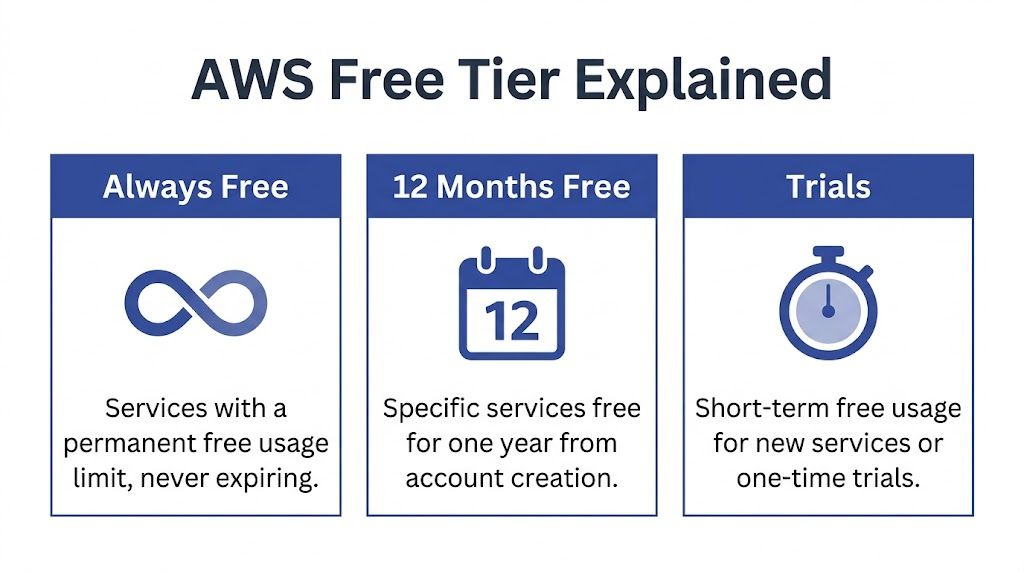
AWS free offers fall into three buckets. Treating them as one program is a mistake because each bucket has its own limits, timing, and failure mode.
Always Free
Some services include ongoing monthly free usage. These allowances reset each month and continue while the service remains part of the always-free program.
Operationally, this is the easiest category to misunderstand. Teams see "always free" and stop reading. In practice, it means "free up to a small monthly threshold." If one engineer runs a feature test that pushes DynamoDB reads or Lambda execution past the allowance, charges start immediately. The same problem shows up in database choices. A prototype that starts on DynamoDB can stay cheap for longer than a relational setup in some cases, but the right choice still depends on access patterns, scaling behavior, and admin overhead. If your team is weighing that decision, this DynamoDB vs RDS comparison is a useful technical checkpoint.
Credit-based free plan for new accounts
New AWS accounts now enter through a credit-based onboarding model rather than the older "everything is 12 months free" assumption many blog posts still repeat. As noted earlier from AWS documentation, this plan gives new users a defined exploration window with promotional credits and service access rules tied to that account's onboarding status.
For a startup, credits are useful but fragile. They are easy to burn on experiments nobody cleans up, and they do not create account-level discipline across dev, test, and demo environments. In a multi-account setup, one account may still have credits while another is already billing normally. Finance sees "AWS Free Tier." The invoice does not care what the team meant.
Service trials and legacy account rules
Some AWS services still have their own trial terms, and older accounts may follow legacy free-tier patterns that differ from what a brand-new account gets today. That is why generic advice from older tutorials often causes trouble. The article may be accurate for the author's account history and still wrong for yours.
Use this model instead:
| Offer type | What it means in practice | Main risk |
|---|---|---|
| Always Free | Small monthly allowances that reset each month | Usage can cross the limit quietly |
| Credit-based free plan | Temporary credits for new-account onboarding | Credits expire, and spending habits carry over after they do |
| Service trials or legacy rules | Terms depend on the service or the age of the account | Old guidance may not match current account behavior |
AWS also notes, in its Free Tier documentation, that it sends email alerts when usage reaches certain free-tier thresholds. Helpful, yes. Sufficient, no.
Email warnings do not enforce stop times, clean up idle resources, or standardize cost controls across multiple accounts.
That gap matters more than founders expect. Native AWS tooling can show spend and send alerts after activity starts. It does not automatically stop a developer from creating a paid resource in the wrong account, leaving test data running all weekend, or bypassing the naming and tagging rules your finance process depends on. Staying free requires active controls your team owns, especially once more than one account is involved.
Key Free Services and Their Critical Limits
A startup usually gets into trouble here the same way. One developer launches a small EC2 instance for testing, another adds a database, nobody cleans up storage, and the team still calls the environment "free" because the app itself has barely any traffic.
The Free Tier can carry an early prototype. It does not tolerate loose operations, especially when work is split across multiple accounts and nobody owns daily cost checks.
EC2 burns through your margin for error fast
EC2 is the first service many founders reach for because it feels familiar. A small Linux box, SSH access, one place to run the app. The problem is not only the instance. The problem is everything around it, including attached storage, snapshots, load balancers, public IP behavior, and the habit of leaving machines on because "we might need it later."
The allowance is small enough that one always-on dev box can consume most of it. Add a second machine, or let a test instance run through a weekend, and the free window closes quickly.
Use EC2 on the Free Tier only if you can answer yes to all three questions below:
- Does someone shut it down on a schedule when it is not needed?
- Is the instance type still inside the free allowance for this account?
- Are you tracking the related resources, not just the VM?
If the answer is no, EC2 is usually the wrong first choice for a cost-sensitive team.
Lambda reduces one common failure mode
Lambda is often safer because idle time does not sit there billing in the background the way a forgotten server can. For small APIs, cron-style tasks, webhook handlers, and internal tools, that matters more than the raw free allocation.
There is still a trade-off. Lambda shifts the risk from "server left running" to "bad execution pattern." A noisy loop, oversized payloads, aggressive retries, or chatty downstream calls can turn a cheap function into an expensive system. Teams also underestimate logging costs. A function that stays inside free request volume can still generate enough CloudWatch log data to create charges.
For an early product, Lambda is a good fit when the workload is bursty and the team has basic discipline around timeouts, retries, and log retention.
DynamoDB is cheap early, but only if the access pattern fits
DynamoDB works well for lean backends with predictable key-based reads and writes. It is often a better Free Tier match than spinning up a relational database just because the team is used to SQL.
The hidden cost is engineering fit. If the product needs joins, flexible reporting, or relational constraints, forcing DynamoDB into that shape creates complexity long before the AWS bill does. Teams save a little on infrastructure and pay for it in developer time.
If you are deciding between document or key-value access patterns and a relational model, read this comparison of DynamoDB vs RDS. Make that decision early. Reworking the data model later is usually more expensive than the first month of infrastructure.
"Free" services still sit inside a billable system
Founders often watch the main service and miss the surrounding charges.
Storage drifts upward. Snapshots pile up. Data leaves a region. Logs grow without retention limits. In a multi-account setup, the problem gets worse because one sandbox account can look harmless in isolation while the combined sprawl across dev, test, and demo accounts creates real spend. Native AWS views show the charges after resources exist. They do not enforce a cleanup standard across accounts.
That is why service selection and reporting have to work together. A useful next step is setting up AWS Cost and Usage Reports for account-level cost analysis so you can see which services and linked accounts are creating drift before the monthly invoice does.
Use this quick lens before adding any "free" service:
- Compute fit: Is the workload event-driven, or will it sit idle for long stretches?
- Storage fit: Will volumes, backups, objects, or logs keep growing unless someone deletes them?
- Traffic fit: Does data stay local, or will transfers and egress show up later?
- Account fit: If your team uses multiple AWS accounts, who checks that the same limits, tags, and cleanup rules apply in each one?
- Team fit: Can the team operate the service without relying on memory?
The Free Tier is enough for a proof of concept run by disciplined operators. It is a poor match for teams that assume alerts alone will keep them free.
How to Set Up Your Account and Monitor Usage
A startup account can stay free for months, then produce a bill in a weekend because one test instance ran in the wrong region and nobody saw the alert email. In a multi-account setup, that problem spreads fast. One founder inbox, one shared root login, and one forgotten sandbox are enough.
Do these first
Set up cost controls before anyone starts clicking around in the console. Native AWS billing tools can warn you after spend starts. They do not give small teams much enforcement across multiple accounts unless you build that discipline yourself.
Create an AWS Budget
Set the threshold low. The goal is not polished reporting. The goal is early noise when a test account starts spending. If you want cleaner account and service breakdowns later, this guide to AWS Cost and Usage Reports for account-level cost analysis is a practical next step.Enable billing alerts
Send alerts to a real distribution list, not a founder’s personal inbox. Include the person who can stop resources, not just the person who notices the problem.Verify who receives Free Tier warning emails
AWS sends usage warning emails for Free Tier thresholds, but those messages are only useful if someone reads them the same day and knows what to shut down.Lock down the root account
Turn on MFA and stop using root for day-to-day work. Cost mistakes and security mistakes often come from the same sloppy setup.Decide who owns each account
In a single account, this is simple. In dev, test, demo, and client-facing accounts, ownership gets blurry fast. Put one name or team on each account and make that visible.
What AWS gives you, and what it does not
AWS provides budgets, billing alarms, and Free Tier usage notifications. That is enough to detect some problems. It is not enough to keep a growing team free by default.
The gap is operational. AWS will not make your team apply the same alert recipients, naming rules, tags, cleanup schedules, and region restrictions in every account. If you run more than one account, check those controls account by account. Otherwise, you are trusting every engineer and contractor to remember the same habits under time pressure.
Here’s a walkthrough if you want to see the workflow in action:
Add a weekly review routine
A short review beats a perfect dashboard nobody checks.
- Review active compute: Confirm every running instance, database, and container has an owner, a purpose, and a shutdown plan.
- Review storage growth: Check EBS volumes, snapshots, S3 buckets, and log groups for items nobody needs.
- Review region sprawl: Look for resources outside the team’s approved region list.
- Review alert paths: Test that billing emails and budget notifications still go to the right people.
- Review account drift: Compare sandbox and dev accounts against your standard settings so one account does not inadvertently lose guardrails.
I have seen small teams assume alerts were enough. The bill usually came from the part no one reviewed.
Common Gotchas That Cause Unexpected Bills
Friday evening is a common failure point. An engineer spins up a small test stack, leaves for the weekend, and nobody notices the account is no longer operating under the assumptions the team started with.
AWS Organizations can change Free Tier eligibility
This catches teams that are doing the right thing from a governance standpoint.
AWS states in its Free Tier eligibility documentation that eligibility can change based on account status, including whether an account is part of an AWS Organization. For a startup, that means a sandbox account that looked harmless on its own can become billable after an org migration.
The operational mistake is assuming account structure and billing status are separate decisions. They are not. If you run dev, test, and founder sandboxes across multiple accounts, check Free Tier eligibility before and after any Organizations change. Do not rely on what was true when the account was first created.
Forgotten resources are still the most common leak
Unexpected bills usually come from leftovers, not from some rare AWS edge case.
The repeat offenders are familiar:
- Detached EBS volumes left behind after instance termination
- Idle test instances created for a demo, migration, or bug hunt
- Old snapshots and build artifacts that nobody reviewed after the project changed
- Cross-region resources launched during testing outside the team’s normal region list
These are easy to miss in a multi-account setup. One engineer checks us-east-1 in the main dev account and assumes the environment is clean. Meanwhile, an old volume sits in another region, or a small database keeps running in a sandbox account nobody opened this month.
If you need a practical walkthrough for tracing these leaks, this guide to unexpected AWS charges covers the usual billing offenders.
Native alerts do not enforce discipline
AWS Budgets, billing alarms, and Free Tier notifications help with visibility. They do not apply rules across every account, stop a teammate from launching the wrong resource type, or clean up abandoned storage.
That gap matters more once a company has several accounts and several people touching cloud infrastructure. Native tools tell you a problem exists. They do not give you strong account-by-account enforcement unless your team builds that operating model itself.
I have seen small teams assume alerts were enough. The bill usually came from an account that had no shared tagging policy, no cleanup schedule, and no clear owner.
Multi-account setups make small misses expensive
Separate accounts for dev, test, and production are usually the right call. The problem starts when each account develops its own habits.
One account has budget alerts. Another sends notices to an ex-contractor. A third lets anyone launch resources in any region. At that point, staying free is no longer about service limits. It is about operating discipline.
In practice, the teams that avoid surprise bills do three things consistently. They assign ownership for every account, restrict where people can build, and review leftovers before month-end. AWS will not do that for you by default.
Your Checklist to Avoid AWS Billing Surprises
You don’t need a formal FinOps team to stay disciplined. You need a short routine that someone follows.
Run this checklist every two weeks if the account is active. Monthly is the bare minimum.
The operating checklist
- Check running compute first: Open EC2 and confirm every active instance is expected, tagged, and still needed for current work.
- Look for unattached storage: Review volumes and snapshots for anything left behind after instance deletion or temporary tests.
- Scan every active region: Teams often check one region and miss resources in another.
- Review database experiments: Remove databases that were created for a spike, migration test, or demo and never revisited.
- Inspect data movement patterns: If apps talk across regions or push data out of AWS, verify those paths are intentional.
- Audit IAM and ownership: Every billable resource should have a human owner, even in a tiny team.
- Confirm alert delivery: Make sure cost emails go to a monitored mailbox or shared ops channel.
What a founder should ask an engineer
If you’re not technical, ask these three questions plainly:
- Which resources are running continuously right now?
- Which of them must stay on outside working hours?
- What gets deleted automatically, and what depends on someone remembering?
Those questions reveal a lot fast.
The right standard
A healthy Free Tier environment is boring. It has clear owners, few always-on resources, and regular cleanup.
If your team can’t explain why something exists, it probably shouldn’t still be running.
Advanced Cost Control for DevOps and SMBs
A startup usually hits the same point around the second or third AWS account. One engineer spins up a staging stack for a client demo, another leaves test infrastructure running over the weekend, and finance finds a bill from an account everyone thought was still "inside Free Tier." That is where cost control stops being a billing exercise and becomes an operating discipline.

For DevOps teams and small businesses, the expensive mistakes are usually boring. Idle EC2 instances. Orphaned EBS volumes. Load balancers left behind after a short test. In multi-account setups, those mistakes get harder to spot because ownership is split, Free Tier treatment changes by account history, and AWS native alerts still tell you about spend after it starts.
The practical fix is to treat free usage as something you enforce, not something you hope for. Schedules, expiration rules, mandatory tags, and account-level ownership do more than another email alert. If a dev environment only matters from 9 to 6, shut it down automatically. If a sandbox is temporary, attach a deletion date when it is created. If nobody can name the owner of a resource, that resource is already a billing risk.
Scheduling needs to survive real team behavior
Teams say they will stop instances at night. They usually do for a week or two. Then a deadline hits, someone bypasses the process, and the exception becomes the standard.
That is why manual cleanup does not scale, especially across separate dev, staging, and experiment accounts. AWS can handle scheduling with native building blocks, but smaller teams often end up stitching together Lambda, EventBridge, IAM roles, and exceptions by hand. That works. It also creates one more internal tool that someone has to maintain.
A simpler approach often wins. Use schedules for anything predictable. Use TTL tags for short-lived resources. Block launches that do not include an owner tag and an intended shutdown pattern. For broader policy ideas, this article on AWS cost optimization is useful because it treats savings as a repeatable operating habit, not a one-time cleanup project.
Cost control without context creates other problems
Saving money is not the same as managing the environment well. A stopped instance may still have an exposed snapshot, overly broad IAM access, or test data that should not exist anymore. Cost controls need to sit alongside basic security review and cleanup standards.
If your team is tightening both at the same time, this guide to a comprehensive AWS penetration test is a useful companion read for checking what should be assessed before temporary environments become long-lived systems.
The transition from "free tier user" to "cost-aware operator" happens when shutdowns, cleanup, and ownership stop depending on memory.
For founders, the rule is simple. Ask for proof that non-production environments turn off automatically, expire on time, and have a clear owner in each account. If the answer is "we usually remember," expect that answer to show up later on your AWS bill.
Teams that stay near free usage do not rely on perfect habits. They use policy, automation, and clear accountability.
If your team wants a simpler way to shut down idle AWS and Azure servers without handing everyone full cloud-console access, CLOUD TOGGLE is worth a look. It gives SMBs and DevOps teams an easier way to apply schedules, delegate control safely with role-based access, and reduce wasted uptime before it turns into another avoidable cloud bill.