Your cloud bill keeps climbing, but nobody can fully explain why. Finance sees rising SaaS charges. Engineering sees always-on dev servers. Business teams keep buying tools because they need work done now, not after a procurement review. A year later, you’re paying for overlapping apps, duplicate workflows, and compute that sits idle outside business hours.
That’s the environment where software application rationalization stops being a strategy deck and becomes an operating discipline. For SMBs on AWS and Azure, it’s not just about retiring old systems. It’s about deciding what software should exist, what should be consolidated, what should be modernized, and what should trigger cloud resources only when needed.
Taming Your Digital Sprawl with Application Rationalization
Complexity rarely stems from a deliberate choice made one morning. It accumulates. A sales team adds one CRM add-on. Product adopts a second project tracker. Finance keeps a separate billing tool. Engineering leaves nonproduction instances running because nobody wants to break a test environment right before a sprint review.

That pileup has a name. It’s application sprawl, and it’s expensive because every extra tool creates follow-on costs in licensing, administration, security review, support, training, integrations, and cloud usage. The problem is widespread. Only 15% of organizations regularly undertake application rationalization, even though it helps address sprawl that fragments workflows, raises security risks, and slows agility, according to FinQuery’s application rationalization analysis.
What rationalization actually means
Software application rationalization is a structured review of your application portfolio to answer four blunt questions:
- What do we have
- Who uses it
- What business capability does it support
- Should we keep funding it in its current form
For cloud-first SMBs, that scope should include more than named applications. It should also include the cloud resources those applications depend on. If an internal reporting app requires two Azure VMs, a database, and a staging environment that runs nights and weekends, the app’s true cost is larger than the license line item.
Practical rule: If you can’t map an app to an owner, a business process, and the infrastructure it consumes, you don’t control it yet.
A simple way to spot hidden waste is to compare software subscriptions with actual operational need. The same thinking people use to manage your recurring payments at a household level applies in IT. You need a clean list, clear ownership, and a reason for every recurring charge.
Cloud teams see this same pattern in infrastructure. If your environment is full of forgotten instances, duplicate test stacks, and unclear ownership, you’re dealing with the same root problem described in this look at virtual machine sprawl. Rationalization is how you get back to a controlled estate instead of reacting to invoices after the fact.
Why this matters now
In on-prem environments, waste hid inside sunk capital costs. In cloud, waste shows up monthly. That’s why rationalization is the first serious move toward cost control. Not because every app should be cut, but because every app should earn its place.
The Business Benefits of a Leaner Application Portfolio
A leaner portfolio does three things for an SMB. It cuts cost, lowers operational risk, and makes daily work simpler. If your leadership team only hears “tool cleanup,” they’ll underestimate the payoff.
Cost reduction that survives budget reviews
The easiest savings come from obvious overlap. Two file-sharing platforms. Multiple analytics tools. Separate ticketing systems acquired by different teams. But the bigger win is cumulative. Each retired or consolidated app removes license costs, vendor management overhead, support burden, and the infrastructure attached to it.
Gartner reports that organizations can achieve up to 30% savings in application-related costs through effective application rationalization by eliminating redundancies and reducing licensing fees, support overheads, and infrastructure maintenance, as cited in Quinnox’s review of application rationalization strategy.
A practical example for SMBs is SaaS duplication. Marketing might love one work management platform while product prefers another. If both tools handle task tracking, approvals, reporting, and integrations well enough, you’re paying extra for preference, not capability.
Less risk and fewer blind spots
Every additional application expands your attack surface. It adds user accounts, permission models, integrations, data flows, and patching obligations. Older apps are especially problematic because they often survive on habit, not because anyone has recently validated their security posture or vendor support status.
Here’s the trade-off leaders often miss. The cheapest-looking app can be the most expensive to keep if it creates manual controls, audit exceptions, or fragile dependencies. Rationalization forces those hidden liabilities into the open.
A smaller portfolio is easier to secure because teams can focus on fewer vendors, fewer integrations, and fewer exceptions.
Operational simplicity that people actually feel
Users experience application sprawl as friction. They don’t call it rationalization. They call it “which tool are we supposed to use?” or “why does this report differ from the other system?” Consolidation clears that up.
A leaner portfolio usually improves:
- Onboarding clarity because new hires learn one approved path instead of several unofficial ones
- Support response because IT supports fewer systems and fewer oddball edge cases
- Workflow consistency because teams stop recreating the same process in multiple platforms
- Change delivery because integrations and dependency chains are shorter
When teams remove redundant apps, they also reduce the number of cloud resources needed to keep those apps alive. That’s where portfolio work starts paying off in both software and infrastructure.
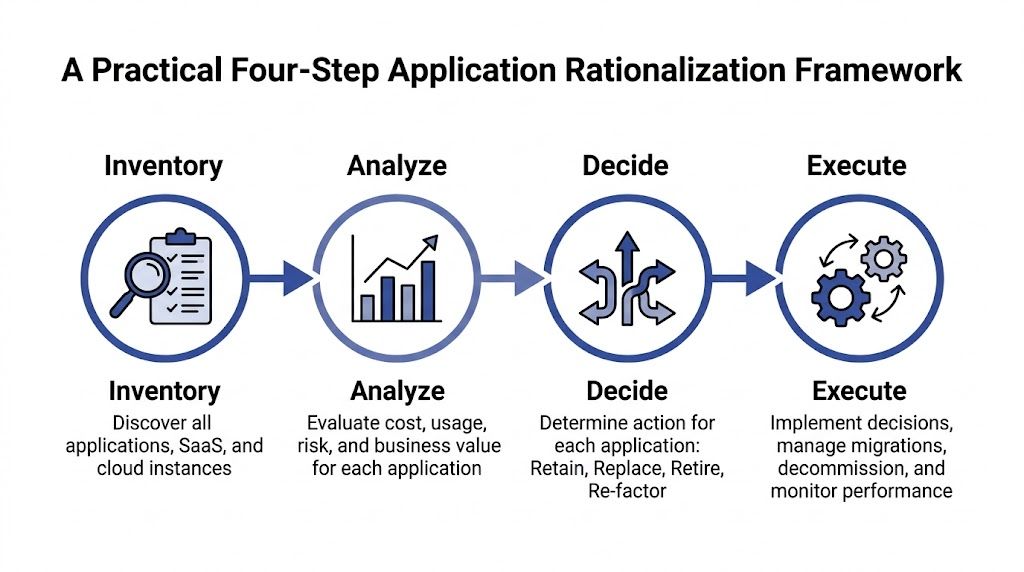
A Practical Four Step Rationalization Framework
Rationalization works when it’s boring, structured, and documented. Teams get into trouble when they jump straight to “what can we cut?” before they know what exists and who depends on it.
Step 1 Inventory what you actually run
Start with a full list of business applications, SaaS subscriptions, internally managed tools, databases, and cloud-hosted workloads tied to them. Don’t rely on procurement records alone. They miss free tools, team cards, inherited systems, and shadow IT.
Build your inventory from multiple inputs:
- Finance records for subscriptions, renewals, and vendor names
- Identity platforms for assigned users and dormant accounts
- Cloud consoles for VMs, storage, and services attached to apps
- Department interviews for tools used outside formal purchasing channels
For each item, capture owner, purpose, users, dependencies, environment, and renewal date. If nobody can identify an owner, flag it immediately.
Step 2 Analyze cost, fit, and dependency
Once the list exists, evaluate each application from three angles.
First, business value. Does it support revenue, compliance, customer delivery, or a core internal workflow?
Second, technical fit. Is it stable, supportable, secure, and aligned with your cloud model?
Third, total operational burden. This includes the software itself plus the people time and infrastructure needed to keep it working.
A useful test is dependency depth. An app with modest direct cost can still be a poor fit if it requires custom scripts, manual admin effort, or always-on compute just to stay available.
Don’t score applications by login count alone. Low-user systems sometimes support critical automations, finance controls, or compliance workflows in the background.
Step 3 Decide with a visible matrix
Many programs become political. Avoid vague discussions. Put every app into a simple decision model and make the criteria visible.
Application Rationalization Decision Matrix
| Business Value Score | Technical Fit Score | Recommended Action |
|---|---|---|
| High | High | Invest |
| High | Low | Migrate |
| Low | High | Tolerate |
| Low | Low | Eliminate |
This table is intentionally simple. You can add cost, risk, or strategic alignment later, but don’t start with a scoring model so complex that nobody trusts it.
Use the matrix as a decision aid, not a substitute for judgment. A niche app with low visible usage may still support an essential automated process. An app with broad usage may still need to be replaced if it creates audit or security issues.
Step 4 Execute in waves, not as a big bang
Execution is where rationalization earns credibility. The first wave should target low-risk, high-confidence moves such as duplicate SaaS tools, unsupported internal apps with clear replacements, and stale cloud environments tied to retired projects.
Handle each action differently:
Retire
Archive required data, communicate cutover dates, remove access, and decommission supporting resources.Replace
Migrate users and workflows to the approved platform, then shut down old integrations and old environments.Refactor
Keep the business capability but reduce cost or complexity by changing architecture, support model, or runtime patterns.Retain with guardrails
Keep the app, but assign ownership, review access, and document a future decision point.
What works and what doesn’t
What works is a cadence. Monthly review meetings. Named owners. A decision log. Renewal checkpoints before contracts auto-renew.
What doesn’t work is treating rationalization like a one-time cleanup. Sprawl always returns when new software can enter faster than old software exits.
Applying Rationalization to Your Cloud Environment
Cloud changes the nature of rationalization. In older environments, the question was often whether to keep or retire an application. In AWS and Azure, you also have to ask how the application consumes resources across the day, week, and month.
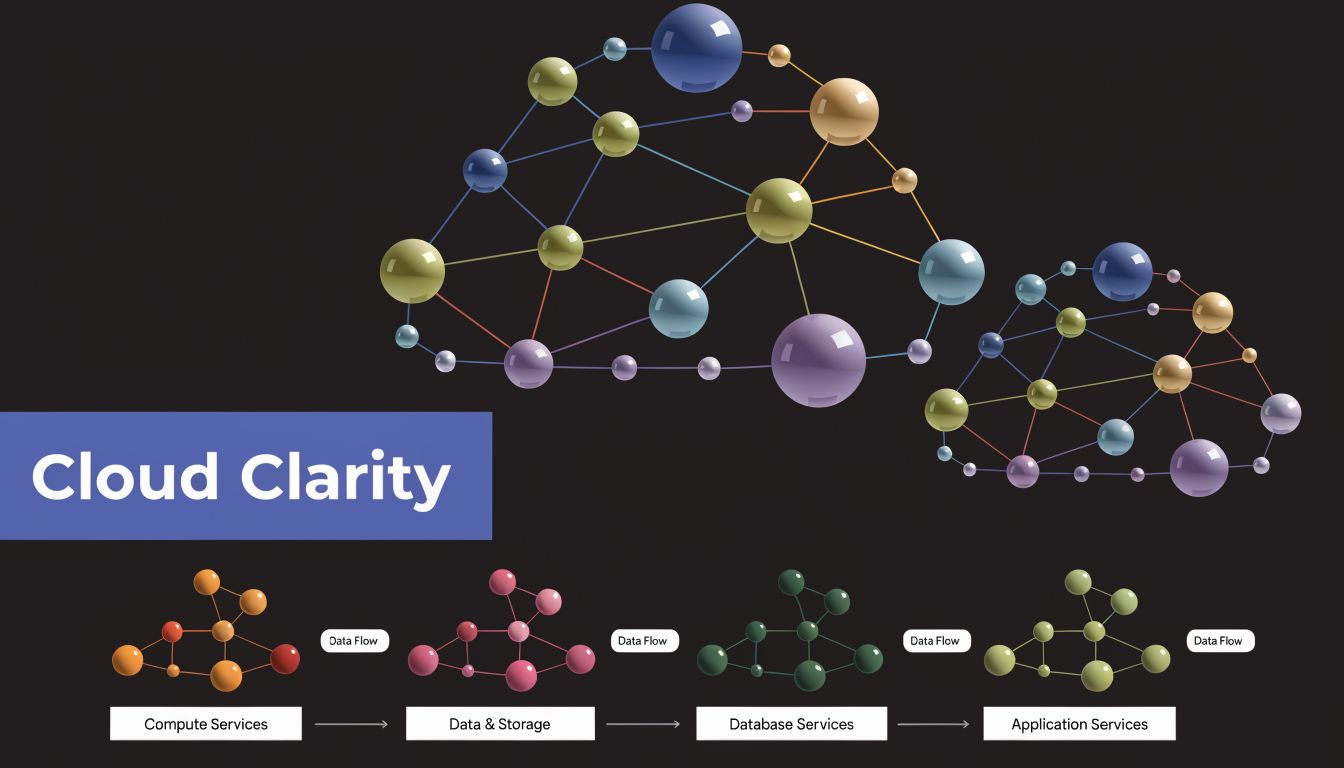
A common SMB pattern looks like this. The company has one production workload, one staging copy, one QA environment, and several developer-specific instances created over time. Nobody wants to turn anything off because each environment might be needed tomorrow. So everything runs continuously.
That isn’t just infrastructure waste. It’s a rationalization failure. You haven’t decided which environments are essential, which can run on schedule, and which should be removed altogether.
Rationalize the application and the runtime
Effective rationalization yields average IT cost savings of 5-10% by eliminating redundant applications, with mechanisms including decreased infrastructure demands such as powering down idle VMs through tools like AWS Instance Scheduler, according to Impact Advisors on cloud cost optimization and application rationalization.
That matters because cloud waste usually sits in one of three buckets:
- Redundant apps that duplicate the same business function
- Redundant environments created for old projects, abandoned testing, or convenience
- Idle runtime where valid systems run around the clock even though users only need them during working hours
A team might consolidate five overlapping internal tools into one standard platform and still miss a major savings opportunity if associated dev and staging servers remain on 24/7. Rationalization has to cover both software choice and uptime policy.
For a broader view of where this fits in FinOps practice, this guide to cloud cost optimization is a useful companion.
A practical cloud example
Take an internal reporting application used by finance every weekday. It runs on a VM, connects to a database, and has a staging environment that mirrors production. The app is valid. The business need is valid. But the staging environment only supports weekday changes and occasional testing.
The right decision usually isn’t “retire the app.” It’s something more precise:
- keep production available for the required business window
- schedule staging around actual working hours
- remove duplicate monitoring or admin tools attached only to the old environment
- document who can override schedules during month-end or release windows
That’s rationalization applied to real cloud behavior rather than abstract portfolio theory.
Here’s a short explainer that shows why cloud teams need to think beyond static inventories and into operating patterns:
What to review in AWS and Azure
When applying software application rationalization in cloud estates, review these areas together:
SaaS overlap
Check whether separate teams bought tools for project management, documentation, incident response, or BI that serve the same purpose.Environment purpose
Label prod, staging, QA, sandbox, and development resources clearly. If nobody can defend an environment’s purpose, it’s a candidate for removal.Usage windows
Identify apps and servers that only need business-hours availability.Dependency chains
Make sure scheduled shutdowns don’t break batch jobs, integrations, or reporting deadlines.Override process
Give teams a clean way to keep systems online temporarily without permanently defeating cost controls.
The strongest cloud programs don’t separate application governance from infrastructure governance. They treat them as one decision system.
Building Your Business Case and Governance Model
Good rationalization work often stalls for one reason. The team doing the analysis isn’t the team approving the changes. You need a business case that finance, security, operations, and department owners can all accept.
Build the case around capability, not just app count
Executives rarely care that you found three duplicate tools. They care that customer support, finance close, and engineering delivery can run with less cost and less friction.
Frame the proposal around business capabilities:
- What capability is being supported
- Which applications currently support it
- Where overlap, risk, or waste exists
- What action is recommended
- What operating impact follows
This keeps the conversation grounded. You’re not arguing over whether a team likes Tool A or Tool B. You’re deciding how the company should support a capability going forward.
Eliminating just one redundant enterprise application can save hundreds of thousands to millions annually through lower license, maintenance, and infrastructure costs, especially when cloud VMs keep accruing charges while idle, as described in EvolveWare’s analysis of application rationalization. For larger SMBs, that’s a useful anchor. Even if your own numbers are smaller, a single redundant platform can still justify the effort.
Involve the right stakeholders early
A rationalization review fails when it’s seen as an IT-only purge. Pull in the people who own value and risk.
Stakeholders to include
- Finance leaders for cost baselines, renewals, and savings validation
- Business unit owners for process dependency and adoption realities
- Security and compliance for risk review and control requirements
- IT operations and engineering for migration, scheduling, and decommissioning work
- Procurement or vendor management for contract timing and negotiation advantage
If you need help packaging that recommendation clearly, a practical guide to effective business proposals can help turn technical findings into an approval-ready document.
Keep governance light but firm
You don’t need a heavyweight architecture board to keep sprawl under control. You do need a few essential controls.
Review every new app request against an existing capability map before purchase. Most sprawl starts when teams solve an urgent problem without checking whether the company already owns a workable tool.
A lightweight governance model usually includes:
- A named owner for every application
- A renewal review before any contract auto-renews
- A usage review for low-adoption or duplicate tools
- A cloud runtime policy for nonproduction workloads
- A quarterly rationalization forum that ties app decisions to FinOps practice
If your organization is still aligning teams around cost accountability, this overview of what FinOps is gives a solid operating context.
Choosing Supportive Tools and Measuring Ongoing Success
No single tool handles software application rationalization end to end. Organizations typically require a stack of supporting systems, each answering a different question.
Which tool type solves which problem
Use enterprise architecture and portfolio tools when you need a map of applications, owners, capabilities, and dependencies. Use application monitoring and usage data when you need evidence about adoption and activity. Use cloud cost and scheduling tools when you need to turn rationalization decisions into day-to-day infrastructure savings.
That’s why mature teams compare tools by role rather than shopping for a magic platform:
- Portfolio visibility tools help you understand what exists
- Usage and operations data help you validate value
- Cloud control tools help you act on runtime waste consistently
For teams formalizing this discipline, broader practices from information technology asset management are helpful because they connect software ownership, lifecycle control, and cost accountability.
Measure outcomes that matter
Don’t stop at “number of apps retired.” Track whether the portfolio is easier to run.
Look for signals like fewer overlapping tools, cleaner ownership, fewer unsupported apps, reduced always-on nonproduction runtime, faster renewal decisions, and less confusion about approved systems. If support tickets, audit findings, or cloud exceptions keep recurring around the same apps, the rationalization decision probably wasn’t finished.
The best measure of success is repeatability. Can your team review a new app request, assess its value, and decide its runtime policy without reinventing the process each time?
That’s the shift from cleanup project to operating habit.
From Cleanup to Competitive Advantage
Software application rationalization starts as cost control, but it doesn’t end there. It gives SMBs a cleaner portfolio, clearer ownership, and better discipline over how applications consume cloud resources. That matters in AWS and Azure because waste doesn’t stay hidden for long.
The strongest programs don’t just retire software. They standardize capabilities, remove duplicate environments, and align application decisions with cloud runtime policy. That’s where rationalization becomes part of FinOps instead of sitting beside it as a separate exercise.
If your team is dealing with SaaS overlap, idle VMs, and unclear ownership, the next move isn’t another budget meeting. It’s a portfolio review with real decisions attached. Start small. Inventory what you run. Identify one duplicated capability. Find one nonproduction workload that doesn’t need continuous uptime. Then turn those wins into a repeatable discipline.
If you want a practical way to turn rationalization decisions into ongoing cloud savings, CLOUD TOGGLE helps teams automatically power off idle AWS and Azure servers on clear schedules without exposing the full cloud console. It’s a straightforward fit for SMBs that need policy-driven control, fast overrides, and predictable savings from nonproduction and low-demand workloads.