IT budgeting used to be an annual exercise. Finance set a number, IT worked within it, and hardware refresh cycles made spending reasonably predictable.
That model breaks in the cloud. Usage changes weekly. Teams can launch resources in minutes. SaaS subscriptions multiply without much friction. If you're running a small or midsize business, budgeting for IT now means managing a moving target, not filling in a spreadsheet once a year.
Why Your Approach to IT Budgeting Needs to Change
Global IT spending is projected to reach $6.15 trillion in 2026, a 10.8% increase from 2025, with AI infrastructure and cloud services driving most of that growth according to CloudZero's IT cost optimization analysis. That number matters because it shows where budgets are moving. IT isn't a back-office utility anymore. It's a core operating function.

The old budget model fails in cloud environments
A lot of SMBs still budget for IT as if most costs were fixed. That worked better when spending centered on servers, storage arrays, network equipment, and predictable support contracts.
Cloud changes the financial behavior of IT. Costs shift from large upfront purchases to ongoing operational spend. That sounds easier to manage, but it often isn't. Pay-as-you-go creates flexibility, and it also creates constant exposure to waste, poor ownership, and forecasting drift.
The most common failure pattern is simple. A company keeps using top-down budgeting for cloud, then wonders why actual spend never matches plan.
Practical rule: If your budget starts with a finance target instead of actual workload data, you're budgeting by hope.
Why SMB teams feel this more sharply
Large enterprises can absorb mistakes longer. SMBs usually can't. One underused environment, one duplicate SaaS stack, or one burst of unmanaged AI experimentation can materially distort the month.
Small teams also have fewer specialists. The same person might be acting as IT manager, cloud admin, procurement reviewer, and incident responder. That makes reactive spending more likely.
A modern budgeting for IT process needs to account for three realities:
- Usage changes fast. Development, testing, seasonal demand, and new product work all change cloud consumption.
- Ownership is fragmented. Engineering creates spend, finance tracks spend, and neither side always sees the full picture.
- Waste hides in plain sight. Idle compute, untagged resources, and software sprawl rarely show up as dramatic line items.
What a better model looks like
The budget has to become operational. That means tighter cost visibility, clearer allocation, and routine adjustments instead of annual guesswork.
For most SMBs, the right shift is straightforward:
- Build the budget from actual billing data.
- Allocate costs to teams, apps, and environments.
- Put controls around the biggest waste sources.
- Review monthly and adjust quarterly.
That approach is less elegant than a static annual plan. It works better.
Identifying Your True Cloud Cost Drivers
Most companies don't have a budgeting problem first. They have a visibility problem.
Before you decide what next quarter should cost, you need to know what last quarter paid for. In practice, cloud bills usually grow for mundane reasons, not dramatic ones. A test environment stayed on. Storage accumulated snapshots nobody owns. Two departments bought overlapping SaaS tools. A migration left old resources behind.
Start with a spend inventory, not assumptions
Build a working list of all recurring IT spend. Don't stop at AWS, Azure, or Google Cloud. Include SaaS, support plans, observability tools, security products, backup platforms, and anything billed to a corporate card.
The average organization spends $55.8 million annually on SaaS alone, and benchmarks in the same analysis show top-performing organizations at an 85% Cloud Efficiency Rate while median performers operate at 65% according to Zylo's IT spend optimization overview. SMBs won't mirror those exact totals, but the pattern absolutely carries over. SaaS is often under-governed and over-purchased.
A clean audit usually includes these buckets:
- Compute spend: Virtual machines, containers, managed compute services, and non-production environments.
- Storage and backups: Block storage, object storage, snapshots, archive tiers, and replication.
- Network-related charges: Data transfer, load balancing, NAT, CDN-related usage, and inter-region traffic.
- Platform services: Databases, monitoring, logging, messaging, and managed security controls.
- SaaS subscriptions: Productivity suites, engineering tools, CRM, ticketing, analytics, and niche apps.
Look for the costs that don't have an owner
The riskiest charges are usually the ones nobody can explain quickly.
Ask these questions during your review:
- Which resources are untagged or poorly named? If nobody can identify them, they tend to survive longer than they should.
- Which SaaS tools overlap? Many SMBs carry multiple products for project management, endpoint security, file sharing, or reporting.
- Which non-production systems run continuously? Development and QA environments often behave like production from a billing standpoint.
- Which subscriptions are paid centrally but chosen locally? That's where shadow IT tends to appear.
If a bill line can't be mapped to a team, application, or business purpose, treat it as suspect until proven necessary.
Compare provider pricing with workload context
A lot of teams waste time chasing generic "cheapest cloud" narratives. The better question is whether your current workload matches your provider choices.
For a grounded reference point, this AWS vs Azure vs Google Cloud price comparison is useful because it frames pricing differences by service type rather than by brand loyalty. That's the right way to think about it. Compute-heavy, storage-heavy, and data-transfer-heavy workloads behave differently.
A practical audit checklist
Use this short pass before building a budget:
- Pull invoices and billing exports for cloud, SaaS, and major vendors.
- Group spend by owner wherever possible.
- Flag unknown or shared charges that lack accountability.
- List duplicate tools by business function.
- Separate production from non-production so you can see what is optional versus business-critical.
That exercise doesn't need a large team. It needs discipline.
Building a Granular Cloud Budget From the Ground Up
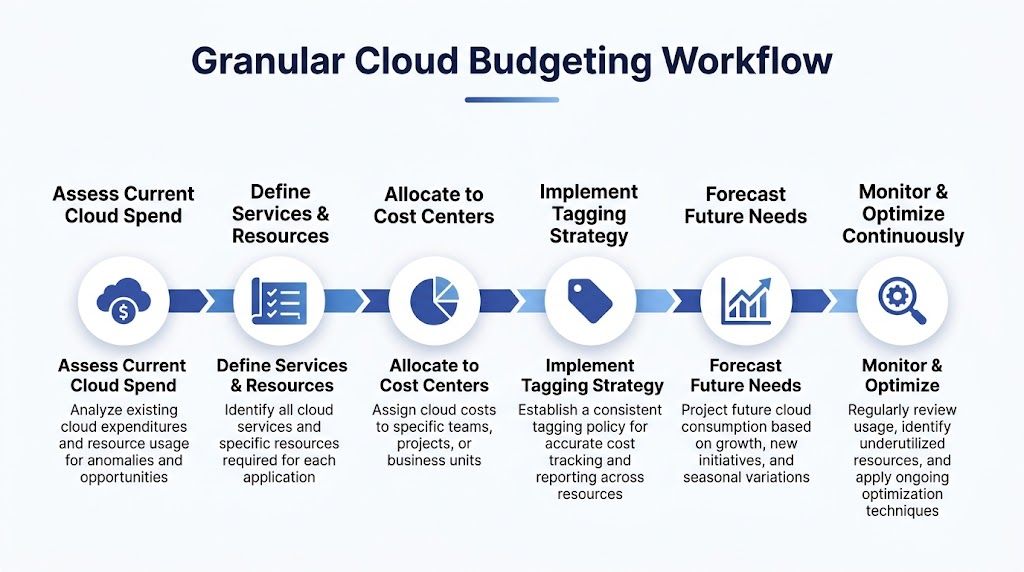
The most reliable cloud budgets are built bottom up. That means starting with actual billing records, not broad annual targets.
This approach is more work at the start. It saves time later because the budget is tied to real workloads, real owners, and real patterns. That's what makes it defensible in front of finance and useful to engineering.
Export the raw data first
Start by exporting detailed billing records from your cloud provider. The practical options named in the source material are AWS Cost and Usage Report to S3, Azure Cost Management exports, and GCP billing exports to BigQuery.
You need several months of history in a queryable place. Spreadsheet summaries aren't enough. Queryable data lets you break spend down by workload, team, application, environment, and cost center.
A bottom-up methodology built on granular billing exports, combined with tagging enforcement above 95% coverage, is associated with stronger forecasting and meaningful savings. The same source notes that FinOps practices show 68% of organizations achieving 20-40% savings through this level of granularity in Sedai's cloud cost optimization guidance.
Tagging is not admin overhead
Tagging is where many budgets fail before they begin.
If your resources aren't consistently tagged, you can't allocate spend cleanly. Then finance sees a large shared bill, engineering disputes ownership, and nobody trusts the numbers.
At minimum, enforce these tags across cloud resources:
- Team
- Environment
- Application
- Cost center
Native controls and IAM policies can enforce this. The point isn't technical purity. The point is making sure every resource can be traced back to a business owner.
Field note: Optional tagging policies usually produce optional accountability.
Build budgets from cost drivers, not from departments alone
Once the data is organized, isolate the biggest cost drivers. In many environments, a small number of workloads account for most of the spend.
Map those drivers to business context. A production customer platform deserves different treatment from a development sandbox. A reporting cluster used only during business hours should not be budgeted like a 24/7 transaction system.
A useful budgeting model for SMBs often has three layers:
| Budget layer | What it covers | Why it matters |
|---|---|---|
| Baseline run cost | Core production systems and essential SaaS | Shows the minimum cost to keep the business operating |
| Variable usage | Development, testing, burst workloads, analytics jobs | Prevents normal fluctuation from looking like budget failure |
| Planned change | New projects, migrations, new hires, tooling changes | Makes growth visible before the invoice arrives |
Forecast with operating assumptions
Forecasting gets easier when you state assumptions plainly.
Examples include expected hiring, application growth, seasonal customer activity, migration milestones, or whether non-production environments should run full time. These assumptions matter more than polished financial formatting.
For teams refining this process, the guidance in CLOUD TOGGLE's piece on budgets and forecasts is useful because it keeps the discussion tied to cloud operating behavior rather than abstract finance models.
Set thresholds before the month gets away from you
A budget that only gets reviewed after the invoice lands isn't a budget. It's a report.
Use native tools such as AWS Budgets or Azure Cost Management to set alerts at progressive thresholds. Those thresholds help teams react while they still have options.
Good alerting should trigger action, not noise:
- Early threshold: Review anomalies and validate intended usage.
- Mid threshold: Pause optional work or investigate changes in workload behavior.
- Late threshold: Escalate to engineering and finance together, not separately.
What works and what doesn't
What works:
- Building from real billing exports
- Enforcing tagging early
- Separating production from non-production
- Tying spend to team ownership
- Updating the model on a regular cadence
What doesn't:
- One shared cloud budget for the whole company
- Untagged resources with "we'll fix it later"
- Forecasting from last year's total without workload context
- Treating SaaS and cloud infrastructure as separate budgeting universes
Granularity sounds tedious. In practice, it's what makes budgeting for IT manageable.
Implementing Governance and Allocation Models
A cloud budget becomes useful when people can see it, trust it, and act on it. That's governance.
SMBs don't need a heavy FinOps bureaucracy. They do need simple rules for ownership, review, and escalation. Without that, the budget lives in finance while the spending decisions happen elsewhere.
Start with showback before chargeback
For most small and midsize teams, showback is the better first step. Showback means each team sees what it costs without being formally billed for it.
That model creates accountability without turning every engineering discussion into an internal invoicing debate. Chargeback can work later, especially in more mature organizations or shared-services structures, but it often creates friction too early.
If you're reviewing models, this overview of allocation of costs methods is a practical reference because it frames the trade-offs clearly.
Show people their spend before you charge them for it. Most teams improve once the bill becomes visible.
Define who owns what decision
A lightweight governance model should answer four questions:
- Who owns the budget? Usually finance and IT together.
- Who owns the spend drivers? Team leads, application owners, or engineering managers.
- Who approves exceptions? Someone with enough context to judge business value.
- Who reviews drift? A recurring monthly checkpoint, not an ad hoc reaction.
Many SMBs can move faster than large enterprises. Fewer layers means fewer approval bottlenecks if the roles are explicit.
Track a small set of useful KPIs
Don't track everything. Track the measures that improve decisions.
| KPI | Description | Good Target |
|---|---|---|
| Forecast accuracy | How closely actual spend matches the working budget | High and improving over time |
| Tagging coverage | Share of cloud resources allocated to a team, app, environment, and cost center | Consistently complete enough to support allocation |
| Unallocated spend | Charges that can't be tied to an owner | As low as possible |
| Non-production runtime control | Whether dev and test environments follow defined schedules | Consistent adherence to policy |
| SaaS ownership clarity | Whether each subscription has a business owner and renewal review path | Clear owner for every recurring tool |
| Budget alert response time | How quickly teams investigate threshold alerts | Fast enough to change the current month's outcome |
Use alerts to support behavior, not punish it
Alerts should route to the people who can act. If a development environment is spending outside plan, the application owner needs that signal. If a shared platform spikes, operations needs it. Finance alone can't fix runtime behavior.
Governance works when it stays close to operations. The closer your budget is to real decisions, the less often it gets ignored.
Tactical Optimizations to Immediately Reduce Waste
Most general advice on budgeting for IT focuses on allocation and planning. That's useful, but it misses one of the easiest places to cut real spend fast.
Idle cloud compute can consume 30-50% of total cloud bills, and simple auto-shutdown policies can yield 25-40% savings on compute alone according to the source material summarized with support from NetSuite's IT budgeting resource. For SMBs, that is often the fastest path to visible savings.

Shut down what doesn't need to run
This is the first control I look for in non-production environments.
Development servers, QA environments, training systems, and internal tools often run nights and weekends for no business reason. If nobody is using them, they should be off. Native cloud tools can handle some of this, but they often require engineering access and more setup than smaller teams want to maintain.
A third-party option such as CLOUD TOGGLE can fit here because it automates scheduled power management for idle servers and virtual machines across AWS and Azure, while letting teams manage schedules without exposing the full cloud account.
The quickest savings usually come from better uptime decisions, not better negotiations.
Rightsize after you've controlled runtime
Teams often jump to rightsizing first because it's conceptually familiar. It matters, but it's not always the fastest move.
A server that's oversized and off most of the time costs less than a perfectly sized server that runs constantly with no need. Runtime policy should come before fine-tuning.
After that, review:
- Instances with consistently low utilization
- Databases provisioned for peak loads that rarely occur
- Managed services with premium tiers nobody is using
Clean up orphaned resources
Cloud environments collect leftovers. Detached volumes, old snapshots, unused IP allocations, stale load balancers, abandoned test databases, and artifacts from half-finished migrations all add noise to the bill.
These aren't glamorous savings. They are repeatable savings.
Run a recurring cleanup review that asks:
- Does this resource have an owner?
- Is it attached to a live workload?
- Would anyone notice if it disappeared?
- Is there a retention requirement that justifies keeping it?
Use purchasing commitments carefully
Reserved capacity or commitment-based discounts can help when the workload is stable. They can also lock in the wrong assumptions.
For SMBs, it's safer to commit only after you've cleaned up idle runtime and validated your baseline. Otherwise you risk committing to waste.
Keep a short optimization playbook
One reason savings stall is that nobody remembers what to do when a bill spikes. Write down a short response list.
A practical external checklist is this guide to 10 Cloud Cost Optimization Strategies. Use it as a supplement, not a substitute, for your own environment-specific playbook.
A simple version might include:
- Pause non-essential environments
- Review new high-cost resources
- Check for failed automation or scheduling drift
- Inspect recent SaaS additions
- Confirm whether a spike was planned or accidental
The key point is this. Waste reduction shouldn't depend on heroic effort from one cloud expert. It should be operationally routine.
Conclusion Making IT Budgeting a Continuous Practice
Effective budgeting for IT isn't an annual document. It's an operating practice.
The teams that manage cloud costs well usually do a few things consistently. They build budgets from actual billing data. They assign ownership with tags and allocation rules. They review spend often enough to act on it. They target obvious waste, especially idle compute, before chasing more complex optimizations.
That's a better fit for SMBs because it respects limited time and smaller teams. You don't need a large FinOps function to get control. You need visibility, a workable process, and a handful of policies people will follow.
If you're trying to improve your process, start with one action that changes the next bill. For many teams, that's scheduling non-production servers to shut down when nobody is using them.
If you want a broader foundation for that operating model, this introduction to what FinOps is is a useful next read. It connects budgeting, accountability, and optimization in a way that fits real cloud environments.
Frequently Asked Questions on IT Budgeting
How should SMBs budget for highly variable workloads like AI or analytics?
Don't force those workloads into a flat monthly assumption. Separate them from baseline operating costs and treat them as variable capacity. Give them their own owner, their own alert thresholds, and a written assumption for when usage is considered planned versus exceptional.
That avoids polluting the core IT budget with bursts that belong to a specific initiative.
What's the best way to handle shadow IT and decentralized SaaS buying?
Start with visibility and ownership, not punishment. Create a simple intake rule for new software purchases, require a named owner for every subscription, and review renewals with both finance and the business user.
If teams think the process is too slow, they'll keep buying around it. Keep the intake lightweight.
Should we use native cloud tools or a third-party platform for cost control?
Use native tools where they are enough. Billing exports, budget alerts, and basic reporting should usually start there.
Add third-party tools when the operational burden of native tooling is too high or when access control becomes a blocker. That decision usually comes down to who needs to act, how much cloud access they should have, and how repeatable the workflow needs to be.
How often should we review the IT budget?
Monthly is a practical minimum for most SMBs. That cadence is frequent enough to catch drift and light enough to sustain. Larger changes, hiring plans, migrations, and architectural shifts deserve a deeper quarterly review.
What is the first sign that our cloud budget isn't credible?
If a meaningful share of spend can't be tied to a team, application, environment, or business purpose, your budget is weak no matter how polished the spreadsheet looks. Allocation quality comes before forecast precision.
If you're looking for a practical way to reduce idle cloud spend without handing broad cloud-console access to every stakeholder, CLOUD TOGGLE is worth a look. It helps teams schedule AWS and Azure servers to power off when they're not needed, which makes it easier to turn cloud budgeting policies into daily operational savings.