Your app is healthy. CPU looks normal. The network path is open. DNS resolves. Users still can't sign in.
That combination usually sends new engineers toward the wrong layer first. They check firewalls, restart services, and compare certificates. Meanwhile, the core problem sits in identity metadata that nobody touched on purpose.
That metadata is often the service principal name.
If you're working in a hybrid shop, the confusion gets worse fast. Someone says "SPN issue" and half the room thinks Kerberos in Active Directory. The other half thinks Azure service principal in Entra ID. Both matter. They are related by purpose, but they are not the same object, and mixing them up leads to bad fixes.
The practical goal is simple. You want services to authenticate reliably, automation to run without human credentials, and access to stay tightly scoped. That means knowing when a service principal name is the lookup key for Kerberos, when a cloud service principal is the application identity, and how the two meet in hybrid operations.
The Silent Failure Why Authentication Breaks
It usually starts with a vague ticket.
Users say the internal app "just spins" or throws a login error. The service is up. The VM is up. Monitoring doesn't show a hard outage. But the app team sees authentication failures and can't explain them.
A common pattern looks like this. A web app moves to a new server, or an engineer changes the account that runs a Windows service. Nothing appears broken at deployment time. Then Kerberos starts failing because the service principal name registered in Active Directory no longer matches the account running the service.
Why the failure feels random
A service principal name is one of the identifiers Kerberos uses to locate a service instance. Payatu describes SPNs as "the sign posts of Kerberos pointing users where to go to connect to resources" and notes that each SPN must be globally unique across the Active Directory forest. If the same SPN exists on different accounts, authentication can fail unpredictably or stop entirely (Payatu).
That explains why the outage often looks inconsistent.
One client may connect with a cached ticket. Another may fail immediately. One node behind a load balancer may work while another loops on auth. The service itself isn't necessarily down. Identity resolution is.
Operational reality: When authentication fails but the infrastructure looks healthy, the problem is often naming, mapping, or account registration rather than compute or network capacity.
Why DevOps teams hit this more often now
Hybrid infrastructure raises the chance of mismatch. Services move between hosts, adopt aliases, sit behind load balancers, or integrate with cloud automation. Every one of those changes affects how clients discover and authenticate to the service.
If you're also managing single sign-on, federation, or identity provider behavior, this broader view helps: single sign-on and identity provider basics.
A small naming error can break a large production path. That's what makes SPN issues dangerous. They don't announce themselves clearly, and they don't always fail in a clean, obvious way.
What Is a Service Principal Name in Active Directory
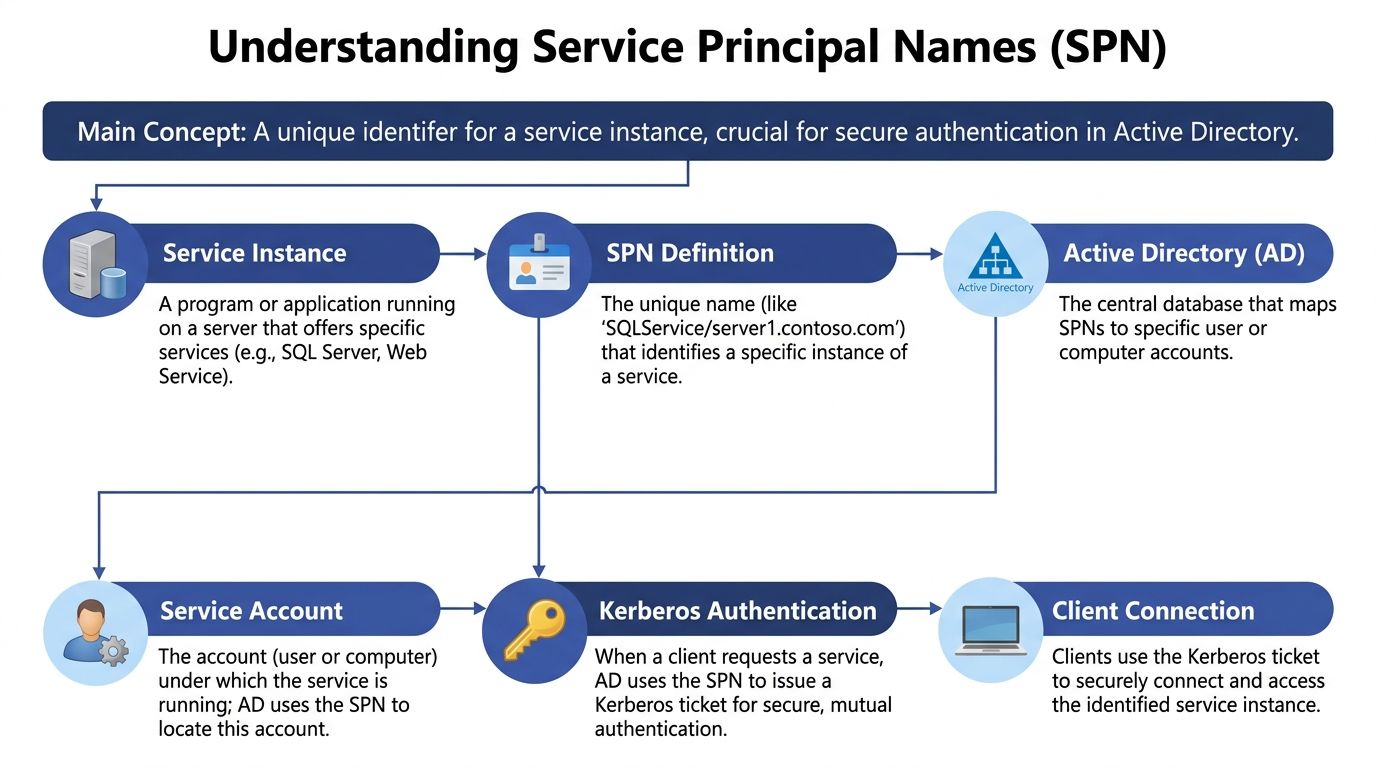
Think of a service principal name as a service's exact address in Kerberos.
Not a server's address in the general sense. A service's address. Kerberos needs a way to distinguish a web service on a host from a database service on the same host. The SPN gives it that precision.
How to read an SPN
In Active Directory, SPNs commonly use a format like:
serviceclass/hostname:port
Examples:
HTTP/app.corp.contoso.comMSSQLSvc/sqlserver.corp.com:1433
Each part matters:
- Service class identifies the type of service, such as
HTTPorMSSQLSvc. - Hostname identifies where the service is reached.
- Port may be included when the service requires that specificity.
The SPN doesn't just label the service. Active Directory maps that SPN to the user account or computer account running the service.
What Kerberos does with it
When a client wants to connect to a service, it doesn't need to know the service account name directly. Instead, it requests a Kerberos ticket for the SPN. That lookup pattern is one reason SPNs remain so useful in larger environments with many services and changing infrastructure.
The simplified flow looks like this:
- A client tries to access a service such as a website or SQL Server.
- The client identifies the service by its SPN.
- The Key Distribution Center in Active Directory looks up which account owns that SPN.
- Kerberos issues a ticket tied to that service account.
- The client presents the ticket to the service.
If the mapping is correct, authentication is smooth. If the mapping is wrong, the client can't reliably prove it's talking to the right service.
An SPN is not just a label. It's the lookup key that ties a network-facing service to the identity that Kerberos trusts.
A concrete example
Say one Windows server hosts both IIS and SQL Server.
That single host might need separate SPNs for each service because they are different service instances with different authentication contexts. The server is one machine, but Kerberos still needs to know whether the client wants the web service or the database service.
Many admins get tripped up here. They think in terms of hosts, but Kerberos thinks in terms of service instances mapped to accounts.
Why uniqueness matters so much
SPNs must be globally unique across the whole Active Directory forest. If two accounts hold the same SPN, clients can be directed to the wrong identity. If no valid mapping exists, Kerberos can't complete the request cleanly.
That uniqueness rule becomes more important as environments scale:
- Shared hosts run multiple services.
- Aliases introduce multiple names for the same endpoint.
- Hybrid infrastructure adds more layers between user access and the underlying workload.
- Containerized or dynamic deployments create more chances for identity drift.
IBM-style formatting guidance, such as HTTP/machine.realm, also reflects the same idea: the identifier must precisely match how users or systems reach the service. Precision isn't bureaucracy here. It's what lets authentication work predictably.
Where the SPN lives
A service principal name is typically stored as an attribute on an Active Directory account. That account may be:
- a computer account for services running as the machine
- a user-based service account
- a managed service account in environments that support that pattern
That's the foundation. In traditional Windows infrastructure, the service principal name is the identifier Kerberos uses to find the right service identity.
How Azure Service Principals Relate and Differ
The term causes confusion because the names sound almost identical.
An Active Directory SPN is a Kerberos identifier attached to an account. An Azure Service Principal is an application identity used for non-interactive access to Azure resources. Same abbreviation in casual conversation, very different job.
The simplest way to separate them
Use this mental model:
- Active Directory SPN = the name Kerberos uses to find a service
- Azure Service Principal = the identity an app uses to sign in to Azure
That distinction matters most in hybrid operations. You may have a Windows service authenticating with Kerberos on premises while an automation platform uses an Azure service principal to control cloud resources.
JumpCloud notes that SPNs have become more important in hybrid and cloud infrastructure, and that a single service instance can maintain multiple SPNs for different names or aliases such as DNS names or load balancer endpoints (JumpCloud).
Active Directory SPN vs Azure Service Principal
| Characteristic | Active Directory SPN | Azure Service Principal |
|---|---|---|
| Primary purpose | Identifies a service instance for Kerberos authentication | Represents an application or automation identity in Azure |
| Where it lives | Active Directory attribute on a user or computer account | Microsoft Entra ID object used for app-based access |
| Authentication model | Kerberos service ticket lookup | Non-interactive sign-in for APIs, automation, and resource access |
| Typical use case | IIS, SQL Server, Windows-integrated applications | Scripts, CI/CD, cost tooling, automation, resource management |
| Main admin concern | Unique registration and correct account mapping | Least-privilege role assignment and secret or certificate handling |
| Hybrid relevance | Supports on-prem and domain-connected service auth | Supports cloud operations without using a human account |
Where people usually mix them up
The phrase "service principal" in Azure sounds like it should be a cloud version of the Kerberos SPN. It isn't.
What they share is intent. Both help systems identify and authenticate services without relying on a person's day-to-day credentials. But the implementation is different enough that you should treat them as separate identity tools.
A practical example:
- Your internal SQL Server may rely on an Active Directory SPN for Kerberos.
- Your automation platform that starts or stops Azure VMs may use an Azure service principal with RBAC permissions.
Those two identities may support the same business workflow, but they operate in different trust systems.
Why hybrid engineers need both concepts
In a hybrid environment, service access often spans:
- domain-joined workloads
- cloud-hosted front ends
- load-balanced endpoints
- automated runbooks and schedulers
That means you might troubleshoot a Kerberos lookup issue in one path and an Entra ID application permission issue in another during the same incident.
If you're comparing Azure application identities with platform-native options, this managed identity overview is useful context: https://www.cloudtoggle.com/blog-en/managed-identity-azure/
The safe habit is to ask one question first: are we talking about a Kerberos identifier or a cloud application identity?
That question saves a lot of time.
Registering and Managing SPNs with Commands
Concepts matter, but outages are fixed with commands.
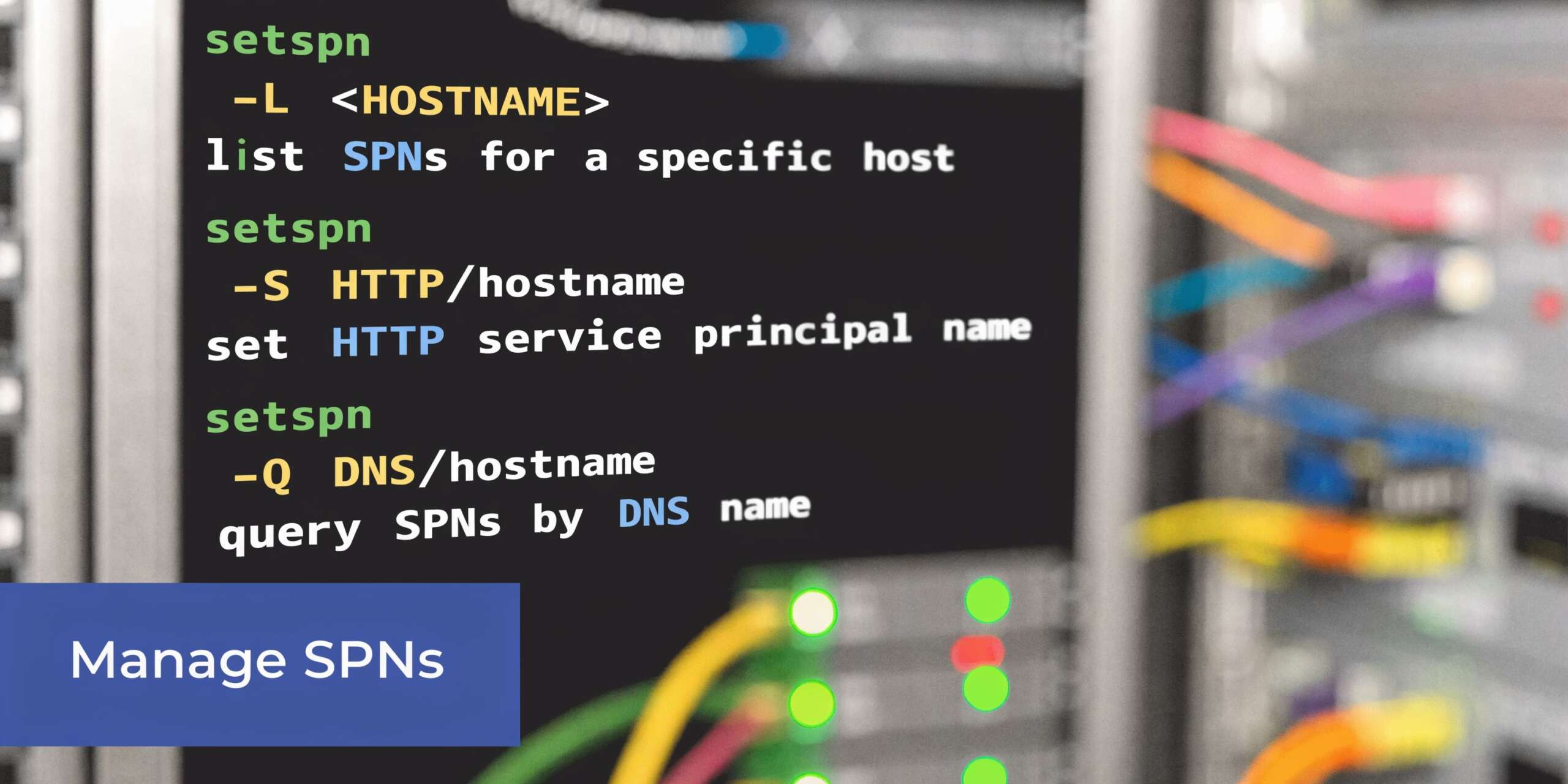
On the Active Directory side, the key tool is setspn.exe. On the Azure side, you usually work with Azure CLI or Azure PowerShell to create and assign a service principal.
Active Directory commands that matter most
Start with discovery before you change anything.
List SPNs on an account
setspn -L svc-webapp
Use this when you want to see every SPN currently attached to a service account or computer account.
Query a specific SPN
setspn -Q HTTP/app.corp.contoso.com
This tells you which account currently owns that SPN. It's the fastest way to verify whether the mapping matches your expectation.
Add an SPN safely
setspn -S HTTP/app.corp.contoso.com svc-webapp
Use -S, not the older add pattern many people remember from legacy examples. The safe form checks for duplicates before writing the SPN.
Delete an SPN
setspn -D HTTP/app-old.corp.contoso.com svc-webapp
Delete only when you're certain the service no longer uses that endpoint.
A practical admin rhythm
When you're deploying a service that needs Kerberos, use a repeatable sequence:
- Check the target account first with
setspn -L. - Query the exact SPN with
setspn -Q. - Register the new SPN with
setspn -S. - Retest authentication from a client path that mirrors production.
That order prevents a lot of accidental duplicate registrations.
Creating an Azure service principal
Azure uses a different identity model. A service principal there is an application identity for secure, non-interactive access.
A basic Azure CLI example looks like this:
az ad sp create-for-rbac --name "cloud-toggle-sp"
That creates the identity and returns credential details. Store the generated secret securely because you may not be able to retrieve it later in plain form.
You can also use PowerShell:
New-AzADServicePrincipal -DisplayName "cloud-toggle-sp"
The exact creation path varies by your admin model, but the operating principle doesn't. You create the identity, then grant only the roles it needs.
If you want a quick refresher on the directory service behind this pattern, this overview of Azure Active Directory (Azure AD) gives useful context for teams moving from classic AD thinking to cloud identity operations.
Role assignment matters more than creation
Creation is easy. Scope is where teams either stay secure or create long-term risk.
For Azure billing and usage access scenarios, verified guidance includes role assignments such as Enrollment Reader and Storage Blob Data Reader. For compute control in some Enterprise Agreement scenarios, permissions may include actions like Microsoft.Compute/virtualMachines/deallocate/action and related read or write operations. Misconfiguration can cause 401 Unauthorized errors during API access, which is exactly what you want from least privilege when the wrong permission set is assigned.
A broader walkthrough of this application identity pattern is here: https://www.cloudtoggle.com/blog-en/service-principal-azure/
Command-line rule: In AD, validate uniqueness before registering. In Azure, validate scope before automating.
Those are different admin motions because they're solving different identity problems.
Example Creating a Service Principal for Cloud Toggle
The clean pattern for third-party cloud automation is simple. Don't hand over a human admin account. Create a dedicated application identity with only the access the tool needs.
In Azure, that identity is a service principal.
What the identity is doing
For a platform that needs to read billing data and deallocate idle virtual machines, the service principal acts as the application's login.
Verified Azure guidance describes a service principal as an application identity created for secure, non-interactive access to resources. It also notes that least-privilege role assignments, including actions such as Microsoft.Compute/virtualMachines/deallocate/action, can support VM power management. In that context, deallocation actions can reduce costs from idle VMs by 30-70% without exposing the whole cloud account (ServiceNow documentation).
A practical setup flow
A minimal working pattern looks like this:
Create the service principal
Use the Azure portal, Azure CLI, or your preferred automation method.Capture the application credentials
Store the client ID, tenant ID, and generated secret securely.Assign only the required roles
For billing and usage access, that may includeEnrollment ReaderandStorage Blob Data Reader. For VM control, assign only the compute actions required for start, stop, or deallocate workflows.Scope permissions at the right level
Subscription scope is common, but narrower scope is often better if the platform doesn't need full subscription visibility.Test with the actual application workflow
Don't stop at successful login. Verify that the identity can read what it needs and perform only the intended actions.
Example with Azure CLI
az ad sp create-for-rbac --name "cloud-toggle-sp"
After creation, assign the needed RBAC roles at the correct scope. In practice, many failures happen here, not at creation time.
Typical causes include:
- Missing reader access for inventory or billing visibility
- Missing blob access when usage data is stored in Azure storage
- Missing compute action permissions when the tool needs to deallocate or start VMs
- Overbroad permissions that work technically but violate least-privilege policy
Why this beats shared admin credentials
A dedicated service principal gives you clearer control over:
- Auditability because actions are tied to the app identity
- Revocation because you can disable or rotate that identity without changing a person's account
- Scope because the app gets only what the workflow requires
- Operational safety because automation doesn't break when an employee leaves or changes roles
For a visual walkthrough of Azure service principal setup, this video is a helpful companion:
What to document before handing it to operations
Write down four things and keep them current:
| Item | Why it matters |
|---|---|
| App or client ID | Identifies the automation identity |
| Tenant ID | Ensures authentication goes to the correct directory |
| Assigned roles | Defines exactly what the app can do |
| Secret or certificate lifecycle | Prevents surprise failures during rotation or expiration |
Cloud identity becomes operational discipline at this point. The identity itself isn't the hard part. The hard part is keeping scope, storage, and rotation under control over time.
Troubleshooting Common SPN Authentication Issues
SPN problems rarely arrive with a friendly error message.
What you usually see is an app failure, a login loop, or a support note that says Windows authentication stopped working after a change. The fix starts by thinking like a detective. Which identity does the client expect? Which account owns that identity now? Did the mapping change?
The error that should get your attention
In Active Directory, a client requests a Kerberos ticket using an SPN. If that SPN is duplicate or unmapped, the Key Distribution Center can return KRB_AP_ERR_MODIFIED, which breaks authentication. Microsoft field data says this issue accounts for up to 40% of AD-integrated app outages (Microsoft Learn).
That number matters because it tells you SPN issues aren't edge cases. They're one of the first things to check in Windows-integrated application failures.
The fastest first checks
Run these before you restart anything:
setspn -Q HTTP/app.corp.contoso.com
That queries the exact SPN and shows which account owns it.
setspn -L svc-webapp
That lists all SPNs on the account you think should own the service.
If the results don't line up, you already have a strong lead.
Symptom-to-cause mapping
| Symptom | Likely cause | First check |
|---|---|---|
| Kerberos auth fails after service account change | SPN still attached to old account | setspn -Q <SPN> |
| Intermittent auth failure across nodes | Duplicate SPN in AD | Query the SPN and inspect all owners |
| App falls back to NTLM | Missing or incorrect SPN mapping | Verify SPN exists on the right account |
| Persistent SSPI or ticket errors | Client requested ticket for wrong service identity | Compare URL, hostname, and SPN registration |
A clean troubleshooting sequence
Check what name the client is using
Users often connect through an alias, load balancer name, or old DNS record. Kerberos cares about the service name the client requests, not the host name you wish it used.
If the app is reached as app.company.local, the SPN must support that access path.
Verify ownership of that exact SPN
Use setspn -Q and confirm the owner is the designated service account.
If another account owns it, remove the stale registration only after confirming the current dependency map.
Inspect the intended account
Use setspn -L <account> to verify that all expected SPNs are present and no leftover entries from retired names remain.
Authentication troubleshooting gets faster when you stop asking "is the server up?" and start asking "which identity did Kerberos try to reach?"
Retest from a real client path
Don't test only from the server itself. Use the same URL, alias, or application route that users take. SPN problems often hide when admins test from the wrong path.
Where engineers lose time
They focus on the server process before validating the service identity.
That's understandable. Restarting feels actionable. But SPN issues are about directory mapping, not service health. If the mapping is wrong, the service can be perfectly healthy and still reject every Kerberos ticket it receives.
Security Best Practices for SPN Management
A service principal name is an availability concern, but it's also a security boundary.
When an SPN maps to an account, that account becomes valuable to attackers. If the account is overprivileged, shared too widely, or managed carelessly, you've created a bigger blast radius than you intended.
Reuse versus separation
One of the most important decisions is whether to reuse a single security principal across multiple application instances or create separate principals.
Microsoft guidance discussed in the Tech Community source highlights the trade-off clearly. Reusing principals increases the attack surface if one instance is compromised. Separate principals improve isolation but create more management work. Group Managed Service Accounts (gMSAs) reduce that burden with automatic password rotation, yet adoption still lags at only 20-30% of enterprises in the cited Microsoft audit data (Microsoft Tech Community).
What good practice looks like
- Use dedicated service accounts where isolation matters most. If one app is compromised, you don't want every sibling service sharing the same identity boundary.
- Keep permissions narrow. The account that owns an SPN should have only the rights the service needs to run.
- Prefer managed account patterns when available. gMSAs reduce manual password handling and lower the chance that teams postpone rotation because the change is operationally painful.
- Review SPN-owning accounts regularly. Stale service accounts often survive migrations and retain access.
Kerberoasting risk in plain language
Attackers can request Kerberos service tickets for SPN-owning accounts and attempt to crack the associated credentials offline. That's why SPN hygiene isn't just about getting authentication to work. It's about limiting the value of what an attacker can extract and reuse.
Defenses aren't exotic:
- strong account hygiene
- limited privileges
- dedicated identities for sensitive services
- managed password rotation where possible
Why modernization matters
Many teams still carry old service account patterns from datacenter-era operations into hybrid cloud. That usually means broad privileges, poor ownership visibility, and weak lifecycle control.
If you're reworking that model, this overview of Security Identity Modernization is a useful reference point for thinking beyond one-off account fixes and toward a cleaner identity architecture.
The best SPN security practice isn't a command. It's refusing to treat service identities as shared infrastructure clutter.
A short decision guide
| Decision point | Safer default |
|---|---|
| Multiple critical apps on one shared service account | Split them when possible |
| Manual password management for service accounts | Move toward managed rotation |
| Broad admin rights on service identities | Reduce to task-specific access |
| Unclear ownership of SPN-bearing accounts | Assign an accountable team and review cycle |
Identity debt accumulates unnoticed. SPN management is one place where a little discipline prevents both outages and lateral movement.
If you're trying to control Azure and AWS compute schedules without handing out full cloud account access, CLOUD TOGGLE gives teams a safer way to automate idle server shutdowns, apply role-based controls, and reduce waste across environments.