A lot of teams arrive at managed identity azure after one bad week.
A service principal secret expires. A deployment fails at night. Someone finds a connection string copied into a wiki, a pipeline variable group, or a test app that became production critical. The fix usually works, but the pattern stays the same. Humans keep handling credentials that should never have been a human chore.
This is why managed identities matter. They do not just make authentication cleaner. They remove a category of operational risk that keeps resurfacing in cloud environments.
From Risky Secrets to Secure Identities
The old pattern is familiar. An app needs Azure Storage, Key Vault, or SQL Database. A developer creates a service principal, stores a secret somewhere, wires it into app settings, and hopes nobody pastes it into source control or forgets to rotate it later.
That pattern fails in predictable ways.
A secret gets reused across environments. A build agent ends up with more access than it needs. An emergency fix adds a credential directly into configuration because delivery pressure beats policy every time. Security teams then inherit cleanup work that should not exist.

Azure changed that model when Managed Identity arrived in preview in September 2017 and reached general availability in June 2018, giving Azure services automatically managed identities in Microsoft Entra ID and removing the need to handle secrets manually, as described in this overview of Azure Managed Identity. The same source notes that 95% of Fortune 500 companies use Microsoft Entra ID for identity management, which helps explain why this approach is now mainstream in enterprise environments.
What changes in day to day operations
Managed identity shifts the job from secret distribution to permission design.
Instead of asking, “Where do we store the secret?” you ask, “What should this workload be allowed to do?” That is a much better architecture question. It leads teams toward scoped roles, cleaner access reviews, and fewer brittle deployment steps.
Three practical improvements show up quickly:
- No embedded credentials: Apps stop carrying passwords, client secrets, or certificates in config.
- Less rotation work: Azure handles the credential lifecycle for the identity.
- Better alignment with zero trust: Access becomes tied to workload identity and RBAC, not to copied secrets.
Tip: If your team still treats secret storage as the main identity strategy, your bigger problem is usually workload access design, not vault hygiene.
For teams sorting out broader cloud access patterns, this guide to https://www.cloudtoggle.com/blog-en/cloud-identity-management/ is useful context because it frames identity as an operational discipline, not just a security checkbox.
What Is a Managed Identity in Azure
A managed identity is easiest to understand as an ID badge for an Azure resource.
If a virtual machine, Function App, App Service, or container needs to call another Azure service, Azure can issue that resource its own identity in Microsoft Entra ID. The workload then uses that identity to request access tokens instead of carrying a secret.
That sounds simple because it is. The complexity sits underneath the platform, not in your app code.
The practical definition
Under the hood, Azure provisions a service principal in Entra ID for the resource. The important difference is that Azure manages the credential for you.
That means your application no longer needs:
- Client secrets stored in app settings
- Certificates deployed across environments
- Connection strings used as a stand-in for identity
- Manual rotation procedures that break when teams miss a date
If you want a broader identity foundation refresher before going deeper, Microsoft Entra ID is worth reviewing because managed identities make more sense when you see how they fit into the wider Entra model.
What managed identity replaces
Managed identity is not competing with usernames and passwords. It mostly replaces service principal plus secret patterns for workloads running in Azure.
That distinction matters. If your application runs outside Azure, you may still need another authentication method. But if the workload already lives on Azure infrastructure, managed identity is usually the cleaner choice.
The comparison becomes clearer when teams understand the older pattern. This breakdown of https://www.cloudtoggle.com/blog-en/service-principal-azure/ helps if you need to explain why a service principal with a secret creates more maintenance and more leakage risk.
Why architects prefer it
Managed identity azure works well because it aligns the identity to the workload lifecycle.
You do not pass credentials through deployment pipelines. You do not email secrets to another team. You do not keep finding forgotten app registrations with unknown owners.
Instead, you grant the workload a role on the target resource and let Azure handle authentication at runtime.
Key takeaway: Managed identity is not just “easier auth.” It is a shift from credential management to policy-driven access.
This provides architectural value. It reduces moving parts, narrows the attack surface, and makes access reviews more understandable because you can see which Azure resource holds which permissions.
System-Assigned vs User-Assigned Choosing the Right Identity
The first design choice is not whether to use managed identity. It is which kind.
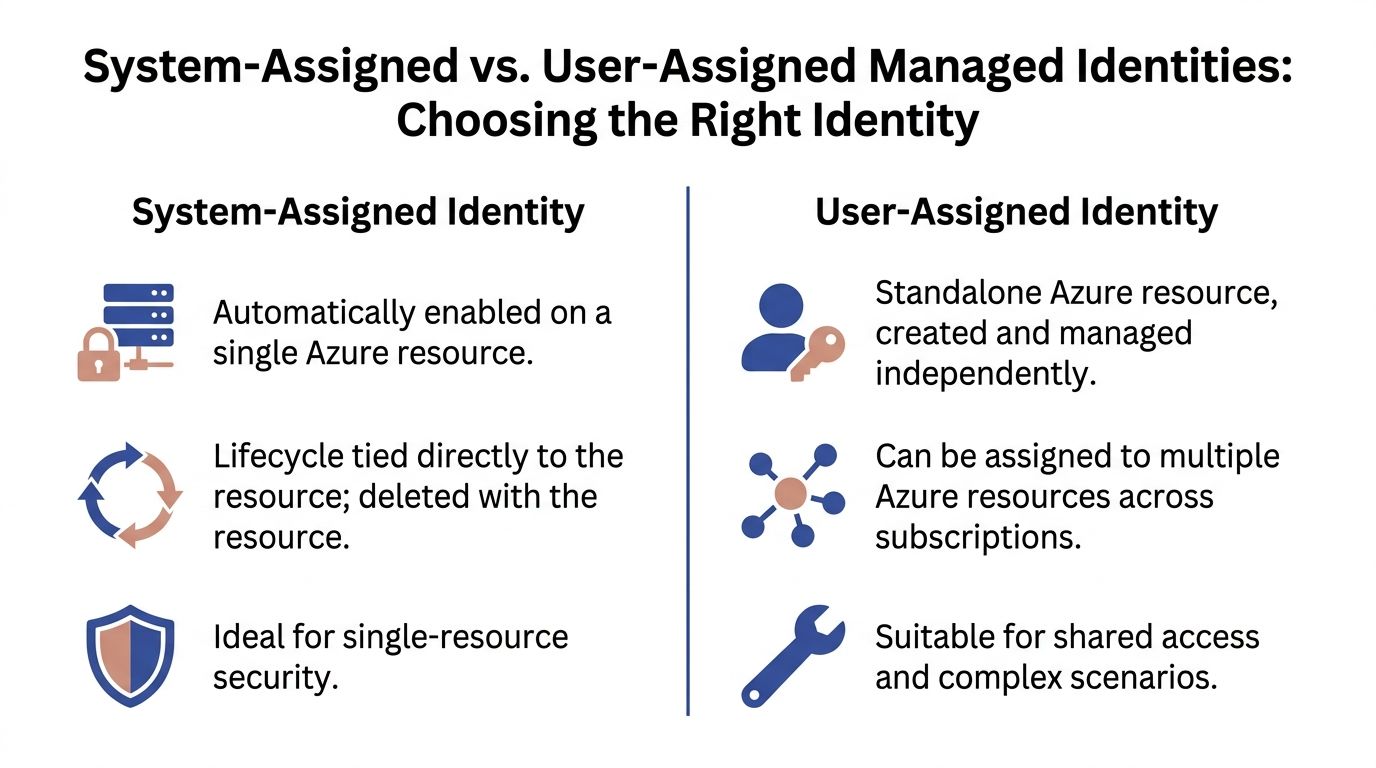
Azure gives you two models. System-assigned managed identity and user-assigned managed identity. Both remove secrets. They differ in lifecycle, reuse, and control.
System-assigned identity
A system-assigned identity belongs to one Azure resource.
Enable it on a VM or App Service, and Azure creates the identity for that resource. Delete the resource, and the identity goes with it. That makes it a good fit when the access pattern is tightly bound to a single workload.
Use it when:
- One resource owns one permission set: A Function App reads one Key Vault and nothing else.
- You want simple lifecycle management: No separate identity object to track.
- The workload is disposable: Dev or test resources can come and go without identity cleanup.
The trade-off is rigidity. If several workloads need the same access, repeating role assignments across multiple system-assigned identities can become noisy.
User-assigned identity
A user-assigned identity is a standalone Azure resource.
You create it once, then attach it to one or more supported resources. Microsoft documents this model as particularly useful in enterprise scenarios because one identity can be shared across multiple resources. Their example shows a user-assigned managed identity with Storage Blob Data Reader permissions assigned to a scale set of VMs so all of them get shared, least-privilege access without configuring each VM separately, which also decouples the identity lifecycle from any single compute resource in Azure SQL user-assigned managed identity guidance.
That lifecycle separation is the big operational win.
Use it when:
- Several resources need the same access: Multiple VMs, App Services, or jobs need the same storage or vault permissions.
- You want cleaner automation workflows: The identity can survive redeployments and resource replacement.
- You need better governance: Security teams can review a single identity object and its role assignments.
Decision rules that hold up in production
A simple rule works well.
Choose system-assigned when the identity belongs only to that resource. Choose user-assigned when the identity should outlive the resource or be shared.
For automation, especially scheduled operations, I usually prefer user-assigned identities. Schedulers, startup scripts, and maintenance jobs often outlive individual VMs. Tying permissions to a standalone identity avoids accidental permission loss when compute is recreated.
Side by side comparison
| Attribute | System-Assigned Identity (SMI) | User-Assigned Identity (UMI) |
|---|---|---|
| Lifecycle | Tied to one resource. Deleted with that resource. | Independent Azure resource. Persists separately. |
| Reuse | Not shared across resources. | Can be assigned to multiple resources. |
| Operational overhead | Simpler for single-resource scenarios. | Better for shared access and longer-lived automation patterns. |
| Governance | Easy when scope is narrow. | Easier to standardize and review across many workloads. |
| Best fit | One app, one resource, one clear purpose. | Shared access, automation, scale sets, recurring operations. |
What often does not work well
Problems usually start when teams choose identity type based on convenience in the portal.
A few patterns create friction fast:
- Using system-assigned identities for shared automation: You end up duplicating RBAC and troubleshooting differences between identical resources.
- Using one user-assigned identity for everything: Secretless does not mean harmless. One shared identity with broad rights becomes a lateral movement path.
- Ignoring lifecycle behavior: Deleting and recreating compute can unexpectedly drop access if the identity design was too tightly coupled.
Tip: If you need shared access, choose user-assigned. If you need isolation, start with system-assigned. Do not use one identity model for every workload.
How Managed Identity Authentication Really Works
Many teams use managed identity successfully without understanding the token flow. That is fine until something breaks. Then you need to know what happens between your code and Azure.

The local token request
The key component is the Instance Metadata Service, or IMDS.
Microsoft documents that the authentication flow uses the IMDS endpoint at http://169.254.169.254, where the application makes a GET request for a token and specifies the target resource URI. Microsoft Entra ID then issues a JSON Web Token (JWT), and Azure SDKs refresh that token automatically, as described in the managed identities overview.
In practical terms, your application asks the local Azure environment for a token. It does not reach into a config file and pull out a secret.
The flow in plain language
The sequence is straightforward:
- Your code asks for a token for a target service such as Key Vault or Azure SQL.
- Azure validates the resource identity behind the scenes.
- Entra ID issues an access token for that specific audience.
- Your app sends that token to the target service.
- The SDK refreshes tokens automatically as needed.
The important point is that your code typically does not manage any of this manually. In modern apps, DefaultAzureCredential handles the heavy lifting.
Why this matters operationally
This model improves both security and reliability.
There is no static secret sitting in a configuration store waiting to leak. There is also less custom authentication code for developers to maintain. That cuts down the number of failure points during deployments and incident response.
A short explainer can help if you want to visualize the mechanics before implementing them:
What developers should remember
Most of the time, you only need to think about three things:
- Which identity is attached to the resource
- Which RBAC role that identity has
- Which audience or resource your SDK is requesting a token for
When one of those three is wrong, authentication fails. Not because managed identity is opaque, but because the permissions model is explicit.
That is a good trade. Explicit permissions are easier to reason about than hidden secrets spread across app settings, variable groups, and deployment scripts.
Implementing Managed Identities With CLI and SDK Examples
Theory stops helping once you need to ship. The practical path is simple. Enable the identity, assign the right role, and let the SDK use it.
Enable a managed identity on a VM
For a virtual machine, the first step is enabling the identity on the resource. In the portal, you can do this under the resource identity settings. In automation-heavy environments, teams usually prefer CLI or infrastructure as code.
A common pattern looks like this conceptually:
az vm identity assign
  --resource-group <resource-group>
  --name <vm-name>
That command enables a system-assigned identity on the VM.
If you want to use a user-assigned identity instead, create it separately and attach it to the VM:
az identity create
  --resource-group <resource-group>
  --name <identity-name>
  --location <region>
Then assign that identity to the VM:
az vm identity assign
  --resource-group <resource-group>
  --name <vm-name>
  --identities <identity-resource-id>
Grant RBAC on the target resource
The identity exists at this point, but it still cannot do anything useful until Azure RBAC allows it.
If the VM needs to read blobs from a storage account, grant the narrowest role that fits the requirement. For example, a read-only scenario might use a storage data reader role at the storage account scope or even a more limited scope if your design supports it.
The pattern is:
az role assignment create
  --assignee <principal-id>
  --role "<role-name>"
  --scope <resource-scope>
Keep the scope tight. If the workload only needs one storage account, do not grant access at subscription scope.
Use the identity from application code
The best part of managed identity azure is how little code you need once the platform side is correct.
In C#, DefaultAzureCredential is the usual starting point:
using Azure.Core;
using Azure.Identity;

var credential = new DefaultAzureCredential();
var token = await credential.GetTokenAsync(
    new TokenRequestContext(new[] { "https://database.windows.net/.default" })
);
The verified Microsoft example for Azure SQL uses this same pattern with DefaultAzureCredential and a token request for https://database.windows.net/.default in the managed identity overview material provided earlier.
If you are calling a client library instead of requesting a raw token yourself, the code is cleaner still:
using Azure.Identity;
using Azure.Storage.Blobs;

var credential = new DefaultAzureCredential();
var client = new BlobServiceClient(
    new Uri("https://<storage-account>.blob.core.windows.net"),
    credential
);
What works well in real environments
A few implementation habits make a big difference:
- Use infrastructure as code for identity assignment: Manual portal changes are hard to audit.
- Separate identity creation from role assignment: That makes access reviews simpler.
- Test from the deployed resource: Local success does not prove Azure runtime success.
- Prefer SDK clients over manual token handling: The SDKs deal with refresh and environment detection.
What causes most failed rollouts
The code is rarely the problem.
These issues are more common:
- Wrong role at the wrong scope
- Identity attached to the wrong resource
- Target service configured for a different auth method
- Developers testing locally without a clear fallback credential path
Tip: When debugging, verify the Azure resource, the attached identity, and the role assignment before touching application code. Most failures are configuration mistakes, not SDK defects.
Security Best Practices for Managed Identities
Managed identities reduce credential risk. They do not remove authorization risk.
That distinction matters most in automation. A scheduler, maintenance job, or operations VM can become a powerful identity carrier if teams grant broad permissions just because “it needs to automate things.”
Treat the workload as the security boundary
Microsoft’s guidance is direct on this point. Any code running on a resource with a managed identity should be treated as having all the permissions granted to that identity. The same guidance warns that over-privileged managed identities can be abused and that threat actors increasingly target Non-Human Identities for lateral movement. For automation tools, Microsoft recommends narrowly scoped roles such as Virtual Machine Contributor on a specific resource group rather than at the entire subscription scope in its managed identity best practice recommendations.
That one principle changes how you should design automation.
If a VM can run arbitrary scripts, anyone who can influence that VM may be able to act with the identity’s permissions. So the identity scope must be designed for the worst credible code path, not the intended script.
RBAC patterns that hold up
The strongest pattern is narrow scope plus narrow role.
Use cases for automation often look like this:
- Start and stop compute: Grant VM-focused rights only on the resource group that contains those VMs.
- Read monitoring state: Use read-only roles where the workflow only needs discovery.
- Pull one secret from Key Vault: Grant access to that vault, not to every vault in the subscription.
This guide on https://www.cloudtoggle.com/blog-en/role-based-access-control-best-practices/ is useful if you are tightening identity scope across operations workflows and need a structured RBAC review process.
Prefer user-assigned identities for controlled automation
For recurring automated jobs, user-assigned identities often give better control than system-assigned ones.
Why? Because the identity lifecycle stays separate from the compute lifecycle. You can inspect, reassign, disable, or replace the identity without rebuilding the whole automation host. That separation is helpful when operations teams need stable access patterns but frequently redeploy the underlying resource.
Audit signs, not intentions
Many teams review what an automation process is supposed to do. Fewer review what the identity could do if misused.
Audit these areas regularly:
- Role assignments by scope
- Sign-in activity in Entra
- Activity logs for identity-related changes
- Resources where users can run code under an attached identity
If your team is preparing admins to reason about these controls more systematically, the AZ-104 Microsoft Azure Administrator – Study Guide is a practical reference because it reinforces the Azure administration skills behind identity, RBAC, and operational governance.
Common mistakes in cost automation
Cost-saving workflows are a special case because they sound harmless. Turning servers on and off feels low risk. The permissions around those workflows often are not.
Watch for these mistakes:
- Subscription-wide contributor rights for a scheduler
- One shared identity across unrelated workloads
- No review of who can trigger scripts on the host resource
- No logging review after initial setup
Key takeaway: Secretless authentication is only half the job. The other half is making sure the identity cannot do more than the automation task requires.
Practical Use Cases for Automation and Cost Savings
Managed identity becomes more valuable when it is tied to a specific operating problem.
Security teams like it because it removes secrets. Operations teams like it because automation gets easier to sustain. Finance and engineering leaders like it because safer automation is easier to approve than shared high-privilege credentials.
Scheduled VM operations
A common example is scheduled start and stop automation for development or nonproduction VMs.
The secure pattern is straightforward. Give the automation host or orchestration resource a managed identity. Scope its RBAC only to the resource group that contains the target VMs. Avoid granting broad subscription permissions just because it is easier during initial setup.
This model works better than shared admin credentials because access remains tied to an Azure resource and a defined role assignment.
App to Key Vault access
This is one of the cleanest wins.
An App Service or Function App can authenticate to Key Vault with managed identity instead of storing vault credentials or embedding secrets in deployment variables. The code asks for the secret at runtime. Azure handles authentication. Security teams gain tighter visibility into who can read what.
Shared identity for repeated infrastructure tasks
Some environments have many resources that need the same access pattern.
A user-assigned identity is useful here because one identity can be applied consistently across a group of resources. That reduces duplicated setup and makes permission reviews easier. It is especially helpful when replacing individual VMs should not change the authorization model.
Azure SQL access without SQL logins
Applications running on Azure compute can authenticate to Azure SQL using tokens rather than stored SQL usernames and passwords.
That reduces the spread of database credentials across pipelines, app settings, and operational runbooks. It also encourages teams to treat database access as part of the cloud identity model instead of a separate credentials problem.
Where teams get the most value
The biggest value usually appears where all three of these are true:
- The workload runs in Azure
- The process is repetitive or automated
- The previous approach depended on stored credentials
In those situations, managed identity azure does more than improve security. It removes friction that slows down platform teams, makes audits harder, and encourages over-permissioned shortcuts.
Frequently Asked Questions About Managed Identity
What permissions do I need to assign a user-assigned managed identity to a VM
Microsoft’s FAQ states that you typically need the Managed Identity Operator role on the identity itself and write permissions on the target resource, such as Microsoft.Compute/virtualMachines/write, as explained in the managed identities FAQ.
In practice, failures here usually come from having permission on the VM but not on the identity, or the reverse.
Can I use managed identity for local development
Not directly in the same way.
Managed identity depends on the Azure runtime environment. Local development usually uses a developer login, Azure CLI context, or another credential source that DefaultAzureCredential can pick up. The key is to make local and deployed authentication paths predictable rather than assuming they are identical.
Can one managed identity access resources in another tenant
Generally, no.
A managed identity in one tenant usually cannot be used to access resources in another tenant. For multi-tenant application scenarios, teams often need a different pattern such as a service principal.
Should I default to system-assigned or user-assigned
Default based on lifecycle.
If the identity belongs only to one Azure resource, system-assigned is usually cleaner. If the identity should survive resource replacement, be shared, or support recurring automation, user-assigned is often the better design.
Why does managed identity fail even when the code looks correct
Because the code is only one part of the chain.
Check the attached identity, the RBAC scope, and the target service configuration first. Most production issues come from permission design or resource wiring, not from the SDK call itself.
If you want to cut Azure and AWS compute waste without handing out broad cloud account access, CLOUD TOGGLE gives teams a safer way to schedule idle servers and VMs, apply role-based controls, and let non-engineers participate in savings without exposing the whole environment.