An effective IT cost reduction strategy isn't about slashing budgets with a blunt instrument. It's a much smarter, more systematic approach: a way to hunt down and eliminate waste, get the most out of every resource, and make sure your tech spending is actually pushing your business forward.
It’s the difference between blindly paying bills and actively managing the value your technology delivers.
The Real Reason Your IT Budget Is Out Of Control

Trying to get a handle on a rising IT bill can feel like plugging leaks in a dam with your fingers. You can easily spot the obvious expenses, like that big server purchase or the main software licenses everyone uses. But the things that are really draining your budget are often hidden in plain sight, quietly adding up month after month.
These sneaky costs create a ton of financial waste that nobody even notices until it’s a massive problem. It’s a story we see all the time: small, overlooked expenses slowly but surely spiral out of control.
Uncovering Hidden IT Costs
The real culprits blowing up your IT budget are rarely the big, one-off purchases. It’s almost always a collection of small, persistent inefficiencies that compound over time. The first step to getting your budget back on track is knowing where to look for them.
Here are a few of the usual suspects where costs secretly pile up:
- Phantom Cloud Resources: Think of these as ghost servers. They’re the forgotten virtual machines, old storage volumes, and other cloud services that are still running in the background, racking up charges every single month.
- Forgotten Software Licenses: You’d be shocked how much money is wasted on "shelfware," subscriptions for tools that are no longer being used by employees who left the company or switched teams.
- Inefficient Manual Processes: All those repetitive, time-sucking tasks that your team does day-in and day-out? Many could be automated, freeing up your people to do work that actually makes a difference.
A huge, often-overlooked contributor is technical debt. It quietly piles up, making your systems more expensive to maintain and a nightmare to update. Getting on top of this is critical, and a good place to start is by learning more about reducing technical debt.
An IT cost reduction strategy is not just about cutting costs; it's about reallocating resources from low-value activities to high-impact investments that drive business growth. It shifts the focus from expenditure to value creation.
From Reactive Spending to Proactive Management
Ultimately, a real IT cost reduction strategy changes your entire mindset. You stop being a reactive bill-payer and become an active manager of your company's technology portfolio.
This proactive approach means you can spot waste before it becomes a five-alarm fire and ensure every dollar you spend on IT is directly contributing to your business goals.
This guide will walk you through the practical steps to uncover these hidden costs, put smart savings tactics into play, and build a culture of financial accountability in your tech teams. By the end, you’ll have a clear roadmap to turn your IT budget from a source of stress into a powerful asset for your business.
Stop Cloud Waste With Smarter Scheduling
The cloud's greatest strength is its double-edged sword. Spinning up servers and services with a few clicks offers incredible agility, but that same ease of use is a recipe for unchecked spending. We've all seen it: resources get created for a project, a quick test, or a dev task, and then they're just… left running. 24/7. Long after everyone has gone home.
This constant, needless uptime is the primary driver of cloud waste. Just think of it like leaving every single light on in an empty office building, all night, every weekend. That bill for an empty, illuminated space would add up fast. It’s the exact same principle at work in your cloud environments.
Every one of those idle servers is a silent drain on your budget. This makes them one of the most immediate and impactful targets for any serious IT cost reduction strategy. Shutting these resources down when they aren't being used is the quickest way to see a real drop in your monthly bill.
The Problem With Non-Production Environments
Your production environments? They need to run around the clock to serve live customers. That’s a given. But your non-production environments for development, testing, staging, and QA are a completely different story. Most of the time, these servers are only being actively used during standard business hours, maybe 40 to 50 hours a week, if we're being generous.
The problem is, they're often left running for all 168 hours in a week. Do the math. For roughly 70% of the time, you are paying for computing power that is delivering absolutely zero value. This isn't a small rounding error; it's a massive, recurring hole in your budget that directly inflates your operational costs.
"For small and midsize businesses, where every dollar counts, idle compute resources alone can account for 30-50% of unnecessary spend. In fact, a staggering 42% of CIOs identify cloud waste as their top challenge."
The financial hit from this oversight is huge. As your teams grow and more temporary environments pop up, the problem just gets worse, leading to a cloud bill that seems to grow for no clear reason.
Automated Scheduling: The First Quick Win
The most direct fix for this is automated scheduling. Instead of crossing your fingers and hoping developers remember to shut down their machines, an automated system can power down non-production resources on a simple, predictable schedule.
This simple change ensures servers are only active when they need to be, say, from 8 AM to 6 PM on weekdays, and are automatically shut down at night, on weekends, and over holidays. Putting this one practice in place can be your first major victory in cutting cloud costs, often slashing the bill for these environments by more than half. You can learn more about the specific savings by exploring the hidden cost of idle VMs in our detailed article.
The following table breaks down common areas where cloud spend gets out of hand and the potential for savings.
High-Impact Areas for Cloud Cost Reduction
This table identifies common sources of cloud overspending and highlights the potential savings from implementing targeted IT cost reduction strategies.
| Area of Overspend | Common Cause | Estimated Savings Potential | Recommended Strategy |
|---|---|---|---|
| Non-Production Environments | Dev, test, and staging servers left running 24/7. | 60-75% | Implement automated start/stop schedules. |
| Oversized Instances | Provisioning more CPU/RAM than needed ("just in case"). | 20-40% | Regularly review usage metrics and rightsize resources. |
| Idle Resources | Unused load balancers, unattached disks, old snapshots. | 10-15% | Conduct regular audits and decommission orphaned assets. |
| Inefficient Storage | Using expensive, high-performance storage for archives. | 30-50% | Implement data lifecycle policies to move old data to cheaper tiers. |
While native tools from cloud providers exist to help with scheduling, they can be clunky to set up and often require deep technical knowledge. A more effective strategy is to use a specialized platform built for simplicity and security.
Empowering Teams Without Sacrificing Security
This is where dedicated scheduling tools like CLOUD TOGGLE really shine. They offer a massive advantage by simplifying access control. You can give non-technical team members, like project managers or QA leads, the ability to manage schedules for their specific resources without handing them the keys to your entire cloud console.
This focused approach delivers a few key benefits:
- Simplified Management: An intuitive interface lets users set, adjust, and override schedules in seconds. No need to get lost in a complex cloud dashboard.
- Enhanced Security: It completely removes the risk of someone accidentally changing critical infrastructure by limiting their permissions to just the scheduling functions they need.
- Increased Accountability: Teams become more aware of the costs tied to their resources, which helps build a culture of financial responsibility from the ground up.
By empowering the people who actually use the resources to manage their uptime, you safely and efficiently decentralize cost control. Cost reduction becomes a shared responsibility, not just another top-down mandate from IT or finance. It’s a practical and powerful first step toward sustainable savings.
Find Savings in Your Infrastructure and Licensing

While smart cloud scheduling delivers a quick victory, don't overlook your core IT stack. There's just as much potential for savings hiding in plain sight, within your on-premise infrastructure and that sprawling list of software subscriptions you pay for every single month.
Think of it like a cluttered garage. Over time, it fills up with tools you no longer use and projects you've forgotten about, but you keep paying the price in lost space. A focused IT cost reduction strategy is your chance to go through that garage, item by item, and decide what to keep, what to consolidate, and what to get rid of for good.
This process really boils down to tackling two main culprits: over-provisioned hardware and unused software licenses, often called "shelfware."
Rightsizing Your Physical Infrastructure
Just like in the cloud, it's common practice to provision on-premise servers with way more power than they actually need, "just in case." This leads to a fleet of underutilized machines that guzzle power, require cooling, and demand maintenance, all while delivering very little value. The goal here is simple: match your server capacity precisely to its workload.
Start by digging into the performance metrics of your servers, specifically CPU and memory usage, over a decent period, say, 90 days. You'll almost certainly find servers that consistently operate at a tiny fraction of their total capacity. These are your prime candidates for consolidation.
For example, you might find three separate servers chugging along at only 20% CPU utilization. Those workloads could almost certainly be combined onto a single, more efficient machine, slashing the associated operational costs. That one move cuts your power, physical space, and administrative overhead.
Eliminating Unused Software Licenses
Software licensing is another goldmine for cost savings. Companies frequently overbuy licenses or simply forget to reclaim them when employees leave or switch roles. These unused licenses just sit on a digital shelf, quietly draining your budget month after month.
A thorough license audit can reveal shocking levels of waste. It’s not uncommon for a company to pay for 100 premium seats for a specific tool, only to find that just 60 employees are actually using it. The other 40 licenses represent pure financial loss. Finding that gap gives you an immediate cost-cutting opportunity and some serious leverage for your next contract negotiation.
You can't manage what you don't measure. By tracking actual usage against purchased licenses, you turn anecdotal hunches into hard data that justifies real cost reductions.
This is about more than just counting seats. It’s about understanding which features are being used and whether you're paying for premium tiers your teams don't even touch. Many businesses save a bundle just by downgrading users from premium to standard plans without impacting productivity at all.
And if you're running a hybrid environment, it's absolutely worth exploring models like the Azure Hybrid Benefit to see how you can leverage existing licenses in the cloud.
Your Infrastructure and License Audit Checklist
To keep this process from becoming overwhelming, you need a structured approach. A checklist ensures you cover all your bases and systematically uncover every saving opportunity.
Here’s a step-by-step guide for your audit:
- Inventory All Assets: Create a master list of all physical servers, virtual machines, and software subscriptions. Use discovery tools to automate this and make sure nothing gets missed.
- Analyze Server Utilization: For each server, pull performance data for the last 3 to 6 months. Flag any server that consistently operates below 40% capacity as a candidate for consolidation or decommissioning.
- Track Software Usage: Implement a software asset management (SAM) tool or use built-in analytics to see who is logging in and what features they're using. Identify all inactive accounts.
- Reclaim and Reallocate Licenses: Set up a formal process for reclaiming licenses from departing employees. Create a pool of available licenses to assign to new hires, preventing needless new purchases.
- Renegotiate Vendor Contracts: Armed with your usage data, get in touch with vendors before your renewal date. Use the proof of underutilization to negotiate better pricing, reduce license counts, or switch to a more appropriate service tier.
By methodically working through these steps, you can transform your IT infrastructure from an uncontrolled cost center into a lean, efficient asset.
Build a FinOps Culture for Sustainable Savings
Tools and new tech are great, but they only get you so far. Automating schedules and auditing licenses will definitely give you some impressive initial savings, but keeping that momentum going requires a deeper change. Real, long-term cost control comes from a cultural shift, getting your tech teams to embrace financial accountability.
This is exactly where FinOps comes into play. Don't think of it as a rigid set of rules. It’s more of an operating model that builds a much-needed bridge between your finance, tech, and business leaders. The whole point is to make cloud spending a shared and transparent responsibility for everyone involved.
Adopting FinOps principles is a powerful it cost reduction strategy because it pulls you out of a reactive, panicked cost-cutting cycle. Instead, you start building a proactive culture focused on wringing every drop of business value out of every dollar you spend in the cloud.
What Is FinOps in Practice
At its heart, FinOps is about applying financial discipline to the notoriously variable spending model of the cloud. It introduces practices that empower your engineering teams to make cost-aware decisions without slowing them down or killing their creativity. It’s all about collaboration, not top-down control.
This approach is catching on for a very good reason. Research shows that fostering financial accountability through FinOps can lead to 25-30% average cloud cost cuts. That’s a huge deal, especially when you consider that 94% of IT leaders are struggling with rising storage costs, making optimization a massive priority. You can learn more about the financial impact by checking out this guide on mature FinOps adoption on uscloud.com.
The good news? You don't need a massive, disruptive overhaul to get started. You can begin by putting a few core principles into practice that create an immediate impact and lay the groundwork for a more mature FinOps culture down the road.
Creating Visibility and Accountability
The first, most critical step in any FinOps journey is simply creating visibility. You can't manage what you can't see. This means getting away from that single, confusing monthly cloud bill and giving clear, relevant cost data to the teams who are actually spending the money.
This is usually done with customized dashboards that break down spending trends for specific projects, teams, or applications. The conversation about efficiency changes completely when an engineering team can see a direct line between a new feature they launched and a sudden spike in costs.
A powerful next step is to introduce showback or chargeback models:
- Showback: This is the gentle approach. You simply show teams the costs associated with their resource consumption. It's an informational step designed to raise awareness without any direct financial penalty.
- Chargeback: This is more formal. The IT costs generated by a department are actually allocated back to that department's budget. It creates a direct, powerful incentive for teams to be more frugal.
By making costs visible and tying them to the right owners, you naturally create a sense of accountability that wasn't there before.
Empowering Engineers as Cost Managers
The old way of thinking was that finance polices the spending and engineers just build cool stuff. FinOps completely flips that script. It recognizes that engineers are the ones making dozens of daily decisions that directly impact the cloud bill, so they have to be empowered to manage those costs effectively.
The goal of FinOps is not just to save money, but to make money. It ensures that for every dollar invested in the cloud, the business is getting the maximum possible value in return.
This empowerment comes from giving them the right tools and data. It means providing access to those cost dashboards we talked about, setting up budget alerts, and weaving cost considerations right into their existing workflows. For a deeper dive into the core ideas, feel free to explore our guide that asks what is FinOps and why it matters.
When engineers understand the financial impact of choosing a larger server instance or a more expensive storage tier, they start to think like business owners. This shift doesn't just cut waste; it drives more efficient, innovative, and ultimately more profitable engineering. That cultural change is how you embed cost efficiency directly into your company's DNA for good.
How to Put Your Strategy into Action
An IT cost reduction strategy on paper is worthless. The real test, and where most great plans fall apart, is turning those ideas into action. Success comes down to a smart, phased rollout that builds momentum, gets your teams on board, and delivers real savings without burning everyone out.
Forget the "big bang" approach. That's a recipe for chaos. Instead, think of this as a series of deliberate steps, starting with easy victories that prove the value of your efforts. Once you build that initial trust and confidence, you can tackle the bigger, more complex challenges.
Start with Quick Wins to Build Momentum
The best way to kick off any cost-saving initiative is to go after the low-hanging fruit. These "quick wins" are actions that demand minimal effort but deliver immediate, obvious financial returns. For most companies, the easiest win is tackling cloud waste in non-production environments.
A perfect example? Automating the shutdown of development, testing, and staging servers during nights and weekends. With a simple scheduling tool like CLOUD TOGGLE, you can set this up in an afternoon and see the savings on your very next cloud bill. This one move can slash the costs of those environments by 60% or more.
Securing an early victory is about more than just money. It's powerful proof that your strategy works. That makes it a whole lot easier to get stakeholders and engineers excited about what's next.
Once you’ve got that first success under your belt, you can build on it. The momentum you create makes proposing and executing those larger, more involved projects much easier.
Phased Rollout for Larger Projects
With a quick win secured, you can shift your focus to more substantial projects. These require more planning and resources, but they also unlock deeper, long-term savings. Taking a phased approach here is critical to avoid disrupting day-to-day operations.
Think of these larger initiatives as distinct stages in your plan:
- Comprehensive License Audit: This is way more than a simple headcount. You’ll deploy software asset management tools to see what’s actually being used, hunt down inactive accounts, and analyze feature adoption. Can you downgrade some users to less expensive tiers without anyone noticing?
- Infrastructure Rightsizing: This one involves digging into several months of server performance data. The goal is to find and consolidate underutilized on-premise servers and rightsize overprovisioned cloud instances, making sure the resources perfectly match the workload. No more, no less.
- Process Automation: Take a hard look at the repetitive, manual tasks bogging down your IT and DevOps teams. Can you automate ticket routing, system patching, or report generation? Every process you automate frees up valuable human hours that can be poured into more strategic work.
By treating these as separate, well-defined projects, you can allocate resources more effectively and track the specific ROI of each effort.
Measure What Matters with Clear KPIs
You can't improve what you don't measure. To keep your strategy on course, you need to define and monitor Key Performance Indicators (KPIs). These metrics turn your abstract goals into concrete numbers, giving you the data to make smart decisions and prove your success to leadership.
Here are a few essential KPIs for any IT cost reduction strategy:
- Cloud Spend vs. Budget: This is the big one. It tracks your actual monthly cloud bill against what you forecasted. It’s the most direct indicator of whether you have costs under control.
- Cost Per Environment: Break down your spending by environment (e.g., production, staging, dev). This helps you pinpoint exactly where the money is going and which areas need the most attention.
- Resource Utilization Rate: This measures the average CPU and memory usage across your servers. If you’re consistently seeing rates below 40%, that's a huge red flag for over-provisioning and a clear opportunity to rightsize.
- License Utilization Percentage: This calculates the ratio of active software licenses to the total number you've bought. It’s a direct measure of expensive "shelfware."
Set up a regular, monthly review to go over these KPIs with your team. This creates a continuous feedback loop, letting you adjust tactics, celebrate wins, and stay focused. When you communicate these successes across the company, it reinforces the value of cost-consciousness and keeps everyone engaged.
Frequently Asked Questions
When you start digging into an IT cost reduction strategy, questions always pop up. Here are some clear, straightforward answers to the ones we hear most often, designed to help you sidestep common roadblocks and get results faster.
What Is the Best First Step in an IT Cost Reduction Strategy?
Always go for the low-hanging fruit: the quick wins that deliver the biggest impact with the least effort. For most companies, that means tackling cloud waste head-on.
Idle resources in non-production environments like development, testing, and staging can easily eat up over 30% of your total cloud bill. Think about it: servers running all night and over the weekend when nobody is even using them.
Putting an automated scheduling tool in place to power these servers down during off-hours can deliver immediate savings in the first month. This isn't just about cutting costs; it's a powerful way to prove the value of the whole initiative and get the buy-in you need for bigger projects down the road.
This is the ideal way to phase your approach, starting with quick wins to build momentum for deeper audits and ongoing reviews.
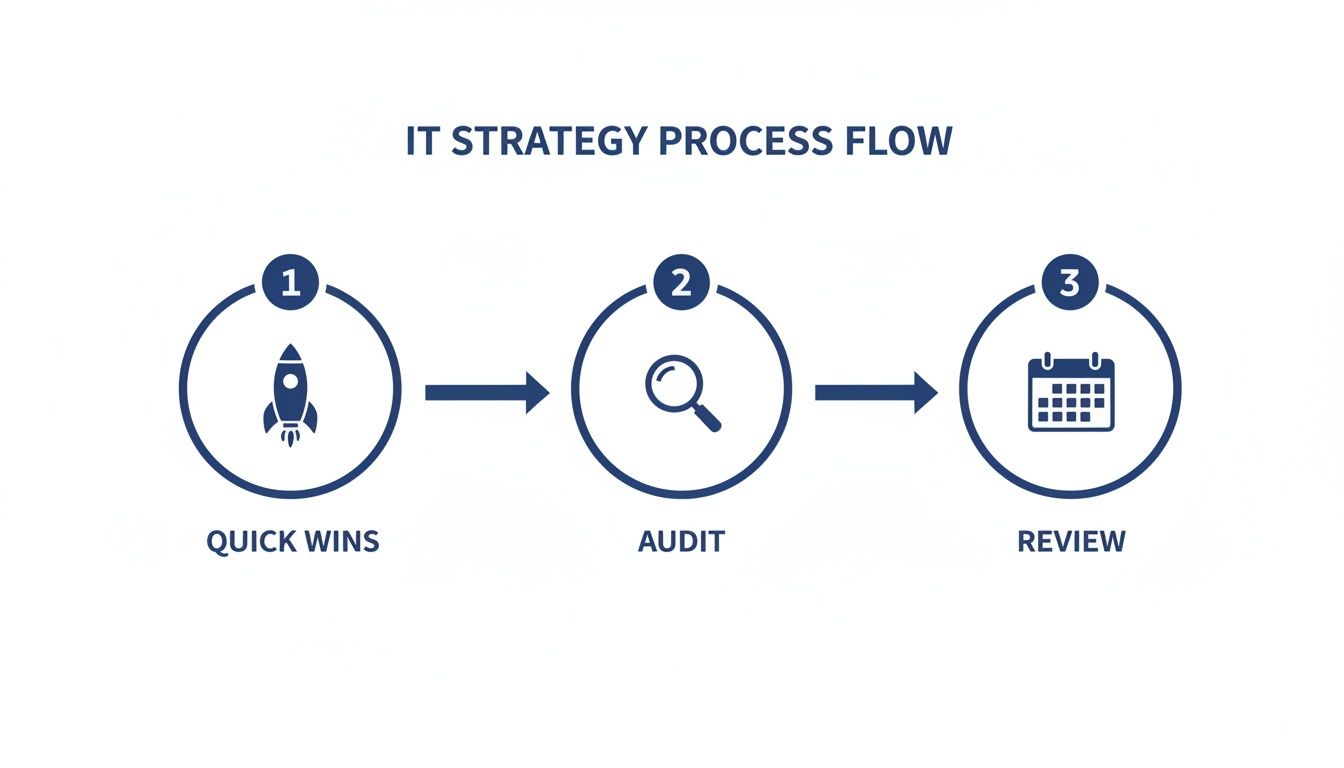
The key takeaway is that each phase builds on the last, creating a sustainable cycle of continuous improvement for your IT spending.
How Do I Get Engineering Teams to Support Cost Reduction?
The secret is to frame it as an opportunity for efficiency and innovation, not as a restrictive, blame-focused exercise. Engineers get excited when they see cost optimization as a path to working smarter and freeing up budget for more interesting, high-impact projects.
Start by giving them clear visibility into the costs of the resources they use every day. More importantly, empower them with tools that make saving money both simple and safe.
An IT cost reduction strategy succeeds when it empowers the people closest to the technology. Give your engineers the data and tools they need to see the impact of their decisions, and they will become your greatest allies in eliminating waste.
For instance, a dedicated scheduling platform like CLOUD TOGGLE lets you grant teams permission to manage resource uptime without giving them full, risky access to the cloud console. When engineers can control costs without slowing down their workflow or creating security holes, they become active partners. Just be sure to acknowledge and celebrate their contributions to reinforce that cost-conscious mindset.
How Often Should We Review Our IT Cost Strategy?
Cost optimization isn't a "set it and forget it" project; it's a continuous process. A successful strategy requires a regular review cadence to stay effective as your business and its technology needs evolve.
A monthly check-in is perfect for tracking key metrics and spotting any spending anomalies. This rhythm allows you to make quick, tactical adjustments before small issues snowball into major budget overruns.
Then, conduct a more comprehensive, strategic review quarterly. This is your chance to assess the overall effectiveness of your plan, look into new optimization tools, and make sure your IT spending still aligns perfectly with your business goals. This ongoing rhythm turns cost management from a reactive chore into a proactive business discipline.
Can Small Businesses Benefit from an IT Cost Reduction Strategy?
Absolutely. In fact, small and mid-sized businesses (SMBs) often have the most to gain. With tighter budgets, every dollar saved on unnecessary IT expenses can be funneled directly back into core activities like product development, marketing, or hiring key talent.
For a smaller company, trimming waste isn't just about boosting profit margins; it's about unlocking the capital needed to fuel growth.
Here’s exactly how SMBs benefit:
- Immediate Cash Flow Improvement: Quick wins, like automated server scheduling, can slash a major operational expense within the first 30 days.
- Increased Agility: A leaner IT operation allows a small business to pivot faster, unburdened by legacy costs or bloated infrastructure.
- Scalable Growth: Building cost-conscious habits early ensures that as the company grows, its IT spending scales efficiently instead of spiraling out of control.
How Do We Measure the Success of Our IT Cost Reduction Strategy?
You measure success through a mix of hard financial savings and softer operational improvements. You need clear, quantifiable metrics to track your progress and prove the value of your efforts to the rest of the business.
First, establish a baseline of your current spending before you make any changes. Then, track these key performance indicators (KPIs) over time:
- Reduction in Cloud Spend: The most direct metric. Compare your monthly cloud bills before and after implementing new strategies.
- License Utilization Rate: Calculate the percentage of paid software licenses that are actually being used. A higher number means less "shelfware."
- Cost Per User/Environment: Track how much it costs to support each employee or run each environment (dev, staging, prod). A downward trend shows you're getting more efficient.
- Hardware Consolidation Ratio: Measure how many physical servers you decommissioned through consolidation, which directly shows lower power and maintenance costs.
Tracking these numbers gives you undeniable proof of your strategy's impact, helping you maintain support and justify future optimization work.
Ready to lock in your first quick win and see an immediate drop in your cloud bill? CLOUD TOGGLE makes it simple to automate your non-production server schedules, cutting waste without getting in the way of security or productivity. Start your free 30-day trial today and see how much you can save.