Let's be honest, IT spending can feel like a black box. Money goes in, services come out, but connecting the dots between investment and actual business value? That's the hard part. This is where IT Finance Management (ITFM) steps in. It's the strategic practice of applying financial discipline to every dollar spent on technology, transforming IT from a cost center into a powerful engine for growth.
In a world running on the cloud, getting this right has never been more critical.
What Is IT Finance Management and Why It Matters Now

Think of IT Finance Management (ITFM) as the financial operating system for your company's tech stack. It's a collection of processes and tools that directly links what you spend on IT to the results you get, giving everyone clear visibility into where the money is going and what it's achieving.
As businesses have stampeded to the cloud, this discipline has evolved into what we now call FinOps. This isn't just about slashing budgets. It’s a cultural shift toward making collaborative, data-driven spending decisions that help teams move faster without breaking the bank. The core goal is to build a culture of financial accountability that everyone, from engineering to finance, buys into.
The Elephant in the Room: Spiraling Cloud Costs
The number one headache for most companies today is a cloud bill that seems to have a mind of its own. Platforms like Amazon Web Services (AWS) and Microsoft Azure offer incredible power, but their pay-as-you-go models can quickly lead to jaw-dropping invoices if you're not paying attention.
The main culprit? Idle and underutilized resources. This waste is a massive, silent drain on company budgets. Recent studies show that organizations waste up to 35% of their cloud budgets on resources just sitting there, doing nothing. These servers and virtual machines often remain dormant for 70-80% of the time on nights, weekends, holidays, yet the meter keeps running.
Tackling this specific problem is often the quickest win on any ITFM journey. If you want to go deeper, we have a detailed guide that answers the question, what is FinOps?
ITFM empowers every stakeholder, from the CFO analyzing budgets to the DevOps engineer deploying code, to see the financial impact of their actions. This shared visibility is the foundation for making smarter, more efficient technology investments.
To put it into perspective, here's a quick breakdown of who cares about what in the world of ITFM.
ITFM Core Concepts at a Glance
This table simplifies the core pillars, showing what each one aims to achieve and who needs to be in the room for it to work.
| Pillar | Objective | Key Stakeholders |
|---|---|---|
| Visibility | To see exactly where cloud spending is going, broken down by team, project, or product. | Finance, FinOps Practitioners, Engineering Leads |
| Optimization | To eliminate waste by right-sizing resources, shutting down idle instances, and using better pricing models. | DevOps, Engineers, Cloud Architects, IT Operations |
| Governance | To set guardrails and policies that guide spending decisions and enforce financial accountability. | CIO/CTO, Finance, Security & Compliance Teams |
| Collaboration | To create a shared language and responsibility for cloud costs between finance, tech, and business units. | All Stakeholders |
Ultimately, these pillars work together to ensure that every dollar spent on technology is a dollar well spent.
Shifting From Reactive to Proactive Control
Too many companies live in a reactive state of "bill shock," scrambling to figure out why the monthly cloud invoice was so high. Effective it finance management flips the script. It’s about moving to a proactive, strategic approach where you can see spending patterns, set realistic budgets, and hold teams accountable for what they use.
This is no longer just a job for the finance department. It's a shared responsibility across the entire organization.
And this field is getting smarter. Gartner predicts that by 2026, a staggering 80% of CIOs will be using generative AI for financial forecasting, budgeting, and spotting optimization opportunities. AI-driven tools are becoming essential for cutting through the complexity of modern cloud environments and reducing the manual grunt work.
This proactive control allows businesses to:
- Align IT spending with business goals: Ensure every tech dollar supports a specific strategic objective.
- Improve financial forecasting: Predict future costs with far greater accuracy, killing budget surprises.
- Boost ROI on technology: Squeeze maximum value out of every software license, cloud service, and piece of hardware.
- Foster a cost-conscious culture: Encourage everyone to think about the financial impact of their technology choices.
When you master ITFM, technology stops being a necessary evil on a spreadsheet. It becomes a true strategic asset that fuels growth and gives you a serious competitive edge.
The Three Pillars of Effective IT Financial Control

To get a handle on IT finance management, you need a solid foundation. Just like a house needs strong supports to stand, effective financial control in the cloud rests on three essential pillars. Getting these right is the first step toward building a culture of financial accountability and finally stopping wasteful tech spending.
These pillars aren't just abstract theories. They're practical disciplines that bring clarity and control to what can often feel like a chaotic cloud environment. Let's break them down with some simple analogies.
Cost Allocation and Tagging
Imagine getting a single, massive credit card bill with just one number at the bottom. You’d have no idea if that money went to groceries, gas, or a weekend getaway. That’s exactly what a cloud bill looks like without proper cost allocation.
Cost Allocation and Tagging is how you itemize that receipt. By "tagging" every single resource, like a server, database, or storage bucket, with specific labels, you can trace its cost back to the right department, project, or even a single product feature. A simple tag like team:marketing or project:q4-campaign makes all the difference.
This one simple act gives you immediate visibility. Suddenly, you can answer critical questions:
- Which department is really driving our cloud spend?
- What’s the true cost of running our new mobile app?
- Is our R&D spending aligned with the revenue it's generating?
Without this level of detail, trying to optimize costs is just guesswork.
Budgeting and Forecasting
Once you know where your money is going, the next step is to plan where it should go. This is the pillar of Budgeting and Forecasting. Think of it like mapping out a household budget before you buy a car or renovate the kitchen. You wouldn't commit to a massive expense without first knowing if you can actually afford it.
In the IT world, this means setting spending limits for teams and projects based on past data and future business goals. Forecasting uses this information to predict what your cloud bill will look like next month, helping you avoid that dreaded "bill shock" when the invoice arrives.
A key part of this is being able to accurately categorize business expenses, which is the bedrock of smart budgeting. This discipline is what moves a company from being reactive to proactive about its finances, making sure spending lines up with what really matters.
Good forecasting isn't about perfectly predicting the future. It's about reducing uncertainty and giving leaders the data they need to make smart trade-offs before costs spiral out of control.
This leads us directly to the final, crucial element: accountability.
Showback and Chargeback
The final pillar is all about changing behavior through transparency. Showback is like showing your family an itemized utility bill. You're not necessarily asking them to pay up, but you are making them aware of how leaving the lights on contributes to the total cost.
In a company, showback means generating reports that show different teams exactly how much their technology usage is costing the business. Often, this awareness alone is enough to encourage people to be more responsible.
Chargeback takes it a step further. It's the formal process of actually billing departments for the IT resources they consume. This flips the script, turning IT from a centrally-funded "freebie" into a service with a real price tag. It forces teams to think like business owners about their consumption, which is a powerful motivator for efficiency.
Of course, these models are useless without clear visibility into spending. It’s a huge problem. A startling 94% of core banking modernization projects run over schedule, often because of poor visibility into cloud costs. This lack of transparency leads to budget overruns that average a staggering 20-40%. You can dig into more data on these challenges in the full IBM report.
Together, these three pillars create a powerful, self-reinforcing cycle. Tagging gives you visibility, visibility allows for accurate budgeting, and budgeting makes meaningful showback or chargeback possible. Mastering them is how you transform chaotic IT spending into a well-managed strategic investment.
Essential KPIs to Measure Your ITFM Success
You can't improve what you don't measure. It’s an old saying, but it’s the absolute truth in cloud finance. Once you have visibility and accountability in place, the next move in solid it finance management is tracking your progress with the right Key Performance Indicators (KPIs).
These aren't just vanity metrics; they are the vital signs of your financial health in the cloud. They tell you, in black and white, whether your strategy is actually working. Tracking the right KPIs gives you a clear, data-driven story to tell. It helps you justify tech investments, show real financial wins to leadership, and keep your entire team focused on what really matters.
Measuring What Matters Most
It's far more effective to focus on a few critical KPIs than to drown in a sea of data. A great starting point is to pick metrics that directly tie back to cost efficiency, operational health, and the value you're delivering to the business. These numbers become the common language you use to talk about performance with both technical and financial teams.
Here are three essential KPIs that every organization should have on its dashboard.
Cloud Cost vs. Budget Variance: This is your ground zero ITFM metric. It simply measures the difference between what you planned to spend and what you actually spent. A low variance is a sign that your forecasting is on point and your teams are sticking to their budgets.
Cost Per Unit of Work: This KPI is a game-changer because it connects your cloud bill directly to business output. The "unit of work" can be anything that matters to your business: cost per customer, cost per transaction, or cost per active user. It reframes the conversation from "How much are we spending?" to "What value are we getting for our money?"
Idle Resource Waste Percentage: This is a direct measure of inefficiency. It calculates the slice of your cloud bill that’s going toward resources that are running but doing zero productive work. Think dev servers spinning all weekend. Tackling this is often the fastest way to find serious savings.
How to Calculate These Key Metrics
You don't need complicated software to put these KPIs into practice. You can start right now with basic calculations using the data straight from your cloud provider's billing console.
For example, figuring out your Idle Resource Waste Percentage is pretty straightforward. Just identify all your non-production resources (like dev, staging, or QA servers), calculate how many hours they run outside of business hours, and multiply that by their hourly cost. This gives you a hard dollar amount of pure waste you can eliminate.
By zeroing in on Idle Resource Waste Percentage, many companies are shocked to discover that 30-40% of their non-production cloud spend is just being thrown away. Slashing this number delivers an immediate and substantial return on your ITFM efforts.
Understanding these numbers is the first step. The next is improving them. If you're looking for a deeper dive into performance tracking, feel free to learn more about other crucial cloud metrics and KPIs to guide your strategy.
Ultimately, these KPIs give you a practical dashboard for your financial operations. They turn abstract goals like "be more efficient" into concrete, measurable targets that drive real action and prove the impact of a well-run ITFM strategy.
Here is the rewritten section, crafted to sound completely human-written and natural, following the provided style guide.
Your Practical Roadmap to Implementing ITFM
Jumping into IT finance management doesn't have to be a massive, boil-the-ocean project. In my experience, the most successful efforts start small. You want to chase quick wins that build momentum and show everyone the value right away. This is a practical, phased roadmap that any business, especially smaller ones, can use to build a solid ITFM practice without getting bogged down in red tape.
The idea is simple: crawl, walk, and then run. We'll start by just getting a clear picture of where your money is going. Then, we'll actively start cutting the obvious waste. Finally, we'll scale that success with smart tools so it becomes second nature. This way, you get real returns at every single stage.
Phase 1: Get Visibility
You can’t control what you can’t see. The very first step is all about getting a crystal-clear view of your current cloud spend. This is the bedrock for everything else you'll do to optimize costs.
Your main goal here is to answer some basic but crucial questions: Who is spending what, and on which services? The key to unlocking this is a consistent tagging strategy across all your cloud resources. Tagging lets you slice and dice your billing data by team, project, or application, turning one giant, confusing invoice into a simple, itemized report.
Here’s how to get started:
- Implement a Basic Tagging Policy: Don't overcomplicate it. Start with simple tags like
team,project, andenvironment(e.g.,dev,prod). The crucial part is making this mandatory for all new resources. - Use Native Cloud Tools: Begin with the free tools your cloud provider already gives you, like AWS Cost Explorer or Azure Cost Management. They are more than powerful enough to give you your first real look into spending patterns.
- Find Your Top Spenders: Run your first reports to see which services or projects are eating up the most budget. This is exactly where you'll find the biggest opportunities for savings down the line.
Phase 2: Start Optimizing
Once you can see everything clearly, it's time to start optimizing. This is where you actively begin to plug the leaks and cut pure waste. The lowest-hanging fruit is almost always idle resources, especially in non-production environments like development, testing, and staging.
Think about it: these servers often run 24/7 but are only actively used during business hours, maybe 40-50 hours a week. That means for every single instance, you're paying for 120+ hours of idle time every week. It's a massive, unnecessary expense just burning a hole in your budget.
Here’s what you’ll do in this phase:
- Create Resource Schedules: Set up schedules to automatically shut down non-production servers on nights and weekends. This one action can immediately slash costs for those resources by 60-70%.
- Right-Size Overprovisioned Instances: Use the data you’ve gathered to spot servers that are consistently underused. Resize them to a more appropriate, cheaper instance type.
- Establish Cost-Aware Policies: Work with your DevOps and engineering teams to create simple ground rules. Things like deleting unattached storage volumes or requiring shutdown schedules for all new test environments can make a huge difference.
The point of optimization isn’t to stifle innovation by randomly cutting budgets. It's about getting rid of pure waste so you can reinvest those savings into projects that actually drive the business forward.
Phase 3: Automate and Govern
Manually turning things off and on works, but it doesn’t scale. The final phase is all about using automation to enforce your policies and setting up a light governance model to keep things disciplined as you grow.
Automation ensures your cost-saving measures happen consistently, without relying on someone remembering to flip a switch. This is also where you formalize who is responsible for what when it comes to cloud costs. This isn't about creating a complex bureaucracy; it's just about making sure everyone is on the same page and shares accountability.
Your governance model should define clear roles:
- Finance: Owns the overall budget, tracks spending against forecasts, and measures the business impact of IT investments.
- DevOps/Engineering: Responsible for putting cost optimization policies into practice, managing resource tagging, and building cost-efficient architecture from the start.
- FinOps (or a designated lead): Acts as the bridge between finance and tech. They facilitate communication, provide cost visibility reports, and recommend new ways to optimize.
By following this phased approach, you can build a strong IT finance management practice that delivers real, measurable savings. It breaks a daunting challenge down into a manageable series of strategic wins.
Choosing the Right Tools for Your ITFM Strategy
Navigating the world of ITFM tools can feel like a chore. With so many options out there, each promising total control over your cloud spend, it’s easy to get stuck in analysis paralysis. But here’s the thing: a practical approach to IT finance management isn’t about finding one magical tool. It’s about understanding that different tools solve different problems.
They generally fall into three main categories, and each serves a unique purpose depending on your company's size, maturity, and specific cost challenges. Let’s break down these options so you can pick the right tool for the job right now.
The journey from hazy spending to full financial control is a predictable one. It starts with visibility, moves into optimization, and finally, reaches automation.
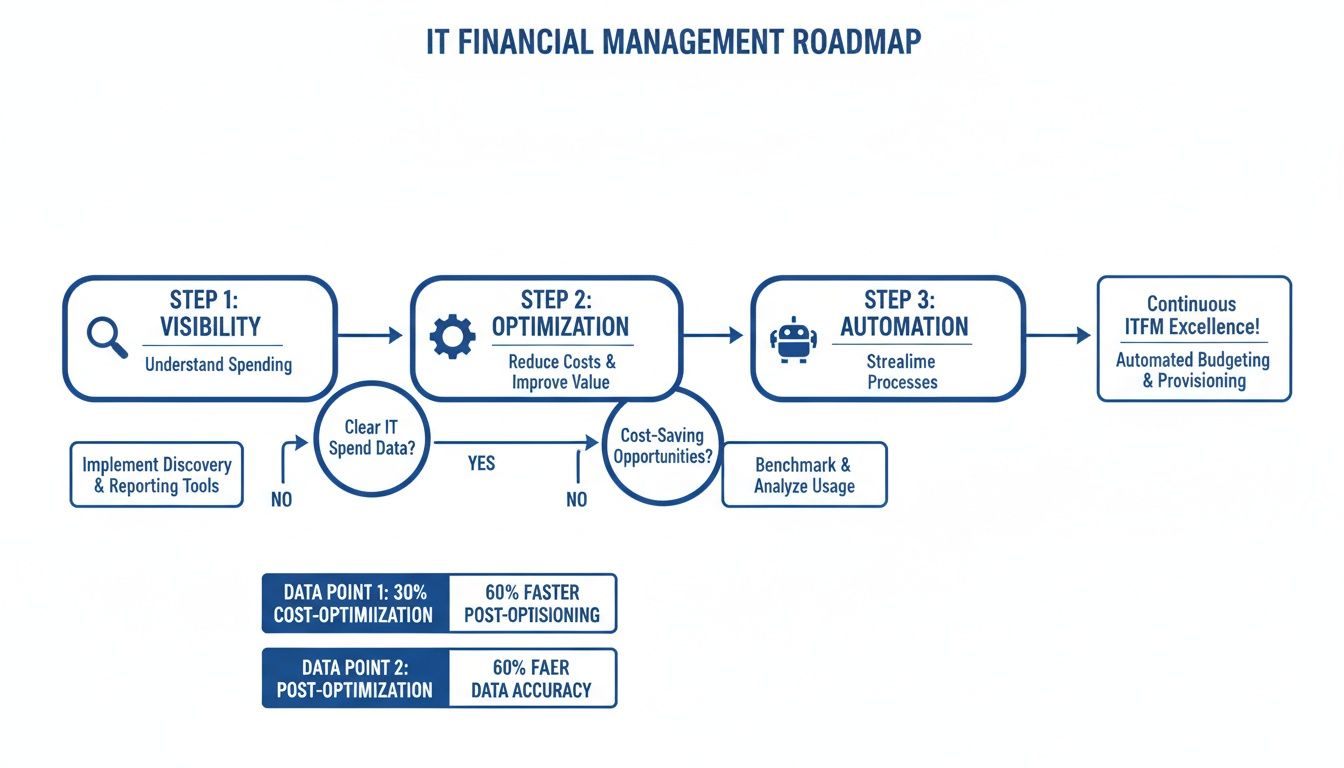
This roadmap shows that mastery begins with seeing where your money is going, progresses to actively cutting waste, and culminates in putting those savings on autopilot.
ITFM Tooling Matrix: When to Use What
Making the right choice comes down to matching a tool's strengths to your immediate needs and your team's FinOps maturity level. This table breaks down the landscape to help you decide.
| Tool Type | Best For | Key Strengths | Potential Limitations |
|---|---|---|---|
| Native Cloud Provider Tools | Startups and teams new to FinOps. | Free to use, deeply integrated, great for basic visibility and tagging. | Limited to a single cloud, lacks advanced analytics, can be complex to master. |
| Comprehensive FinOps Platforms | Mature enterprises with multi-cloud environments. | Centralized view of all cloud spend, advanced forecasting, deep anomaly detection. | High cost, requires a dedicated team, can be overly complex for simple problems. |
| Specialized Optimization Solutions | SMBs and DevOps teams focused on quick wins. | Solves one specific problem extremely well, delivers fast ROI, simple to implement. | Narrow focus, doesn't provide a complete picture of all cloud costs. |
Ultimately, you don't need a sledgehammer to hang a picture. If your biggest issue is idle servers, a specialized tool is almost always a better first step than a massive, all-in-one platform.
Breaking Down Your Tooling Options
Your choice of tools should align with where you are in your FinOps journey. It makes little sense to invest in a heavy, feature-rich platform if your biggest problem is simply servers running idle after hours. A targeted solution is often more effective and delivers a much faster return.
Here’s a closer look at the different types of tools available:
Native Cloud Provider Tools: Think AWS Cost Explorer or Azure Cost Management. These are the free, built-in dashboards from your cloud vendor. They are excellent starting points for gaining basic visibility and are powerful enough for early-stage cost allocation.
Comprehensive Third-Party FinOps Platforms: These are the all-in-one solutions that offer deep analytics and multi-cloud reporting. They’re best for mature organizations with complex environments and dedicated FinOps teams who need a single source of truth.
Specialized Optimization Solutions: This category includes tools designed to solve one specific, high-impact problem exceptionally well. They don't try to do everything but focus on delivering immediate, measurable savings in a targeted area.
Choosing the right tool isn't about finding the one with the most features. It's about identifying your biggest source of financial waste and deploying a solution that fixes that exact problem quickly and efficiently.
For smaller businesses, specialized tools often provide the fastest path to significant savings without the complexity and cost of a large platform.
The Power of a Specialized Tool Like CLOUD TOGGLE
A perfect example of a specialized solution is an automated instance scheduler like CLOUD TOGGLE. Its entire purpose is to tackle the low-hanging fruit of idle resource waste, a problem that plagues nearly every company with a cloud presence. While larger platforms can identify this waste, they often don't offer a simple, direct way to fix it.
For growing businesses, a tool like this offers a direct path to immediate savings by automating the shutdown of non-production servers during nights and weekends. This single action can slash the costs of those resources by up to 70%.
It solves a clear, expensive problem without requiring a massive overhaul of your financial processes. If you're exploring different options, our guide on the best cloud cost management tools offers more detailed comparisons.
This targeted approach helps build momentum for your ITFM practice. By showing quick, tangible wins, you gain the buy-in needed to tackle more complex optimization challenges down the road.
Real World Examples of ITFM Driving ROI

Theory is great, but seeing IT finance management deliver real-world results is what really counts. Let’s jump into three practical stories where companies used ITFM to solve common problems and lock in some serious ROI.
These examples prove you don’t need a massive, complicated overhaul to see a difference. Sometimes, a few focused changes are all it takes to cut costs, build accountability, and make a real financial impact.
Startup Slashes Surprise AWS Bill by 30 Percent
A fast-growing tech startup hit a wall that will feel familiar to many. After months of heads-down development, they were blindsided by their first five-figure AWS bill. The number was a shock and a genuine threat to their cash flow.
The culprit? A sprawling collection of development and testing servers left running 24/7, burning through cash even while the engineers were asleep.
The Challenge: Uncontrolled spending on non-production resources was wrecking their budget and draining capital that was desperately needed for growth.
The Solution: Instead of a hiring freeze, they tried a simple but incredibly effective ITFM tactic. They brought in an automated scheduling tool to power down all dev, staging, and QA servers outside of business hours: from 7 PM to 7 AM on weekdays and all weekend.
The Result: This one change slashed the runtime of their non-production environments by about 70%. The impact on their bill was immediate, leading to a sustained 30% reduction in their total monthly AWS spend. It was a quick win that saved critical funds and showed the whole team the power of active cost management.
Mid-Sized Agency Fosters Cost Awareness with Showback
A digital marketing agency was dealing with a different kind of headache. Their project profit margins were all over the place because they couldn’t connect their hefty cloud costs to specific client campaigns. Developers would spin up resources whenever needed, and the finance team just saw one massive, confusing bill at the end of the month.
The Challenge: A total lack of visibility made it impossible to price their services accurately or figure out which projects were actually profitable.
The Solution: The agency rolled out a "showback" model. They enforced a strict resource tagging policy, making sure every single server and database was assigned to a client project code. Each month, project managers got a detailed report showing exactly what their campaigns were costing in cloud resources. As ITFM evolves, many are exploring how technologies like AI in accounting can further automate these processes.
This wasn't about billing clients more. It was about making internal teams aware of the financial impact of their technical decisions. Visibility alone became a powerful motivator for change.
The Result: Within three months, a cultural shift began. Developers started proactively shutting down unused test environments and choosing more cost-effective server types. The agency saw a 15% drop in overall cloud spend, but just as importantly, their project margin calculations became way more accurate, leading to smarter quoting and healthier profits.
SaaS Company Aligns Infrastructure Spend with Growth
A B2B SaaS company had a classic scaling problem. As their customer base grew, their infrastructure costs were growing even faster, chewing away at their gross margins. Their "cost per customer" metric was heading in the wrong direction because their architecture wasn't built for cost efficiency.
The Challenge: The disconnect between their unit cost and revenue growth was creating an unsustainable financial model.
The Solution: The company turned "cost per customer" into a key KPI for the entire engineering team. Using detailed cost allocation data, they pinpointed the most expensive parts of their service delivery. This data guided them to re-architect key features, shifting from pricey, always-on instances to more scalable, on-demand services.
The Result: The initiative successfully broke the link between user growth and spiraling infrastructure costs. They brought down their average cost per customer by 22% in just six months, ensuring that as the company scaled, its profitability scaled right along with it. This strategic move turned their infrastructure from a growing liability into a predictable and efficient asset.
Common Questions About IT Finance Management
Even with the best roadmap, theory and practice are two different things. Getting started with IT finance management can feel like a huge undertaking, especially for teams that are already running lean.
Let's tackle some of the most common questions that come up when teams start thinking about controlling their cloud spend. The goal is to give you direct, practical answers that address the real-world concerns of DevOps engineers, finance leaders, and small business owners alike.
How Much Can We Realistically Save?
This is always the first question, and the answer really depends on where you're starting from. The good news? Most organizations find the quickest and largest savings by going after one thing: idle resource waste.
It’s incredibly common for businesses to slash their non-production environment costs by 60-70%. How? Simply by scheduling them to turn off when nobody is using them. Think nights and weekends.
This one move can often shrink the total monthly cloud bill by 15-30%. That's a huge and immediate return on your effort.
The key takeaway here is that you don't need a massive, company-wide overhaul to see big savings. A focused attack on obvious waste delivers fast, measurable results that build momentum for your ITFM practice.
Do We Need to Hire a FinOps Specialist?
Not necessarily, especially not right out of the gate. For most small and mid-sized businesses, ITFM starts as a shared responsibility, not a dedicated job title.
A DevOps or IT lead can easily champion the initial effort. They can work directly with the finance team to track costs and put some basic guardrails in place. You can build a culture of cost awareness with the team you already have.
Down the road, as your cloud footprint and spending grow, you might want to bring in a dedicated FinOps practitioner. But in the beginning, just get the ball rolling.
Ready to stop wasting money on idle cloud resources? CLOUD TOGGLE makes it simple to automate server schedules, cutting your AWS and Azure bills by up to 70% with just a few clicks. Start your 30-day free trial and see how much you can save.