When the CloudWatch bill comes in higher than expected, it almost always boils down to three culprits: data ingestion, storage, and analysis. Of these, ingestion is usually the biggest offender by a long shot.
Think of it like your home water bill. You pay for every single drop that flows into your house, not just for the big tank where you store it. This guide will walk you through how to get a handle on your CloudWatch Logs spending. With the right strategy, it's completely achievable.
Why Your CloudWatch Logs Bill Is So High
It’s a story many engineering and FinOps teams know well: the AWS bill arrives, and a huge chunk of it is from CloudWatch. We're not talking about a minor line item, either. For some teams, logging costs can actually rival or even blow past the cost of the compute resources they’re monitoring.
I’ve seen this firsthand. One team I worked with had a single Lambda function that cost just $205 per year to run. But that same function was generating over $10,000 annually in log charges.
How does this happen? It’s simple: logging is often an afterthought during development. Engineers are focused on debugging, so they turn on verbose logging to see every little detail. That’s great for testing, but that firehose of data often gets left on when the code moves to production. Suddenly, you’re flooding CloudWatch and driving your bill through the roof.
To give you a quick reference, here’s a breakdown of the core costs you're dealing with.
CloudWatch Logs Cost at a Glance (us-east-1)
| Cost Dimension | Standard Rate (per GB) | What It Means |
|---|---|---|
| Data Ingestion | $0.50 | The cost to send your logs into CloudWatch. This is often the biggest part of your bill. |
| Data Storage | $0.03 | The monthly fee to keep your logs archived. Without a retention policy, this is indefinite. |
| Data Analysis | $0.005 | The cost to run queries on your stored logs using CloudWatch Logs Insights. |
As you can see, getting the data in is where the bulk of the cost lies.
The Core of the Problem
At its heart, the issue is volume. Every single log entry, no matter how small, adds to the total amount of data you ingest, store, and analyze. These three activities are the main cost levers for the service.
- Data Ingestion: This is the fee for sending log data into CloudWatch. It's almost always the largest part of the bill because you pay for every gigabyte that crosses the threshold.
- Data Storage: This is the recurring monthly cost to keep your logs around. AWS charges per gigabyte, and if you don't set a retention policy, those logs stick around forever, costing you money each month.
- Data Analysis: This is what you pay to run queries against your logs, usually with CloudWatch Logs Insights.
A common mistake is treating all logs as equally important. In reality, a tiny fraction of logs are ever needed for critical troubleshooting, while the vast majority are informational noise that quietly inflates your AWS bill.
It's also worth noting that your logging costs don't exist in a vacuum. Other infrastructure choices, like using certain expensive frameworks, can also have a downstream effect on your operational budget. The key is to build a cost-aware mindset across your entire tech stack, and a high-volume service like CloudWatch is the perfect place to start.
Breaking Down the Three Pillars of CloudWatch Pricing
To get your CloudWatch Logs spending under control, you first have to know exactly what you’re paying for. It’s not a single line item on your bill; it's a mix of three different charges that all work together.
A good way to think about it is like running a physical warehouse for an e-commerce business. Your products (your logs) have to be shipped in, stored on shelves, and occasionally counted. Each one of those steps has a cost, and CloudWatch works the same way. The entire pricing structure rests on these three pillars: data ingestion, data storage, and data analysis.
Pillar 1: Data Ingestion
Data ingestion is simply the cost of getting your log data into CloudWatch. In our warehouse analogy, this is the shipping and handling fee you pay to get products from the factory to the warehouse door. It’s a one-time fee for every gigabyte you send over.
This is almost always the biggest chunk of your CloudWatch logs cost. Why? Because you get charged for every single log event your applications spit out, from a harmless debug message to a critical error. A "chatty" application can easily generate terabytes of data, and you pay to ingest all of it, whether you ever look at it again or not.
The second a log is created and sent to CloudWatch, you’ve been charged for ingestion. This is the single biggest reason why controlling log volume at the source is the most powerful cost-cutting move you can make.
Pillar 2: Data Storage
Once your logs arrive, they need a place to live. That brings us to data storage, which is the recurring fee for keeping your logs over time. Think of this as the monthly rent you pay for your shelf space in the warehouse.
AWS charges this per gigabyte, per month. The scary part? By default, CloudWatch stores your logs forever. That means if you do nothing, your "rent" will climb every single month as new logs pile up. Setting a retention policy is like telling the warehouse manager to throw out old inventory after 90 days, which stops your storage costs from spiraling out of control.
Pillar 3: Data Analysis
The final piece of the puzzle is data analysis. Your logs aren't just sitting there to take up space; you need to search and query them to fix problems or find business insights. In our analogy, this is what you pay the warehouse staff to run an inventory check or find a specific item tucked away on a high shelf.
This cost usually comes from using tools like CloudWatch Logs Insights. You’re charged based on the volume of data scanned each time you run a query. While this is often the smallest of the three costs, don’t ignore it. Running frequent or sloppy queries across massive amounts of log data can still add up and give you a nasty surprise on your bill.
Understanding these three pillars separately is the key to getting a handle on your spending.
- Ingestion: The fee to get your data in the door.
- Storage: The ongoing rent for keeping it there.
- Analysis: The cost to search through what you've stored.
Once you realize that ingestion is the most expensive part of the whole operation, you can start focusing your efforts where they’ll have the biggest impact. Next, let's see how these pillars translate into real-world dollars and cents.
Calculating Your CloudWatch Costs with Real Examples
Understanding the theory is one thing, but seeing how the numbers add up in the real world makes everything click. Let's walk through two very different scenarios to see just how dramatically your logging strategy can impact your AWS bill.
First, it helps to know where the money goes. This visual breaks down how the three main cost pillars, ingestion, storage, and analysis, typically contribute to your total CloudWatch bill.
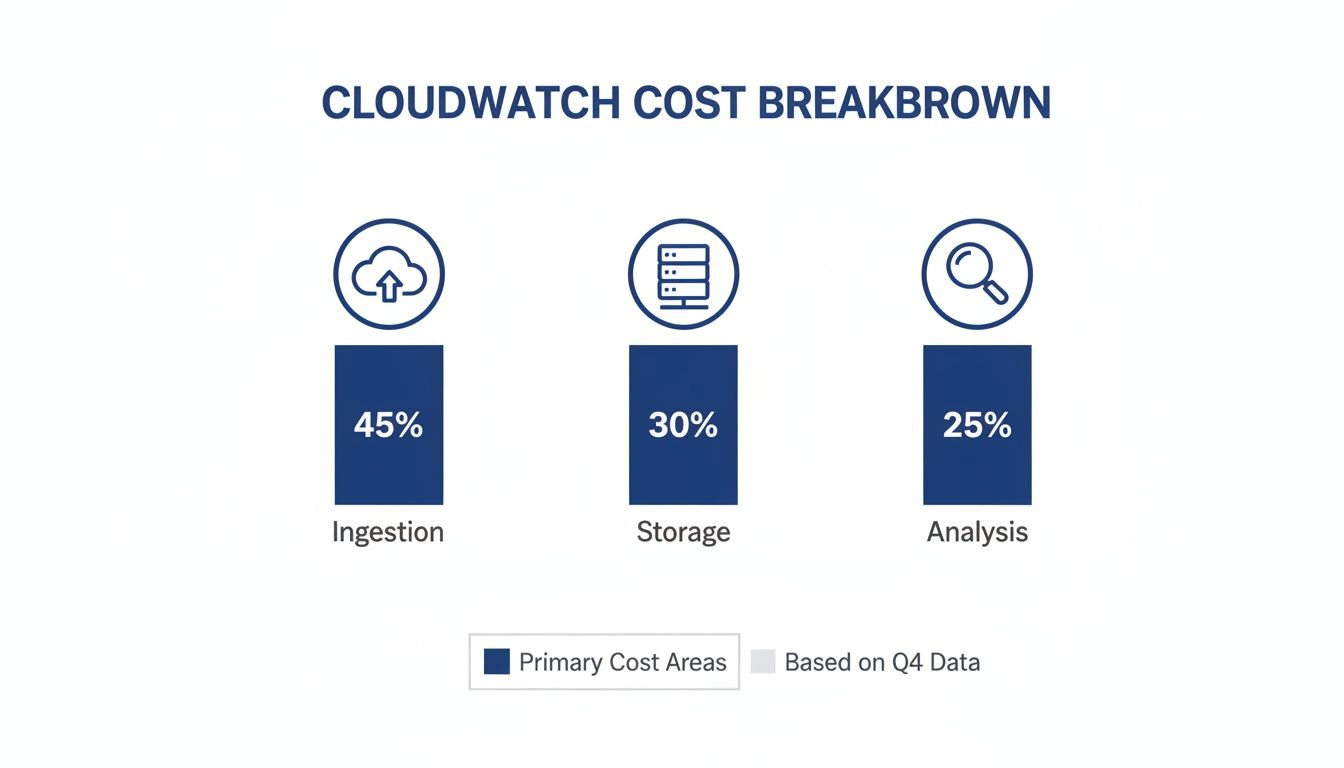
As you can see, data ingestion is almost always the biggest slice of the pie. That makes it the number one target for any cost optimization efforts.
Scenario 1: A Small Application
Let's start with a small web application that generates a steady but manageable 1 GB of logs per day. Over a 30-day month, that adds up to 30 GB of total log data. Calculating the cost here is pretty straightforward.
AWS gives you a generous 5 GB free tier for ingestion every month. So, you only actually pay for the remaining 25 GB.
- Ingestion Cost: 25 GB * $0.50/GB = $12.50
- Storage Cost: Assuming you keep all 30 GB for the month, the storage bill is tiny: 30 GB * $0.03/GB = $0.90
- Analysis Cost: If you run a few queries scanning about 10 GB of data, you’re looking at pennies: 10 GB * $0.005/GB = $0.05
For this small app, the grand total comes to a very reasonable $13.45 per month. This shows that for low-volume workloads, CloudWatch can be incredibly affordable. If you want to see exactly how these charges appear on your bill, our guide on AWS Cost and Usage Reports explained breaks it all down.
Scenario 2: An Enterprise Workload
Now, let's flip the script and look at a high-traffic enterprise environment. Think services like AWS WAF and CloudFront, which can pump out terabytes of incredibly detailed log data, capturing every single web request. This is where things get serious.
Real-world CloudWatch bills can tell a shocking story about what happens when logging goes unchecked. A modest setup ingesting 1 GB daily might only cost $12.53 a month, but an enterprise workload is a different beast entirely.
In one scenario involving a WAF and CloudFront combination, ingestion charges ballooned to $13,414.40. Add another $921.60 for archiving 30 TB of that data, and the monthly bill hits a staggering $14,336. At this scale, the cost of logging alone can easily dwarf your other observability expenses. You can find more of these eye-opening examples in the official AWS pricing documentation.
The jump from a few gigabytes to multiple terabytes transforms CloudWatch Logs from a minor operational expense into a major line item on your budget. This is exactly why a "set it and forget it" approach to logging is so dangerous for large-scale applications.
This tale of two workloads makes one thing perfectly clear: your CloudWatch Logs cost is directly tied to your data volume. Without proactive management, what starts as a rounding error on your bill can quickly spiral into thousands of dollars.
Finding the Hidden Drivers of High Logging Costs
While ingestion fees are usually the biggest line item on your CloudWatch bill, the real key to managing your spend is understanding what’s generating all that data in the first place. High bills are almost always a symptom of something deeper, an issue with how your applications and infrastructure are set up. Pinpointing these root causes is the first and most important step toward real savings.
These cost drivers can be subtle. They often creep up over time, slowly turning a manageable expense into a major budget headache. It's rarely one single problem, but more of a perfect storm of common practices that, together, create an overwhelming volume of log data.
Verbose Application Logging
One of the most frequent culprits we see is verbose application logging. This makes perfect sense during development; engineers need to log absolutely everything to debug their code effectively. They’ll log entire request payloads, detailed object states, and step-by-step execution traces. While this is a lifesaver for troubleshooting, it often gets left switched on in production.
When this "debug mode" logging is exposed to real production traffic, it generates a massive and massively expensive stream of data. A single transaction that should only create one or two meaningful log entries might suddenly produce dozens, bloating your ingestion volume and sending costs through the roof.
Short-Lived Compute Resources
Another major driver comes from modern, ephemeral infrastructure. Services like AWS Lambda and containers are brilliant because they spin up, do a job, and disappear. They're incredibly efficient, but this creates a unique logging challenge.
Every single time a new container or Lambda instance runs, it can create a brand-new log stream in CloudWatch. An application with heavy traffic could easily generate thousands of these short-lived log streams every hour. Not only does this make it a nightmare to track down specific logs, but it also adds significantly to the sheer volume of data being ingested and managed. Many teams are caught off guard by these unexpected AWS charges, which can quickly inflate a monthly bill. You can learn how to spot and manage these surprise costs by reviewing our guide on addressing unexpected AWS charges.
High-Volume Vended Logs
Finally, don't ever overlook Vended Logs. These are the logs generated automatically by other AWS services, like VPC Flow Logs, Route 53 Resolver query logs, or AWS WAF logs. They are incredibly useful for security and network analysis, but they can also produce an absolutely enormous amount of data.
AWS CloudWatch Logs has emerged as a massive cost driver for cloud users, accounting for a whopping 38% of the average CloudWatch bill across enterprise accounts, with typical monthly spends hitting around $1,200 per account. Data ingestion costs were pinpointed as the culprit behind 51% of billing spikes in high-volume workloads, primarily because AWS charges $0.50 per GB ingested in standard regions. Discover more about these statistics on AWS CloudWatch spending.
Turning on a service like VPC Flow Logs on a busy network without applying careful filtering can instantly flood your account with terabytes of data. The result? A truly shocking bill at the end of the month. Understanding which services are sending logs, and just how much they're sending, is absolutely essential for keeping your costs predictable and under control.
Actionable Strategies to Reduce Your CloudWatch Spend

Alright, now that you understand what's driving your CloudWatch bill, it's time to take back control. The good news is that reducing your CloudWatch logs cost doesn't mean you have to rip everything apart and start over. It's all about making a series of smart, practical tweaks that can lead to some serious savings, often right away.
These strategies are designed to trim the fat from your logging practices without losing the critical visibility you need for effective troubleshooting. By being more deliberate about what you log, how long you keep it, and where you store it, you can transform a runaway expense into a predictable, manageable cost.
Optimize Log Ingestion with Smart Filtering
Since log ingestion is almost always the biggest chunk of the bill, the most powerful move you can make is to simply send less data to CloudWatch in the first place. Let's be honest, not every single log entry is critical, especially in a busy production environment.
Start by implementing strategic filtering and sampling right at the source. Configure your logging agents or even your application code to drop repetitive, low-value messages before they ever leave your server. This way, you only pay to ingest the data that actually helps you monitor and debug.
The fastest way to slash your CloudWatch bill is to stop paying for noise. A single, well-placed filter that drops verbose informational logs in production can easily cut your ingestion volume by over 50% without impacting your ability to diagnose real problems.
Many of these cost-saving principles are universal. For instance, looking at how other services approach cost management, like cutting BI spend by up to 70% with flexible pricing models, can provide fresh ideas for optimizing your own spend.
Master Log Levels and Retention Policies
Two of the simplest and most effective tools you have are log levels and retention policies. They give you direct control over both the volume and the lifespan of your stored data.
-
Use Log Levels Effectively: In your production environment, make
WARNorERRORyour default log level. This one change can immediately stop the flood ofINFOandDEBUGmessages that are great for development but just create expensive noise in production. You can find more tips like this in our broader guide to cost optimization on AWS. -
Set Aggressive Retention Policies: Here's a scary default: CloudWatch keeps logs forever unless you tell it otherwise. Go through your log groups and set a realistic retention period, maybe 30, 60, or 90 days. Forcing the deletion of old, irrelevant logs is a simple way to stop storage costs from creeping up month after month.
Leverage Modern Pricing and Storage Tiers
AWS is constantly rolling out new features aimed at making logging more affordable, especially at scale. Keeping up with these updates can unlock major savings for high-volume applications.
A recent game-changer is the tiered pricing for Lambda logs. A huge update on May 1st introduced steep discounts that completely change the math for serverless cost strategies. While the first 10 TB per month is still $0.50 per GB, the next 40 TB drops to $0.25 per GB, and anything over 50 TB plummets to just $0.05 per GB. That's a potential 90% savings at massive scale.
Don't forget to look at the Infrequent Access (IA) log class, either. It cuts the ingestion price in half for logs you need to keep for compliance but rarely query. It’s the perfect home for archival data that you have to retain but almost never touch.
Frequently Asked Questions About CloudWatch Costs
Getting a handle on AWS billing can feel like a moving target. When it comes to CloudWatch Logs, a few key questions pop up again and again. Getting these sorted will help you build a smarter cost-saving strategy and make sure you’re spending your budget wisely.
Here are some direct answers to the most common questions we hear about CloudWatch expenses.
What Is the Single Biggest Factor in High CloudWatch Logs Costs?
Without a doubt, data ingestion is the number one driver of high CloudWatch Logs bills. AWS charges for every single gigabyte of data you push into the service, and that cost hits your account the instant the data arrives. While storage and analysis have their own fees, they are almost always dwarfed by the sheer volume of logs you're sending in.
If you want to make a real dent in your spending, focus your efforts on reducing the amount of data you ingest in the first place. You can do this by filtering out noisy logs, using strategic sampling, and dialing back the log levels in your applications.
The most impactful change you can make is to control the firehose of data before it ever reaches CloudWatch. Every gigabyte you stop from being sent is a direct saving on your ingestion bill, which is where the bulk of the cost lives.
How Can I Monitor My CloudWatch Costs Proactively?
Proactive monitoring is absolutely essential if you want to avoid a nasty surprise at the end of the month. The best way to do this is by using a combination of AWS's own tools to keep an eye on your spending as it happens.
Your first stop should be AWS Cost Explorer. This is where you can get a crystal-clear picture of your spending. Be sure to filter by the "CloudWatch" service and then group everything by "Usage Type." This will break down your bill into the important categories like DataProcessing-Bytes (your ingestion cost) and TimedStorage-ByteHrs (storage), showing you exactly which area needs your attention.
On top of that, you should also:
- Set up AWS Budgets: Create a dedicated budget just for CloudWatch. You can configure alerts to ping your team via email or Slack the moment spending goes over a threshold you've defined. Think of it as an early warning system.
- Create Custom Metrics: To get even more granular, you can build CloudWatch metrics based on the log data itself. For example, tracking the volume of incoming log events for your busiest log groups can help you spot unusual spikes long before they turn into a massive bill.
Is It Cheaper to Export Logs to S3?
Yes, for long-term archival, exporting your logs to Amazon S3 is dramatically cheaper. S3 storage costs are a fraction of what CloudWatch charges, especially when you use lifecycle policies to automatically shift that data to deep archive tiers like S3 Glacier.
But there's a tradeoff: accessibility. Querying logs that are sitting in S3 with a tool like Amazon Athena is more involved than just firing up CloudWatch Logs Insights. It's not as quick for immediate analysis, and Athena queries come with their own separate costs.
The best practice for most teams is a hybrid approach. Keep the logs you need for immediate troubleshooting, say, the last 30 to 90 days, in CloudWatch where they are fast and easy to search. Then, set up an automated export for all older logs to S3. This gives you cost-effective, long-term storage for compliance and archival without breaking the bank.
Take control of your cloud costs beyond just logging. CLOUD TOGGLE helps you save by automatically powering down idle servers, ensuring you only pay for the compute resources you actually use. Start your free 30-day trial and see how much you can save at https://cloudtoggle.com.