That surprisingly high Azure bill is a classic "welcome to the cloud" moment for a lot of businesses. It's a common problem, but thankfully, it's also a solvable one. Getting your Azure cost optimization strategy right isn't about cutting corners or hamstringing your teams. It's about being smart and methodical, managing your cloud resources to surgically remove waste.
Think of it as a continuous process: constantly monitoring, analyzing, and tweaking your setup to make sure you're only paying for what you actually use and need.
Why Azure Cost Optimization Is a Top Priority

Let's be clear: controlling cloud costs has shot up the priority list from a niche IT concern to a critical business challenge. The beauty of Azure is how easy it is to spin up new services. But that's a double-edged sword. While it fuels rapid innovation, it also makes it incredibly easy for expenses to spiral out of control if nobody's watching the meter.
I like to think of a cloud environment like a fleet of taxis. Some are actively driving passengers around, generating real value. But others? They're sitting idle in a forgotten parking lot, meter running 24/7, just racking up charges. The whole point of cost optimization is to find those idle taxis and turn them off.
The Hidden Costs of Cloud Waste
The biggest culprits behind inflated Azure bills often hide in plain sight. They're the accidental byproducts of everyday development cycles where speed trumps efficiency. Pinpointing these areas is your first big step toward serious savings.
So where is all this money going? It usually boils down to a few key areas:
- Idle Resources: This is the big one. Virtual machines (VMs) for development, testing, or staging are frequently left running around the clock, even when they’re only being used for a few hours a day.
- Oversized Services: We've all seen it. An engineer provisions a much beefier VM or database than needed, "just in case." This overprovisioning means you're constantly paying for horsepower you never actually use.
- Forgotten Storage: Old snapshots, unattached disks, and abandoned storage accounts are like dust bunnies that accumulate over time. They create a slow, steady, and completely unnecessary drain on your budget.
Effective cost management isn't a one-time project you can check off a list. It’s an ongoing discipline that’s essential for your financial health and for getting the best possible return on your cloud investment.
This guide is your practical roadmap to taking back control.
The Financial Impact of Inefficiency
The scale of this problem is staggering. As Azure's popularity has exploded, cost control has become a massive headache for companies of all sizes. The numbers are shocking: up to 30% of an average annual Azure spend is pure waste. We're talking about underutilized resources like oversized databases humming along at 20% capacity or "zombie" storage snapshots that have been lurking for years. If you want to dive deeper into the data, you can read the full research on these cost optimization challenges and solutions on holori.com.
By taking a proactive approach to your Azure costs, you can reclaim that wasted budget. Imagine what you could do by redirecting that 30% back into real innovation and growth.
Understanding the Core Cost Saving Strategies
To really get a handle on your Azure spending, you first need to master the fundamental strategies that deliver the biggest wins. These aren't obscure technical secrets; they're the foundational pillars of smart cloud management. Think of them as the primary tools in your cost-saving toolkit, each designed to fix a different kind of inefficiency.
We'll focus on four key pillars: Rightsizing, Reservations and Savings Plans, Autoscaling, and Storage Tiering. Getting how each of these works is the first and most important step before you can move on to more advanced tactics and build a strategy that actually makes a dent in your Azure bill.
Rightsizing: Finding the Perfect Fit
Rightsizing is all about matching your cloud resources to your actual performance needs. It’s one of the simplest yet most powerful ways to stop overspending. The idea is dead simple: don't pay for more horsepower than you're actually using.
Imagine you're renting a moving truck. You wouldn't get a massive semi-trailer if all your belongings fit in a small van, you'd just be paying for a lot of empty space. Rightsizing in Azure is the exact same principle. It ensures you’re not paying for a high-performance virtual machine when a smaller, cheaper one would do the job just fine. Tools like Azure Advisor are great for this, as they analyze your usage and tell you when a resource can be safely scaled down without hurting performance.
Reservations and Savings Plans: Committing for Big Discounts
If you have workloads with predictable, consistent usage, then Reservations and Savings Plans are going to be your best friends. These are pricing models that give you a huge discount in exchange for committing to use specific services for a one or three-year term. It's a no-brainer for any resource that needs to run 24/7.
Think of it like signing a long-term lease on an apartment instead of paying the sky-high nightly rate at a hotel. The longer you commit, the better the rate.
- Azure Reservations: These offer the deepest discounts, up to 72%, but you have to commit to a specific VM family in a particular region. This is perfect for workloads that are extremely stable and predictable.
- Azure Savings Plans: These give you a bit more flexibility. You commit to a fixed hourly spend on compute services, and the discount automatically applies to a wide range of resources. This makes them a better fit for more dynamic environments where your needs might shift.
By forecasting your long-term needs, you can lock in major savings on your baseline costs, turning a volatile operational expense into a predictable budget item.
Autoscaling: Matching Capacity to Demand
Of course, not all workloads are predictable. Many applications see demand fluctuate wildly, with traffic spiking during business hours and dropping off completely at night or on weekends. Autoscaling is the dynamic fix for these scenarios, automatically adjusting your resource capacity to match demand in real-time.
It's like a retail store hiring extra staff only during the chaotic holiday season instead of keeping them on the payroll all year. Autoscaling ensures you have the power you need during peak times to deliver a great user experience, but it also scales resources back down during quiet periods to stop the financial bleeding from idle capacity. This makes it a cornerstone of efficient Azure cost optimization for any variable workload.
Storage Tiering: Paying Only for What You Access
Finally, let's talk about data. Not all data is created equal, and you shouldn't be paying for it as if it is. Azure offers different storage tiers, each with a different price point and access speed, allowing you to match your storage costs with how often you actually need to access your data.
The core idea is simple: pay premium prices only for data you need to access frequently and immediately. For data that is rarely touched, move it to a cheaper, long-term storage tier.
Azure's primary storage tiers include:
- Hot Tier: Optimized for frequently accessed data. It has the highest storage costs but the lowest access costs.
- Cool Tier: Designed for data that is stored for at least 30 days and isn't accessed much. Storage costs are lower, but it costs more to retrieve the data.
- Archive Tier: The cheapest option for long-term data archival (for data stored at least 180 days). It has rock-bottom storage costs, but it can take several hours to get your data back.
By simply classifying your data and using the right tier, you can slash your storage bill. And for a deeper look at the software that helps manage all these strategies, check out our guide on the best Azure cost optimization tools.
To tie this all together, here's a quick summary of the core strategies we've just covered. This table should help you quickly see which approach might be the best fit for different parts of your Azure environment.
Azure Cost Optimization Strategies at a Glance
| Strategy | Best For | Typical Savings Potential |
|---|---|---|
| Rightsizing | Over-provisioned VMs and services with consistent but oversized capacity. | 15% – 40% |
| Reservations & Savings Plans | Stable, predictable workloads that run 24/7 (e.g., production servers). | 40% – 72% |
| Autoscaling | Applications with variable or unpredictable traffic patterns (e.g., web apps, batch jobs). | 20% – 50% |
| Storage Tiering | Large datasets with mixed access patterns (e.g., backups, logs, archives). | 30% – 80% |
Each of these pillars offers a different path to savings, and the most effective cost optimization plans almost always use a combination of all four.
Once you've got your resources right-sized, the next big lever you can pull for cost optimization is committing to your usage. If you have any resources that need to be up and running consistently, paying the standard pay-as-you-go rate is basically just leaving money on the table.
Microsoft has a couple of powerful ways to reward you for long-term planning, and the discounts are substantial. We're talking up to 72% off standard rates when you commit to one or three years of compute.
When you start layering these commitments, known as Azure Reservations and Savings Plans, with other clever tactics like Spot VMs for batch jobs (which can be up to 90% cheaper) and the Azure Hybrid Benefit, you really start to stack up the savings like a pro.
Azure Reservations Explained
Think of an Azure Reservation like pre-booking a very specific hotel room for a long stay. You're telling Microsoft, "I guarantee I will use this exact virtual machine family, in this specific region, for the next one or three years."
It’s the most direct path to the biggest possible discount, but it comes with a trade-off: it demands the most certainty from you.
This is the perfect choice for workloads that are rock-solid and predictable. Good candidates include:
- Core production servers that run 24/7.
- Essential infrastructure like domain controllers.
- Databases with consistent, unchanging performance needs.
Because you're giving Microsoft a high degree of certainty, they reward you with the best price. That lack of flexibility, however, means Reservations aren't a great fit for workloads that are still evolving or have dynamic needs.
Understanding Azure Savings Plans
If Reservations are like booking a specific room, Azure Savings Plans are more like buying a hotel voucher. Instead of committing to a particular VM instance in a particular place, you commit to spending a fixed amount of money per hour on compute services for one or three years.
This discount then automatically applies to a whole range of compute resources, even if you switch VM families or move them to different regions.
This model is a game-changer for organizations with more dynamic environments. It gives you the freedom to modernize your applications, try out different VM types, or shift resources between regions, all without losing your discount. You might get a slightly lower discount compared to a super-specific Reservation, but the flexibility is often well worth it for a growing business.
This decision tree helps visualize when to pick one over the other.
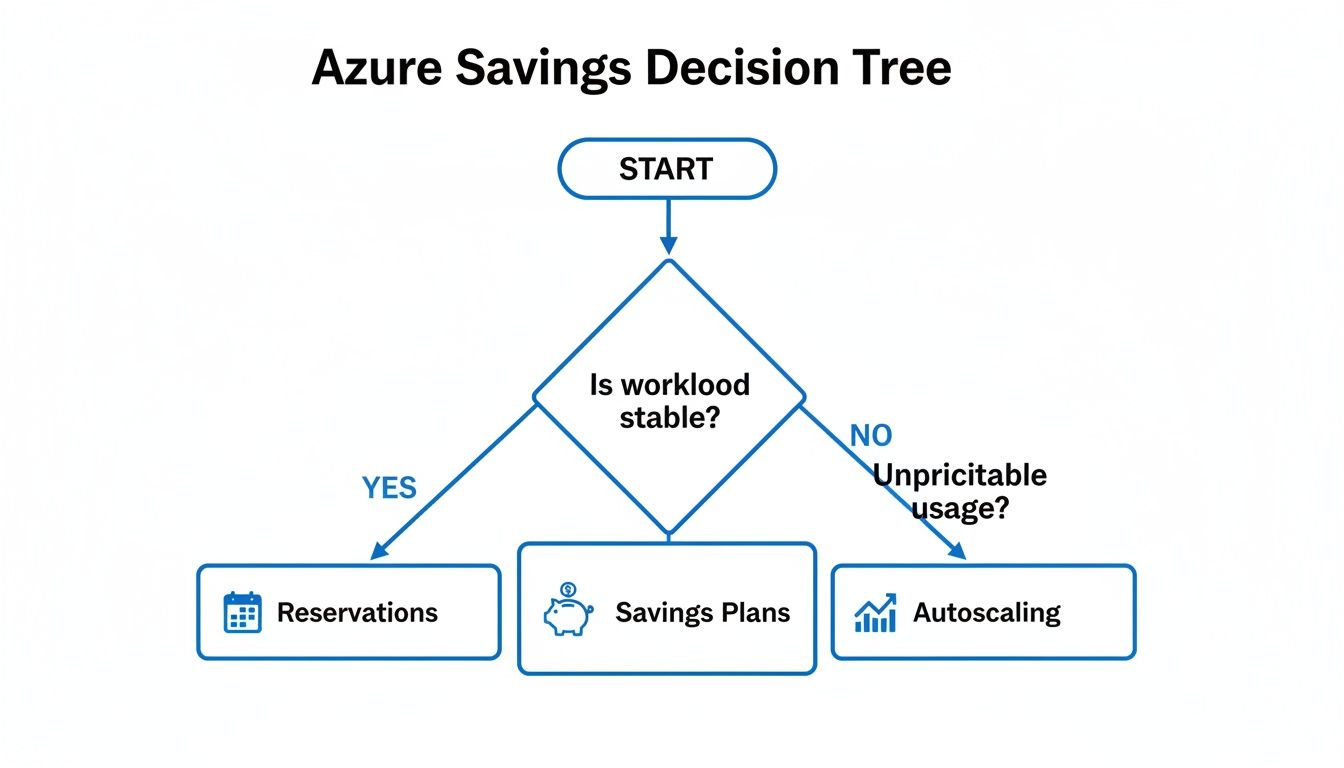
The bottom line is simple: stable, predictable workloads get the deep discounts of Reservations. Dynamic, evolving workloads are better suited for the flexibility of Savings Plans.
Maximizing Value with the Azure Hybrid Benefit
On top of these commitments, the Azure Hybrid Benefit is another critical tool you can't afford to ignore, especially if you have existing investments in Microsoft software. This program lets you use your on-premises Windows Server and SQL Server licenses (as long as they have Software Assurance) in Azure.
By bringing your own licenses to the cloud, you can make your Windows and SQL workloads up to five times cheaper than on other major cloud platforms. It essentially wipes out the software licensing cost from your Azure VM bill, so you only pay for the base compute infrastructure.
The best part? This benefit can be combined with both Reservations and Savings Plans, creating multiple layers of savings. For any company already in the Microsoft ecosystem, overlooking the Hybrid Benefit is a massive financial mistake.
To get a full breakdown of how this program works, check out our Azure Hybrid Benefit in our detailed guide.
Building a Culture of Cost Governance

Technical fixes like rightsizing and reservations are great, but they only get you so far. To achieve sustainable Azure cost optimization, you need a cultural shift, a point where financial accountability becomes part of your team's DNA. This is the heart of cost governance.
Think of your Azure environment like a community garden. If there are no rules about who can plant what or where, you'll quickly end up with an overgrown mess. Governance acts as the fence and the plot markers, giving everyone the structure they need to keep things tidy and productive. It ensures no single project drains all the resources.
When you get governance right, cost management stops being a reactive cleanup job and becomes a proactive, shared responsibility. It’s all about creating guardrails that nudge teams toward cost-conscious decisions from day one, stopping budget blowouts before they even start.
Establishing Clear Visibility with Tagging
You can't control what you can't see. This simple truth is why a solid tagging strategy is your most critical governance tool. Tagging is just applying metadata labels (key-value pairs) to your Azure resources, but its impact is massive.
By consistently tagging resources with details like Project, Department, Environment, or CostCenter, you're essentially creating a detailed spending map. This lets you slice and dice your Azure bill to see exactly which teams, applications, or initiatives are driving costs.
A consistent tagging policy is the bedrock of cloud financial management. It provides the granular data needed for accurate cost allocation, showback, and chargeback, making it possible to hold teams accountable for their consumption.
Without tags, your Azure bill is just an intimidating wall of numbers. With them, it transforms into a clear, actionable report that tells the story of how your organization actually uses the cloud.
Automating Enforcement with Azure Policy
A brilliant policy is worthless if nobody follows it. And let's be realistic, manually checking every single new resource for compliance just isn't scalable. This is where Azure Policy steps in to become your automated governance engine.
Azure Policy lets you create, assign, and manage rules that are enforced across your entire Azure environment. It can flat-out prevent actions that violate your standards, ensuring compliance happens automatically. For instance, you could:
- Enforce Tagging: Block any new resource deployment if it’s missing essential tags like
CostCenterorOwner. - Restrict VM Sizes: Prevent developers from accidentally spinning up massive, expensive VMs in a simple dev environment.
- Limit Deployable Regions: Ensure all resources are deployed to specific, cost-effective geographic regions to keep data transfer costs in check.
These policies act like automated guardrails, helping engineers "fall into the pit of success" by making the right thing easy and the wrong thing hard.
Defining Standardized Environments with Blueprints
If you need even more control, Azure Blueprints take things a step further. While a policy enforces a single rule, a Blueprint lets you bundle an entire collection of policies, access controls (RBAC), and resource templates into one reusable package.
Think of a Blueprint as a complete "starter kit" for a new cloud environment. When a team needs a new dev or production setup, you just deploy the right Blueprint. Instantly, it's created with all your governance, security, and cost controls baked in from the very beginning.
This approach standardizes everything, guaranteeing that every new environment automatically follows best practices without any manual checklists or oversight. By building this strong foundation of visibility, automated enforcement, and standardization, you create a true culture of accountability. This operational discipline is a core pillar of the FinOps framework, which is all about aligning financial goals with cloud engineering. If you want to dive deeper, check out our guide on what is FinOps and how it drives accountability.
Automating Savings on Non-Production Resources
Once you’ve sorted out the big-ticket items like reservations and governance, one of the fastest ways to make a dent in your Azure bill is by tackling non-production resources. These environments, development, staging, and QA, are the silent budget killers. While they’re absolutely essential for building and testing, they often sit completely idle outside of business hours, racking up charges minute by minute.
Just think about it. A typical developer’s server might only be in active use for eight hours a day, five days a week. That’s 40 hours of real work. But if it’s left on, you’re paying for all 168 hours in a week. That massive gap is pure waste, and it's some of the easiest low-hanging fruit you can find in cloud cost management.
The Financial Impact of Idle Resources
The money you can save by shutting down idle machines is far from trivial. Let's run the numbers on a single, common virtual machine to see just how big the impact is. We'll use a Standard_D4s_v5 general-purpose VM as our example.
- Total Hours in a Month: Roughly 730 hours.
- Pay-As-You-Go Rate: Around $0.20 per hour.
- Cost if Running 24/7: 730 hours * $0.20/hour = $146 per month.
Now, what if we only ran this VM during standard business hours? Let's say that's 8 AM to 6 PM, Monday through Friday.
- Total Uptime: 10 hours/day * 5 days/week * 4.33 weeks/month ≈ 217 hours per month.
- Cost with a Schedule: 217 hours * $0.20/hour = $43.40 per month.
By doing nothing more than turning off this one dev VM on nights and weekends, the cost plummets from $146 to just $43.40. That's a saving of over 70%. Imagine multiplying that across dozens or even hundreds of non-production machines. The savings quickly scale into thousands of dollars every single month.
Relying on people to manually shut down resources every evening is a recipe for failure. It's inconsistent and prone to human error. Automation is the only practical and scalable way to lock in these savings without getting in your developers' way.
This is exactly why automated scheduling is a non-negotiable part of any serious cost optimization playbook.
Simplifying Schedules with the Right Tools
The fix for idle resource waste is simple in concept: turn things off when nobody's using them. Azure does have native tools like Azure Automation that can script these shutdowns, but they often demand a good bit of technical know-how to configure and maintain. This can create a bottleneck, dumping the entire responsibility on your already busy IT or DevOps teams.
A much smoother path is to use a dedicated platform that takes the complexity out of scheduling. This is where a tool like CLOUD TOGGLE really shines. It offers a clean, user-friendly interface for managing resource schedules, completely removing the need to write scripts or get lost in the depths of the Azure portal.
The key is that the interface is built for everyone, not just engineers, allowing both technical and non-technical staff to safely manage uptime.
Empowering Teams to Control Costs Safely
One of the biggest wins from a specialized tool is the power to delegate control without creating security nightmares. You would never give a project manager or finance team member full admin rights to your Azure environment; that's a huge risk. But platforms like CLOUD TOGGLE neatly isolate the scheduling function. They empower these stakeholders to contribute directly to cost savings without ever touching sensitive infrastructure settings.
This approach hits several key goals at once:
- Democratizes Cost Savings: It gets more people across the organization involved in and accountable for cost control.
- Reduces IT Burden: It frees up your engineering talent from the mind-numbing task of managing server schedules.
- Enhances Security: It uses granular, role-based access control (RBAC) designed specifically for scheduling, so you avoid handing out overly broad permissions.
By putting an automated scheduling solution in place, you turn a major source of financial waste into a predictable and significant monthly saving. This makes it one of the quickest and most effective moves you can make to slash your Azure bill.
Common Questions About Azure Cost Optimization
As you dive into smarter cloud spending, a few practical questions always seem to pop up. Let's tackle some of the most common ones we hear, reinforcing the key ideas from this guide and giving you some extra, actionable advice.
What Is the First Step I Should Take for Azure Cost Optimization?
The most impactful first step is always the same: get visibility. You can't fix what you can't see.
Before you do anything else, you need to dig into Azure Cost Management + Billing and get a crystal-clear picture of where your money is actually going. This initial analysis is like turning on the lights in a dark room; it immediately shows you the biggest cost centers and the most obvious areas of waste.
Once you know where the money is flowing, go after the low-hanging fruit. These are the quick wins that deliver immediate savings with minimal effort. For most teams, this means two things: rightsizing obviously oversized VMs and setting up automated shutdown schedules for non-production environments. Tackling these first almost always delivers the fastest and most significant returns.
How Do I Decide Between Azure Reservations and Savings Plans?
The choice between Azure Reservations and Savings Plans really comes down to a single word: flexibility. Your decision should hinge entirely on how predictable your cloud workloads are.
You should choose Azure Reservations if you have a rock-solid, predictable workload. Think of core production servers that never change. If you can confidently commit to a specific VM family in a specific Azure region for one or three years, this is your best bet. Reservations offer the deepest possible discount because you're giving Microsoft maximum certainty about your future usage.
On the other hand, you'll want to opt for Azure Savings Plans if your workloads are more dynamic or if you expect your infrastructure to evolve. Savings Plans let you commit to an hourly spend on compute, and that discount applies across different VM families and regions. This gives you the freedom to modernize or shift resources without losing your cost-saving benefits, making it perfect for growing or changing applications.
Is It Safe to Let Non-Engineers Manage Server Schedules?
Handing out broad, administrative access to your core Azure portal is definitely risky, and we'd never recommend it for non-technical staff. The potential for someone to accidentally tweak the wrong setting on a critical piece of infrastructure is just too high. But this is exactly where specialized tools come into play.
A common mistake is thinking only engineers can help with cost savings. When you empower other teams with the right tools, you build a culture of shared responsibility and uncover savings opportunities IT might otherwise miss.
Platforms like CLOUD TOGGLE were designed specifically for this scenario. They offer a secure, isolated interface that is focused only on scheduling. This allows project managers, finance teams, or department heads to control the uptime of their team's resources without ever being able to touch sensitive settings like networking or security. It’s a smart way to safely get more people directly involved in your Azure cost optimization goals.
How Much Can I Realistically Save with Azure Cost Optimization?
This is the big question, and the answer is often surprisingly high. Most organizations are shocked to discover that 20% to 30% of their total cloud spend is pure waste from idle or overprovisioned resources. That’s not an exaggeration; it's a widely observed industry benchmark.
By consistently applying the strategies in this guide, achieving an overall bill reduction of 25% or more is a very realistic and attainable goal. The savings don't come from one single action. They build up through a combination of smart, consistent practices.
Let's break it down:
- Automating Shutdowns: Simply scheduling non-production resources to turn off on nights and weekends can slash the cost of those specific machines by 60% to 70%.
- Rightsizing: Analyzing actual usage and correctly sizing your VMs can often cut the cost of those resources by another 20% to 40%.
- Reservations & Savings Plans: For your stable workloads, committing to long-term usage can unlock discounts of up to 72% compared to pay-as-you-go pricing.
Each of these tactics chips away at your bill. When you combine them, a massive reduction in your monthly Azure spend isn't just possible, it's probable. The key is to be methodical and consistent.
Ready to stop paying for idle cloud resources? CLOUD TOGGLE makes it simple to automate server shutdowns and cut your Azure bill. Start your 30-day free trial and see how much you can save at https://cloudtoggle.com.